

Read and Write Custom Changelog Formats in Confluent Cloud for Apache Flink
A changelog is a stream of row-level changes, where each record says whether a
row was created, updated, or deleted. Change data capture (CDC) tools such as
Debezium produce changelogs in a standard format that Confluent Cloud for Apache Flink® understands.
Many systems use their own custom format, where the change operation is
carried in a field you define, for example an op field set to c, u,
or d. Flink doesn’t recognize that field on its own.
This guide shows how to bridge that gap with two built-in changelog conversion
functions,
FROM_CHANGELOG and
TO_CHANGELOG. FROM_CHANGELOG
reads a custom changelog into a Flink table you can query. TO_CHANGELOG does
the reverse: it turns a Flink table back into a custom changelog that another
system can consume. Under the hood, both are
process table functions (PTFs), but these two are built-in,
so you call them directly in Flink SQL with no code to write or deploy. If
you want to build your own PTF, see
Process Table Functions and
Create a Process Table Function.
Note
In these function names, changelog refers to a stream where each record
states its own change operation in a field, for example op = c for a
create or op = d for a delete. This is the kind of stream a CDC tool
produces. It is different from Flink’s internal changelog, the +I,
-U, +U, and -D markers that Flink manages for you behind the
scenes. FROM_CHANGELOG and TO_CHANGELOG translate between the two.
For the underlying concept, see The internal changelog versus a
changelog you own.
When would you use these functions?
Reading change data that arrives in a custom format. A CDC connector other than Debezium, or a custom event envelope, puts the operation in its own field instead of using Flink’s row kinds.
FROM_CHANGELOGreads that stream and turns it into a table you can query, join, and aggregate. Typical cases are ingesting a non-Debezium CDC source or fanning a custom lifecycle-event topic into per-entity tables.Producing change events for a non-|af| consumer. A microservice, a Connect sink, or a compacted topic expects an explicit operation on each record, or a tombstone on delete, not Flink’s internal
-Uand+Urecords.TO_CHANGELOGturns your updating table into an append-only stream the consumer can act on.
The round trip at a glance
The following diagram follows a small batch of order events all the way through Flink: in from a custom changelog, through a query, and back out as a custom changelog.

The round trip: FROM_CHANGELOG reads a custom changelog in, a query
processes it, and TO_CHANGELOG writes a custom changelog back out.
A few terms appear in every step. They are described as follows:
Operation code (or op code): a field in each record that states what happened to the row, for example
cfor create,ufor update, anddfor delete. You choose these values. They are whatever your source system uses.Row kind: the marker Flink puts on each change internally, one of four:
+I(insert),-Uand+U(the before and after images of an update), and-D(delete).Append-only stream: a stream where every record is a brand-new insert. Nothing that already arrived is changed or removed.
Updating table: a table whose rows can change or be deleted after they first appear, such as the result of an aggregation.
Step through the diagram:
The
raw_orderstopic holds your custom changelog. To Flink every record looks like an insert; the real intent is in theopfield.FROM_CHANGELOGreadsopand converts each record into the matching row kind, producing theorderstable. Order1is created, updated, and then deleted, so it appears as+I, then-U/+U, and finally-D.A query aggregates the orders into a count per region. Because the count changes over time, the result is an updating table.
TO_CHANGELOGconverts the updating result back into explicit op codes.The
orders_outtopic holds the resulting custom changelog, ready for a downstream consumer.
The next sections walk through each function with its own example.
Read a custom changelog with FROM_CHANGELOG
FROM_CHANGELOG reads an append-only stream that carries an operation code
and turns it into an updating table, mapping each code to a Flink row kind.
Suppose a single order is created, has its amount updated from 100 to
150, and is then deleted. Your source records this in a custom format where
c is a create, ub and ua are the before and after of an update, and
d is a delete. FROM_CHANGELOG maps each op code to a Flink row kind.
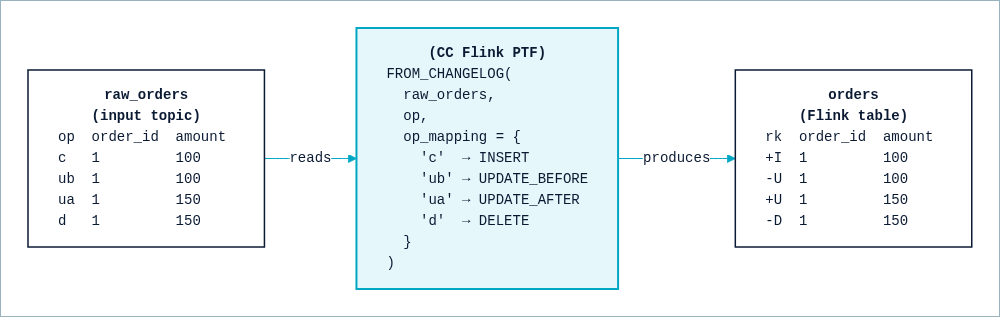
FROM_CHANGELOG interprets your op codes as Flink row kinds.
You declare that mapping with the op_mapping parameter:
SELECT * FROM FROM_CHANGELOG(
    input      => TABLE raw_orders,
    op         => DESCRIPTOR(op),
    op_mapping => MAP[
        'c',  'INSERT',
        'ub', 'UPDATE_BEFORE',
        'ua', 'UPDATE_AFTER',
        'd',  'DELETE'
    ]
);
Important
Known limitation: FROM_CHANGELOG’s upsert output (an op_mapping
with no UPDATE_BEFORE) can’t be consumed directly by a foreground
SELECT query. Instead, use a plain INSERT INTO or
CREATE TABLE ... AS SELECT. A query built directly on that output,
foreground or background, can fail to plan with an error like:
The query cannot be planned because of a changelog mode mismatch: an
operator cannot produce the changelog its consumer requires.
This always happens for a foreground query. For a background query, it means something in the query is breaking upsert mode.
Always materialize the upsert result into its own table first, then build
any further query on top of that table instead of on
FROM_CHANGELOG(...) directly. That’s because a join, aggregation, or
filter built directly on that output doesn’t always fail this way—some
shapes plan and run with no error at all, yet silently return wrong
results, for example when a DELETE row carries only NULL values.
TO_CHANGELOG doesn’t have this limitation, because its output is
always append-only.
The op parameter names the field that holds the operation code, and
op_mapping says how each of your codes maps to a row kind. The result is the
orders table: the create becomes +I, the update becomes the -U /
+U pair, and the delete becomes -D. Flink
now treats orders as a real updating table. If you query it, the row for
order 1 collapses to nothing, because it was created, updated, and then
deleted.
When you reconstruct updates or handle deletes, route every event for the same
key to the same task with PARTITION BY, so that the changes are applied in
order.
Because this example maps both UPDATE_BEFORE and UPDATE_AFTER, the
result is a retract stream, where every update is a pair of records. If your
source only ever sends the new value of a row, map it to UPDATE_AFTER
alone. The result is then an upsert stream, which is more compact but
requires a primary key so that Flink knows which row each update replaces.
The function doesn’t change raw_orders or create anything by itself. It
produces a table as the result of the query, which you can read, join, or write
to a sink. To persist the result as a new table and its backing Apache Kafka® topic,
wrap the query in a CREATE TABLE ... AS SELECT:
CREATE TABLE orders AS
SELECT * FROM FROM_CHANGELOG(
    input      => TABLE raw_orders,
    op         => DESCRIPTOR(op),
    op_mapping => MAP[
        'c',  'INSERT',
        'ub', 'UPDATE_BEFORE',
        'ua', 'UPDATE_AFTER',
        'd',  'DELETE'
    ]
);
Any Flink statement that reads the new orders table sees the same row kinds.
Query the result and why it keeps updating
A query keeps updating its result when it has to revise an answer it already gave. This happens with aggregations and joins, but not with a query that only filters or transforms, which stays append-only because each input row maps to at most one output row.
Take the count of orders per region from the round-trip diagram:
SELECT region, COUNT(*) AS cnt
FROM orders
GROUP BY region;
When the first EU order arrives, Flink emits +I (EU, 1). When a second EU
order arrives, the count for EU is no longer 1, so Flink revises the earlier
answer: it emits +U (EU, 2) (in a retract stream, preceded by -U (EU,
1)). When the EU order is later deleted, the count drops back and Flink emits
+U (EU, 1). The result is an updating table, even though the input was
append-only. This is why a downstream system that expects plain inserts can’t
read the result directly, and why you need TO_CHANGELOG to hand it off.
Write a custom changelog with TO_CHANGELOG
TO_CHANGELOG turns an updating table into a plain append stream where each
change carries an explicit op code the consumer can act on. Consider the
reverse direction: you have orders_per_region, the updating result of the
aggregation, and you want to publish it to a topic for a consumer that doesn’t
understand Flink’s internal -U and +U records and would read them as
duplicates.
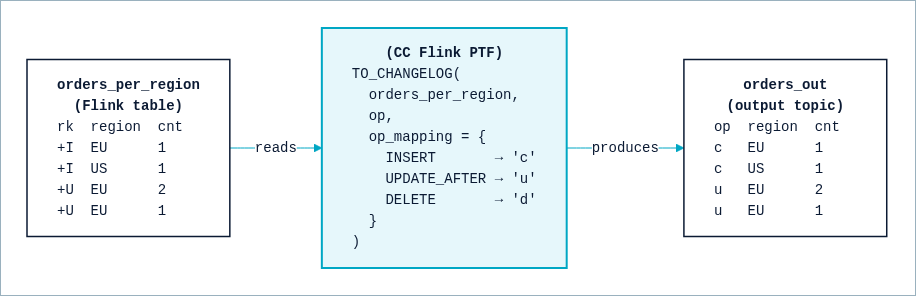
TO_CHANGELOG stamps each change with the op code your sink expects.
The mapping runs the other way: each row kind maps to an output op code.
SELECT * FROM TO_CHANGELOG(
    input      => TABLE orders_per_region,
    op         => DESCRIPTOR(op),
    op_mapping => MAP[
        'INSERT',       'c',
        'UPDATE_AFTER', 'u',
        'DELETE',       'd'
    ]
);
Each change in orders_per_region becomes one append record on the output
topic, carrying the op code in the op column. The consumer reads a clean
sequence of creates and updates instead of Flink’s internal row kinds.
Example: convert Amazon DynamoDB Streams change data
A more realistic case ties everything together: ingesting change data from a
system with its own CDC format, and doing something useful with it on both
sides. Amazon DynamoDB Streams is a good example: it isn’t Debezium, so
Flink doesn’t recognize it natively, and it carries a nested, typed
representation of each row instead of flat columns. This example uses the raw
stream format, the shape you get from the DynamoDB Streams API directly, from an
AWS Lambda trigger, or from a custom bridge into Kafka. If you use the fully
managed
Amazon DynamoDB CDC Source connector
instead, it re-encodes each change into its own flatter representation before
it reaches the topic, so adjust the table definition and op_mapping in the
following example to match what actually lands in your topic. A single raw
record from a
DynamoDB stream looks like this:
{
  "eventID": "1",
  "eventName": "INSERT",
  "eventVersion": "1.1",
  "eventSource": "aws:dynamodb",
  "awsRegion": "us-east-1",
  "dynamodb": {
    "Keys": {
      "Id": { "N": "101" }
    },
    "NewImage": {
      "Id": { "N": "101" },
      "Message": { "S": "New item!" }
    },
    "SequenceNumber": "111",
    "SizeBytes": 26,
    "StreamViewType": "NEW_AND_OLD_IMAGES"
  }
}
eventName is DynamoDB’s operation code: INSERT, MODIFY, or
REMOVE. Each attribute value is itself typed ({"S": "..."} for a
string, {"N": "..."} for a number), so the table declares that shape and
uses computed columns to pull out the
fields you actually want:
CREATE TABLE dynamodb_cdc (
  eventID   STRING,
  eventName STRING,
  dynamodb  ROW<
    Keys            MAP<STRING, ROW<S STRING, N STRING>>,
    NewImage        MAP<STRING, ROW<S STRING, N STRING>>,
    OldImage        MAP<STRING, ROW<S STRING, N STRING>>,
    SequenceNumber  STRING,
    SizeBytes       BIGINT,
    StreamViewType  STRING
  >,
  id      AS CAST(dynamodb.Keys['Id'].N AS INT),
  message AS dynamodb.NewImage['Message'].S
);
This example seeds dynamodb_cdc with a fixed, deterministic set of events,
so the following results are reproducible. If you want a continuously generating
source instead of a fixed batch, see
Generate Custom Sample Data.
INSERT INTO dynamodb_cdc (eventID, eventName, dynamodb) VALUES
  -- Keys: {Id: 101}. NewImage: {Id: 101, Message: 'New item!'}. No OldImage.
  ('1', 'INSERT', ROW(
      MAP['Id', ROW(CAST(NULL AS STRING), '101')],
      MAP['Id', ROW(CAST(NULL AS STRING), '101'), 'Message', ROW('New item!', CAST(NULL AS STRING))],
      CAST(NULL AS MAP<STRING, ROW<S STRING, N STRING>>),
      '111', CAST(20 AS BIGINT), 'NEW_AND_OLD_IMAGES'
  )),
  -- Keys: {Id: 101}. NewImage: {..., Message: 'Updated item!'}. OldImage: {..., Message: 'New item!'}.
  ('2', 'MODIFY', ROW(
      MAP['Id', ROW(CAST(NULL AS STRING), '101')],
      MAP['Id', ROW(CAST(NULL AS STRING), '101'), 'Message', ROW('Updated item!', CAST(NULL AS STRING))],
      MAP['Id', ROW(CAST(NULL AS STRING), '101'), 'Message', ROW('New item!', CAST(NULL AS STRING))],
      '112', CAST(24 AS BIGINT), 'NEW_AND_OLD_IMAGES'
  )),
  -- Keys: {Id: 101}. No NewImage (the row is gone). OldImage: {..., Message: 'Updated item!'}.
  ('3', 'REMOVE', ROW(
      MAP['Id', ROW(CAST(NULL AS STRING), '101')],
      CAST(NULL AS MAP<STRING, ROW<S STRING, N STRING>>),
      MAP['Id', ROW(CAST(NULL AS STRING), '101'), 'Message', ROW('Updated item!', CAST(NULL AS STRING))],
      '113', CAST(20 AS BIGINT), 'NEW_AND_OLD_IMAGES'
  ));
A DynamoDB MODIFY event carries both the old and new image in a single
message. As the Limitations
explain, FROM_CHANGELOG can’t split one input row into two output
rows, so this mapping deliberately uses only the new image and maps MODIFY
to UPDATE_AFTER alone, producing an upsert table instead of a retract one:
CREATE TABLE items (
  id      INT,
  message STRING,
  PRIMARY KEY (id) NOT ENFORCED
) WITH ('changelog.mode' = 'upsert');

INSERT INTO items
SELECT id, message
FROM FROM_CHANGELOG(
    input      => TABLE dynamodb_cdc PARTITION BY id,
    op         => DESCRIPTOR(eventName),
    op_mapping => MAP[
        'INSERT', 'INSERT',
        'MODIFY', 'UPDATE_AFTER',
        'REMOVE', 'DELETE'
    ]
);
Because items has a primary key, Confluent Cloud backs it with a compacted topic.
A REMOVE event becomes a DELETE row, and the compacted topic writes a
real tombstone for that key—a record with a null value, not merely a
record with null fields. You don’t write the tombstone yourself; it
follows from items being an upsert table. This is the whole pattern for
landing custom CDC in a compacted topic with tombstones on delete; no further
step is needed.
If several changes to the same key arrive close together, Confluent Cloud can write only the final state as one physical message instead of one message per change, because upsert sinks coalesce updates to the same key within a checkpoint. That’s expected, and it’s a property of upsert sinks in general, not specific to these functions; don’t rely on seeing every intermediate value on the output topic.
Important
FROM_CHANGELOG is an advanced feature. When you use it, you tell Flink
that your stream is a valid changelog, and Flink doesn’t validate that claim.
An incorrect changelog can produce silently wrong results downstream and, in
the worst case, leave a statement in an unrecoverable state. When the data
handed to FROM_CHANGELOG isn’t the shape the function expects, it becomes
hard to diagnose what actually went wrong, so Confluent is only able to
provide limited support for statements that contain FROM_CHANGELOG.
To stay correct, make sure that every update and delete refers to a key you have already inserted, you map all of your operation codes so no changes are dropped, events for the same key stay in order, and your key is unique per row.
Example: an explicit delete marker for a downstream consumer
TO_CHANGELOG solves a different problem than relying on Kafka’s tombstone
convention: it stamps every row, including deletes, with an explicit operation
code that a consumer can act on directly.
Use it when a consumer can’t rely on Kafka’s tombstone convention at all—for
example, a microservice or a Connect sink that only understands a plain
append stream and needs to see an explicit marker on every row, including
deletes:
CREATE TABLE items_for_downstream_consumer (
  id      INT,
  op      STRING,
  message STRING
);

INSERT INTO items_for_downstream_consumer
SELECT * FROM TO_CHANGELOG(
    input                 => TABLE items PARTITION BY id,
    produces_full_deletes => FALSE
);
Every row here, including a delete, is a real, fully serialized Kafka record
with an explicit op value, not a tombstone: a delete looks like
+I[id:101, op:'DELETE', message:null]. The message column is null,
but the record’s value as a whole isn’t; a real Kafka tombstone has no value at
all. That’s what makes this shape readable by a consumer that doesn’t
understand Kafka’s compaction and tombstone convention at all. If you need an
actual Kafka tombstone instead, write an upsert table’s
DELETE row (for example, FROM_CHANGELOG’s output) directly to a sink
with a PRIMARY KEY, as shown in the DynamoDB example, and skip
TO_CHANGELOG.
Limitations
FROM_CHANGELOGandTO_CHANGELOGmap each input record to exactly one row kind. One input row can’t become two output rows, so a single message can’t be split into a fullUPDATE_BEFORE/UPDATE_AFTERpair. A record that also happens to carry other fields, such as a before-image column you don’t reference, isn’t a problem by itself; it’s the 1:1 mapping that’s fixed, not the input’s shape. This is why the DynamoDB example mapsMODIFYtoUPDATE_AFTERalone instead of trying to reconstruct a retract pair fromNewImageandOldImage.