

Process Encrypted Data with Confluent Cloud for Apache Flink
Confluent Cloud for Apache Flink® supports processing data encrypted with client-side field level encryption and client-side payload encryption. This enables you to work with sensitive data while maintaining end-to-end encryption, ensuring that your data is protected even if the server is compromised.
Note
Client-side field level encryption (CSFLE) and client-side payload encryption (CSPE) with Flink is a Limited Availability feature in Confluent Cloud.
For limitations during the Limited Availability phase, see Known limitations and caveats.
If you would like to participate in the Limited Availability Program, contact your Confluent account team.
Confluent Cloud for Apache Flink® supports two modes for working with data encrypted using client-side field level encryption or client-side payload encryption:
- Transparent decryption
Flink automatically decrypts encrypted fields for processing when you have the required permissions. The decrypted data is available for all SQL operations. This mode requires that you share Key Encryption Keys with Confluent and grant permissions to access them.
- Deterministic encryption
Flink processes encrypted data without decrypting it. This mode works with deterministic encryption only and supports limited operations like equality comparisons, grouping, and joins on encrypted values.
The mode you use depends on your security requirements, the operations you need to perform, and whether you share encryption keys with Confluent.
Known limitations and caveats
The following limitations and caveats apply to processing encrypted data with Flink during the Limited Availability phase. Review them before you create statements that read or write CSFLE- or CSPE-encrypted data. For background on how Flink processes encrypted data, see Transparent decryption mode and Deterministic encryption mode.
Schema and encryption rules are fixed at statement creation
Flink captures the full schema from Schema Registry, including encryption rules, when a Flink SQL statement is created. The statement uses this captured schema and these rules for its entire lifetime, which has the following consequences:
Schema evolution is not supported for running statements. If you evolve the schema in Schema Registry after the statement is running, such as by adding, removing, or changing fields, the running statement does not pick up the changes. It continues to use the schema that was captured when the statement was created.
Encryption rule changes are not supported for running statements. If you change CSFLE encryption rules in Schema Registry after the statement is running, the running statement does not pick up the changes. It silently continues to use the encryption rules that were captured when the statement was created.
You must re-create statements to use updated schemas or rules. To pick up an updated schema or updated encryption rules, delete and re-create the Flink SQL statement.
Topics can contain a mix of old and new records after a change. After a schema or encryption rule change, a topic can contain records written with both the previous and the updated schema or encryption configuration. A newly created statement uses only the current schema and rules and might not correctly process records written with earlier schemas or rules. Where possible, use a new topic or allow older records to expire through topic retention before you create the new statement.
Data Encryption Key refresh
Data Encryption Keys refresh every five minutes. If you revoke permissions on a Key Encryption Key, running statements continue to decrypt data for up to five minutes.
Encrypted data stored in state
When you process CSFLE or CSPE encrypted data without decryption permission, the encrypted ciphertext is stored in Flink state. This encrypted data cannot be decrypted in the output topic unless you preserve the encryption rules in the output schema.
Decrypted output without encryption rules
If you have key access and decrypt input data but do not configure encryption rules for the output topic, Flink writes decrypted plaintext data to the output topic. Flink logs a warning but does not block the statement. Ensure your output topics have appropriate encryption rules.
Encrypted passthrough without key access
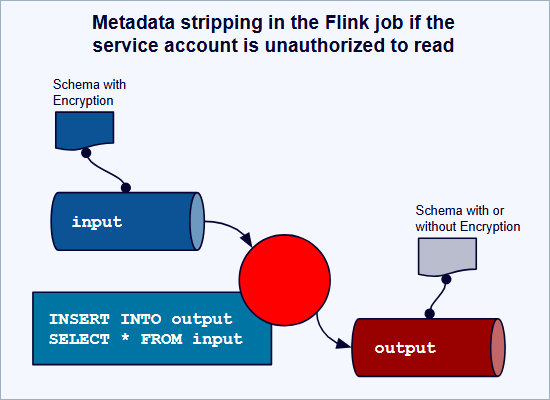
If Flink runs without key access, encrypted fields pass through as raw ciphertext. The output can contain encrypted bytes without the encryption metadata needed to decrypt them. This is true for ciphertext with no rules and no encryption in output, and for encrypted rule-less ciphertext with encryption in output. In both cases, unusable ciphertext is written to the output topic.
Warning
This scenario can cause permanent data loss. If Flink writes encrypted bytes without the metadata needed to decrypt them, downstream consumers can never recover the original data.
Tableflow and Flink snapshot query
Snapshot queries with union reads from Kafka and Tableflow can result in different encryption states for the same data. If you read from an encrypted Kafka topic and a plaintext Tableflow materialized table, the same field is encrypted in one source and plaintext in the other. Queries return a mix of ciphertext and plaintext for the same column.
Transparent decryption mode
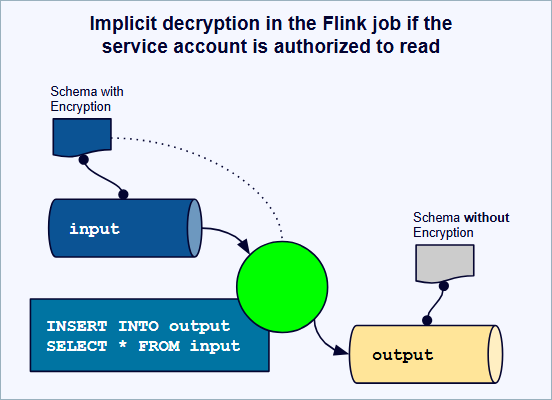
Transparent decryption mode automatically decrypts encrypted fields for processing when you share Key Encryption Keys with Confluent and have the required permissions. This lets you perform any SQL operation on encrypted data as if it were plaintext, while maintaining end-to-end encryption.
Prerequisites
To use transparent decryption, you must:
Share Key Encryption Keys with Confluent when creating encryption rules
Grant permission on the encryption keys to the Flink principal:
DeveloperWriteis required for the first write, which generates the Data Encryption Key. After the first write,DeveloperReadis enough for both reading and writing encrypted data.Configure encryption rules in Schema Registry for both input and output topics
For more information about permissions, see Data access layer.
How transparent decryption works
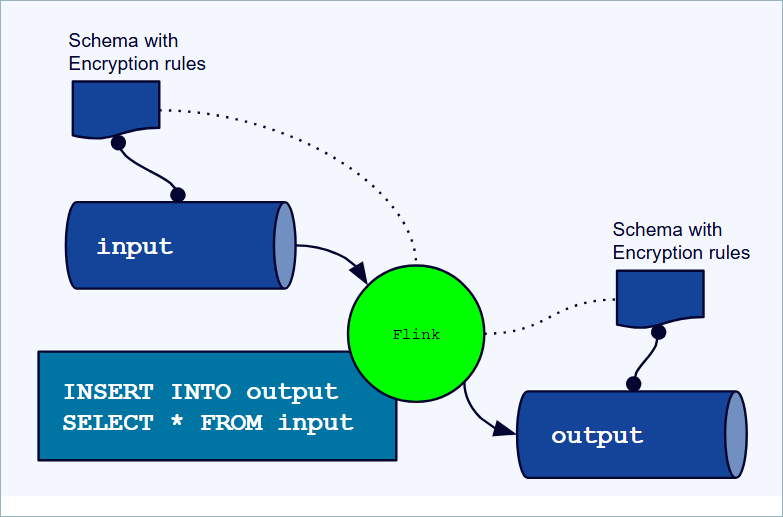
When a Flink SQL statement starts, Flink evaluates the permissions you have on the encryption keys referenced in the statement. These permissions remain fixed for the lifetime of the statement.
If you have DeveloperRead permission on an encryption key, Flink transparently
decrypts fields encrypted with that key. The decrypted data is available for
all SQL operations including filtering, aggregation, joins, and transformations.
The decryption happens within the Flink processing environment. Output data is encrypted again if you have configured encryption rules for the output topic.
Permission-based behavior
The behavior of your Flink SQL statement depends on your permissions and the encryption type:
Input encryption |
Output encryption |
Permission |
Behavior |
|---|---|---|---|
CSFLE or CSPE |
CSFLE or CSPE |
Authorized |
Input is decrypted for processing. Output is encrypted. |
CSFLE or CSPE |
None |
Authorized |
Input is decrypted for processing. Output is not encrypted. Confluent Cloud logs a warning about unencrypted output. |
CSFLE |
None |
Unauthorized |
Input remains encrypted and passes through without decryption. Output retains encrypted values. This can cause permanent data loss; see Encrypted passthrough without key access. |
CSPE |
Any |
Unauthorized |
The statement fails because Flink cannot decrypt the payload. |
CSFLE |
CSFLE or CSPE |
Unauthorized |
The statement fails because you cannot encrypt the output without key access. |
None |
CSFLE or CSPE |
Authorized |
Input is processed normally. Output is encrypted. |
None |
CSFLE or CSPE |
Unauthorized |
The statement fails because you cannot encrypt the output without key access. |
In this table:
Authorized means you have
DeveloperReadpermission on the Key Encryption Keys referenced in the encryption rulesUnauthorized means you do not have
DeveloperReadpermission on the encryption keys
Examples
Decrypt and process encrypted data
This example shows processing data where both input and output topics use
CSFLE encryption. You have DeveloperRead permission on the encryption keys.
-- Create a table for encrypted customer data
CREATE TABLE customers (
  customer_id STRING,
  email STRING,  -- Encrypted with CSFLE
  ssn STRING,    -- Encrypted with CSFLE
  address STRING -- Encrypted with CSFLE
) WITH (
  'kafka.topic' = 'customers-encrypted',
  'value.format' = 'avro-registry'
);

-- Create output table with encryption rules
CREATE TABLE customer_summary (
  customer_id STRING,
  email STRING,       -- Will be encrypted with CSFLE
  location_count INT  -- Not encrypted
) WITH (
  'kafka.topic' = 'customer-summary-encrypted',
  'value.format' = 'avro-registry'
);

-- Query decrypts input, processes it, and encrypts output
INSERT INTO customer_summary
SELECT
  customer_id,
  email,
  COUNT(DISTINCT address) AS location_count
FROM customers
GROUP BY customer_id, email;
In this example:
Flink decrypts the
email,ssn, andaddressfields for processingThe SQL operations work with plaintext values
The
emailfield in the output is encrypted according to the output encryption rulesThe
location_countfield is not encrypted
Process encrypted data without permission
This example shows what happens when you try to process CSFLE-encrypted data without permission. The encrypted data passes through without decryption.
-- Same input table as previous example; output table has no encryption rules
-- User does NOT have DeveloperRead on encryption keys

INSERT INTO customer_summary
SELECT
  customer_id,
  email,
  COUNT(DISTINCT address) AS location_count
FROM customers
GROUP BY customer_id, email;
In this example:
Flink does not decrypt the encrypted fields
The
emailandaddressfields contain encrypted ciphertextThe
COUNT(DISTINCT address)operation counts distinct ciphertext values, not distinct addressesThe output contains encrypted values, but no encryption rules are applied
This scenario can produce unexpected results. See Permission-based behavior for details.
Deterministic encryption mode
Deterministic encryption mode allows Flink to process encrypted data without decrypting it. This mode works by using deterministic encryption, where encrypting the same plaintext value with the same key always produces the same ciphertext.
This mode does not require sharing encryption keys with Confluent. However, it supports only limited operations.
What is deterministic encryption?
At the core of this capability is deterministic encryption, a method where encrypting the same plaintext value with the same key always produces the exact same ciphertext. This property allows Flink to process the encrypted ciphertext directly, effectively performing equality comparisons, joins, and groupings on the original data without ever needing to decrypt it.
Supported operations on encrypted data
Flink does not perform decryption. It operates on raw bytes, which allows it to process the ciphertext produced by CSFLE. Because the encryption is deterministic, you can:
Process non-encrypted fields in your data stream without any limitations
Run SQL queries that operate directly on your encrypted fields
Here are the key operations possible on deterministically encrypted columns:
- Filtering and equality
Use encrypted fields in
WHEREclauses for exact matches.- Grouping and aggregation
Perform
GROUP BYoperations on encrypted fields. The only aggregation functions that work correctly are those based on uniqueness comparison, such asCOUNTandCOUNT(DISTINCT).- Joins
Join multiple streams together using an encrypted column. For example, join a stream of user activity to a stream of user profiles on an encrypted user ID.
- Window functions
Use comparison-based window functions like
LEADandLAG.
Example
This example counts the number of active users, grouping by the deterministically encrypted email field:
SELECT COUNT(DISTINCT email_encrypted)
FROM users_stream
WHERE status = 'ACTIVE';
This example shows a common use case where the encrypted email_encrypted
field can be grouped or filtered without being decrypted, leveraging
deterministic encryption.
Important limitations and trade-offs
This capability comes with two important considerations:
Limited aggregation functions: Because the data’s actual value is never revealed to Flink, mathematical operations do not produce correct results. Aggregation functions like
SUM,AVG,MIN, andMAXexecute but yield erroneous values.The deterministic trade-off: Deterministic encryption inherently reveals when two encrypted values are identical. This is a necessary trade-off that enables querying, but it’s a piece of information that can be analyzed. You should carefully consider this when deciding which fields to encrypt deterministically.
How deterministic encryption protects data
When you use CSFLE with deterministic encryption in Flink, the security of your data is maintained because the actual decryption only happens when the data is read from a sink like a database or materialized view by an authorized client application that holds the decryption keys. Flink processes the data without ever having access to the plaintext. This ensures that sensitive data cannot be exposed even in the event of a compromise within the processing environment.
CSPE behavior with Flink
Client-side payload encryption (CSPE) encrypts the entire record payload before it is written to Kafka. From the Flink perspective, CSPE follows the same permission model as CSFLE but with stricter behavior for unauthorized users:
When the Flink principal has
DeveloperReadpermission on the Key Encryption Key (KEK), Flink transparently decrypts the payload for processing and re-encrypts records on write according to the CSPE rules configured on the output topic.When the Flink principal does not have
DeveloperReadon the KEK, any Flink SQL statement that reads from a CSPE-encrypted topic fails because Flink can’t decrypt the payload.Unlike CSFLE, there is no ciphertext pass-through mode for CSPE: unauthorized users can’t run queries that read from CSPE-encrypted topics.
For the full permission-based behavior matrix and examples, see Permission-based behavior.
Uses Google Tink
The CSFLE implementation uses the open-source
Google Tink Cryptographic library
to perform deterministic encryption using the AES256_SIV algorithm. For
more information on Google Tink, see the following: