

Manage Stream Governance Packages in Confluent Cloud
Stream Governance offers two package types in Confluent Cloud, Essentials and Advanced, that determine the features, limits, and billing for an environment. This page describes each package and how to upgrade or delete them.
Get Started for Free
Sign up for a Confluent Cloud trial and get $400 of free credit.
Overview
Confluent offers two types of governance packages in Confluent Cloud that are applied to your cloud environments: Essentials and Advanced. The governance package type you choose determines the features, capabilities, limits, and billing for the governance package. Use the information in this topic to find the governance package with the features and capabilities that’s right for you:
Use the Essentials package to help you get started with the governance fundamentals.
Use the Advanced package for enterprise grade data governance in production workloads.
The table below offers a high-level comparison of features across the governance package types.
Feature |
Essentials |
Advanced |
|---|---|---|
✔ (Yes) |
✔ (Yes) |
|
Schema Registry SLA |
99.5% |
99.99% |
Schema Registry calls per second |
Read: 75 Write: 25 |
Read: 75 Write: 25 |
No |
✔ (Yes) |
|
Number of schemas included [1] |
100 [2] |
20,000 |
Number of exporters included |
10 |
100 |
✔ (Yes) |
✔ (Yes) |
|
(No) |
✔ (Yes) |
|
✔ (Yes) |
✔ (Yes) |
|
(No) |
✔ (Yes) |
|
Data portal (powered by the Stream Catalog) |
✔ (Yes) |
✔ (Yes) |
Stream lineage (point in time: last 10 minutes) |
✔ (Yes) |
✔ (Yes) |
Stream lineage (point in time: last 7 days) |
No |
✔ (Yes) |
✔ (Yes) |
✔ (Yes) |
For information on pricing, see Stream Governance packages pricing. For details on how package, schema, and rule usage affect your bill, see Stream Governance Billing.
Create an environment with a package
The Essentials package is automatically attached to your environment by default. The Stream Governance package is available in all Confluent Cloud regions. The Schema Registry cluster is instantiated in the same region when you create the first cluster in the environment. The Schema Registry cluster is resilient against zonal failures. You cannot change the Schema Registry region once it has been created.
If you choose Essentials, you can upgrade to Advanced later, if needed.
To create an environment with the Cloud Console:
Log in to Confluent Cloud at https://confluent.cloud.
Select Environments on the left panel, choose Add cloud environment, provide an environment name in the dialog, and click Create.
Choose a Stream Governance package to enable Schema Registry, Stream Catalog, and Stream Lineage, either upgrade to Advanced or accept the Essentials package:
Upgrade to Stream Governance Advanced starting at $1/hour
Now, continue with Stream Governance Essentials for free
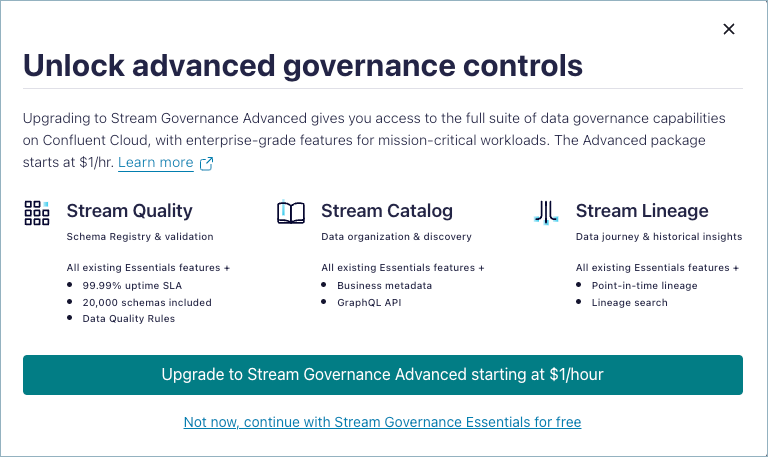
(Note that the full workflow for the Cloud Console is also provided in Add a cloud environment in the Quick Start for Schema Management on Confluent Cloud.)
To create an environment with the Confluent CLI, use the confluent environment create command.
For example, to create an environment called “production” with the “ESSENTIALS” governance package:
confluent environment create production
Your output should resemble:
+---------------------------+----------------+
| Current                   | false          |
| ID                        | env-vnnpnz     |
| Name                      | production     |
| Stream Governance Package | ESSENTIALS     |
+---------------------------+----------------+
Since “ESSENTIALS” is the default, it is not necessary to specify the package type. If you wanted to create the environment using the “ADVANCED” package, you would specify the package type:
confluent environment create production --governance-package ADVANCED
Note: If you are using Confluent CLI v3 or lower, the governance package will not be created automatically. Confluent CLI v3 or lower will be removed starting March 1, 2025. You should upgrade to Confluent CLI v4 at your earliest convenience. To learn more and read upgrade guidelines, see Upgrade to SRCM v3 clusters and regions APIs (Deprecation of SRCM v2).
To create an environment with the Confluent Cloud APIs, use the Create an environment API call, and indicate the environment name and governance package you want (ESSENTIALS or ADVANCED).
You will need a Confluent Cloud API key and secret to make these calls. In the examples, these have been stored shell environment variables. (Note that since you are working at the Confluent Cloud environment level, you do not need Schema Registry API keys and secrets for these particular calls.)
For example, to create an environment called “production” with the “ADVANCED” governance package:
me$ curl --silent -u $APIKEY_CLOUD:$APISECRET_CLOUD --url https://api.confluent.cloud/org/v2/environments --header 'content-type: application/json' --data '{"display_name":"production","stream_governance_config"}' | jq .
Your output should resemble:
{
  "api_version": "org/v2",
  "display_name": "production",
  "id": "env-2jjwwq",
  "kind": "Environment",
  "metadata": {
    "created_at": "2024-05-01T22:25:26.42437Z",
    "resource_name": "crn://confluent.cloud/organization=7ec51216-6104-4493-bf5b-50b11910f748/environment=env-2jjwwq",
    "self": "https://api.confluent.cloud/org/v2/environments/env-2jjwwq",
    "updated_at": "2024-05-01T22:25:26.42437Z"
 },
  "stream_governance_config": {
    "package": "ESSENTIALS"
  . . .
Since “ESSENTIALS” is the default, it is not necessary to specify the package type. If you wanted to create the environment using the “ADVANCED” package, you would specify the package type:
me$ curl --silent -u $APIKEY_CLOUD:$APISECRET_CLOUD --url https://api.confluent.cloud/org/v2/environments --header 'content-type: application/json' --data '{"display_name":"production","stream_governance_config":{"package":"ADVANCED"}}' | jq .
Note: If you are using srcm/v2, the governance package will not be created automatically. srcm/v2 is a deprecated API which will be removed starting March 1, 2025. You should upgrade to srcm/v3 at your earliest convenience. To learn more and read upgrade guidelines, see Upgrade to SRCM v3 clusters and regions APIs (Deprecation of SRCM v2).
You can use the Confluent Terraform provider to deploy and manage your Confluent Cloud infrastructure. The Confluent Terraform provider automates the workflow managing environments, Apache Kafka® clusters, Kafka topics, and other resources in Confluent Cloud. The specifics of setting up environments and clusters with Terraform require following the Terraform guides and examples to ensure all resources and dependencies are properly accounted for:
Note: If you are using Terraform provider v1, the governance package will not be created automatically. Terraform v1 will be removed starting March 1, 2025. To learn more and read upgrade guidelines, see Upgrade to SRCM v3 clusters and regions APIs (Deprecation of SRCM v2).
Cloud providers and region support
Stream Governance Essentials and Advanced packages are available in all Confluent Cloud regions.
When you create your first Kafka cluster in the new Confluent Cloud environment, the Schema Registry cluster is instantiated in the same region. This Schema Registry region does not change, it persists regardless of clusters created in other regions or deleted. The Schema Registry region determines where Schema Registry and Stream Catalog services will run, and corresponding metadata is stored.
Resilience in Schema Registry and Stream Governance
The Schema Registry cluster is a multi-zone cluster where all nodes are set to leader eligible.
All Schema Registry nodes are behind a Confluent Cloud Load Balancer.
The storage used by the Schema Registry cluster is also a multi-zone store, protecting schema data from zonal failures.
Limitations
You can upgrade to an Advanced governance package, but it is not possible to downgrade from Advanced to Essentials. The only option is to delete the environment, and start over.
There are rate limits on API requests to search the Catalog API, which is not designed for continuous requests at upper rate limits. To learn more about alternative strategies to list subjects, schemas, and topics, see Catalog API usage limitations and best practices.
View a cloud environment governance package
To view the governance package associated with an environment on the Confluent Cloud Console, navigate to the environment, and view the package indicated under “Stream Governance package” on the right panel.

To view the governance package associated with an environment using the Confluent CLI, use either of the commands, confluent environment list or confluent environment describe:
Use confluent environment list:
me$ confluent environment list
Your output should resemble:
  Current |     ID     |        Name         | Stream Governance Package
----------+------------+---------------------+----------------------------
          | env-1wrq56 | new-destination-env | ESSENTIALS
          | env-3w2p50 | new-source-env      | ESSENTIALS
  *       | env-97wz20 | my-stuff            | ADVANCED
Use confluent environment describe:
me$ confluent environment describe env-97wz20
Your output should resemble:
+---------------------------+------------+
| Current                   | true       |
| ID                        | env-97wz20 |
| Name                      | my-stuff   |
| Stream Governance Package | ADVANCED   |
+---------------------------+------------+
To view the governance package associated with an environment with the Confluent Cloud REST APIs, see List environments or Read an environment in the Confluent Cloud API reference.
You will need a Confluent Cloud API key and secret to make these calls. In the examples, these have been stored shell environment variables. (Note that since you are working at the Confluent Cloud environment level, you do not need Schema Registry API keys and secrets for these particular calls.)
For example, use List environments:
curl --silent -u $APIKEY_CLOUD:$APISECRET_CLOUD --request GET --url https://api.confluent.cloud/org/v2/environments | jq .
Your output should resemble the following. Note that listing environments shows all environment IDs:
"api_version": "org/v2",
"data": [
  {
    "api_version": "org/v2",
    "display_name": "my-stuff",
    "id": "env-97wz20",
    "kind": "Environment",
    "metadata": {
      "created_at": "2023-02-21T21:03:04.884544Z",
      "resource_name": "crn://confluent.cloud/organization=7ec51216-6104-4493-bf5b-50b11910f748/environment=env-97wz20",
      "self": "https://api.confluent.cloud/org/v2/environments/env-97wz20",
      "updated_at": "2024-04-29T18:35:54.69138Z"
    },
    "stream_governance_config": {
      "package": "ADVANCED"
    }
  },
  {
    "api_version": "org/v2",
    "display_name": "new-source-env",
    "id": "env-3w2p50",
    "kind": "Environment",
    "metadata": {
      "created_at": "2024-03-31T13:30:12.042014Z",
      "resource_name": "crn://confluent.cloud/organization=7ec51216-6104-4493-bf5b-50b11910f748/environment=env-3w2p50",
      "self": "https://api.confluent.cloud/org/v2/environments/env-3w2p50",
      "updated_at": "2024-03-31T13:30:12.042014Z"
    },
    "stream_governance_config": {
      "package": "ES
   SENTIALS"
    }

    ...
Or, use Read an environment and provide the environment ID:
curl --silent -u $APIKEY_CLOUD:$APISECRET_CLOUD --request GET --url https://api.confluent.cloud/org/v2/environments/env-97wz20 | jq .
Your output should resemble:
"api_version": "org/v2",
 "display_name": "my-stuff",
 "id": "env-97wz20",
 "kind": "Environment",
 "metadata": {
   "created_at": "2023-02-21T21:03:04.884544Z",
   "resource_name": "crn://confluent.cloud/organization=7ec51216-6104-4493-bf5b-50b11910f748/environment=env-97wz20",
   "self": "https://api.confluent.cloud/org/v2/environments/env-97wz20",
   "updated_at": "2024-04-29T18:35:54.69138Z"
 },
 "stream_governance_config": {
   "package": "ADVANCED"
Once you have deployed your Confluent Cloud environments, governance packages, and clusters with the Confluent Cloud Terraform, you can view and manage them using Terraform tools.
To learn more, see Schema management and Stream Governance under Resources you can manage in the Terraform documentation.
Understand the total number of schemas in your environment
An environment’s schema count is the total number of schema versions,
including soft-deleted schemas. For example, if
the subject customer-value has four schema versions and two are
soft-deleted, the schema count is still four.
Keep the following in mind:
To permanently remove a schema, hard delete it so that it isn’t included in the total schema count.
Schema versions created by Flink SQL, Connect, or ksqlDB count towards the schema count.
Internal schemas created by ksqlDB whose subject names start with
_confluent-ksqldon’t count towards the schema count, schema limit, or billing.
To learn more about deleting schemas and schema limits, see Delete Schemas and Manage Storage Space on Confluent Cloud.
Schema limits, included counts, and overrides
Three distinct numbers govern how many schemas a Stream Governance environment can hold. These numbers affect billing, capacity planning, and whether enforcement occurs at the public threshold.
Term |
What it means |
|---|---|
Included count |
The number of schemas covered by the package price. Essentials includes 100 schemas. Advanced includes 20,000. See the Manage Stream Governance Packages in Confluent Cloud table for the current values. |
Default cap |
The default enforcement threshold for all environments on a package. For Advanced, the default cap matches the included count of 20,000. Essentials doesn’t enforce a cap. Schemas above the Essentials included count are billed per schema per hour instead. See Stream Governance Billing for details. |
Effective limit |
The enforced limit on a specific Schema Registry cluster. If Confluent approves a higher limit for the environment, the effective limit replaces the default cap for that cluster. |
When an effective limit is in place, schema registration succeeds until the environment reaches the effective limit, even though the public default cap is lower. As a result, you might not see an enforcement error near the published 20,000 threshold.
Above the effective limit, schema registration returns an HTTP 422
error with the message Schema Limit Exceeded. Reduce the schema count
by hard deleting unused schemas, or contact
Confluent to request a higher limit.
If your environment is approaching the Advanced included count of 20,000
schemas and needs more, contact
Confluent Support or your
account team to request a higher limit. Provide the environment ID, the
logical Schema Registry cluster ID (lsrc-xxxxx), the requested limit, and the
expected growth timeline.
Upgrade a cloud environment from Essentials to Advanced
If you have started with the Essentials package, you can upgrade to the Advanced package anytime.
If you started with the Advanced package, you cannot downgrade. Options are to start over with a new Confluent Cloud environment, or contact Confluent Support.
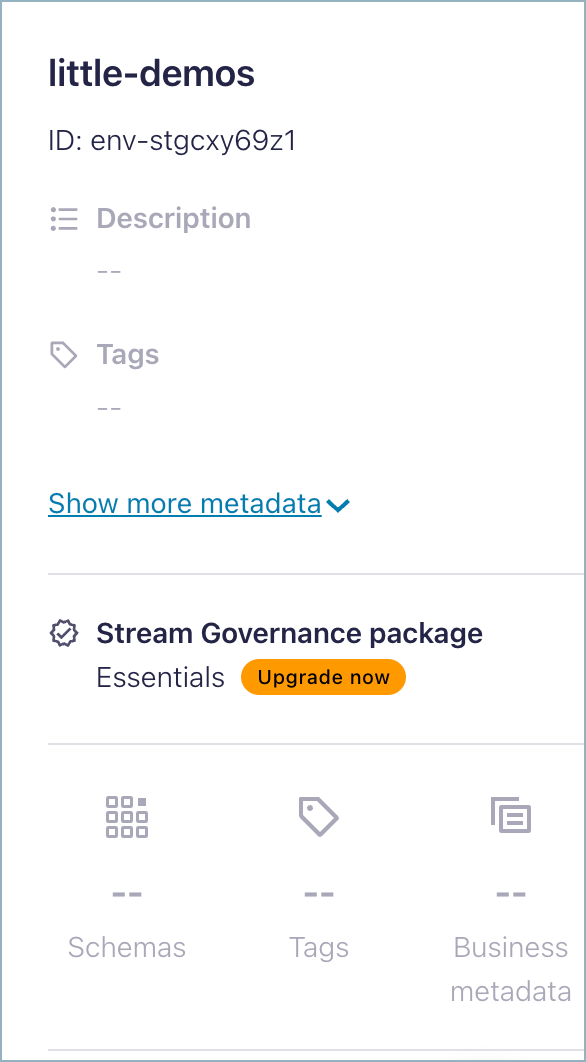
To upgrade an environment from Essentials to Advanced on the Confluent Cloud Console, navigate to the environment, and choose Upgrade now under “Stream Governance package” on the right panel.
Features that specifically require the Advanced Stream Governance package provide an upgrade option when you hover over the feature on the right panel. (For example, Business metadata requires the Advanced package.)
To upgrade to an environment from Essentials to Advanced, use confluent environment update.
For example, this command upgrades the “production” environment from the previous Confluent CLI example (environment ID env-vnnpnz) from Essentials to the Advanced package:
confluent environment update env-vnnpnz --governance-package advanced
Your output should resemble:
+---------------------------+----------------+
| Current                   | false          |
| ID                        | env-vnnpnz     |
| Name                      | production     |
| Stream Governance Package | ADVANCED       |
+---------------------------+----------------+
You will need a Confluent Cloud API key and secret to make these calls. In the examples, these have been stored shell environment variables. (Note that since you are working at the Confluent Cloud environment level, you do not need Schema Registry API keys and secrets for these particular calls.)
For example, to upgrade the environment “production” from ESSENTIALS to ADVANCED:
curl --silent -u $APIKEY_CLOUD:$APISECRET_CLOUD --request PATCH \
> --url 'https://api.confluent.cloud/org/v2/environments/{env-2jjwwq}' \
> --header 'content-type: application/json' \
> --data '{"display_name":"production","stream_governance_config":{"package":"ADVANCED"}}'
Your output should resemble the following, showing the associated governance package as upgraded to ADVANCED:
{
  "api_version": "org/v2",
  "display_name": "production",
  "id": "env-2jjwwq",
  "kind": "Environment",
  "metadata": {
    "created_at": "2024-05-01T22:25:26.42437Z",
    "resource_name": "crn://confluent.cloud/organization=7ec51216-6104-4493-bf5b-50b11910f748/environment=env-2jjwwq",
    "self": "https://api.confluent.cloud/org/v2/environments/env-2jjwwq",
    "updated_at": "2024-05-01T22:45:17.119634Z"
  },
  "stream_governance_config": {
    "package": "ADVANCED"
  }
}
Once you have deployed your Confluent Cloud environments, governance packages, and clusters with the Confluent Cloud Terraform, you can view and manage them using Terraform tools.
To learn more, see Schema management and Stream Governance under Resources you can manage in the Terraform documentation.
Remove an environment with a package
You cannot delete a Stream Governance package nor the Schema Registry cluster within an environment. If you want to remove a governance package or Schema Registry cluster, the only way to do this is to delete the environment.
If you would like to recreate the Schema Registry in another region within an environment, contact Confluent Support.
You cannot delete a Schema Registry cluster directly. The Schema Registry cluster is auto-deleted if you delete an environment.
Upgrade to SRCM v3 clusters and regions APIs (Deprecation of SRCM v2)
Support for Schema Registry cluster management (SRCM) v2 regions API and v2 clusters API will end on May 3, 2025. Similarly, any related Confluent CLI commands and Confluent Terraform Provider resources and data sources that rely on this API will no longer be supported. You should upgrade from the SRCM v2 to v3 clusters API by May 3, 2025.
With the new APIs, Schema Registry is automatically provisioned in the same region as the first Kafka cluster provisioned in the environment. To learn more about region support, see Cloud providers and region support.
To upgrade the Confluent CLI, see Update to Confluent CLI v4.
To upgrade Confluent Terraform, see the Confluent Provider 2.0.0: Upgrade Guide at (Guides > Confluent Provider 2.0.0: Upgrade Guide).
For
GetandListAPI operations, upgrade to srcm/v3:For
CreateandDeleteoperations, Schema Registry will automatically be provisioned after the first Kafka cluster in the environment, and deleted during environment deletion. These operations are no longer supported.For
Updateoperations, update the Stream Governance package using the org/v2 Environments API
For more information, log into the Confluent Support Portal to refer to the article on Removal of Schema Registry Cluster Management (srcm) version v2 API.