

Integrate Catalogs with Tableflow in Confluent Cloud
An Apache Iceberg™ catalog manages metadata for Iceberg tables. It provides an abstraction layer over schema, partitioning, and file locations so that analytics engines can seamlessly interact with the data. Iceberg catalogs can be backed by different services, such as Hive, AWS Glue, or REST APIs, depending on the use case.
Tableflow offers a built-in Iceberg REST catalog service that enables you to access tables created by Tableflow. Also, you can configure catalog integrations with external services, such as AWS Glue Data Catalog, to keep external catalogs synchronized with Tableflow.
For Delta Lake tables, Tableflow also supports integration with Databricks through Unity Catalog. These Delta tables are available only through Unity Catalog integration.
The following diagram shows the integrations between Tableflow and the catalog services.
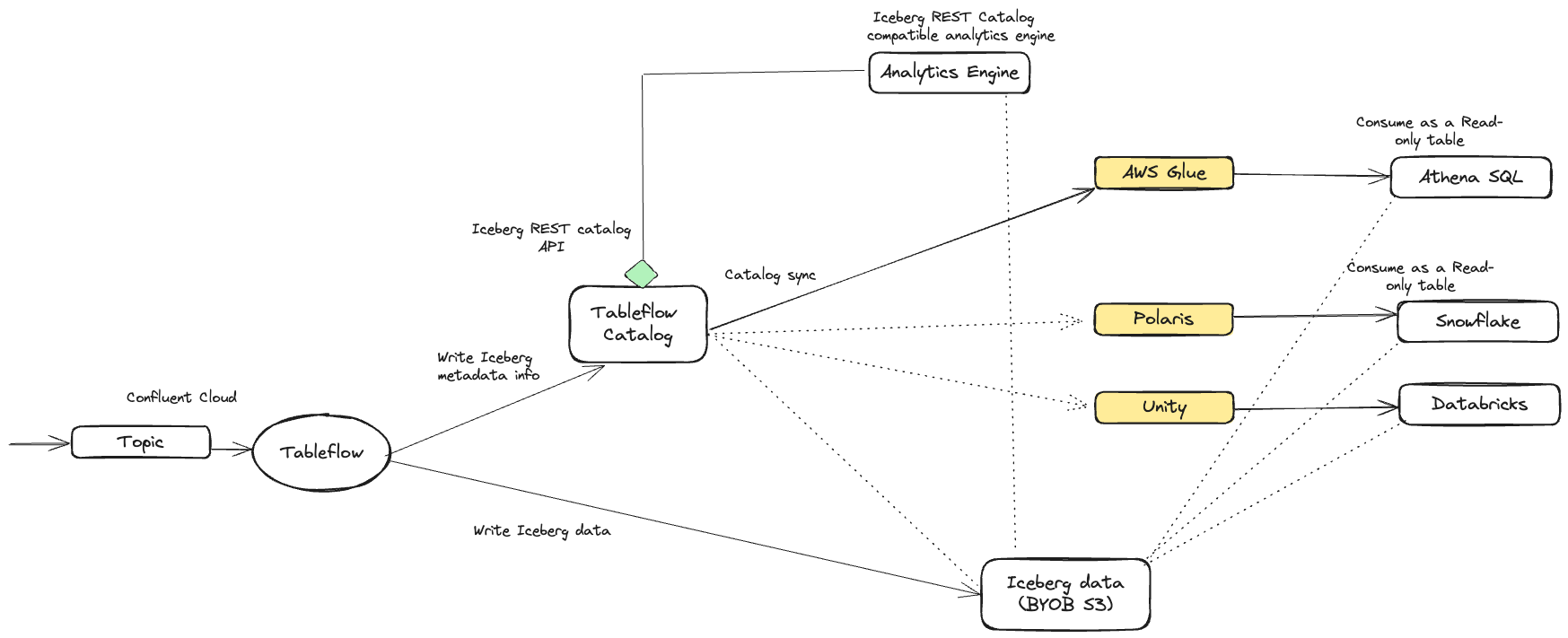
Tableflow Iceberg REST Catalog
Tableflow features an integrated Iceberg REST catalog (IRC), which enables seamless connections to any analytics or compute engine that supports the Iceberg REST catalog API.
Note
The Tableflow Iceberg REST Catalog doesn’t support credential vending for customer-managed storage buckets, so when you use Tableflow Catalog with your own storage, the analytics engine must have access to the storage location where you materialize Tableflow Iceberg tables.
To access the REST Catalog endpoint and obtain the necessary credentials, navigate to the Tableflow section in the Confluent Cloud Console. You can use this information within the analytics engine that supports the Iceberg REST catalog, enabling you to query Iceberg tables.
Authenticate to the Tableflow Iceberg REST Catalog using either of the following API key types:
- Tableflow API key
A resource-scoped key specific to Tableflow. The key is scoped to any topics the principal has access to, which can span multiple Confluent Cloud environments and clusters.
- Global API key
You can use a global API key in place of a Tableflow-scoped key. This is useful when your application also accesses Kafka, Schema Registry, Flink, or other Confluent Cloud resources and you want to manage a single credential.
Snowflake Horizon Catalog
Snowflake Horizon Catalog can federate directly against the Tableflow Iceberg REST Catalog through a catalog-linked database. Snowflake connects to the Tableflow Catalog with a Tableflow-scoped API key, automatically discovers every Bring Your Own Storage (BYOS) table in a Kafka cluster, and reads data from your storage bucket through an external volume. Snowflake treats Tableflow tables as read-only. You don’t configure an external catalog sync in Tableflow, and Tableflow doesn’t copy metadata. This is the recommended integration path for Snowflake. For more information, see Integrate Tableflow with Snowflake Horizon Catalog in Confluent Cloud.
External catalog integration
Tableflow supports synchronizing Iceberg table metadata with multiple external catalogs per cluster, including AWS Glue, Databricks Unity Catalog, the Google Cloud Lakehouse runtime catalog, and Snowflake Open Catalog.
Each catalog type is supported through a specific Tableflow format, ensuring that external catalogs remain up-to-date and consistent while the Tableflow Catalog continues to serve as the single source of truth.
Tableflow enables multiple catalog syncs within a cluster, but only one integration is allowed per catalog type. For example, a Kafka cluster can connect only to one AWS Glue Data Catalog.
Key aspects of external catalog integration include:
Cluster-level integration: External catalogs can be integrated at the cluster level, allowing all topics materialized from the cluster to be published to the catalog service.
Metadata Synchronization: Tableflow synchronizes its metadata with the external catalog that is integrated with the Kafka cluster. When there’s a new update to a table, it’s immediately published in the external catalog. Delta Lake tables are published directly from Tableflow to the external catalog services (Unity Catalog).
Read-Only Tables: Iceberg tables exposed via external catalog synchronization are read-only. When working with Iceberg tables created by Tableflow, it’s essential to ensure that they are consumed as read-only tables.
Bring Your Own Storage (BYOS) support: Tableflow supports BYOS for all catalog integrations, providing flexibility in managing storage and infrastructure. External catalog integration is not supported with Tableflow Confluent-managed storage.
To manage catalog integrations with Terraform, use the confluent_catalog_integration resource.
Note
Catalogs used with Tableflow must have access to the KMS key that encrypts the Tableflow data. This applies to both Confluent Managed Storage and Bring Your Own Storage (BYOS). For details on encryption behavior and required permissions, see Use self-managed encryption keys with Tableflow and Tableflow with KMS-encrypted S3 storage.
Tableflow supports the following catalog integrations and table formats.
AWS Glue Data Catalog — Apache Iceberg
Databricks Unity Catalog — Delta Lake
Google Cloud Lakehouse runtime catalog — Apache Iceberg
Snowflake Horizon Catalog — Apache Iceberg. Use this integration for new Snowflake deployments. Horizon uses catalog federation, so you don’t configure a catalog integration in Tableflow.
Snowflake Open Catalog — Apache Iceberg. Use this integration only for existing Open Catalog deployments. Snowflake no longer offers Open Catalog sign-up to new accounts.
Important
Topics must be materialized in order for catalog synchronization to complete. Enable Tableflow on a topic before enabling your external catalog provider. Catalog sync remains in the
pendingstate until at least one topic is enabled with Tableflow.
Topic catalog sync status
Topic catalog sync status reports whether Tableflow has successfully published each topic’s table metadata to the configured external catalog.
When you integrate an external catalog with Tableflow, Tableflow publishes every materialized topic to that catalog if the catalog supports the enabled table format. Analytics engines can then discover and query the table. Catalog publication can fail independently of materialization. For example, a topic might materialize to your storage successfully while one or more catalog syncs fail. Common causes include unsupported data types or catalog-specific errors.
The Confluent Cloud Console exposes per-topic catalog sync status so you can quickly see which topics are healthy, which are failing, and what the underlying error is, without inspecting logs or opening a support ticket.
External catalog integrations list
From the Tableflow page in the Confluent Cloud Console, the External Catalog Integrations section lists every catalog integration configured on the cluster.

For each integration, the list shows the following:
Integration name — the name you assigned when adding the integration.
Status — the connection state of the integration itself. Connected indicates that Tableflow can reach the catalog service and authenticate using the configured credentials, such as an IAM role for AWS Glue, a service principal for Databricks Unity Catalog, or a Snowflake principal for Snowflake Open Catalog.
Catalog ID — the unique identifier that Tableflow assigns to each catalog integration. Select the copy icon to capture this value for support tickets or API calls.
Type — the catalog type: AWS Glue, Snowflake Open Catalog, or Databricks Unity Catalog.
Associated topics — a link to the per-topic drill-down view, showing the count of topics published to this catalog. A warning indicator next to the count indicates that one or more topics are failing to sync to this catalog and require attention.
Select the Associated topics link to view the per-topic sync status.
Per-topic catalog sync status
The drill-down view lists every Tableflow topic syncing to the selected catalog integration, along with both its materialization status and its catalog publication status.
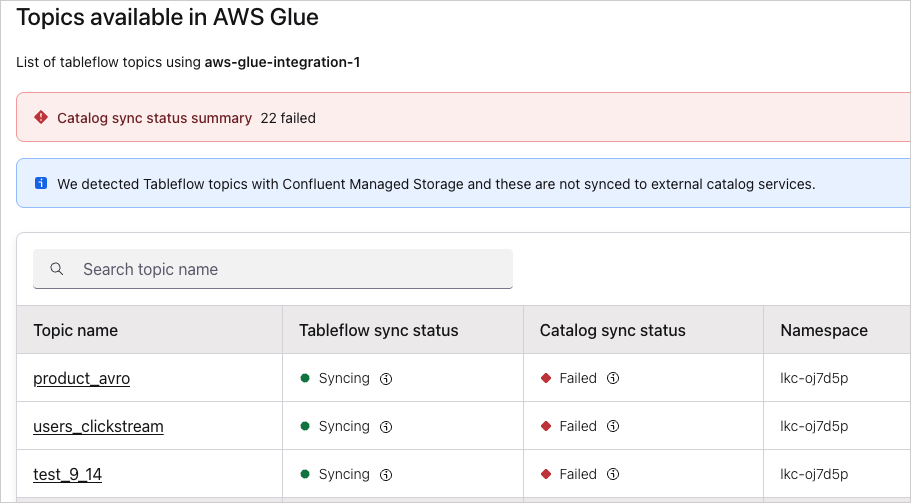
For each topic, the table shows the following:
Topic name — the Kafka topic that has Tableflow enabled. Select the topic name to go to the Tableflow topic detail page.
Tableflow sync status — the status of the materialization pipeline that writes Iceberg or Delta Lake files to your storage. Common values include Syncing, Paused, and Failed.
Catalog sync status — the status of publishing the table’s metadata to the external catalog. This status is independent of the Tableflow sync status. A topic can be successfully Syncing at the materialization layer while its catalog sync status is Failed.
Namespace — the catalog namespace, such as a database or schema, that the table is registered under in the external catalog.
Inspecting a sync failure
Hover over (or tab to) the Failed indicator in the Catalog sync status column to view a tooltip with the failure details for that topic.
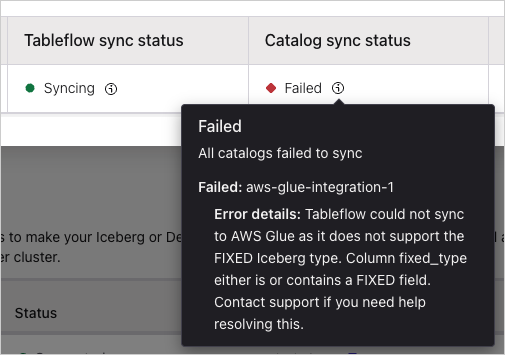
Note
Catalog sync errors don’t block topic materialization. Tableflow still writes the Iceberg or Delta Lake files to your storage location, and the table remains queryable through the Tableflow Iceberg REST Catalog. Tableflow pauses publication to the affected external catalog until you resolve the underlying issue.