

Configure Observer container for Confluent Platform
Starting with Confluent for Kubernetes 3.2.0, the Observer container is available as a lightweight health monitoring sidecar for Kafka and KRaft controllers running on Kubernetes. It provides enhanced health checking capabilities with support for secure authentication and certificate management.
Note
The Observer container follows the same version scheme as the
confluent-init-container.
Overview of Observer container
The Observer container is a sidecar that runs alongside your Kafka brokers and KRaft controllers to provide Kubernetes-native health checks. It monitors component health through JMX metrics and provides standard Kubernetes probe endpoints.
The following diagram shows how the Observer container fits into a Kafka or KRaft pod:
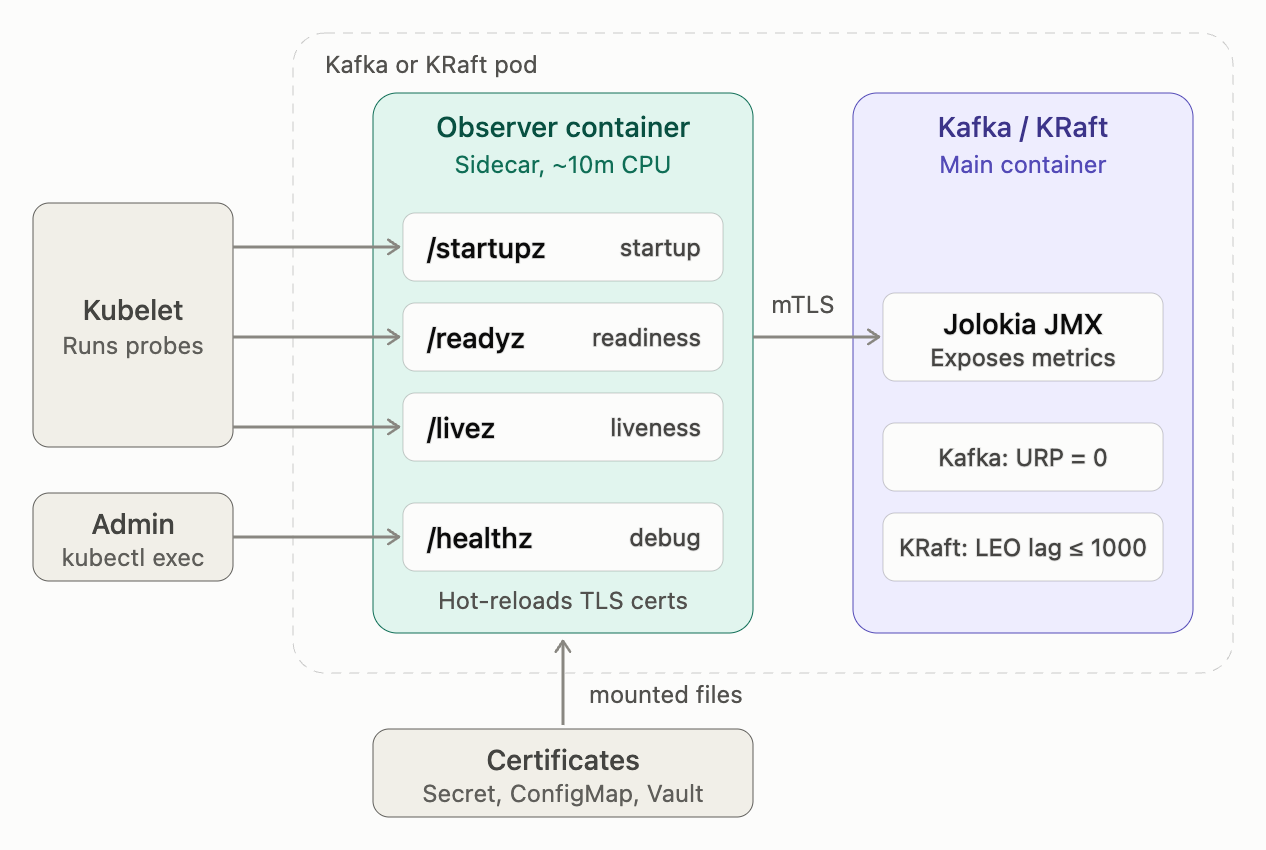
Observer container in a Kafka or KRaft pod
Key capabilities:
Self-contained readiness: Observer determines pod readiness independently without operator dependency.
Component-specific health monitoring: Monitors Kafka and KRaft controllers via Jolokia JMX.
Separate startup and readiness validation: Distinguishes between initial startup and production readiness checks.
Secure authentication: Supports mutual TLS (mTLS) for probe communication and JMX metric collection.
Certificate hot-reload: Enables seamless certificate rotation without pod restarts.
Standard Kubernetes health endpoints: Provides
/startupz,/readyz,/livez, and/healthzendpoints.Configurable retry logic: Built-in retry with exponential backoff for Jolokia client.
Lightweight: Minimal resource footprint (approximately 10m CPU, 32Mi memory).
Compare Observer container benefits
The Observer container provides several advantages over the traditional readiness and liveness probe implementation.
Self-contained health checks
The observer’s primary design goal is self-contained pod readiness determination. Pods can be deployed and become ready without depending on the Confluent Operator. This enables:
Standalone deployments without operator.
Operator failures do not affect running cluster health checks.
Simpler debugging, which means there is no distributed state to reason about.
Enhanced health validation
The Observer container provides more sophisticated health checks:
For Kafka brokers:
Validates that URP equals zero before marking the pod as ready.
Ensures data integrity during rolling updates.
For KRaft controllers:
Queries all peer controllers to determine the cluster’s maximum Log End Offset (LEO).
Validates that the local controller’s LEO lag is within acceptable threshold. The default is 1000.
Ensures metadata synchronization before marking the controller as ready.
Separate startup and readiness validation
The Observer container distinguishes between startup and readiness:
Startup probe (
/startupz): Checks only for basic process initialization. This probe is lenient and allows controllers time to catch up on metadata during initial startup.Readiness probe (
/readyz): Performs full validation includingURP=0for Kafka or LEO lag ≤ threshold for KRaft. The pod begins receiving traffic only when this probe passes.
The following diagram shows how a pod moves from startup to readiness:
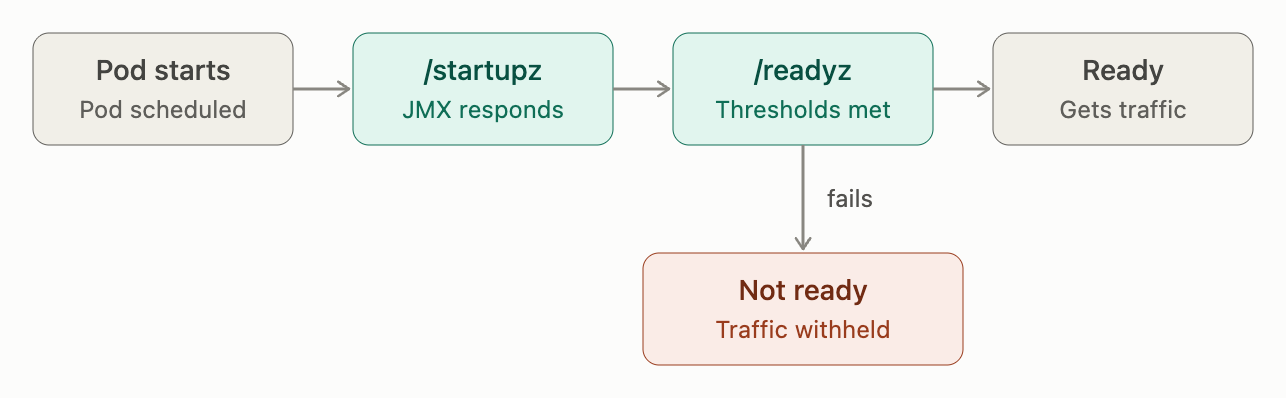
Pod startup and readiness sequence
This separation prevents premature traffic routing while allowing sufficient time for component initialization.
Simplified rolling restarts
When using the Observer container, rolling restarts for KRaft controllers and Kafka brokers can be performed using standard Kubernetes StatefulSet restart commands, the same way as other Confluent Platform components. For details, see Restart Confluent Platform Using Confluent for Kubernetes.
Configure authentication
The Observer container supports the following authentication configurations:
mTLS (Mutual TLS)
The recommended authentication method for production deployments. The Observer container can use mTLS for:
Probe communication: Kubernetes probes authenticate to the Observer server using client certificates.
JMX metric collection: The Observer authenticates to Jolokia endpoints using client certificates.
When mTLS is enabled:
The Observer server listens on HTTPS. The default port is 7443.
Kubernetes probes use the
observer-clientbinary with TLS certificates.Jolokia client connections use mutual TLS authentication.
Plaintext (HTTP)
For development or testing environments where encryption is not required:
The Observer server listens on HTTP. The default port is 7080.
Kubernetes probes connect without TLS.
Jolokia client connections use HTTP without authentication.
Warning
Plaintext mode is not recommended for production deployments.
Certificate management
The Observer container supports:
ConfigMap/Secret-based certificates: Certificates mounted as Kubernetes ConfigMaps or Secrets.
Vault integration: HashiCorp Vault for dynamic secret injection (DPIC mode).
Certificate hot-reload: Automatic detection and reload of updated certificates without pod restarts.
Configure Observer container
The Observer container is configured through the Confluent Platform component custom resource
(CR). All the configurations are specified under spec.services.observer.
Basic configuration
To enable the Observer container with default settings:
apiVersion: platform.confluent.io/v1beta1
kind: Kafka  # or KRaftController
metadata:
  name: kafka
spec:
  services:
    observer:
      # Observer container image
      image: "confluentinc/confluent-observer-container:3.2.0"

      # Logging level (debug, info, warn, error)
      logLevel: "info"
Configure readiness thresholds
You can customize the health check thresholds based on your requirements:
For KRaft controllers:
apiVersion: platform.confluent.io/v1beta1
kind: KRaftController
metadata:
  name: kraftcontroller
spec:
  services:
    observer:
      image: "confluentinc/confluent-observer-container:3.2.0"
      readiness:
        # Maximum Log End Offset lag before marking controller not ready
        # Default: 1000
        maxLeoLag: 500
For Kafka brokers:
apiVersion: platform.confluent.io/v1beta1
kind: Kafka
metadata:
  name: kafka
spec:
  services:
    observer:
      image: "confluentinc/confluent-observer-container:3.2.0"
      readiness:
        # Maximum under-replicated partitions before marking broker not ready
        # Default: 0
        maxURP: 0
Configure probe timing
Customize probe timing to match your environment:
apiVersion: platform.confluent.io/v1beta1
kind: Kafka
metadata:
  name: kafka
spec:
  services:
    observer:
      image: "confluentinc/confluent-observer-container:3.2.0"
      containerOverrides:
        probe:
          startup:
            initialDelaySeconds: 15
            periodSeconds: 5
            timeoutSeconds: 10
            failureThreshold: 30
          readiness:
            initialDelaySeconds: 20
            periodSeconds: 10
            timeoutSeconds: 5
            failureThreshold: 3
          liveness:
            initialDelaySeconds: 20
            periodSeconds: 10
            timeoutSeconds: 5
            failureThreshold: 3
Configure Jolokia client
Adjust the JMX client timeout and retry settings:
apiVersion: platform.confluent.io/v1beta1
kind: Kafka
metadata:
  name: kafka
spec:
  services:
    observer:
      image: "confluentinc/confluent-observer-container:3.2.0"
      clients:
        jolokia:
          # Request timeout for JMX calls
          timeout: "15s"

          # Maximum retry attempts for failed requests
          maxRetries: 5

          # Initial backoff between retries
          retryBackoff: "200ms"
Configure resource limits
Adjust resource allocation for the Observer container:
apiVersion: platform.confluent.io/v1beta1
kind: Kafka
metadata:
  name: kafka
spec:
  services:
    observer:
      image: "confluentinc/confluent-observer-container:3.2.0"
      containerOverrides:
        resources:
          requests:
            cpu: "10m"
            memory: "32Mi"
          limits:
            cpu: "100m"
            memory: "128Mi"
Multi-cluster KRaft deployments
For KRaft controllers deployed across multiple Kubernetes clusters, you must specify peer endpoints manually as the Observer cannot auto-discover endpoints outside the local cluster:
apiVersion: platform.confluent.io/v1beta1
kind: KRaftController
metadata:
  name: kraftcontroller
spec:
  services:
    observer:
      image: "confluentinc/confluent-observer-container:3.2.0"
      cluster:
        # List of all controller Jolokia endpoints (including this one)
        peerEndpoints:
          - "https://kraftcontroller-0.cluster-a.example.com:7777/jolokia"
          - "https://kraftcontroller-1.cluster-b.example.com:7777/jolokia"
          - "https://kraftcontroller-2.cluster-c.example.com:7777/jolokia"
Configuration reference
The following table summarizes all available configuration options:
Configuration Path |
Description |
Default |
|---|---|---|
|
Observer container image |
Required |
|
Logging level (debug, info, warn, error) |
|
|
Maximum LEO lag for KRaft controllers |
|
|
Maximum under-replicated partitions for Kafka |
|
|
Jolokia request timeout |
|
|
Maximum retry attempts |
|
|
Initial retry backoff |
|
|
Custom peer Jolokia endpoints (multi-cluster) |
Auto-discovered |
|
Probe timing configuration |
|
|
Resource limits and requests |
10m CPU, 32Mi memory |
|
Custom environment variables |
|
Monitor health endpoints
The Observer container exposes the following health check endpoints:
Startup probe (/startupz)
Purpose: Verifies that the component process has initialized.
Validation: Checks only for basic Jolokia connectivity (JMX endpoint response).
Use case: Allows Kubernetes to determine when the component has started and is ready for more stringent health checks. This probe is lenient to allow controllers time to catch up on metadata during initial startup.
Default configuration:
initialDelaySeconds: 10periodSeconds: 5failureThreshold: 30 (allows up to 150 seconds for startup)
Readiness probe (/readyz)
Purpose: Determines if the component is ready to receive traffic.
Validation:
For Kafka brokers: Verifies URP equals the configured threshold. The default value is 0.
For KRaft controllers: Verifies LEO lag is within the configured threshold. The default value is ≤ 1000.
Use case: Kubernetes uses this probe to decide when to add the pod to the Service endpoints and route traffic to it.
Default configuration:
initialDelaySeconds: 20periodSeconds: 10failureThreshold: 3
Liveness probe (/livez)
Purpose: Determines if the component process is alive and responsive.
Validation: Performs basic port connectivity checks to verify the component process is running.
Use case: Kubernetes uses this probe to determine if the pod should be restarted.
Default configuration:
initialDelaySeconds: 20periodSeconds: 10failureThreshold: 3
Health diagnostics (/healthz)
Purpose: Provides comprehensive health diagnostics for troubleshooting.
Response: Returns detailed JSON with probe results, metrics, and historical health check data.
Use case: Used by administrators for debugging health issues. Not used by Kubernetes probes.
Example response:
{
  "status": "healthy",
  "timestamp": "2024-01-15T10:30:45Z",
  "component": {
    "type": "kraftcontroller",
    "pod_name": "kraftcontroller-1"
  },
  "probes": {
    "startup": {"status": "pass", "message": "Jolokia responding"},
    "readiness": {"status": "pass", "message": "LEO lag: 16"},
    "liveness": {"status": "pass", "message": "Controller port healthy"}
  },
  "metrics": {
    "kraft_log_end_offset": {"value": 15234, "status": "healthy"},
    "connectivity": {"value": true, "status": "healthy"}
  }
}
Manage certificates
The Observer container supports automatic certificate rotation without pod restarts.
Certificate hot-reload
When TLS certificates are updated (via ConfigMap or Secret updates), the Observer container automatically:
Detects the certificate file changes.
Reloads the TLS configuration.
Applies new certificates to all new connections.
Maintains zero downtime during the rotation.
Certificate paths
The Observer container expects certificates in the following locations:
For Observer server TLS (probe connections):
Mount path:
/mnt/sslcerts/observer/Required files:
fullchain.pem: Server certificate chainprivkey.pem: Server private keycacerts.pem: CA certificate bundle
For Jolokia client mTLS (JMX connections):
Mount path:
/mnt/sslcerts/jolokia/or/vault/secrets/Required files:
fullchain.pem: Client certificate chainprivkey.pem: Client private keycacerts.pem: CA certificate bundle
Vault integration (DPIC mode)
When using HashiCorp Vault for secret management, certificates are injected
into the /vault/secrets/ directory. The Observer container automatically
detects and uses these certificates.
Troubleshoot Observer issues
Checking Observer logs
To view Observer container logs:
kubectl logs <pod-name> -c observer -n <namespace>
Enable debug logging by updating the component CR:
apiVersion: platform.confluent.io/v1beta1
kind: Kafka
metadata:
  name: kafka
spec:
  services:
    observer:
      logLevel: "debug"
Verifying probe health
To manually test a health endpoint:
# From inside the pod
kubectl exec <pod-name> -c observer -n <namespace> -- \
  /usr/local/bin/observer-client --endpoint /readyz
Common issues
Probe failures during startup
If startup probes fail:
Verify Jolokia endpoint is accessible:
kubectl exec <pod-name> -c observer -n <namespace> -- \
  curl -k https://localhost:7777/jolokia/version
Check Observer logs for connection errors.
Verify TLS certificates are correctly mounted.
Consider increasing
failureThresholdorinitialDelaySecondsin the probe configuration.
Readiness probe not passing
If readiness probes fail but startup succeeds:
Check the
/healthzendpoint for detailed diagnostics:kubectl exec <pod-name> -c observer -n <namespace> -- \ /usr/local/bin/observer-client --endpoint /healthz
For Kafka, verify that no under-replicated partitions exist.
For KRaft, check the LEO lag across controllers.
Consider adjusting readiness thresholds (
maxURPormaxLeoLag).
Certificate errors
If you see TLS/certificate errors:
Verify certificates are mounted correctly:
kubectl exec <pod-name> -c observer -n <namespace> -- \
  ls -la /mnt/sslcerts/observer/
Verify certificate validity:
kubectl exec <pod-name> -c observer -n <namespace> -- \
  openssl x509 -in /mnt/sslcerts/observer/fullchain.pem -text -noout
Check that CA certificate matches the signing authority.
Emergency bypass
In emergency situations, you can temporarily bypass health checks using annotations:
apiVersion: platform.confluent.io/v1beta1
kind: Kafka
metadata:
  name: kafka
  annotations:
    # Bypass readiness checks (pod always ready)
    platform.confluent.io/disable-observer-readiness-checks: "true"
    # Bypass liveness checks (pod never restarted)
    platform.confluent.io/disable-observer-liveness-checks: "true"
Warning
Bypass annotations should only be used for emergency troubleshooting. They disable safety checks and may result in traffic being routed to unhealthy pods.