

Configure Security for Confluent Gateway using Confluent for Kubernetes
Configure security for Confluent Gateway deployed with Confluent for Kubernetes (CFK). Because Confluent Gateway sits between your Apache Kafka® clients and clusters, the Confluent Gateway controls how clients authenticate, how it encrypts traffic in transit, and how it stores credentials. Configure authentication, TLS/SSL, passwords, and secret stores to protect client connections and the credentials Confluent Gateway uses to reach your brokers.
Confluent Gateway supports the following security configurations with CFK:
Security best practices
Confluent Gateway deployments have two authentication layers:
Client to Confluent Gateway: Clients authenticate to Confluent Gateway using SASL/PLAIN, SASL/SCRAM, mTLS, or NONE.
Confluent Gateway to broker: Confluent Gateway authenticates to the backing Kafka cluster using SASL/PLAIN, SASL/OAUTHBEARER, or NONE. Store these credentials in AWS Secrets Manager, HashiCorp Vault, Azure Key Vault, or a local directory.
To secure both layers, follow these authentication best practices:
Use a dedicated credential for each client. Give every client its own Confluent Gateway-to-broker SASL credential. Don’t map multiple clients to a single credential or share static credentials across clients, so that you can audit and revoke access for each client independently.
Prefer SASL/SCRAM over SASL/PLAIN. Unlike SASL/PLAIN, SASL/SCRAM doesn’t send passwords in cleartext and protects against dictionary attacks using salted hashes.
Configure authentication for Confluent Gateway
Confluent Gateway supports the following modes for authenticating clients and forwarding traffic to Kafka clusters:
Identity passthrough: Confluent Gateway forwards client credentials directly to Kafka clusters without modification.
Use identity passthrough when the authentication method is uniform across clients and you want Confluent Gateway to forward credentials to brokers unchanged.
Identity passthrough supports all SASL authentication mechanisms, such as SASL/PLAIN, SASL/SCRAM, and SASL/OAUTHBEARER.
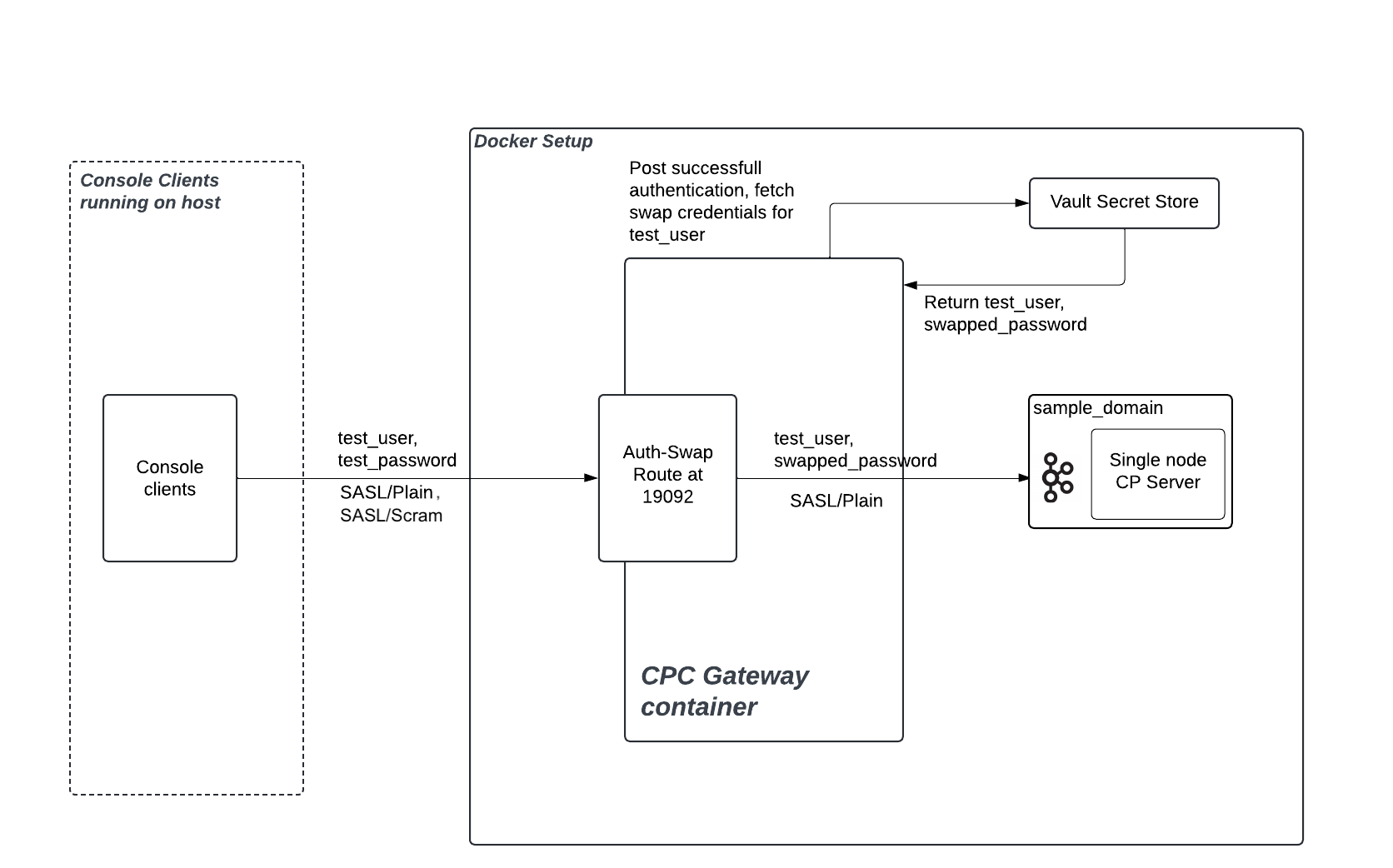
Authentication swapping: Confluent Gateway transforms client credentials into different credentials before connecting to Kafka clusters.
When you enable this mode, Confluent Gateway authenticates incoming clients, optionally using a different authentication mechanism than the backing Kafka cluster. Confluent Gateway then swaps the client identity and credentials as it forwards requests to brokers.
With authentication swapping:
For client-to-Confluent Gateway authentication, Confluent Gateway supports SASL/PLAIN, SASL/SCRAM, SASL/OAUTHBEARER, mTLS, or NONE.
For Confluent Gateway-to-Kafka cluster authentication, Confluent Gateway supports SASL/PLAIN, SASL/OAUTHBEARER, or NONE.
Use authentication swapping when you need to:
Migrate clients between source and destination clusters that have different authentication requirements, without modifying client applications.
Share cluster access with external clients while maintaining your internal authentication standards, even when you cannot enforce those standards directly on the client side.
The following diagram shows a sample authentication swapping flow:
Consider the following when you select the authentication mode in Confluent Gateway:
You can configure either identity passthrough or authentication swapping for an individual route.
You cannot configure multiple authentication mechanisms for the same route while using authentication swapping.
You cannot use identity passthrough for mTLS because TLS terminates at Confluent Gateway. Authentication swapping is mandatory for mTLS clients.
Authentication swapping requires more configuration, such as identity stores, key management systems (KMS), and mappings, but adds flexibility and supports more complex enterprise scenarios.
Authentication swapping with multi-cluster streaming domains requires identical user identities and role-based access control (RBAC) policies across all clusters. If clusters have different authentication systems or user permissions, use separate streaming domains instead.
Configure identity passthrough
When you configure a route for identity passthrough, Confluent Gateway forwards unaltered authentication information directly to Kafka brokers and does not authenticate incoming clients itself. The brokers perform authentication and authorization checks.
Identity passthrough supports SASL authentication mechanisms, such as SASL/PLAIN, SASL/SCRAM, and SASL/OAUTHBEARER.
To configure a route for identity passthrough in CFK:
kind: Gateway
spec:
  routes:
    - name:
      security:
        auth: passthrough              --- [1]
        client:
          authentication:
            type: oauth                --- [2]
            oauthSettings:             --- [3]
              jwksEndpointUri:
              audience:
            mtls:
              sslClientAuthentication: --- [4]
          tls:                         --- [5]
        cluster:
          extensionHeaders:            --- [6]
            logicalCluster:
[1] The authentication mode for the route. Set to
passthroughto enable identity passthrough.[2] To have Confluent Gateway inject SASL extension headers (see [6]) into an OAUTHBEARER client’s authentication request before forwarding it to the backing Kafka cluster, set the client authentication
typetooauth. Use this when clients authenticate to Confluent Cloud with SASL/OAUTHBEARER and you want Confluent Gateway to set the logical cluster (lkc) extension on their behalf. This keeps client configurations independent of the active cluster, so authentication continues to succeed after a failover.[3] When
typeisoauth, the CRD requiresjwksEndpointUriandaudience. Confluent Gateway ignores these fields on passthrough routes, so set any non-empty placeholder values. For more information, see OAUTHBEARER passthrough limitation.[4] If using TLS, set
sslClientAuthenticationtorequiredto require clients to present their certificates. Set torequestedfor optional certificate presentation.[5] The TLS configuration for the client to Confluent Gateway communication. For more information, see TLS/SSL configuration.
[6] One or more SASL extension headers that Confluent Gateway adds to the client’s OAUTHBEARER authentication request to the backing Kafka cluster. Each header is a key-value pair. Set
logicalClusterto the target cluster ID, for example,lkc-abc123. Confluent Gateway honorsextensionHeadersonly whenauthispassthroughand the client authenticationtypeisoauth.
Sample configurations for identity passthrough
The following example configures TLS for the client-to-Confluent Gateway connection:
kind: Gateway
spec:
  routes:
    - name:
      security:
        auth: passthrough
        client:
          authentication:
            type: PLAIN
          tls:
            secretRef: my-tls-secret
The following example configures TLS for the client-to-Confluent Gateway connection and requires client certificates:
kind: Gateway
spec:
  routes:
    - name:
      security:
        auth: passthrough
        client:
          authentication:
            type: PLAIN
            mtls:
              sslClientAuthentication: "required"
          tls:
            secretRef: my-tls-secret
The following example injects a logical cluster header for SASL/OAUTHBEARER identity passthrough:
kind: Gateway
spec:
  routes:
    - name:
      security:
        auth: passthrough
        client:
          authentication:
            type: oauth
            oauthSettings:
              jwksEndpointUri: "https://placeholder.invalid/jwks"
              audience: "placeholder"
        cluster:
          extensionHeaders:
            logicalCluster: 'lkc-abc123'
Note
Setting cluster.extensionHeaders currently requires
client.authentication.type: oauth with placeholder oauthSettings
values. For more information, see
OAUTHBEARER passthrough limitation.
OAUTHBEARER passthrough limitation
In CFK 3.3, a Confluent Gateway passthrough route that sets
cluster.extensionHeaders is rejected at admission. This happens because
injecting extension headers requires setting client.authentication.type to
oauth, which triggers a custom resource definition (CRD) rule requiring
oauthSettings.jwksEndpointUri and oauthSettings.audience. Although
Confluent Gateway ignores these fields at runtime and forwards tokens unmodified, the
validation rule still rejects the resource.
When you apply such a route, CFK returns an error similar to the following:
The Gateway "<name>" is invalid: spec.routes[0].security.client.authentication:
  Invalid value: "object": security.client.authentication.oauthSettings.jwksEndpointUri
  and oauthSettings.audience are required when security.client.authentication.type is 'oauth'
To work around this limitation, set placeholder values for jwksEndpointUri
and audience under oauthSettings. CFK ignores these fields on
passthrough routes, so any non-empty string satisfies the validation rule
without affecting runtime behavior:
kind: Gateway
spec:
  routes:
    - name:
      security:
        auth: passthrough
        client:
          authentication:
            type: oauth
            oauthSettings:
              jwksEndpointUri: "https://placeholder.invalid/jwks"
              audience: "placeholder"
        cluster:
          extensionHeaders:
            logicalCluster: 'lkc-abc123'
After the CRD validation requirement is removed in a later CFK release, re-apply the Confluent Gateway CRD and remove the placeholder values. Helm does not upgrade installed CRDs during a chart upgrade, so you must re-apply the updated CRD manually:
kubectl apply --server-side \
  -f charts/confluent-for-kubernetes/crds/platform.confluent.io_gateways.yaml
Configure authentication swapping
When you configure a route for authentication swapping, Confluent Gateway authenticates incoming clients, optionally using a different authentication mechanism than the backing Kafka cluster. Confluent Gateway then swaps the client identity and credentials as it forwards requests to Kafka brokers.
Authentication swapping requires identity mapping, which integrates with external KMS or secret stores.
Confluent Gateway supports the following secret stores for fetching credentials:
HashiCorp Vault
AWS Secrets Manager
Azure Key Vault
To configure a route for authentication swapping in CFK:
kind: Gateway
spec:
  routes:
    - name:               --- [1]
      security:
        auth: swap        --- [2]
        client:           --- [3]
        secretStore:      --- [4]
        cluster:          --- [5]
[1] The unique name for the route.
[2] The authentication mode for the route. Set to
swapto enable authentication swapping.[3] How clients authenticate to Confluent Gateway. For more information, see Client authentication for authentication swapping.
[4] Reference to a secret store for exchanging credentials. For more information, see Secret store configuration.
[5] How Confluent Gateway authenticates to the Kafka cluster after swapping. For more information, see Cluster authentication for authentication swapping.
Client authentication for authentication swapping
Configure how clients authenticate to Confluent Gateway for authentication swapping.
You can use SASL/PLAIN, SASL/SCRAM, SASL/OAUTHBEARER, mTLS, or NONE authentication methods.
SASL authentication
kind: Gateway
spec:
  routes:
    - name:
      security:
        auth: swap
        client:
          authentication:
            type:                      --- [1]
            jaasConfig:                --- [2]
              secretRef:               --- [3]
            jaasConfigPassThrough:     --- [4]
              secretRef:               --- [5]
              directoryPathInContainer: -- [6]
          connectionsMaxReauthMs:      --- [7]
[1] The SASL mechanism to use. Set to
plainfor SASL/PLAIN authentication.[2]
jaasConfigprovides the SASL credentials for client authentication. Specify eitherjaasConfigorjaasConfigPassThrough, not both.[3] The Kubernetes secret that holds the
jaasConfigcredentials.To learn more about creating the JAAS configuration secret, see Create client-side SASL/PLAIN credentials using JAAS config.
[4]
jaasConfigPassThroughis an alternative tojaasConfig([2]) that supplies the JAAS configuration directly, from a secret ([5]) or a mounted directory ([6]).[5] The Kubernetes secret that holds the
jaasConfigPassThroughcredentials.To learn more about creating the JAAS Passthrough credentials, see Create client-side SASL/PLAIN credentials using JAAS config pass-through.
[6] The directory path in the container that contains the JAAS configuration file.
To learn more about creating the JAAS Passthrough credentials, see Create client-side SASL/PLAIN credentials using JAAS config pass-through.
[7] Maximum time in milliseconds before requiring client reauthentication. If the client does not reauthenticate within this time frame, the connection is closed. Default is
0.
SASL/SCRAM authentication
Confluent Gateway supports SASL/SCRAM authentication for client-to-Confluent Gateway connections. When you use SCRAM with authentication swapping, you have three options for managing SCRAM credentials:
Store SCRAM credentials in the same secret store as authentication swapping: Confluent Gateway stores SCRAM credentials in the route’s secret store.
Store SCRAM credentials in a SCRAM-specific secret store: Confluent Gateway stores SCRAM credentials in a separate secret store from other authentication swap credentials.
Manage SCRAM credentials with the Kafka administrator API: Confluent Gateway automatically manages SCRAM credentials by creating and updating SCRAM user credentials through the Kafka administrator API.
kind: Gateway
spec:
  routes:
    - name:
      security:
        auth: swap
        secretStore:                       --- [1]
        client:
          authentication:
            type: scram                    --- [2]
            scram:
              alterScramCredentials:       --- [3]
              scramCredentialsTtlMs:       --- [4]
              secretStore:                 --- [5]
              admin:
                secretRef:                 --- [6]
[1] The secret store reference for authentication swapping. For more information, see Secret store configuration.
[2] The authentication type. Set to
scramto enable SCRAM authentication for clients.[3] Optional. When set to
true, enables Confluent Gateway to manage SCRAM user credentials by creating and updating them through the Kafka administrator API. This field requires administrator credentials. The default isfalse.[4] Optional. The time-to-live, in milliseconds, for cached SCRAM credentials. The default is
600000(10 minutes).[5] Optional. Refers to a SCRAM-specific secret store. If not specified, the field uses the secret store defined in
secretStore([1]).[6] Required when
alterScramCredentials: true. Refers to administrator credentials in the secret store that Confluent Gateway uses to perform SCRAM credential operations. Ensure these credentials are present in the secret store and that the administrator user has the required permissions to alter and describe SCRAM credentials.
Configuration scenario 1: Using the same secret store as authentication swapping
In this configuration, you store SCRAM credentials in the route’s secret store.
kind: Gateway
spec:
  routes:
    - name: gateway-route
      security:
        auth: swap
        secretStore: vault-store
        client:
          authentication:
            type: scram
Configuration scenario 2: Using a SCRAM-specific secret store
In this configuration, you store SCRAM credentials in a separate secret store from other authentication swap credentials.
kind: Gateway
spec:
  routes:
    - name: gateway-route
      security:
        auth: swap
        secretStore: vault-store
        client:
          authentication:
            type: scram
            scram:
              secretStore: scram-secret-store
Configuration scenario 3: Managing SCRAM credentials from Confluent Gateway
In this configuration, you enable Confluent Gateway to automatically create and update SCRAM user credentials through the Kafka administrator API. Ensure that:
secretRefcontains the username and password.The administrator user has the necessary permissions to perform
AlterUserScramCredentialsandDescribeUserScramCredentialsoperations on the Kafka cluster.
kind: Gateway
spec:
  routes:
    - name: gateway-route
      security:
        auth: swap
        secretStore: vault-store
        client:
          authentication:
            type: scram
            scram:
              alterScramCredentials: true
              admin:
                secretRef: scram-admin-credentials
Note
When you set alterScramCredentials: true, ensure that Confluent Gateway has the
necessary permissions to create, update, and delete secrets.
For required permissions, see Secret store configuration.
SASL/OAUTHBEARER authentication
Confluent Gateway supports SASL/OAUTHBEARER authentication for client-to-Confluent Gateway connections. The client presents an OAuth bearer token (a JSON Web Token, or JWT), and Confluent Gateway validates it against your identity provider’s JSON Web Key Set (JWKS) endpoint.
After validation, Confluent Gateway reads the client principal from a claim in the
token (the sub claim by default) and uses it as the key to look up the
swapped credentials in the secret store. Confluent Gateway then uses those credentials
to authenticate to the Kafka cluster.
kind: Gateway
spec:
  routes:
    - name:
      security:
        auth: swap
        secretStore:                   --- [1]
        client:
          authentication:
            type: oauth                --- [2]
            jaasConfigPassThrough:
              secretRef:                --- [3]
            oauthSettings:
              jwksEndpointUri:         --- [4]
              audience:                --- [5]
              expectedIssuer:          --- [6]
              subClaimName:            --- [7]
          connectionsMaxReauthMs:      --- [8]
[1] The secret store reference for authentication swapping. For more information, see Secret store configuration.
[2] The authentication type. Set to
oauthto enable SASL/OAUTHBEARER authentication for clients.[3] The Kubernetes secret that holds the JAAS configuration for the client inbound authentication.
[4] Required. The JWKS endpoint URI that Confluent Gateway uses to validate the signature of the inbound token.
[5] Required. The expected audience (
audclaim) in the token. Confluent Gateway rejects tokens whose audience does not match this value.[6] Optional. The expected issuer (
issclaim) in the token.[7] Optional. The token claim that Confluent Gateway uses as the client principal and the secret store lookup key. The default is
sub.[8] Optional. Maximum time in milliseconds (ms) before requiring client reauthentication. The default is
0(no reauthentication required).
Note
When you set type: oauth, both oauthSettings.jwksEndpointUri and
oauthSettings.audience are required. CFK rejects the Confluent Gateway custom
resource at admission if either is missing.
mTLS authentication
kind: Gateway
spec:
  routes:
    - name:
      security:
        auth: swap
        client:
          authentication:
            type:                      --- [1]
            mtls:
              principalMappingRules:   --- [2]
              sslClientAuthentication: --- [3]
            tls:
              secretRef:
[1] The client authentication mechanism to use. Set to
mtlsfor mTLS authentication.[2] The pattern to read principal name from the certificates. Required for authentication swapping with mTLS authentication.
[3] The SSL client authentication mode. Set to
"required"to enable mandatory mTLS authentication from the client side and to enforce certificate presentation. Valid values are"requested"and"required".
NONE authentication
kind: Gateway
spec:
  routes:
    - name:
      security:
        auth: swap
        client:
          authentication:
            type: none                   --- [1]
[1] The client authentication mechanism to use. Set to
noneto use NONE client authentication.
When you use none, Confluent Gateway identifies all incoming clients as anonymous
and assigns the client ID ANONYMOUS. Configure the swapped credentials for
the ANONYMOUS user in the associated secret store.
Cluster authentication for authentication swapping
Configure how Confluent Gateway authenticates to the Kafka cluster for authentication swapping.
You can use SASL/PLAIN, SASL/OAUTHBEARER, or NONE authentication methods.
SASL authentication
kind: Gateway
spec:
  routes:
    - name:
      security:
        auth: swap
        cluster:
          authentication:
            type:                                 --- [1]
            jaasConfigPassThrough:                --- [2]
              secretRef:                          --- [3]
              directoryPathInContainer:           --- [4]
            oauthSettings:                        --- [5]
              tokenEndpointUri:                   --- [6]
[1] The SASL mechanism to use. Set to
plainfor SASL/PLAIN authentication, oroauthfor SASL/OAUTHBEARER authentication.[2] Required for SASL/PLAIN authentication. Only
jaasConfigPassThroughis supported for cluster authentication.[3] The Kubernetes secret that holds the credentials. Specify either
secretRefordirectoryPathInContainer([4]), not both.The secret file content must use the following format:
org.apache.kafka.common.security.oauthbearer.OAuthBearerLoginModule required clientId="%s" clientSecret="%s";
[4] The directory path in the container that contains the JAAS Passthrough configuration file.
To learn more about creating the JAAS Passthrough credentials, see Create client-side SASL/PLAIN credentials using JAAS config pass-through.
[5] The OAuth settings for cluster authentication, such as the token endpoint URI ([6]). Required only if
cluster.authentication.type=oauth([1]).[6] The URI for the OAuth token endpoint.
You must also configure the
GATEWAY_OPTSenvironment variable inpodTemplate.envVarsto set theorg.apache.kafka.sasl.oauthbearer.allowed.urlsJVM system property to this URL. Without this, Confluent Gateway authentication fails with aConfigExceptionindicating the URL is not allowed.
NONE authentication
The NONE authentication method disables authentication between Confluent Gateway and the cluster. When you use this method, Confluent Gateway ignores the client ID and bypasses cluster authentication.
Because Confluent Gateway doesn’t perform a secret lookup, don’t configure a secret store. Including a secret store in this configuration triggers a validation error.
kind: Gateway
spec:
  routes:
    - name:
      security:
        auth: swap
        cluster:
          authentication:
            type: none                   --- [1]
[1] The cluster authentication mechanism to use. Set to
noneto use NONE cluster authentication.
Sample configurations for authentication swapping
When you use SASL/OAUTHBEARER for cluster authentication, update the following in your Confluent Gateway configuration:
Set
bootstrapServersin thestreamingDomainssection to your Kafka cluster’s OAuth listener. For example,SASL_SSL://kafka.example.com:9093. For more information, see Configure streaming domains.Set
tokenEndpointUriincluster.authentication.oauthSettingsto your OAuth token endpoint URL. For example,https://<your-oauth-server.com>/oauth2/token.Set
GATEWAY_OPTSinpodTemplate.envVarsto the same OAuth token endpoint URL to configure theorg.apache.kafka.sasl.oauthbearer.allowed.urlsJVM system property, which allows the OAuth token endpoint. Without this, Confluent Gateway authentication fails with aConfigExceptionindicating the URL is not allowed.
SASL/PLAIN to SASL/OAUTHBEARER example:
kind: Gateway
spec:
  podTemplate:
    envVars:
      - name: GATEWAY_OPTS
        value: "-Dorg.apache.kafka.sasl.oauthbearer.allowed.urls=https://idp.mycompany.io:8080/realms/cp/protocol/openid-connect/token"
  routes:
    - name: route-name
      security:
        auth: swap
        client:
          authentication:
            type: plain
            jaasConfig:
                secretRef: plain-secrets
          connectionsMaxReauthMs:
          tls:
        secretStore: "oauth-secrets"
        cluster:
          authentication:
            type: oauth
            jaasConfigPassThrough:
              secretRef: oauth-jaas-template
            oauthSettings:
              tokenEndpointUri: "https://idp.mycompany.io:8080/realms/cp/protocol/openid-connect/token"
mTLS to SASL/OAUTHBEARER example:
kind: Gateway
spec:
  podTemplate:
    envVars:
      - name: GATEWAY_OPTS
        value: "-Dorg.apache.kafka.sasl.oauthbearer.allowed.urls=https://idp.mycompany.io:8080/realms/cp/protocol/openid-connect/token"
  routes:
    - name: route-name
      security:
        auth: swap
        client:
          authentication:
            type: mtls
            mtls:
              principalMappingRules: ["RULE:^CN=([a-zA-Z0-9._-]+),OU=.*$/$1/", "RULE:^UID=([a-zA-Z0-9._-]+),.*$/$1/","DEFAULT"]
              sslClientAuthentication: "required"
            tls:
              secretRef: tls-secrets
        secretStore: "oauth-secrets"
        cluster:
          authentication:
            type: oauth
            jaasConfigPassThrough:
              secretRef: oauth-jaas-template
            oauthSettings:
              tokenEndpointUri: "https://idp.mycompany.io:8080/realms/cp/protocol/openid-connect/token"
SASL/OAUTHBEARER to SASL/OAUTHBEARER (OAuth-to-OAuth) example:
In this configuration, the client presents an OAuth token to Confluent Gateway. Confluent Gateway validates the token against the client identity provider’s JWKS endpoint, then obtains a separate token from the cluster identity provider to authenticate to the Kafka cluster.
Because both legs use OAuth, set the
org.apache.kafka.sasl.oauthbearer.allowed.urls JVM system property in
GATEWAY_OPTS to a comma-separated list that includes both the client JWKS
endpoint and the cluster token endpoint. Otherwise, Confluent Gateway authentication
fails with a ConfigException that reports the URL is not allowed.
kind: Gateway
spec:
  podTemplate:
    envVars:
      - name: GATEWAY_OPTS
        value: "-Dorg.apache.kafka.sasl.oauthbearer.allowed.urls=https://idp.mycompany.io:8080/realms/clients/protocol/openid-connect/certs,https://idp.mycompany.io:8080/realms/cp/protocol/openid-connect/token"
  routes:
    - name: route-name
      security:
        auth: swap
        secretStore: "oauth-secrets"
        client:
          authentication:
            type: oauth
            jaasConfigPassThrough:
              secretRef: client-oauth-jaas
            oauthSettings:
              jwksEndpointUri: "https://idp.mycompany.io:8080/realms/clients/protocol/openid-connect/certs"
              audience: "kafka-clients"
              expectedIssuer: "https://idp.mycompany.io:8080/realms/clients"
              subClaimName: "sub"
        cluster:
          authentication:
            type: oauth
            jaasConfigPassThrough:
              secretRef: cluster-oauth-jaas
            oauthSettings:
              tokenEndpointUri: "https://idp.mycompany.io:8080/realms/cp/protocol/openid-connect/token"
TLS/SSL configuration
Confluent Gateway uses TLS/SSL to encrypt connections and verify peer certificates.
The same tls block configures encryption in two places:
streamingDomains.kafkaCluster.bootstrapServers.tlsencrypts traffic from Confluent Gateway to the backing Kafka cluster.routes.security.client.tlsencrypts traffic from clients to Confluent Gateway.
The tls block supports the following fields with CFK:
tls:
  ignoreTrustStoreConfig:    --- [1]
  jksPassword:
    secretRef:               --- [2]
  secretRef:                 --- [3]
  directoryPathInContainer:  --- [4]
[1] Skip certificate validation (not recommended for production). Setting this to
truetrusts all certificates.Important
Set
ignoreTrustStoreConfig: falsein all production configurations. Setting this totruedisables TLS certificate validation, introducing critical security risks, such as:Exposure to man-in-the-middle (MITM) attacks
Possibility of certificate spoofing
Compromise of encrypted traffic
Risk to data confidentiality
[2] Password that CFK uses for both JKS keystore and truststore. CFK also uses this password as the keystore’s key password.
[3] [4] Use either
secretRefordirectoryPathInContainerto provide the TLS/SSL certificates.The following example creates a Kubernetes secret with the JKS type TLS/SSL certificates:
kubectl create secret generic kafka-tls \
  --from-file=keystore.jks=keystore.jks \
  --from-file=truststore.jks=truststore.jks \
  --from-file=jksPassword.txt=jksPassword.txt
For details on how to create the TLS/SSL certificates, see Provide TLS keys and certificates in PEM format and Provide TLS keys and certificates in Java KeyStore format.
Note
Confluent Gateway doesn’t hot-reload TLS/SSL certificates because CFK doesn’t
monitor referenced secrets. As a result, an in-place rotation (for
example, by cert-manager) has no effect until the Confluent Gateway custom
resource (CR) reconciles. To apply a rotated certificate, trigger a
reconciliation to restart the Confluent Gateway pods and load the new
certificate. For example, edit the Confluent Gateway spec.
Password configuration
Confluent Gateway supports the file-based and inline password configurations. Provide only one of the two.
password:
  file:                   --- [1]
  value:                  --- [2]
[1] The path to the password file.
[2] The inline password value.
Secret store configuration
Confluent Gateway uses secret stores, such as AWS Secrets Manager, Azure Key Vault, HashiCorp Vault, or a file, to securely manage authentication credentials and sensitive information. This setup is critical for several key operations:
Storing Confluent Gateway to Kafka broker credentials
Supporting authentication swapping scenarios
When Confluent Gateway translates or “swaps” authentication, such as from mTLS clients to SASL/OAUTHBEARER brokers or the reverse, Confluent Gateway needs secret stores to store and fetch the swap credentials. This lets each client connection use its mapped broker credential, which enhances security and enables fine-grained access control.
Confluent Gateway should always interact with these secret stores over TLS for confidentiality and integrity.
As a security best practice, configure Confluent Gateway to assume IAM roles that follow the principle of least privilege. Don’t use static IAM user credentials, which can expose sensitive credentials.
Ensure proper role trust policies are in place and limit permissions to only what Confluent Gateway needs. For example in AWS:
{
    "Version": "2012-10-17",
    "Statement": [
        {
            "Effect": "Allow",
            "Action": [
                "secretsmanager:GetSecretValue"
            ],
            "Resource": [
                "arn:aws:secretsmanager:us-east-1:123456789012:secret:gateway/*",
                "arn:aws:secretsmanager:us-east-1:123456789012:secret:confluent/*"
            ],
            "Condition": {
                "StringEquals": {
                    "aws:RequestTag/Environment": "production"
                }
            }
        }
    ]
}
When you use SCRAM authentication with automatic credential management
(alterScramCredentials: true),
Confluent Gateway requires additional permissions to create, update, and delete SCRAM
user credentials in the secret store:
{
    "Version": "2012-10-17",
    "Statement": [
        {
            "Effect": "Allow",
            "Action": [
                "secretsmanager:GetSecretValue",
                "secretsmanager:CreateSecret",
                "secretsmanager:PutSecretValue",
                "secretsmanager:DeleteSecret"
            ],
            "Resource": [
                "arn:aws:secretsmanager:us-east-1:123456789012:secret:gateway/*",
                "arn:aws:secretsmanager:us-east-1:123456789012:secret:confluent/*"
            ]
        }
    ]
}
Configure a secret store
Add the following configurations to the Confluent Gateway CR to configure a secret store:
kind: Gateway
spec:
  secretStores:
    - name:               --- [1]
      provider:
        type:             --- [2]
        configSecretRef:  --- [3]
        certificateRef:   --- [4]
[1] A unique name for the secret store.
[2] The type of the secret store. Set to
AWS(AWS Secrets Managers),Azure(Azure Key Vault),Vault(HashiCorp Vault), orFile(file).[3] Required. The name of the Kubernetes secret that contains the secret store configuration.
[4] Optional. The name of the Kubernetes secret that contains the certificates to mount as a volume in the Confluent Gateway pod.
The following sections provide examples for creating secret store configurations
that you specify in the gateway.spec.secretStores.provider.configSecretRef
field.
Create a secret store configuration for HashiCorp Vault
Note
Confluent Gateway does not support connecting to HashiCorp Vault using a certificate.
HashiCorp Vault configuration supports the following fields:
address: Required. Sets the address (URL) of the Vault server instance to connect to.authMethod: Required. The authentication method to use. You can set this toToken(the default value) or leave it empty.authToken: The authentication token for the Vault server to connect using theauthTokenmethod.path: Required. The path to the secret in Vault.prefixPath: The prefix path to the secret store.separator: The separator for the secret store. The default value is:.role: The role to use to connect to the Vault server.secret: The secret to use to connect to the Vault server.username: The username to use to connect to the Vault server.password: The password to use to connect to the Vault server.
The following example creates a Kubernetes secret for HashiCorp Vault using an authentication token configuration:
kubectl create secret generic vault-config \
  --from-literal=address="https://vault.prod.company.com" \
  --from-literal=authMethod="Token" \
  --from-literal=authToken="<auth-token>" \
  --from-literal=path="/secrets/prod/gateway/swap-creds" \
  --from-literal=prefixPath="" \
  --from-literal=separator=":"
The following example creates a Kubernetes secret for HashiCorp Vault using an AppRole configuration:
kubectl create secret generic vault-config \
  --from-literal=address="https://vault.prod.company.com" \
  --from-literal=authMethod="AppRole" \
  --from-literal=role="<app-role>" \
  --from-literal=secret="<app-role-secret>" \
  --from-literal=path="/secrets/prod/gateway/swap-creds" \
  --from-literal=prefixPath="" \
  --from-literal=separator=":"
The following example creates a Kubernetes secret for HashiCorp Vault using a username and password configuration:
kubectl create secret generic vault-config \
  --from-literal=address="https://vault.prod.company.com" \
  --from-literal=authMethod="UserPass" \
  --from-literal=username="<username>" \
  --from-literal=password="<password>" \
  --from-literal=path="/secrets/prod/gateway/swap-creds" \
  --from-literal=prefixPath="" \
  --from-literal=separator=":"
Additional Vault capabilities for SCRAM credential management
When you use SCRAM authentication with automatic credential management
(alterScramCredentials: true),
Confluent Gateway requires additional Vault capabilities to create, update, and delete
SCRAM user credentials.
HashiCorp Vault uses policies to grant capabilities. Ensure Confluent Gateway has the following capabilities on the secret paths:
path "secret/data/gateway/*" {
  capabilities = ["create", "read", "update", "delete"]
}
For more information on Vault policies, see Policies | Vault | HashiCorp Developer.
Create a secret store configuration for AWS Secrets Manager
If the environment, such as EC2, has an IAM role attached with sufficient
permissions, you don’t need to specify accessKey or secretKey. The
provider automatically assumes the attached IAM role through the default AWS
credential provider chain.
AWS Secrets Manager configuration supports the following fields:
regionof the AWS Secrets Manager.accessKeyof the AWS IAM Access Key ID. Only required when authenticating with IAM user credentials.secretKeyof the AWS IAM Secret Key corresponding to theaccessKey. Only required when authenticating with IAM user credentials.separatorof the AWS Secrets Manager. Defaults to:.
The following example creates a Kubernetes secret for AWS Secrets Manager using an IAM role configuration:
kubectl create secret generic aws-us-west-2-secret-mgr-config \
  --from-literal=region="us-west-2" \
  --from-literal=accessKey="<ACCESS_KEY>" \
  --from-literal=secretKey="<SECRET_KEY>" \
  --from-literal=separator="/"
Create a secret store configuration for Azure Key Vault
Azure Key Vault configuration supports the following fields:
vaultUrlof the Azure Key Vault to connect to.credentialTypeof the Azure Key Vault.tenantIdof the Azure Key Vault.clientIdof the Azure Key Vault.clientSecretof the Azure Key Vault.prefixPathof the Azure Key Vault. The prefix path to the secret store. Defaults to an empty string.usernameof the Azure Key Vault.passwordof the Azure Key Vault.certificateTypeof the Azure Key Vault. You can connect to Azure Key Vault using the Privacy-Enhanced Mail (PEM) or Personal Information Exchange (PFX) format certificates. Set toPFXfor PFX certificates orPEMfor PEM certificates.certificatePathof the Azure Key Vault.certificatePfxPasswordof the Azure Key Vault.certificateSendChainof the Azure Key Vault.separator: The character or string used to split authentication data within the retrieved secret. Defaults to:.
The following example creates a Kubernetes secret for Azure Key Vault using Client ID and Secret configuration:
kubectl create secret generic azure-eu-vault-config \
  --from-literal=vaultUrl="https://authswap.vault.azure.net/" \
  --from-literal=credentialType="ClientCertificate" \
  --from-literal=tenantId="<TENANT_ID>" \
  --from-literal=clientId="<CLIENT_ID>" \
  --from-literal=certificateType="PFX" \
  --from-literal=certificatePfxPassword="password" \
  --from-literal=separator="/"
The following example creates a Kubernetes secret for Azure Key Vault using Username and Password configuration:
kubectl create secret generic azure-eu-vault-config \
  --from-literal=vaultUrl="https://authswap.vault.azure.net/" \
  --from-literal=credentialType="UsernamePassword" \
  --from-literal=tenantId="<TENANT_ID>" \
  --from-literal=clientId="<CLIENT_ID>" \
  --from-literal=username="<USERNAME>" \
  --from-literal=password="<PASSWORD>" \
  --from-literal=separator="/"
The following example creates a Kubernetes secret for Azure Key Vault using Client Certificate configuration:
kubectl create secret generic azure-keyvault \
  --from-literal=vaultUrl="https://authswap.vault.azure.net/" \
  --from-literal=credentialType="ClientCertificate" \
  --from-literal=tenantId="<TENANT_ID>" \
  --from-literal=clientId="<CLIENT_ID>" \
  --from-literal=certificateType="PEM" \
  --from-literal=certificatePath="/opt/ssl/client-cert.pem" \
  --from-literal=separator="/"
The following example creates a Kubernetes secret for Azure Key Vault using PFX certificate configuration:
kubectl create secret generic azure-keyvault \
  --from-literal=vaultUrl="https://authswap.vault.azure.net/" \
  --from-literal=credentialType="ClientCertificate" \
  --from-literal=tenantId="<TENANT_ID>" \
  --from-literal=clientId="<CLIENT_ID>" \
  --from-literal=certificateType="PFX" \
  --from-literal=certificatePath="/opt/ssl/client-cert.pfx" \
  --from-literal=certificatePfxPassword="<pfx-password>" \
  --from-literal=separator="/"
Note
Azure Key Vault does not support SCRAM authentication.
Create a file-based secret store configuration
In file-based secret store configuration, each file represents the incoming
client’s username. For example, if an incoming username is sales-cp-app
and you want to swap it to sales-cc-app, the
<path_to_credentials>/sales-cp-app file on your workstation should
contain sales-cc-app:sales-cc-secret-key.
Confluent Gateway mounts your client credentials secret as a volume in the Confluent Gateway pod, so each key in the secret becomes a file. At runtime, Confluent Gateway matches the incoming client username to the file of the same name and reads its contents as the swapped credential. The provider type takes its name from this file-based lookup.
The separator field sets the delimiter between the swapped username and
secret key in each credential file. It defaults to :.
To provision the secret, create a Kubernetes secret containing your credential mappings using one of these methods:
From a single credential file:
kubectl create secret generic file-secret \
  --from-file=sales-cp-app=<path_to_credentials>/sales-cp-app
From several credential files: Include credential mappings for several incoming usernames within a single Kubernetes secret:
kubectl create secret generic file-secret \
  --from-file=sales-cp-app=<path_to_credentials>/sales-cp-app \
  --from-file=dev-cp-app=<path_to_credentials>/dev-cp-app \
  --from-file=it-cp-app=<path_to_credentials>/it-cp-app
From literal values: Define key-value credentials directly without managing local files:
kubectl create secret generic file-secret \
  --from-literal=sales-cp-app="sales-cc-app:sales-cc-secret-key"
Create a Kubernetes secret containing the provider configuration, such as the
separator:
kubectl create secret generic file-secret-config \
  --from-literal=separator=":"
To configure the secret store, reference your secrets in the Confluent Gateway CR:
kind: Gateway
spec:
  secretStores:
    - name:                                --- [1]
      provider:
        type: File                         --- [2]
        configSecretRef: file-secret-config --- [3]
        clientCredentialsRef: file-secret   --- [4]
[1] A unique name for the secret store.
[2] Set to
Fileto use the file-based secret store provider.[3] Required. Set to the secret that contains the provider configuration, such as the
separator.[4] Set to the secret that contains your client credentials.