

Claim Validation for OAuth JWT tokens on Confluent Platform
Confluent Platform clients, whether a producer/consumer client application or a Confluent Platform service, must authenticate via an Oauth-compliant JSON Web Token (JWT). Every OAuth-based authentication request in Confluent Platform adheres to the same token validation process.
Token validation process
The following diagram depicts the token validation process at a high-level:
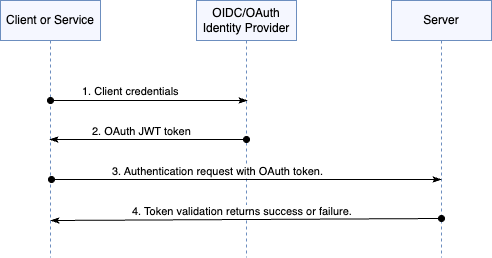
Client credentials.
A client that must authenticate to another service requests an OAuth token from an OIDC-compatible identity provider (IdP). The client provides its credentials to the IdP. During the client application deployment both the client credentials and the IdP endpoints are made available to the client application.
IdP returns an OAuth JWT token.
The IdP verifies the incoming client credentials and returns an OAuth token in JWT format. The OAuth token has all the client identity details such as unique id, groups, and scope and more. The token also has other attributes to verify the client authenticity such as signature, audience, and issuer and so forth.
Each IdP has a token configuration it defines for an individual client application or a set of applications. An IdP’s token configuration specification can impact the actual payload of the JWT.
Client sends an authentication request to the server with an OAuth token provisioned by the IdP.
The server authenticates the incoming client request by validating the OAuth token.
The tokens are validated by the server via JSON Web Key Set (JWKS). These are a set of public cryptographic keys which the Confluent Platform uses to verify a token’s authenticity. The JWKS includes information such as the signature, expected audience, expected issuer, expected JTI/UTI and more.
The Confluent Platform server configuration specifies the expected audience claim value, issuer value and other attributes required for successful validation. When validations are successful, the server authenticates the client request.
Claim validation behavior in Confluent Platform versions 7.7.3, 7.8.2, and 7.9.1
subA subject identifier claim. This claim is optional. To specify that a different claim act as the
subvalue, configure theoauthbearer.sub.claim.nameproperty.jtiAn optional token identifier claim. You can configure whether Confluent Platform checks for the
jticlaim. By default the check is enabled, though Confluent Platform does not use the claim in token validation. The following table shows how and where to configure this behavior:Service
Property to set
Kafka
listener.name.<listener-name>sasl.oauthbearer.jti.validation.enabledMDS
confluent.metadata.server.oauthbearer.jti.validation.enabledConfluent Platform services
oauthbearer.jti.validation.enabledWhen set to
false, each of these properties turns offjticlaim checking. If thejticlaim is present, Confluent Platform ignores it.iatAn optional claim with the time at which the JWT was issued. You can configure whether Confluent Platform checks for the
iatclaim. By default, the check is enabled. The following table shows how and where to configure this behavior:Service
Property to set
Kafka
listener.name.<listener-name>sasl.oauthbearer.iat.validation.enabledMDS
confluent.metadata.server.oauthbearer.iat.validation.enabledConfluent Platform services
oauthbearer.iat.validation.enabledWhen set to
false, each of these properties turns offiatclaim checking. If theiatclaim is present, Confluent Platform ignores it.audIntended audience of the token and it typically includes the client ID of the application making the authentication request. The service configuration controls whether this claim is required or optional.
If you want Confluent Platform to use the
audvalue when validating a token, configureoauthbearer.expected.audiencein the service properties. You can turn off theaudvalidation by removing this property from the service properties file.issA required claim it identifies the server that issued this token. This claim cannot be empty.
expA required claim that specifies when the token is expired and no longer valid. This claim cannot be empty.
Claim validation behavior in Confluent Platform versions 7.7.2, 7.8.0, and 7.8.1
subA subject identifier claim. This claim is required for Confluent Platform services but optional for Kafka listeners. To specify that a different claim act as the
subvalue, configure theoauthbearer.sub.claim.nameproperty.jtiAn optional token identifier claim. You can configure whether Confluent Platform checks for the
jticlaim. By default the check is enabled, though Confluent Platform does not use the claim in token validation. The following table shows how and where to configure this behavior:Service
Property to set
Kafka
listener.name.<listener-name>sasl.oauthbearer.jti.validation.enabledMDS
confluent.metadata.server.oauthbearer.jti.validation.enabledConfluent Platform services
oauthbearer.jti.validation.enabledWhen set to
false, each of these properties turns offjticlaim checking. If thejticlaim is present, Confluent Platform ignores it.iatAn optional claim with the time at which the JWT was issued. You can configure whether Confluent Platform checks for the
iatclaim. By default, the check is enabled. The following table shows how and where to configure this behavior:Service
Property to set
Kafka
listener.name.<listener-name>sasl.oauthbearer.iat.validation.enabledMDS
confluent.metadata.server.oauthbearer.iat.validation.enabledConfluent Platform services
oauthbearer.iat.validation.enabledWhen set to
false, each of these properties turns offiatclaim checking. If theiatclaim is present, Confluent Platform ignores it.audIntended audience of the token and it typically includes the client ID of the application making the authentication request. The service configuration controls whether this claim is required or optional.
If you want Confluent Platform to use the
audvalue when validating a token, configureoauthbearer.expected.audiencein the service properties. You can turn off theaudvalidation by removing this property from the service properties file.issA required claim it identifies the server that issued this token. This claim cannot be empty.
expA required claim that specifies when the token is expired and no longer valid. This claim cannot be empty.
Claim validation behavior in Confluent Platform version 7.7.0
subA subject identifier claim. This claim is required for Confluent Platform services but optional for Kafka listeners. To specify that a different claim act as the
subvalue, configure theoauthbearer.sub.claim.nameproperty.jtiA required token identifier claim.
iatA required claim for the time at which the JWT was issued.
audThis property is optional, but if
audis present in the token, the server checks it. This value is the intended audience of the token and it typically includes the client ID of the application making the authentication request.issA required claim it identifies the server that issued this token. This claim cannot be empty.
expA required claim that specifies when the token is expired and no longer valid. This claim cannot be empty.
Microsoft Entra ID group claim behavior and overage
When you use Microsoft Azure (Microsoft Entra ID) as your IdP, Confluent Platform reads a user’s
group membership from the groups claim in the JWT for role-based access control (RBAC). Confluent Platform
supports only a flat JSON array of strings from this claim. Nested structures
are not supported. The specific configuration property that defines this
claim name depends on where groups are evaluated:
Where groups are evaluated |
Property to set |
|---|---|
Kafka broker (SASL/OAUTHBEARER) and MDS |
|
Confluent Control Center single sign-on (OIDC) |
|
The commonly cited six-group limit applies only to the OAuth implicit flow, which Confluent Platform does not use. Instead, Confluent Platform uses the authorization code, client credentials, and device code flows, which support up to 200 groups in a JWT.
When a user belongs to more groups than Azure can include in a token, the
token enters a group overage state. In this state, the groups claim is
omitted and replaced with either a hasgroups claim set to true or a
_claim_names claim containing a groups member. Because Confluent Platform looks only
for the explicit groups claim, it cannot extract group memberships from an
overage token. Additionally, Confluent Platform does not call the Microsoft Graph API to
resolve group memberships externally, resulting in the user having no groups
assigned for authorization.
A user can also end up with no group memberships if the groups claim is
present but empty ("groups": []). Unlike a group overage—where the user has
too many groups to fit in the token, an empty claim occurs because the Azure app
registration is not configured to emit group claims. While both scenarios
leave the user without groups for RBAC, their root causes and resolutions differ.
To ensure Confluent Platform receives the required groups for RBAC, use one of the following approaches:
Filter the groups emitted in the token: In the Azure app registration, configure the group claim to emit only groups explicitly assigned to the application. This keeps the total group count below the overage limit.
Use Azure app roles instead of groups: Azure always includes application roles in the token, regardless of the quantity assigned. For more details, see Configuring group claims and app roles in tokens in the Microsoft Azure documentation.