Confluent Platform uses role-based access control (RBAC) to authorize clients authenticated
through OAuth-OIDC. Authorization depends on either the individual identity
inside the JSON Web Token (JWT) or the user’s group memberships.
This page guides you through both methods. It describes the
client flow that authorizes an individual user, and how
group-based authorization works on top of that flow.
Individual user authorization
In individual user authorization, Confluent Platform authorizes a client based on the user
identity extracted from the JWT token. The following diagram shows the flow of
interactions between a client, an identity provider (IdP), a Confluent Platform service, and
the Metadata Service (MDS) when using OAuth-OIDC with RBAC.
In the diagram:
Client is the Apache Kafka® client or application that wants to access a
resource in a Confluent Platform service.
Confluent Platform service (“CP_Service”) is the service that hosts the
resource. Supported services include Confluent Server brokers, Kafka Connect, REST Proxy,
Schema Registry, and ksqlDB.
Identity provider (“IdP”) is the identity provider that issues JWT tokens
to the Kafka client or application.
Metadata Service (“MDS”) is the Confluent Platform component that provides metadata
about your Confluent Platform cluster to the client or application and enforces access
control policies.
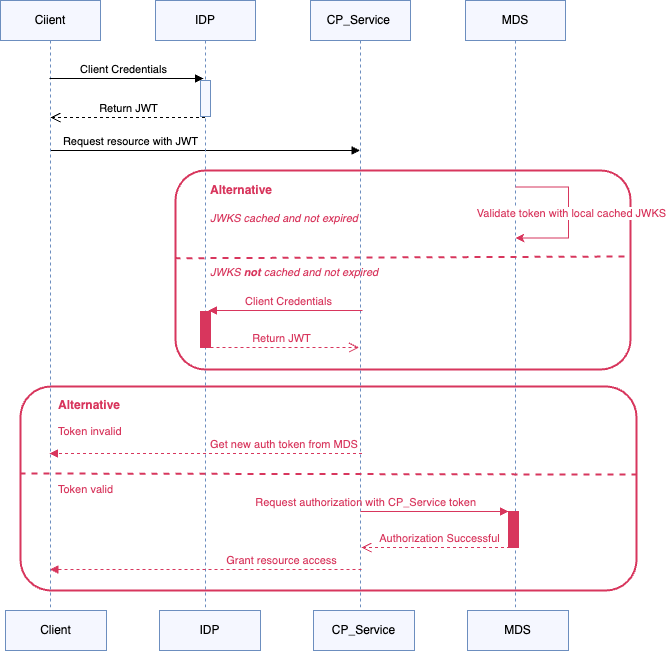
Step 1 - Client fetches JWT token for authentication from the IdP
The client initiates the process by sending its credentials to the IdP. The IdP
authenticates the client based on these credentials and returns a JWT token
(“Return JWT”), also referred to as an access token. This JWT token is used by
the client to authenticate requests to the Confluent Platform service (“CP_Service”).
Step 2 - Confluent Platform service validates the incoming client request using JWKS
JWKS (JSON Web Key Set) is a set of keys containing the public keys used to
verify any JWT issued by the authorization server. In the
flow, when the Confluent Platform service (“CP_Service”) needs to validate a JWT, it checks
if the JWKS is available (“JWKS not cached or expired”).
When the JWKS is already cached and valid, the Confluent Platform service uses the
locally cached keys and skips the request to the IdP.
When the JWKS is unavailable, the Confluent Platform service requests it from the IdP
(“Request jwks”). The IdP then returns the JWKS to the service (“Return
jwks”), which it can use to validate incoming JWTs.
Step 3 - Confluent Platform service validates JWT token from the client
When the Confluent Platform service (“CP_Service”) receives a request from the client with a
JWT token (“Request resource with JWT”), the token must be validated to ensure
it’s legitimate and hasn’t been tampered with. The Confluent Platform service validates the
token using the JWKS obtained in Step 2 (“Validate token with local
cached jwks”). If the token is valid, the process moves to the authorization
step.
Step 4 - Confluent Platform service authorizes client using RBAC
After the JWT token is validated, the Confluent Platform service (“CP_Service”) extracts the
principal or user identity from the token. This identity is used to determine
the RBAC roles and permissions associated with the principal, based on the RBAC
policies in the system.
Then, the Confluent Platform service (“CP_Service”) seeks
authorization from the MDS (“Request authorization” with “CP_Service” token),
providing the necessary credentials and the extracted principal. After the
MDS verifies that the principal has the required permissions
(“Authorization successful”), it authorizes the client to access the desired
resource through the Confluent Platform service (“CP_Service”).
After authorization, the client can use the Confluent Platform service (“CP_Service”) to
access the requested resource.
Group-based authorization with OAuth tokens
In addition to binding roles to individual users, RBAC lets you bind roles to
groups. Group-based authorization uses the same OAuth-OIDC authentication flow
as individual user authorization. The difference is in how Confluent Platform evaluates
permissions. Confluent Platform reads the user’s group memberships from a claim in the JWT
token and evaluates RBAC role bindings against both the user principal and each
of those groups. A role that is bound to a group applies to every user who is a
member of that group, so you do not have to grant access to each user
individually.
Group authorization requires OAuth-OIDC authentication to be configured first.
For setup, see Use OAuth/OIDC for Authentication in Confluent Platform. For how to create the
group role bindings, see Role-Based Access Control for Confluent Platform Quick Start.
Token requirements for group authorization
Confluent Platform reads the configured groups claim as a flat JSON array of strings. The
following token authorizes the user as a member of /app_group1:
{
  "sub": "client_app1",
  "groups": ["/app_group1"],
  "iss": "https://my-idp.example.com/realms/cp",
  "exp": 1781273669
}
The broker reads the groups claim, attaches Group:/app_group1 to the
session, and RBAC evaluates the role bindings for both the user and the group.
Ensure the following requirements are met:
The claim must be a JSON array of strings. If it is a nested object, an
array of objects, or a plain string (such as the comma-separated
"groups": "a,b,c"), the broker rejects the token and authentication
fails. The client cannot connect.
Confluent Platform uses only the groups that are present in the token. It does not resolve
nested or inherited group memberships from the IdP. If your IdP expands nested
memberships into a flat array in the token, Confluent Platform can use them. If it does not,
Confluent Platform does not infer them.
Match role bindings to group names
The group name in a role binding must match the group string in the token
exactly. Confluent Platform treats each group as an opaque string and does not normalize,
trim, or resolve a group hierarchy.
Different identity providers format group names differently. For example, an IdP
might prefix group names with a slash ("groups": ["/app_group1"]) or return
group object IDs (GUIDs) instead of names. In each case, create the role binding
against the exact string that appears in the token:
confluent iam rbac role-binding create \
  --role ResourceOwner \
  --principal Group:/app_group1 \
  --resource Topic:my-topic \
  --kafka-cluster <kafka_cluster_id>
A binding for Group:app_group1 (without the slash) does not match the
/app_group1 group in the token, and authorization fails. Likewise, a binding
for a parent group such as Group:/g2 does not match a token group of
/g2/g21, because Confluent Platform does not resolve group hierarchies.
Missing or empty groups claim
If the configured groups claim is missing or empty, the user is authenticated
but is assigned no groups. Authentication succeeds and any role bindings on the
user principal still apply, but operations that depend on a group role
binding fail with an authorization error such as TOPIC_AUTHORIZATION_FAILED.
A token can have no groups for different reasons:
The IdP is not configured to emit group claims, so the claim is absent or
empty ("groups": []). Configure the IdP to include the groups claim.
The user belongs to too many groups (group overage). When you use
Microsoft Azure (Microsoft Entra ID), a user who belongs to more groups than the
token can carry causes the groups claim to be replaced with a
hasgroups or _claim_names reference. Confluent Platform reads only the groups
claim and does not call the Microsoft Graph API, so the user is assigned no
groups. For details and workarounds, see Microsoft Entra ID group claim behavior and overage.
Use a different claim for groups
The groups claim name can point to any claim that contains an array of strings,
not just a claim named groups. This is useful when your IdP puts group
information under a different claim, or to work around group overage by using a
claim that is not subject to the overage limit. For example, to read groups from
a roles claim, set the property for the relevant component:
# Broker
confluent.oauth.groups.claim.name=roles
# MDS
confluent.metadata.server.oauthbearer.groups.claim.name=roles
The component then reads the roles claim as the user’s groups for RBAC. The
claim you point to must still be a flat array of strings, and role bindings must
match those strings exactly.

