

Configure Kafka Listeners in Confluent Platform
Kafka brokers use listeners to define how clients and other brokers connect to them. Listeners are essential for configuring Kafka in different network environments, including Docker, cloud deployments, and multi-network scenarios.
A listener is a combination of:
Host/IP address: The network interface where the broker binds and listens for connections
Port: The network port number
Protocol: The security protocol (PLAINTEXT, SSL, SASL_PLAINTEXT, or SASL_SSL)
Each listener has a name that identifies it. Kafka brokers can have multiple listeners configured simultaneously, which enables a single broker to accept connections from different networks. For example, internal Docker network, external internet, and inter-broker communication.
When configuring multiple listeners, specify them as a comma-separated list in the format LISTENER_NAME://host:port,LISTENER_NAME://host:port.
To configure listeners, you need to understand three key properties that work together. The listeners and advertised.listeners properties define where brokers bind and what they advertise to clients. The listener.security.protocol.map property assigns security protocols to listener names. The inter.broker.listener.name property specifies which listener brokers use for internal communication.
Listeners and advertised listeners
There are two important configuration properties for listeners:
listeners: Defines where the broker binds and listens for incoming connections. This property specifies the actual network interface and port that the broker opens.advertised.listeners: Defines the address that the broker advertises to clients in metadata responses. Clients use this address to connect back to the broker.
The listeners property tells Kafka where to listen, while advertised.listeners tells clients where to connect. These can be different, which is useful when:
The broker is behind a load balancer or proxy
The broker is in a Docker container and needs to advertise a different address
The broker is in a cloud environment with internal and external IPs
If advertised.listeners is not set, Kafka uses the value from listeners, but this might not work correctly in all network configurations.
Since listeners can have custom names (like INTERNAL or EXTERNAL), you need to map these names to their security protocols.
Security protocol map
The listener.security.protocol.map property maps listener names to security protocols. Use this property to assign friendly names to listeners and specify their security protocols.
Example:
listener.security.protocol.map=INTERNAL:PLAINTEXT,EXTERNAL:SSL,CONTROLLER:PLAINTEXT
In this example:
INTERNALlistener usesPLAINTEXT(no encryption)EXTERNALlistener usesSSL(encrypted)CONTROLLERlistener usesPLAINTEXT
When you have multiple listeners, you need to tell Kafka which one brokers should use to communicate with each other.
Inter-broker listener
The inter.broker.listener.name property specifies which listener brokers use when communicating with each other. This is an internal listener that does not require external access.
Example:
inter.broker.listener.name=INTERNAL
This configuration directs brokers to use the INTERNAL listener for all broker-to-broker communication.
The following sections show how these core properties work together in real-world scenarios.
Common configuration patterns
Single listener (simple setup)
In a simple, single-machine setup where all clients are on the same network, use the following configuration:
listeners=PLAINTEXT://0.0.0.0:9092
advertised.listeners=PLAINTEXT://localhost:9092
In this configuration:
The broker listens on all interfaces (
0.0.0.0) on port9092The broker advertises
localhost:9092to clients
Multiple listeners (Docker)
When you run Kafka in Docker, configure separate listeners for the following:
Internal Docker network communication
External host machine access
Example:
listeners=INTERNAL://kafka0:29092,EXTERNAL://localhost:9092
advertised.listeners=INTERNAL://kafka0:29092,EXTERNAL://localhost:9092
listener.security.protocol.map=INTERNAL:PLAINTEXT,EXTERNAL:PLAINTEXT
inter.broker.listener.name=INTERNAL
In this configuration:
INTERNALlistener is used by containers within the Docker network (hostnamekafka0, port29092)EXTERNALlistener is used by clients on the host machine (localhost:9092)Brokers communicate with each other using the
INTERNALlistener
Multiple listeners (cloud/on-premises)
When you run Kafka in a cloud environment (for example, AWS, Azure, or GCP) with both internal and external access, use the following configuration:
listeners=INTERNAL://172.31.18.160:9092,EXTERNAL://0.0.0.0:9093
advertised.listeners=INTERNAL://172.31.18.160:9092,EXTERNAL://ec2-54-191-84-122.us-west-2.compute.amazonaws.com:9093
listener.security.protocol.map=INTERNAL:PLAINTEXT,EXTERNAL:SSL
inter.broker.listener.name=INTERNAL
In this configuration:
INTERNALlistener uses the private IP address for VPC-internal communicationEXTERNALlistener uses the public hostname for internet accessExternal listener uses SSL for security
Brokers communicate internally using the
INTERNALlistener
KRaft mode listeners
In KRaft mode, each listener serves a distinct role:
CONTROLLER: Handles controller-to-controller and controller-to-broker communication.INTERBROKER: Handles broker-to-broker communication.CLIENT: Handles connections from producers and consumers.
The following diagram shows how these listeners interact across controllers, brokers, and clients.
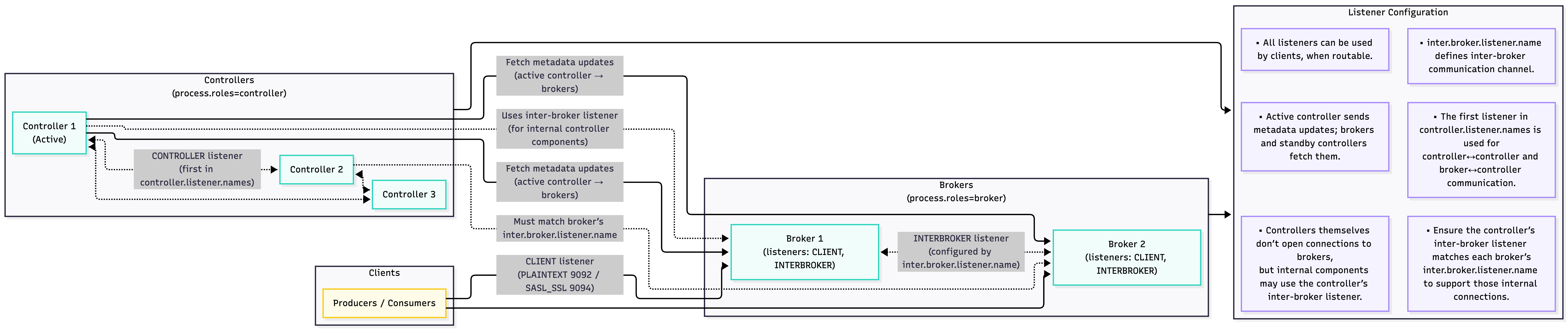
In KRaft mode, configure controller listeners separately from broker listeners:
listeners=CONTROLLER://kafka0:29093,INTERNAL://kafka0:29092,EXTERNAL://localhost:9092
advertised.listeners=INTERNAL://kafka0:29092,EXTERNAL://localhost:9092
listener.security.protocol.map=CONTROLLER:PLAINTEXT,INTERNAL:PLAINTEXT,EXTERNAL:PLAINTEXT
controller.listener.names=CONTROLLER
inter.broker.listener.name=INTERNAL
In this configuration:
CONTROLLERlistener is used for KRaft controller communicationINTERNALandEXTERNALlisteners are for broker and client communicationThe
controller.listener.namesproperty specifies which listeners are used by controllers
How listeners work
When a client connects to Kafka, the following process occurs:
The client connects to any broker using the bootstrap server address (one of the advertised listeners).
The broker responds with metadata that includes the addresses of all brokers and their available listeners.
The client uses the appropriate listener address from the metadata to connect to the partition leader for reading or writing data.
The client establishes a connection to the broker using the listener address provided in the metadata.
The broker returns addresses from advertised.listeners in the metadata response. These addresses must be reachable from the client’s network. If a client receives an internal IP address but is connecting from outside the network, the connection will fail.
Troubleshooting common issues
Issue: Client can connect initially but fails when reading or writing
When you connect to the broker, the client fails with connection errors when trying to produce or consume messages. This occurs when the broker returns an advertised.listeners address that is not reachable from the client’s network.
Example:
# Broker configuration
listeners=PLAINTEXT://0.0.0.0:9092
# Missing advertised.listeners - defaults to internal hostname

# Client connects from outside network
# Broker returns: ip-172-31-18-160.us-west-2.compute.internal:9092
# Client cannot resolve this hostname → connection fails
Solution: Ensure that advertised.listeners contains addresses that are accessible from where your clients connect. For external clients, use external hostnames or IP addresses.
listeners=PLAINTEXT://0.0.0.0:9092
advertised.listeners=PLAINTEXT://ec2-54-191-84-122.us-west-2.compute.amazonaws.com:9092
Issue: Client uses the wrong listener
When a client connects, it uses an internal listener instead of an external one. This occurs when the client connects to a listener that returns metadata with internal addresses.
Solution: Verify that clients connect to the appropriate listener port. Use different ports for internal and external listeners, and configure clients to use the correct port.
Verify listener configuration
To verify your listener configuration, use the kafkacat tool. This command shows the metadata that the broker returns, including the listener addresses:
kafkacat -b <broker-address>:<port> -L
Example output:
Metadata for all topics (from broker -1: localhost:9092/bootstrap):
1 brokers:
  broker 0 at localhost:9092
If you see an internal address (for example, ip-172-31-18-160.us-west-2.compute.internal:9092) when connecting from outside the network, complete the following steps:
Verify that the addresses are reachable from your client network.
Adjust your
advertised.listenersconfiguration if necessary.
Best practices
Always set
advertised.listeners. Do not rely on defaults, especially in Docker or cloud environments.Use descriptive listener names like
INTERNAL,EXTERNAL, andCONTROLLERto make configurations easier to understand.Use different listeners for internal (broker-to-broker) and external (client) communication.
Use
PLAINTEXTonly for internal, trusted networks. For external listeners, useSSLorSASL_SSL.Test connectivity from where your clients connect, not only from the broker machine.
Track which listeners serve which purpose, especially in complex multi-network setups.
Ensure that hostnames used in
advertised.listenersare resolvable from client networks. Use IP addresses if DNS resolution is unreliable.