

Tutorial: Migrate Data with Cluster Linking on Confluent Platform
When migrating data from an old cluster to a new cluster, Cluster Linking makes an identical copy of your topics on the new cluster, so it’s easy to make the move with low downtime and no data loss.
Cluster Linking can:
Automatically create matching “mirror” topics with the same configurations, so you don’t have to recreate your topics by hand
Sync all historical data and new data from the existing topics to the new mirror topics
Sync your consumer offsets, so your consumers can pick up exactly where they left off, without missing any messages or consuming any duplicates
Move consumers from the old cluster to the new cluster independently
Move producers from the old cluster to the new cluster topic-by-topic
Success stories
Read about successful migrations with Cluster Linking:
New Kafka Tier, No Kafka Tears, published in Maker Stories by Wealthsimple, describes using Cluster Linking for migration to scale up existing Kafka systems
Confluent Sets Data in Motion Across Hybrid and Multicloud Environments for Real-Time Connectivity Everywhere lists success stories implementing Cluster Linking for software as a service (SAS) under the subheading “Cluster Linking: Seamlessly Connect Applications and Data Systems Across Hybrid and Multicloud Architectures”
Namely describes their data migration projects in “Everywhere: Cloud Cluster Linking” under the subtopic Simplify geo-replication and multi-cloud data movement with Cluster Linking
Standard migration with Cluster Linking
The sections below describe the general steps to migrate data from one cluster to another using Cluster Linking.
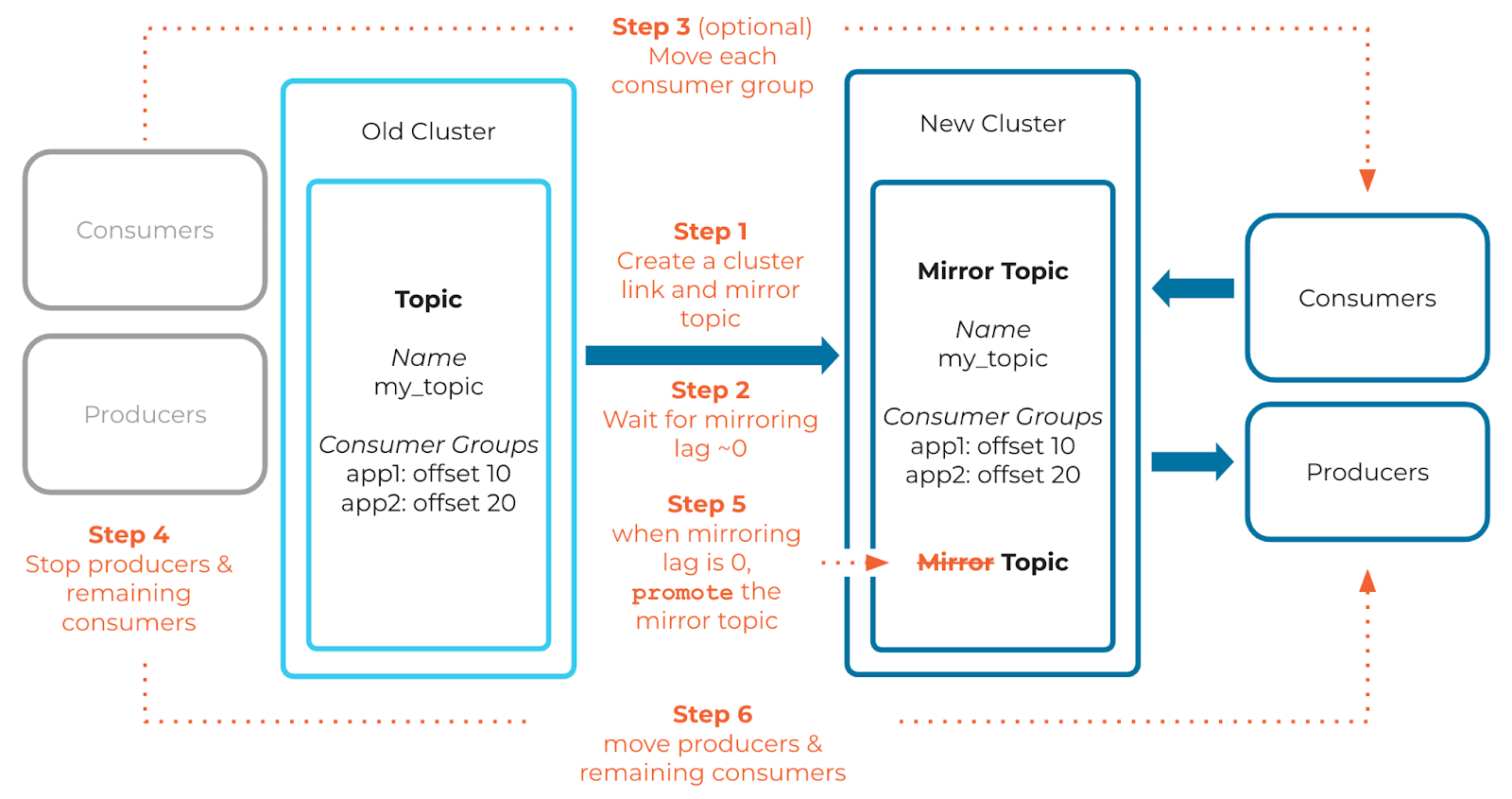
Step 1: Create a cluster link across two clusters
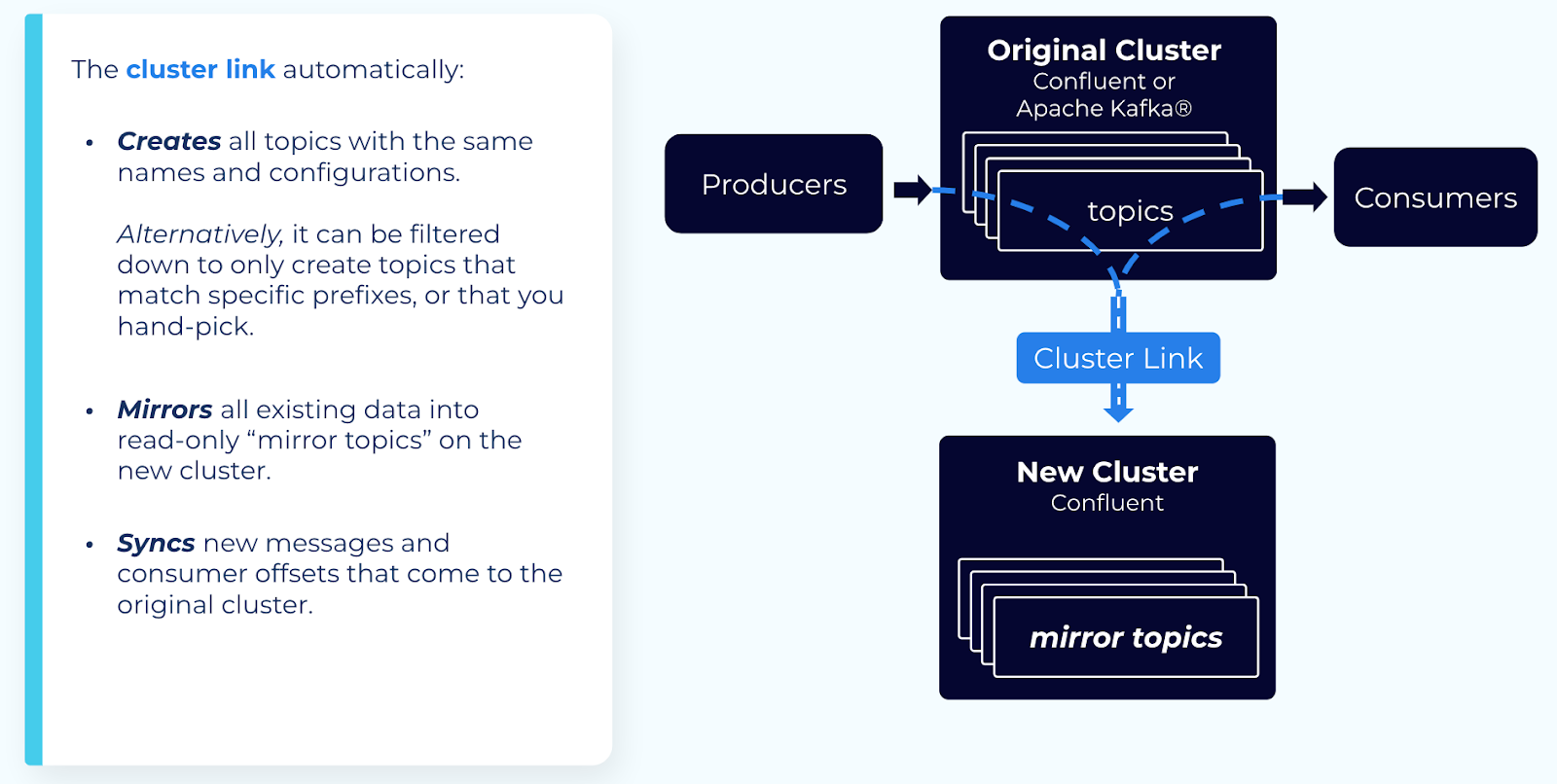
Create a cluster link with the following configurations:
Enable auto-create mirror topics.
This configures Cluster Linking to automatically create mirror topics on your new cluster for any existing topics on your old cluster. You can filter by specific prefixes, if needed.
Alternatively, you can create individual mirror topics by CLI or REST API after you’ve created the cluster link.
Enable consumer offset sync.
This syncs your consumer offsets from your old cluster to your new cluster. You can filter by specific consumer group names or prefixes, if needed.
By default, this sync happens every 30 seconds. You can set it as low as 1 second, to minimize consumer downtime when switching from the old cluster to the new cluster. Consumer offsets are part of the data that your cluster link mirrors, so syncing them more frequently comes at the cost of higher data throughput.
If migrating between two Confluent Cloud clusters, or two Confluent Platform / Apache Kafka® clusters with the same security system, enable “ACL sync” (available on Confluent Platform starting on Confluent Platform 7.1.0) You can filter by specific resources, principals, and so on, if needed.
Tip
This is not helpful when migrating to Confluent Cloud from another platform because Confluent Cloud uses its own authentication system.
Step 2: Wait for mirroring lag to approach zero (0)
When mirroring lag is almost zero (0), this means that the existing data in your topics has been mirrored to your new cluster.
This allows you to switch your consumers and producers with minimal downtime.
If you want certain topics to be ready before others, you can prioritize those topics by pausing mirroring on the other topics. That way, more throughput is allocated to the topics you prioritize.
If your cluster link is having trouble keeping up with the incoming data and is not able to get mirroring lag near 0, you may need to prioritize certain topics by pausing mirroring on the other topics.
(Optional) Step 3: Move consumer groups from the old cluster to the new cluster
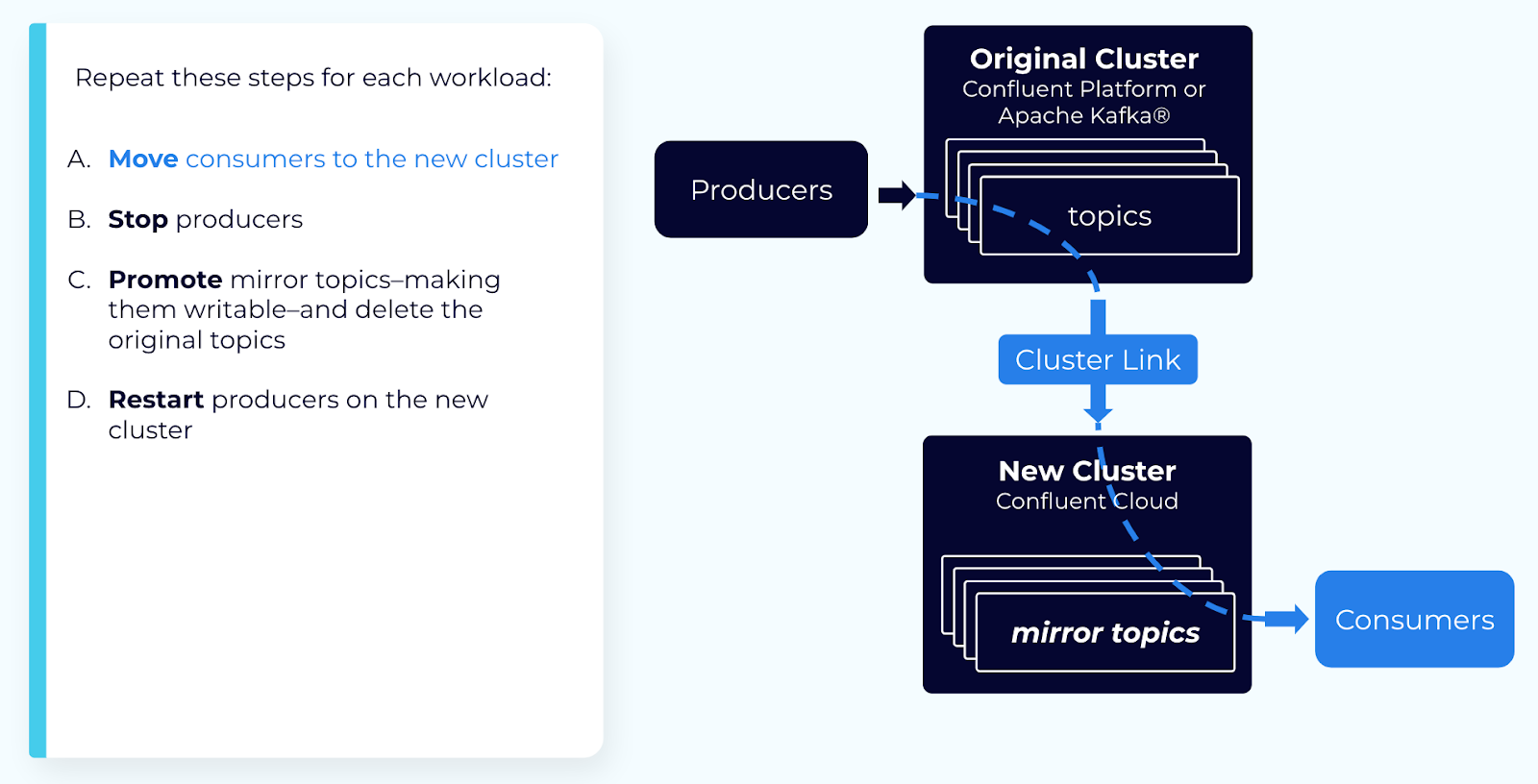
You can move each consumer group independently, if you wish. Because consumer offsets are synced, consumers pick up from the same spot where they left off. To move a consumer group, follow these steps:
Stop the consumer group on the old cluster.
Wait for at least
consumer.offset.sync.ms(default is 30 seconds) to ensure its latest offsets have been synced.Exclude that consumer group’s name from the cluster link, in the
consumer.offset.group.filterssetting.Verify that the topic offsets the consumer group is at have been synced to the mirror topic.
You can do this by checking that consumer lag > mirroring lag.
Before you start the consumer on the new cluster, you need to ensure that the offsets at which the consumer is at have been mirrored to the mirror topic. If the consumer is ahead of the mirroring, then its offsets are reset to the latest offsets in the topic, and consumes duplicates.
For example, if the consumer is at offset 100 for a partition, but you start the consumer when the mirror topic is only at offset 90, then the consumer starts consuming from the end of the topic, and re-consumes messages 90-100.
Restart the consumer group on the new cluster.
Step 4: Stop producers and consumers
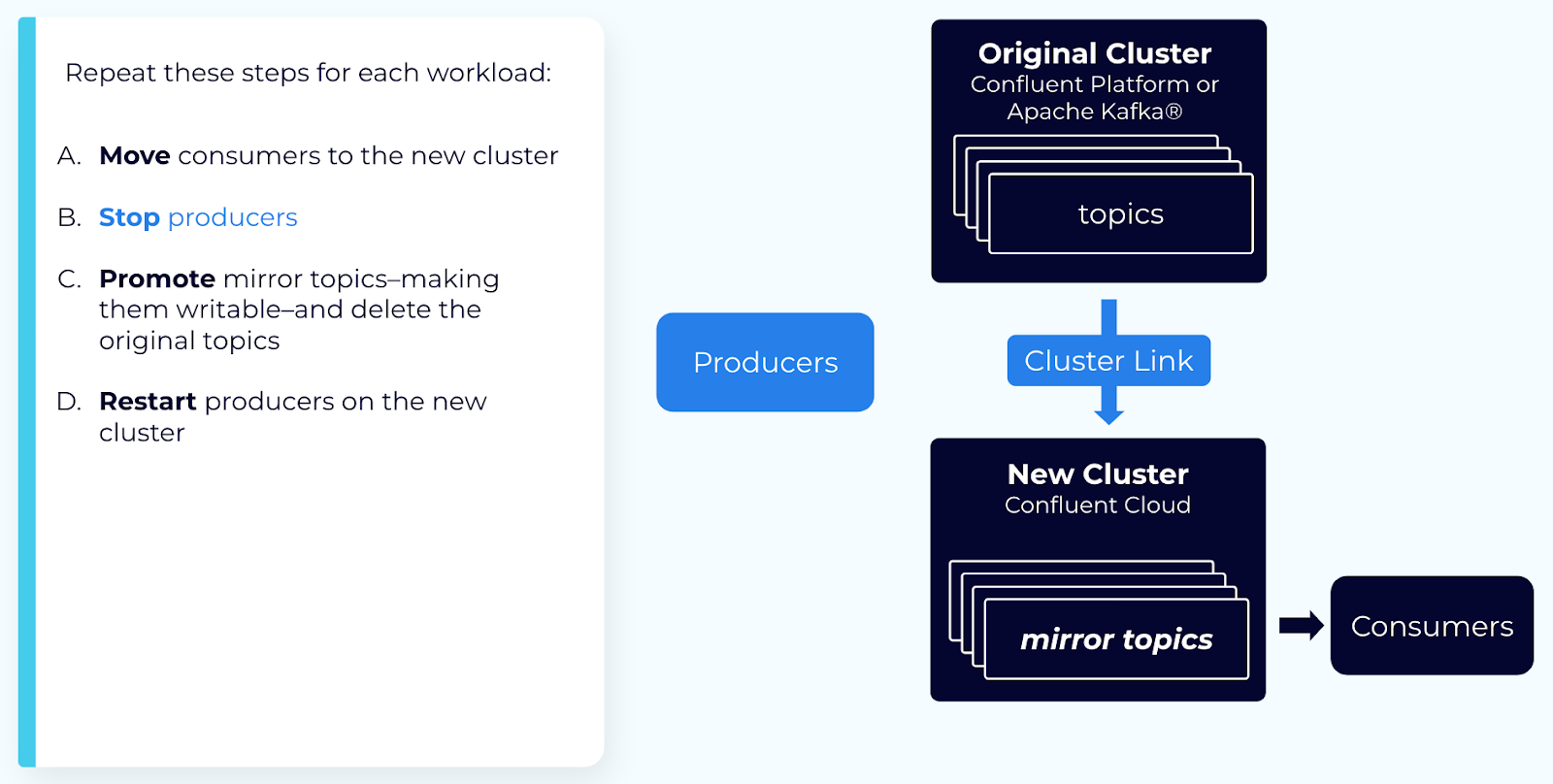
Stop all producers and any remaining consumers. This gives the cluster link a chance to “catch up,” without new messages coming in.
Step 5: Promote the mirror topic
When mirroring lag is near zero, you can promote mirror topics to make them writable.
Important
When deleting a cluster link, first check that all mirror topics are in the
STOPPEDstate. If any are in thePENDING_STOPPEDstate, deleting a cluster link can cause irrecoverable errors on those mirror topics due to a temporary limitation.Make sure that you’ve stopped all producers and consumers on the source topic on your original cluster. After you call promote, mirroring and consumer offset sync stop permanently. After promote, if any producers produce messages to the source topic on the original cluster, those messages are not be migrated. After promote, if any consumers consume messages from the source topic on the original cluster, their offsets are not synced, and they consume duplicates when they move to the new cluster.
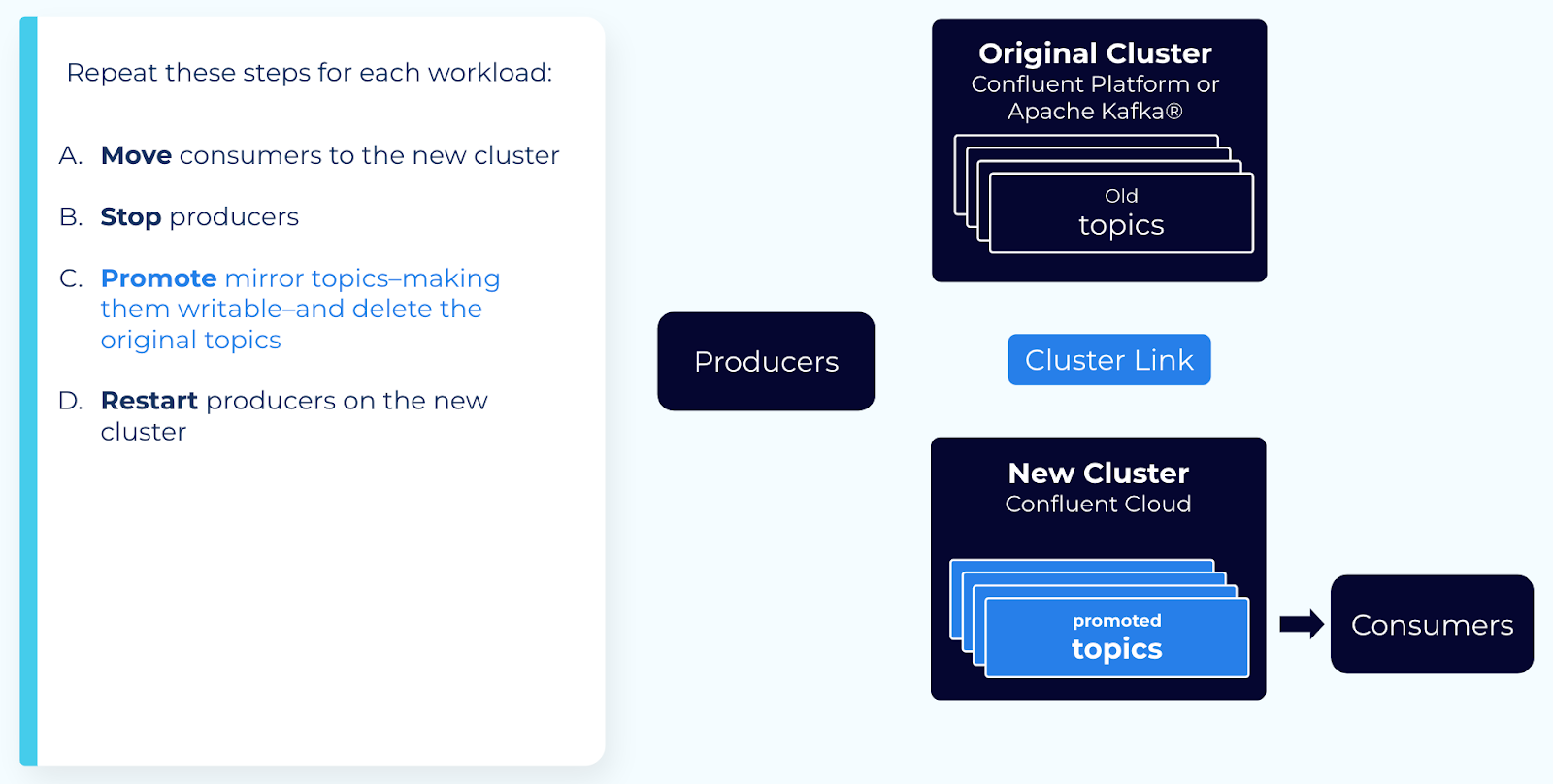
When mirroring lag is 0, call the promote Cluster Linking API on the mirror topic.
This converts the mirror topic into a normal, writable topic.
You must wait for mirroring lag to go to zero (0) to ensure all messages have been replicated to your new cluster.
The promote command checks to make sure the topic is not lagging before succeeding, but you should also check the mirroring lag metric.
Step 6: Restart producers and consumers
Wait for the promotion to complete and the mirror topics to enter the STOPPED
state. Mirror topic state is available in the REST API or CLI by describing an
individual mirror topic or all mirror topics on a cluster link.
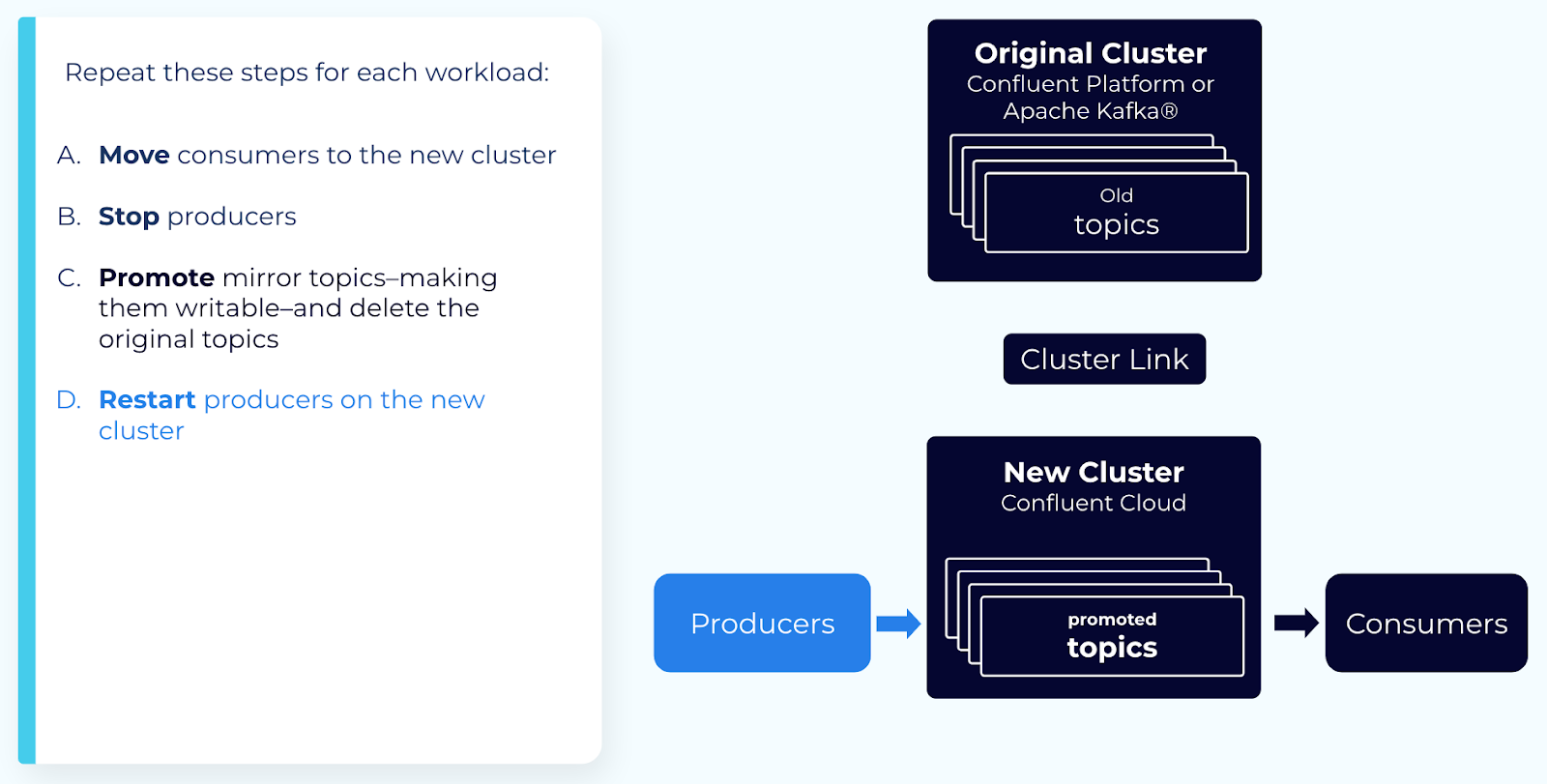
Restart your producers and remaining consumers on the new cluster.
You have now moved your topics, producers, and consumers to a new cluster.
Troubleshooting
Be aware of the following issues that can occur during the promotion process:
Stuck in PENDING_MIRROR state. During a failover, if the consumer group is already active on the destination
cluster, the mirror topic state can become stuck in the PENDING_MIRROR state,
which halts the failover process. To mitigate this, ensure one of the following:
No source offsets: The consumer group must not have any committed offsets on the source cluster before failover. This prevents Cluster Linking from attempting to sync conflicting offset data.
Exclusion filter: Update the offset syncing filter to explicitly exclude the affected consumer group. This prevents offset conflicts during both standard Cluster Linking operation and the failover (promotion) process.
Producing or consuming too early. Producing to a mirror topic that is still in the PENDING_STOPPED state can
cause messages to fail. Consuming from a mirror topic in this state can cause
duplicate messages. Wait for topics to reach the STOPPED state before
restarting producers and consumers.
Step 7: Extra steps when leaving some consumers on the original cluster
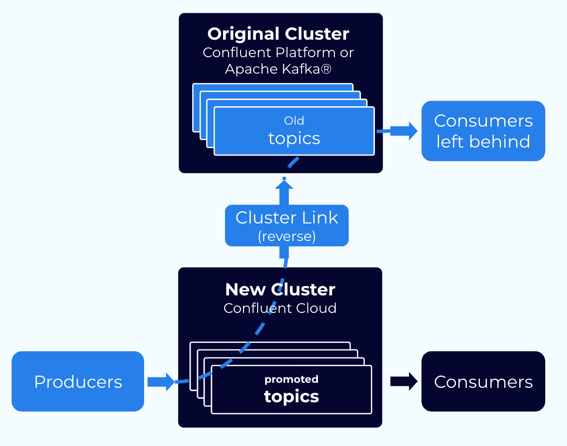
If you want to leave some of your consumer groups on your original cluster, you must take some extra steps. You must get mirroring flowing in the reverse direction: from your new cluster back to your original cluster.
Note
A given consumer group should only consume from one cluster. A consumer group cannot be “stretched” between two clusters.
This strategy is only available for Confluent clusters, not for Apache Kafka® clusters, as Cluster Linking cannot move data to an Apache Kafka® cluster.
Make sure that the cluster link you used for migration was mirroring these consumer group offsets too; even though the consumers won’t move. The consumer offsets are temporarily be on the new cluster.
Make sure that your consumer group(s) have stopped consuming (in step 4, above).
Delete the original topics on the original cluster.
Create a cluster link in the reverse direction: from the new cluster to the original cluster. Have this cluster link sync the consumer offsets for these consumer groups. This moves the consumer offsets back to the original cluster.
Create mirror topic(s) on the original cluster. This starts data flowing from the new cluster to the original cluster.
Once the mirror topic has mirrored up to the offsets where the consumer group(s) were, exclude those consumer group(s) from the cluster link’s consumer offset sync. This stops the cluster link from syncing their consumer offsets.
Restart the consumer group(s) on the original cluster. (See the caveats in step 3, above.)
Alternate migration strategies
If you cannot move all of your producers for a given topic(s) at the same time, you can consider two alternate approaches. Both involve more hands-on work than the standard migration approach with Cluster Linking.
Bidirectional with Cluster Linking
Mirror topics are read-only. Therefore, if you migrate some producers but not others, you cannot have those producers writing to the mirror topic on the new cluster. You’ll need a different topic to write these events to, and you’ll need to sync those events back to your old cluster for any consumers that haven’t moved yet. You’ll also need to make some changes to your consumers to make sure they get the events produced to both clusters.
For a given topic, you can set up three new topics:
A new, regular topic on your new cluster by the same name. This topic receives new events produced to your new cluster.
A mirror topic on your new cluster, which mirrors historical data and any new events produced to the old cluster. You’ll give this topic a prefix, so it doesn’t clash with the writable topic.
Tip
Prefixing is available in Confluent Cloud as of early Q2 2022.
A mirror topic on your old cluster, which mirrors the writable topic from the new cluster. This brings new events back to your old cluster for straggling consumers.
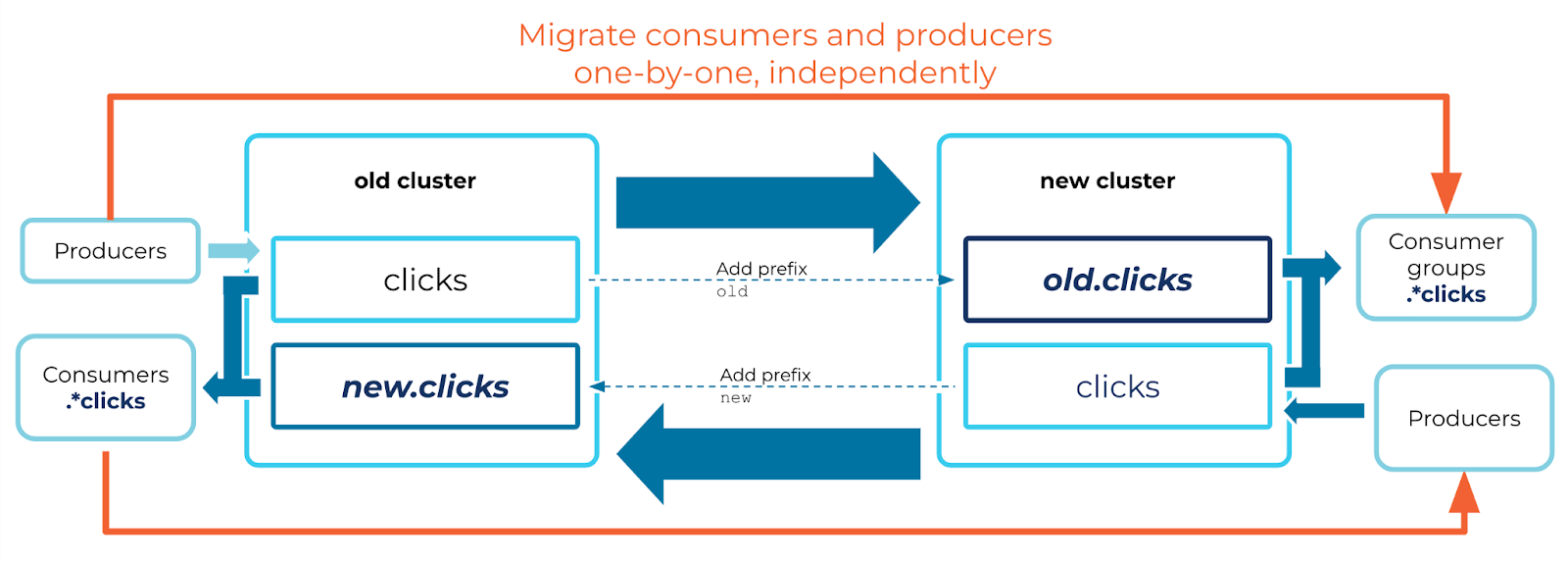
There are several changes you need to make to your consumers to make this work:
Your consumers need to consume from a regex pattern–instead of a topic name–that captures both topics. For example, if your topic is named
clicks, the consumers could consume from the pattern.*clicksto consume from bothclicksand the prefixed topics.When moving a consumer group, it must manually set its offsets on the new cluster for the writable topic. Because this is moving “upstream,” the cluster link does not sync its consumer offsets from the mirror topic on the old cluster.
Because your consumers are consuming from two different topics, you cannot rely on the partitions for ordering. A message with a given key is produced to one partition on the old cluster and a different partition on the new cluster. Two messages with the same key may be read in different order by different consumers. So, your consumers must use something else to determine message order, such as the timestamp.
Bidirectional with Replicator
Confluent Replicator can be run in VMs or in a Kubernetes cluster. It syncs messages between topics in two different clusters.
You can set up two deployments of Replicator to achieve bi-directional replication. Replicator ensures that no cyclical loops are created; that is, that the same message doesn’t get replicated back to the original cluster where it was produced.
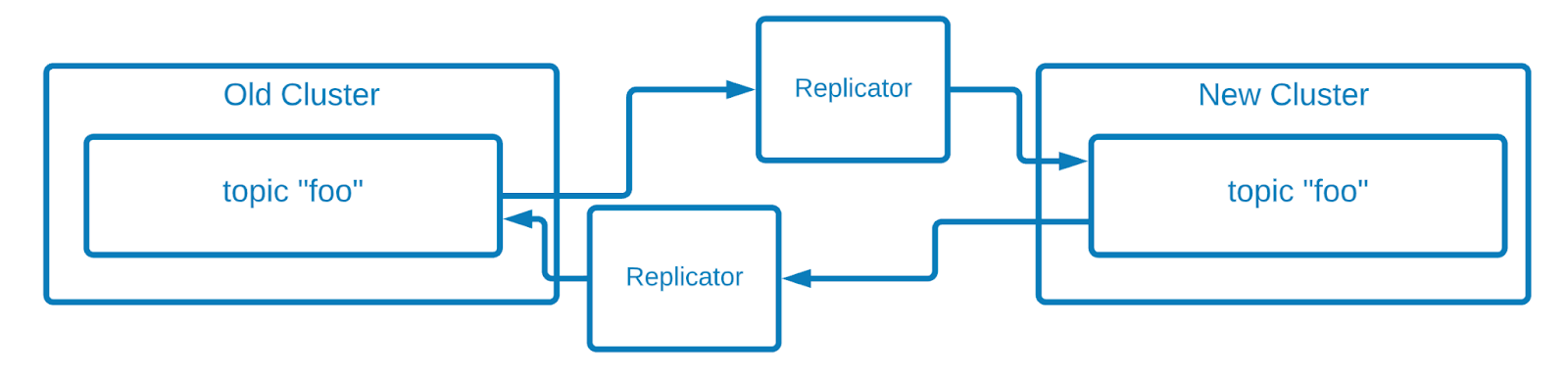
However, the ordering between these two topics is not be the same. That means it is impossible for a consumer to move from the `old` cluster to the `new` cluster and pick up at the same spot where it left off. The consumer must choose to either:
Rewind to an earlier offset in order to ensure that no messages are missed. However, this can cause the consumer to consume duplicates of some messages. Or,
Start consuming at the end of the topic, which can cause it to miss the most recently produced messages.