

Use Role-Based Access Control (RBAC) for Authorization in Confluent Platform
Role-based access control (RBAC) controls system access based on the roles you assign to users in an organization. A role is a collection of permissions, and RBAC uses predefined roles.
With RBAC, you control who can access specific Confluent Platform resources and which actions users can perform on them. RBAC uses the Confluent Platform Metadata Service (MDS) to manage role bindings from a single, centralized configuration context, which simplifies access management across Confluent Platform resources.
For details about enabling and configuring RBAC, see Metadata Service Configuration Settings and Configure Metadata Service (MDS) in Confluent Platform.
Terminology
RBAC uses the following terms:
- Principal
The identity of a user or software requesting permission to perform a specific action on a specific resource. Principals can be authenticated or unauthenticated (
ANONYMOUS).- User principal
A single identity tied to a specific user or piece of software.
- Group principal
A shared identity that groups together a list of user principals or other group principals.
- Role
A Confluent-defined job function that has the set of permissions required to perform specific actions or operations on Confluent Platform resources. A role binding binds each role to a principal and to Confluent Platform resources.
- Resource
A resource can be an Apache Kafka® topic, consumer group, transactional ID, cluster, Schema Registry, ksqlDB, or any other Confluent Platform component.
- Role binding
A principal-role-resource combination that allows a principal to perform operations on a resource or set of resources as defined by the role.
- Metadata Service (MDS)
The centralized authorization service that implements RBAC in Confluent Platform. MDS is the system of record for role bindings. For details, see Confluent Platform Metadata Service.
RBAC benefits
RBAC simplifies authorization in Confluent Platform by providing centralized, role-based access control across all components. Key benefits include:
Manage access across Confluent Platform, including Kafka, ksqlDB, Connect, Schema Registry, Confluent Control Center, and Confluent Platform for Apache Flink®, with granular permissions for users and groups. For example, you can specify permissions for each connector or Flink application in a cluster.
Manage authorization at scale. Administrators centrally assign predefined roles and can delegate access management to the departments or business units that own and know the resources best.
Centrally manage authentication and authorization for multiple clusters, including MDS, Kafka clusters, Connect, ksqlDB, Schema Registry clusters, Confluent Platform for Apache Flink applications, and a single Confluent Control Center.
How RBAC works
Predefined role assignments determine who can access specific Confluent Platform resources and
what actions an individual user can perform on those resources. An administrator
assigns predefined roles to users and groups on various resources, and can
assign multiple roles to each user on each resource. Privileged users, such as
users with the UserAdmin or SystemAdmin role, assign roles to users and
groups, and then map specific resources to those user roles. For example, a user
with the ResourceOwner role in the finance department can grant department
members access to all topics that use the prefix finance_, so they can
manage the resources that they know best.
User administrators can manage users and groups from Lightweight Directory Access Protocol (LDAP) or an OAuth or OpenID Connect (OIDC) identity provider, which simplifies centralized configuration of authentication and authorization for Confluent Platform resources used in an organization. RBAC authorization applies to access through the CLI, GUI, and API.
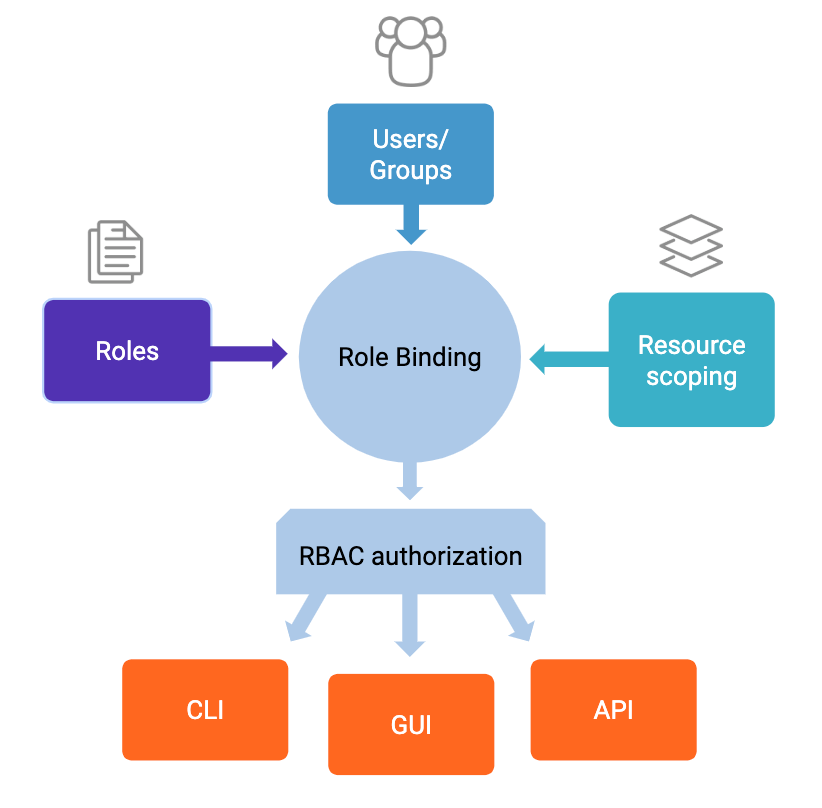
RBAC overview
Role bindings
A role binding assigns a role to a principal (a user or group) for a specific resource or set of resources. With RBAC, the user administrator creates role bindings to control who can access which resources. After you create a role binding with the Confluent CLI confluent iam rbac role-binding create command, users can’t use an API or Confluent Control Center to bypass the role binding and access resources.
Binding roles to groups lets administrators avoid granting explicit access to each user across every component. For details about viewing role bindings, see the Confluent CLI confluent iam rbac role-binding list command. Role bindings don’t support wildcard matching in principal names. For details, see Wildcard principals.
Note
If you need to troubleshoot while setting up role bindings
(confluent iam rbac role-binding create), view audit logs to identify
authorization events for specific principals, resources, or operations. For
details, see View audit logs on the fly.
The Confluent Platform cluster registry lets cluster administrators centrally register Kafka clusters in MDS, so you can refer to a registered cluster by name when you create role bindings. For details, see Cluster Registry in Confluent Platform.
Confluent Platform Metadata Service
Metadata Service (MDS) is the centralized authorization service that implements
RBAC in Confluent Platform. MDS provides a single configuration context for managing role
bindings across Kafka clusters, connectors, schemas, and Flink resources, such as
FlinkApplication and FlinkEnvironment, so administrators don’t
have to define and assign roles separately for each resource.
MDS is the central authority for authorization data and token-based authentication. Confluent Platform components that use MDS enforce permissions consistently. You must configure every Kafka broker in the MDS-managed cluster to use MDS. MDS also controls access to integrated services such as Flink.
Running on a Confluent Server broker, MDS authenticates users and provides refreshable bearer tokens for impersonation. MDS can retrieve user and group information from LDAP, an OAuth or OIDC identity provider, or both. For details about configuring LDAP with RBAC, see Configure LDAP Group-Based Authorization in Confluent Platform and Configure LDAP Authentication. For details about configuring MDS to use OAuth, see Configure Metadata Service (MDS) for OAuth Authentication in Confluent Platform. For details about configuring MDS, see Configure Metadata Service (MDS) in Confluent Platform.
RBAC and ACLs
RBAC adds an authorization enforcement layer on top of access control lists (ACLs) and doesn’t change the way you create or manage ACLs.
Like ACLs, RBAC uses principals. You can associate the principal that a
client uses with an RBAC role. The Confluent Server Authorizer authorizes that principal against
both RBAC role bindings and ACLs. For details about the Confluent Server Authorizer, see
Configure Confluent Server Authorizer in Confluent Platform. RBAC roles don’t support DENY rules.
If you already use locally managed Kafka ACLs, you create and use them the same way when you also use RBAC. If you plan to continue using Kafka ACLs, as a best practice, migrate to centralized ACLs, which, like role bindings, store ACL information in MDS.
The following table summarizes when to use each approach.
Scenario |
Recommended approach |
|---|---|
Default access control |
RBAC (centralized, easier to manage at scale) |
Restrictions by client host |
ACLs |
Explicit deny rules |
ACLs |
Connector access control |
RBAC (required because ACLs can’t grant connector access) |
Consistent authentication and authorization across all Confluent Platform components |
RBAC |
For example, you could use RBAC to allow access for a group of users, but an ACL to deny access for a particular member of that group.
Add RBAC to your ACL strategy in the following cases:
You need connector access control. ACLs have no connector resource type, so only RBAC can grant access to connectors. Connect authorizes connector operations with the RBAC authorizer in MDS, and each connector can have its own principal, so users have access only to connectors for which they have explicit permission.
You need granular access in Confluent Control Center. Before RBAC, any user with access to Confluent Control Center had full or read-only access to topics and resources.
You need consistent authentication and authorization across Confluent Platform, including Flink. RBAC authorizes Flink resources such as applications, environments, and secrets.
You manage access for thousands of resources and users. Creating and managing ACLs centrally in that scenario takes a long time. With RBAC, you grant the
ResourceOwnerrole to other users to manage the resources that specific business units own, and those users can in turn manage access for others on their teams. For example, if you’re responsible for managing user access to 1,000 topics, you can delegate that access management instead of managing all of the topics centrally.
RBAC authentication options
The authentication method you use with RBAC depends on the Confluent Platform component. The authentication options in use before implementing RBAC might require additional configuration, or you might need to use a different authentication method altogether.
A Confluent Platform REST endpoint that uses the AuthenticationHandler class and is
configured for mutual TLS (mTLS) authentication can derive the principal for RBAC from the client
certificate, using principal mapping rules. It can also authenticate the
client with an HTTP Authorization header that carries either a bearer token
or Basic credentials. For details, see Configure mTLS RBAC in Confluent Platform and
Use the AuthenticationHandler Class for Multi-Protocol Authentication in Confluent Platform.
With AuthenticationHandler, the endpoint chooses the authentication method
for each request as follows:
If the request has an
Authorizationheader, the endpoint uses the bearer token or Basic credentials in that header.If the request has no
Authorizationheader, the endpoint uses the client certificate.If the request has neither, the endpoint requests Basic credentials, unless anonymous access is enabled.
With Basic authentication, the endpoint sends the username and password to MDS. MDS validates them against its configured user store, such as LDAP or a file, and returns a token. The endpoint uses that token as the identity of the user.
Important
Confluent Control Center is an exception. With RBAC, the Confluent Control Center REST endpoint accepts only bearer tokens and doesn’t derive the principal from a client certificate. Users still sign in to Confluent Control Center with a password or single sign-on (SSO), and it obtains the token for them.
The standard InstallBearerOrBasicSecurityHandler class, which the
documented RBAC configurations for Schema Registry, Connect, and REST Proxy use, ignores
client certificates and accepts only bearer tokens or Basic credentials. It
returns a 401 response to a request that has only a client certificate. To
authenticate with client certificates, use AuthenticationHandler.
The following table summarizes how Confluent Platform components authenticate when you use RBAC.
Component |
Authentication |
More information |
|---|---|---|
Confluent Control Center |
Configure authentication in the Confluent Control Center properties file. To communicate
with Kafka clusters, Confluent Control Center must use SASL/OAUTHBEARER with an MDS token.
With mTLS RBAC, it also presents a client certificate on that
|
Set RBAC configuration options in the Control Center properties file |
ksqlDB and REST Proxy |
Authenticate to MDS with the HTTP credential type that you set with
|
Deploy Secure ksqlDB with RBAC in Confluent Platform, Role-Based Access Control (RBAC) |
Schema Registry and Connect |
Authenticate to MDS with a |
Configure Role-Based Access Control for Schema Registry in Confluent Platform, Kafka Connect and RBAC for Confluent Platform |
Kafka clients |
You can use any of the authentication methods supported by Confluent Platform. |
For authentication with other Confluent Platform components such as Confluent Platform for Apache Flink, see Use HTTP Basic Authentication in Confluent Platform.
For sample curl commands that create role bindings for Confluent Platform components by
using the REST API, see Configure RBAC using the REST API in Confluent Platform.
You can’t use principal propagation with Confluent Platform components, such as REST Proxy, that have a REST endpoint that requires RBAC.
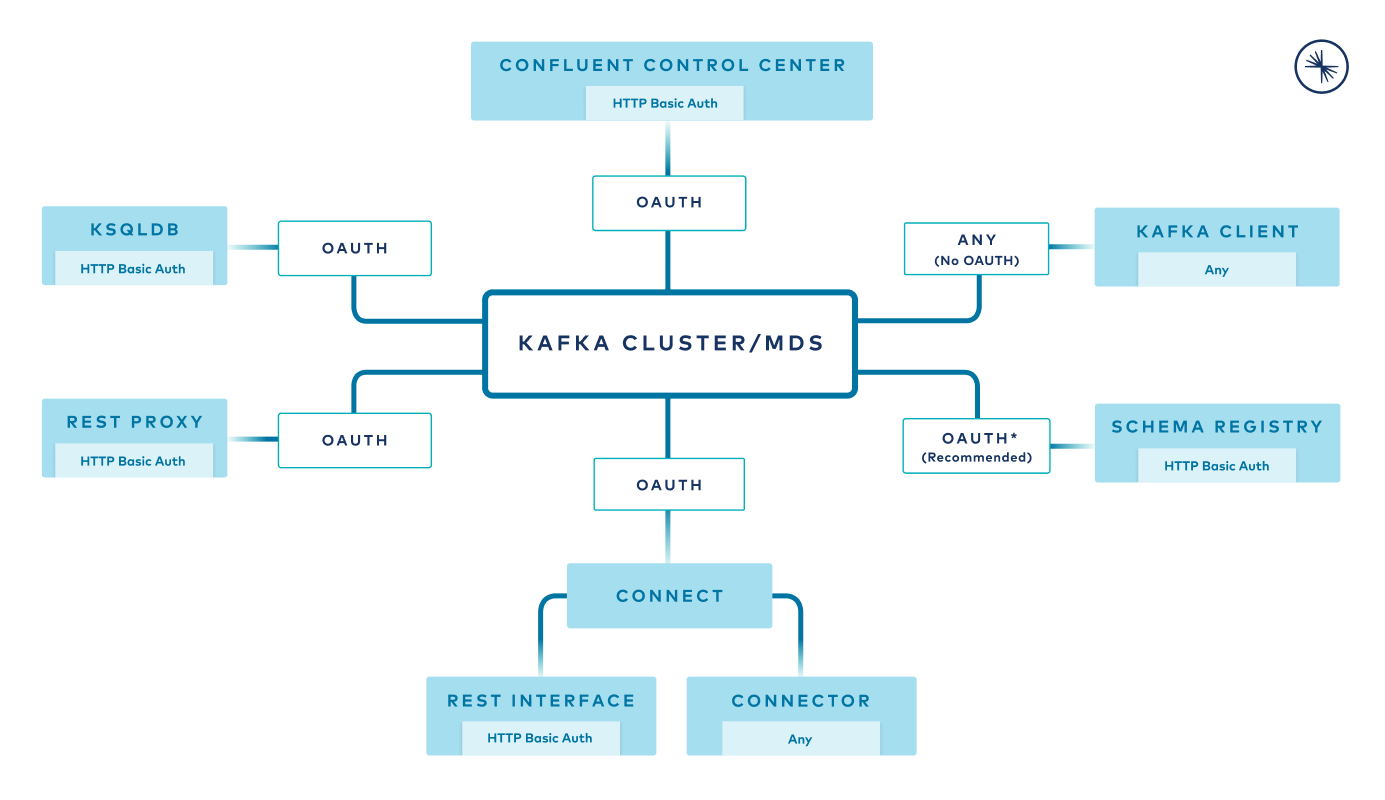
RBAC authentication options
RBAC limitations
Keep RBAC role bindings and API calls within the following limits. Exceeding these limits can degrade performance.
Resource |
Limit |
|---|---|
Role bindings |
1,000 (soft limit) |
API requests per second to add, remove, or look up role bindings |
15 |
Up to 1,000 per cluster |
Important
The user ID specified in group role bindings is case-specific, and must match the case specified in the AD record. Also note that when logging in as a super user, the login ID is also case-specific and must match the case specified for the user ID in role bindings.
RBAC error codes
RBAC uses the following HTTP error codes for user access:
- 401
User login failed because the credentials are missing or invalid.
- 403
The user is authenticated but doesn’t have the required permissions for a specific resource, such as Schema Registry or Connect.
- 404
The user has correct credentials and access to a resource, for example, the user has the
ResourceOwnerrole, but the resource, such as Connect, doesn’t exist.- 502
Confluent Control Center can’t reach MDS. When this happens during login, it shows the message
MDS is unreachable. Contact your security administrator.
Note
If a user has correct credentials but lacks the required permissions, a request for a nonexistent resource can return a 403 error instead of a 404 error. This avoids exposing details about specific resources.
Schema Registry has many granular error codes that extend beyond the context of RBAC. For descriptions of Schema Registry HTTP errors, such as 40401, see Schema Registry API Reference for Confluent Platform.
RBAC implementation checklist
Use this checklist to install and configure RBAC in Confluent Platform.
Ansible offers a simpler way to configure and deploy RBAC and MDS. For details, see Ansible RBAC settings.
To set up RBAC:
Install Confluent Platform, including the
confluent-servercommercial component. For more information, see Migrate Confluent Platform to Confluent Server.Work with your security team to evaluate the needs of the users in your organization and, based on the resources they require to perform their duties, identify which roles to assign to users and groups. As a best practice, grant each user the minimum role required to complete their tasks. For a description of some typical use cases and required roles for each, see RBAC role use cases.
Identify a bootstrap super user. To bootstrap RBAC, add that user’s principal to the
super.usersproperty in the Confluent Server broker’sserver.propertiesfile on the cluster that hosts MDS. This super user can then assign theSystemAdminrole to another user who can create the required clusters and scope the required role bindings for users and groups. For details, see Use Predefined RBAC Roles in Confluent Platform.Configure the Metadata Service (MDS). MDS implements the core RBAC capabilities and communicates with LDAP or an OAuth or OIDC identity provider (see Configure Metadata Service (MDS) for OAuth Authentication in Confluent Platform) to retrieve user and group information and authenticate users. After configuring MDS, you can create role bindings and configure other Confluent Platform components. For an example LDAP configuration for MDS, see Configure the LDAP identity provider.
After you determine which roles to assign to users and groups, create the appropriate role bindings for users to access the resources they require to perform their duties, such as Schema Registry, ksqlDB, Connect, and Confluent Control Center.
Use the confluent iam rbac role-binding list command to confirm the role bindings that you defined for users and groups.
Configure Confluent Platform components to communicate with MDS for authentication and authorization. For details, see:
For related information, see:
RBAC demo for Confluent Platform
For a working example of RBAC, see Confluent Platform demo. This demo and its accompanying tutorial show you how to deploy a Kafka event streaming application. All components in the demo have end-to-end security enabled, including RBAC.