

Kafka Streams Interactive Queries for Confluent Platform
Interactive Queries allow you to use the state of your application from outside your application. The Kafka Streams API enables your applications to be queryable.
The full state of your application is typically split across many distributed instances of your application, and across many state stores that are managed locally by these application instances.
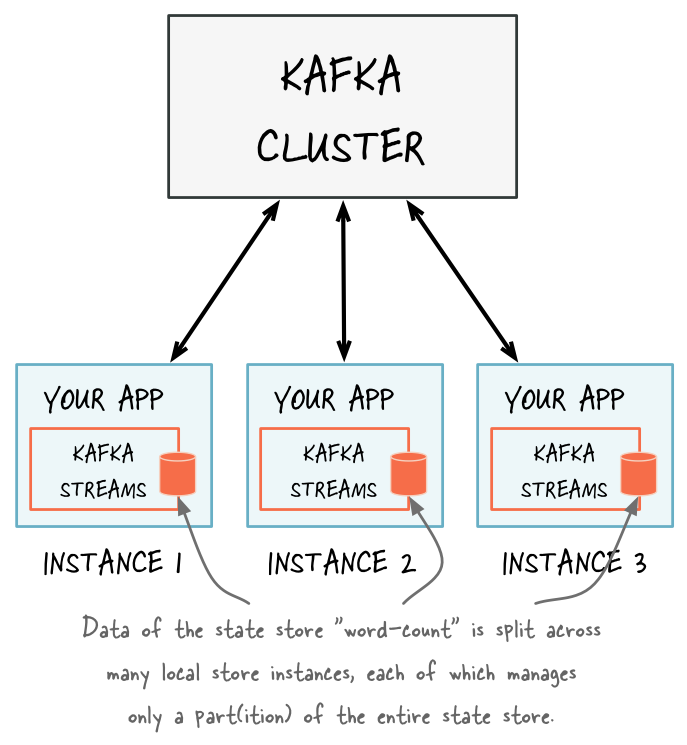
There are local and remote components to query the state of your application interactively.
- Local state
An application instance can query the locally managed portion of the state and directly query its own local state stores. You can use the corresponding local data in other parts of your application code, as long as it doesn’t require calling the Kafka Streams API. Querying state stores is always read-only to guarantee that the underlying state stores are never mutated out-of-band, such as adding new entries. State stores should only be mutated by the corresponding processor topology and the input data it operates on. For more information, see Query local state stores for an application instance.
- Remote state
To query the full state of your application, you must connect the various fragments of the state, including:
query local state stores
discover all running instances of your application in the network and their state stores
communicate with these instances over the network, such as an RPC layer
Connecting these fragments enables communication between instances of the same application and communication from other applications for Interactive Queries. For more information, see Query remote state stores for the entire application.
Kafka Streams natively provides all of the required functionality for interactively querying the state of your application, except if you want to expose the full state of your application via Interactive Queries. To allow application instances to communicate over the network, you must add a Remote Procedure Call (RPC) layer to your application, such as a REST API.
This table shows the Kafka Streams native communication support for various procedures.
Procedure |
Application instance |
Entire application |
|---|---|---|
Query local state stores of an app instance |
Supported |
Supported |
Make an app instance discoverable to others |
Supported |
Supported |
Discover all running app instances and their state stores |
Supported |
Supported |
Communicate with app instances over the network (RPC) |
Supported |
Not supported (you must configure) |
Query local state stores for an application instance
A Kafka Streams application typically runs on multiple instances. The state that is locally available on any given instance is only a subset of the application’s entire state. Querying the local stores on an instance returns only data available locally on that particular instance.
The method KafkaStreams#store(...) finds an application instance’s local
state stores by name and type.
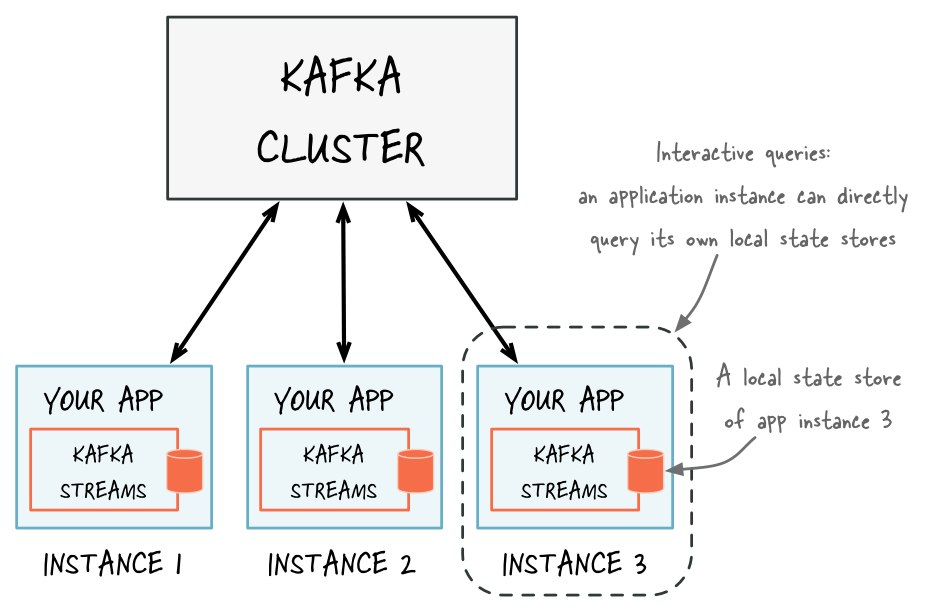
Every application instance can directly query any of its local state stores.
The name of a state store is defined when you create the store. You can create the store explicitly by using the Processor API or implicitly by using stateful operations in the DSL.
The type of a state store is defined by QueryableStoreType. You can access
the built-in types through the QueryableStoreTypes class, which provides
eight built-in types:
Store |
Plain |
Timestamped |
Header-aware |
|---|---|---|---|
Key-value |
|
|
|
Window |
|
|
|
Session |
|
None |
|
The plain types return values only. To get a ValueAndTimestamp for each
value, use the timestamped types. For examples, see
Query local key-value stores,
Query local window stores, and
Query local session stores. To use
the header-aware types with header-aware state stores, see
Query local header-aware state stores.
You can also implement your own QueryableStoreType as described in section Query local custom state stores.
Kafka Streams materializes one state store per stream partition. This means your application potentially manages many underlying state stores. The API enables you to query all of the underlying stores without having to know which partition the data is in.
Query local key-value stores
To query a local key-value store, you must first create a topology with a key-value store. This example creates a key-value store named “CountsKeyValueStore”. This store holds the latest count for any word that is found on the topic “word-count-input”.
Properties props = ...;
StreamsBuilder builder = ...;
KStream<String, String> textLines = ...;

// Define the processing topology (here: WordCount)
KGroupedStream<String, String> groupedByWord = textLines
  .flatMapValues(value -> Arrays.asList(value.toLowerCase().split("\\W+")))
  .groupBy((key, word) -> word, Grouped.with(stringSerde, stringSerde));

// Create a key-value store named "CountsKeyValueStore" for the all-time word counts
groupedByWord.count(Materialized.<String, String, KeyValueStore<Bytes, byte[]>>as("CountsKeyValueStore"));

// Start an instance of the topology
KafkaStreams streams = new KafkaStreams(builder.build(), props);
streams.start();
After the application has started, you can get access to “CountsKeyValueStore” and then query it via the ReadOnlyKeyValueStore API:
// Get the key-value store CountsKeyValueStore
ReadOnlyKeyValueStore<String, Long> keyValueStore =
    streams.store(StoreQueryParameters.fromNameAndType("CountsKeyValueStore", QueryableStoreTypes.keyValueStore()));

// Get value by key
System.out.println("count for hello:" + keyValueStore.get("hello"));

// Get the values for a range of keys available in this application instance
KeyValueIterator<String, Long> range = keyValueStore.range("all", "streams");
while (range.hasNext()) {
  KeyValue<String, Long> next = range.next();
  System.out.println("count for " + next.key + ": " + next.value);
}
// close the iterator to release resources
range.close();

// Get the values for all of the keys available in this application instance
KeyValueIterator<String, Long> range = keyValueStore.all();
while (range.hasNext()) {
  KeyValue<String, Long> next = range.next();
  System.out.println("count for " + next.key + ": " + next.value);
}
// close the iterator to release resources
range.close();
You can also materialize the results of stateless operators by using the
overloaded methods that take a queryableStoreName as shown in the example
below:
StreamsBuilder builder = ...;
KTable<String, Integer> regionCounts = ...;

// materialize the result of filtering corresponding to odd numbers
// the "queryableStoreName" can be subsequently queried.
KTable<String, Integer> oddCounts = numberLines.filter((region, count) -> (count % 2 != 0),
  Materialized.<String, Integer, KeyValueStore<Bytes, byte[]>>as("queryableStoreName"));

// do not materialize the result of filtering corresponding to even numbers
// this means that these results will not be materialized and cannot be queried.
KTable<String, Integer> evenCounts = numberLines.filter((region, count) -> (count % 2 == 0));
Query local window stores
A window store potentially has many results for any given key because the key can be present in multiple windows. However, there is only one result per window for a given key.
To query a local window store, you must first create a topology with a window store. This example creates a window store named “CountsWindowStore” that contains the counts for words in 1-minute windows.
StreamsBuilder builder = ...;
KStream<String, String> textLines = ...;

// Define the processing topology (here: WordCount)
KGroupedStream<String, String> groupedByWord = textLines
  .flatMapValues(value -> Arrays.asList(value.toLowerCase().split("\\W+")))
  .groupBy((key, word) -> word, Grouped.with(stringSerde, stringSerde));

// Create a window state store named "CountsWindowStore" that contains the word counts for every minute
groupedByWord.windowedBy(TimeWindows.ofSizeWithNoGrace(Duration.ofMinutes(1)))
  .count(Materialized.<String, Long, WindowStore<Bytes, byte[]>>as("CountsWindowStore"));
After the application has started, you can get access to “CountsWindowStore” and then query it via the ReadOnlyWindowStore API:
// Get the window store named "CountsWindowStore"
ReadOnlyWindowStore<String, Long> windowStore =
    streams.store(StoreQueryParameters.fromNameAndType("CountsWindowStore", QueryableStoreTypes.windowStore()));

// Fetch values for the key "world" for all of the windows available in this application instance.
// To get *all* available windows we fetch windows from the beginning of time until now.
Instant timeFrom = Instant.ofEpochMilli(0); // beginning of time = oldest available
Instant timeTo = Instant.now(); // now (in processing-time)
WindowStoreIterator<Long> iterator = windowStore.fetch("world", timeFrom, timeTo);
while (iterator.hasNext()) {
  KeyValue<Long, Long> next = iterator.next();
  long windowTimestamp = next.key;
  System.out.println("Count of 'world' @ time " + windowTimestamp + " is " + next.value);
}
// close the iterator to release resources
iterator.close();
Query local session stores
A session store potentially has many results for any given key because there can be multiple sessions for that key. However, there is only one result per session for a given key.
To query a local session store, you must first create a topology with a session store. This example creates a session store named “CountsSessionStore” that contains the counts for words, grouped into sessions with a five-minute inactivity gap.
StreamsBuilder builder = ...;
KStream<String, String> textLines = ...;

// Define the processing topology (here: WordCount)
KGroupedStream<String, String> groupedByWord = textLines
  .flatMapValues(value -> Arrays.asList(value.toLowerCase().split("\\W+")))
  .groupBy((key, word) -> word, Grouped.with(stringSerde, stringSerde));

// Create a session state store named "CountsSessionStore" that contains the word counts for every session
groupedByWord.windowedBy(SessionWindows.ofInactivityGapWithNoGrace(Duration.ofMinutes(5)))
  .count(Materialized.<String, Long, SessionStore<Bytes, byte[]>>as("CountsSessionStore"));
Query “CountsSessionStore” by using the ReadOnlySessionStore API after the application has started:
// Get the session store named "CountsSessionStore"
ReadOnlySessionStore<String, Long> sessionStore =
    streams.store(StoreQueryParameters.fromNameAndType("CountsSessionStore", QueryableStoreTypes.sessionStore()));

// Fetch all of the sessions for the key "world" available in this application instance.
try (KeyValueIterator<Windowed<String>, Long> iterator = sessionStore.fetch("world")) {
  while (iterator.hasNext()) {
    KeyValue<Windowed<String>, Long> next = iterator.next();
    Window session = next.key.window();
    System.out.println("Count of 'world' for session @ " + session.start() + "-" + session.end()
        + " is " + next.value);
  }
}
Query local header-aware state stores
A header-aware state store persists each record’s
headers with its value and, for key-value and window stores, its timestamp. To
read the headers back with the store() API, look up the store with the
QueryableStoreTypes method that matches your store type:
|
Returned store type |
|---|---|
|
|
|
|
|
|
No *WithHeaders() method exists for plain, non-timestamped key-value or
window stores.
The following example queries a header-aware key-value store and a header-aware window store:
// Key-value store built with a *WithHeaders supplier
ReadOnlyKeyValueStore<String, ValueTimestampHeaders<Long>> keyValueStore =
    streams.store(StoreQueryParameters.fromNameAndType(
        "counts-store", QueryableStoreTypes.timestampedKeyValueStoreWithHeaders()));

ValueTimestampHeaders<Long> vth = keyValueStore.get("hello");
if (vth != null) {
  System.out.println("value:     " + vth.value());
  System.out.println("timestamp: " + vth.timestamp());
  System.out.println("headers:   " + vth.headers());
}

// Window store built with a *WithHeaders supplier
ReadOnlyWindowStore<String, ValueTimestampHeaders<Long>> windowStore =
    streams.store(StoreQueryParameters.fromNameAndType(
        "counts-window-store", QueryableStoreTypes.timestampedWindowStoreWithHeaders()));

try (WindowStoreIterator<ValueTimestampHeaders<Long>> it =
         windowStore.fetch("hello", Instant.ofEpochMilli(0), Instant.now())) {
  while (it.hasNext()) {
    ValueTimestampHeaders<Long> wv = it.next().value;
    System.out.println("value: " + wv.value() + " headers: " + wv.headers());
  }
}
Session stores return AggregationWithHeaders<V>. Read the aggregated value
with aggregation(), not value(), and the headers with headers():
// Session store built with a *WithHeaders supplier
ReadOnlySessionStore<String, AggregationWithHeaders<Long>> sessionStore =
    streams.store(StoreQueryParameters.fromNameAndType(
        "counts-session-store", QueryableStoreTypes.sessionStoreWithHeaders()));

try (KeyValueIterator<Windowed<String>, AggregationWithHeaders<Long>> it =
         sessionStore.fetch("hello")) {
  while (it.hasNext()) {
    AggregationWithHeaders<Long> awh = it.next().value;
    System.out.println("aggregation: " + awh.aggregation());
    System.out.println("headers:     " + awh.headers());
  }
}
What the store() API returns also depends on the supplier that the
*WithHeaders builder wraps. If the supplier doesn’t store headers natively,
the store() API doesn’t report an error. A timestamped supplier returns
empty headers, and a plain supplier returns a -1 timestamp. For details,
see the store-build table in
Query header-aware state stores with IQv2.
To read headers with Interactive Queries v2 (IQv2) instead, see Query header-aware state stores with IQv2.
Query local custom state stores
Only the Processor API supports custom state stores.
Before querying the custom state stores you must implement these interfaces:
Your custom state store must implement
StateStore.You must have an interface to represent the operations available on the store.
You must provide an implementation of
StoreBuilderfor creating instances of your store.Provide an interface that restricts access to read-only operations. This prevents users of this API from mutating the state of your running Kafka Streams application out-of-band.
The class/interface hierarchy for your custom store might look something like:
public class MyCustomStore<K,V> implements StateStore, MyWriteableCustomStore<K,V> {
  // implementation of the actual store
}

// Read-write interface for MyCustomStore
public interface MyWriteableCustomStore<K,V> extends MyReadableCustomStore<K,V> {
  void write(K Key, V value);
}

// Read-only interface for MyCustomStore
public interface MyReadableCustomStore<K,V> {
  V read(K key);
}

public class MyCustomStoreBuilder implements StoreBuilder<MyCustomStore<K,V>> {
  // implementation of the supplier for MyCustomStore
}
To make this store queryable you must:
Provide an implementation of QueryableStoreType.
Provide a wrapper class that has access to all of the underlying instances of the store and is used for querying.
Here is how to implement QueryableStoreType:
public class MyCustomStoreType<K,V> implements QueryableStoreType<MyReadableCustomStore<K,V>> {

  // Only accept StateStores that are of type MyCustomStore
  public boolean accepts(final StateStore stateStore) {
    return stateStore instanceOf MyCustomStore;
  }

  public MyReadableCustomStore<K,V> create(final StateStoreProvider storeProvider, final String storeName) {
      return new MyCustomStoreTypeWrapper(storeProvider, storeName, this);
  }

}
A wrapper class is required because each instance of a Kafka Streams application may run multiple stream tasks and manage multiple local instances of a particular state store. The wrapper class hides this complexity and lets you query a “logical” state store by name without having to know about all of the underlying local instances of that state store.
When implementing your wrapper class you must use the
StateStoreProvider
interface to get access to the underlying instances of your store.
StateStoreProvider#stores(String storeName, QueryableStoreType<T> queryableStoreType)
returns a List of state stores with the given storeName and of the type as
defined by queryableStoreType.
Here is an example implementation of the wrapper:
// You should implement a read-only interface to restrict
// usage of the store to safe read operations.
public class MyCustomStoreTypeWrapper<K,V> implements MyReadableCustomStore<K,V> {

  private final QueryableStoreType<MyReadableCustomStore<K, V>> customStoreType;
  private final String storeName;
  private final StateStoreProvider provider;

  public MyCustomStoreTypeWrapper(final StateStoreProvider provider,
                                final String storeName,
                                final QueryableStoreType<MyReadableCustomStore<K, V>> customStoreType) {

    // ... assign fields ...
  }

  // Implement a safe read method
  @Override
  public V read(final K key) {
    // Get all the stores with storeName and of customStoreType
    final List<MyReadableCustomStore<K, V>> stores = provider.stores(storeName, customStoreType);
    // Try and find the value for the given key
    final Optional<V> value = stores.stream().filter(store -> store.read(key) != null).findFirst();
    // Return the value if it exists
    return value.orElse(null);
  }

}
You can now find and query your custom store:
Topology topology = ...;
ProcessorSupplier processorSuppler = ...;

// Create CustomStoreSupplier for store name the-custom-store
MyCustomStoreBuilder customStoreBuilder = new MyCustomStoreBuilder("the-custom-store") //...;
// Add the source topic
topology.addSource("input", "inputTopic");
// Add a custom processor that reads from the source topic
topology.addProcessor("the-processor", processorSupplier, "input");
// Connect your custom state store to the custom processor above
topology.addStateStore(customStoreBuilder, "the-processor");

KafkaStreams streams = new KafkaStreams(topology, props);
streams.start();

// Get access to the custom store
MyReadableCustomStore<String,String> store = streams.store(StoreQueryParameters.fromNameAndType("the-custom-store", new MyCustomStoreType<String,String>()));

// Query the store
String value = store.read("key");
Query state stores during a rebalance
With the Streams API, you can build stateful applications that offer different trade-offs for consistency and availability. For example, your application can query state stores during a consumer group rebalance. Kafka Streams applications can:
Route queries to standby replicas for better availability if the active host is currently down.
Implement a control plane to exchange lag information and choose the best standby replica to route to. Lag information could be piggybacked on requests or heartbeats.
Choose to fail a query if all replicas are lagging greatly.
Use the KafkaStreams.queryMetadataForKey method to find the metadata that
contains the active hosts and standby hosts where the key being queried resides.
It returns a KeyQueryMetadata that contains all metadata about hosting the
given key for a specified store. Use the query metadata and the lag APIs, like
the KafkaStreams.allLocalStorePartitionLags method, to determine which hosts
are in sync and which are lagging.
The following code example shows how to enumerate standby hosts and sort them by lag, from the most in-sync to the least in-sync.
Important
If you are migrating from the deprecated KafkaStreams#metadataForKey
method, use queryMetadataForKey as shown in the following example.
// Global map containing latest lag information across hosts. This is
// collected by the Streams application instances outside of Streams,
// relying on the local lag APIs in each.
//
// Each application instance uses KafkaStreams#allMetadata() to discover
// other application instances to exchange this lag information.
final Map<HostInfo, Map<String, Map<Integer, Long>>> globalLagInformation;

// Key which needs to be routed.
final K key;

// Store to be queried.
final String storeName;

// Fetch the metadata related to the key.
KeyQueryMetadata queryMetadata = queryMetadataForKey(storeName, key, serializer);

// Acceptable lag for the query.
final long acceptableOffsetLag = 10000;

if (isAlive(queryMetadata.activeHost())) {
  // Always route to the active host if it's alive.
  // The isAlive and query methods are for illustration only
  // and aren't part of the Streams API.
  query(storeName, key, queryMetadata.activeHost());
} else {
  // Filter out all of the standby hosts with more unacceptable lag than
  // acceptable lag, and obtain a list of standbys hosts that are in-sync.
  List<HostInfo> inSyncStandbys = queryMetadata.standbyHosts().stream()
      // Get the lag at each standby host for the key's store partition.
      .map(standbyHostInfo -> new Pair<>(standbyHostInfo, globalLagInformation.get(standbyHostInfo).get(storeName).get(queryMetadata.partition())))
      // Sort by offset lag, that is, smallest lag first.
      .sorted(Comparator.comparing(Pair::getRight))
      .filter(standbyHostLagPair -> standbyHostLagPair.getRight() < acceptableOffsetLag)
      .map(standbyHostLagPair -> standbyHostLagPair.getLeft())
      .collect(Collectors.toList());

  // Query standbys most in-sync to least in-sync.
  for (HostInfo standbyHost : inSyncStandbys) {
    try {
      query(storeName, key, standbyHost);
    } catch (Exception e) {
      System.err.println("Querying standby failed");
    }
  }
}
The following code example shows how to use the
KafkaStreams.allLocalStorePartitionLags method and the LagInfo class to
get partition lags for all local stores. For the full code listing, see
LagFetchIntegrationTest.java
Map<String, Map<Integer, LagInfo>> offsetLagInfoMap = // return value from allLocalStorePartitionLags()
    ...
    // Get the lag for a given state store's partition 0.
    LagInfo lagInfo = offsetLagInfoMap.get(stateStoreName).get(0);
    assertThat(lagInfo.currentOffsetPosition(), equalTo(5L));
    assertThat(lagInfo.endOffsetPosition(), equalTo(5L));
    assertThat(lagInfo.offsetLag(), equalTo(0L));
The following code example shows how to query both active and standby stores for a key. For the full code listing, see StoreQueryIntegrationTest.java
final StreamsBuilder builder = new StreamsBuilder();
builder.table(INPUT_TOPIC_NAME, Consumed.with(Serdes.Integer(), Serdes.Integer()),
                Materialized.<Integer, Integer, KeyValueStore<Bytes, byte[]>>as(TABLE_NAME)
                        .withCachingDisabled())
        .toStream()
        .peek((k, v) -> semaphore.release());

final KafkaStreams kafkaStreams1 = createKafkaStreams(builder, streamsConfiguration());
final KafkaStreams kafkaStreams2 = createKafkaStreams(builder, streamsConfiguration());
final List<KafkaStreams> kafkaStreamsList = Arrays.asList(kafkaStreams1, kafkaStreams2);
final QueryableStoreType<ReadOnlyKeyValueStore<Integer, Integer>> queryableStoreType = QueryableStoreTypes.keyValueStore();

// Both active and standby stores are able to query for a key.
final ReadOnlyKeyValueStore<Integer, Integer> store1 = kafkaStreams1
    .store(StoreQueryParameters.fromNameAndType(TABLE_NAME, queryableStoreType).enableStaleStores());

final ReadOnlyKeyValueStore<Integer, Integer> store2 = kafkaStreams2
    .store(StoreQueryParameters.fromNameAndType(TABLE_NAME, queryableStoreType).enableStaleStores());
Query remote state stores for the entire application
To query remote states for the entire application, you must expose the application’s full state to other applications, including applications that are running on different machines.
For example, you have a Kafka Streams application that processes user events in a multi-player video game, and you want to retrieve the latest status of each user directly and display it in a mobile app. Here are the required steps to make the full state of your application queryable:
Add an RPC layer to your application so that the instances of your application can be interacted with over the network, such as a REST API, Thrift, or a custom protocol. The instances must respond to Interactive Queries. You can follow the reference examples provided to get started.
Expose the RPC endpoints of your application’s instances by using the
application.serverconfiguration setting of Kafka Streams. Because RPC endpoints must be unique within a network, each instance has its own value for this configuration setting. This makes an application instance discoverable by other instances.In the RPC layer, discover remote application instances and their state stores and query locally available state stores to make the full state of your application queryable. The remote application instances can forward queries to other application instances if a particular instance lacks the local data to respond to a query. The locally available state stores can directly respond to queries.
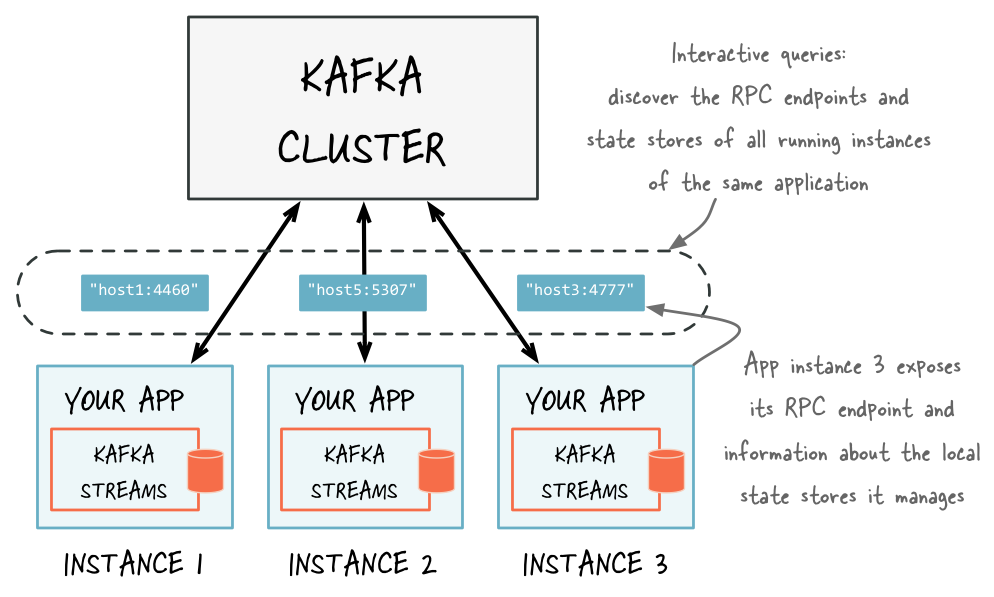
Discover any running instances of the same application as well as the respective RPC endpoints they expose for Interactive Queries
Add an RPC layer to your application
There are many ways to add an RPC layer. The only requirements are that the RPC layer is embedded within the Kafka Streams application and that it exposes an endpoint that other application instances and applications can connect to.
The word count interactive queries demo is an end-to-end demo application for Interactive Queries that showcases the implementation of an RPC layer through a REST API.
Expose the RPC endpoints of your application
To enable remote state store discovery in a distributed Kafka Streams application,
you must set the
configuration property in the
config properties instance. The application.server property defines a unique
host:port pair that points to the RPC endpoint of the respective instance of
a Kafka Streams application. The value of this configuration property varies across
the instances of your application. When this property is set, Kafka Streams keeps
track of the RPC endpoint information for every instance of an application, its
state stores, and assigned stream partitions through instances of
StreamsMetadata.
Tip
Consider using the exposed RPC endpoints of your application for further functionality, such as piggybacking additional inter-application communication that goes beyond Interactive Queries.
This example shows how to configure and run a Kafka Streams application that supports the discovery of its state stores.
Properties props = new Properties();
// Set the unique RPC endpoint of this application instance through which it
// can be interactively queried.  In a real application, the value would most
// probably not be hardcoded but derived dynamically.
String rpcEndpoint = "host1:4460";
props.put(StreamsConfig.APPLICATION_SERVER_CONFIG, rpcEndpoint);
// ... further settings may follow here ...

StreamsBuilder builder = new StreamsBuilder();

KStream<String, String> textLines = builder.stream(stringSerde, stringSerde, "word-count-input");

final KGroupedStream<String, String> groupedByWord = textLines
    .flatMapValues(value -> Arrays.asList(value.toLowerCase().split("\\W+")))
    .groupBy((key, word) -> word, Grouped.with(stringSerde, stringSerde));

// This call to `count()` creates a state store named "word-count".
// The state store is discoverable and can be queried interactively.
groupedByWord.count(Materialized.<String, Long, KeyValueStore<Bytes, byte[]>>as("word-count"));

// Start an instance of the topology
KafkaStreams streams = new KafkaStreams(builder.build(), props);
streams.start();

// Then, create and start the actual RPC service for remote access to this
// application instance's local state stores.
//
// This service should be started on the same host and port as defined above by
// the property `StreamsConfig.APPLICATION_SERVER_CONFIG`.  The example below is
// fictitious, but we provide end-to-end demo applications (such as KafkaMusicExample)
// that showcase how to implement such a service to get you started.
MyRPCService rpcService = ...;
rpcService.listenAt(rpcEndpoint);
Discover and access application instances and their local state stores
The following methods return StreamsMetadata objects, which provide meta-information about application instances such as their RPC endpoint and locally available state stores.
KafkaStreams#allMetadata(): find all instances of this applicationKafkaStreams#allMetadataForStore(String storeName): find those applications instances that manage local instances of the state store “storeName”KafkaStreams#queryMetadataForKey(String storeName, K key, Serializer<K> keySerializer): using the default stream partitioning strategy, find the one application instance that holds the data for the given key in the given state storeKafkaStreams#queryMetadataForKey(String storeName, K key, StreamPartitioner<K, ?> partitioner): usingpartitioner, find the one application instance that holds the data for the given key in the given state store
Attention
If application.server is not configured for an application instance,
then these methods don’t find any
StreamsMetadata
for it.
queryMetadataForKey finds the application instance that would hold a
key under the given or default partitioning strategy. This works only
if the key you pass in is the same key you used to write to the
state store.
If you use the Processor API
to populate a state store with keys that differ from the input record’s
key, call queryMetadataForKey with the actual store key, not the
input record’s key. Passing the wrong key can return the wrong
application instance, or an instance that doesn’t hold the data for that
key at all.
For instance, a processor might write three state store entries for a
single input record, such as keys key-a, key-b, and key-c for
an input record with key key. To find the instance holding key-a,
call queryMetadataForKey("store-name", "key-a", serializer), not
queryMetadataForKey("store-name", "key", serializer).
For example, you can now find the StreamsMetadata for the state store named
“word-count” that you defined in the code example shown in the previous section:
KafkaStreams streams = ...;
// Find all the locations of local instances of the state store named "word-count"
Collection<StreamsMetadata> wordCountHosts = streams.allMetadataForStore("word-count");

// For illustrative purposes, we assume using an HTTP client to talk to remote app instances.
HttpClient http = ...;

// Get the word count for word (aka key) 'alice': Approach 1
//
// We first find the one app instance that manages the count for 'alice' in its local state stores.
KeyQueryMetadata metadata = streams.queryMetadataForKey("word-count", "alice", Serdes.String().serializer());
// Then, we query only that single app instance for the latest count of 'alice'.
// Note: The RPC URL shown below is fictitious and only serves to illustrate the idea.  Ultimately,
// the URL (or, in general, the method of communication) will depend on the RPC layer you opted to
// implement.  Again, we provide end-to-end demo applications (such as KafkaMusicExample) that showcase
// how to implement such an RPC layer.
Long result = http.getLong("http://" + metadata.activeHost().host() + ":" + metadata.activeHost().port() + "/word-count/alice");

// Get the word count for word (aka key) 'alice': Approach 2
//
// Alternatively, we could also choose (say) a brute-force approach where we query every app instance
// until we find the one that happens to know about 'alice'.
Optional<Long> result = streams.allMetadataForStore("word-count")
    .stream()
    .map(streamsMetadata -> {
        // Construct the (fictitious) full endpoint URL to query the current remote application instance
        String url = "http://" + streamsMetadata.host() + ":" + streamsMetadata.port() + "/word-count/alice";
        // Read and return the count for 'alice', if any.
        return http.getLong(url);
    })
    .filter(s -> s != null)
    .findFirst();
At this point the full state of the application is interactively queryable:
You can discover the running instances of the application and the state stores they manage locally.
Through the RPC layer that was added to the application, you can communicate with these application instances over the network and query them for locally available state.
The application instances are able to serve such queries because they can directly query their own local state stores and respond via the RPC layer.
Collectively, this lets you query the full state of the entire application.
To see an end-to-end application with Interactive Queries, review the demo applications.
Interactive Queries APIs
Kafka Streams currently provides two APIs for querying state:
Interactive Queries v2 (IQv2) – the newer, query-based API
Interactive Queries v1 (IQv1) – the original, store-access-based API
This documentation introduces Interactive Queries v2 as the new API, while retaining IQv1 for backward compatibility.
Interactive Queries v2 (IQv2) introduces a query-based API for accessing Kafka Streams application state. Instead of directly interacting with state store objects, applications define structured queries that are executed by Kafka Streams.
IQv2 improves API safety, extensibility, and error handling by:
Decoupling query definition from store internals
Returning structured query results instead of throwing exceptions
Returning metadata (partitions) beside query results
Enabling clearer handling of partial failures in distributed environments
Queries are executed against local state stores on an application instance, with Kafka Streams managing:
Query execution
Validation
Result and failure reporting
IQv2 is designed to evolve independently of specific state store implementations and serves as the successor to the legacy Interactive Queries v1 API.
How Interactive Queries v2 works
Interactive Queries v2 works by allowing applications to define explicit query objects that describe the data to fetch from a state store. These queries are submitted to Kafka Streams, which is responsible for executing the query, handling validation, and returning a structured result.
Instead of exposing state store internals, Kafka Streams processes the query and
returns a StateQueryResult, which may contain either the requested data or
detailed failure information. This approach makes querying state safer, more
extensible, and better suited for distributed environments.
Build and execute a query with IQv2
In Interactive Queries v2, applications first build a query object that
describes the data to retrieve from a specific state store, for example, a key
lookup or range query. This query is wrapped in a StateQueryRequest, which
also specifies the target state store.
Once the request is created, it is executed using the KafkaStreams#query()
method. Kafka Streams validates the request, executes the query against the
appropriate local state store, and returns a StateQueryResult containing
either the query result or failure details.
This separation of query construction and query execution allows Kafka Streams to manage execution logic while keeping application code clean and extensible.
The following code example shows how to build the query.
// Build a query to fetch the value for a specific key.
StateQueryRequest<Long> request =
  StateQueryRequest.inStore("counts-store")
    .withQuery(KeyQuery.withKey("user-1"));
In this code:
"counts-store"is the name of the state store."user-1"is the key you want to query.KeyQuerydefines what kind of query you are performing.
The following code example shows how to execute the query.
StateQueryResult<Long> result = kafkaStreams.query(request);
Kafka Streams executes the query against the local state store and returns a result object.
The following code example shows how to read the result.
QueryResult<Long> queryResult = result.getOnlyPartitionResult();
Long count = queryResult.getResult();
System.out.println("Count: " + count);
Compare Interactive Queries versions IQv1 and IQv2
The tables below summarize the key differences between Interactive Queries v1 and Interactive Queries v2.
Aspects |
Interactive Queries v1 (Legacy API) |
Interactive Queries v2 (New API) |
|---|---|---|
API Style |
Store-based API |
Query-based API |
How queries are defined |
Direct access to state store objects |
Explicit query objects (e.g., KeyQuery) |
Interaction with state stores |
Application interacts directly with store internals |
Kafka Streams executes queries on behalf of the application |
Result handling |
Results returned directly or via iterators |
Results wrapped in StateQueryResult |
Error handling |
Exception-based |
Structured failures returned with results |
Coupling to store implementation |
Tightly coupled to store types |
Decoupled from store internals |
Extensibility |
Harder to evolve without breaking changes |
Designed to be extensible and future-proof |
Partial failure visibility |
Limited |
Explicit visibility into per-host failures |
Feature completeness |
Feature complete and stable |
Not yet feature complete |
For new applications, use IQv2. IQv1 remains supported and feature complete, so existing applications can continue to use it.
Query header-aware state stores with IQv2
Starting in Confluent Platform 8.4.x (Kafka Streams 4.4.x), four IQv2 query types return record headers from header-aware state stores. Each one parallels an existing query type:
Query type |
Parallels |
Store type |
Result type |
|---|---|---|---|
|
|
Key-value |
|
|
|
Key-value |
|
|
|
Window |
|
|
|
Window or session |
|
A ReadOnlyRecord exposes key(), value(), timestamp(), and
headers(). The headers() method never returns null. If the record
has no headers, it returns an empty Headers object. Treat the headers as
read-only. Adding or removing a header throws an IllegalStateException.
The byte array behind an individual header value can still be changed in
place, so treat header values as read-only too.
These query types are marked @Evolving, so their API might change in future
releases. The existing IQv2 query types, such as KeyQuery and
RangeQuery, also run against header-aware stores, but they return results
without headers.
- Query a single key
TimestampedKeyWithHeadersQuerylooks up a single key in a header-aware key-value store:TimestampedKeyWithHeadersQuery<String, Long> query = TimestampedKeyWithHeadersQuery.withKey("hello"); StateQueryRequest<ReadOnlyRecord<String, Long>> request = StateQueryRequest.inStore("counts-store").withQuery(query); StateQueryResult<ReadOnlyRecord<String, Long>> result = streams.query(request); QueryResult<ReadOnlyRecord<String, Long>> partitionResult = result.getOnlyPartitionResult(); if (partitionResult != null && partitionResult.isSuccess()) { ReadOnlyRecord<String, Long> record = partitionResult.getResult(); if (record != null) { System.out.println("value: " + record.value()); System.out.println("headers: " + record.headers()); } }
To bypass the record cache and read directly from the underlying store, chain
skipCache(), for example,TimestampedKeyWithHeadersQuery.<String, Long>withKey("hello").skipCache(). The explicit type witness is required because a chained call isn’t target-typed. Query objects are immutable, soskipCache()returns a new query. Only the single-key query offersskipCache().- Query a key range
TimestampedRangeWithHeadersQueryscans a key range in a header-aware key-value store. A range can span several local partitions, so iterate overgetPartitionResults(), and close eachReadOnlyRecordIteratorwhen you’re done:TimestampedRangeWithHeadersQuery<String, Long> query = TimestampedRangeWithHeadersQuery.withRange("a", "n"); StateQueryRequest<ReadOnlyRecordIterator<String, Long>> request = StateQueryRequest.inStore("counts-store").withQuery(query); StateQueryResult<ReadOnlyRecordIterator<String, Long>> result = streams.query(request); for (QueryResult<ReadOnlyRecordIterator<String, Long>> partition : result.getPartitionResults().values()) { if (partition.isFailure()) { System.out.println("failed: " + partition.getFailureReason() + " - " + partition.getFailureMessage()); continue; } try (ReadOnlyRecordIterator<String, Long> iterator = partition.getResult()) { while (iterator.hasNext()) { ReadOnlyRecord<String, Long> record = iterator.next(); System.out.println(record.key() + " -> " + record.value() + " " + record.headers()); } } }
For open-ended or full scans, use
withLowerBound(),withUpperBound(), orwithNoBounds(). Results are unordered by default. To order them, callwithAscendingKeys()orwithDescendingKeys(). The order is based on the serialized bytes of the keys, not on their logical order.- Query windows for a single key
TimestampedWindowKeyWithHeadersQueryfetches all windows for a single key within a window-start range from a header-aware window store. UnlikeWindowKeyQuery, which returns aWindowStoreIterator<V>keyed by the window-start time, this query returns records keyed byWindowed<K>. The record’stimestamp()is the stored event time.TimestampedWindowKeyWithHeadersQuery<String, Long> query = TimestampedWindowKeyWithHeadersQuery.withKeyAndWindowStartRange( "hello", Instant.ofEpochMilli(0), Instant.now()); StateQueryRequest<ReadOnlyRecordIterator<Windowed<String>, Long>> request = StateQueryRequest.inStore("counts-window-store").withQuery(query); StateQueryResult<ReadOnlyRecordIterator<Windowed<String>, Long>> result = streams.query(request); // Iterate over result.getPartitionResults() and close each iterator, // as in the key range example.
- Query a window range or a session key
TimestampedWindowRangeWithHeadersQueryhas two forms. Each form works only with its matching store type. Sending the wrong form fails with an unknown-query-type error.withWindowStartRange(timeFrom, timeTo)fetches every key across a window-start range from a header-aware window store.withKey(key)fetches all sessions for a key from a header-aware session store. For session results,timestamp()is the end of the session window.
// Window store: every key across a window-start range
TimestampedWindowRangeWithHeadersQuery<String, Long> byWindow =
    TimestampedWindowRangeWithHeadersQuery.withWindowStartRange(
        Instant.ofEpochMilli(0), Instant.now());
StateQueryRequest<ReadOnlyRecordIterator<Windowed<String>, Long>> windowRequest =
    StateQueryRequest.inStore("counts-window-store").withQuery(byWindow);

// Session store: all sessions for one key
TimestampedWindowRangeWithHeadersQuery<String, Long> byKey =
    TimestampedWindowRangeWithHeadersQuery.withKey("hello");
StateQueryRequest<ReadOnlyRecordIterator<Windowed<String>, Long>> sessionRequest =
    StateQueryRequest.inStore("counts-session-store").withQuery(byKey);
Keep the following behavior in mind when you use these query types:
Window-start ranges are closed.
TimestampedWindowKeyWithHeadersQueryand thewithWindowStartRangeform ofTimestampedWindowRangeWithHeadersQueryrequire bothtimeFromandtimeTo. Both bounds are inclusive.Close every iterator exactly once. Close each
ReadOnlyRecordIteratorwhen you’re done, even if anext()call throws an exception partway through. Otherwise, the underlying store iterator leaks, and so does the store’snum-open-iteratorsmetric. A try-with-resources block handles this correctly. The iterator doesn’t supportremove().Only the single-key query reads your own writes.
TimestampedKeyWithHeadersQueryreads through the record cache, so it sees a write that hasn’t been flushed to the store yet, unless you callskipCache(). The range, window, and session queries bypass the cache, so they don’t see unflushed writes. With a position bound, these queries fail with a not-up-to-bound error.
The supplier that the *WithHeaders builder wraps determines what the queries
return from key-value and window stores:
|
Headers |
Query outcome |
|---|---|---|
Native header supplier (RocksDB) |
Returned |
All queries succeed. |
In-memory non-header supplier |
Returned |
All queries succeed. |
Persistent timestamped non-header supplier |
Returned while served from the cache. Empty when served from the store,
after a flush or with |
All queries succeed. |
Persistent plain non-header supplier |
Returned while served from the cache. Otherwise, not available. |
A point query served from the store fails with a store-exception error.
The range, window-key, and |
No |
Not available |
The query fails with an unknown-query-type error. |
Session stores don’t have separate plain and timestamped suppliers. A
*WithHeaders session store built over a persistent non-header supplier
behaves like the timestamped row and returns empty headers. One built over an
in-memory supplier behaves like the in-memory row and returns headers. In both
cases, the withKey form of TimestampedWindowRangeWithHeadersQuery
doesn’t throw an exception.
For more information, see KIP-1356.
Interactive Queries v2 limitations
Some advanced query patterns available in the original Interactive Queries API are not supported.
Demo applications
Here is an end-to-end demo application to get you started:
Note
This website includes content developed at the Apache Software Foundation under the terms of the Apache License v2.