

Cascading Downstream Capture for Oracle XStream CDC Source Connector for Confluent Platform
Cascading downstream capture is a variant of Downstream Capture for Oracle XStream CDC Source Connector for Confluent Platform in which redo data reaches the downstream indirectly, through an Oracle Data Guard physical standby running Active Data Guard. Instead of shipping redo from the source primary directly to the downstream, the primary ships to a standby, and the standby cascades redo onward to the downstream.
The connector configuration and XStream capture setup are unchanged from base downstream capture. What differs is the redo transport path, and, because the connector only reads from the source, you can optionally point its source connection at the Active Data Guard standby instead of the source primary.
The supported Data Guard configuration is Physical Standby with Active Data Guard (ADG). Both real-time cascade and archived-log cascade are supported. Standard Data Guard, Logical Standby, Snapshot Standby, and chained cascading are not supported. See Restrictions.
For more information, see Oracle Database Data Guard Concepts and Administration 19c, Cascaded Redo Transport Destinations.
Cascading topology architecture
The cascading topology uses three Oracle databases: a source primary, a Physical Standby running Active Data Guard as the intermediate hop, and a downstream primary that hosts XStream capture. Redo travels from the source to the standby, and the standby forwards (cascades) redo to the downstream.
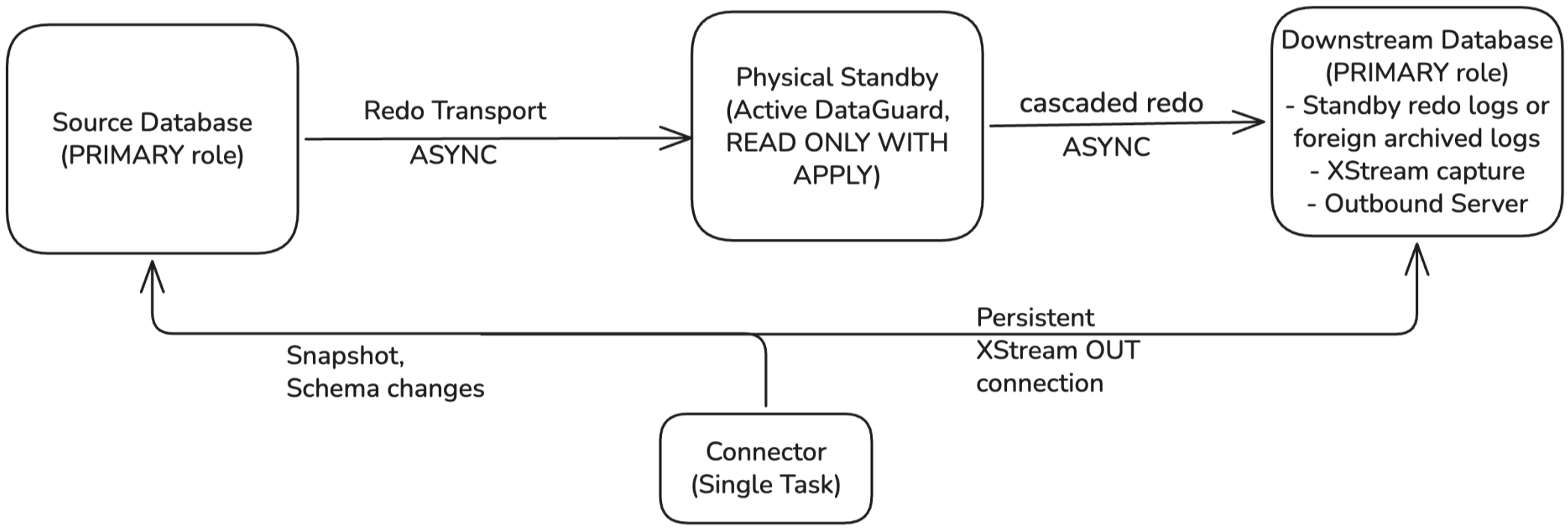
The downstream remains a PRIMARY database. XStream capture cannot run on
a standby. Cascading describes only the redo transport path.
The metadata path—the DB link from the downstream to the source—is
unchanged from base downstream capture and always points at the source primary,
not the standby. The DB link uses the primary’s global name (for example,
SRCCDB.EXAMPLE.COM), and any TNS alias resolving that name on the
downstream must also resolve to the primary.
Source connection. The connector reads the source only, for the initial
snapshot and schema queries, so its database.hostname and
database.service.name can resolve to either the source primary or the
Active Data Guard standby. Pointing the source connection at the standby
offloads the snapshot and schema reads from the primary.
When the source connection points at the standby, the standby must have
applied redo up to the snapshot SCN. Otherwise the Flashback query used for
the initial snapshot can fail with ORA-01466.
Cascade modes
Aspect |
Real-time cascade |
Archived-log cascade |
|---|---|---|
Redo trigger from standby |
RFS forwards redo as it lands in the standby redo logs |
Standby archives the standby log, then ARCH forwards |
Downstream redo storage |
Standby redo logs |
Foreign archived redo logs |
Capture mode on downstream |
Real-time downstream capture ( |
Archived-log downstream capture |
Latency |
Low. Comparable to direct real-time downstream. |
Higher. Bounded by the standby log switch frequency. |
|
|
|
Standby |
|
|
Both modes require Active Data Guard.
Redo transport configuration
Cascading adds one destination on the standby. The full three-role configuration is:
-- On the source PRIMARY: ship redo to the standby (DEST_2).
ALTER SYSTEM SET LOG_ARCHIVE_DEST_2=
  'SERVICE=standby_service ASYNC
   VALID_FOR=(ONLINE_LOGFILES,PRIMARY_ROLE)
   DB_UNIQUE_NAME=SRCCDB_STBY' SCOPE=BOTH;

-- On the standby: real-time cascade to the downstream (DEST_3).
-- ASYNC forwards redo as it lands in the standby redo logs.
ALTER SYSTEM SET LOG_ARCHIVE_DEST_3=
  'SERVICE=downstream_service ASYNC NOREGISTER
   VALID_FOR=(STANDBY_LOGFILES,STANDBY_ROLE)
   DB_UNIQUE_NAME=CAPCDB' SCOPE=BOTH;

-- On the standby: archived-log cascade variant (DEST_3).
-- TEMPLATE specifies the directory at the downstream where cascaded
-- archived logs land.
ALTER SYSTEM SET LOG_ARCHIVE_DEST_3=
  'SERVICE=downstream_service NOREGISTER
   TEMPLATE=+RECO/arc_dest/SRCCDB/%t_%s_%r.arc
   VALID_FOR=(STANDBY_LOGFILES,STANDBY_ROLE)
   DB_UNIQUE_NAME=CAPCDB' SCOPE=BOTH;

-- On the downstream: receive cascaded redo into standby logs (real-time)
-- or foreign archived logs (archived-log). Same as base downstream capture.
LOG_ARCHIVE_CONFIG=DG_CONFIG=(SRCCDB_DB,SRCCDB_STBY,CAPCDB) must list all
three DB_UNIQUE_NAME values on the primary, standby, and downstream.
STANDBY_ROLE in VALID_FOR ensures the cascade destination is
automatically suppressed if the standby is promoted to primary. Configure this
LOG_ARCHIVE_DEST_3 on the primary database as well (with STANDBY_ROLE
keeping it inactive while the primary role is in effect) to ensure the
destination survives a role transition.
Data Guard role transitions
A switchover or failover changes which source database holds the primary role. For the role transition steps, see Oracle Database Data Guard Concepts and Administration 19c, Role Transitions.
The connector holds two connections, and they behave differently across a
role change. Streaming runs against the outbound server on the downstream
database, set by downstream.database.*, and a source role change does not
affect it. Snapshots, ad hoc blocking snapshots, and schema lookups run
against the source database, set by database.hostname, database.port,
and database.service.name. These are read-only operations, so this
connection can point at either the source primary or the Active Data Guard
standby.
Transition |
Streaming |
What the connector needs |
|---|---|---|
Switchover |
Keeps running, no restart needed |
No repoint or restart. The source connection keeps working as the host transitions between the primary and standby roles. Repoint only if you want to stay pinned to the primary (or the standby). |
Failover, no new incarnation |
Stops until a standby is back in place, then resumes |
Repoint the source connection to whichever database is up. If the database it points at is still up, no repoint is needed. |
Failover, new incarnation from |
Stops and does not resume |
Rebuild the capture, move the connector offset forward, and backfill the gap |
Check which failover case you are in by running this on the new primary:
SELECT INCARNATION#, RESETLOGS_CHANGE#, STATUS FROM V$DATABASE_INCARNATION ORDER BY INCARNATION#;
A new incarnation with STATUS set to CURRENT means the database opened
with RESETLOGS.
A demoted database is open read-only. An initial snapshot, a blocking
snapshot signal, or the schema lookup for a table the connector has not seen
before all fail against it with ORA-16000: database or pluggable database
open for read-only access. The schema lookup does not fail right away. It
only runs the first time a new table appears, which can be days after the
switchover, so repoint the source connection at a database that is open for
reads — the current primary, or the standby once it opens in Active Data
Guard mode — even while the connector looks healthy and keeps streaming.
The capture’s data dictionary belongs to the old redo branch, so it aborts at
the branch point and cannot be repositioned. Drop the queue, capture process,
and outbound server on the downstream and create them again as described in
Step 4: Create XStream Out on the downstream, with one change.
Run DBMS_CAPTURE_ADM.BUILD on the new primary and use the returned SCN for
both first_scn and start_scn, rather than using
use_database_link => TRUE, because a build over the link can pick up a
dictionary build from the old incarnation.
The new outbound server can refuse the connector’s stored offset, and the
task then fails with ORA-21560 asking for a valid SCN or LCR position, so
expect to move the offset forward to the new build SCN. Nothing committed
between STANDBY_BECAME_PRIMARY_SCN and that SCN was mined, so backfill
those tables with an ad-hoc blocking snapshot signal. For more information,
see Signals and Actions for Oracle XStream CDC Source Connector for Confluent Platform. A snapshot rebuilds
current row state only, which means rows deleted inside the gap stay in
Kafka and intermediate updates are lost.
Database prerequisites
Before configuring cascading downstream capture, your Oracle database administrator must complete the base downstream capture prerequisites and the cascading-specific additional steps:
Restrictions
In addition to Restrictions, the only supported Data Guard configuration is Physical Standby with Active Data Guard. Both real-time cascade and archived-log cascade are supported.
The following are not supported:
Physical Standby with standard Data Guard. Standard Data Guard does not support real-time cascade.
Logical Standby. Cascade is not possible from a logical standby.
Snapshot Standby. The standby is not applying redo while in snapshot mode, so cascade does not flow.
Chained cascading (for example, primary → standby A → standby B → downstream).
Failure scenarios
In addition to Downstream-specific failure scenarios:
Downstream offline while primary and standby continue to operate. The standby retains cascaded redo locally up to its archive retention limit. Capture catches up when the downstream returns online.
For health check queries and troubleshooting procedures, see Downstream capture monitoring and troubleshooting.