

Downstream Capture for Oracle XStream CDC Source Connector for Confluent Platform
Downstream capture is a deployment topology in which the XStream capture process and outbound server run on a separate Oracle database (the downstream database) rather than on the database where DML and DDL originate (the source database). The connector connects to both databases: the source database for the initial snapshot and metadata queries, and the downstream database for streaming changes from the XStream outbound server.
This topology offloads the XStream capture workload from the source database so production OLTP performance is not affected by capture overhead or long-running mining sessions. It is the foundation for the Cascading Downstream Capture for Oracle XStream CDC Source Connector for Confluent Platform topology that uses Oracle Data Guard.
For more information, see Oracle Database XStream Guide 19c, Downstream Capture.
Architecture
The following architecture diagram shows how the connector reads from each database during the snapshot and streaming phases. The connector interacts with both databases throughout its lifecycle:
During the snapshot phase, the connector reads from the source database. This includes locking captured tables in
ROW SHARE MODE, reading the snapshot SCN fromV$DATABASE, capturing schemas, and running Flashback queries (SELECT ... AS OF SCN).During the streaming phase, the connector attaches to the XStream outbound server on the downstream database and reads Logical Change Records (LCRs) starting from the
snapshot_scnon first startup, or the persistedlcr_positionon resume.Schema queries during streaming (for example, when adding a table to
table.include.list) are issued against the source database, because XStream LCRs do not carry full DDL history for tables not yet processed.
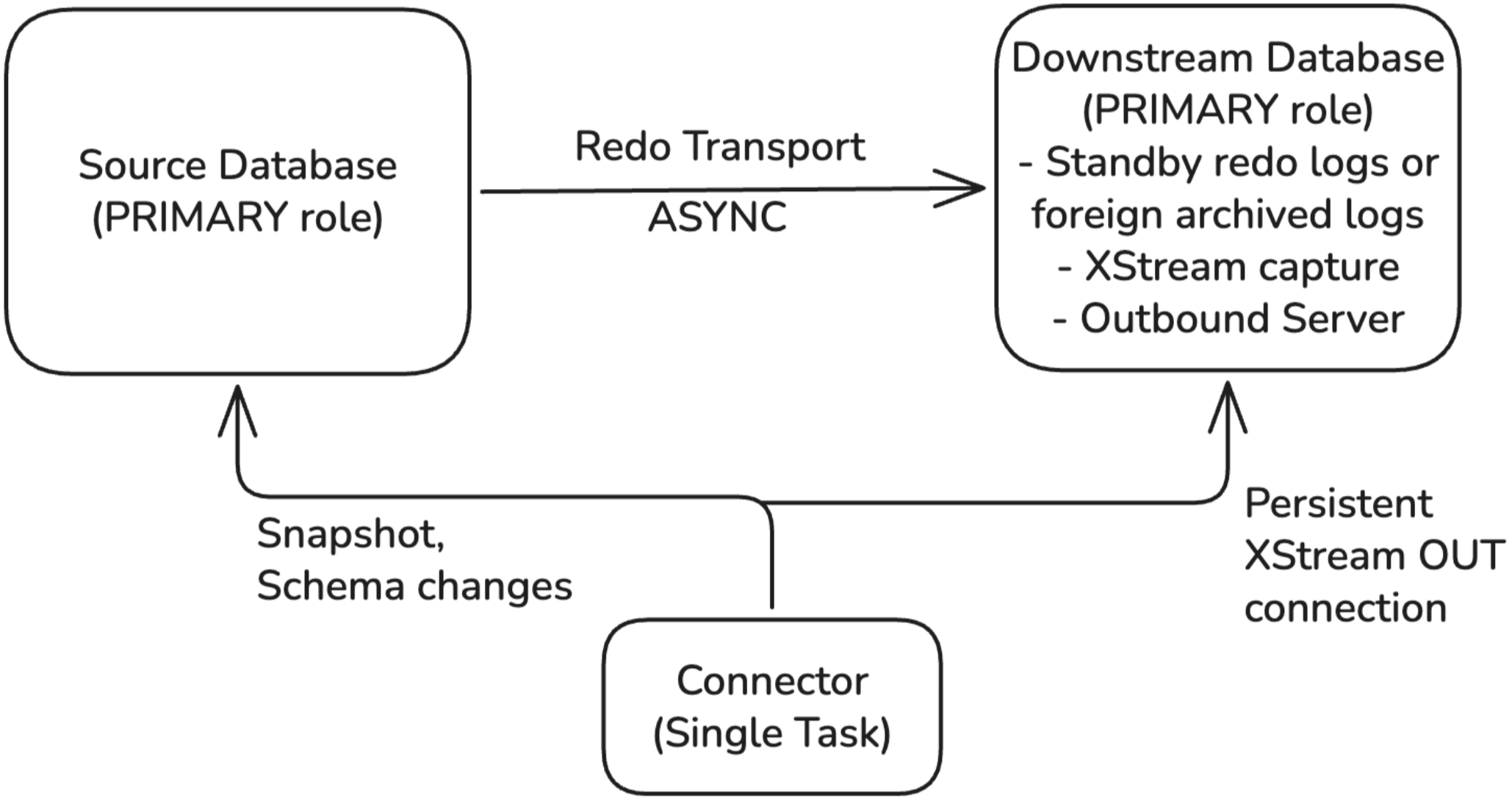
Both the source and the downstream must be PRIMARY databases. Downstream
capture cannot run on a standby database. For the topology in which redo
arrives at the downstream through a Data Guard standby, see
Cascading Downstream Capture for Oracle XStream CDC Source Connector for Confluent Platform.
Capture modes
XStream downstream capture supports two modes, distinguished by how redo arrives on the downstream database:
Aspect |
Real-time downstream capture |
Archived-log downstream capture |
|---|---|---|
Source of redo on downstream |
Standby redo logs |
Foreign archived redo logs |
Capture parameter |
|
Not set (defaults to |
|
|
|
Standby redo logs required on downstream |
Yes |
No |
Latency |
Low. Capture mines redo as RFS writes to standby logs. |
Higher. Waits for source log switch and archive shipment. |
Monitoring view on downstream |
|
|
Capture auto-restart after downstream recovery |
Automatic if the capture status was |
No. |
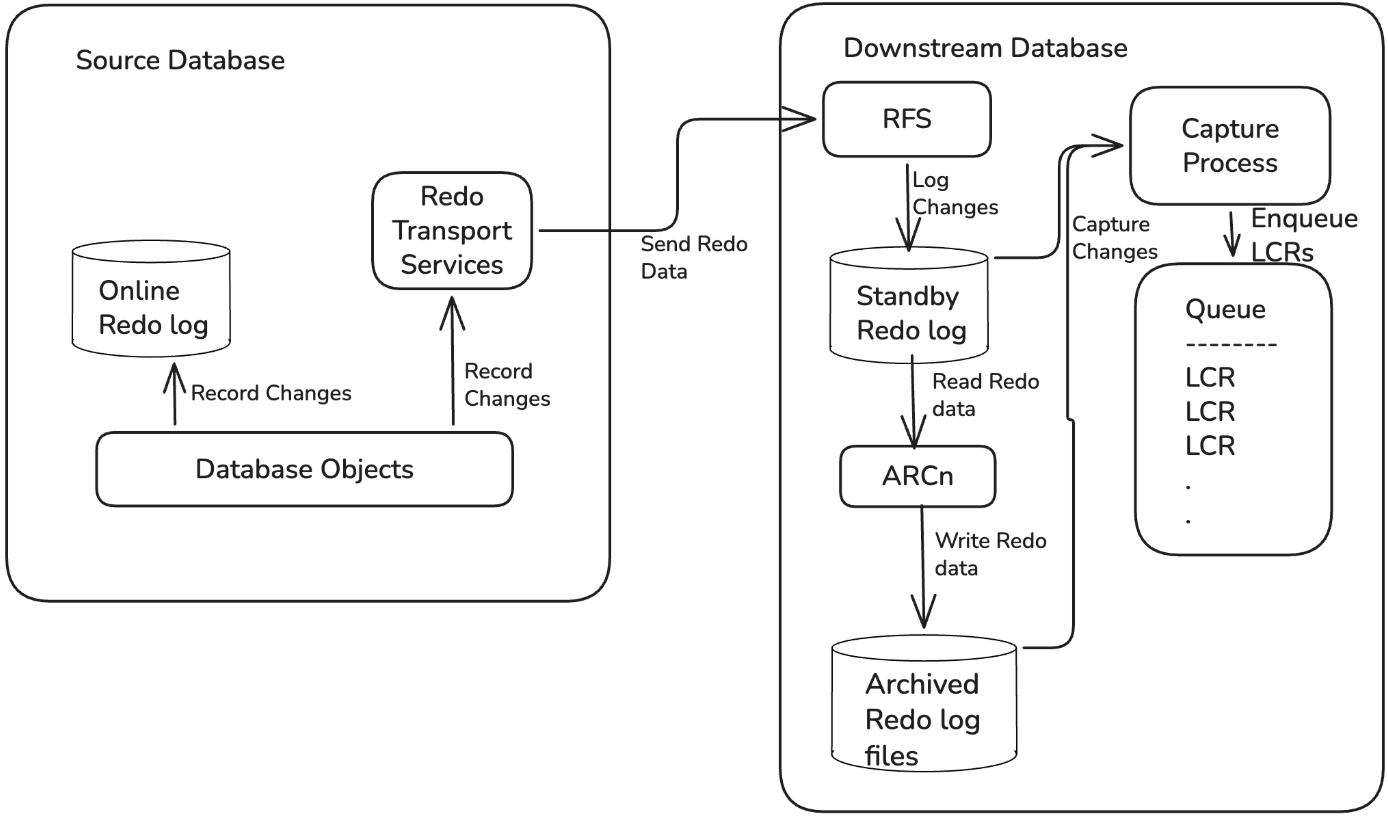
The following diagram shows how redo flows in real-time downstream capture mode.
The following diagram shows how redo flows in archived-log downstream capture mode.
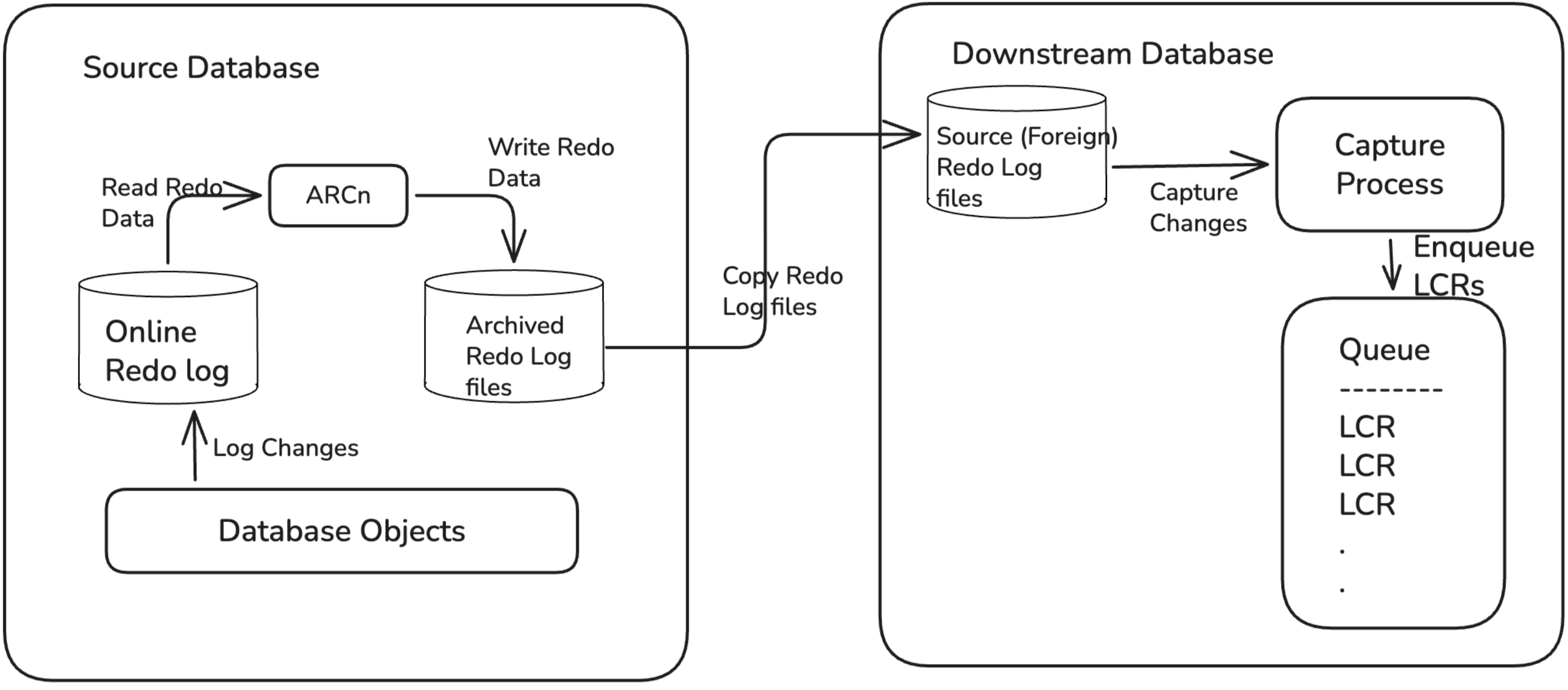
Both modes use a single XStream outbound server on the downstream and the same connector configuration. The difference is only in how redo arrives at the downstream.
Connector configuration
Downstream capture is enabled by setting one or more downstream.database.*
configuration properties. When any of these properties is set, the connector
enters downstream capture mode. When none are set, the connector runs in local
capture mode.
Note
The connector’s existing database.user and database.password
credentials are reused for both the source and the downstream connections.
The same user with the same password must exist on both databases. Distinct
credentials for each database are not supported.
database.pdb.name continues to refer to the source PDB. The initial
snapshot and all schema queries run against the source. The connector does not
include a separate downstream.database.pdb.name configuration. Because the
XStream queue, capture process, and outbound server run in the downstream CDB root,
the connector attaches to the CDB service name specified in downstream.database.service.name.
Configuration property |
Type |
Default |
Description |
|---|---|---|---|
|
|
(none) |
Required*. Hostname or IP address of the downstream Oracle database
server. Setting any |
|
|
|
Listener port for the downstream database. Use |
|
|
(none) |
Required*. Name of the downstream database. In a multitenant architecture, this is the CDB name. |
|
|
(none) |
Required*. Service name for connecting to the downstream database.
In a CDB, use the service for the CDB root. For an Oracle RAC
downstream, use the service auto-created for the XStream outbound
server ( |
|
|
|
TLS mode for the connector-to-downstream connection. One of
|
|
|
(empty) |
Directory path containing the Oracle client wallet ( |
* Required when downstream capture mode is activated (that is, when at least
one downstream.database.* property is set).
Configuration examples
Minimum configuration for a CDB source and CDB downstream:
{
  "name": "OracleCDC-Downstream",
  "config": {
    "connector.class": "io.confluent.connect.oracle.xstream.cdc.OracleXStreamSourceConnector",
    "tasks.max": "1",
    "database.hostname": "src-db.example.com",
    "database.port": "1521",
    "database.user": "C##CFLTUSER",
    "database.password": "<password>",
    "database.dbname": "SRCCDB",
    "database.service.name": "SRCCDB_DB.EXAMPLE.COM",
    "database.pdb.name": "SRCPDB1",
    "downstream.database.hostname": "cap-db.example.com",
    "downstream.database.port": "1521",
    "downstream.database.dbname": "CAPCDB",
    "downstream.database.service.name": "CAPCDB.EXAMPLE.COM",
    "database.out.server.name": "XOUT",
    "topic.prefix": "cflt",
    "table.include.list": "HR.EMPLOYEES",
    "schema.history.internal.kafka.bootstrap.servers": "broker:9092",
    "confluent.topic.bootstrap.servers": "broker:9092"
  }
}
For non-CDB databases, omit database.pdb.name, use user names
without the c## prefix, and qualify schemas without a PDB name:
{
  "config": {
    "database.hostname": "src-db.example.com",
    "database.user": "CFLTUSER",
    "database.dbname": "SRCDB",
    "database.service.name": "SRCDB_DB.EXAMPLE.COM",
    "downstream.database.hostname": "cap-db.example.com",
    "downstream.database.dbname": "CAPDB",
    "downstream.database.service.name": "CAPDB.EXAMPLE.COM",
    "database.out.server.name": "XOUT",
    "table.include.list": "DBUSER.EMPLOYEES"
  }
}
Source over plaintext TCP/1521 and downstream over mutual TLS on TCPS/2484 with its own wallet directory:
{
  "config": {
    "database.hostname": "src-db.example.com",
    "database.port": "1521",
    "downstream.database.hostname": "cap-db.example.com",
    "downstream.database.port": "2484",
    "downstream.database.tls.mode": "two-way",
    "downstream.database.wallet.location": "/opt/oracle/downstream-wallet"
  }
}
Database prerequisites
Before configuring the connector for downstream capture, your Oracle database administrator must complete the prerequisite setup on both the source and downstream databases. See Downstream capture database prerequisites.
Connector startup
The snapshot and streaming flow are unchanged from local capture, with one difference: the streaming phase attaches to the downstream’s outbound server rather than the source’s. Schema capture, the initial snapshot, and out-of-band schema queries continue to read from the source.
The following additional validations run at startup when downstream capture mode is active:
The downstream database is reachable, on a supported version, and the connect user has read access to the required catalog views at
CDB$ROOT(or at the database level for non-CDB), throughSELECT_CATALOG_ROLEor the equivalentSELECTgrants.The XStream outbound server is looked up on the downstream rather than on the source.
ARCHIVELOGmode is verified on the downstream in addition to the source.
Startup logs indicate when downstream capture mode is active and list both database hostnames.
Oracle Real Application Clusters (RAC)
Both the source and the downstream may be single-instance or RAC databases. All four source and downstream combinations are supported.
When the downstream is RAC, configure the capture and the connector as
documented in the local capture RAC section, substituting
downstream.database.hostname and downstream.database.service.name (not
database.hostname and database.service.name) for the SCAN address and
the auto-created XStream service name. The use_rac_service=Y mechanism,
the failover behavior, and SCAN-based reconnect are unchanged from local
capture.
When the source is RAC shipping to a downstream:
LOG_ARCHIVE_DEST_non every source instance must point at the downstream.The downstream needs
m+1standby redo log groups per source thread (n*(m+1)total for ann-thread RAC source withmgroups per thread), each assigned to the matchingTHREADnumber.For real-time downstream capture, both source instances ship to the same downstream RFS pool. For archived-log downstream capture, both instances archive independently to the foreign archive directory.
Transport Layer Security (TLS)
The connector connects to the source and the downstream independently. Each connection has its own TLS configuration:
Source:
database.tls.modeanddatabase.wallet.locationDownstream:
downstream.database.tls.modeanddownstream.database.wallet.location
The two settings are independent. Any combination of disable, one-way,
or two-way for each side is valid.
Topology |
Source to connector |
Downstream to connector |
Source to downstream (redo transport) |
|---|---|---|---|
Both plaintext |
TCP/1521 |
TCP/1521 |
TCP/1521 |
One-way TLS on both |
TCPS/2484, server cert verified |
TCPS/2484, server cert verified |
Configured independently at Oracle Net layer |
Mutual TLS on both |
TCPS/2484, mutual TLS |
TCPS/2484, mutual TLS |
Configured independently at Oracle Net layer |
Mixed (for example, one-way source, plaintext downstream) |
TCPS/2484 |
TCP/1521 |
Configured on the source side independently |
The redo-transport channel between the source and the downstream is a
database-to-database connection that the connector is not in the path of.
Configuring TLS on that channel uses the Oracle Net layer (TCPS listener on
the receiver, sender wallet trusting the receiver’s CA, and a TCPS service
alias referenced by LOG_ARCHIVE_DEST_n).
For securing redo transport, see Redo Transport Security in the Oracle documentation. For TLS support, see Database Security Guide in the Oracle documentation.
Restrictions
In addition to the existing local capture restrictions:
The source and the downstream must both be Oracle Enterprise Edition at the same release, with matching operating system family.
The downstream database must be in the
PRIMARYrole. Capture cannot run on a physical or logical standby. For the topology where redo arrives through a Data Guard standby, see Cascading Downstream Capture for Oracle XStream CDC Source Connector for Confluent Platform.The source and the downstream must have different
GLOBAL_NAMEvalues. Use a distinctDB_DOMAINifDB_NAMEwould otherwise collide.The capture process and the outbound server must both run on the same downstream database. Splitting them across two databases using XStream Propagation Send/Receive is not supported.
The connect user must exist on both databases with identical credentials.
Downstream-specific failure scenarios
Connector restart, snapshot resume, capture process restart, and outbound server failure behavior are the same as for local capture.
Downstream-specific behavior:
If the downstream is offline long enough for the source to archive multiple redo log files, the source retains unshipped logs subject to its own log-retention policy. The gap resolves automatically when the downstream comes back online. As an operator, configure the source archive retention to ensure it covers expected downstream downtime.
A capture process created without the
_SEND_STREAMS_DICTIONARYparameter set toINFINITEsilently skips DML and DDL changes for tables that were created before the capture process’s first SCN. Any capture process created against a source database that already contains the tables to capture is affected, including the first capture process you create. The connector keeps running while a subset of its tables produces no streaming change events. Set the parameter afterCREATE_CAPTUREand before the capture process is first started, as described in the downstream capture prerequisites. For detection and recovery, see No change events for pre-existing tables.
Monitoring and troubleshooting
For health check queries and troubleshooting procedures, see Downstream capture monitoring and troubleshooting.