

Track Events in Confluent Manager for Apache Flink
Confluent Manager for Apache Flink (CMF) records events for each Apache Flink® application, SQL statement, and compute pool. Events tell you why a resource is pending, failing, or restarting, even without access to the Kubernetes cluster.
An event is a timestamped record of something that happened to the resource: a user created or stopped it, its status changed, its job restarted after an exception, or the Confluent Platform for Apache Flink Kubernetes Operator reported a problem, such as an image that can’t be pulled or a container in a crash loop. CMF always records events, so there is nothing to turn on.
You can read events in the CMF UI or with the REST API. Each event has a
type, a severity of INFO or WARNING, a message, the number of times it
occurred, and the times it first and last occurred. The events of an
application also name the
application instance they belong to.
Event types
CMF records the following types of events. Not every resource has every type.
Type |
What it records |
Recorded for |
|---|---|---|
|
An action in CMF. Applications get an event when they are created and updated, statements when they are created, stopped, and resumed, and compute pools when they are created. Shared compute pools also get an event when they are suspended and resumed. |
Applications, statements, compute pools |
|
A change of the state of the Flink job of an application, from
|
Applications, statements |
|
A change of the lifecycle state of an application, from
|
Applications, compute pools |
|
An exception that made the Flink job restart. |
Applications, statements |
|
A change of the state of a savepoint, such as when a savepoint is created, completed, failed, abandoned, or deleted. |
Applications |
|
An event that the Kubernetes Operator reports while it deploys or runs the resource, such as a validation error, an image that can’t be pulled, or a container in a crash loop. |
Applications, statements, compute pools |
|
A scaling decision or a scaling problem that the Flink autoscaler reports. |
Applications, statements |
The types JOB_EXCEPTION, DEPLOYMENT_EVENT, and AUTOSCALER_EVENT come
from Kubernetes events. CMF records every Kubernetes event on the FlinkDeployment
or FlinkSessionJob that it creates for an application, statement, or
compute pool. Most of these events come from the Kubernetes Operator. Kubernetes
events on other objects, such as the FailedScheduling event of a pod that
doesn’t fit on a node, are not recorded. To see them, use
kubectl get events. The reason of the Kubernetes event sets its type.
JobException is a JOB_EXCEPTION. The autoscaler reasons
ScalingReport, ScalingLimited, ScalingVetoed,
IneffectiveScaling, MemoryPressure, ResourceQuotaReached,
AutoscalerError, and Configuration recommendation are an
AUTOSCALER_EVENT. Every other reason, such as ErrImagePull or
CrashLoopBackOff, is a DEPLOYMENT_EVENT.
The CLUSTER_STATUS events of an application report the following lifecycle
states of its FlinkDeployment:
CREATED: The resource was created in Kubernetes, but the Kubernetes Operator has not handled it yet.DEPLOYED: The resource is deployed, but it isn’t stable yet and can still be rolled back.STABLE: The deployment is stable and won’t be rolled back. The Flink cluster is healthy.SUSPENDED: The job is suspended.UPGRADING: The job is suspended before an upgrade to a new spec.ROLLING_BACK: The resource is being rolled back to the last stable spec.ROLLED_BACK: The resource runs with the last stable spec.FAILED: The job failed and won’t restart.
For the phases of a compute pool, see Manage Compute Pools in Confluent Manager for Apache Flink.
Events of statements and compute pools
Where CMF records an event depends on which resource owns the Flink cluster that the event is about. For the difference between shared and dedicated compute pools, see Manage Compute Pools in Confluent Manager for Apache Flink. A statement on a dedicated compute pool runs in its own Flink cluster, so all of its events are on the statement, including deployment events about its cluster. A statement on a shared compute pool runs as a job in the session cluster of the pool. The statement reports events about its job, and the compute pool reports events about the session cluster. When a statement on a shared compute pool doesn’t start, read the events of both the statement and its compute pool. The statement page in the CMF UI shows a banner when the compute pool has a problem. For details about the banner, see Compute pool banner on statements.
A shared compute pool reports only events about its own session cluster, and never the events of the statements that run in it. A dedicated compute pool only describes the clusters that CMF creates for its statements, so its only event is its creation.
You can delete a compute pool that statements still use only when the pool is
FAILED. CMF then moves those statements to FAILED and records a
JOB_STATUS warning on each of them with the message Statement transitioned
to FAILED because compute pool '<name>' was deleted.
Event severity
A JOB_EXCEPTION, DEPLOYMENT_EVENT, or AUTOSCALER_EVENT takes the
severity of its Kubernetes event: a Warning event is WARNING, and any
other event is INFO. A JOB_STATUS, CLUSTER_STATUS, or
SAVEPOINT_STATUS event is WARNING when the resource moves to a failure
state, and INFO otherwise. The failure states are:
FAILINGandFAILEDfor statements and compute pools.FAILINGandFAILEDfor the Flink job of an application, andFAILED,ROLLING_BACK, andROLLED_BACKfor its lifecycle.FAILEDandABANDONEDfor savepoints.
A CMF_STATUS event, such as the creation of a statement, is always
INFO. To
see only the problems of a resource, turn on Warnings only in the CMF UI,
or filter on severity=WARNING in the REST API.
Recurring events and occurrence counts
CMF stores one record for each Kubernetes event that the Kubernetes Operator
reports. When the operator reports the same Kubernetes event again, CMF updates
that record instead of storing a new one. status.count takes the
occurrence count that Kubernetes reports, metadata.updateTimestamp moves to
the latest occurrence, and the message changes to the latest message.
metadata.creationTimestamp stays the time of the first occurrence. A job
exception that recurs with the same message, for example, stays one event whose
count climbs each time the job restarts. A job exception whose message changes
each time, such as one that names the value that failed, is a new event each
time.
The Kubernetes Operator decides which occurrences share a Kubernetes event. It
usually groups occurrences with the same reason and message, but it also groups
some different messages, such as consecutive autoscaler scaling reports. Status
changes and actions in CMF are never grouped, and their count is always
1.
View events in the CMF UI
Applications, statements, and shared compute pools each have an Events log tab on their details page. The page of a dedicated compute pool has no tabs. Its only event is its creation, which you can read with the REST API.
The table shows one event per row with the columns Event reason,
Message, Count, First occurrence time, and Last occurrence
time. For a DEPLOYMENT_EVENT or an AUTOSCALER_EVENT, the reason is the
reason of the Kubernetes event, such as ErrImagePull. For every other event,
it is the event type, such as JOB_EXCEPTION. Each row also shows whether the
event is a warning.
The table lists the events with the latest occurrence first. You can sort it by
Count, First occurrence time, or Last occurrence time. Turn on
Warnings only to hide INFO events, use the Type filter to show only
some event types, and use the search box to find events by their message.
Expand a row with the arrow at its start to see the full message of the event,
including any stack trace. For an application, the expanded event also shows
the Flink application instance.
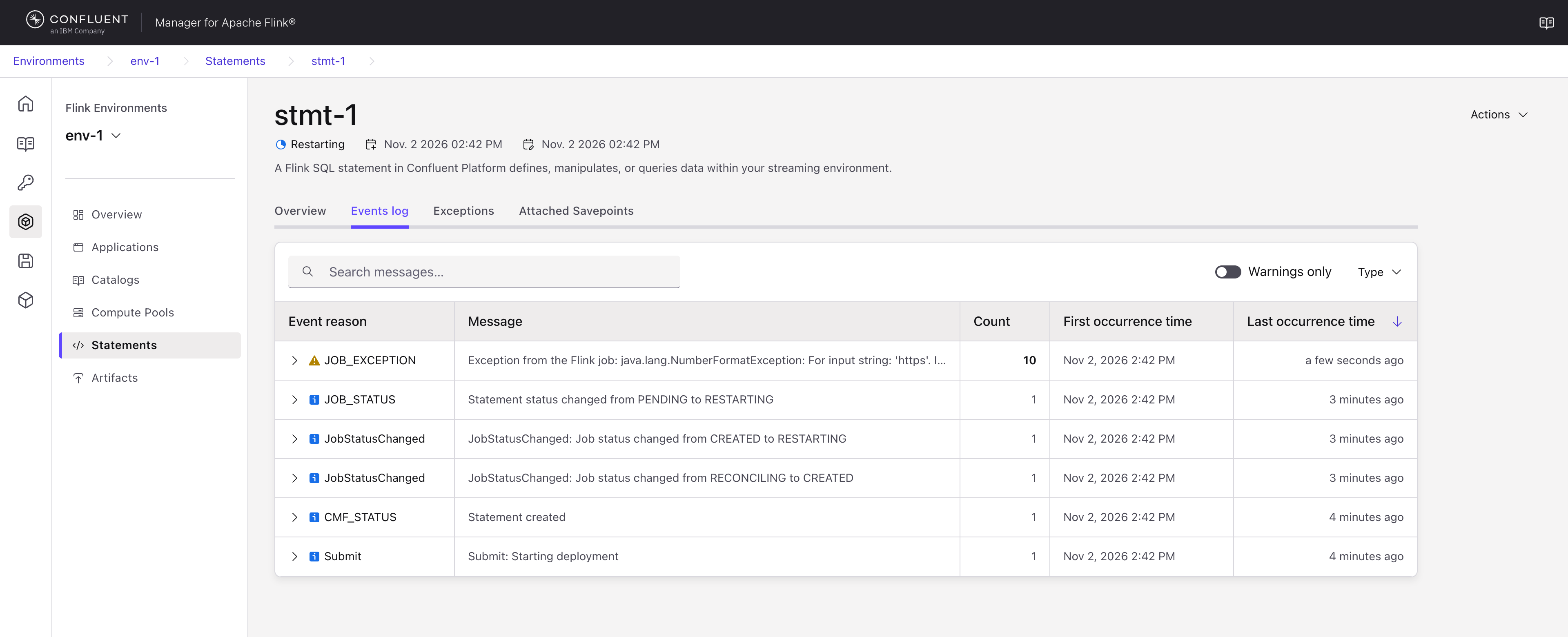
The following Events log of a statement shows a job exception that recurred 10 times with the same message, above the events of the statement’s start:
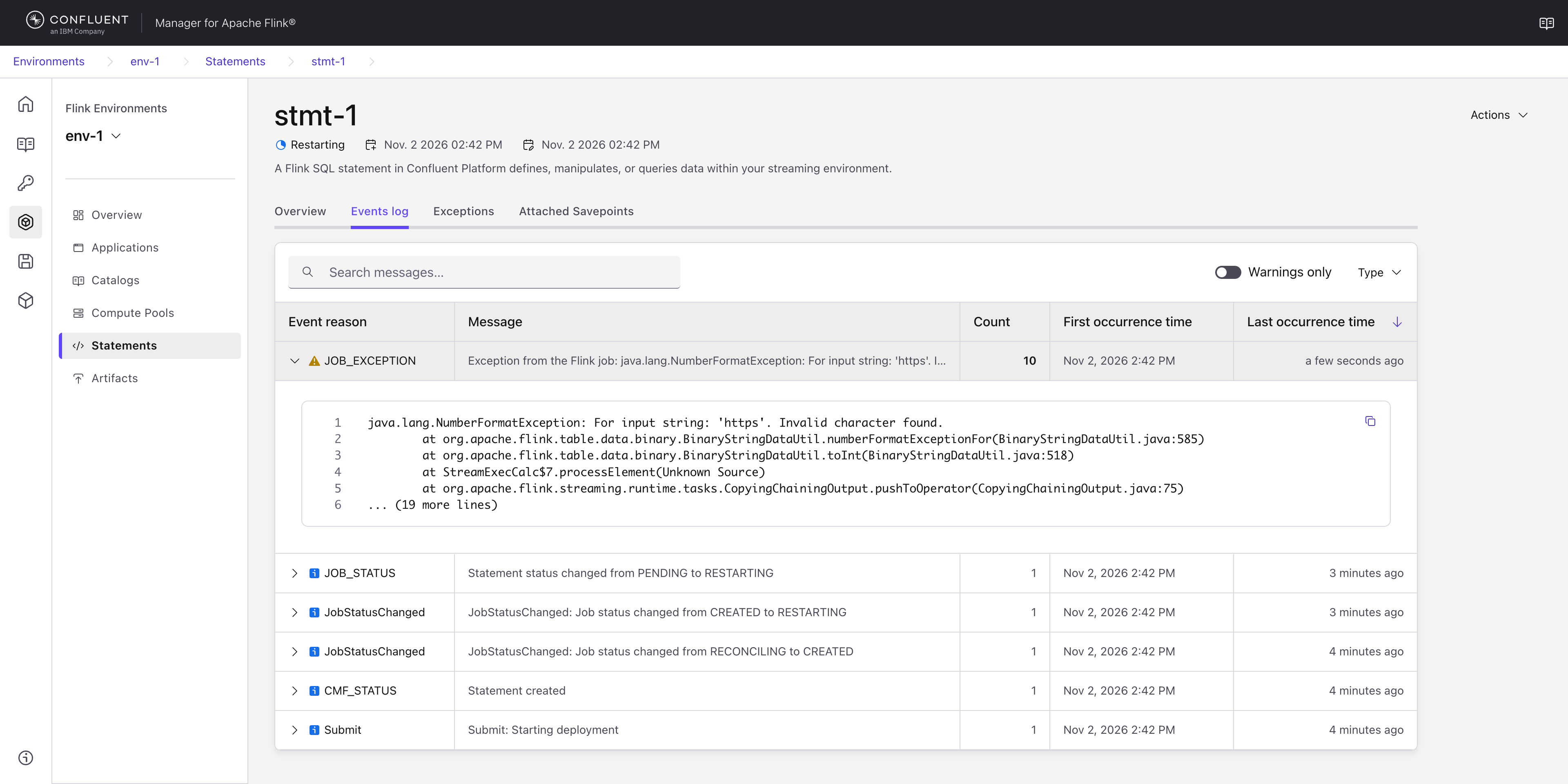
Expanding the job exception shows its stack trace:
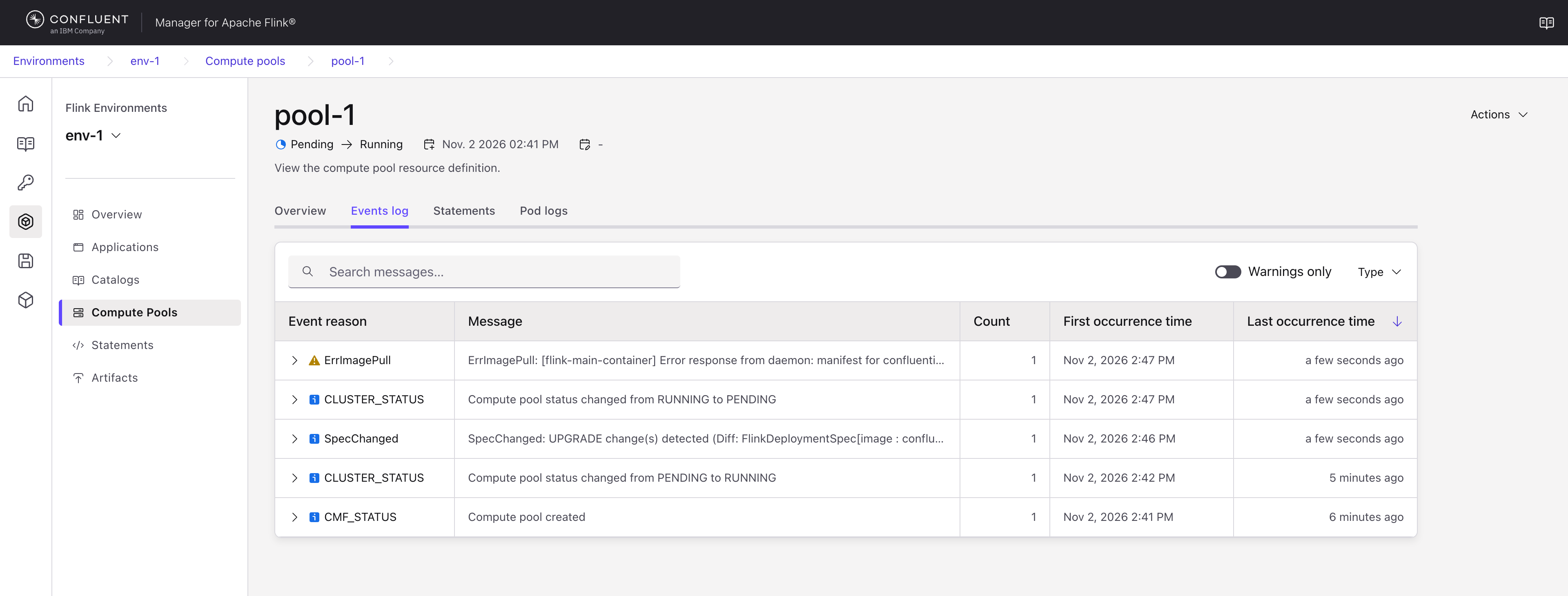
The following Events log of a shared compute pool shows the pool going
from RUNNING back to PENDING after its image was changed to one that
doesn’t exist, with the ErrImagePull warning that explains why:
Compute pool banner on statements
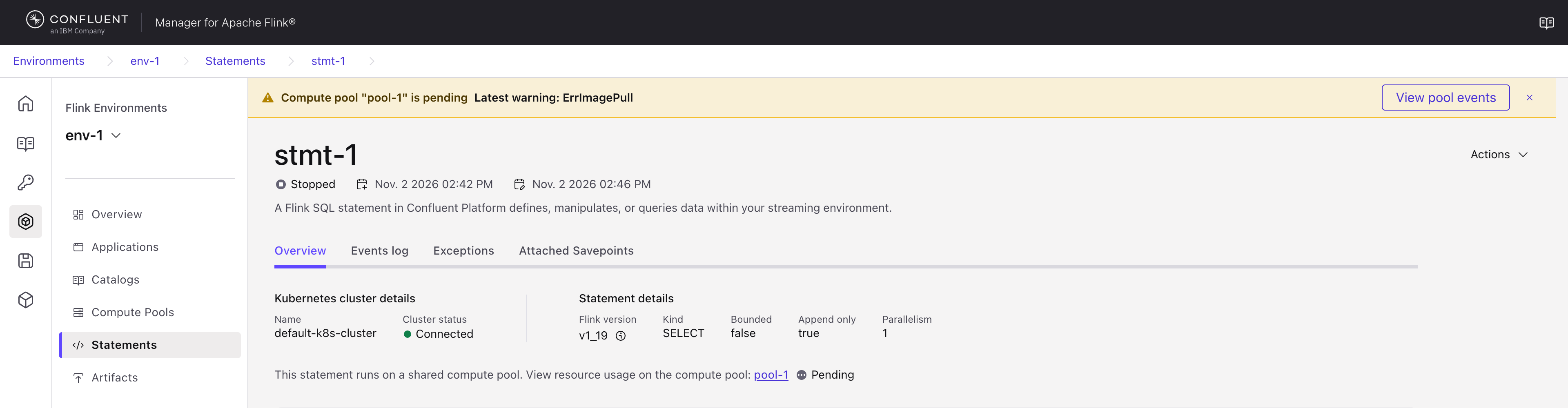
A statement on a shared compute pool can’t report problems of the session cluster it runs in. Instead, the details page of the statement shows a banner on every tab in two cases:
When the compute pool is
FAILINGorFAILED, an error banner says that the pool is failing or has failed.When the compute pool is
PENDINGand its latest event is a warning, a warning banner says that the pool is pending. A pool whose image can’t be pulled, for example after its image was changed, staysPENDING.
If the compute pool has had a warning from a Kubernetes event since it was last
RUNNING, the banner names the reason of the most recent one, for example
Latest warning: ErrImagePull. View pool events opens the Events
log of the compute pool. In all other cases, for example for a statement on a
dedicated compute pool or on a RUNNING shared compute pool, there is no
banner. The banner also needs View permission on the compute pool. Without it,
the statement page shows no banner.
Get events with the REST API
Each resource has an events endpoint:
GET /cmf/api/v1/environments/{envName}/applications/{appName}/events
GET /cmf/api/v1/environments/{envName}/statements/{stmtName}/events
GET /cmf/api/v1/environments/{envName}/compute-pools/{computePoolName}/events
The following request gets the events of the compute pool pool-1:
curl http://localhost:8080/cmf/api/v1/environments/env-1/compute-pools/pool-1/events
For a compute pool that can’t pull its image, the response looks like the following:
{
  "pageable": null,
  "metadata": {
    "size": 2
  },
  "items": [
    {
      "apiVersion": "cmf.confluent.io/v1",
      "kind": "ResourceEvent",
      "metadata": {
        "creationTimestamp": "2026-11-02T09:05:21Z",
        "flinkApplicationInstance": null,
        "name": "1edbf278-7b27-4a01-b2ed-c912291f49e5",
        "resourceKind": "ComputePool",
        "uid": "1edbf278-7b27-4a01-b2ed-c912291f49e5",
        "updateTimestamp": "2026-11-02T09:05:21Z"
      },
      "status": {
        "count": 1,
        "data": {
          "message": "[flink-main-container] Error response from daemon: manifest for confluentinc/cp-flink-sql:1.19-cp99 not found: manifest unknown: manifest unknown",
          "reason": "ErrImagePull"
        },
        "message": "ErrImagePull: [flink-main-container] Error response from daemon: manifest for confluentinc/cp-flink-sql:1.19-cp99 ",
        "severity": "WARNING",
        "type": "DEPLOYMENT_EVENT"
      }
    },
    {
      "apiVersion": "cmf.confluent.io/v1",
      "kind": "ResourceEvent",
      "metadata": {
        "creationTimestamp": "2026-11-02T09:03:51.367Z",
        "flinkApplicationInstance": null,
        "name": "d8f8651a-663e-4c87-adb1-0068bcf197cd",
        "resourceKind": "ComputePool",
        "uid": "d8f8651a-663e-4c87-adb1-0068bcf197cd",
        "updateTimestamp": "2026-11-02T09:03:51.367Z"
      },
      "status": {
        "count": 1,
        "data": null,
        "message": "Compute pool created",
        "severity": "INFO",
        "type": "CMF_STATUS"
      }
    }
  ]
}
metadata.resourceKind is FlinkApplication, Statement, or
ComputePool. For the events of an application,
metadata.flinkApplicationInstance is the instance they belong to. For the
events of a statement or a compute pool, it is null.
status.data depends on the type: a status change has the new state in
newStatus, a job exception has its stack trace in exceptionString, and a
deployment or autoscaler event has the reason and the message of the
Kubernetes event. For these events, status.message is the reason followed by
the first line of the message, cut at 100 characters, as in the previous
example. For a job exception, status.message is Exception from the Flink
job: followed by the first line of the exception, cut the same way.
status.data keeps the full text.
The endpoints return the newest events first. To get only some events, or to
change their order, use the filter and sort query parameters. The
following request gets the warnings of the statement stmt-1, with the most
frequent first:
curl -G http://localhost:8080/cmf/api/v1/environments/env-1/statements/stmt-1/events \
  --data-urlencode "filter=severity=WARNING" \
  --data-urlencode "sort=count,desc"
You can also filter on the type, for example with
filter=type in (DEPLOYMENT_EVENT, AUTOSCALER_EVENT). An unknown type or
severity value returns a 400 Bad Request. For the full query syntax, see
Query parameters.
The application events endpoint of earlier CMF versions still works:
GET /cmf/api/v1alpha1/environments/{envName}/applications/{appName}/events
It returns FlinkApplicationEvent objects, which don’t have a severity.
Configure event retention
CMF stores at most 100 events for each application, statement, and compute pool. Each time CMF records an event for a resource that is over the limit, it deletes the events of that resource whose latest occurrence is the oldest, so an event that keeps recurring stays. Because a recurring event updates one record, a resource that fails in a loop doesn’t fill the limit with copies of the same event.
To change the limit, set cmf.resource-events.max-events-per-resource. Set it
to 0 to keep all events. Add the value to the Helm values file that you
installed CMF with:
cmf:
  resource-events:
    max-events-per-resource: 200
Then apply the values file:
helm upgrade --install cmf confluentinc/confluent-manager-for-apache-flink \
  --version "~2.5.0" \
  --namespace <namespace> \
  -f values.yaml
A lower limit takes effect for a resource the next time it records an event.
The cmf.application-events.max-events-per-application value from earlier
CMF versions is deprecated as of CMF 2.5.0, and the Helm chart doesn’t set
it. If your values
file sets it, it sets the limit for applications, and
cmf.resource-events.max-events-per-resource applies only to statements and
compute pools. Move its value to cmf.resource-events.max-events-per-resource
and remove it.
When you delete an application, statement, or compute pool, CMF deletes its events. Deleting a compute pool doesn’t delete the events of the statements that ran in it.
Access to events
If you use role-based access control (RBAC), a user needs View permission on an application, statement, or
compute pool to read its events. A user who can view a statement but not its
compute pool sees the events of the statement, but not the events of the pool or
the compute pool banner. For example, the following role binding lets
u-developer read the events of the compute pool shared-pool:
confluent iam rbac role-binding create \
    --principal User:u-developer \
    --role DeveloperRead \
    --cmf <cmf_id> \
    --flink-environment prod-env \
    --resource FlinkComputePool:shared-pool
Replace <cmf_id> with the ID of your CMF cluster. For more information
about cluster IDs, see Cluster identifiers. For the roles that grant View permission, see
Configure Access Control for Confluent Manager for Apache Flink.