

Migrate from LDAP to mTLS in an RBAC-enabled Confluent Platform Cluster
You can migrate an existing role-based access control (RBAC)-enabled Confluent Platform cluster from HTTP Basic authentication (Lightweight Directory Access Protocol, or LDAP) to mutual TLS (mTLS) authentication without disrupting running workloads. This migration provides the following:
RBAC principal compatibility: Preserves existing RBAC access rules when you maintain principal mapping. For example, if an access policy applies to user
schema-registry, the principal extracted from the mTLS certificate must matchschema-registry. For details about extracting principals, see Use Principal Mapping in Confluent Platform.Zero downtime for clients: Enables Confluent Platform services to accept both mTLS certificates and MDS-issued bearer tokens simultaneously using
AuthenticationHandler. Additionally, Metadata Service (MDS) accepts mTLS certificates while retaining LDAP as the backing user store, ensuring backward compatibility for unmigrated clients.
Limitations
Group-based authorization: Confluent Platform mTLS identities don’t support group-based authorization in RBAC. Before migrating services or client applications to mTLS, convert all group-based access policies into individual principal role bindings.
Version support: mTLS with RBAC requires Confluent Platform 7.8 or later. The 7.8 limitation that only new deployments support mTLS RBAC applies to upgrading from ACLs without a backing identity provider, not to this scenario of migrating an existing LDAP-backed RBAC cluster.
Command-line management: Confluent CLI doesn’t support user authentication with mTLS RBAC. To manage role bindings during and after migration, use the REST API or a principal that authenticates to MDS using LDAP or OAuth.
Prerequisites
Before you begin, make sure you have:
Confluent Platform 7.8 or later.
An existing RBAC-enabled Confluent Platform cluster with MDS configured to use LDAP as its backing user store.
A certificate authority (CA) able to issue a certificate for brokers and Confluent Platform services that migrate to mTLS.
A non-mTLS administrator principal, authenticating through OAuth or the existing LDAP store, to manage role bindings during and after migration. See the CLI management limitation.
Access to your cluster’s current LDAP configuration, so you can confirm which principals and groups have role bindings today.
Sample cluster with migration from LDAP to mTLS
The following diagram illustrates a Confluent Platform cluster using RBAC authorization before migrating from LDAP-backed HTTP Basic authentication to mTLS.
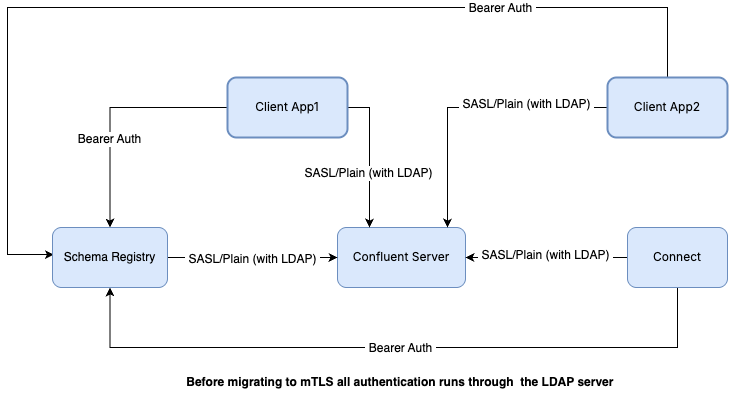
Pre-migration cluster state
MDS: Uses HTTP Basic authentication, backed by an LDAP server as the user store.
Confluent Server brokers: Use SASL/PLAIN authentication, also backed by the LDAP user store.
Token authentication: After MDS validates a client’s credentials, it issues a bearer token. Both Confluent Platform services and client applications use this token for later authentication requests across the cluster.
The following diagram illustrates the cluster state during the migration phase, when both LDAP and mTLS authentication are accepted:
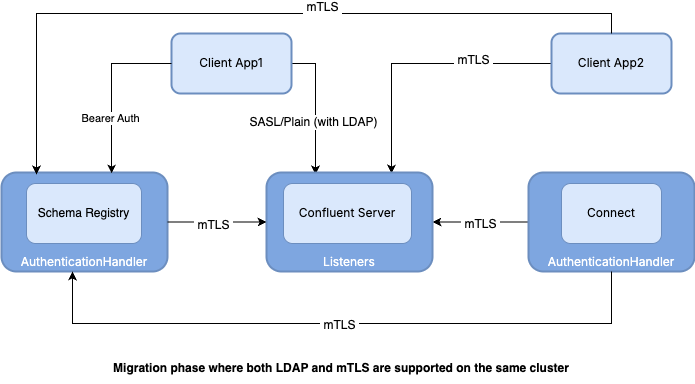
Migration-phase cluster state
MDS: Accepts TLS certificates for mTLS authentication.
Services: REST-based services like Schema Registry and Connect use the AuthenticationHandler class to accept both MDS-issued bearer tokens and mTLS certificates simultaneously. Confluent Server is also configured to accept mTLS for client authentication.
Clients and internal traffic: Client app 1 and all internal service-to-service traffic are migrated to mTLS, while Client app 2 continues using LDAP.
RBAC rules: Require no changes because the user principals for clients and services remain identical before and after migration.
Request forwarding: Combines mTLS for service-to-service authentication with token-based authorization for end-user requests. For example, Confluent Control Center forwards end-user requests to underlying Confluent Platform services.
To prevent authentication failures during migration, platform services
might use REQUESTED mode for certificate-based authentication.
For the full list of supported values and other configuration options,
see Configure mTLS RBAC in Confluent Platform.
The AuthenticationHandler class
The AuthenticationHandler class enables zero-downtime authentication
migration by allowing REST-based services to accept MDS-issued bearer
tokens and mTLS certificates simultaneously. It applies only to
REST-based services, including Schema Registry, REST Proxy, and Connect. Apache Kafka®
brokers and MDS do not use AuthenticationHandler directly. You must use
their dedicated mTLS configuration parameters described in the following
sections.
Configure AuthenticationHandler for a REST-based service
To configure AuthenticationHandler for a REST-based service, set
rest.servlet.initializor.classes and the service’s mTLS-related
properties.
AuthenticationHandler overrides the REST framework’s security handler
and independently handles mTLS certificates based on
ssl.client.authentication. For the complete property reference, see
Use the AuthenticationHandler Class for Multi-Protocol Authentication in Confluent Platform.
During migration, set ssl.client.authentication=REQUESTED instead
of REQUIRED. This keeps client certificates optional on that
service, supporting dual authentication:
Unmigrated clients: Continue authenticating with existing LDAP-backed HTTP Basic credentials.
Migrated clients: Authenticate over mTLS when presenting a valid certificate.
Migrate from LDAP to mTLS
Complete the following procedure to migrate from LDAP to mTLS. For component-specific configuration properties, see Configure mTLS RBAC in Confluent Platform.
The steps update the cluster in sequence: MDS, Kafka brokers, REST-based services, internal services, client applications, and cutover.
Restart, or rolling-restart, each component after you change its properties file and before moving to the next step.
Prepare for migration
Save existing role bindings.
Export current role bindings for all target principals to establish a baseline for post-migration comparison. The
--principalfilter accepts bothUser:andGroup:principals, so run the command once for each principal:confluent iam rbac role-binding list --principal User:<principal-name> --kafka-cluster $KAFKA_CLUSTER_ID confluent iam rbac role-binding list --principal Group:<group-name> --kafka-cluster $KAFKA_CLUSTER_ID
Replace group-based role bindings with per-principal role bindings.
Confluent Platform mTLS identities don’t support group-based authorization. Before migrating any clients or services, use
confluent iam rbac role-binding createto re-create each LDAP group role binding found in the previous step as an individual principal role binding.Generate certificates and define principal mapping rules.
Generate a keystore and truststore for each broker and Confluent Platform service. Then, define
ssl.principal.mapping.rules, or the component-specific variant, to extract the principal from each certificate’s Distinguished Name (DN). To preserve the existing RBAC role bindings, the extracted principal must match the LDAP principal. For example:ssl.principal.mapping.rules=RULE:.*CN=([a-zA-Z0-9.-]*).*$/$1/,DEFAULT
Under this rule,
C=IN, ST=KA, O=CFLT, CN=schema-registrymaps toschema-registry, matching the existing LDAP principal. For more information about principal mapping properties per component, see Use Principal Mapping in Confluent Platform.
Enable mTLS with LDAP
Enable mTLS on MDS while retaining LDAP.
Add an HTTPS listener to MDS and set client certificate authentication to
REQUESTED. This enables mTLS along with the existing LDAP user store without disrupting unmigrated clients:# Add HTTPS listener and configure TLS keystore or truststore confluent.metadata.server.listeners=<existing-listeners>,https://0.0.0.0:8090 confluent.metadata.server.advertised.listeners=<existing-advertised-listeners>,https://<mds-hostname>:8090 confluent.metadata.server.ssl.keystore.location=/path/to/keystore.jks confluent.metadata.server.ssl.keystore.password=<keystore-password> confluent.metadata.server.ssl.key.password=<key-password> confluent.metadata.server.ssl.truststore.location=/path/to/truststore.jks confluent.metadata.server.ssl.truststore.password=<truststore-password> # Accept mTLS certificates and map certificate CN to principal name confluent.metadata.server.ssl.client.authentication=REQUESTED confluent.metadata.server.auth.ssl.principal.mapping.rules=RULE:.*CN=([a-zA-Z0-9.-]*).*$/$1/,DEFAULT # Preserve LDAP user store and token authentication during transition confluent.metadata.server.authentication.method=BEARER
confluent.metadata.server.authentication.methodis specific to MDS. MDS overrides the REST framework’s default security handler, which lets it acceptBEARERand continue issuing tokens against the LDAP-backed user store throughout the migration.During the final cutover, set
confluent.metadata.server.ssl.client.authenticationtoREQUIRED, after all clients authenticate to MDS using certificates. For MDS mTLS configuration options, including impersonation settings, see Configure mTLS RBAC in Confluent Platform.Restart MDS to apply these changes.
Configure
AuthenticationHandleron Schema Registry, Connect, and REST Proxy.Set
rest.servlet.initializor.classeson each REST-based service so it accepts both the existing MDS-issued bearer tokens and new mTLS certificates, as described in The AuthenticationHandler class. For example, on Schema Registry (schema-registry.properties):rest.servlet.initializor.classes=io.confluent.common.security.jetty.initializer.AuthenticationHandler ssl.client.authentication=REQUESTED ssl.truststore.location=/path/to/truststore.jks ssl.truststore.password=<truststore-password> ssl.keystore.location=/path/to/keystore.jks ssl.keystore.password=<keystore-password> ssl.key.password=<key-password> auth.ssl.principal.mapping.rules=RULE:.*CN=([a-zA-Z0-9.-]*).*$/$1/,DEFAULT
Connect and standalone REST Proxy use the same property. When REST Proxy is embedded in another service, prefix the property with
kafka.rest., for example,kafka.rest.rest.servlet.initializor.classes=.... For complete configuration examples, see Use the AuthenticationHandler Class for Multi-Protocol Authentication in Confluent Platform.REST Proxy also requires a
SASL_SSLlistener and additional impersonation properties to forward its client identity to Kafka. For the full REST Proxy property set, see Configure mTLS RBAC in Confluent Platform.Restart each REST-based service you updated to apply these changes.
Add an mTLS listener to Kafka brokers.
Add a dedicated listener for mTLS clients while retaining your existing LDAP-backed listener. Migrated and not-yet-migrated clients then connect concurrently without service disruption:
listeners=...,MTLS://:9096
listener.security.protocol.map=...,MTLS:SSL

listener.name.mtls.ssl.client.auth=requested
listener.name.mtls.ssl.truststore.location=/path/to/server.truststore.jks
listener.name.mtls.ssl.truststore.password=<truststore-password>
listener.name.mtls.ssl.keystore.location=/path/to/server.keystore.jks
listener.name.mtls.ssl.keystore.password=<keystore-password>
listener.name.mtls.ssl.key.password=<key-password>
listener.name.mtls.ssl.principal.mapping.rules=RULE:.*CN=([a-zA-Z0-9.-]*).*$/$1/,DEFAULT
Set
listener.name.mtls.ssl.client.authtorequestedduring the migration phase, and set it torequiredafter every client that connects on this listener has switched to a certificate. For a complete listener configuration reference, including the interbroker listener, see Configure mTLS RBAC in Confluent Platform and Configure mTLS Authentication and RBAC for Kafka Brokers.Perform a rolling restart of your brokers, one at a time, to add the new listener without taking the cluster down.
Migrate services and clients to mTLS
Migrate Connect to mTLS.
Update each Connect worker’s properties file to authenticate with certificates instead of MDS-issued bearer tokens when connecting to brokers and MDS. For example, a Connect worker connecting to the new mTLS listener from the previous step uses the following (
connect-distributed.properties):bootstrap.servers=<kafka-host>:9096 security.protocol=SSL ssl.truststore.location=/path/to/truststore.jks ssl.truststore.password=<truststore-password> ssl.keystore.location=/path/to/keystore.jks ssl.keystore.password=<keystore-password> ssl.key.password=<key-password> producer.security.protocol=SSL producer.ssl.truststore.location=/path/to/truststore.jks producer.ssl.truststore.password=<truststore-password> producer.ssl.keystore.location=/path/to/keystore.jks producer.ssl.keystore.password=<keystore-password> producer.ssl.key.password=<key-password> consumer.security.protocol=SSL consumer.ssl.truststore.location=/path/to/truststore.jks consumer.ssl.truststore.password=<truststore-password> consumer.ssl.keystore.location=/path/to/keystore.jks consumer.ssl.keystore.password=<keystore-password> consumer.ssl.key.password=<key-password> # Connection to MDS confluent.metadata.ssl.truststore.location=/path/to/truststore.jks confluent.metadata.ssl.truststore.password=<truststore-password> confluent.metadata.ssl.keystore.location=/path/to/keystore.jks confluent.metadata.ssl.keystore.password=<keystore-password> confluent.metadata.ssl.key.password=<key-password>
Remove any
confluent.metadata.basic.auth.user.infoandconfluent.metadata.http.auth.credentials.providerproperties, since they are no longer needed once the worker authenticates to MDS with a certificate. Restart each Connect worker to apply these changes.Migrate ksqlDB to mTLS.
ksqlDB requires both an inbound and an outbound change. Inbound, its server accepts mTLS clients (
ksql-server.properties):security.protocol=SSL ssl.client.authentication=REQUESTED ssl.key.password=<key-password> ssl.keystore.location=<keystore-location> ssl.keystore.password=<keystore-password> ssl.principal.mapping.rules=RULE:.*CN=([a-zA-Z0-9.-]*).*$/$1/,DEFAULT ssl.truststore.location=<truststore-location> ssl.truststore.password=<truststore-password> # to pass the impersonated token to Kafka ksql.kafka.delegate.client.bootstrap.servers=<sasl-ssl-kafka-bootstrap-server> ksql.kafka.delegate.client.security.protocol=SASL_SSL
Outbound, ksqlDB authenticates to MDS the same way Connect does in the previous step, using the equivalent
confluent.metadata.ssl.*properties. Restart ksqlDB to apply these changes.Migrate Confluent Control Center to mTLS.
Update Confluent Control Center to use its own
confluent.controlcenter.*-prefixed properties to connect to Kafka, Schema Registry, and Connect over mTLS. Confluent Control Center Streams cannot authenticate over pure mTLS, so keep a token-acceptingSASL_SSLlistener available for it, as described in Configure mTLS RBAC in Confluent Platform. Restart Confluent Control Center to apply these changes.Configure impersonation for multi-node services.
If you deploy a service with more than one node, request forwarding from follower to leader also uses mTLS. Add that service’s principal to the secure impersonation super user list on MDS:
confluent.metadata.server.impersonation.super.users=User:<connect-principal-name>;User:<ksql-principal-name>;User:<other-super-user>
confluent.metadata.server.impersonation.protected.users=User:<connect-principal-name>;User:<other-super-user>
For a complete description of this impersonation flow, see Request Forwarding from Follower to Leader in Confluent Platform. For the complete per-service property reference, including Schema Registry, REST Proxy, and Confluent Control Center, see Configure mTLS RBAC in Confluent Platform. Restart MDS to apply these changes.
Migrate client applications one at a time.
For each producer, consumer, or other client application, replace its SASL-based, LDAP-backed configuration with the standard Kafka mTLS client properties:
security.protocol=SSL
ssl.truststore.location=/path/to/client.truststore.jks
ssl.truststore.password=<truststore-password>
ssl.keystore.location=/path/to/client.keystore.jks
ssl.keystore.password=<keystore-password>
ssl.key.password=<key-password>
After switching each client, rerun the role binding command from the first step and compare the result to your saved baseline. If the mapped mTLS principal matches the previous LDAP principal, no role binding changes are required.
Cut over and retire LDAP
Cut over and retire LDAP.
After all clients and Confluent Platform services authenticate over mTLS:
Authentication: Change
ssl.client.authon brokers fromrequestedtorequired, and changessl.client.authenticationon REST-based services andconfluent.metadata.server.ssl.client.authenticationon MDS fromREQUESTEDtoREQUIRED.LDAP settings: If no clients rely on LDAP, remove the legacy LDAP-backed listener, any
basic.auth.ldap.*properties from REST-based services, and theldap.*properties on MDS.User store: Set
confluent.metadata.server.user.storetoNONEon MDS.
Restart every component you changed to apply the cutover.
Verify role bindings.
Rerun the role binding command for each migrated principal and compare the output against your baseline:
confluent iam rbac role-binding list --principal User:<principal-name> --kafka-cluster $KAFKA_CLUSTER_ID
If the extracted principals match your baseline, no role binding updates are required. Access authorization remains unchanged, now backed by the mTLS principal instead of the LDAP principal.
Note
Run this verification, and any later role-binding management, with the non-mTLS administrator principal noted in the Limitations above. Confluent CLI can’t authenticate under mTLS RBAC, so once you complete the previous step and retire the LDAP user store on MDS, the CLI has no way to authenticate unless that principal still reaches MDS through OAuth.
Troubleshooting
Invalid certificate fails authentication in REQUESTED mode
Symptom: A client with an invalid or expired certificate fails to
authenticate, even though the listener is set to REQUESTED.
Cause: REQUESTED mode makes presenting a certificate optional,
not the certificate’s validity. Any certificate a client presents
must be valid, so an invalid or expired one fails authentication.
Resolution: Reissue the client’s certificate, or have the client fall back to its existing LDAP-backed credentials until a valid certificate is available.
Role bindings stop working after migrating a principal
Symptom: A client or service loses access after you migrate it to mTLS, even though you didn’t change its role bindings.
Cause: The ssl.principal.mapping.rules property, or its
component-specific variant, extracted a different value from the
certificate’s Distinguished Name (DN) than the principal name RBAC used
under LDAP.
Resolution: Test the mapping rule against the certificate’s DN and confirm the extracted principal exactly matches the pre-migration LDAP principal. For rule syntax, see Use Principal Mapping in Confluent Platform.
Request forwarding fails only for one multi-node service
Symptom: A multi-node service’s follower-to-leader request forwarding fails, while requests that don’t require forwarding succeed.
Cause: The service’s principal is missing from
confluent.metadata.server.impersonation.super.users on MDS.
Resolution: Add the service’s principal to the impersonation super user list, as shown in the impersonation step of the migration procedure, and see Request Forwarding from Follower to Leader in Confluent Platform for the full impersonation flow.