

Migrate between Kafka Clusters using Confluent Private Cloud Gateway
Use the Client Switchover feature to migrate workloads from a source Apache Kafka® cluster to a destination cluster. Confluent Gateway acts as an intelligent proxy that handles all traffic routing and authentication transparently. This enables client applications to transition to new infrastructure automatically, without requiring any updates to existing client configurations.
Use cases for Client Switchover include:
Enable disaster recovery by switching from an unhealthy cluster to a healthy cluster.
Enable easier on-premises broker upgrades by enabling blue-green deployment strategies.
For a sample configuration, see Switchover examples in the gateway-images GitHub repository.
Client Switchover architecture
Client Switchover routes traffic through a single Confluent Gateway Route whose target Streaming Domain can be reconfigured to point to either the source or the destination Kafka cluster. Clients connect only to Confluent Gateway; the cluster swap happens server-side when the Route configuration is updated.
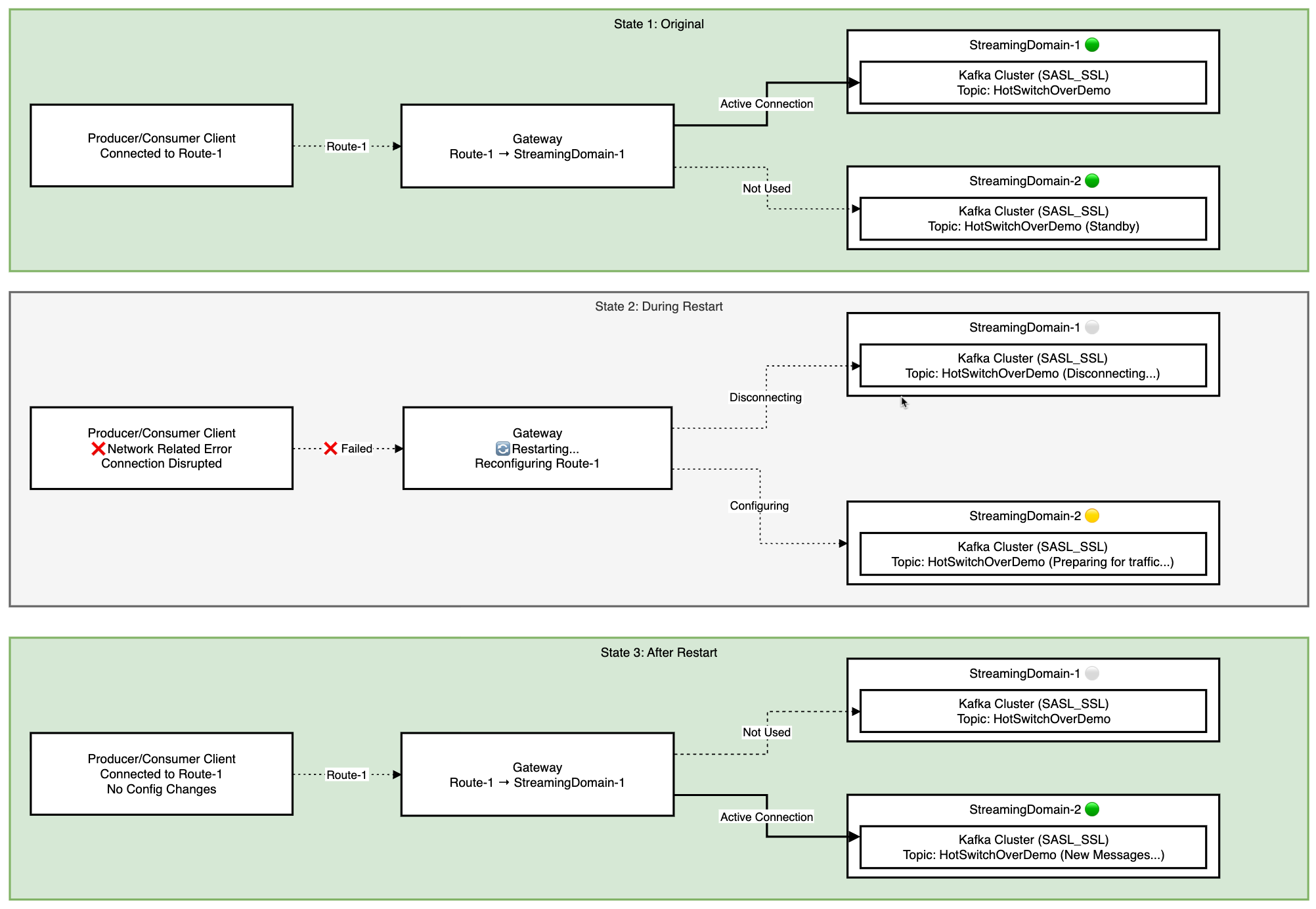
Prerequisites
Before performing Client Switchover, set up data replication between the source and destination Kafka clusters outside of Confluent Gateway, using tools like Cluster Linking.
Considerations
Client Switchover has one hard limitation and a set of restart-related risks you can mitigate.
Hard limitation: Switching between clusters breaks message ordering and end-to-end consistency, because the source and destination are separate Kafka clusters. Don’t use Client Switchover for applications that require strict ordering, such as Kafka Streams applications.
Restart-related risks: Client Switchover requires a Confluent Gateway restart, which affects clients differently depending on their role. The following table details the per-component impact and mitigations:
Component |
Impact during restart |
Mitigation |
|---|---|---|
Consumer |
Consumer group rebalancing triggers if the restart exceeds
|
Set |
Producer |
Message duplication can occur when the broker acknowledges a message but Confluent Gateway fails before relaying the acknowledgment. This causes producer retries. |
Set |
Transactions |
Exactly Once Semantics (EOS) holds. In-flight transactions commit
if the outage is shorter than |
The producer application must reset the transaction state on failure and start a new transaction. |
Perform Client Switchover
To switch clients from a source Kafka cluster to a destination Kafka cluster:
Configure Confluent Gateway with two Streaming Domains, one for each Kafka cluster. For more information, see Streaming domains configuration.
For example:
streamingDomains:
  - name: kafka1-domain
    type: kafka
    kafkaCluster:
      name: kafka-cluster-1
      bootstrapServers:
        - id: internal-plaintext-listener
          endpoint: "kafka-1:44444"
  - name: kafka2-domain
    type: kafka
    kafkaCluster:
      name: kafka-cluster-2
      bootstrapServers:
        - id: internal-plaintext-listener
          endpoint: "kafka-2:22222"
Define a switchover Route that points to the source Kafka cluster. For example, the following Route points to
kafka1-domain, so clients send and receive messages fromkafka-cluster-1:routes: - name: switchover-route endpoint: "host.docker.internal:19092" streamingDomain: name: kafka1-domain bootstrapServerId: internal-plaintext-listener
To switch clients over to the destination Kafka cluster, update the
streamingDomain.namein the Route tokafka2-domain:routes: - name: switchover-route endpoint: "host.docker.internal:19092" streamingDomain: name: kafka2-domain bootstrapServerId: internal-plaintext-listener
Stop and restart the Confluent Gateway container. For instructions, see Deploy Confluent Gateway using Docker.
After restart, clients continue sending and receiving new messages from the destination Kafka cluster. No changes are required on the producer or consumer side.