

Configure Security for Confluent Private Cloud Gateway
Configure security for Confluent Private Cloud Gateway (Confluent Gateway) on Docker by setting up authentication, SSL, secret stores, and passwords.
For the security configuration steps using Confluent for Kubernetes (CFK), see Configure Security for Confluent Gateway using CFK.
The top-level layout for the Confluent Gateway security configuration is as follows:
gateway:
  secretStores:
  streamingDomains:
    kafkaCluster:
      bootstrapServers:
        - id:
          endpoint:
          ssl:
  routes:
    - name:
      security:
        auth:
        ssl:
        swapConfig:
For streamingDomains.kafkaCluster.bootstrapServers.ssl and
routes.security.ssl, see the SSL configuration section. For
secretStores, see Secret store configuration. For password
configuration, see Password configuration.
Security best practices and recommendations
Confluent Gateway deployments typically have two authentication layers:
Client → Confluent Gateway (SASL/PLAIN, SASL/SCRAM, SASL/OAUTHBEARER, or NONE).
Confluent Gateway → Broker (SASL/PLAIN, SASL/OAUTHBEARER, or NONE), with secrets stored in AWS Secrets Manager, HashiCorp Vault, Azure Key Vault, CyberArk Conjur, or local directory.
Apply these authentication best practices:
Choose SASL/SCRAM over SASL/PLAIN. Unlike SASL/PLAIN, SCRAM doesn’t send passwords in cleartext and protects against dictionary attacks using salted hashes.
Don’t map multiple client users to a single Gateway-to-Broker credential.
Each client should ideally have its own Gateway-to-Broker SASL credential.
Avoid static “shared” credentials across multiple clients.
Authentication configuration
Confluent Gateway supports two modes for authenticating clients and forwarding traffic to Apache Kafka® clusters: identity passthrough and authentication swapping.
Aspect |
Identity passthrough |
Authentication swapping |
|---|---|---|
Authentication |
Confluent Gateway forwards client credentials unchanged |
Confluent Gateway authenticates clients, then swaps credentials before forwarding |
Supported client authentication mechanisms |
SASL (PLAIN, SCRAM, OAUTHBEARER) |
SASL (PLAIN, SCRAM, OAUTHBEARER), mTLS, NONE |
Supported cluster authentication mechanisms |
SASL (PLAIN, SCRAM, OAUTHBEARER) |
SASL (PLAIN, OAUTHBEARER), NONE |
mTLS clients |
Not supported |
Supported |
Secret store required |
No |
Yes |
Identity passthrough: Client credentials are forwarded directly to Kafka clusters without modification.
For more information, see Configure identity passthrough mode.
Authentication swapping: Client credentials are transformed into different credentials before connecting to Kafka clusters.
When enabled, Confluent Gateway authenticates incoming clients, optionally using a different authentication mechanism than the backing Kafka cluster. Confluent Gateway then swaps the client identity and credentials as it forwards requests to brokers.
Use authentication swapping when you need to:
Migrate clients between source and destination clusters that have different authentication requirements, without modifying client applications.
Share cluster access with external clients while maintaining your internal authentication standards, even when you can’t enforce those standards directly on the client side.
For more information, see Configure authentication swapping mode.
The following diagram shows a sample authentication flow for authentication swapping:
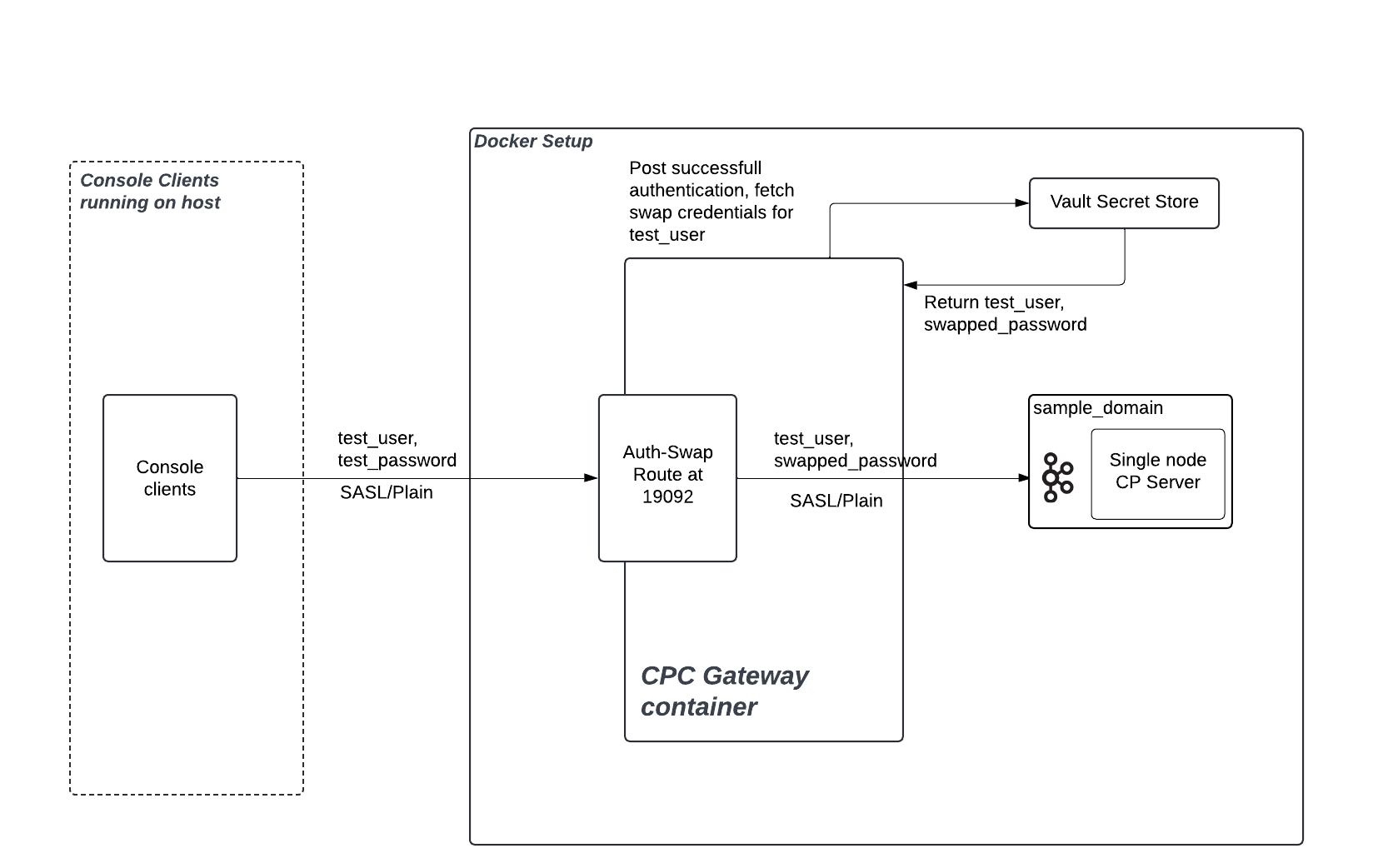
For authentication best practices, see Security best practices and recommendations.
Some considerations when selecting the authentication mode in Confluent Gateway are:
You can configure either identity passthrough or authentication swapping for an individual route.
You cannot configure multiple authentication mechanisms for the same route while using authentication swapping.
Identity passthrough cannot be used for mTLS due to TLS termination at Confluent Gateway; currently, authentication swapping is mandatory for mTLS clients.
Swapping mandates more setup, such as identity stores, Key Management Systems (KMS), or mappings, but adds flexibility and supports more complex enterprise scenarios.
Authentication swapping with multi-cluster streaming domains requires identical user identities and role-based access control (RBAC) policies across all clusters. If clusters have different authentication systems or user permissions, use separate streaming domains instead.
Configure identity passthrough mode
Identity passthrough forwards client authentication information unchanged from Confluent Gateway to Kafka brokers. The brokers perform authentication and authorization checks.
Identity passthrough is supported for SASL authentication mechanisms, such as SASL/PLAIN, SASL/SCRAM, or SASL/OAUTHBEARER.
Use identity passthrough when client applications and Kafka clusters share the same authentication system, and you do not need to translate credentials at the gateway. Identity passthrough is not supported for mTLS clients because TLS terminates at Confluent Gateway. For mTLS, use authentication swapping instead.
To configure a route for identity passthrough in Docker Compose:
gateway:
  routes:
    - name:
      security:
        auth: passthrough              --- [1]
        passthroughConfig:             --- [2]
          sasl:
            mechanism:                 --- [3]
            extensionHeaders:          --- [4]
              logicalCluster:
[1] The authentication mode for the route. Set to
passthroughto enable identity passthrough.[2] Optional. Configures Confluent Gateway to inject SASL extension headers into the client’s authentication request before forwarding it to the backing Kafka cluster. Use
passthroughConfigwhen clients authenticate with SASL/OAUTHBEARER and the backing Kafka cluster requires a logical cluster (lkc) extension to identify the target cluster. Confluent Gateway sets the extension on the client’s behalf, which keeps client configurations independent of the active cluster, so authentication continues to succeed after a failover.[3] The client SASL mechanism that
passthroughConfigapplies to.OAUTHBEARERis the only supported value.[4] One or more SASL extension headers that Confluent Gateway adds to the client’s authentication request to the backing Kafka cluster. Each header is a key-value pair. Set
logicalClusterto the target cluster ID, for example,lkc-abc123.
Example: inject a logical cluster header for SASL/OAUTHBEARER passthrough:
gateway:
  routes:
    - name:
      security:
        auth: passthrough
        passthroughConfig:
          sasl:
            mechanism: OAUTHBEARER
            extensionHeaders:
              logicalCluster: 'lkc-abc123'
Configure authentication swapping mode
Authentication swapping lets Confluent Gateway authenticate incoming clients with one mechanism, then swap their credentials before forwarding requests to Kafka brokers using a different mechanism.
Authentication swapping requires configuration of identity mapping, potentially integration with external KMS or secret stores, and audit policies.
Before configuring authentication swapping, set up a secret store. For supported secret store providers, see Secret store configuration.
Configure a route for authentication swapping
To configure a route for authentication swapping in Docker Compose, set the
route’s authentication mode to swap and provide the necessary
swapConfig fields:
gateway:
  routes:
    - name:               --- [1]
      security:
        auth: swap        --- [2]
        swapConfig:
          clientAuth:     --- [3]
          secretStore:    --- [4]
          clusterAuth:    --- [5]
[1] The unique name for the route.
[2] The authentication mode for the route. Set to
swapto enable authentication swapping.[3] How clients authenticate to Confluent Gateway. See Client authentication for authentication swapping.
[4] Reference to a secret store for exchanging credentials. See Secret store configuration.
[5] How Confluent Gateway authenticates to the Kafka cluster after swapping. See Cluster authentication for authentication swapping.
Client authentication for authentication swapping
Client authentication for authentication swapping supports three providers: SASL, mTLS, and None. Enable exactly one per route.
SASL/PLAIN authentication
gateway:
  routes:
    - name:
      security:
        auth: swap
        swapConfig:
          clientAuth:
            sasl:
              mechanism:               --- [1]
              callbackHandlerClass:    --- [2]
              jaasConfig:
                file:                  --- [3]
            connectionsMaxReAuthMs:    --- [4]
[1] The SASL mechanism to use. Set to
PLAINfor SASL/PLAIN authentication.[2] The callback handler class to use. Set to
org.apache.kafka.common.security.plain.internals.PlainServerCallbackHandlerfor SASL/PLAIN authentication.[3] The path to the Java Authentication and Authorization Service (JAAS) configuration file. See the JAAS configuration file content for SASL/PLAIN authentication later in this section.
[4] The maximum re-authentication time in milliseconds.
JAAS configuration file content for SASL/PLAIN authentication
org.apache.kafka.common.security.plain.PlainLoginModule required
    username="admin"
    password="admin-secret"
    user_admin="admin-secret";
The JAAS configuration file content is a single login-module entry, ending in
;, with the following properties:
org.apache.kafka.common.security.plain.PlainLoginModule: The login module to use.username: The username to use.password: The password to use.user_<username>: Defines the password for each user that connects to Confluent Gateway. Add oneuser_<username>property per user.
A sample JAAS configuration file content:
org.apache.kafka.common.security.plain.PlainLoginModule required
    username="admin"
    password="admin-secret"
    user_admin="admin-secret"
    user_additional-user="additionaluser-secret";
SASL/SCRAM authentication
Confluent Gateway supports SASL/SCRAM authentication for client-to-Confluent Gateway connections. When using SCRAM with authentication swapping, choose one of three options for managing SCRAM credentials:
Same secret store as authentication swapping: SCRAM credentials are stored in the route’s secret store.
SCRAM-specific secret store: SCRAM credentials are stored in a separate secret store from other authentication swap credentials.
Managed by the Kafka administrator API: Confluent Gateway automatically creates and updates SCRAM user credentials through the Kafka administrator API.
gateway:
  routes:
    - name:
      security:
        auth: swap
        swapConfig:
          secretStore: vault-store   --- [1]
          clientAuth:
            sasl:
              mechanism: SCRAM   --- [2]
              scram:
                alterScramCredentials: true   --- [3]
                scramCredentialsTtlMs: 600000   --- [4]
                secretStore: scram-vault-store --- [5]
                admin:                          --- [6]
                  username: admin-user
                  password: admin-password
[1] The secret store reference for authentication swapping. For more information, see Secret store configuration.
[2] The SASL mechanism to use for client authentication. Set to
SCRAMfor SASL/SCRAM authentication.[3] Optional. When set to
true, enables Confluent Gateway to manage SCRAM user credentials by creating and updating them through the Kafka administrator API. This field requires administrator credentials. The default isfalse.[4] Optional. The time-to-live, in milliseconds, for cached SCRAM credentials. The default is
600000(10 minutes).[5] Optional. Refers to a SCRAM-specific secret store. If not specified, the field uses the secret store defined in
swapConfig.secretStore.[6] Required when
alterScramCredentials: true. The administratorusernameandpasswordthat Confluent Gateway uses to perform SCRAM credential operations through the Kafka administrator API. Ensure the administrator user has the required permissions to alter and describe SCRAM credentials.
Configuration scenario 1: Using the same secret store as authentication swapping
In this configuration, you store SCRAM credentials in the route’s secret store.
gateway:
  routes:
    - name: gateway-route
      security:
        auth: swap
        swapConfig:
          secretStore: vault-store
          clientAuth:
            sasl:
              mechanism: SCRAM
Configuration scenario 2: Using a SCRAM-specific secret store
In this configuration, you store SCRAM credentials in a separate secret store from other authentication swap credentials.
gateway:
  routes:
    - name: gateway-route
      security:
        auth: swap
        swapConfig:
          secretStore: vault-store
          clientAuth:
            sasl:
              mechanism: SCRAM
              scram:
                secretStore: scram-secret-store
Configuration scenario 3: Managing SCRAM credentials from Gateway
In this configuration, you enable Confluent Gateway to automatically create and update SCRAM user credentials through the Kafka administrator API. Ensure that:
Provide
admin.usernameandadmin.password.The administrator user must have the necessary permissions to perform
AlterUserScramCredentialsandDescribeUserScramCredentialsoperations on the Kafka cluster.
gateway:
  routes:
    - name: gateway-route
      security:
        auth: swap
        swapConfig:
          secretStore: vault-store
          clientAuth:
            sasl:
              mechanism: SCRAM
              scram:
                alterScramCredentials: true
                admin:
                  username: admin-user
                  password: admin-password
When alterScramCredentials: true, Confluent Gateway must have permissions to
create, update, and delete secrets. For required permissions, see
Secret store configuration.
SASL/OAUTHBEARER authentication
Confluent Gateway supports SASL/OAUTHBEARER authentication for client-to-Confluent Gateway connections. The client presents an OAuth bearer token, and Confluent Gateway validates its signature against your identity provider’s JSON Web Key Set (JWKS) endpoint.
After validation, Confluent Gateway reads the client principal from a claim in the token and uses it as the lookup key for the swapped credentials in the secret store.
gateway:
  routes:
    - name:
      security:
        auth: swap
        swapConfig:
          clientAuth:
            sasl:
              mechanism: OAUTHBEARER             --- [1]
              callbackHandlerClass: "org.apache.kafka.common.security.oauthbearer.OAuthBearerValidatorCallbackHandler"  --- [2]
              jaasConfig:
                file:                            --- [3]
              oauth:
                jwksEndpointUrl:                 --- [4]
                jwksEndpointRefreshMs:           --- [5]
                jwksEndpointRetryBackoffMs:      --- [6]
                jwksEndpointRetryBackoffMaxMs:   --- [7]
                expectedAudience:                --- [8]
                expectedIssuer:                  --- [9]
                subClaimName:                    --- [10]
                scopeClaimName:                  --- [11]
            connectionsMaxReAuthMs:              --- [12]
[1] The SASL mechanism to use. Set to
OAUTHBEARERfor SASL/OAUTHBEARER authentication.[2] The callback handler class to use. Set to
org.apache.kafka.common.security.oauthbearer.OAuthBearerValidatorCallbackHandler, as Confluent Gateway validates client tokens as a SASL server.[3] The path to the JAAS configuration file that Confluent Gateway loads to set up token validation. Because Confluent Gateway only validates the inbound token, the file doesn’t need to define login options:
org.apache.kafka.common.security.oauthbearer.OAuthBearerLoginModule required;
[4] Required. The JWKS endpoint URL that Confluent Gateway uses to validate the signature of the inbound token. For example:
jwksEndpointUrl: "https://idp.mycompany.io:8080/realms/clients/protocol/openid-connect/certs"
[5] Optional. The interval, in milliseconds, at which Confluent Gateway refreshes its JWKS cache. The default is
3600000(1 hour).[6] Optional. The delay, in milliseconds, that Confluent Gateway waits before the first retry after a failed JWKS retrieval. Each subsequent retry increases this delay exponentially, up to the maximum set by
jwksEndpointRetryBackoffMaxMs. The default is100.[7] Optional. The maximum delay, in milliseconds, between JWKS retrieval retries. This sets the upper limit for the exponential increase set by
jwksEndpointRetryBackoffMs. The default is10000.[8] Optional. The expected audience (the
audclaim) in the token. Your identity provider sets this claim to identify who it issued the token for. Provide a comma-separated list to accept multiple audiences. Confluent Gateway rejects tokens whoseaudclaim doesn’t match one of the listed values.[9] Optional. The expected issuer (the
issclaim) in the token. Your identity provider sets this claim to identify itself as the token’s issuer. Confluent Gateway rejects tokens whoseissclaim doesn’t match this value.[10] Optional. The token claim that Confluent Gateway reads to determine the client’s identity (the principal). Confluent Gateway uses this value as the key to look up the client’s swapped credentials in the secret store. Most identity providers populate the standard OAuth/OpenID Connect (OIDC)
sub(subject) claim with a unique client identifier, so the default issub. Override this only if your identity provider uses a different claim to identify the client.[11] Optional. The token claim that Confluent Gateway reads to determine the client’s granted scope (the level of access the identity provider authorized for this token). Most identity providers populate the standard OAuth
scopeclaim, so the default isscope. Override this only if your identity provider uses a different claim name.[12] Optional. The maximum re-authentication time in milliseconds.
mTLS authentication
gateway:
  routes:
    - name:
      security:
        auth: swap
        swapConfig:
          clientAuth:
            ssl:
              principalMappingRules: --- [1]
[1] Required only for authentication swapping with mTLS authentication. The pattern to read principal name from the certificates. For example:
"RULE:^CN=([a-zA-Z0-9._-]+),OU=.*$/$1/,RULE:^UID=([a-zA-Z0-9._-]+),.*$/$1/,DEFAULT"
NONE authentication
When using none authentication, Confluent Gateway identifies all incoming
clients as anonymous and assigns the client ID ANONYMOUS. Configure
the swapped credentials for the ANONYMOUS user in the associated
secret store.
gateway:
  routes:
    - name:
      security:
        auth: swap
        swapConfig:
          clientAuth:
            none: {}
Cluster authentication for authentication swapping
Cluster authentication defines how Confluent Gateway authenticates to the Kafka cluster after swapping credentials. SASL and NONE are supported.
SASL authentication
gateway:
  routes:
    - name:
      security:
        auth: swap
        swapConfig:
          clusterAuth:
            sasl:
              mechanism:               --- [1]
              callbackHandlerClass:    --- [2]
              jaasConfig:
                file:                  --- [3]
              oauth:
                tokenEndpointUri:      --- [4]
[1] The SASL mechanism to use. Set to
PLAINfor SASL/PLAIN authentication orOAUTHBEARERfor SASL/OAUTHBEARER authentication. Confluent Gateway doesn’t supportSCRAMfor cluster authentication.[2] The callback handler class to use. Set to
org.apache.kafka.common.security.authenticator.SaslClientCallbackHandlerfor SASL/PLAIN authentication. (Confluent Gateway acts as a client when authenticating to brokers, so use the client-side callback handler.)[3] The path to the JAAS configuration file.
[4] The URI for the OAuth token endpoint.
JAAS configuration file content for SASL/PLAIN authentication
org.apache.kafka.common.security.plain.PlainLoginModule required username="%s" password="%s";
JAAS configuration file content for SASL/OAUTHBEARER authentication
org.apache.kafka.common.security.oauthbearer.OAuthBearerLoginModule required clientId="%s" clientSecret="%s";
NONE authentication
The none authentication method disables authentication between Confluent Gateway
and the cluster. In this mode, Confluent Gateway ignores the client ID and bypasses
cluster authentication.
Because Confluent Gateway doesn’t require a secret lookup, skip the secret store configuration. Including a secret store in this configuration triggers a validation error.
gateway:
  routes:
    - name:
      security:
        auth: swap
        swapConfig:
          clusterAuth:
            none: {}
Authentication swapping examples
The following examples combine client and cluster authentication configurations to show complete authentication swapping setups.
SASL/PLAIN to SASL/OAUTHBEARER example:
gateway:
  routes:
    - name: gateway
      security:
        auth: swap
        ssl:
          ignoreTrust: false
          truststore:
            type: PKCS12
            location: /opt/ssl/client-truststore.p12
            password:
              file: /opt/secrets/client-truststore.password
          keystore:
            type: PKCS12
            location: /opt/ssl/gw-keystore.p12
            password:
              file: /opt/secrets/gw-keystore.password
              keyPassword:
                value: inline-password
          clientAuth: required

        swapConfig:
          clientAuth:
            sasl:
              mechanism: PLAIN
              callbackHandlerClass: "org.apache.kafka.common.security.plain.internals.PlainServerCallbackHandler"
              jaasConfig:
                  file: /opt/gateway/gw-users.conf
            connectionsMaxReAuthMs: 0 # optional
          secretStore: s1
          clusterAuth:
            sasl:
              mechanism: OAUTHBEARER
              callbackHandlerClass: "org.apache.kafka.common.security.oauthbearer.OAuthBearerLoginCallbackHandler"
              jaasConfig:
                file: /opt/gateway/cluster-login.tmpl.conf
              oauth: # required when mechanism is OAUTHBEARER
                tokenEndpointUri: "https://idp.mycompany.io:8080/realms/cp/protocol/openid-connect/token"
For connectionsMaxReAuthMs, see the Kafka broker configuration reference.
mTLS to SASL/OAUTHBEARER example:
gateway:
  routes:
    - name: gateway
      security:
        auth: swap
        ssl:
          ignoreTrust: false
          truststore:
            type: PKCS12
            location: /opt/ssl/client-truststore.p12
            password:
              file: /opt/secrets/client-truststore.password
          keystore:
            type: PKCS12
            location: /opt/ssl/gw-keystore.p12
            password:
              file: /opt/secrets/gw-keystore.password
              keyPassword:
                value: inline-password
          clientAuth: required
        swapConfig:
          clientAuth:
            ssl:
              principalMappingRules: "RULE:^CN=([a-zA-Z0-9._-]+),OU=.*$/$1/,RULE:^UID=([a-zA-Z0-9._-]+),.*$/$1/,DEFAULT"
          secretStore: "oauth-secrets"
          clusterAuth:
            sasl:
              mechanism: OAUTHBEARER
              callbackHandlerClass: "org.apache.kafka.common.security.oauthbearer.OAuthBearerLoginCallbackHandler"
              jaasConfig:
                file: "/etc/gateway/cluster-jaas.tmpl.conf"
              oauth:
                tokenEndpointUri: "https://idp.mycompany.io:8080/realms/cp/protocol/openid-connect/token"
Note
When using SASL/OAUTHBEARER as the cluster authentication mechanism,
you must also allowlist the OAuth token endpoint URL by passing a JVM
argument through the GATEWAY_OPTS environment variable in your
docker-compose.yaml:
gateway:
  environment:
    GATEWAY_OPTS: "-Dorg.apache.kafka.sasl.oauthbearer.allowed.urls=<tokenEndpointUri>"
Replace <tokenEndpointUri> with the same URL set in oauth.tokenEndpointUri.
Without this, Confluent Gateway rejects requests to the OAuth token endpoint with an
is not allowed error. For more information, see OAuth token endpoint not allowed.
SASL/OAUTHBEARER to SASL/OAUTHBEARER (OAuth-to-OAuth) example:
In this configuration, the client presents an OAuth token to Confluent Gateway. Confluent Gateway validates the token against the client identity provider’s JWKS endpoint, then obtains a separate token from the cluster identity provider to authenticate to the Kafka cluster.
gateway:
  routes:
    - name: gateway
      security:
        auth: swap
        swapConfig:
          clientAuth:
            sasl:
              mechanism: OAUTHBEARER
              callbackHandlerClass: "org.apache.kafka.common.security.oauthbearer.OAuthBearerValidatorCallbackHandler"
              jaasConfig:
                file: "/opt/gateway/client-oauth-jaas.conf"
              oauth:
                jwksEndpointUrl: "https://idp.mycompany.io:8080/realms/clients/protocol/openid-connect/certs"
                expectedAudience: "kafka-clients"
                expectedIssuer: "https://idp.mycompany.io:8080/realms/clients"
                subClaimName: "sub"
          secretStore: "oauth-secrets"
          clusterAuth:
            sasl:
              mechanism: OAUTHBEARER
              callbackHandlerClass: "org.apache.kafka.common.security.oauthbearer.OAuthBearerLoginCallbackHandler"
              jaasConfig:
                file: "/opt/gateway/cluster-oauth-jaas.conf"
              oauth:
                tokenEndpointUri: "https://idp.mycompany.io:8080/realms/cp/protocol/openid-connect/token"
Note
Because both legs use OAuth, set GATEWAY_OPTS to a comma-separated
list that includes both the client JWKS endpoint and the cluster token
endpoint:
gateway:
  environment:
    GATEWAY_OPTS: "-Dorg.apache.kafka.sasl.oauthbearer.allowed.urls=https://idp.mycompany.io:8080/realms/clients/protocol/openid-connect/certs,https://idp.mycompany.io:8080/realms/cp/protocol/openid-connect/token"
Otherwise, Confluent Gateway rejects requests to either OAuth endpoint with an
is not allowed error. For more information, see
OAuth token endpoint not allowed.
SSL configuration
Configure SSL on streaming-domain bootstrap servers
(streamingDomains.kafkaCluster.bootstrapServers.ssl) and on routes
(routes.security.ssl) to enable TLS for gateway-to-broker and
client-to-gateway connections.
ssl:
  ignoreTrust:            --- [1]
  truststore:             --- [2]
    type:                 --- [3]
    location:             --- [4]
    password:             --- [5]
  keystore:               --- [6]
    type:                 --- [7]
    location:             --- [8]
    password:             --- [9]
    keyPassword:          --- [10]
      value:
      file:
[1] Skip certificate validation (not recommended for production). Essentially, setting this to
truetrusts all certificates.Important
Ensure that
ignoreTrust: falseis set in all production configurations. Setting this totruedisables TLS certificate validation, introducing critical security risks.[2] Truststore configuration.
[3] Truststore certificate type. The supported values are
JKS,PKCS12, andPEM.[4] The path to the truststore file.
[5] The password for the truststore file. See Password configuration.
[6] Keystore configuration (gateway identity).
[7] The keystore certificate type. The supported values are
JKS,PKCS12, andPEM.[8] The path to the keystore file.
[9] The password for the keystore file. See Password configuration.
[10] The password for the private key inside the keystore. Can be defined either inline or file-based.
An example SSL configuration for Confluent Gateway using Docker Compose:
ssl:
  ignoreTrust: false
  truststore:
    type: PKCS12 # optional, default=JKS
    location: /opt/ssl/client-truststore.p12
    password:
      file: /opt/secrets/client-truststore.password # or inline password
  keystore:
    type: PKCS12 # optional, default=JKS
    location: /opt/ssl/gw-keystore.p12
    password:
      file: /opt/secrets/gw-keystore.password # or inline password
    keyPassword:
      value: inline-password
Password configuration
Confluent Gateway supports file-based and inline password configurations. Provide only one of the two.
password:
  file:                   --- [1]
  value:                  --- [2]
[1] The path to the password file.
[2] The inline password value.
Secret store configuration
Confluent Gateway uses secret stores, such as AWS Secrets Manager, Azure Key Vault, HashiCorp Vault, or CyberArk Conjur, to securely manage authentication credentials and sensitive information. This setup is critical for several key operations:
Storing Confluent Gateway to Kafka broker credentials.
Supporting authentication swapping scenarios.
In cases where Confluent Gateway translates or “swaps” authentication (such as from mTLS clients to OAuthbearer brokers, or vice versa), secret stores are needed to store and fetch the credentials used in the swap. This allows each client connection to use its mapped broker credential, enhancing security and enabling fine-grained access control.
Always use TLS when Confluent Gateway connects to a secret store, to ensure confidentiality and integrity.
As a security best practice, configure Confluent Gateway to assume identity and access management (IAM) roles with the least privilege principle. Don’t use static IAM user credentials to avoid sensitive credential exposure.
Ensure proper role trust policies are in place and limit permissions to only what the Confluent Gateway needs. For example in AWS:
{
    "Version": "2012-10-17",
    "Statement": [
        {
            "Effect": "Allow",
            "Action": [
                "secretsmanager:GetSecretValue"
            ],
            "Resource": [
                "arn:aws:secretsmanager:us-east-1:123456789012:secret:gateway/*",
                "arn:aws:secretsmanager:us-east-1:123456789012:secret:confluent/*"
            ],
            "Condition": {
                "StringEquals": {
                    "aws:RequestTag/Environment": "production"
                }
            }
        }
    ]
}
When using SCRAM authentication with automatic credential management
(alterScramCredentials: true), Confluent Gateway requires additional permissions
to create, update, and delete SCRAM user credentials in the secret store:
{
    "Version": "2012-10-17",
    "Statement": [
        {
            "Effect": "Allow",
            "Action": [
                "secretsmanager:GetSecretValue",
                "secretsmanager:CreateSecret",
                "secretsmanager:PutSecretValue",
                "secretsmanager:DeleteSecret"
            ],
            "Resource": [
                "arn:aws:secretsmanager:us-east-1:123456789012:secret:gateway/*",
                "arn:aws:secretsmanager:us-east-1:123456789012:secret:confluent/*"
            ]
        }
    ]
}
HashiCorp Vault
HashiCorp Vault supports three authentication methods for Confluent Gateway: Token, AppRole, and UserPass.
Connect using an authentication token
gateway:
  secretStores:
    - name:               --- [1]
      provider:
        type:             --- [2]
        config:
          address:        --- [3]
          authMethod:     --- [4]
          authToken:      --- [5]
          path:           --- [6]
          prefixPath:     --- [7]
          separator:      --- [8]
[1] A unique name for the secret store.
[2] The type of the secret store. Set to
Vaultto use HashiCorp Vault.[3] The address of the Vault server.
[4] The authentication method to use. You can set to
Token(the default value) or leave it empty.[5] The authentication token for the Vault server to connect using the
authTokenmethod.[6] The path to the secret store.
[7] Optional. The prefix path to the secret store.
[8] Optional. The separator for the secret store. The default value is
:.
Connect using AppRole
gateway:
  secretStores:
    - name:               --- [1]
      provider:
        type:             --- [2]
        config:
          address:        --- [3]
          authMethod:     --- [4]
          role:           --- [5]
          secret:         --- [6]
          path:           --- [7]
          prefixPath:     --- [8]
          separator:      --- [9]
[1] A unique name for the secret store.
[2] The type of the secret store. Set to
Vaultto use HashiCorp Vault.[3] The address of the Vault server.
[4] The authentication method to use. Set to
AppRole.[5] The role to use to connect to the Vault server.
[6] The secret to use to connect to the Vault server.
[7] The path to the secret store.
[8] Optional. The prefix path to the secret store.
[9] Optional. The separator for the secret store. The default value is
:.
Connect using username and password
gateway:
  secretStores:
    - name:               --- [1]
      provider:
        type:             --- [2]
        config:
          address:        --- [3]
          authMethod:     --- [4]
          username:       --- [5]
          password:       --- [6]
          path:           --- [7]
          prefixPath:     --- [8]
          separator:      --- [9]
[1] A unique name for the secret store.
[2] The type of the secret store. Set to
Vaultto use HashiCorp Vault.[3] The address of the Vault server.
[4] The authentication method to use. Set to
UserPass.[5] The username to use to connect to the Vault server.
[6] The password to use to connect to the Vault server.
[7] The path to the secret store.
[8] Optional. The prefix path to the secret store.
[9] Optional. The separator for the secret store. The default value is
:.
Note that connecting to HashiCorp Vault using a certificate is not supported.
Additional Vault capabilities for SCRAM credential management
When using SCRAM authentication with automatic credential management
(alterScramCredentials: true), Confluent Gateway requires additional Vault
capabilities to create, update, and delete SCRAM user credentials.
HashiCorp Vault uses policies to grant capabilities. Ensure Confluent Gateway has the following capabilities on the secret paths:
path "secret/data/gateway/*" {
  capabilities = ["create", "read", "update", "delete"]
}
For more information on Vault policies, see Policies | Vault | HashiCorp Developer.
AWS Secrets Manager
AWS Secrets Manager supports two authentication methods for Confluent Gateway: IAM role (recommended) and access key with secret key.
If the environment (such as EC2) has an IAM role with sufficient permissions,
you don’t need to specify accessKey or secretKey. The provider
automatically assumes the attached IAM role using the default AWS
credential provider chain.
gateway:
  secretStores:
    - name:                  --- [1]
      provider:
        type:                --- [2]
        config:
          region:            --- [3]
          accessKey:         --- [4]
          secretKey:         --- [5]
          endpointOverride:  --- [6]
          prefixPath:        --- [7]
          separator:         --- [8]
          useJson:           --- [9]
[1] A unique name for the secret store.
[2] The type of the secret store. Set to
AWS.[3] The region of the AWS Secrets Manager.
[4] AWS IAM access key ID. Only required when authenticating with IAM user credentials.
[5] AWS IAM secret key corresponding to the
accessKey. Only required when authenticating with IAM user credentials.[6] Optional. A custom endpoint URL to use instead of the default AWS endpoint. Defaults to the AWS region endpoint.
[7] Optional. A string prefix added to all secret paths. Useful for environment separation (example: staging, production). Defaults to an empty string.
[8] Optional. The character/string used to split authentication data within the retrieved secret. Defaults to
:.[9] If set to
true, the provider attempts to parse the secret value as a JSON object. Iffalse(the default value), the raw string value is returned.
An example IAM role configuration for AWS Secrets Manager:
gateway:
  secretStores:
    - name: aws-secrets
      provider:
        type: AWS
        config:
          region: us-west-2
          endpointOverride: https://secretsmanager.us-west-2.amazonaws.com
          prefixPath: secret/
          separator: ":"
          useJson: true
Additional AWS capabilities for SCRAM credential management
When using SCRAM authentication with automatic credential management
(alterScramCredentials: true), Confluent Gateway requires additional AWS Secrets
Manager permissions to create, update, and delete SCRAM user credentials.
Ensure the IAM role or policy attached to Confluent Gateway includes the following permissions:
{
    "Version": "2012-10-17",
    "Statement": [
        {
            "Effect": "Allow",
            "Action": [
                "secretsmanager:CreateSecret",
                "secretsmanager:PutSecretValue",
                "secretsmanager:DeleteSecret"
            ],
            "Resource": [
                "arn:aws:secretsmanager:us-east-1:123456789012:secret:gateway/*",
                "arn:aws:secretsmanager:us-east-1:123456789012:secret:confluent/*"
            ]
        }
    ]
}
Azure Key Vault
Azure Key Vault supports three credential types for Confluent Gateway:
ClientSecret, UsernamePassword, and ClientCertificate. Azure Key
Vault is not supported for SCRAM authentication.
Connect using client ID and secret
gateway:
  secretStores:
    - name:                  --- [1]
      provider:
        type:                --- [2]
        config:
          vaultUrl:          --- [3]
          credentialType:    --- [4]
          tenantId:          --- [5]
          clientId:          --- [6]
          clientSecret:      --- [7]
          prefixPath:        --- [8]
          separator:         --- [9]
[1] A unique name for the secret store.
[2] The type of the secret store. Set to
Azure.[3] The URL of the Azure Key Vault to connect to.
[4] The credential type to use. Set to
ClientSecret.[5] The tenant ID of the Azure Key Vault.
[6] The client ID of the Azure Key Vault.
[7] The client secret of the Azure Key Vault for the authentication.
[8] Optional. The prefix path to the secret store. Defaults to an empty string.
[9] Optional. The character or string used to split authentication data within the retrieved secret. Defaults to
:.
An example configuration for Azure Key Vault using Client ID and Secret:
gateway:
  secretStores:
    - name: azure-keyvault
      provider:
        type: Azure
        config:
          vaultUrl: https://authswap.vault.azure.net/
          credentialType: ClientSecret
          tenantId: xxxx-xxxx-xxxx-xxxx-xxxxxxxx
          clientId: xxxx-xxxx-xxxx-xxxx-xxxxxxxx
          clientSecret: client-secret
          prefixPath: ""
          separator: ":"
Connect using username and password
gateway:
  secretStores:
    - name:                  --- [1]
      provider:
        type:                --- [2]
        config:
          vaultUrl:          --- [3]
          credentialType:    --- [4]
          tenantId:          --- [5]
          clientId:          --- [6]
          username:          --- [7]
          password:          --- [8]
          prefixPath:        --- [9]
          separator:         --- [10]
[1] A unique name for the secret store.
[2] The type of the secret store. Set to
Azure.[3] The URL of the Azure Key Vault to connect to.
[4] The credential type to use. Set to
UsernamePassword.[5] The tenant ID of the Azure Key Vault.
[6] The client ID of the Azure Key Vault.
[7] The username to authenticate with.
[8] The password to authenticate with.
[9] Optional. The prefix path to the secret store. Defaults to an empty string.
[10] Optional. The character or string used to split authentication data within the retrieved secret. Defaults to
:.
An example configuration for Azure Key Vault using Username and Password:
gateway:
  secretStores:
    - name: azure-keyvault
      provider:
        type: Azure
        config:
          vaultUrl: https://authswap.vault.azure.net/
          credentialType: UsernamePassword
          tenantId: xxxx-xxxx-xxxx-xxxx-xxxxxxxx
          clientId: xxxx-xxxx-xxxx-xxxx-xxxxxxxx
          username: username
          password: password
          prefixPath: ""
          separator: ":"
Connect using a client certificate
You can connect to Azure Key Vault using the Privacy-Enhanced Mail (PEM) or Personal Information Exchange (PFX) format certificates.
gateway:
  secretStores:
    - name:                       --- [1]
      provider:
        type:                     --- [2]
        config:
          vaultUrl:               --- [3]
          credentialType:         --- [4]
          tenantId:               --- [5]
          clientId:               --- [6]
          certificateType:        --- [7]
          certificatePath:        --- [8]
          certificatePfxPassword: --- [9]
          certificateSendChain:   --- [10]
          prefixPath:             --- [11]
          separator:              --- [12]
[1] A unique name for the secret store.
[2] The type of the secret store. Set to
Azure.[3] The URL of the Azure Key Vault to connect to.
[4] The credential type to use. Set to
ClientCertificate.[5] The tenant ID of the Azure Key Vault.
[6] The client ID of the Azure Key Vault.
[7] The type of encoding used on the file specified in certificatePath.
Set to
PEMfor PEM certificates orPFXfor PFX certificates.[8] The path to the client certificate file.
[9] Required for the PFX certificates. The password protecting the PFX file.
[10] Optional. The flag to indicate if certificate chain should be sent as part of authentication request. Defaults to
false.[11] Optional. The prefix path to the secret store. Defaults to an empty string.
[12] Optional. The character or string used to split authentication data within the retrieved secret. Defaults to
:.
An example configuration for Azure Key Vault using PEM certificate:
gateway:
  secretStores:
    - name: azure-keyvault
      provider:
        type: Azure
        config:
          vaultUrl: https://authswap.vault.azure.net/
          credentialType: ClientCertificate
          tenantId: xxxx-xxxx-xxxx-xxxx-xxxxxxxx
          clientId: xxxx-xxxx-xxxx-xxxx-xxxxxxxx
          certificatePath: /opt/ssl/client-cert.pem
          prefixPath: ""
          separator: ":"
An example configuration for Azure Key Vault using PFX certificate:
gateway:
  secretStores:
    - name: azure-keyvault
      provider:
        type: Azure
        config:
          vaultUrl: https://authswap.vault.azure.net/
          credentialType: ClientCertificate
          tenantId: xxxx-xxxx-xxxx-xxxx-xxxxxxxx
          clientId: xxxx-xxxx-xxxx-xxxx-xxxxxxxx
          certificateType: PFX
          certificatePath: /opt/ssl/client-cert.pfx
          certificatePfxPassword: <pfx-password>
          prefixPath: ""
          separator: ":"
CyberArk Conjur
CyberArk Conjur supports API key authentication for Confluent Gateway.
Connect using an API key
gateway:
  secretStores:
    - name:                  --- [1]
      provider:
        type:                --- [2]
        config:
          url:               --- [3]
          account:           --- [4]
          username:          --- [5]
          apiKey:            --- [6]
          prefixPath:        --- [7]
          sslVerifyEnabled:  --- [8]
          separator:         --- [9]
[1] A unique name for the secret store.
[2] The type of the secret store. Set to
CyberArkto use CyberArk Conjur.[3] The URL of the CyberArk Conjur server.
[4] The CyberArk Conjur account name.
[5] The username (login) used to authenticate with CyberArk Conjur.
[6] The API key used to authenticate with CyberArk Conjur.
[7] Optional. The path prefix prepended to all secret lookups. For example, if set to
secrets/and the client username isuser1, Confluent Gateway looks up the secret atsecrets/user1.[8] Optional. Whether to verify the SSL certificate of the Conjur server. Set to
falseonly in development or test environments.[9] Optional. The character used to split the retrieved secret into username and password. Defaults to
:.
An example configuration for CyberArk Conjur:
gateway:
  secretStores:
    - name: conjur-store
      provider:
        type: CyberArk
        config:
          url: "https://conjur.example.com"
          account: "myaccount"
          username: "gateway-user"
          apiKey: "your-conjur-api-key"
          prefixPath: "secrets/"
          sslVerifyEnabled: true
          separator: ":"
Additional Conjur capabilities for SCRAM credential management
When using SCRAM authentication with automatic credential management
(alterScramCredentials: true), Confluent Gateway requires additional CyberArk
Conjur permissions to create, update, and delete SCRAM user credentials in the
secret store.
Ensure the Conjur identity used by Confluent Gateway has create, update, and
execute privileges on the secret variables, in addition to the standard
read and execute privileges:
- !host
  id: gateway-user
- !permit
  role: !host gateway-user
  privileges: [ read, execute, create, update ]
  resource: !variable secrets/user1
- !permit
  role: !host gateway-user
  privileges: [ read, execute, create, update ]
  resource: !variable secrets/user2