

How Confluent for Kubernetes Works
Confluent for Kubernetes (CFK) is a Kubernetes operator that deploys and manages Confluent Platform. It runs as a control plane in your cluster and continuously reconciles the custom resources you declare against the actual state of the cluster.
Architecture
CFK runs as a control plane inside your Kubernetes cluster, following the standard Kubernetes Operator pattern. You describe the Confluent Platform deployment you want in custom resources, and CFK creates and manages the underlying Kubernetes objects, such as StatefulSets, Pods, Services, and Secrets, to match.
The following diagram shows the high-level architecture of CFK and Confluent Platform in Kubernetes. CFK also supports Confluent REST Proxy, which is not shown in the diagram. For more information, see Configure REST Proxy.
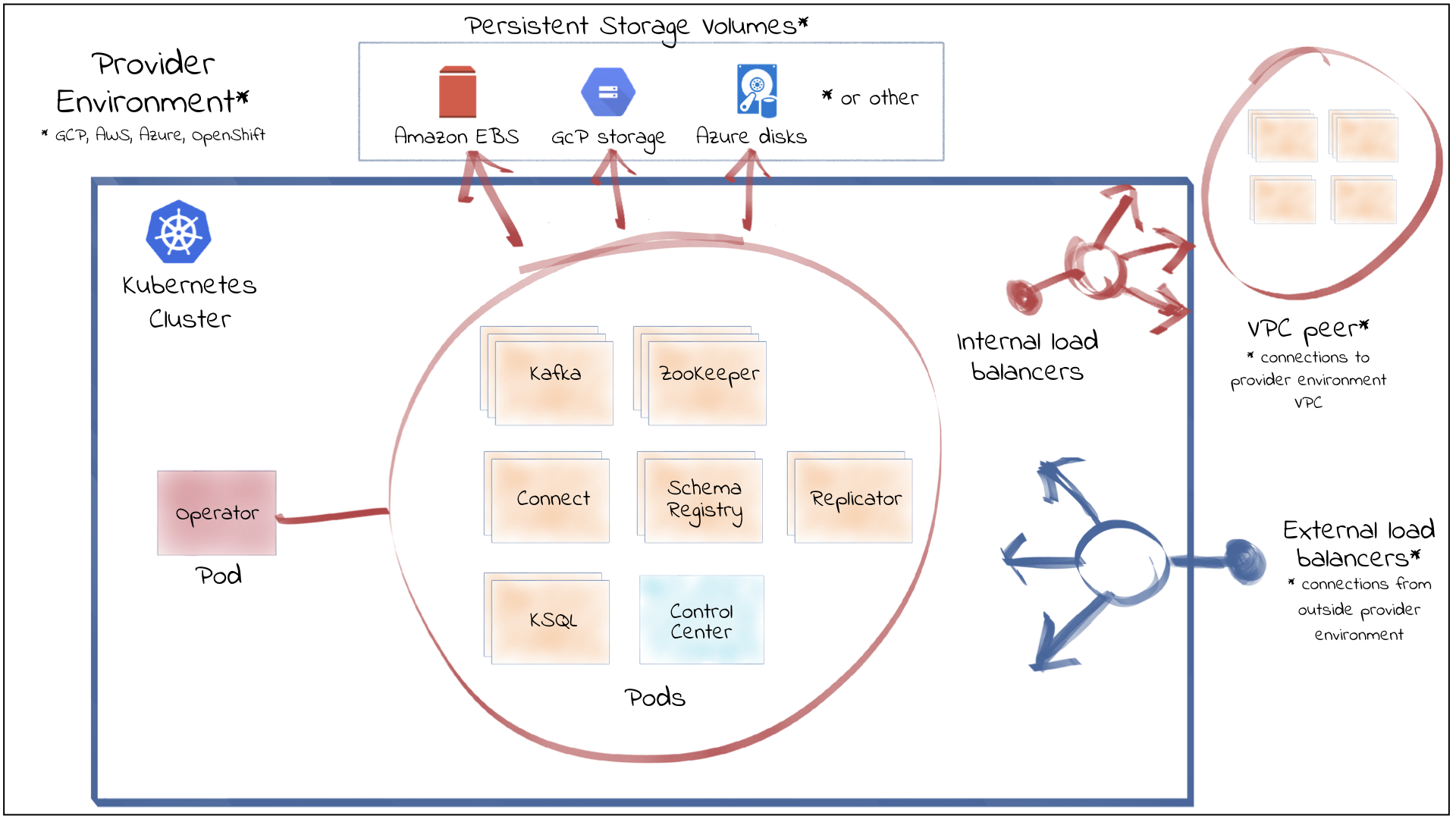
The following concepts are central to how this architecture operates. For full definitions of these and other CFK terms, see Confluent for Kubernetes Terminology.
Core concepts
- Control plane (the operator)
CFK is the active component that runs in your cluster. It watches your Confluent custom resources and the Confluent Platform workloads, and takes action to keep them healthy and synchronized with what you declared.
- Declarative API
You declare the desired state of Confluent Platform in YAML instead of running imperative commands. CFK determines the steps needed to reach that state. This is the same Infrastructure as Code (IaC) model that you use for native Kubernetes resources.
- Custom resources and CRDs
Each Confluent Platform component, such as Apache Kafka®, Connect, Schema Registry, ksqlDB, and Confluent Control Center, and each application resource, such as topics and role bindings, has a custom resource definition (CRD). You create custom resources (CRs) from these CRDs to configure and manage Confluent the same way you manage any other Kubernetes object.
- Reconciliation
CFK continuously compares the desired state in your custom resources with the actual state in the cluster. When the two differ, for example after a configuration change or a pod failure, CFK reconciles the difference and restores the desired state.
- Helm-managed lifecycle
CFK itself is installed and upgraded with Helm. After CFK is running, you manage Confluent Platform through custom resources rather than through Helm.
Next steps
To learn the key terms, see Confluent for Kubernetes Terminology.
For testing, follow the Get Started with Confluent for Kubernetes to deploy Confluent Platform right away.
For production, see Plan a Confluent Platform Deployment with Confluent for Kubernetes to plan your deployment.