

Example of a Multi-Version Upgrade
This example walks through a common scenario. It moves from an older CFK with a ZooKeeper-based Confluent Platform to the latest CFK with a KRaft-based Confluent Platform 8.x. Use it as a template. Your exact versions can differ, but the order and the reasoning are the same.
Before you follow this example, read Upgrade Confluent Platform Using Confluent for Kubernetes and choose your own upgrade path using the same reasoning.
Starting point
CFK 3.1 with Confluent Platform 7.3, running in ZooKeeper mode, using classic Control Center (Legacy).
Target
CFK 3.3 with Confluent Platform 8.3, running in KRaft mode, using Control Center.
Why this path has multiple jumps
The path is not a single upgrade because of the constraints mentioned in the Before you choose your upgrade path section. In this scenario:
CFK 3.3 requires at least Confluent Platform 7.5. Because the starting Confluent Platform 7.3 is below this floor, you must upgrade Confluent Platform before raising CFK. While you are still on CFK 3.1, keep the Confluent Platform upgrade within its own supported range of Confluent Platform 7.3 to 8.1, not the CFK 3.3 range.
CFK-managed KRaft migration requires at least Confluent Platform 7.6, though 7.7 or later is recommended for production. As a result, the Confluent Platform upgrade in Step 1 must reach at least Confluent Platform 7.6.
Because the cluster runs in ZooKeeper mode, you must complete the KRaft migration in Step 3 before upgrading to Confluent Platform 8.x in Step 5.
The cluster uses classic Control Center (Legacy), so plan the Control Center migration before the final Confluent Platform upgrade.
The path
Open the support matrix in a separate tab to follow along.
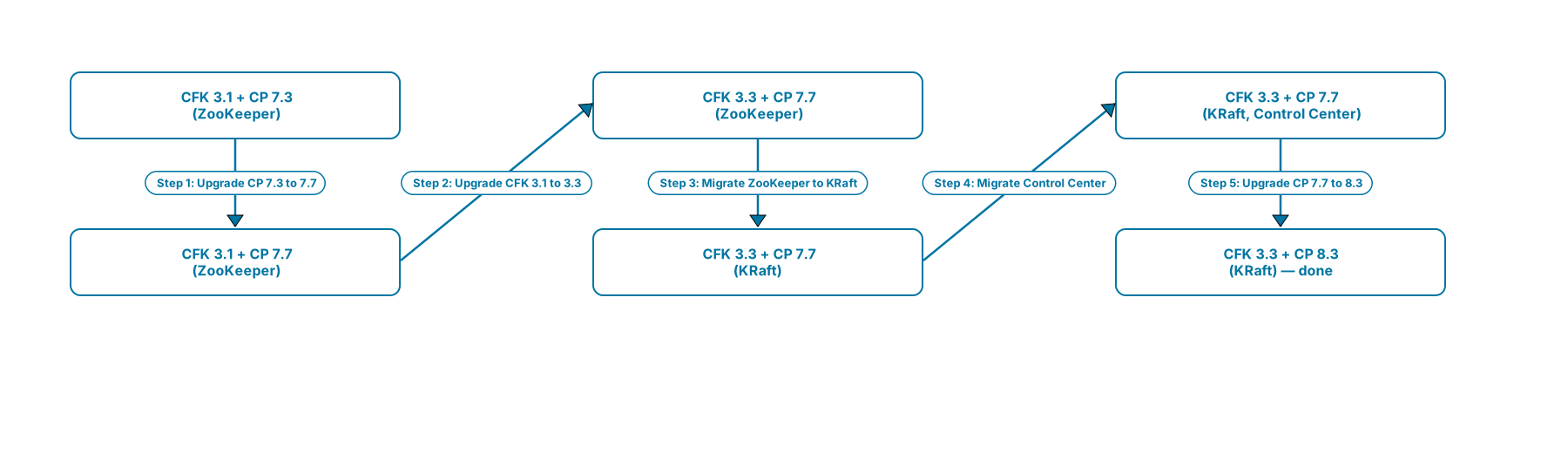
Multi-version upgrade path from CFK 3.1 + Confluent Platform 7.3 (ZooKeeper) to CFK 3.3 + Confluent Platform 8.3 (KRaft)
Walkthrough
Upgrade Confluent Platform while staying on CFK 3.1:
Upgrade Confluent Platform from 7.3 to 7.7 (or later, up to 8.1). CFK 3.1 supports Confluent Platform 7.3 through 8.1, so this stays inside your current CFK’s range. While the bare minimum target for this jump is Confluent Platform 7.5, upgrading to 7.7 satisfies the Confluent Platform 7.6 or later requirement for production KRaft migration in Step 3. For details, see Upgrade Confluent Platform Using Confluent for Kubernetes.
Upgrade CFK to 3.3:
With Confluent Platform at 7.7, CFK 3.3 supports both your current Confluent Platform and the target Confluent Platform 8.3. As a result, this single CFK upgrade covers the rest of the upgrade path. For details, see Upgrade Confluent for Kubernetes.
Migrate ZooKeeper to KRaft:
Confluent Platform 8.x removes support for ZooKeeper, making this migration mandatory before you upgrade to Confluent Platform 8.x. CFK supports KRaft migration starting at Confluent Platform 7.6, which is why Step 1 upgraded your environment to Confluent Platform 7.7. For details, see Migrate a Single Cluster from ZooKeeper to KRaft.
Migrate to Control Center:
If you use Control Center (Legacy), migrate your alerts and switch to Control Center before upgrading to Confluent Platform 8.x. Confluent Platform 8.x does not support Control Center (Legacy). For details, see Migrate Control Center (Legacy) to Control Center. Skip this step if you do not use Control Center (Legacy).
Upgrade Confluent Platform to 8.3:
With CFK 3.3, a KRaft-based cluster, and (if applicable) Control Center in place, upgrade Confluent Platform to the target version. For details, see Upgrade Confluent Platform Using Confluent for Kubernetes.
Next steps
For pre-upgrade tasks and known issues, see Pre-upgrade tasks and known issues.
To upgrade the CFK Operator, see Upgrade Confluent for Kubernetes.
To upgrade Confluent Platform components, see Upgrade Confluent Platform Using Confluent for Kubernetes.
To migrate Confluent Control Center (Legacy) alerts to Control Center and upgrade Control Center, see Migrate to and Upgrade Control Center.