

Configure Multi-Region Clusters in Confluent Platform
Confluent Server is often run across availability zones or nearby datacenters. Dissimilar networks between brokers—in reliability, latency, bandwidth, or cost—can cause higher latency, lower throughput, and increased cost to produce and consume messages.
To mitigate this, Confluent Server adds three capabilities:
Follower fetching
Observers
Replica placement
Follower fetching
With Multi-Region Clusters, clients can consume from followers instead of only the leader, reducing cross-datacenter traffic between clients and brokers. Before this feature, all consume and produce operations took place on the leader.
To enable follower fetching, configure these settings in your server.properties file, where broker.rack
identifies the location of the broker. It doesn’t have to be a rack; it can be the region in which the broker resides:
replica.selector.class=org.apache.kafka.common.replica.RackAwareReplicaSelector
broker.rack=<region>
On the consumer side, set client.rack as the client property. Apache Kafka® 2.3
clients or later will then read from followers that have matching broker.rack as the
specified client.rack ID.
client.rack=<rack_id>
Tip
This feature is also available in the
confluent-kafkapackage.A consumer can consume messages from a follower even if the follower is out-of-sync. For example, given a
westand aneastrack, ifwestis down for an hour, and then restarts, its brokers are out of sync but start to catch up by replicating data fromeast. During this catch up period, consumers inwestcan consume from these out-of-sync follower replicas, and so avoid the long network hop over toeast, as long as the out-of-sync followers have the offset that the consumers request. If a consumer gets ahead of the out-of-sync followers, it starts to fetch from the leader, which could be ineast.
Observers
An observer is a third replica type, introduced by Multi-Region Clusters, that replicates data from the leader without joining the in-sync replicas (ISR) by default. Kafka historically had only two replica types: leaders and followers. Observers try to keep up with the leader like a follower does, and with follower fetching, clients can also consume from observers.
By not joining the ISR, observers give operators the ability to asynchronously replicate data. In Confluent Server, the high watermark
for a topic partition is not increased until all members of the ISR acknowledge they have replicated a message. Clients using
acks=all can suffer from throughput issues, especially when high-latency, low-bandwidth networks across datacenters are involved.
With observers, you can define topics that synchronously replicate data within one region, but replicate the data asynchronously between
regions. These observers do not affect the throughput and latency of producing messages because the topic partition leader doesn’t need to wait for them to get replicated to the observers before acknowledging the request back to
the producer.
You can use the metrics described in the Metrics section to monitor the number of replicas (normal synchronous replicas and observers) that are caught up with the leader.
Note
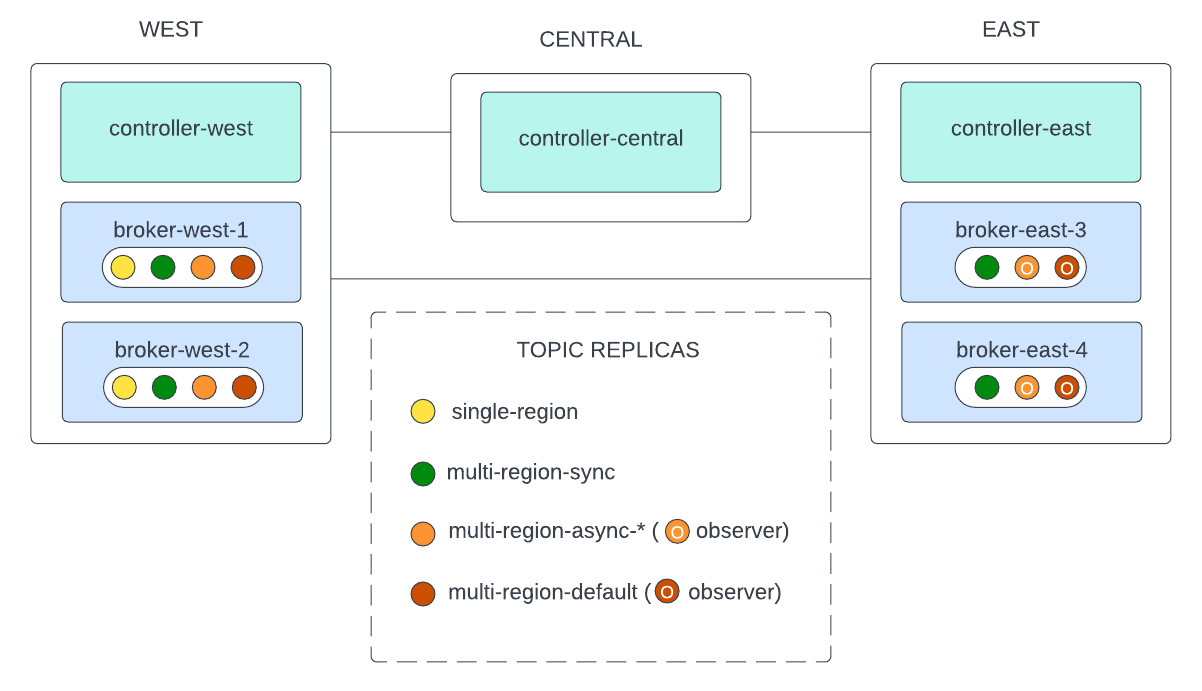
A common deployment is to run two datacenters, each containing a KRaft controller and a broker, and a third location that hosts only a controller so that a quorum can be established. In this setup, if there is a network partition between the brokers, but not between the controller instances, then manual action is required to restore the cluster to health, even if automatic observer promotion is in use. If you have this deployment, it is important to be aware of this potential failure scenario and set up appropriate monitoring, alerting, and procedures to address it.
Intelligent Replication, a performance optimization feature available in Confluent Private Cloud, does not support observers. If you need to use observers for multi-region deployments, you cannot enable Intelligent Replication on those clusters.
Automatic observer promotion
Automatic observer promotion is available with replica placement version 2. To use version 2, specify "version": 2 in your replica placement JSON. For more information, see Replica placement.
Automatic observer promotion is the process whereby an observer is promoted into the ISR. This is useful in certain degraded scenarios. For example, if there have been enough broker failures for a given partition to be below its minimum in-sync replicas constraint, that partition would normally become offline. With automatic observer promotion, one or more observers can take the place of followers in the ISR, keeping the partition online until the followers can be restored. After followers have been restored (they are caught up and have rejoined the ISR), the observers are automatically demoted from the ISR.
The observerPromotionPolicy field in a topic’s replica placement policy controls this behavior. It can have the following values:
under-min-isr: observers are promoted if the ISR size drops below the topic’smin.insync.replicasconfiguration. For example, given a partition withISR=3andmin.insync.replicas=2, an observer would be promoted if two replicas in the ISR failed.under-replicated: observers are promoted if the ISR size drops below the configured count of replicas in the topic’s replica placement policy. For example, given a partition withISR=3andmin.insync.replicas=2, an observer would be promoted if one replica in the ISR failed.leader-is-observer: if the current partition leader is an observer. Ifleader-is-observeris used, observers join the ISR only if you intervene manually. You must calluncleanleader election on an observer node to make that observer the partition’s leader. Then, other observers also join the ISR to satisfy min-ISR, if needed. This is always the behavior if"version": 1is used in the replica placement policy.
Important
The default observerPromotionPolicy is under-min-isr, which is a change from the default version 1 replica placement behavior. To use the legacy behavior, use replica placement version 1 or configure observerPromotionPolicy to leader-is-observer.
The metric ObserversInIsrCount described in Metrics displays the number of observers
that are currently in the ISR.
To learn more, see this blog post: Automatic Observer Promotion Brings Fast and Safe Multi-Datacenter Failover with Confluent Platform 6.1.
Replica placement
New replica placement features and limitations
In Confluent Platform, Multi-Region Clusters observers and replicas can be in the same rack, as described in example 2 below.
Auto Data Balancer supports matching racks.
Replica placement configuration notes
Using the same rack for both replicas and observers in a topic’s replica placement requires the cluster’s brokers to have
inter.broker.protocol.versionof at least3.3. This was an issue with earlier versions of Confluent Platform running ZooKeeper, which required upgrades, as described in Upgrade Confluent Platform and Steps for upgrading to 8.3.x. ZooKeeper is deprecated in Confluent Platform 7.5 in favor of KRaft, and it was removed in Confluent Platform 8.0. To learn more about running Kafka in KRaft mode, see KRaft Overview for Confluent Platform and KRaft Configuration for Confluent Platform. To learn about upgrading from ZooKeeper to KRaft, see Steps for upgrading to 8.3.x.If you have set
confluent.log.placement.constraintsin the brokerserver.propertiesfiles and you want those constraints applied to new topics, do not create topics using--replication-factor. Specifying a replication factor when creating a new topic results in the placement constraints being ignored for that topic.
How replica placement works
Replica placement defines how to assign replicas to the partitions in a topic. This feature relies on the broker.rack property
configured for each broker. For example, you can create a topic that uses observers with the --replica-placement
flag on kafka-topics to configure the internal property confluent.placement.constraints.
kafka-topics --create \
    --bootstrap-server kafka-west-1:9092 \
    --topic testing-observers \
    --partitions 3 \
    --replica-placement /etc/confluent/testing-observers.json \
    --config min.insync.replicas=2
The file (in this case, /etc/confluent/testing-observers.json) contains the following:
{
  "version": 2,
  "replicas": [
    // array of objects of this shape:
    {
      "count": <integer>,
      "constraints": {
        "rack": <string>, // name of a broker.rack group to assign these replicas
      }
    }
  ],
  "observers": [ // optional
    // array of objects of this shape:
    {
      "count": <integer>,
      "constraints": {
        "rack": <string>, // name of a broker.rack group to assign these observers
      }
    }
  ],
  "observerPromotionPolicy": "under-min-isr" or "under-replicated" or "leader-is-observer" // optional
}
Tip
This JSON does not pass a JSON validator because of the comments, which are for documentation purposes only. If you want to copy and paste the JSON into a file, remove the comments first.
The field replicas contains a list of constraints that must be satisfied by the
sync replicas. The field observers contains a list of constraints that must be
satisfied by the asynchronous replicas (observers).
Each unique rack string can be specified at most once in replicas and at most
once in observers. The total number of brokers with a given broker.rack must be greater
than or equal to the total number of replicas and observers with that "rack" in
this JSON.
Tip
Internal topics (system-generated) must have the same constraints as normal topics. If the default replica placement is configured in the broker, internal topics can use their defaults.
Example 1: Replicas and observers in different racks
The following replica placement JSON shows replicas in rack us-west and observers in rack us-east:
{
    "version": 2,
    "replicas": [
        {
            "count": 3,
            "constraints": {
                "rack": "us-west"
            }
        }
    ],
    "observers": [
        {
            "count": 2,
            "constraints": {
                "rack": "us-east"
            }
        }
    ],
    "observerPromotionPolicy":"under-min-isr"
}
In the preceding example, Confluent Server creates one topic with three partitions. Confluent Server assigns five replicas to each partition. Three of the replicas are sync replicas
with a broker.rack equal to us-west, while two of the replicas are observers with a broker.rack equal to us-east.
If the constraint cannot be satisfied and Confluent Server fails to find enough brokers matching the specified constraint, topic creation fails.
Tip
When a topic is created with a replica placement policy, all its preferred leaders are in the first rack listed in the replica placement policy. If you run Quick Start for Auto Data Balancing in Confluent Platform or Manage Self-Balancing Kafka Clusters in Confluent Platform, the preferred leaders are redistributed among all racks that have replicas.
The topic looks like this when you run kafka-topics --bootstrap-server localhost:9092 --describe:
Topic: test-observers    PartitionCount: 3       ReplicationFactor: 5    Configs: segment.bytes=1073741824,confluent.placement.constraints={"version":1,"replicas":[{"count":3,"constraints":{"rack":"us-west"}}],"observers":[{"count":2,"constraints":{"rack":"us-east"}}]}
Topic: test-observers    Partition: 0    Leader: 1       Replicas: 1,2,3,4,5 Isr: 1,2,3      Offline:      Observers: 4,5
Topic: test-observers    Partition: 1    Leader: 2       Replicas: 2,3,1,5,4 Isr: 2,3,1      Offline:      Observers: 5,4
Topic: test-observers    Partition: 2    Leader: 3       Replicas: 3,1,2,4,5 Isr: 3,1,2      Offline:      Observers: 4,5
In the preceding example, for the first partition, a producer with acks=all gets an acknowledgment back from
the topic partition leader 1 after brokers 1, 2, and 3 have replicated the produced message. Brokers 4 and 5
also replicate the data as quickly as possible, but the leader can send the producer an acknowledgment
without waiting for an acknowledgment from brokers 4 and 5.
Example 2: Replicas and observers in the same rack
Here is another example of a JSON replica placement, which contains replicas and observers in the same rack. To read more about the usefulness of patterns like this one, see the Confluent blog post Automatic Observer Promotion Brings Fast and Safe Multi-Datacenter Failover with Confluent Platform 6.1.
{
    "version": 2,
    "replicas": [
        {
            "count": 2,
            "constraints": {
                "rack": "New York"
            }
        },
        {
            "count": 2,
            "constraints": {
                "rack": "Boston"
            }
        }
    ],
    "observers": [
      {
          "count": 1,
          "constraints": {
              "rack": "New York"
          }
      },
      {
          "count": 1,
          "constraints": {
              "rack": "Boston"
          }
      }
    ],
    "observerPromotionPolicy":"under-min-isr"
}
This example configures the New York and Boston racks, each with two
synchronous replicas and one observer.
Tip
When an existing topic’s replica placement constraint changes, Confluent Server does not automatically move the topic’s partitions to satisfy the new constraint. Either Auto Data Balancer or Manage Self-Balancing Kafka Clusters in Confluent Platform must be run to move the partitions into the new replica placement constraint’s state.
Default placement constraints for internal topics and manually created topics
A default replica placement constraint can be defined for manually created topics and for internal topics. If already defined, the constraint applies at topic creation time:
confluent.log.placement.constraints: applied to all manually created topics.confluent.offsets.topic.placement.constraints: applied to the consumer offsets topic.confluent.transaction.state.log.placement.constraints: applied to the transaction state log topic.
Confluent Control Center inherits the broker replica placement constraints by default so that its internal topics can have replica placement; otherwise, they would be created in a single region.
For all other internal topics (for example, Connect, metrics, telemetry, command, and so on), no default replica placement constraint exists. You must apply and enforce these constraints manually.
Multi-Region Clusters deployment architecture
As a best practice, deploy multi-region clusters across three or more datacenters to avoid split-brain during a network partition. A KRaft deployment might look like this:
DC1: Two KRaft nodes
DC2: Two KRaft nodes
DC3: One KRaft node
Kafka brokers do not need to be deployed in each datacenter. The KRaft ensemble should be deployed so that if a network partition occurs, a quorum of Kafka nodes remains. This is easiest in a three or more datacenter multi-region cluster.
A two-datacenter deployment is possible but requires either a preferred datacenter that wins all leader elections (for example, a 3:2 KRaft node split) or manual intervention to reconfigure the KRaft quorum during a network partition.
Observer failover
Note
This section refers to the failure of all replicas for a partition. To handle partial failures automatically, see Automatic observer promotion.
When all sync replicas for a partition are offline, you can elect an observer as leader. Confluent Server includes the
kafka-leader-election command to send a request to the controller to elect an online replica, including
an observer, as a leader even if it is not part of the ISR. Electing a replica or observer as leader when it
is not in the ISR is called unclean leader election.
In an unclean leader election, it is possible for the new leader to not have all of the produced records up to the largest offset that was acknowledged. This can result in the truncation of all the topic partition logs to an offset that is before the largest acknowledged offset.
Important
To minimize possible data loss caused by unclean leader election, monitor observer replication to make sure that it is not falling too far behind.
For example, if you have a cluster spanning us-west-1 and us-west-2, and you lose all brokers in us-west-1:
If a topic has replicas in
us-west-2in the ISR, one of those brokers is automatically elected leader, and the clients continue to produce and consume.If a topic has replicas, including observers, in
us-west-2not in the ISR, you can perform unclean leader election:Create a JSON file named
unclean-election.jsonthat specifies the topic partitions:{ "version": 1, "partitions": [ {"topic": "testing-observers", "partition": 0} ] }Run this command, and the observers join the ISR:
kafka-leader-election --bootstrap-server kafka-west-2:9092 \
--election-type UNCLEAN --path-to-json-file unclean-election.json
To fail back to the preferred leaders after the brokers have recovered, run this command:
kafka-leader-election --bootstrap-server kafka-west-1:9092 \
--election-type preferred --all-topic-partitions
A switch to the preferred leader happens automatically when
auto.leader.rebalance.enableis set. The selection of the preferred leader is also subject toleader.imbalance.per.broker.percentageandleader.imbalance.check.interval.seconds. To prompt the selection of preferred leaders, run:kafka-leader-election --bootstrap-server localhost:9092 --election-type PREFERRED --topic foo
Multi-Region Clusters metrics
Confluent Server exposes several metrics you should monitor to determine the health and state of a topic partition. Some of these metrics are listed here:
ReplicasCount- In Java Management Extensions (JMX), the full object name iskafka.cluster:type=Partition,name=ReplicasCount,topic=<topic-name>,partition=<partition-id>. It reports the number of replicas (sync replicas and observers) assigned to the topic partition.ObserverReplicasCount- In JMX, the full object name iskafka.cluster:type=Partition,name=ObserverReplicasCount,topic=<topic-name>,partition=<partition-id>. It reports the number of observers assigned to the topic partition.InSyncReplicasCount- In JMX, the full object name iskafka.cluster:type=Partition,name=InSyncReplicasCount,topic=<topic-name>,partition=<partition-id>. It reports the number of replicas in the ISR.CaughtUpReplicasCount- In JMX, the full object name iskafka.cluster:type=Partition,name=CaughtUpReplicasCount,topic=<topic-name>,partition=<partition-id>. It reports the number of replicas that are considered caught up to the topic partition leader. This can be greater than the size of the ISR, as observers can be caught up but are not part of the ISR.IsNotCaughtUp- In JMX, the full object name iskafka.cluster:type=Partition,name=IsNotCaughtUp,topic=<topic-name>,partition=<partition-id>. It reports 1 (true) if not all replicas are considered caught up to the partition leader.ObserversInIsrCount- In JMX, the full object name iskafka.cluster:type=Partition,name=ObserversInIsrCount,topic=<topic-name>,partition=<partition-id>. It reports the number of observers that are currently in the ISR.
Partition reassignment
Confluent Platform 5.5 added a broker setting that makes it easier to configure partition placement constraints for auto-generated topics. Set confluent.log.placement.constraints to define a default replica placement
constraint for the cluster. For example:
confluent.log.placement.constraints={"version": 1,"replicas": [{"count": 2, "constraints": {"rack": "west"}}], "observers": [{"count": 2, "constraints": {"rack": "east"}}]}
You can change the replica placement constraints of a topic and the assignment of replicas to the partitions of a topic. You can use the kafka-configs command-line tool
to change the replica placement constraints. For example:
kafka-configs --bootstrap-server kafka-west-1:9092 --entity-name testing-observers --entity-type topics --alter --replica-placement /etc/confluent/testing-observers.json
The /etc/confluent/testing-observers.json file contains the following:
{
    "version": 1,
    "replicas": [
        {
            "count": 3,
            "constraints": {
                "rack": "us-west"
            }
        }
    ],
    "observers": [
        {
            "count": 2,
            "constraints": {
                "rack": "us-east"
            }
        }
    ]
}
For more information about the replica placement JSON file, see Replica placement.
Important
Changing the configuration of a topic does not change the replica assignment for the topic partition. Changing the replica placement of a topic configuration must be followed by a partition reassignment. The confluent-rebalancer command-line tool supports reassignment that also accounts for replica placement constraints. To learn more, see Quick Start for Auto Data Balancing in Confluent Platform.
For example, run the following commands to start a reassignment that matches the topic’s replica placement constraints. You must use Confluent Platform 5.5 or later,
which includes --topics and --exclude-internal-topics flags to limit the set of topics that are eligible for reassignment. This decreases
the overall rebalance scope and therefore time. Use --replica-placement-only to reassign only the partitions that do not satisfy the
replica placement constraints.
confluent-rebalancer execute --bootstrap-server kafka-west-1:9092 --replica-placement-only --throttle 10000000 --verbose
Run this command to monitor the status for the reassignment:
confluent-rebalancer status --bootstrap-server kafka-west-1:9092
Run this command to finish the reassignment:
confluent-rebalancer finish --bootstrap-server kafka-west-1:9092
Tip
If you have set
confluent.log.placement.constraintsin the brokerserver.propertiesfiles and you want those constraints applied to new topics, do not create topics using--replication-factor. Specifying a replication factor when creating a new topic results in the placement constraints being ignored for that topic.Make sure you use
confluent-rebalancer5.4.0 or later (packaged with Confluent Platform 5.4.0 or later).Use version 5.5.0 with a 5.5.0 Kafka cluster to use these capabilities and limit the scope of the rebalance with
--topics,--exclude-internal-topics, or--replica-placement-only.
For more information and examples, see Quick Start for Auto Data Balancing in Confluent Platform.
Monitoring replicas
You can use the command kafka-replica-status to monitor the status of replicas assigned to a partition, including information about their current mode and replication state.
For example, you can run the following command from $CONFLUENT_HOME to show information about all replicas that constitute the testing-observers topic for the first partition:
./bin/kafka-replica-status --bootstrap-server localhost:9092 --topics testing-observers --partitions 0 --verbose
The output for the example is:
./bin/kafka-replica-status --bootstrap-server localhost:9092 --topics testing-observers --partitions 0 --verbose
Topic: testing-observers
Partition: 0
Replica: 1
IsLeader: true
IsObserver: false
IsIsrEligible: true
IsInIsr: true
IsCaughtUp: true
LastCaughtUpLagMs: 0
LastFetchLagMs: 0
LogStartOffset: 0
LogEndOffset: 10000

Topic: testing-observers
Partition: 0
Replica: 2
...
The output includes the following fields:
Topic(<String>): The topic for the replica.Partition(<Integer>): The partition for the replica.Replica(<Integer>): The broker ID for the replica.IsLeader(<Boolean>): Whether the replica is the ISR leader.IsObserver(<Boolean>): Whether the replica is an observer, otherwise a traditional replica.IsIsrEligible(<Boolean>): Whether the replica is a candidate to be in the ISR set.IsInIsr(<Boolean>): Whether the replica is in the ISR set.IsCaughtUp(<Boolean>): Whether the replica’s log is sufficiently caught up to the leader such that it’s considered to be in sync. However, a replica being caught up doesn’t necessarily mean the replica is in the ISR set. For example, the replica can be an observer, or a follower that cannot be included in the ISR due to topic placement constraints.LastCaughtUpLagMs(<Long>): The duration, in milliseconds, since the last fetch request was received from the replica in which it was considered caught up. This is always0for the leader, and can be-1if the leader hasn’t received a fetch request from the replica.LastFetchLagMs(<Long>): The duration, in milliseconds, since the last fetch request was received from the replica. This is always0for the leader, and can be-1if the leader hasn’t received a fetch request from the replica.LogStartOffset/LogEndOffset(<Long>): The starting and ending log offset for the replica’s log from the leader’s perspective. These can be-1if the leader hasn’t received a fetch request from the replica.
You can also use these flags:
--topics: Comma-separated topics to retrieve replica status for.--partitions: Comma-separated list of partition IDs or ID ranges for the topics; for example,5,10-20.--verbose: Print output in a verbose manner with one attribute per line.--json: Print output in JSON format.--leaders: Show only partition leaders, or omit leaders ifexcludeis provided.--observers: Show only observer replicas, or omit observers ifexcludeis provided.--exclude-internal: Exclude internal topics from the output.--version: Display the Confluent Server version.
Multi-Region Clusters tutorial example
To try a detailed Multi-Region Clusters example, run the end-to-end Tutorial: Multi-Region Clusters on Confluent Platform. The tutorial injects latency and packet loss to simulate the distances between the regions and demonstrates how these capabilities behave in a multi-region environment.
Using Multi-Region Clusters with other Confluent products
If you are using both Multi-Region Clusters and Manage Self-Balancing Kafka Clusters in Confluent Platform, you must specify the broker rack on all brokers. Your starting set of brokers and any brokers you add with Self-Balancing enabled must have a region or rack specified for
broker.rackin each of theirserver.propertiesfiles. To learn more, see Replica placement and multi-region clusters in the Self-Balancing documentation.Operator tasks are not supported.
Tiered Storage is not supported due to the limitations and implementation of many object stores (singular region, eventually consistent replication, one bucket for the whole cluster, and so forth).
Multi-Region Clusters are available for new KRaft clusters.