

Migrate Existing Clusters to Multi-Tenant LKCs
Use Cluster Linking to migrate topics, consumer group offsets, and access control lists (ACLs) from an existing Kafka cluster to Logical Kafka Clusters (LKCs) on a multi-tenant Physical Kafka Cluster (PKC).
Cluster Linking keeps your applications running during replication until you complete the final cutover.
An LKC is an isolated, tenant-scoped Kafka cluster with its own bootstrap URL, role bindings, and quotas. A PKC is the multi-tenant Kafka cluster that hosts one or more LKCs. Clients and cluster link filters always use the same resource names that the LKC exposes, with no LKC-specific prefix.
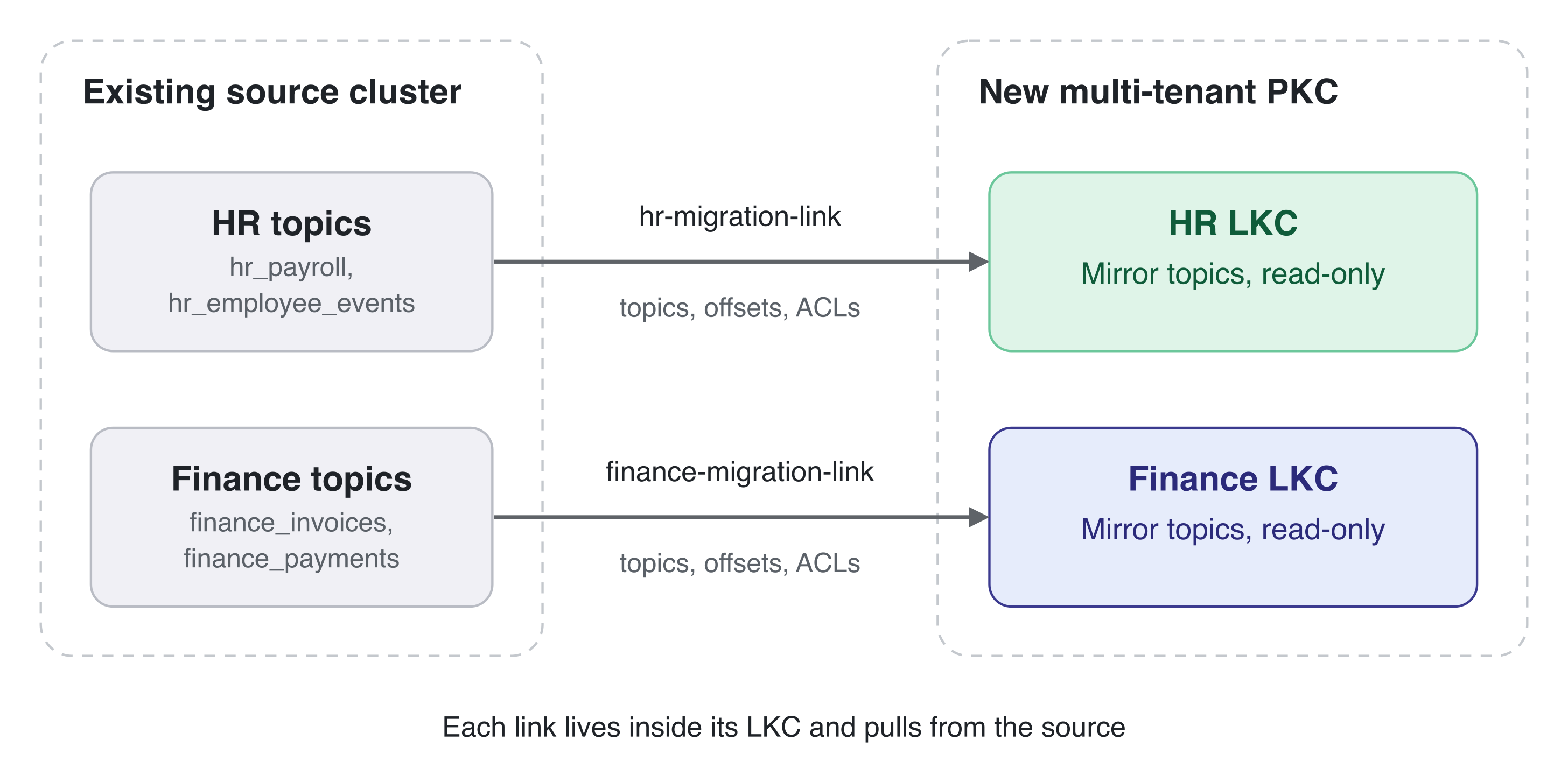
In-place topic migration to LKCs isn’t supported, because LKCs manage only topics that were created through them. Instead, you deploy a new PKC, create an LKC for each team, and replicate data from the existing source cluster into each LKC over a cluster link.
Example scenario
This guide assumes a single shared source cluster where teams rely on topic-naming prefixes for logical separation:
Team |
Source topics |
Consumer groups |
|---|---|---|
HR |
|
|
Finance |
|
|
The source topics don’t need a common prefix. A cluster link migrates the
topics that you select, so if topicA and topicB belong to the same
team, one link can migrate both. The example uses prefixes only to group each
team’s topics.
After the migration, strict multi-tenant isolation replaces the naming conventions. Each team receives a dedicated LKC with its own bootstrap URL, role bindings, and resource quotas.
Migration steps
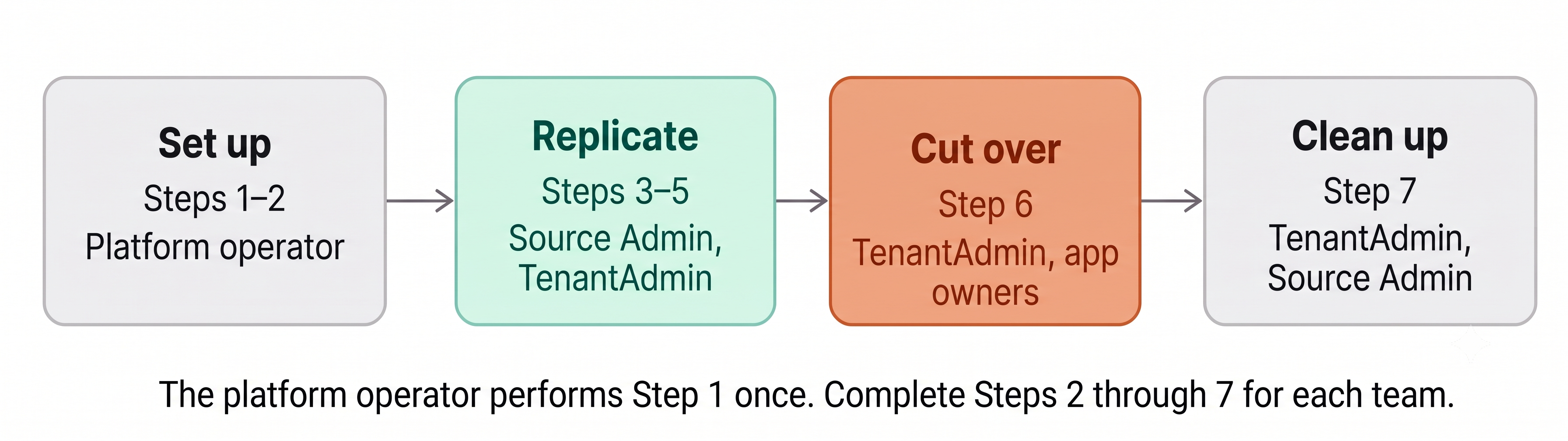
The platform operator performs Step 1 once. Complete Steps 2 through 7 for each team. The procedure shows the HR steps in detail, and the Finance steps repeat them:
Step |
Action |
Performed by |
|---|---|---|
1 |
Platform operator |
|
2 |
Platform operator |
|
3 |
Source cluster administrator and |
|
4 |
|
|
5 |
|
|
6 |
|
|
7 |
|
Until you promote a team’s mirror topics in Step 6, the source cluster remains that team’s system of record, and the mirror topics on its LKC are read-only. Teams migrate independently, so you can pause or postpone any team’s cutover at any point before you promote its topics.
Prerequisites
Before you start the migration, make sure that you have the following:
Software versions: Confluent Platform 8.4 or later and Confluent for Kubernetes (CFK) 3.4 or later for the destination PKC that the platform operator deploys in Step 1, with Multi-Tenancy enabled.
Network connectivity: Network paths that allow all brokers in the destination PKC to reach all brokers in the source cluster. Cluster links are destination-initiated, so the PKC brokers open all outbound connections.
Workload baseline: A snapshot of each team’s workload, including topic and partition counts on the source cluster, peak ingress and egress byte rates, the largest message size, and total connection counts.
Source credentials: A principal and credential on the source cluster for the cluster link. The source cluster administrator grants its permissions in Step 3.
Administrative access: A designated
TenantAdminfor each team. In Step 2, the platform operator grants this person theTenantAdminrole on the team’s LKC, or theOrganizationAdminrole on the PKC. TheDeveloperManagerole isn’t enough, because it can’t create cluster links or promote mirror topics.
Step 1: Deploy the destination PKC
The platform operator deploys a new multi-tenant PKC by using CFK. All teams share this PKC after the migration. For deployment instructions, see the Deploy a Multi-Tenant Physical Kafka Cluster page.
Note
Don’t enable Multi-Tenancy on an existing cluster that has active
workloads. Setting spec.multiTenant.enabled on an active cluster
doesn’t assign existing topics to LKCs.
Step 2: Onboard an LKC for each team
The platform operator creates a LogicalKafkaCluster custom resource (CR)
on the new PKC for each team and assigns the TenantAdmin role to the
person who administers that team’s LKC. In the example, the platform operator
onboards one LKC for HR and one for Finance. For instructions, see the Onboard
an LKC to a Multi-Tenant Physical Kafka Cluster page.
Apply the guidance in the following sections to each LKC.
Size quotas and limits for the imported workload
Use the workload snapshot to set quotas.ingressByteRate,
quotas.egressByteRate, quotas.brokerRequestThreads,
limits.maxPartitions, and limits.maxMessageSizeBytes.
Mirror topics are ordinary topics in the LKC, so their partitions count toward
limits.maxPartitions.Set
limits.maxMessageSizeBytesto the largest message size on the source topics, so that clients can still produce those messages after cutover.
Retrieve the LKC’s bootstrap URL
Retrieve the bootstrap URL from the LogicalKafkaCluster CR status.
CFK generates the LKC ID, so you can’t choose the endpoint. The endpoint has
the format <lkc-id>-kafka.<domain>:<port>.
kubectl get logicalkafkacluster <lkc-name> -n <your-namespace> \
  -o jsonpath='{.status.bootstrapEndpoint}'
Create role bindings before cutover
Configure LKC-scoped role-based access control (RBAC) role bindings for developer accounts before cutover. Although Cluster Linking syncs ACLs, it doesn’t sync RBAC role bindings. For instructions, see the Onboard a Developer page.
Step 3: Prepare the source cluster and the LKC client
The source cluster administrator and the TenantAdmin complete this
step.
Grant source permissions: On the source cluster, grant the following permissions to the link’s authentication principal (a user or service account). Without
READaccess to source topics, mirror topic creation fails.DESCRIBEandREADon the source topics to migrate.DESCRIBEon the consumer groups whose offsets you sync.DESCRIBEon the cluster, if you sync ACLs.
For the complete list, see Authorization (ACLs).
Configure client properties: Create a client properties file that uses the
TenantAdmincredentials from Step 2 to authenticate to the LKC’s bootstrap URL. LKCs require theSSLorSASL_SSLsecurity protocol. This procedure refers to this file as<lkc-command-config>. For more information, see Authentication in Confluent Platform.Get the source cluster ID: Run the following command against the source cluster. The same ID applies to every team’s link, so retrieve it once and use it when creating each link:
kafka-cluster cluster-id --bootstrap-server <source-bootstrap-servers> \
  --config <source-command-config>
Step 4: Create a cluster link from each LKC
The TenantAdmin creates each link on the destination LKC, with the
source cluster as the link’s source. The following steps create the link for
HR. The steps for Finance follow them.
Create and manage the link with the CFK ClusterLink CR (recommended) or
with the Kafka command-line tools. This step shows both approaches.
When you create a link, the LKC ignores unsupported options without returning an error. When you change a link’s configuration, the LKC rejects unsupported options with an error. Verify the applied configuration in Step 5. LKCs support the following options:
link.modeconnection.modeauto.create.mirror.topics.enableauto.create.mirror.topics.filterscluster.link.prefixconsumer.offset.sync.enableconsumer.offset.sync.msconsumer.offset.group.filtersacl.sync.enableacl.sync.msacl.filterstopic.config.sync.mstopic.config.sync.includemirror.start.offset.specClient security settings
This procedure doesn’t set cluster.link.prefix, because ACL sync can’t be
used on a link that sets it.
Note
Run the initial catch-up replication outside peak hours. In a default
CFK-generated configuration, quotas.ingressByteRate doesn’t throttle
cluster link traffic, and the traffic uses broker capacity that every LKC
on the PKC shares. Monitor the PKC’s load while the link catches up. For
more information, see the Monitor and Manage Per-LKC Resource Quotas page.
Create a
KafkaRestClassfor the LKC. AClusterLinkCR creates its link on the cluster that itsKafkaRestClassidentifies, so setspec.kafkaRest.kafkaClusterIDto the LKC ID, which is thestatus.logicalClusterIDvalue of theLogicalKafkaClusterCR.apiVersion: platform.confluent.io/v1beta1 kind: KafkaRestClass metadata: name: hr-lkc namespace: <pkc-namespace> spec: kafkaClusterRef: name: <pkc-name> kafkaRest: kafkaClusterID: <lkc-id> # Add the same authentication settings as the # KafkaRestClass that you used to create the LKC.
CFK creates the link as the principal in this
KafkaRestClass. Confirm that the principal holds theTenantAdminrole on the LKC, because creating a link requiresALTERpermission on the cluster.Create a file named
hr-migration-link.yamlthat defines theClusterLinkCR:apiVersion: platform.confluent.io/v1beta1 kind: ClusterLink metadata: name: hr-migration-link namespace: <pkc-namespace> spec: destinationKafkaCluster: kafkaRestClassRef: name: hr-lkc sourceKafkaCluster: bootstrapEndpoint: <source-bootstrap-servers> clusterID: <source-cluster-id> authentication: type: plain jaasConfig: secretRef: <source-credential-secret> mirrorTopicOptions: deleteRemovedMirrorTopics: false autoCreateTopics: enabled: true topicFilters: - name: hr_ patternType: PREFIXED filterType: INCLUDE consumerGroupFilters: - name: hr_payroll_app patternType: LITERAL filterType: INCLUDE aclFilters: - resourceFilter: resourceType: topic name: hr_ patternType: prefixed accessFilter: operation: ANY permissionType: any
Replace the placeholders with your values:
<source-bootstrap-servers>: The source cluster’s bootstrap servers, such as<host-1>:<port>,<host-2>:<port>.<source-cluster-id>: The source cluster ID that you retrieved in Step 3.<source-credential-secret>: The name of theSecretthat holds the credentials that the link uses to authenticate to the source cluster. Changeauthenticationto match the source cluster’s authentication type.
The topic, consumer group, and ACL filters select what the link replicates. Setting
consumerGroupFiltersenables consumer offset sync, and settingaclFiltersenables ACL sync. SettingdeleteRemovedMirrorTopicstofalsestops CFK from deleting a mirror topic that you don’t list inspec.mirrorTopics. For the filter fields, see Link Kafka Clusters Using Cluster Linking and Use ACL filters to migrate or sync ACLs from Source to Destination cluster.Create the link:
kubectl apply -f hr-migration-link.yaml
Create a link configuration file named
hr-link.configthat contains the connection details and feature settings. The file holds the source cluster’s credentials in plain text, so restrict its file permissions:bootstrap.servers=<source-bootstrap-servers> security.protocol=<source-security-protocol> sasl.mechanism=<source-sasl-mechanism> sasl.jaas.config=<source-jaas-config> auto.create.mirror.topics.enable=true consumer.offset.sync.enable=true consumer.offset.sync.ms=<offset-sync-interval-ms> acl.sync.enable=true
Replace the placeholders with your values:
<source-bootstrap-servers>: The source cluster’s bootstrap servers, such as<host-1>:<port>,<host-2>:<port>.<source-security-protocol>,<source-sasl-mechanism>, and<source-jaas-config>: The settings that the link uses to authenticate to the source cluster.<offset-sync-interval-ms>: How often to sync consumer offsets, in milliseconds. The default is30000.
Don’t put the topic, consumer group, or ACL filters in this file. The command-line tool requires each set of filters as a separate JSON file, as the next step describes.
For more parameters, see Cluster link configuration properties and Filters for auto-create mirror topics.
Create the topic, consumer group, and ACL filter files that the command in the next step references. For the file format, see Filters for auto-create mirror topics, Use ACL filters to migrate or sync ACLs from Source to Destination cluster, and the migration tutorial.
Create the link by connecting to the LKC’s bootstrap URL. Use the source cluster ID that you retrieved in Step 3 as the
--cluster-idvalue. Creating a link requiresALTERpermission on the cluster, which theTenantAdminrole on the LKC includes.kafka-cluster-links --bootstrap-server <lkc-bootstrap-endpoint> \ --command-config <lkc-command-config> --create \ --link hr-migration-link \ --cluster-id <source-cluster-id> \ --config-file hr-link.config \ --topic-filters-json-file hr-topic-filters.json \ --consumer-group-filters-json-file hr-group-filters.json \ --acl-filters-json-file hr-acl-filters.json
For Finance, repeat these steps with the Finance LKC and the Finance topic,
consumer group, and ACL filters. With CFK, create a separate
KafkaRestClass for the Finance LKC. Each link exists only inside its own
LKC, so neither team can see or write to the other team’s mirrored data.
Step 5: Verify the mirrored data
The TenantAdmin verifies each LKC independently by connecting
directly to its bootstrap URL.
If you created the link with CFK, check the link and its mirror topics first:
kubectl get clusterlink hr-migration-link -n <pkc-namespace>

kubectl get clusterlink hr-migration-link -n <pkc-namespace> \
  -o jsonpath='{.status.mirrorTopics}'
The ClusterLink status shows the link’s state and the state of each mirror
topic, but not the replication lag. Complete the following steps with the
command-line tools to verify the lag, consumer offsets, and ACLs.
Verify link configuration: Confirm the link status and active properties:
kafka-cluster-links --bootstrap-server <lkc-bootstrap-endpoint> \
  --command-config <lkc-command-config> --list

kafka-configs --bootstrap-server <lkc-bootstrap-endpoint> \
  --command-config <lkc-command-config> --describe \
  --cluster-link hr-migration-link
If a setting is missing, the LKC ignored it. For troubleshooting steps, see Troubleshooting.
Verify topic replication: Verify that all filtered source topics exist as mirror topics in the
ACTIVEstate with minimal or zero replication lag:kafka-mirrors --describe --links hr-migration-link \ --bootstrap-server <lkc-bootstrap-endpoint> \ --command-config <lkc-command-config>
Automatic mirror topic creation runs periodically, so mirror topics can take about five minutes to appear after you create the link. Mirror topics keep their original source names without LKC prefixes, for example,
hr_payroll. Verify that other teams’ topics don’t appear in the LKC.Verify consumer offsets: Compare the committed offsets between the source cluster and the LKC:
kafka-consumer-groups --bootstrap-server <lkc-bootstrap-endpoint> \
  --command-config <lkc-command-config> --describe \
  --group <hr-consumer-group>
Offsets sync only while a topic is an active mirror and the consumer group has no active members on the LKC. Don’t start LKC consumers until offset verification completes.
Verify ACL synchronization: Confirm that the synchronized ACLs exist:
kafka-acls --bootstrap-server <lkc-bootstrap-endpoint> \
  --command-config <lkc-command-config> --list
The LKC scopes each synced ACL to itself. If an ACL’s principal doesn’t exist in your identity provider, the ACL has no effect. Synced ACLs also count toward the per-LKC ACL limit that the brokers enforce (
confluent.max.acls.per.tenant, default:1000).Monitor system metrics: Observe PKC performance and resource usage during catch-up replication. For more information, see the Monitor and Manage Per-LKC Resource Quotas page.
Step 6: Cut over the clients
TenantAdmin users and application owners cut over one team at a time.
Until you promote a team’s mirror topics, the source cluster stays the system of
record for that team, so you can postpone cutover for any team without affecting
the others.
This flow differs from the general migration tutorial, which moves consumer groups one at a time. In an LKC, offsets can’t be committed to a consumer group that has active members, so this procedure stops all consumers before promotion.
Caution
Cut over a team’s topics, producers, and consumers together in a single maintenance window. Promotion is irreversible. After you promote a topic, never restart source producers against the source topic, because the data streams permanently diverge.
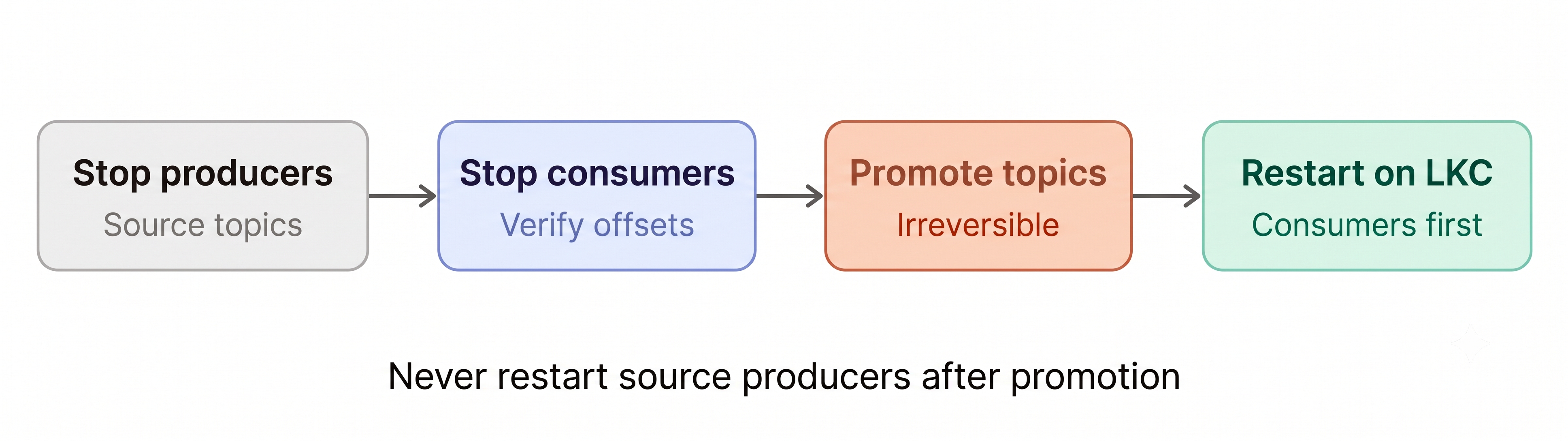
Stop source producers: Stop all producer applications that publish to the team’s source topics. Messages that producers send to a source topic after you promote its mirror topic aren’t replicated to the LKC.
Stop source consumers: Gracefully shut down the consumer applications on the source cluster. Wait for at least
consumer.offset.sync.ms(default: 30 seconds), and then verify that the committed offsets on the LKC match the source cluster.Disable automatic topic creation: When the mirror lag of every topic reaches
0, disable automatic mirror topic creation so that the link doesn’t mirror new source topics:Set
spec.mirrorTopicOptions.autoCreateTopics.enabledtofalseinhr-migration-link.yaml, and then apply the file again.kafka-configs --bootstrap-server <lkc-bootstrap-endpoint> \ --command-config <lkc-command-config> --alter \ --cluster-link hr-migration-link \ --add-config auto.create.mirror.topics.enable=false
Promote mirror topics: Convert the mirror topics into standard, writable topics:
Add each topic to
spec.mirrorTopicsinhr-migration-link.yamlwith thePROMOTEstate, and then apply the file again:spec: mirrorTopics: - name: hr_payroll state: PROMOTE - name: hr_employee_events state: PROMOTE
CFK promotes each topic and creates a
KafkaTopicCR for it in theClusterLinkCR’s namespace. CFK derives the name of that CR from the topic name, so it can’t create the CR for a topic whose name contains a character that Kubernetes doesn’t allow in resource names, such as an underscore. CFK still promotes the topic.kafka-mirrors --promote \ --topics <topic-1>,<topic-2> \ --bootstrap-server <lkc-bootstrap-endpoint> \ --command-config <lkc-command-config>
Promotion verifies that there’s no lag, performs a final offset and configuration sync, and converts the mirror topics to standard topics. Promotion requires
ALTERpermission on the topics. If a consumer group has active members on the LKC, the final offset sync can’t complete, and the mirror topic stays in thePENDING_STOPPEDstate. If promotion doesn’t complete, see Troubleshooting. For failover options, see Stopping mirroring on a topic.Verify topic state: Confirm that all promoted topics reach the
STOPPEDstate. Topics pass through thePENDING_STOPPEDstate first. To check the state, run the following command:kubectl get clusterlink hr-migration-link -n <pkc-namespace> \ -o jsonpath='{.status.mirrorTopics}'
kafka-mirrors --describe --include-stopped \
  --links hr-migration-link \
  --bootstrap-server <lkc-bootstrap-endpoint> \
  --command-config <lkc-command-config>
Repoint client applications: Update the client application configurations to target the LKC’s
status.bootstrapEndpointvalue that you retrieved in Step 2. Check that clients use theSSLorSASL_SSLsecurity protocol and trust the endpoint’s certificate. Confirm that the role bindings from Step 2 are in place. For more information, see the Onboard a Developer page. Start the consumer applications first, and then the producers.Warning
Starting consumers on an LKC before offset sync completes can cause offset resets and duplicate message processing.
Validate client operation: Verify that consumers resume processing from their committed offsets and that producers write successfully to the LKC’s topics.
Retain the original source topics until the migration is validated. The source cluster administrator deletes them in Step 7.
Step 7: Clean up migration resources
After client workloads run successfully on the LKC, the TenantAdmin
and the source cluster administrator decommission the migration resources.
TenantAdmin: Confirm that every mirror topic on the link is still
STOPPED, as verified in Step 6. A link can’t be deleted while any of its mirror topics is in another state.TenantAdmin: Delete the cluster link:
Delete the
ClusterLinkCR:kubectl delete clusterlink hr-migration-link -n <pkc-namespace>
Before CFK deletes the link, it fails over any mirror topic that is still
ACTIVEorPAUSED, and failover doesn’t wait for the lag to reach0. Confirm that every mirror topic isSTOPPEDfirst.Keep the
KafkaRestClassthat you created for the LKC. TheKafkaTopicCRs that CFK created for the promoted topics use it.kafka-cluster-links --bootstrap-server <lkc-bootstrap-endpoint> \ --command-config <lkc-command-config> --delete \ --link hr-migration-link
Delete the link before you decommission the LKC or revoke the
TenantAdmincredentials. For more information, see the Decommission an LKC page.Source cluster administrator: Revoke the link’s credential and remove the ACLs granted in Step 3.
Source cluster administrator: Delete the migrated source topics, such as the
hr_topics.
After all teams migrate, retire the source cluster.
Troubleshooting
A link configuration setting is missing
When you create a link, the LKC ignores unsupported cluster link properties
without returning an error. Compare the output from kafka-configs --describe
--cluster-link with your properties file. Remove unsupported properties or
contact your platform operator.
A source topic didn’t mirror
Check the following:
Filter mismatch: Verify that the topic names match the filter criteria.
Insufficient authorization: Confirm that the link principal holds
READpermission on the source topic.Naming collision: Confirm that a topic with the same name doesn’t already exist on the destination LKC.
Partition limits: Verify that the new mirror topics’ partitions don’t exceed
limits.maxPartitions. If necessary, update theLogicalKafkaClusterCR. CFK sends the complete quotas and limits to Metadata Service (MDS) on every reconcile, so any quota or limit that you omit from the CR is cleared. Keep all existing quota and limit values in the CR when you change one.
Consumer offsets don’t match the source cluster
Wait at least
consumer.offset.sync.msafter you stop the source consumers.Check that the consumer group filter includes the consumer group. This is
consumerGroupFiltersin theClusterLinkCR, orconsumer.offset.group.filterswith the command-line tools.Confirm that the consumer group has no active members on the LKC.
Promotion doesn’t complete
If lag exists, wait for the lag to reach
0, and then run the command again.If a consumer group has active members on the LKC, stop them. The link can’t commit offsets for an active group, so the mirror topic stays in the
PENDING_STOPPEDstate until the final offset sync succeeds. To see the error, runkafka-mirrors --describeagainst the LKC.If the PKC’s brokers can’t reach the source cluster, restore connectivity. If the source cluster is down, run
kafka-mirrors --failoverinstead. You lose any data that the link hasn’t mirrored yet. For more information, see Stopping mirroring on a topic.