

Deploy Ecosystem Components on a Multi-Tenant PKC
This page describes how each component fits into a multi-tenant Physical Kafka Cluster (PKC). Multi-Tenancy is supported starting in Confluent Platform 8.4, and in Confluent for Kubernetes (CFK), starting in the 3.4 release.
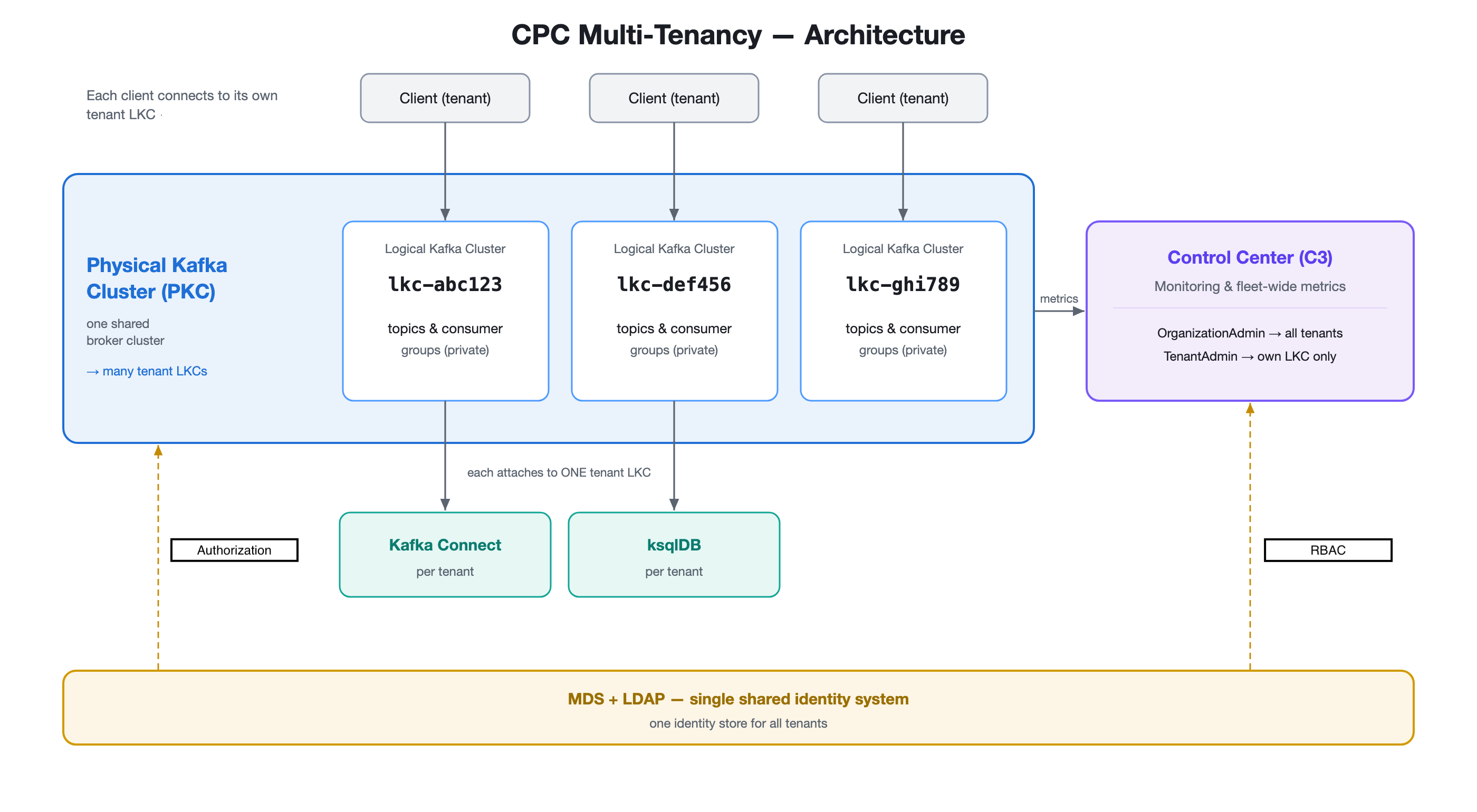
Each component uses one of three deployment models:
Multi-tenant-aware: Kafka, Confluent Control Center, and Metadata Service (MDS) run as a single shared instance per PKC, enforcing isolation or scoping views per LKC through role-based access control (RBAC) instead of deploying separate infrastructure per Logical Kafka Cluster (LKC).
Shared per PKC: deploy a single shared Schema Registry instance per PKC. You can achieve schema isolation between LKCs using Schema Registry contexts, if required.
Dedicated per LKC: deploy a dedicated instance of Kafka Connect, ksqlDB, and REST Proxy for each LKC. Each instance binds to a single LKC as its backend, so one instance can’t serve multiple LKCs.
Component deployment model
Component |
Deployment model |
Why |
|---|---|---|
Kafka |
Multi-tenant. Shared brokers, isolated per LKC |
Each LKC gets its own advertised broker URLs, and broker-native architecture enforces LKC boundaries and resource quotas directly, so you don’t need an extra per-LKC instance. |
Confluent Control Center |
Shared per PKC, RBAC-scoped views per persona |
RBAC scopes each persona’s console view to their own PKC or LKC,
so one shared instance can serve every LKC without exposing
others’ resources. Requires Confluent Control Center 2.7 or later and
For more information, see Configure RBAC for Control Center on Confluent Platform. |
MDS |
Single instance bound to the Kafka brokers, supporting both PKC-wide and LKC-scoped role bindings |
LKC-scoped role bindings let one shared identity and authorization foundation govern every LKC, without a separate RBAC deployment per LKC. For more information, see Manage RBAC for Confluent Platform Using Confluent for Kubernetes. |
Schema Registry |
Shared per PKC |
A single shared instance can serve every LKC. LKCs that need schema isolation use a Schema Registry context to separate their schemas from other LKCs’ without a dedicated instance. Confluent recommends this approach. For more information, see Manage Schemas for Confluent Platform Using Confluent for Kubernetes. |
Kafka Connect |
Dedicated per LKC |
Configures its own LKC bootstrap URL as its backend, so each LKC needs its own dedicated instance to route to the right LKC. For more information, see Manage Connectors for Confluent Platform Using Confluent for Kubernetes. |
ksqlDB |
Dedicated per LKC |
Configures its own LKC bootstrap URL as its backend, so each LKC needs its own dedicated instance to route to the right LKC. |
REST Proxy |
Dedicated per LKC |
Configures its own LKC bootstrap URL as its backend, so each LKC needs its own dedicated instance to route to the right LKC. For more information, see Configure and Manage REST Proxy for Confluent Platform Using Confluent for Kubernetes. |
For each LKC, point the dedicated Kafka Connect, ksqlDB, or
REST Proxy CR at that LKC instead of the PKC’s own Kafka CR.
Set dependencies.kafka.discovery.kind to LogicalKafkaCluster
and dependencies.kafka.discovery.name to the LKC’s name.
After discovery resolves the LKC’s bootstrap URL, Kafka Connect and ksqlDB register themselves in the MDS cluster registry, so Confluent Control Center can discover them by LKC. REST Proxy doesn’t register itself in the cluster registry, so Confluent Control Center can’t discover an LKC-scoped REST Proxy instance.
Tiered storage
Tiered storage works the same way on a multi-tenant PKC as on a single-tenant cluster. The broker archives eligible segments to remote object storage.
The PKC accepts tiered-storage topic configurations, such as
confluent.tier.enable, at topic-creation time. For more information about
configuring tiered storage, see Tiered Storage in Confluent Platform.