

Data Contracts for Schema Registry on Confluent Platform
Data contracts in Confluent Schema Registry define quality expectations, metadata, and transformation rules for schemas. A data contract helps you:
Check field values and enforce constraints to maintain data quality.
Tag sensitive information, such as PII and financial data.
Migrate schemas safely with upgrade and downgrade transformations that use JSONata or CEL expressions.
Data contracts support quality validation rules, migration rules, and metadata such as tags, ownership, and SLOs. Together, they keep data consistent and interoperable when you share information across systems.
How To Improve Data Quality with Domain Validation Rules (video)
To learn about working with data contracts in Confluent Cloud Console, see Manage Data Contracts in Confluent Cloud.
Requirements
General requirements
Schema rules are only available on Confluent Enterprise and Confluent Cloud with the Stream Governance Advanced package.
Schema rules are only supported in version 7.4 or above.
Confluent Cloud requirements
To work with rules on Confluent Cloud Schema Registry:
Enable Schema Registry with the Advanced Stream Governance package. To learn how, see Packages, Features, and Limits and Choose a Stream Governance package and enable Schema Registry for Confluent Cloud.
Confluent Platform requirements
Schema rules are only available on Confluent Enterprise, not on the Confluent Community edition. To learn about Confluent Platform packages, see Platform packages.
To enable schema rules for Confluent Enterprise, add the following property to the Schema Registry properties before starting Schema Registry. The value can be a comma-separated list of class names:
resource.extension.class=io.confluent.kafka.schemaregistry.rulehandler.RuleSetResourceExtension
Limitations
Current limitations are:
Kafka Connect on Confluent Cloud doesn’t support rules execution.
Flink SQL and ksqlDB don’t support rules execution in either Confluent Platform or Confluent Cloud.
Confluent Control Center doesn’t show the new properties for Data Contracts on the schema view page, in particular metadata and rules.
Schema rules are only executed for the root schema, not referenced schemas. For example, given a schema named “Order” that references another schema named “Product” which has some rules attached to it, the serialization/deserialization of the “Order” object doesn’t execute the rules of the “Product” schema.
The non-Java clients (.NET, go, Python, JavaScript) don’t yet support the
DLQaction.JavaScript and .NET don’t support schema migration rules for Protobuf due to a limitation of the underlying third-party Protobuf libraries.
Understanding the scope of a data contract
A data contract is a formal agreement between an upstream component and a downstream component on the structure and semantics of data in motion. A schema is only one element of a data contract. A data contract specifies and supports the following aspects of an agreement:
Structure. The fields and their types, which the schema defines.
Integrity constraints. Declarative constraints or data quality rules on the domain values of fields, such as requiring that an age is a positive integer.
Metadata. Information about the schema or its parts, such as whether a field contains sensitive information. Metadata can also document the data contract, such as who created it.
Rules or policies. Data rules or policies, such as encrypting fields that contain sensitive information or sending messages with an invalid age to a dead letter queue.
Change or evolution. Data contracts have versions and can include declarative migration rules that transform data from one version to another. These rules accommodate even changes that would normally break downstream components.
In an agreement between an upstream component and a downstream component:
The upstream component enforces the data contract.
The downstream component can assume that the data it receives conforms to the contract.
Data contracts give you transparency over dependencies and data usage in a stream architecture. They also keep data in motion consistent, reliable, and high quality.
The upstream component can be a Apache Kafka® producer, and the downstream component the Kafka consumer. The upstream component can also be a Kafka consumer, and the downstream component the application in which that consumer resides. This distinction matters in schema evolution, when the producer uses a newer version of the data contract but the downstream application still expects an older version. In this case, the Kafka consumer uses the data contract to mediate between the Kafka producer and the downstream application. The consumer ensures that the application receives data that matches the older version. It can use declarative transformation rules to reshape the data into the desired form.
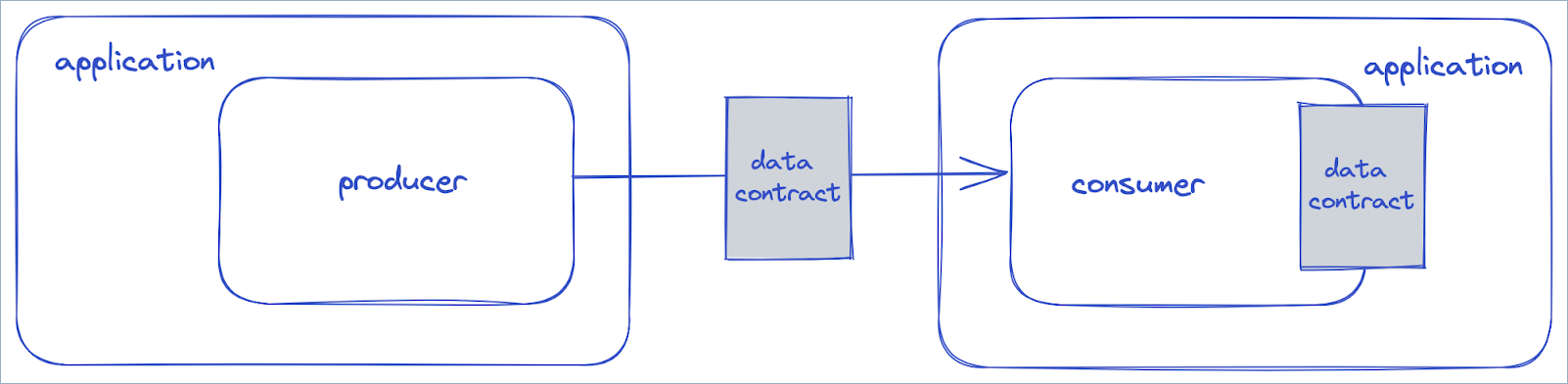
In the preceding diagram, the producer uses version 2 of the data contract, but the application in which the consumer resides expects version 1. The consumer uses a migration rule to transform the data so that it conforms to version 1.
Schema Registry supports the five aspects of a data contract with tags, metadata, and rules.
Metadata properties
You can add arbitrary metadata properties to a data contract.
{
"schema": "...",
"metadata": {
"properties": {
"owner": "Bob Jones",
"email": "bob@acme.com"
}
},
"ruleSet": ...
}
Rules
Rules specify integrity constraints or data policies in a data contract. A rule has the following properties:
name: a user-defined name that you can use to reference the ruledoc: an optional descriptionkind: eitherCONDITIONorTRANSFORMtype: the rule type, which invokes a specific rule executor, such as Google Common Expression Language (CEL) or JSONata.mode: when the rule runs. Modes fall into two groups:Migration rules run in
UPGRADEmode,DOWNGRADEmode, or both (UPDOWN) during complex schema evolution.Domain rules run during serialization (
WRITE), deserialization (READ), or both (WRITEREAD). They can transform the domain values in a message payload.
tags: the tags to which the rule applies, if anyparams: an optional set of static parameters for the rule, as key-value pairsexpr: the optional body of the ruleonSuccess: an optional action to run if the rule succeeds. The default is the built-in action typeNONE. ForUPDOWNandWRITEREADrules, specify two actions separated by a comma. For example,NONE,ERRORfor aWRITEREADrule appliesNONEtoWRITEandERRORtoREAD.onFailure: an optional action to run if the rule fails. The default is the built-in action typeERROR. ForUPDOWNandWRITEREADrules, specify two actions separated by a comma, as foronSuccess.
Every rule executor must have a method named type() that returns a string.
During serialization or deserialization, the client checks whether you
configured a rule executor for the rule type in the schema. If so, the client
uses that executor to run the rule.
Data quality rules
The built-in CEL rule type supports data quality rules. CEL is the Google Common Expression Language. To import the CEL rule executor, include the following dependency:
<dependency>
<groupId>io.confluent</groupId>
<artifactId>kafka-schema-rules</artifactId>
<version>7.4.0</version>
</dependency>
Tip
Make sure that kafka-schema-rules and the serializer, such as
kafka-avro-serializer, are both version 7.4 or above, as detailed in
General requirements.
Next, configure the Java Client to use this executor. The CEL rule executor
registers itself with the CEL rule type. Then associate a CEL rule with the
schema. For example, the following rule checks that the ssn field is exactly
nine characters long before serializing a message. The rule receives the message as
a variable named message:
{
"schema": "...",
"ruleSet": {
"domainRules": [
{
"name": "checkSsnLen",
"kind": "CONDITION",
"type": "CEL",
"mode": "WRITE",
"expr": "size(message.ssn) == 9"
}
]
}
}
The example gives the rule the same name (checkSsnLen) as the name passed to
the rule.executors property. If the names differ, the client uses any
executor registered for the rule type on the client. If you want to configure
two or more rules of the same type differently, give each rule the same name as
its executor.
If you omit the schema from the registration request, Schema Registry attaches the ruleset
to the latest schema in the subject. After registration, set
auto.register.schemas=false and use.latest.version=true on the client.
With this data quality rule in place, the serializer throws an exception when
you send a message whose ssn field isn’t nine characters long. To send the
message to a dead-letter queue when validation fails, set the action type to
DLQ, as in the following example. For the bidirectional rules (WRITEREAD and
UPDOWN), you can specify a comma-separated pair of action types.
{
"schema": "...",
"ruleSet": {
"domainRules": [
{
"name": "checkSsnLen",
"kind": "CONDITION",
"type": "CEL",
"mode": "WRITE",
"expr": "size(message.ssn) == 9",
"params": {
"dlq.topic": "bad-data"
},
"onFailure": "DLQ"
}
]
}
}
Like rule executors, every rule action must have a method named type() that
returns a string.
When you use a dead-letter queue to check a record value, you want to capture the record key and the record value if validation fails. The serializer or deserializer that checks the record value doesn’t receive the record key. To capture the key, specify a wrapper serializer or deserializer for the record key. The wrapper captures the key and makes it available to the serializer or deserializer for the record value. For example, if the record key is a simple string, replace this setting:
key.serializer=org.apache.kafka.common.serialization.StringSerializer
with these settings:
key.serializer=io.confluent.kafka.serializers.WrapperKeySerializer
wrapped.key.serializer=org.apache.kafka.common.serialization.StringSerializer
To learn more about CEL, see https://github.com/google/cel-spec and Understanding CEL in Data Contract Rules.
Field-Level transforms
You can also specify field-level transforms using the Google Common Expression
Language (CEL). A rule executor of type CEL_FIELD transforms field values in a
message. To use this executor, include the following dependency:
<dependency>
<groupId>io.confluent</groupId>
<artifactId>kafka-schema-rules</artifactId>
<version>8.1.6</version>
</dependency>
The CEL field-level rule executor registers itself with the CEL_FIELD rule
type. You can apply the rule expression to more than one field, but the fields
must be of the same type. To specify the applicable fields, use a guard, which
is a CEL boolean expression. The complete rule expression has the form:
<CEL expr for guard> ; <CEL expr for transformation>
To provide a default value for an empty field, use a schema with the following
rule. The rule receives the field name as name, the field value as
value, and the field type as typeName. The expr in this example
applies only to the field named occupation.
{
"schema": "...",
"ruleSet": {
"domainRules": [
{
"name": "populateDefault",
"kind": "TRANSFORM",
"type": "CEL_FIELD",
"mode": "WRITE",
"expr": "name == 'occupation' ; value == '' ? 'unspecified' : value"
}
]
}
}
To apply the rule expression to all string fields, specify a guard of the form
typeName == 'STRING', as in the following example:
{
"schema": "...",
"ruleSet": {
"domainRules": [
{
"name": "populateDefault",
"kind": "TRANSFORM",
"type": "CEL_FIELD",
"mode": "WRITE",
"expr": "typeName == 'STRING' ; value == '' ? 'unspecified' : value"
}
]
}
}
Note
Field transformations support only primitive types (string,
bytes, int, long, float, double, boolean).
They don’t support enums.
Event-condition-action rules
With conditions, you can model arbitrary Event-Condition-Action (ECA) rules.
Specify an action for onSuccess to use when the condition is true.
Specify an action for onFailure to use when the condition is false. The
action type for onSuccess defaults to the built-in action type NONE, and the
action type for onFailure defaults to the built-in action type ERROR. You
can set these values to NONE, ERROR, DLQ, or a custom action type. For example,
a custom action can send an email whenever an event indicates a credit card is
about to expire.
To add a custom action type, write a class for the RuleAction interface and
register the action as follows:
rule.actions=myRuleName # a comma-separated list of names
rule.actions.myRuleName.class=com.myorg.MyCustomAction
rule.actions.myRuleName.param.myparam1=value1
rule.actions.myRuleName.param.myparam2=value2
The RuleAction interface has the following definition:
public interface RuleAction extends RuleBase {
String type();
void run(RuleContext ctx, Object message, RuleException ex)
throws RuleException;
}
Complex schema evolution
Schema Registry serves and maintains a versioned history of schemas, called a subject. Schema Registry also supports schema evolution by allowing schemas to evolve only according to the configured compatibility settings. The compatibility rules enforce a subject-schema constraint. The schema in a subject can evolve only in ways that don’t break clients.
What if you want to evolve the schema in an incompatible way without breaking clients? This scenario requires data migration, and you can use one of these approaches:
Inter-topic migrations: Set up a new Kafka topic and translate the topic data from the old format in the old topic to the new format in the new topic.
Intra-topic migrations: Use transformations when consuming from a topic to translate the topic data from the old format to the new format.
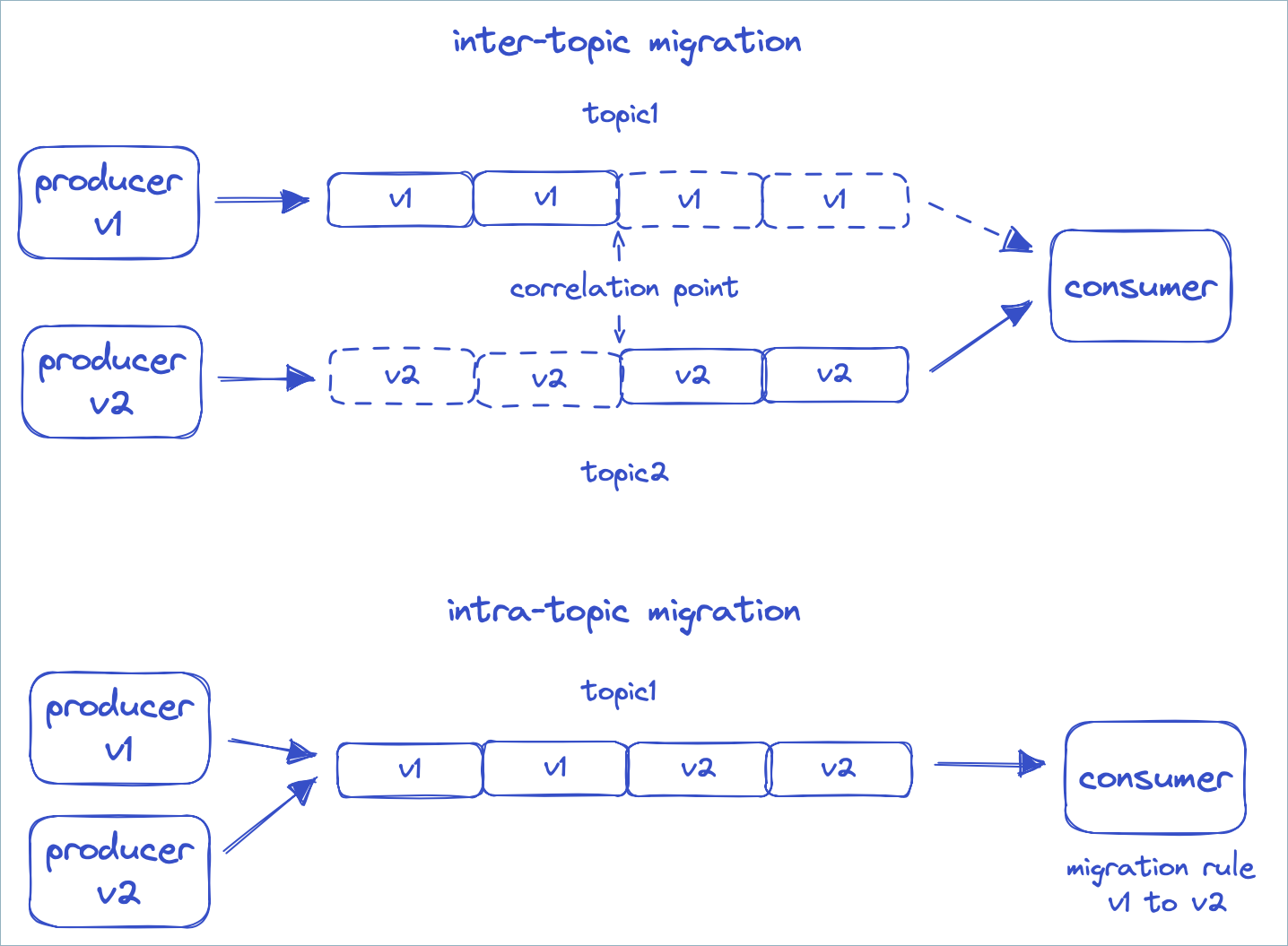
The first approach is complex because you must switch consumers from the old topic to the new topic without skipping data or processing it twice. To do this, you must correlate the offsets of the two topics and start each consumer at the correct correlation point in the new topic. If something goes wrong, you also need to switch back to the old topic, again at the correct correlation point.
With the second approach, the client keeps reading from the same topic. A set of declarative migration rules transforms the data into the form that the consumer expects. With these rules, producers can use incompatible versions 1, 2, and 3 of a schema at the same time. Consumers that expect version 1, 2, or 3 each see every message transformed to their version, regardless of the version the producer sent. This approach is often cleaner and simpler for complex schema evolution. It’s available starting with Confluent Platform 7.4.
Before you use declarative migration rules, review the following features that support complex schema evolution.
Application major versioning
Schema Registry versions schemas with a monotonically increasing sequence of numbers. To
identify when a breaking or incompatible change occurs in the schema history,
use the metadata property of the schema object. The name
application.major.version in the following example is arbitrary. You can use
another name, such as major.version.
{
"schema": "...",
"metadata": {
"properties": {
"application.major.version": "2"
}
},
"ruleSet": ...
}
You can then configure a consumer to use only the latest schema of a specific major version.
auto.register.schemas=false
use.latest.with.metadata=application.major.version=2
latest.cache.ttl.sec=300
The preceding example also sets the client to check for a new latest version
every five minutes. You can also use this TTL configuration with
use.latest.version=true.
Configuration enhancements
You can set the compatibility level in Schema Registry globally or for an individual subject by using a configuration object. The configuration object also has the following properties:
compatibilityGroup: limits compatibility checks to schemas that belong to the same compatibility group.defaultMetadata: the default metadata to use during schema registration.overrideMetadata: the override metadata to use during schema registration.defaultRuleSet: the defaultruleSetto use during schema registration.overrideRuleSet: the overrideruleSetto use during schema registration.
Example: Use overrideMetadata to group schemas by application major version
When you register a schema, Schema Registry initializes the schema metadata with these steps:
Take the default value.
Merge the metadata from the schema on top of it.
Merge the override value for the final result.
If the schema doesn’t specify metadata, Schema Registry uses the metadata from the previous version, if one exists.
Set overrideMetadata to the following value to give every schema an
application.major.version of 2 at registration. You then don’t need to
pass this metadata value explicitly with every schema during registration.
Setting compatibilityGroup to application.major.version also means Schema Registry
compares only schemas that have the same value for application.major.version
during compatibility checks.
{
"compatibilityGroup": "application.major.version",
"overrideMetadata": {
"properties": {
"application.major.version": "2"
}
}
}
Example: Specify a global rule for a metadata tag for a given schema
You can register a ruleset for a metadata tag globally without attaching it to a
subject. For example, a global rule for the PII tag transforms all
PII-tagged fields regardless of topic, schema, and field name. You can create
the same effect with custom rules.
The following curl command sets a global rule that Schema Registry injects into every
new schema created after you set the rule:
curl --location --request PUT '<SR_URL>/config' \
--header 'Accept: application/vnd.schemaregistry.v1+json, application/vnd.schemaregistry+json, application/json' \
--header 'Content-Type: application/json' \
--header 'Authorization: ••••••' \
--data '{
"defaultRuleSet": {
"domainRules": [
{
"name": "maskPII",
"doc": "Mask all PII tagged fields",
"kind": "TRANSFORM",
"mode": "WRITE",
"type": "CEL_FIELD",
"tags": [
"PII"
],
"expr": "\"XXXXX\"",
"onSuccess": "NONE",
"onFailure": "ERROR",
"disabled": false
}
]
}
}
'
Migration rules
How to Evolve your Schemas with Migration Rules (video)
With the preceding configurations, you can pin a consumer to a specific application major version. Compatibility checks then happen only while the application major version doesn’t change.
When you introduce a schema that belongs to a new major version, attach migration rules to the schema. The migration rules transform messages in these ways:
From the previous major version to the new major version, for new consumers reading old messages.
From the new major version to the previous major version, for old consumers reading new messages.
A consumer can encounter a schema that is two or more major versions away. For example, the consumer might go from version 1 to 3 or from 3 to 1. In this case, it runs migration rules transitively, from 1 to 2 and then from 2 to 3.
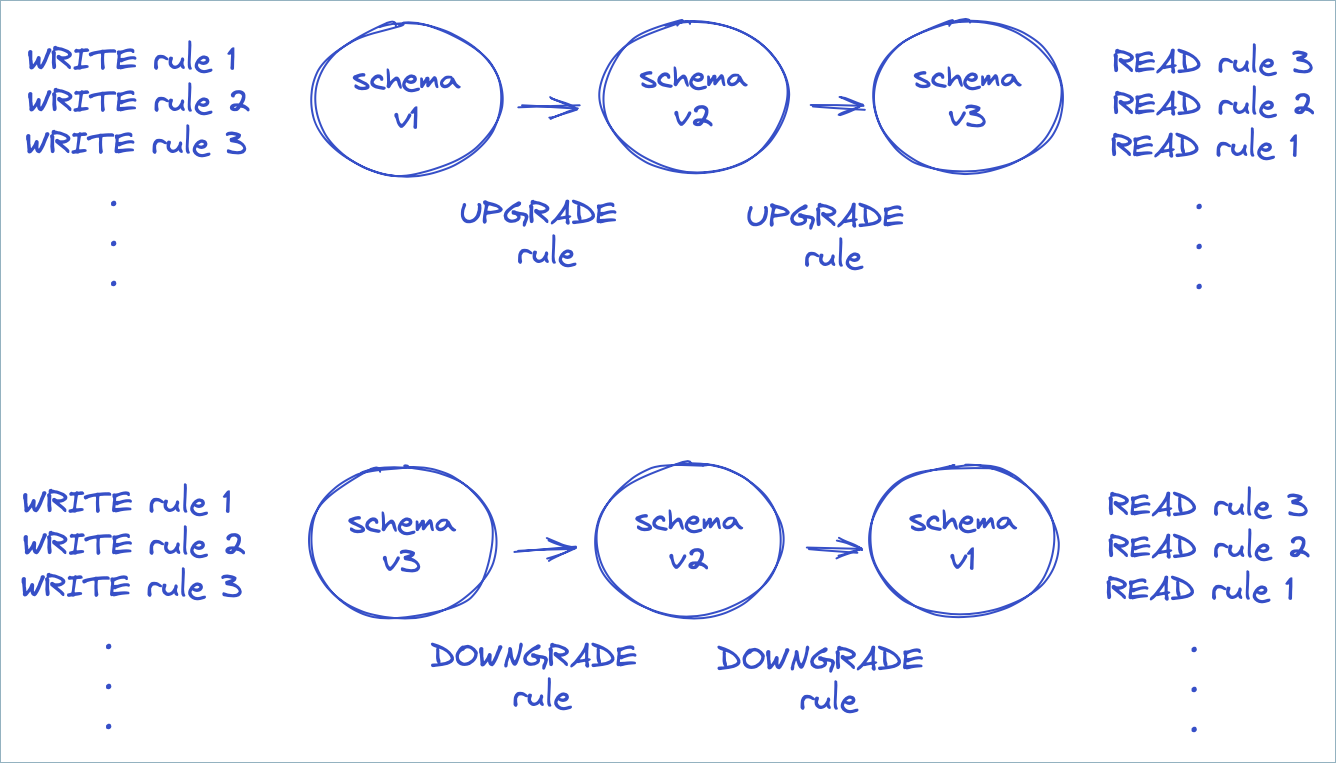
In the preceding diagram, the producer runs the rules that apply to WRITE mode.
The consumer runs rules in either UPGRADE or DOWNGRADE mode, depending on the
schema version of the payload and the desired version. The consumer then runs
the rules that apply to READ mode. The rules run in reverse order during READ
mode, which undoes any actions performed during WRITE in the proper order.
How do migration rules work? They rely on the fact that Avro, JSON Schema, and Protobuf all specify a JSON serialization format for messages. You can write migration rules in any declarative language that supports JSON transformations.
Declarative JSONata rules
JSONata is a transformation language for JSON, inspired by XPath. To use the rule executor for JSONata, include the following dependency:
<dependency>
<groupId>io.confluent</groupId>
<artifactId>kafka-schema-rules</artifactId>
<version>7.4.0</version>
</dependency>
The JSONata rule executor registers itself with the “JSONATA” rule type.
Suppose you have a simple schema with an ssn field.
{
  "type":"record",
  "name":"MyRecord",
  "fields":[{
    "name":"ssn",
    "type":"string",
    "confluent:tags": [ "PII", "PRIVATE" ]
  }]
}
To rename the field to socialSecurityNumber, use the following set of
migration rules. The rules use the JSONata function sift to remove the field
with the old name, and then use a JSON property to specify the new field.
{
"schema": "...",
"ruleSet": {
"migrationRules": [
{
"name": "changeSsnToSocialSecurityNumber",
"kind": "TRANSFORM",
"type": "JSONATA",
"mode": "UPGRADE",
"expr": "$merge([$sift($, function($v, $k) {$k != 'ssn'}), {'socialSecurityNumber': $.'ssn'}])"
},
{
"name": "changeSocialSecurityNumberToSsn",
"kind": "TRANSFORM",
"type": "JSONATA",
"mode": "DOWNGRADE",
"expr": "$merge([$sift($, function($v, $k) {$k != 'socialSecurityNumber'}), {'ssn': $.'socialSecurityNumber'}])"
}
]
}
}
The UPGRADE rule allows new consumers to read old messages, and the DOWNGRADE
rule allows old consumers to read new messages. If you plan to upgrade all
consumers, you can omit the DOWNGRADE rule.
To learn more about JSONata, see https://jsonata.org and Understanding JSONata.
Custom rules
You can enhance data quality and enforce data contracts by registering schemas with custom rules. Both Java and non-Java clients such as Python clients support custom rules.
Apply a custom rule in these ways:
Built-in CEL rules: Define the rule with a Common Expression Language (CEL) expression and associate it with an Avro, JSON, or Protobuf schema. You don’t need any code. The
CEL_FIELDfield-level transform and the Python example both use this approach.Custom rule executors: Write a Java
RuleExecutorclass to define a new rule type for logic that a CEL expression can’t express.
Include the kafka-schema-rules
To use custom rules, include the following dependency:
<dependency>
    <groupId>io.confluent</groupId>
    <artifactId>kafka-schema-rules</artifactId>
    <version>8.1.6</version>
</dependency>
RuleExecutor interface
To define your own rule type, write a class for the RuleExecutor interface:
public interface RuleExecutor extends RuleBase {
  String type();

  Object transform(RuleContext ctx, Object message) throws RuleException;
}
For rules of type CONDITION, the transform method must return a Boolean
value. For rules of type TRANSFORM, it must return the transformed message.
Example function: register_schema_with_rules
The example function, register_schema_with_rules, shows how to register a schema with a custom rule in Schema Registry.
from confluent_kafka.schema_registry import SchemaRegistryClient, Schema, Rule, RuleSet

def register_schema_with_rules(schema_registry_url: str, subject_name: str, schema_str: str, rule_expression: str):
    """
    Registers a schema with a custom validation rule in Confluent Schema Registry.

    This function takes a schema definition and a CEL rule, registers them
    with the Schema Registry under a specified subject by embedding the rule
    within the Schema object itself.

    Args:
        schema_registry_url (str): The URL of the Schema Registry instance.
        subject_name (str): The name of the subject under which to register the schema.
        schema_str (str): The Avro, JSON, or Protobuf schema as a string.
        rule_expression (str): A CEL (Common Expression Language) expression for the rule.
    """
    schema_registry_conf = {'url': schema_registry_url}
    schema_registry_client = SchemaRegistryClient(schema_registry_conf)

    # Define the rule based on the provided CEL expression
    rule = Rule(name="custom_validation_rule",
                doc="Custom data validation rule",
                kind="CONDITION",
                mode="WRITE",
                type="CEL_FIELD",
                expr=rule_expression,
                on_failure="ERROR") # Other options: DLQ, NONE

    # Create a RuleSet and add the rule
    rule_set = RuleSet(domain_rules=[rule])

    # Create a Schema object and pass the ruleset to the constructor
    schema = Schema(schema_str, schema_type="AVRO", ruleset=rule_set) # Or JSON, PROTOBUF

    # Register the schema (which now contains the ruleset internally)
    schema_id = schema_registry_client.register_schema(subject_name=subject_name,
                                                   schema=schema)

    print(f"Schema registered for subject '{subject_name}' with ID: {schema_id}")
    print(f"Associated rule: '{rule_expression}'")
Example usage
The following example uses the register_schema_with_rules function to
register a user schema with a rule that ensures the age field is a positive
integer.
# Schema Registry and Kafka Configuration
SCHEMA_REGISTRY_URL = "http://localhost:8081"
SUBJECT_NAME = "user-topic-value"

# Define the Avro schema
AVRO_SCHEMA = """
{
    "type": "record",
    "name": "User",
    "fields": [
        {"name": "name", "type": "string"},
        {"name": "age", "type": "int"}
    ]
}
"""

# Define the CEL rule
# This rule will be applied to the 'age' field
RULE_EXPRESSION = "message.age > 0"

# Register the schema with the custom rule
register_schema_with_rules(SCHEMA_REGISTRY_URL, SUBJECT_NAME, AVRO_SCHEMA, RULE_EXPRESSION)
Generate a UUID with a custom rule executor
A CEL rule can’t generate a value such as a UUID. To populate a field with a
generated value, write a custom rule executor. The following example defines a
TRANSFORM executor that fills an empty tagged field with a generated UUID on
write. It then registers the executor and applies it to a schema.
Create the executor:
package io.confluent.kafka.schemaregistry.rules;

import io.confluent.kafka.schemaregistry.rules.RuleContext.FieldContext;
import io.confluent.kafka.schemaregistry.rules.RuleContext.Type;
import java.nio.charset.StandardCharsets;
import java.util.UUID;

// A field-level rule executor that overwrites the tagged field with a freshly
// generated UUID (v4). Intended for TRANSFORM rules on WRITE.
// FieldRuleExecutor is a convenience base class that implements RuleExecutor
// for field-level transforms.
public class UuidGeneratorExecutor extends FieldRuleExecutor {

  public static final String TYPE = "UUID";

  public UuidGeneratorExecutor() {
  }

  @Override
  public String type() {
    return TYPE;
  }

  @Override
  public FieldTransform newTransform(RuleContext ctx) throws RuleException {
    UuidGeneratorTransform transform = new UuidGeneratorTransform();
    transform.init(ctx);
    return transform;
  }

  public static class UuidGeneratorTransform implements FieldTransform {

    @Override
    public Object transform(RuleContext ctx, FieldContext fieldCtx, Object fieldValue)
        throws RuleException {
      // Only generate when the field is empty or unset, so existing ids are preserved.
      if (fieldValue != null && !"".equals(fieldValue)) {
        return fieldValue;
      }
      String uuid = UUID.randomUUID().toString();
      switch (fieldCtx.getType()) {
        case STRING:
          return uuid;
        case BYTES:
          return uuid.getBytes(StandardCharsets.UTF_8);
        default:
          // Not a string or bytes field, so leave it unchanged.
          return fieldValue;
      }
    }

    @Override
    public void close() {
    }
  }
}
Register the executor so the Java ServiceLoader discovers it. Create a file named
io.confluent.kafka.schemaregistry.rules.RuleExecutor under
src/main/resources/META-INF/services/, containing the fully qualified class name of
the executor:
io.confluent.kafka.schemaregistry.rules.UuidGeneratorExecutor
Define a TRANSFORM rule on the subject that targets fields tagged UUID and runs on
write:
{
  "ruleSet": {
    "domainRules": [
      {
        "name": "genId",
        "kind": "TRANSFORM",
        "type": "UUID",
        "mode": "WRITE",
        "tags": ["UUID"]
      }
    ]
  }
}
Tag the target field in the schema so the rule applies to it. For an Avro schema, add the tag to the field definition:
{"name": "id", "type": "string", "confluent:tags": ["UUID"]}
Quick start
This quick start shows how to add a data quality rule to an Avro schema. You
create a schema with a single field named f1. You then add a rule that
ensures the length of the field is always less than 10.
Requirements
Schema rules are only available on Confluent Enterprise, not the Confluent Community edition, and on Confluent Cloud with the Stream Governance Advanced package.
For Confluent Cloud Schema Registry, enable the Advanced Stream Governance package. To learn how, see Packages, Features, and Limits and Choose a Stream Governance package and enable Schema Registry for Confluent Cloud.
For Confluent Platform, install Confluent Platform (Enterprise Edition) and add the following property to the Schema Registry properties before starting Schema Registry. The value can be a comma-separated list of class names:
resource.extension.class=io.confluent.kafka.schemaregistry.rulehandler.RuleSetResourceExtension
Start the producer
To run the producer on Confluent Platform:
 ./bin/kafka-avro-console-producer \
   --topic test \
   --bootstrap-server localhost:9092 \
   --property schema.registry.url=http://localhost:8081 \
   --property value.schema='{"type":"record","name":"myrecord","fields":
   [{"name":"f1","type":"string"}]}' \
   --property value.rule.set='{ "domainRules":
   [{ "name": "checkLen", "kind": "CONDITION", "type": "CEL",
      "mode": "WRITE", "expr": "size(message.f1) < 10",
      "onFailure": "ERROR"}]}'

{"f1": "success"}
{"f1": "this will fail"}
To run the producer on Confluent Cloud:
./bin/kafka-avro-console-producer \
  --topic test \
  --bootstrap-server ${BOOTSTRAP_SERVER} \
  --producer.config config.properties \
  --property schema.registry.url=${SR_URL} \
  --property basic.auth.credentials.source=USER_INFO \
  --property basic.auth.user.info=${SR_API_KEY}:${SR_API_SECRET} \
  --property value.schema='{"type":"record","name":"myrecord","fields":
  [{"name":"f1","type":"string"}]}' \
  --property value.rule.set='{ "domainRules":
  [{ "name": "checkLen", "kind": "CONDITION", "type": "CEL",
     "mode": "WRITE", "expr": "size(message.f1) < 10",
     "onFailure": "ERROR"}]}'

{"f1": "success"}
{"f1": "this will fail"}
where config.properties contains:
bootstrap.servers={{ BOOTSTRAP_SERVER }}
security.protocol=SASL_SSL
sasl.jaas.config=org.apache.kafka.common.security.plain.PlainLoginModule required username='{{ CLUSTER_API_KEY }}' password='{{ CLUSTER_API_SECRET }}';
sasl.mechanism=PLAIN

client.dns.lookup=use_all_dns_ips

session.timeout.ms=45000

acks=all
The preceding config.properties example includes the following best practices and requirements:
bootstrap.servers, security protocols, and credentials are required for the Apache Kafka® producer, consumer, and admin.The
client.dns.lookupvalue is required for Kafka clients prior to 2.6.session.timeout.msbeing included is a best practice for higher availability in Kafka clients prior to 3.0. This value is ignored whengroup.protocol=consumeris set.acks=allspecifies that the producer requires all in-sync replicas to acknowledge receipt of messages (records), and is a best practice configuration on the producer to prevent data loss.
Start the consumer
To run the consumer on Confluent Platform:
./bin/kafka-avro-console-consumer \
  --topic test \
  --bootstrap-server localhost:9092 \
  --property schema.registry.url=http://localhost:8081
To run the consumer on Confluent Cloud:
./bin/kafka-avro-console-consumer \
  --topic test \
  --bootstrap-server ${BOOTSTRAP_SERVER} \
  --consumer.config config.properties \
  --property schema.registry.url=${SR_URL} \
  --property basic.auth.credentials.source=USER_INFO \
  --property basic.auth.user.info=${SR_API_KEY}:${SR_API_SECRET}
where config.properties contains:
bootstrap.servers={{ BOOTSTRAP_SERVER }}
security.protocol=SASL_SSL
sasl.jaas.config=org.apache.kafka.common.security.plain.PlainLoginModule required username='{{ CLUSTER_API_KEY }}' password='{{ CLUSTER_API_SECRET }}';
sasl.mechanism=PLAIN

client.dns.lookup=use_all_dns_ips

session.timeout.ms=45000

acks=all
The preceding config.properties example includes the following best practices and requirements:
bootstrap.servers, security protocols, and credentials are required for the Kafka producer, consumer, and admin.The
client.dns.lookupvalue is required for Kafka clients prior to 2.6.session.timeout.msbeing included is a best practice for higher availability in Kafka clients prior to 3.0. This value is ignored whengroup.protocol=consumeris set.acks=allspecifies that the producer requires all in-sync replicas to acknowledge receipt of messages (records), and is a best practice configuration on the producer to prevent data loss.
Reference
CEL rule executor
The CEL rule executor sets the following variables that are available in expressions.
message: the message
CEL_FIELD rule executor
The CEL_FIELD rule executor sets the following variables that are available in expressions.
value: field valuefullName: fully qualified name of the fieldname: field nametypeName: name of the field type, one ofSTRING,BYTES,INT,LONG,FLOAT,DOUBLE,BOOLEANtags: tags that apply to the fieldmessage: the containing message
CEL built-in functions
Both the CEL and CEL_FIELD rule executors support the following built-in string functions.
<string>.isEmail(): test whether the string is a valid email address.<string>.isHostname(): test whether the string is a valid hostname.<string>.isIpv4(): test whether the string is a valid IPv4 address.<string>.isIpv6(): test whether the string is a valid IPv6 address.<string>.isUri(): test whether the string is a valid absolute URI.<string>.isUriRef(): test whether the string is a valid absolute or relative URI.<string>.isUuid(): test whether the string is a valid UUID.
JSONATA rule executor
The JSONATA rule executor supports the following configuration parameters that can be passed when specifying the executor.
jsonata.timeout.ms: the execution time limit in millisecondsjsonata.max.depth: the limit on recursive calls