

Passwordless Authentication for Confluent Server and Schema Registry
Passwordless authentication is available for Confluent Server and Schema Registry. It uses asymmetric encryption, an extension of Confluent Platform OAuth, to secure Kafka and Schema Registry components without user names or passwords. It also streamlines and automates the periodic rotation of client credentials for client applications.
JWT client assertions based Token Retrieval from an IdP
Beginning with Confluent Platform 7.7, Confluent Server and Schema Registry support the OAuth client credential grant
flow for client authentication. Passwordless authentication uses JWT client
assertions (private_key_jwt) to retrieve OAuth tokens from an identity
provider (IdP).
Clients must create a local assertion by using the provided configurations. The client assertion is a JWT that the configured private key signs.
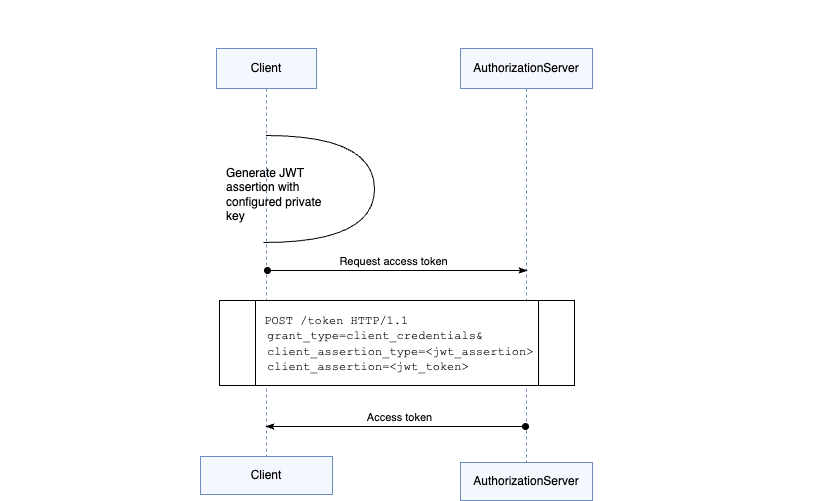
Sample Kafka client authentication to Confluent Server with JWT assertion
The client application uses a private certificate to generate a JWT assertion. It doesn’t use a client ID and client secret.
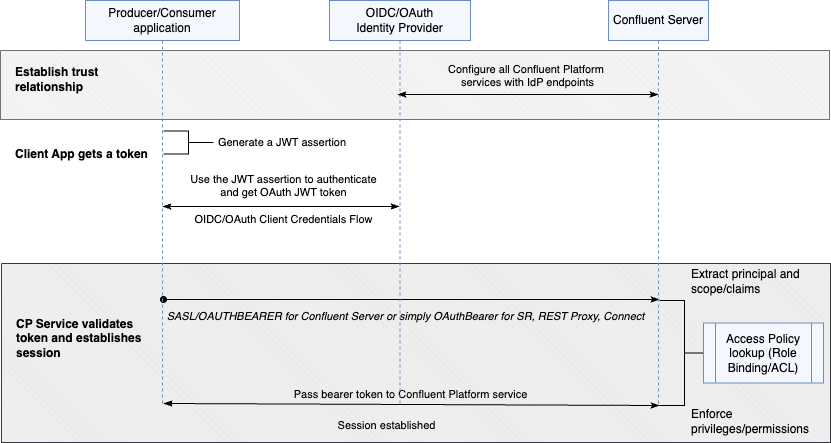
The client uses the generated JWT assertion to fetch the OAuth JWT from the identity provider.
The remaining sequence works the same as the SASL/OAuthBearer flow. For how clients can use OAuth to authenticate to a Confluent service, see Use SASL/OAUTHBEARER Authentication overview.
Configuration
Server-side configurations for Kafka and Schema Registry are the same as the Confluent Platform 7.7 OAuth configurations. Only the client configurations differ.
Kafka client configurations
A client assertion extends the existing client credentials flow. Most client-side properties stay the same, but you add properties to create the client assertion locally. Because these properties are for a Kafka client, they apply to interbroker communication.
sasl.mechanism=OAUTHBEARER #EXISTING
security.protocol=SASL_PLAINTEXT #EXISTING
sasl.login.callback.handler.class=org.apache.kafka.common.security.oauthbearer.OAuthBearerLoginCallbackHandler #EXISTING
sasl.login.connect.timeout.ms=15000  #EXISTING
sasl.oauthbearer.token.endpoint.url=<idp_token_endpoint> #EXISTING

sasl.oauthbearer.assertion.claim.iss=client_app1 #REQUIRED
sasl.oauthbearer.assertion.claim.sub=client_app1 #REQUIRED
sasl.oauthbearer.assertion.claim.aud=<expected_aud> #REQUIRED

sasl.oauthbearer.assertion.claim.jti.include=true #OPTIONAL

sasl.oauthbearer.assertion.private.key.file=<file_path> #REQUIRED

sasl.oauthbearer.assertion.claim.nbf.seconds=60 #OPTIONAL
sasl.oauthbearer.assertion.algorithm=RS256 #OPTIONAL
sasl.oauthbearer.assertion.claim.exp.seconds=300 #OPTIONAL

sasl.oauthbearer.assertion.private.key.passphrase=<passphrase> #OPTIONAL

sasl.oauthbearer.assertion.template.file=<file_path> #OPTIONAL
For communication between clients and Schema Registry, set these properties:
sasl.jaas.config=org.apache.|ak|.common.security.oauthbearer.OAuthBearerLoginModule required \
    clientId="<client-id>" \ [OPTIONAL, needed in case we need to send client id in the token request]
    ssl.keystore...\[needed in case IDP is on mTLS]
    ssl.truststore...\[needed for communicating to IDP]
    scope="<scope>"; #OPTIONAL
Schema Registry client
For the Schema Registry client, most of the existing client credentials properties are also supported. New configurations create the local client assertion.
sasl.jaas.config=org.apache.|ak|.common.security.oauthbearer.OAuthBearerLoginModule required \
    clientId="<client-id>" \ [OPTIONAL, needed in case we need to send client id in the token request]
    ssl.keystore...\[needed in case IDP is on mTLS]
    ssl.truststore...\[needed for communicating to IDP]
    scope="<scope>"; #OPTIONAL

 bearer.auth.credentials.source=OAUTHBEARER_CLIENTASSERTION
 bearer.auth.issuer.endpoint.url=<idp token end point>
 bearer.auth.client.id=<client id> #REQUIRED
 bearer.assertion.claim.iss=client_app1 #REQUIRED
 bearer.assertion.claim.sub=client_app1 #REQUIRED
 bearer.assertion.claim.aud=<expected_aud> #REQUIRED
 bearer.assertion.private.key.file=<file_path> #REQUIRED
 bearer.assertion.claim.jti.include=true #OPTIONAL
 bearer.assertion.claim.nbf.seconds=60 #OPTIONAL
 bearer.assertion.algorithm=RS256 #OPTIONAL
 bearer.assertion.claim.exp.seconds=300 #OPTIONAL
 bearer.assertion.private.key.passphrase=<passphrase> #OPTIONAL
 bearer.assertion.template.file=<file_path> #OPTIONAL
 bearer.auth.scope=groups #OPTIONAL
Schema Registry Server to MDS
confluent.metadata.bootstrap.server.urls=http://{mds_url}:8090
confluent.metadata.http.auth.credentials.provider=OAUTHBEARER // configures HttpOauthBearerCredentialProvider
confluent.metadata.oauthbearer.token.endpoint.url=http://{idp_url}:80
confluent.metadata.oauthbearer.login.client.id={clientId}
confluent.metadata.oauthbearer.assertion.claim.iss=client_app1
confluent.metadata.oauthbearer.assertion.claim.sub=client_app1
confluent.metadata.oauthbearer.assertion.claim.aud=<expected_aud>
confluent.metadata.oauthbearer.assertion.private.key.file=<file_path>
confluent.metadata.oauthbearer.assertion.claim.jti.include=true #OPTIONAL
confluent.metadata.oauthbearer.assertion.claim.nbf.seconds=60 #OPTIONAL
confluent.metadata.oauthbearer.assertion.algorithm=RS256 #OPTIONAL
confluent.metadata.oauthbearer.assertion.claim.exp.seconds=300 #OPTIONAL
confluent.metadata.oauthbearer.assertion.private.key.passphrase=<passphrase> #OPTIONAL
confluent.metadata.oauthbearer.assertion.template.file=<file_path> #OPTIONAL