

Data Contracts for Schema Registry on Confluent Platform
Data contracts in Confluent Schema Registry define quality expectations, metadata, and transformation rules for schemas. A data contract helps you:
Check field values and enforce constraints to maintain data quality.
Tag sensitive information, such as PII and financial data.
Migrate schemas safely with upgrade and downgrade transformations that use JSONata or CEL expressions.
Data contracts support quality validation rules, migration rules, and metadata such as tags, ownership, and SLOs. Together, they keep data consistent and interoperable when you share information across systems.
How To Improve Data Quality with Domain Validation Rules (video)
To learn about working with data contracts in Confluent Cloud Console, see Manage Data Contracts in Confluent Cloud.
Requirements
General requirements
Schema rules are only available on Confluent Enterprise and Confluent Cloud with the Stream Governance Advanced package.
Schema rules are only supported in version 7.4 or above.
Confluent Cloud requirements
To work with rules on Confluent Cloud Schema Registry:
Enable Schema Registry with the Advanced Stream Governance package. To learn how, see Packages, Features, and Limits and Choose a Stream Governance package and enable Schema Registry for Confluent Cloud.
Confluent Platform requirements
Schema rules are only available on Confluent Enterprise, not on the Confluent Community edition. To learn about Confluent Platform packages, see Platform packages.
To enable schema rules for Confluent Enterprise, add the following property to the Schema Registry properties before starting Schema Registry. The value can be a comma-separated list of class names:
resource.extension.class=io.confluent.kafka.schemaregistry.rulehandler.RuleSetResourceExtension
Limitations
Current limitations are:
Kafka Connect on Confluent Cloud doesn’t support rules execution.
Flink SQL and ksqlDB don’t support rules execution in either Confluent Platform or Confluent Cloud.
Confluent Control Center doesn’t show the new properties for Data Contracts on the schema view page, in particular metadata and rules.
Schema rules are only executed for the root schema, not referenced schemas. For example, given a schema named “Order” that references another schema named “Product” which has some rules attached to it, the serialization/deserialization of the “Order” object doesn’t execute the rules of the “Product” schema.
Inline rules are the exception. When the client enables them, for example with
validation.rules.executionin Java, they run even on a referenced schema, though only during serialization. For more information, see Inline data quality rules.The non-Java clients (.NET, go, Python, JavaScript) don’t yet support the
DLQaction.JavaScript and .NET don’t support schema migration rules for Protobuf due to a limitation of the underlying third-party Protobuf libraries.
Understanding the scope of a data contract
A data contract is a formal agreement between an upstream component and a downstream component on the structure and semantics of data in motion. A schema is only one element of a data contract. A data contract specifies and supports the following aspects of an agreement:
Structure. The fields and their types, which the schema defines.
Integrity constraints. Declarative constraints or data quality rules on the domain values of fields, such as requiring that an age is a positive integer.
Metadata. Information about the schema or its parts, such as whether a field contains sensitive information. Metadata can also document the data contract, such as who created it.
Rules or policies. Data rules or policies, such as encrypting fields that contain sensitive information or sending messages with an invalid age to a dead letter queue.
Change or evolution. Data contracts have versions and can include declarative migration rules that transform data from one version to another. These rules accommodate even changes that would normally break downstream components.
In an agreement between an upstream component and a downstream component:
The upstream component enforces the data contract.
The downstream component can assume that the data it receives conforms to the contract.
Data contracts give you transparency over dependencies and data usage in a stream architecture. They also keep data in motion consistent, reliable, and high quality.
The upstream component can be a Apache Kafka® producer, and the downstream component the Kafka consumer. The upstream component can also be a Kafka consumer, and the downstream component the application in which that consumer resides. This distinction matters in schema evolution, when the producer uses a newer version of the data contract but the downstream application still expects an older version. In this case, the Kafka consumer uses the data contract to mediate between the Kafka producer and the downstream application. The consumer ensures that the application receives data that matches the older version. It can use declarative transformation rules to reshape the data into the desired form.
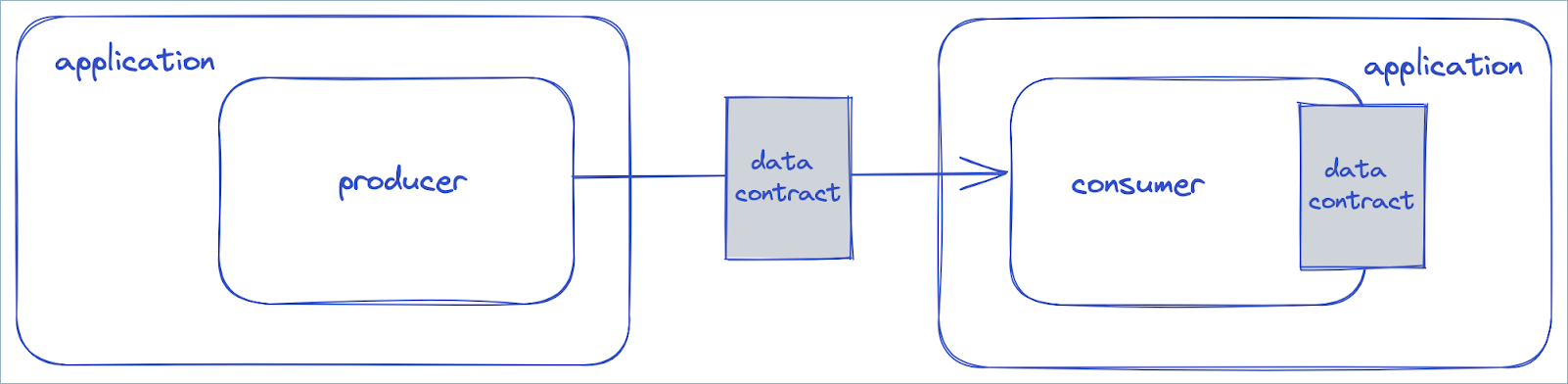
In the preceding diagram, the producer uses version 2 of the data contract, but the application in which the consumer resides expects version 1. The consumer uses a migration rule to transform the data so that it conforms to version 1.
Schema Registry supports the five aspects of a data contract with tags, metadata, and rules.
Metadata properties
You can add arbitrary metadata properties to a data contract.
{
"schema": "...",
"metadata": {
"properties": {
"owner": "Bob Jones",
"email": "bob@acme.com"
}
},
"ruleSet": ...
}
Logical Types
Logical Types let you define a schema using SQL types and skip writing Avro, Protobuf, or JSON Schema directly. Confluent Schema Registry still stores and serves the schema in one of those three formats. It translates a Logical Type to the declared format on registration, and translates it back on request.
For example, here’s an Avro schema:
{
"type": "record",
"name": "Person",
"fields": [
{ "name": "id", "type": "string" },
{ "name": "name", "type": "string" },
{ "name": "age", "type": [ "null", "int" ] },
{ "name": "active", "type": "boolean" }
]
}
You can register the same schema as a Logical Type:
STRUCT Person (
id STRING NOT NULL,
name STRING NOT NULL,
age INT,
active BOOLEAN NOT NULL
)
curl -X POST -H "Content-Type: application/json" \
--data '{
"schemaType": "AVRO",
"schema": "STRUCT Person ( id STRING NOT NULL, name STRING NOT NULL, age INT, active BOOLEAN NOT NULL )"
}' \
'http://localhost:8081/subjects/mytopic-value/versions'
schemaType still accepts AVRO, PROTOBUF, or JSON. It sets the
serialization format clients use on the wire. Retrieving the preceding
schema returns the Avro form by default. The same Logical Type
registered with schemaType set to PROTOBUF returns as:
syntax = "proto3";
message Person {
string id = 1;
string name = 2;
optional int32 age = 3;
bool active = 4;
}
and with schemaType set to JSON, as:
{
"$schema": "https://json-schema.org/draft/2020-12/schema",
"additionalProperties": false,
"properties": {
"id": { "type": "string" },
"name": { "type": "string" },
"age": { "oneOf": [ { "type": "null" }, { "type": "number" } ], "connect.type": "int32" },
"active": { "type": "boolean" }
},
"required": [ "id", "name", "active" ],
"title": "Person",
"type": "object"
}
To retrieve the Logical Type form of a registered schema, add
?format=LOGICAL:
curl -H "Content-Type: application/json" \
'http://localhost:8081/subjects/mytopic-value/versions/1?format=LOGICAL'
The format parameter works on every endpoint that returns a schema:
registering a schema, subject and version lookups, and the /schemas
by-ID and by-GUID endpoints.
The round trip can widen a type. Avro has no native TINYINT or
SMALLINT. Both become int and carry a connect.type
property that lets ?format=LOGICAL restore the original type.
CHAR(n) and VARCHAR(n) become Avro string the same way,
tagged with flink.minLength and flink.maxLength properties.
Protobuf and JSON Schema preserve the same distinctions, using their
own tagging: Protobuf sets the matching parameters under
(confluent.field_meta), and JSON Schema sets connect.type and
native minLength/maxLength directly on the field’s schema.
TIMESTAMP and TIMESTAMP_LTZ, which both map to the same
google.protobuf.Timestamp or JSON Schema form, round-trip the same
way. ?format=LOGICAL restores the narrower type whenever these
tagging properties are present, whether a Logical Type translation
wrote them or a schema registered directly as Avro, Protobuf, or JSON
Schema happens to carry the same tags. A schema without them comes
back as the widest matching Logical Type, such as INT or
STRING.
Schema Registry detects a Logical Type from the request body itself and needs no
separate flag. It first tries to parse the body as the declared
schemaType, and falls back to Logical Type syntax only if that
fails. Because detection is content-driven, you can send a Logical Type
anywhere you can send a schema, including both
compatibility/subjects/{subject}/versions/{version} and
compatibility/subjects/{subject}/versions.
Checking compatibility lets you confirm a Logical Type before you
register it:
curl -X POST -H "Content-Type: application/json" \
--data '{
"schemaType": "AVRO",
"schema": "STRUCT Person ( id STRING NOT NULL, name STRING NOT NULL, age BIGINT, active BOOLEAN NOT NULL )"
}' \
'http://localhost:8081/compatibility/subjects/mytopic-value/versions/latest'
Logical Types cover most of what Avro, Protobuf, and JSON Schema can express. This example declares a namespace, an enum, and two structs, one of which references the other:
NAMESPACE com.example.demo;
ENUM Status ('ACTIVE', 'PAUSED', 'CANCELLED');
STRUCT Address (
street STRING NOT NULL,
city STRING NOT NULL,
postal_code VARCHAR(16)
);
STRUCT Order (
id STRING NOT NULL,
retries INT NOT NULL DEFAULT 0,
status Status NOT NULL,
shipping Address,
billing Address
);
When a script declares more than one named type, Schema Registry infers the root
schema as the single declared type that no other declared type
references. In this example, that’s Order, because Status and
Address are both referenced by it. A type referencing itself
doesn’t count as an incoming reference. A self-recursive type can
still be the root. When more than one declared type has no incoming
references, the first one declared becomes the root, and the rest
remain as peer named types in Protobuf and JSON Schema. Avro allows
only one top-level type. The Avro output entirely drops a declared
type that the root doesn’t reference. When every declared type has an
incoming reference from another type, forming a cycle, Schema Registry can’t
infer a root and rejects the script. Add an explicit trailing
TYPE <name> NOT NULL statement to name the root, for example
TYPE Order NOT NULL.
Avro expresses the same schema far more verbosely. Nullable fields translate to Avro unions:
{
"type": "record",
"name": "Order",
"namespace": "com.example.demo",
"fields": [
{ "name": "id", "type": "string" },
{ "name": "retries", "type": "int", "default": 0 },
{
"name": "status",
"type": {
"type": "enum",
"name": "Status",
"symbols": [ "ACTIVE", "PAUSED", "CANCELLED" ]
}
},
{
"name": "shipping",
"type": [
"null",
{
"type": "record",
"name": "Address",
"fields": [
{ "name": "street", "type": "string" },
{ "name": "city", "type": "string" },
{
"name": "postal_code",
"type": [ "null", { "type": "string", "flink.maxLength": 16 } ]
}
]
}
]
},
{ "name": "billing", "type": [ "null", "Address" ] }
]
}
Define a Logical Type yourself, using STRUCT or ENUM
(Status, Order, and Address in the preceding example). Or
use a built-in type that matches one of the SQL types listed under
Logical Type mappings. To register a built-in type on its
own, such as when a record key is a plain integer, use TYPE:
TYPE INT NOT NULL
This TYPE declaration matches { "type": "int" } in Avro and
needs NOT NULL because types default to nullable.
A field can also be a UNION of typed alternatives:
STRUCT IdAndPayload (
id STRING NOT NULL,
payload UNION (
text STRING NOT NULL,
number BIGINT NOT NULL,
blob BINARY(16) NOT NULL
) NOT NULL
);
A UNION translates to an Avro union, a Protobuf oneof, or a JSON
Schema oneOf. Avro rejects a union with two branches that map to
the same unnamed Avro type, such as UNION (a INT, b SMALLINT)
(both map to Avro int). Avro unions also have no branch names.
?format=LOGICAL can’t restore branch names like text,
number, or blob for a schema registered as Avro.
Schema references
A Logical Type can refer to a STRUCT or ENUM defined in a
different schema. Any type name that doesn’t match a built-in type or a
locally defined STRUCT or ENUM refers to an external one
instead. A misspelled built-in type, such as STRNG, produces a
missing schema reference error, not a syntax error.
Register the Logical Type with a schema reference to that external
type:
curl -X POST -H "Content-Type: application/json" \
--data '{
"schemaType": "AVRO",
"schema": "STRUCT Order ( id STRING NOT NULL, quantity INT NOT NULL, ship_to com.example.demo.Address NOT NULL )",
"references": [
{
"name": "com.example.demo.Address",
"subject": "address",
"version": 1
}
]
}' \
'http://localhost:8081/subjects/orders-value/versions'
For JSON Schema, the referenced schema must define the type under
$defs (definitions for JSON Schema Draft-07 and earlier), keyed
by its fully qualified name:
{
"$schema": "https://json-schema.org/draft/2020-12/schema",
"$defs": {
"com.example.demo.Address": {
"additionalProperties": false,
"properties": {
"city": { "type": "string" },
"postal_code": { "oneOf": [ { "type": "null" }, { "maxLength": 16, "type": "string" } ] },
"street": { "type": "string" }
},
"required": [ "street", "city" ],
"title": "com.example.demo.Address",
"type": "object"
}
}
}
The most minimal form, a bare reference, refers to an external
type without wrapping it in a new STRUCT:
TYPE com.example.demo.Address NOT NULL
This bare reference uses TYPE, because STRUCT only defines a
new user-defined type and can’t wrap an external one. It also needs
NOT NULL, the same as any other TYPE. Register it the same
way, with a schema reference:
curl -X POST -H "Content-Type: application/json" \
--data '{
"schemaType": "AVRO",
"schema": "TYPE com.example.demo.Address NOT NULL",
"references": [
{
"name": "com.example.demo.Address",
"subject": "address",
"version": 1
}
]
}' \
'http://localhost:8081/subjects/addresses-value/versions'
For Avro, this translates to "com.example.demo.Address". For
Protobuf:
syntax = "proto3";
import public "com.example.demo.Address";
For JSON Schema:
{
"$schema": "https://json-schema.org/draft/2020-12/schema",
"$ref": "com.example.demo.Address#/$defs/com.example.demo.Address"
}
Struct and field clauses
A struct and its fields accept extra clauses. NOT NULL and
DEFAULT apply only to fields. CHECK, COMMENT, TAGS, and
WITH apply to both:
NOT NULL: marks a field as required. Fields are nullable by default.DEFAULT: sets a default value for a primitive field.CHECK: a struct- or field-level constraint. See CHECK constraints. Write a field-levelCHECKafter the field’s type. Write a struct-levelCHECKas its own comma-separated entry inside the struct’s parentheses, not after them withCOMMENT,TAGS, andWITH.COMMENT: a human-readable description of a struct or field.TAGS: a set of labels for targeting structs or fields with rules, such asPII. Compiles to aconfluent:tagsproperty.WITH: a set of key-value parameters for struct- or field-level metadata. Compiles to aconfluent:paramsproperty, distinct from the data contract’s ownmetadata.propertiesshown in Metadata properties.
A struct-level COMMENT, TAGS, or WITH goes after the
struct’s closing parenthesis, as in the following example.
NAMESPACE com.example.hr;
STRUCT Person (
id BIGINT NOT NULL
COMMENT 'Primary key',
ssn STRING
CHECK (MATCHES(ssn, '^[0-9]{3}-[0-9]{2}-[0-9]{4}$'))
MESSAGE 'ssn must look like 123-45-6789'
COMMENT 'US social security number'
TAGS ('PII')
WITH ('owner' = 'privacy-team'),
email STRING
COMMENT 'Contact address'
TAGS ('PII', 'CONTACT'),
age INT
CHECK (age BETWEEN 0 AND 150),
CHECK (age IS NOT NULL OR ssn IS NOT NULL) MESSAGE 'need age or ssn'
)
COMMENT 'An employee record'
TAGS ('INTERNAL')
WITH ('owner' = 'hr-team', 'retention.days' = '365');
Local aliases with USING
A USING directive declares a local alias for a type name. The
alias improves readability when a user-defined type lives outside the
current namespace:
NAMESPACE com.example.hr;
USING TYPE Person FOR com.example.common.Person;
STRUCT Employee (
id BIGINT NOT NULL,
person Person
);
com.example.common.Person isn’t defined in this script. It’s an
external type. Registering Employee needs a schema reference to
it, the same as any other external type under
Schema references.
Logical Type mappings
The following table shows how each built-in Logical Type maps to Avro, Protobuf, and JSON Schema.
Logical Type |
Avro |
Protobuf |
JSON Schema |
|---|---|---|---|
|
|
|
|
|
|
|
|
|
|
|
|
|
|
|
|
|
|
|
|
|
|
|
|
|
|
|
|
|
|
|
|
|
|
|
|
|
|
|
|
|
|
|
|
|
|
|
|
|
|
|
|
|
|
|
|
|
|
|
|
|
|
|
|
|
|
|
|
|
|
|
|
|
|
|
|
|
Array of |
|
Array of key-value objects |
|
|
|
|
|
|
Nested message, for example |
|
|
Avro union, for example |
|
|
|
|
|
|
|
Named record |
|
|
|
|
|
|
The translator maps every numeric Logical Type to JSON Schema
number, not integer. A JSON Schema validator accordingly
accepts a value such as 1.5 for an INT NOT NULL field. Each
numeric type still gets its own connect.type tag, the same
mechanism TINYINT/SMALLINT use: int32, int64,
float32, and float64 for INT, BIGINT, FLOAT, and
DOUBLE respectively. ?format=LOGICAL restores each one
correctly.
DATE and TIME(n) also map to number, each tagged with both
a connect.type and a title of
org.apache.kafka.connect.data.Date or .Time.
TIMESTAMP_LTZ(n) gets the same treatment, titled .Timestamp.
Plain TIMESTAMP(n), with no time zone, shares the same
connect.type=int64 as TIMESTAMP_LTZ but carries no Connect
title. A Flink-specific property distinguishes it, and
the two still round-trip correctly. At the default precision, that’s
an epoch day count for DATE, a millisecond count from midnight for
TIME, and an epoch millisecond count for the TIMESTAMP types.
These counts match the Kafka Connect semantics for these names.
DECIMAL(p,s) also maps to number, tagged with
connect.type=bytes and a title of
org.apache.kafka.connect.data.Decimal, plus precision and
scale parameters. It still risks silent precision loss beyond a
JSON double’s roughly 15 significant digits, unlike Avro’s
bytes-backed decimal.
Variant type
As a Logical Type, VARIANT represents semi-structured data whose
shape isn’t fixed, such as a JSON payload whose fields vary by message.
It covers a wider range of primitives than JSON, including
TIMESTAMP and DECIMAL.
A VARIANT field translates differently in each format:
Avro: a record named
confluent.type.Variantwith ametadatafield and avaluefield, tagged"logicalType": "variant". Any otherVARIANTfield in the same schema references the type by name,"confluent.type.Variant". It doesn’t redefine the record.Protobuf: a
confluent.type.Variantmessage, also withmetadataandvaluefields.JSON Schema: an empty schema,
{}, which accepts any JSON value. The field serializes as plain JSON, not in the Variant binary format. Types such asTIMESTAMPandDECIMALaren’t preserved.
Use Variant with Avro
Declare the payload field using the Avro record form of
VARIANT:
{
"type": "record",
"name": "Event",
"namespace": "com.example.demo",
"fields": [
{ "name": "id", "type": "string" },
{ "name": "payload", "type": {
"type": "record",
"name": "Variant",
"namespace": "confluent.type",
"logicalType": "variant",
"fields": [
{ "name": "metadata", "type": "bytes" },
{ "name": "value", "type": "bytes" }
]
}}
]
}
To generate a Java class from this record, configure the Avro Maven
Plugin’s customLogicalTypeFactories and customConversions
elements for Variant:
<plugin>
<groupId>org.apache.avro</groupId>
<artifactId>avro-maven-plugin</artifactId>
<version>${avro.version}</version>
<executions>
<execution>
<phase>generate-sources</phase>
<goals>
<goal>schema</goal>
</goals>
</execution>
</executions>
<configuration>
<customLogicalTypeFactories>
<logicalTypeFactory>
io.confluent.avro.type.VariantLogicalTypeFactory
</logicalTypeFactory>
</customLogicalTypeFactories>
<customConversions>
<conversion>io.confluent.avro.type.VariantConversion</conversion>
</customConversions>
</configuration>
<dependencies>
<dependency>
<groupId>io.confluent</groupId>
<artifactId>kafka-avro-types</artifactId>
<version>${confluent.version}</version>
</dependency>
</dependencies>
</plugin>
The generated class uses VariantConversion and the Variant
class. Add kafka-avro-types to your project’s
<dependencies> as well. A plugin dependency is only available while the
plugin runs.
Both kafka-avro-types entries come from the Confluent Maven
repository, https://packages.confluent.io/maven/. Maven resolves
project dependencies from <repositories> and a plugin’s own
dependencies from <pluginRepositories>. List the repository under
both elements in your POM. If either one is missing, the
kafka-avro-types dependency that Maven resolves from it fails.
Declare confluent.version and avro.version in your POM’s
<properties> element.
Set confluent.version to 8.4.0 and avro.version to your
project’s Avro runtime version.
VariantUtils.fromJson builds the payload field from a JSON
string when producing:
String json = "{\"user\": \"alice\", \"score\": 42}";
Event event = Event.newBuilder()
.setId("evt-1")
.setPayload(VariantUtils.fromJson(json))
.build();
producer.send(new ProducerRecord<>("events", "evt-1", event));
When consuming, VariantUtils.toJsonString converts the payload
field back to a JSON string. Set specific.avro.reader to true
on the consumer so that record.value() returns the generated
Event class. Without it, record.value() returns a
GenericRecord:
Event event = record.value();
String json = VariantUtils.toJsonString(event.getPayload());
Use Variant with Protobuf
Import confluent/type/variant.proto. Declare the field as
confluent.type.Variant. The .proto file, the generated Java
class io.confluent.protobuf.type.Variant, and
io.confluent.protobuf.type.utils.VariantUtils all come from the
io.confluent:kafka-protobuf-types Maven artifact. Add it to your
project’s <dependencies>.
Set the dependency version to 8.4.0.
The artifact comes from the Confluent Maven repository,
https://packages.confluent.io/maven/. List that repository
under <repositories>. protobuf-maven-plugin adds .proto
files from project dependencies to the protoc include path. The
import resolves without extra configuration. With other build
tools, extract confluent/type/variant.proto from the artifact’s
JAR. Then add the directory that contains it to the protoc include
path.
Schema Registry treats confluent/type/variant.proto as a known dependency,
like confluent/meta.proto and confluent/type/decimal.proto.
Registering a schema that imports it needs no references entry
for it.
This schema declares a payload field of type
confluent.type.Variant:
syntax = "proto3";
package com.example.demo;
import "confluent/type/variant.proto";
option java_multiple_files = true;
message Event {
string id = 1;
confluent.type.Variant payload = 2;
}
On the producer side, convert a JSON string to the format-neutral
Variant class, then to the Protobuf confluent.type.Variant
message:
String json = "{\"user\": \"alice\", \"score\": 42}";
Variant variant =
io.confluent.kafka.schemaregistry.type.VariantUtils.fromJson(json);
Event event = Event.newBuilder()
.setId("evt-1")
.setPayload(io.confluent.protobuf.type.utils.VariantUtils
.fromKafkaVariant(variant))
.build();
On the consumer side, reverse the conversion. Set
specific.protobuf.value.type to com.example.demo.Event, the
generated class’s fully qualified name. Otherwise, record.value()
returns an untyped DynamicMessage. An unset message field isn’t
null in proto3. getPayload() returns an empty default
confluent.type.Variant. Check hasPayload() before converting
it:
Event event = record.value();
if (event.hasPayload()) {
Variant variant = io.confluent.protobuf.type.utils.VariantUtils
.toKafkaVariant(event.getPayload());
String json = io.confluent.kafka.schemaregistry.type.VariantUtils
.toJsonString(variant);
}
Build and read a Variant
Build a Variant field by field, without going through a JSON
string. The builder classes and the format-neutral Variant class
are in the io.confluent.kafka.schemaregistry.type package:
VariantBuilder builder = new VariantBuilder();
VariantObjectBuilder root = builder.startObject();
root.appendKey("user");
root.appendString("alice");
root.appendKey("score");
root.appendInt(42);
root.appendKey("price");
root.appendDecimal(new java.math.BigDecimal("19.99"));
root.appendKey("createdAt");
// Microseconds since the epoch: 2024-01-01T00:00:00
root.appendTimestampNtz(1704067200000000L);
root.appendKey("tags");
VariantArrayBuilder tags = root.startArray();
tags.appendString("a");
tags.appendString("b");
root.endArray(); // closes "tags"
root.appendKey("nested");
VariantObjectBuilder nested = root.startObject();
nested.appendKey("ok");
nested.appendBoolean(true);
root.endObject(); // closes "nested"
builder.endObject(); // closes root
Variant variant = builder.build();
Read a Variant the same way, field by field. For a field that a
message might not carry, check the result of getFieldByKey before
calling an accessor on it. A missing key returns Java null. An
explicit JSON null returns a non-null Variant whose type
is Variant.Type.NULL. Calling a value accessor, such as
getString(), on either one throws.
getLong() reads any stored integer width. It works whether the
builder wrote score as an int8, int16, int32, or
int64:
if (variant.getType() != Variant.Type.OBJECT) {
throw new IllegalArgumentException("Expected a Variant object");
}
Variant userField = variant.getFieldByKey("user");
String user =
(userField != null && userField.getType() != Variant.Type.NULL)
? userField.getString() : null;
long score = variant.getFieldByKey("score").getLong();
java.math.BigDecimal price = variant.getFieldByKey("price").getDecimal();
long createdAtMicros =
variant.getFieldByKey("createdAt").getTimestampNtz();
Variant tagList = variant.getFieldByKey("tags");
for (int i = 0; i < tagList.numArrayElements(); i++) {
String tag = tagList.getElementAtIndex(i).getString();
}
boolean ok = variant.getFieldByKey("nested")
.getFieldByKey("ok").getBoolean();
Converting a DECIMAL or TIMESTAMP field to JSON with
VariantUtils.toJsonString keeps its value but not its type. A
DECIMAL renders as an exact JSON number. A TIMESTAMP renders
as a date-time string with no time zone offset, such as
"2024-01-01T00:00:00" for the createdAt field.
The C#, Go, Python, JavaScript, and C++ Schema Registry clients also include a
Variant builder and accessors. For API details, see the reference
documentation for each client:
To operate on a VARIANT field from a CEL data quality rule without
client code, see Variant functions.
Rules
Rules specify integrity constraints or data policies in a data contract. A rule has the following properties:
name: a user-defined name that you can use to reference the ruledoc: an optional descriptionkind: eitherCONDITIONorTRANSFORMtype: the rule type, which invokes a specific rule executor, such as Google Common Expression Language (CEL) or JSONata.mode: when the rule runs. Modes fall into two groups:Migration rules run in
UPGRADEmode,DOWNGRADEmode, or both (UPDOWN) during complex schema evolution.Domain rules run during serialization (
WRITE), deserialization (READ), or both (WRITEREAD). They can transform the domain values in a message payload.
tags: the tags to which the rule applies, if anyparams: an optional set of static parameters for the rule, as key-value pairsexpr: the optional body of the ruleonSuccess: an optional action to run if the rule succeeds. The default is the built-in action typeNONE. ForUPDOWNandWRITEREADrules, specify two actions separated by a comma. For example,NONE,ERRORfor aWRITEREADrule appliesNONEtoWRITEandERRORtoREAD.onFailure: an optional action to run if the rule fails. The default is the built-in action typeERROR. ForUPDOWNandWRITEREADrules, specify two actions separated by a comma, as foronSuccess.
Every rule executor must have a method named type() that returns a string.
During serialization or deserialization, the client checks whether you
configured a rule executor for the rule type in the schema. If so, the client
uses that executor to run the rule.
Data quality rules
The built-in CEL rule type supports data quality rules. CEL is the Google Common Expression Language. To import the CEL rule executor, include the following dependency:
<dependency>
<groupId>io.confluent</groupId>
<artifactId>kafka-schema-rules</artifactId>
<version>7.4.0</version>
</dependency>
Tip
Make sure that kafka-schema-rules and the serializer, such as
kafka-avro-serializer, are both version 7.4 or above, as detailed in
General requirements.
Next, configure the Java Client to use this executor. The CEL rule executor
registers itself with the CEL rule type. Then associate a CEL rule with the
schema. For example, the following rule checks that the ssn field is exactly
nine characters long before serializing a message. The rule receives the message as
a variable named message:
{
"schema": "...",
"ruleSet": {
"domainRules": [
{
"name": "checkSsnLen",
"kind": "CONDITION",
"type": "CEL",
"mode": "WRITE",
"expr": "size(message.ssn) == 9"
}
]
}
}
The example gives the rule the same name (checkSsnLen) as the name passed to
the rule.executors property. If the names differ, the client uses any
executor registered for the rule type on the client. If you want to configure
two or more rules of the same type differently, give each rule the same name as
its executor.
If you omit the schema from the registration request, Schema Registry attaches the ruleset
to the latest schema in the subject. After registration, set
auto.register.schemas=false and use.latest.version=true on the client.
With this data quality rule in place, the serializer throws an exception when
you send a message whose ssn field isn’t nine characters long. To send the
message to a dead-letter queue when validation fails, set the action type to
DLQ, as in the following example. For the bidirectional rules (WRITEREAD and
UPDOWN), you can specify a comma-separated pair of action types.
{
"schema": "...",
"ruleSet": {
"domainRules": [
{
"name": "checkSsnLen",
"kind": "CONDITION",
"type": "CEL",
"mode": "WRITE",
"expr": "size(message.ssn) == 9",
"params": {
"dlq.topic": "bad-data"
},
"onFailure": "DLQ"
}
]
}
}
Like rule executors, every rule action must have a method named type() that
returns a string.
When you use a dead-letter queue to check a record value, you want to capture the record key and the record value if validation fails. The serializer or deserializer that checks the record value doesn’t receive the record key. To capture the key, specify a wrapper serializer or deserializer for the record key. The wrapper captures the key and makes it available to the serializer or deserializer for the record value. For example, if the record key is a simple string, replace this setting:
key.serializer=org.apache.kafka.common.serialization.StringSerializer
with these settings:
key.serializer=io.confluent.kafka.serializers.WrapperKeySerializer
wrapped.key.serializer=org.apache.kafka.common.serialization.StringSerializer
To learn more about CEL, see https://github.com/google/cel-spec and Understanding CEL in Data Contract Rules.
CEL functions for decimal, timestamp, and variant
CEL has no native Decimal or Variant type, and its native
timestamp type has no conversions from sub-second epoch values or
java.time types. The CEL rule executor adds the following
functions and overloads. Both the CEL and CEL_FIELD rule
executors share them, so a CEL expression in a data quality rule or a
field-level transform can operate on values of these types.
A field reaches CEL as a Decimal when its schema is one of the
following:
An Avro
bytesorfixedfield withlogicalType: decimalA Protobuf
confluent.type.Decimalmessage
A field reaches CEL as a Variant when its schema is one of the
following:
An Avro record named
confluent.type.VariantwithlogicalType: variantA Protobuf
confluent.type.Variantmessage
These fields don’t need decimal(...) or variant(...). JSON Schema
fields never reach CEL as a Decimal or Variant. To pass a field of
any other schema type to the decimals.* or variants.* functions,
first convert it with decimal(...) or variant(...).
For a string field that holds JSON text, use
variants.parseJson(...) instead of variant(...), which rejects
a string argument.
When a function in these tables throws, CEL evaluation fails and the
rule’s onFailure action runs (ERROR by default).
Decimal functions
The built-in CEL == and != operators work on Decimal values.
They compare by numeric value, ignoring scale, matching
decimals.eq. Other built-in operators, such as < and +,
don’t apply to Decimal. Use the decimals.* functions for
comparisons and arithmetic instead.
A CEL null argument to decimal(v) or any decimals.* function
throws. It doesn’t return a CEL null or treat the argument as zero.
Function |
Signature |
Returns |
Notes |
|---|---|---|---|
|
|
|
Converts a value to |
|
|
|
Constructs from big-endian, unscaled two’s-complement bytes plus scale. |
|
|
|
Equal by numeric value. |
|
|
|
Less than. |
|
|
|
Less than or equal. |
|
|
|
Greater than. |
|
|
|
Greater than or equal. |
|
|
|
Exact addition. |
|
|
|
Exact subtraction. |
|
|
|
Exact multiplication. |
|
|
|
Division, using |
|
|
|
The modulo operation, with the sign of the dividend, as in SQL. Throws on a zero divisor. |
|
|
|
Square root, using |
|
|
|
The larger of the two operands. |
|
|
|
The smaller of the two operands. |
|
|
|
Negation. |
|
|
|
Absolute value. |
|
|
|
The sign, as |
|
|
|
Rounds to the nearest integer, using |
|
|
|
Rounds to the given scale, using |
|
|
|
Truncates to an integer, toward zero. |
|
|
|
Truncates to the given scale, toward zero. |
|
|
|
Rounds toward negative infinity. |
|
|
|
Rounds toward positive infinity. |
|
|
|
Plain-string form, with no scientific notation. |
|
|
|
Narrowing conversion that can lose precision. An out-of-range value becomes positive or negative infinity. |
Timestamp functions
A CEL null argument to either timestamp overload throws, the same
as the decimals.* functions.
Function |
Signature |
Returns |
Notes |
|---|---|---|---|
|
|
|
Converts a |
|
|
|
Constructs a timestamp from an epoch value at the given precision:
Throws for any other precision. |
Variant functions
Function |
Signature |
Returns |
Notes |
|---|---|---|---|
|
|
|
Lifts a value to |
|
|
|
Constructs a |
|
|
|
Parses a JSON string. Throws on a parse failure or a CEL null argument. |
|
|
|
Parses a JSON string. Returns a CEL null on a parse failure, but throws on a CEL null argument. |
|
|
|
Serializes a |
|
|
|
Returns the type label as a string: |
|
|
|
True only if the top-level type is |
|
|
|
Looks up an object field by name. A CEL null |
|
|
|
Looks up an array element by a 0-based index. A CEL null
|
|
|
|
Navigates using a subset of
A negative index throws, rather than doing a last-relative
lookup. A CEL null |
|
|
|
Extracts a typed value. A CEL null input always returns a CEL
null, checked before |
|
|
|
Extracts a typed value, with the same |
Examples
This data quality rule asserts that a subtotal plus tax equals the total, with tax capped at 10% of the subtotal:
decimals.eq(
decimals.add(message.subtotal, message.tax),
message.total)
&& decimals.le(
message.tax,
decimals.mul(message.subtotal, decimal('0.10')))
This data quality rule asserts that a Variant payload is an object with
a non-negative integer score key. If the user key is present, it
can’t be an explicit JSON null. A missing score also fails the
rule:
variants.type(message.payload) == 'object'
&& !variants.isNull(variants.field(message.payload, 'user'))
&& variants.as(variants.field(message.payload, 'score'), 'int') >= 0
Inline data quality rules
An inline rule, also called an inline validation rule, embeds directly
in the schema text, at the message level or the field level. A rule
set, described in Rules, lives next to the schema
text, in the ruleSet field of the registration request, and runs
only for the root schema. Inline rules run only when the client sets
the validation.rules.execution serializer property, and only
during serialization, not deserialization. When inline rules run, they
run even when another schema references the schema that carries them.
CHECK constraints compile to this same
mechanism.
The validation.rules.execution serializer property that turns on
inline rules also controls whether they run before or after the root
schema’s domain rules:
validation.rules.execution=<execution_order>
Set <execution_order> to BEFORE_DOMAIN_RULES or
AFTER_DOMAIN_RULES.
If the domain rules include |
Set |
Why |
|---|---|---|
Encryption |
|
Validation sees the original values, not ciphertext. |
Transformations that clean or correct data |
|
Validation sees the corrected values. |
Both, and an inline rule reads an encrypted field |
|
Otherwise, the rule evaluates ciphertext. Validation then sees the uncleaned values. |
Inline rules ship in the same kafka-schema-rules client library as
the CEL rule executor described under
Data quality rules.
Include that dependency to use them. You don’t configure a separate
rule executor for inline rules. The serializer wires in inline rule
evaluation automatically once you set
validation.rules.execution. The validation.rules.execution
property and kafka-schema-rules dependency in this section apply
to the Java Client. The other clients also run inline rules. Each sets
the execution order through its own serializer configuration, from
these minimum versions:
Client |
Setting |
Minimum version |
|---|---|---|
Go Client |
|
2.16.0 |
Python Client |
|
2.16.0 |
JavaScript |
|
1.11.0 |
.NET Client |
|
2.16.0 |
C++ ( |
|
0.1.4 |
An inline rule object has the same name, doc, and expr
fields as a rule-set rule, with the same meaning. When an inline rule
fails, the error message is the first of these that exists:
The message the rule’s expression returns, if the expression returns a non-empty string.
The rule’s
doc.The rule’s
sql.The rule’s
expr.
These examples reuse each matching CHECK constraint’s MESSAGE
text as doc.
The following Avro schema is hand-written to match the Customer
Logical Type example in CHECK constraints. It uses inline
rules with the confluent:rules property:
{
"type": "record",
"name": "Customer",
"namespace": "com.example",
"confluent:rules": [
{ "name": "contact_required",
"doc": "a customer needs an email or a phone",
"expr": "dyn(this.email) != null || dyn(this.phone) != null" }
],
"fields": [
{ "name": "id", "type": "string" },
{ "name": "email", "type": ["null", "string"], "default": null,
"confluent:rules": [
{ "name": "email_has_at", "doc": "email must contain @",
"expr": "this.contains('@')" }
] },
{ "name": "phone", "type": ["null", "string"], "default": null },
{ "name": "created",
"type": { "type": "long", "logicalType": "timestamp-millis" },
"confluent:rules": [
{ "name": "created_not_future",
"doc": "created cannot be in the future",
"expr": "timestamp(this, 3) <= now" }
] }
]
}
The following JSON Schema expresses the same rules:
{
"$schema": "https://json-schema.org/draft/2020-12/schema",
"type": "object",
"title": "Customer",
"confluent:rules": [
{ "name": "contact_required",
"doc": "a customer needs an email or a phone",
"expr": "(has(this.email) && dyn(this.email) != null) || (has(this.phone) && dyn(this.phone) != null)" },
{ "name": "created_required",
"doc": "created is required",
"expr": "has(this.created) && dyn(this.created) != null" },
{ "name": "id_required",
"doc": "id is required",
"expr": "has(this.id) && dyn(this.id) != null" }
],
"properties": {
"id": { "type": "string" },
"email": { "type": ["string", "null"],
"confluent:rules": [
{ "name": "email_has_at", "doc": "email must contain @",
"expr": "this.contains('@')" }
] },
"phone": { "type": ["string", "null"] },
"created": { "type": "number",
"confluent:rules": [
{ "name": "created_not_future",
"doc": "created cannot be in the future",
"expr": "timestamp(int(this), 3) <= now" }
] }
},
"required": ["id", "created"]
}
Protobuf has no confluent:rules property. The following schema
expresses the same rules with Confluent custom options:
syntax = "proto3";
package com.example;
import "confluent/meta.proto";
import "google/protobuf/timestamp.proto";
message Customer {
option (confluent.message_meta) = {
rules: {
name: "contact_required"
doc: "a customer needs an email or a phone"
expr: "has(this.email) || has(this.phone)"
}
rules: {
name: "created_required"
doc: "created is required"
expr: "has(this.created)"
}
rules: {
name: "id_required"
doc: "id is required"
expr: "has(this.id)"
}
};
// optional so id_required can detect an unset id. The Logical Type's
// id STRING NOT NULL compiles to plain string, which can't.
optional string id = 1;
optional string email = 2 [(confluent.field_meta) = {
rules: { name: "email_has_at" doc: "email must contain @"
expr: "this.contains('@')" }
}];
optional string phone = 3;
google.protobuf.Timestamp created = 4 [(confluent.field_meta) = {
rules: { name: "created_not_future"
doc: "created cannot be in the future"
expr: "this <= now" }
}];
}
An inline rule’s CEL expression uses this for the message or
field carrying the rule. In a message-level inline rule, this
replaces the message variable of a CEL rule. In a field-level
inline rule, this replaces the value variable of a
CEL_FIELD rule. The expression also uses now for the current
timestamp. These keywords come from Protovalidate, a CEL-based
validation framework for Protobuf. Confluent Schema Registry extends them to Avro and
JSON Schema. A field-level inline rule only borrows this variable
naming from CEL_FIELD. Unlike a CEL_FIELD field transform, a
field-level inline rule needs no <guard> ; prefix and isn’t
limited to primitive types. The rule can apply to a message-typed
field such as created.
How a timestamp field arrives depends on the format, and so does the
expression that compares it to now:
Format |
How the field arrives |
Expression |
|---|---|---|
Protobuf |
A |
|
Avro, default |
A |
|
Avro, with |
The field arrives as a |
|
JSON Schema |
JSON Schema defines no timestamp type. The field arrives as an
epoch number. A |
|
The expression passes the epoch value to timestamp(epoch,
precision), which takes an integer. A JSON Schema field needs
int(this), as the example does. The rule lives in the registered
schema, not the client configuration. Every producer that serializes
this schema must use the same converter setting. The same applies to
producers on other subjects whose schemas reference it, because
inline rules run on referenced schemas too.
A field-level inline rule skips evaluation when the field’s value is null or absent, but how that applies depends on whether the field tracks presence:
A field with presence tracking skips the rule when it’s null or absent. For example,
email_has_atdoesn’t fail for a customer with only a phone number.A field without presence tracking, such as a Protobuf scalar field not marked
optional, is never absent. When the field is unset, Schema Registry doesn’t skip the rule. The rule evaluates against the field’s zero value, such as""or0.A Protobuf message-typed field, such as
created, always tracks presence. A field-level rule on that field skips evaluation whenever the field is unset, the same as an unsetoptionalscalar. A field-level rule alone can’t require a message-typed field. The Protobuf schema’screated_requiredrule checks presence at the message level.
How the JSON Schema serializer validates a payload depends on
json.fail.invalid.schema:
By default, the serializer doesn’t validate a payload against the schema at all, including its
"required"array and each property’s"type". It checks them only when you setjson.fail.invalid.schema=true.With the default, a
Customermissingcreatedskipscreated_not_future, and nothing enforces the"required"array. Thecreated_requiredandid_requiredrules close that gap. They check presence directly, independent of that property. ACustomermissingidorcreatedstill fails.A property of the wrong type, such as a numeric
email, also reaches the inline rules unchecked. It then fails with a CEL evaluation error and no clean rule violation. Consider settingjson.fail.invalid.schema=truetogether with inline rules to catch that earlier as a schema-validation error.
Unlike a rule set, an inline rule runs even when another schema
references its schema. For example, suppose an Order schema
references a Product schema that carries a rule set and inline
rules. Serializing an Order message runs the inline rules
of the Product schema but skips its rule set. The inline rules
that run come from the Product version that the Order
schema’s reference pins. Registering a new Order version that
references the new Product version doesn’t change what an
existing producer runs. A producer keeps using whatever version it
already resolved, whether pinned by ID or baked into a generated
class. To pick up the new version, regenerate any such class from
the new schema and redeploy the producer, or set
auto.register.schemas=false together with
use.latest.version=true. The client caches the latest version. To
make a running producer pick up the new version without a restart,
also set latest.cache.ttl.sec.
Validation doesn’t stop at the first failure. Schema Registry evaluates every
inline rule reachable from the schema, including inline rules on
referenced schemas, and reports all violations together as a single
error. The serializer treats a rule that fails to evaluate, for
example because a field has the wrong type, the same way. It adds to
the same aggregated error and doesn’t stop the pass early. Unlike a
rule set’s own rules, an inline rule carries no onSuccess or
onFailure action of its own. Any violation throws a serialization
error, with no DLQ or custom-action option.
CHECK constraints
Avro, Protobuf, and JSON Schema each express a missing-field check differently:
!has(this.email) // Protobuf
dyn(this.email) == null // Avro
!has(this.email) || dyn(this.email) == null // JSON Schema
A nullable Logical Type field becomes a proto3 optional field.
Protobuf tracks presence, and has() reports a missing value. A
nullable Avro field becomes a ["null", T] union. A missing
value reads back as CEL null. In JSON, a property can be null
or absent entirely. Check for both.
Logical Types add a CHECK constraint that abstracts these format
differences. Write IS NULL or IS NOT NULL in a struct-level
CHECK constraint, and Confluent Schema Registry compiles it to one expression that
works against all three formats: CEL’s has() macro together with a
null comparison, the same shape as the preceding JSON Schema
expression. The contact_required constraint in the following
Logical Type compiles to that portable form:
NAMESPACE com.example;
STRUCT Customer (
id STRING NOT NULL,
email STRING CONSTRAINT email_has_at CHECK (email LIKE '%@%')
MESSAGE 'email must contain @',
phone STRING,
created TIMESTAMP_LTZ(3) NOT NULL
CONSTRAINT created_not_future CHECK (created <= CURRENT_TIMESTAMP)
MESSAGE 'created cannot be in the future',
CONSTRAINT contact_required
CHECK (email IS NOT NULL OR phone IS NOT NULL)
MESSAGE 'a customer needs an email or a phone'
);
A CHECK constraint can carry a name, and an optional MESSAGE
that appears as the error text when the constraint fails. It compiles
to a domain rule under Rules. The same mode
and onFailure and onSuccess behavior described there applies:
by default, a failing CHECK throws on the client that evaluates it.
Placement
A CHECK constraint can appear in two positions. Each differs in what the expression can reference.
Field-level, written inside a field definition. The expression can reference only that field:
email STRING CHECK (email LIKE '%@%')
Struct-level, written in the struct body alongside the fields. The expression can reference any field in the surrounding struct:
STRUCT Customer (
email STRING,
phone STRING,
CHECK (email IS NOT NULL OR phone IS NOT NULL)
);
Syntax
[ CONSTRAINT <name> ] CHECK ( <expression> ) [ MESSAGE '<text>' ]
CONSTRAINT <name> supplies a machine-readable identifier for
diagnostics. MESSAGE supplies the human-readable error text. You
can omit either or both.
Operator precedence
The operator precedence, from loosest to tightest, matches Flink SQL:
OR < AND < NOT < IS NULL < comparison < BETWEEN / IN / LIKE
< + - < * / % || < unary sign < primary
Two consequences follow:
BETWEEN,IN, andLIKEbind tighter than comparison.x BETWEEN 0 AND 10 = activegroups the predicate first.||, string and bytes concatenation, binds at the multiplicative level, tighter than+and-.
A prefix NOT scopes over the whole predicate that follows it:
NOT x BETWEEN 1 AND 10 means NOT (x BETWEEN 1 AND 10).
Predicates
Form |
Notes |
|---|---|
|
Handles each format’s null model. See Null handling. |
|
Non-associative. Chaining such as |
|
With |
|
Without parentheses, the right side is a single collection-valued
expression, testing membership: |
|
Uses the SQL wildcards |
Operators
Category |
Operators |
|---|---|
Arithmetic |
|
Concatenation |
|
Unary sign |
|
Logical |
|
Functions
Category |
Functions |
|---|---|
String |
|
Null and selection |
|
Math |
|
Validation |
|
Variant |
|
Quantifiers |
|
The parser rejects any function name that isn’t in this list or among the special-syntax forms below, and the error lists the permitted names.
Quantifiers over collections
EVERY, ANY, and ONE each take a collection, a bound
variable, and a predicate over that variable. EVERY requires every
element to match the predicate. ANY requires at least one element
to match. ONE requires exactly one element to match.
ONE(codes, c, c = 'primary') fails if two codes are 'primary',
not only if none are. On an empty collection, EVERY passes
vacuously, and ANY and ONE both fail. A null collection isn’t
empty and raises an evaluation error instead. Collection fields are
nullable by default. Guard a struct-level quantifier against a null
collection first, for example
CHECK (ages IS NULL OR EVERY(ages, n, n BETWEEN 0 AND 120)).
CHECK (EVERY(ages, n, n BETWEEN 0 AND 120))
CHECK (ANY(tags, t, t = 'admin'))
CHECK (ONE(codes, c, c = 'primary'))
Special-syntax forms
These forms use a SQL keyword inside the parentheses (FROM,
AS, IN) to separate arguments. Some, such as
SUBSTRING, also accept an f(args) form that means the same
thing. CURRENT_TIMESTAMP takes no parentheses at all.
Form |
Syntax |
|---|---|
|
|
|
|
|
|
|
|
|
|
|
No parentheses. It’s a runtime variable, not a function, and holds the current time on the client that evaluates the constraint. |
|
|
|
|
CAST accepts any Logical Type primitive. The parser accepts a
length on a string or bytes type, such as VARCHAR(5), but doesn’t
enforce it.
CAST(x AS DECIMAL(p, s)) does apply the scale s, rounding half
up. CAST(price AS DECIMAL(10, 2)) rounds to two decimal places.
The precision p isn’t enforced.
Without RETURNING, VARIANT_GET returns the sub-variant. With
it, VARIANT_GET casts the value at the path to the given scalar
type, and fails if the path is missing or the cast fails.
TRY_VARIANT_GET returns a CEL null and doesn’t fail. For
example, VARIANT_GET(payload, '$.user.id' RETURNING STRING).
Conditional expressions
Both simple (CASE x WHEN ...) and searched (CASE WHEN ...)
CASE forms work. A CASE is an expression, not a predicate.
Wrap it in a comparison to use it in a CHECK:
CHECK ((CASE WHEN phone IS NOT NULL THEN 'has_phone' WHEN email IS NOT NULL
THEN 'has_email' ELSE 'none' END) <> 'none')
Referencing fields
A reference names a field, optionally followed by member access or subscripting:
addr.zip -- nested field
tags[1] -- array element, 1-based
m['k'] -- map value
Array subscripts are 1-based, matching Flink SQL. The translator
converts the index to CEL’s 0-based form. tags[1] compiles to
the first element.
An out-of-bounds array index or a missing map key raises a CEL
evaluation error, not NULL. CHECK (m['k'] IS NULL OR m['k'] <> '')
doesn’t guard a missing key the way it would in Flink SQL, because
m['k'] errors out before IS NULL runs. Check for the key or
index first. For an array, compare the index against LENGTH:
CHECK (LENGTH(tags) < 2 OR tags[2] <> '')
For a map, use a quantifier, which also accepts a map and binds the variable to each key:
CHECK (NOT ANY(m, k, k = 'k') OR m['k'] <> '')
Null handling
Use IS NULL and IS NOT NULL as the portable way to test for a
missing value. When the left side is a bare field reference, such as
addr.zip or phone, each compiles to a single expression that
combines CEL’s has() macro with a null comparison. The same
constraint works whether Schema Registry registers the schema as Avro, Protobuf,
or JSON Schema. CEL’s has() macro only accepts a field reference,
so any other left side, such as m['k'] or a function call,
compiles to a plain null comparison instead, with no has() guard.
For a nested field such as addr.zip, has() only guards the
final selector. Evaluating addr still happens first.
addr.zip IS NULL raises a CEL evaluation error if addr itself
is null. It doesn’t return true. Guard the parent field first,
for example addr IS NULL OR addr.zip IS NULL.
A field-level constraint’s compiled rule skips evaluation entirely
when that field’s value is null or absent. A field-level
CHECK (x IS NOT NULL) never fails. Use NOT NULL instead to
require a field. A struct-level constraint reaches across fields.
It’s the one that needs an explicit guard.
NOT NULL on a Logical Type that compiles to a Protobuf message
type, such as TIMESTAMP, TIMESTAMP_LTZ, DATE, or a nested
STRUCT, doesn’t enforce presence. Protobuf has no required
keyword, and a message-typed field always tracks presence in proto3.
An unset field still skips its field-level rule, the same as an
unset optional scalar. created in the preceding example is a
google.protobuf.Timestamp message. An unset created skips
created_not_future despite NOT NULL. Add a struct-level
CHECK (created IS NOT NULL) to require it.
Limitations
The JavaScript and Python clients don’t implement GREATEST and
LEAST, because of a limitation in their underlying CEL
libraries. A schema using either function registers
successfully, but fails at evaluation time on those clients. In a
mixed-client environment, use the portable CASE form instead, such
as CASE WHEN a > b THEN a ELSE b END.
Field-Level transforms
You can also specify field-level transforms using the Google Common Expression
Language (CEL). A rule executor of type CEL_FIELD transforms field values in a
message. To use this executor, include the following dependency:
<dependency>
<groupId>io.confluent</groupId>
<artifactId>kafka-schema-rules</artifactId>
<version>8.4.0</version>
</dependency>
The CEL field-level rule executor registers itself with the CEL_FIELD rule
type. You can apply the rule expression to more than one field, but the fields
must be of the same type. To specify the applicable fields, use a guard, which
is a CEL boolean expression. The complete rule expression has the form:
<CEL expr for guard> ; <CEL expr for transformation>
To provide a default value for an empty field, use a schema with the following
rule. The rule receives the field name as name, the field value as
value, and the field type as typeName. The expr in this example
applies only to the field named occupation.
{
"schema": "...",
"ruleSet": {
"domainRules": [
{
"name": "populateDefault",
"kind": "TRANSFORM",
"type": "CEL_FIELD",
"mode": "WRITE",
"expr": "name == 'occupation' ; value == '' ? 'unspecified' : value"
}
]
}
}
To apply the rule expression to all string fields, specify a guard of the form
typeName == 'STRING', as in the following example:
{
"schema": "...",
"ruleSet": {
"domainRules": [
{
"name": "populateDefault",
"kind": "TRANSFORM",
"type": "CEL_FIELD",
"mode": "WRITE",
"expr": "typeName == 'STRING' ; value == '' ? 'unspecified' : value"
}
]
}
}
Note
Field transformations support only primitive types (string,
bytes, int, long, float, double, boolean).
They don’t support enums.
Event-condition-action rules
With conditions, you can model arbitrary Event-Condition-Action (ECA) rules.
Specify an action for onSuccess to use when the condition is true.
Specify an action for onFailure to use when the condition is false. The
action type for onSuccess defaults to the built-in action type NONE, and the
action type for onFailure defaults to the built-in action type ERROR. You
can set these values to NONE, ERROR, DLQ, or a custom action type. For example,
a custom action can send an email whenever an event indicates a credit card is
about to expire.
To add a custom action type, write a class for the RuleAction interface and
register the action as follows:
rule.actions=myRuleName # a comma-separated list of names
rule.actions.myRuleName.class=com.myorg.MyCustomAction
rule.actions.myRuleName.param.myparam1=value1
rule.actions.myRuleName.param.myparam2=value2
The RuleAction interface has the following definition:
public interface RuleAction extends RuleBase {
String type();
void run(RuleContext ctx, Object message, RuleException ex)
throws RuleException;
}
Complex schema evolution
Schema Registry serves and maintains a versioned history of schemas, called a subject. Schema Registry also supports schema evolution by allowing schemas to evolve only according to the configured compatibility settings. The compatibility rules enforce a subject-schema constraint. The schema in a subject can evolve only in ways that don’t break clients.
What if you want to evolve the schema in an incompatible way without breaking clients? This scenario requires data migration, and you can use one of these approaches:
Inter-topic migrations: Set up a new Kafka topic and translate the topic data from the old format in the old topic to the new format in the new topic.
Intra-topic migrations: Use transformations when consuming from a topic to translate the topic data from the old format to the new format.
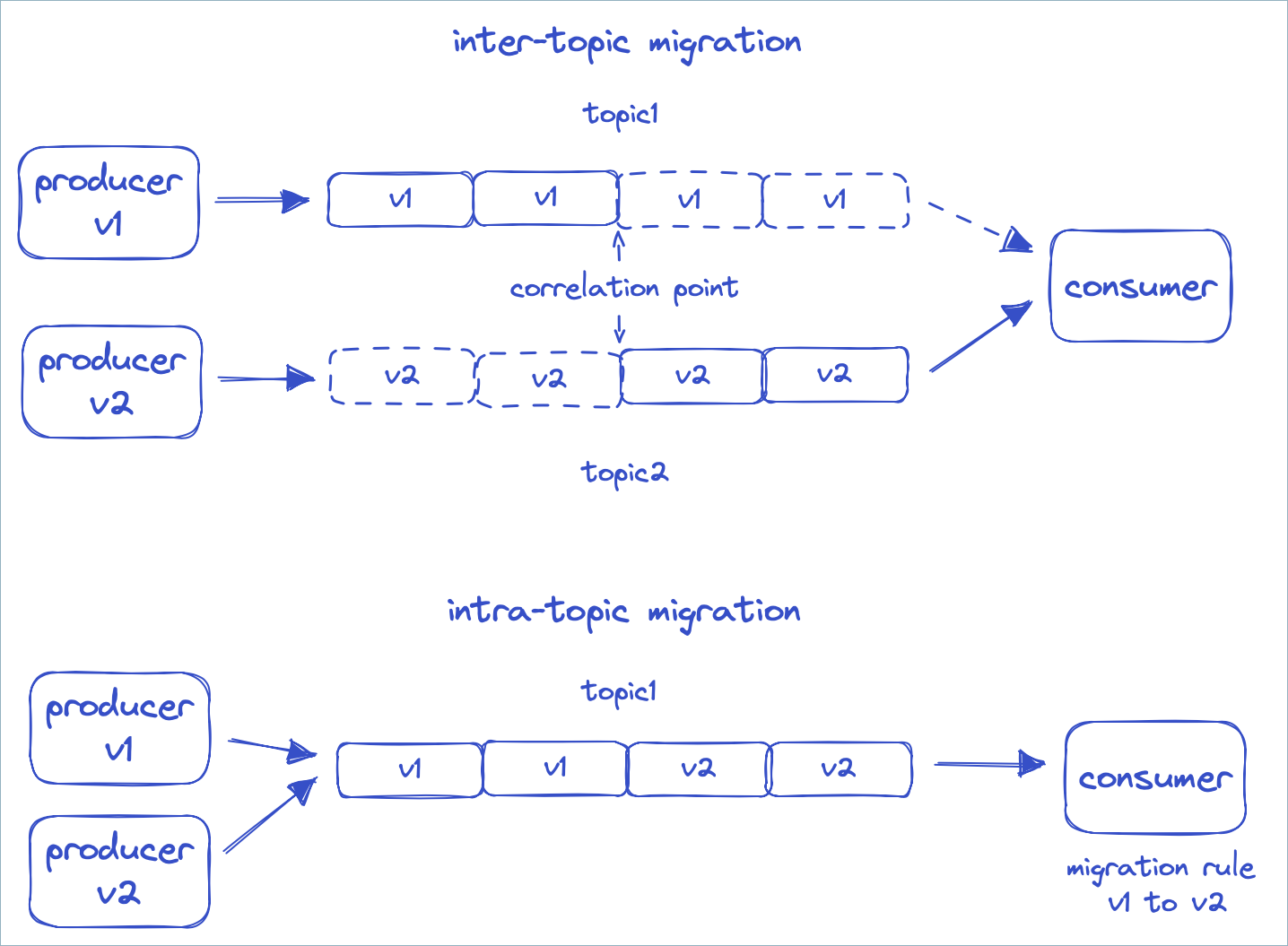
The first approach is complex because you must switch consumers from the old topic to the new topic without skipping data or processing it twice. To do this, you must correlate the offsets of the two topics and start each consumer at the correct correlation point in the new topic. If something goes wrong, you also need to switch back to the old topic, again at the correct correlation point.
With the second approach, the client keeps reading from the same topic. A set of declarative migration rules transforms the data into the form that the consumer expects. With these rules, producers can use incompatible versions 1, 2, and 3 of a schema at the same time. Consumers that expect version 1, 2, or 3 each see every message transformed to their version, regardless of the version the producer sent. This approach is often cleaner and simpler for complex schema evolution. It’s available starting with Confluent Platform 7.4.
Before you use declarative migration rules, review the following features that support complex schema evolution.
Application major versioning
Schema Registry versions schemas with a monotonically increasing sequence of numbers. To
identify when a breaking or incompatible change occurs in the schema history,
use the metadata property of the schema object. The name
application.major.version in the following example is arbitrary. You can use
another name, such as major.version.
{
"schema": "...",
"metadata": {
"properties": {
"application.major.version": "2"
}
},
"ruleSet": ...
}
You can then configure a consumer to use only the latest schema of a specific major version.
auto.register.schemas=false
use.latest.with.metadata=application.major.version=2
latest.cache.ttl.sec=300
The preceding example also sets the client to check for a new latest version
every five minutes. You can also use this TTL configuration with
use.latest.version=true.
Configuration enhancements
You can set the compatibility level in Schema Registry globally or for an individual subject by using a configuration object. The configuration object also has the following properties:
compatibilityGroup: limits compatibility checks to schemas that belong to the same compatibility group.defaultMetadata: the default metadata to use during schema registration.overrideMetadata: the override metadata to use during schema registration.defaultRuleSet: the defaultruleSetto use during schema registration.overrideRuleSet: the overrideruleSetto use during schema registration.
Example: Use overrideMetadata to group schemas by application major version
When you register a schema, Schema Registry initializes the schema metadata with these steps:
Take the default value.
Merge the metadata from the schema on top of it.
Merge the override value for the final result.
If the schema doesn’t specify metadata, Schema Registry uses the metadata from the previous version, if one exists.
Set overrideMetadata to the following value to give every schema an
application.major.version of 2 at registration. You then don’t need to
pass this metadata value explicitly with every schema during registration.
Setting compatibilityGroup to application.major.version also means Schema Registry
compares only schemas that have the same value for application.major.version
during compatibility checks.
{
"compatibilityGroup": "application.major.version",
"overrideMetadata": {
"properties": {
"application.major.version": "2"
}
}
}
Example: Specify a global rule for a metadata tag for a given schema
You can register a ruleset for a metadata tag globally without attaching it to a
subject. For example, a global rule for the PII tag transforms all
PII-tagged fields regardless of topic, schema, and field name. You can create
the same effect with custom rules.
The following curl command sets a global rule that Schema Registry injects into every
new schema created after you set the rule:
curl --location --request PUT '<SR_URL>/config' \
--header 'Accept: application/vnd.schemaregistry.v1+json, application/vnd.schemaregistry+json, application/json' \
--header 'Content-Type: application/json' \
--header 'Authorization: ••••••' \
--data '{
"defaultRuleSet": {
"domainRules": [
{
"name": "maskPII",
"doc": "Mask all PII tagged fields",
"kind": "TRANSFORM",
"mode": "WRITE",
"type": "CEL_FIELD",
"tags": [
"PII"
],
"expr": "\"XXXXX\"",
"onSuccess": "NONE",
"onFailure": "ERROR",
"disabled": false
}
]
}
}
'
Migration rules
How to Evolve your Schemas with Migration Rules (video)
With the preceding configurations, you can pin a consumer to a specific application major version. Compatibility checks then happen only while the application major version doesn’t change.
When you introduce a schema that belongs to a new major version, attach migration rules to the schema. The migration rules transform messages in these ways:
From the previous major version to the new major version, for new consumers reading old messages.
From the new major version to the previous major version, for old consumers reading new messages.
A consumer can encounter a schema that is two or more major versions away. For example, the consumer might go from version 1 to 3 or from 3 to 1. In this case, it runs migration rules transitively, from 1 to 2 and then from 2 to 3.
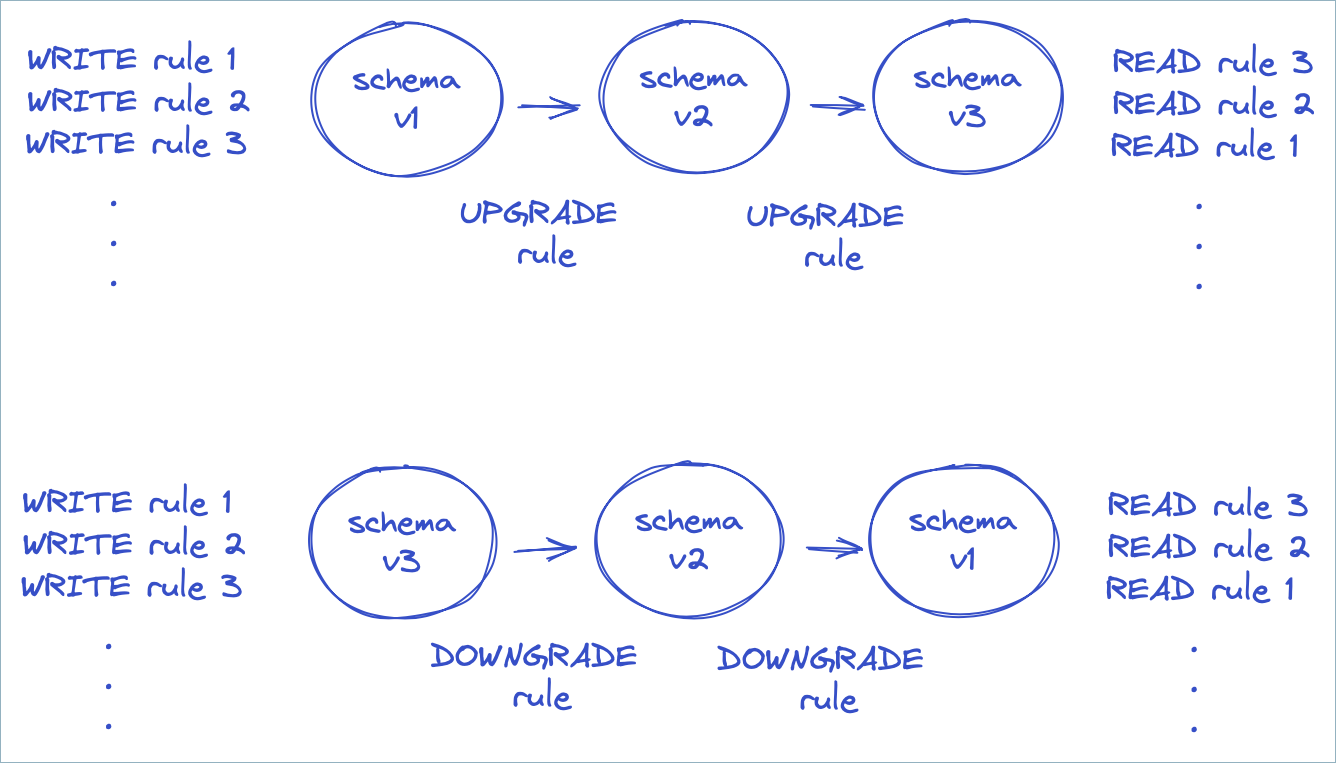
In the preceding diagram, the producer runs the rules that apply to WRITE mode.
The consumer runs rules in either UPGRADE or DOWNGRADE mode, depending on the
schema version of the payload and the desired version. The consumer then runs
the rules that apply to READ mode. The rules run in reverse order during READ
mode, which undoes any actions performed during WRITE in the proper order.
How do migration rules work? They rely on the fact that Avro, JSON Schema, and Protobuf all specify a JSON serialization format for messages. You can write migration rules in any declarative language that supports JSON transformations.
Declarative JSONata rules
JSONata is a transformation language for JSON, inspired by XPath. To use the rule executor for JSONata, include the following dependency:
<dependency>
<groupId>io.confluent</groupId>
<artifactId>kafka-schema-rules</artifactId>
<version>7.4.0</version>
</dependency>
The JSONata rule executor registers itself with the “JSONATA” rule type.
Suppose you have a simple schema with an ssn field.
{
  "type":"record",
  "name":"MyRecord",
  "fields":[{
    "name":"ssn",
    "type":"string",
    "confluent:tags": [ "PII", "PRIVATE" ]
  }]
}
To rename the field to socialSecurityNumber, use the following set of
migration rules. The rules use the JSONata function sift to remove the field
with the old name, and then use a JSON property to specify the new field.
{
"schema": "...",
"ruleSet": {
"migrationRules": [
{
"name": "changeSsnToSocialSecurityNumber",
"kind": "TRANSFORM",
"type": "JSONATA",
"mode": "UPGRADE",
"expr": "$merge([$sift($, function($v, $k) {$k != 'ssn'}), {'socialSecurityNumber': $.'ssn'}])"
},
{
"name": "changeSocialSecurityNumberToSsn",
"kind": "TRANSFORM",
"type": "JSONATA",
"mode": "DOWNGRADE",
"expr": "$merge([$sift($, function($v, $k) {$k != 'socialSecurityNumber'}), {'ssn': $.'socialSecurityNumber'}])"
}
]
}
}
The UPGRADE rule allows new consumers to read old messages, and the DOWNGRADE
rule allows old consumers to read new messages. If you plan to upgrade all
consumers, you can omit the DOWNGRADE rule.
To learn more about JSONata, see https://jsonata.org and Understanding JSONata.
Custom rules
You can enhance data quality and enforce data contracts by registering schemas with custom rules. Both Java and non-Java clients such as Python clients support custom rules.
Apply a custom rule in these ways:
Built-in CEL rules: Define the rule with a Common Expression Language (CEL) expression and associate it with an Avro, JSON, or Protobuf schema. You don’t need any code. The
CEL_FIELDfield-level transform and the Python example both use this approach.Custom rule executors: Write a Java
RuleExecutorclass to define a new rule type for logic that a CEL expression can’t express.
Include the kafka-schema-rules
To use custom rules, include the following dependency:
<dependency>
    <groupId>io.confluent</groupId>
    <artifactId>kafka-schema-rules</artifactId>
    <version>8.4.0</version>
</dependency>
RuleExecutor interface
To define your own rule type, write a class for the RuleExecutor interface:
public interface RuleExecutor extends RuleBase {
  String type();

  Object transform(RuleContext ctx, Object message) throws RuleException;
}
For rules of type CONDITION, the transform method must return a Boolean
value. For rules of type TRANSFORM, it must return the transformed message.
Example function: register_schema_with_rules
The example function, register_schema_with_rules, shows how to register a schema with a custom rule in Schema Registry.
from confluent_kafka.schema_registry import SchemaRegistryClient, Schema, Rule, RuleSet

def register_schema_with_rules(schema_registry_url: str, subject_name: str, schema_str: str, rule_expression: str):
    """
    Registers a schema with a custom validation rule in Confluent Schema Registry.

    This function takes a schema definition and a CEL rule, registers them
    with the Schema Registry under a specified subject by embedding the rule
    within the Schema object itself.

    Args:
        schema_registry_url (str): The URL of the Schema Registry instance.
        subject_name (str): The name of the subject under which to register the schema.
        schema_str (str): The Avro, JSON, or Protobuf schema as a string.
        rule_expression (str): A CEL (Common Expression Language) expression for the rule.
    """
    schema_registry_conf = {'url': schema_registry_url}
    schema_registry_client = SchemaRegistryClient(schema_registry_conf)

    # Define the rule based on the provided CEL expression
    rule = Rule(name="custom_validation_rule",
                doc="Custom data validation rule",
                kind="CONDITION",
                mode="WRITE",
                type="CEL_FIELD",
                expr=rule_expression,
                on_failure="ERROR") # Other options: DLQ, NONE

    # Create a RuleSet and add the rule
    rule_set = RuleSet(domain_rules=[rule])

    # Create a Schema object and pass the ruleset to the constructor
    schema = Schema(schema_str, schema_type="AVRO", ruleset=rule_set) # Or JSON, PROTOBUF

    # Register the schema (which now contains the ruleset internally)
    schema_id = schema_registry_client.register_schema(subject_name=subject_name,
                                                   schema=schema)

    print(f"Schema registered for subject '{subject_name}' with ID: {schema_id}")
    print(f"Associated rule: '{rule_expression}'")
Example usage
The following example uses the register_schema_with_rules function to
register a user schema with a rule that ensures the age field is a positive
integer.
# Schema Registry and Kafka Configuration
SCHEMA_REGISTRY_URL = "http://localhost:8081"
SUBJECT_NAME = "user-topic-value"

# Define the Avro schema
AVRO_SCHEMA = """
{
    "type": "record",
    "name": "User",
    "fields": [
        {"name": "name", "type": "string"},
        {"name": "age", "type": "int"}
    ]
}
"""

# Define the CEL rule
# This rule will be applied to the 'age' field
RULE_EXPRESSION = "message.age > 0"

# Register the schema with the custom rule
register_schema_with_rules(SCHEMA_REGISTRY_URL, SUBJECT_NAME, AVRO_SCHEMA, RULE_EXPRESSION)
Generate a UUID with a custom rule executor
A CEL rule can’t generate a value such as a UUID. To populate a field with a
generated value, write a custom rule executor. The following example defines a
TRANSFORM executor that fills an empty tagged field with a generated UUID on
write. It then registers the executor and applies it to a schema.
Create the executor:
package io.confluent.kafka.schemaregistry.rules;

import io.confluent.kafka.schemaregistry.rules.RuleContext.FieldContext;
import io.confluent.kafka.schemaregistry.rules.RuleContext.Type;
import java.nio.charset.StandardCharsets;
import java.util.UUID;

// A field-level rule executor that overwrites the tagged field with a freshly
// generated UUID (v4). Intended for TRANSFORM rules on WRITE.
// FieldRuleExecutor is a convenience base class that implements RuleExecutor
// for field-level transforms.
public class UuidGeneratorExecutor extends FieldRuleExecutor {

  public static final String TYPE = "UUID";

  public UuidGeneratorExecutor() {
  }

  @Override
  public String type() {
    return TYPE;
  }

  @Override
  public FieldTransform newTransform(RuleContext ctx) throws RuleException {
    UuidGeneratorTransform transform = new UuidGeneratorTransform();
    transform.init(ctx);
    return transform;
  }

  public static class UuidGeneratorTransform implements FieldTransform {

    @Override
    public Object transform(RuleContext ctx, FieldContext fieldCtx, Object fieldValue)
        throws RuleException {
      // Only generate when the field is empty or unset, so existing ids are preserved.
      if (fieldValue != null && !"".equals(fieldValue)) {
        return fieldValue;
      }
      String uuid = UUID.randomUUID().toString();
      switch (fieldCtx.getType()) {
        case STRING:
          return uuid;
        case BYTES:
          return uuid.getBytes(StandardCharsets.UTF_8);
        default:
          // Not a string or bytes field, so leave it unchanged.
          return fieldValue;
      }
    }

    @Override
    public void close() {
    }
  }
}
Register the executor so the Java ServiceLoader discovers it. Create a file named
io.confluent.kafka.schemaregistry.rules.RuleExecutor under
src/main/resources/META-INF/services/, containing the fully qualified class name of
the executor:
io.confluent.kafka.schemaregistry.rules.UuidGeneratorExecutor
Define a TRANSFORM rule on the subject that targets fields tagged UUID and runs on
write:
{
  "ruleSet": {
    "domainRules": [
      {
        "name": "genId",
        "kind": "TRANSFORM",
        "type": "UUID",
        "mode": "WRITE",
        "tags": ["UUID"]
      }
    ]
  }
}
Tag the target field in the schema so the rule applies to it. For an Avro schema, add the tag to the field definition:
{"name": "id", "type": "string", "confluent:tags": ["UUID"]}
Quick start
This quick start shows how to add a data quality rule to an Avro schema. You
create a schema with a single field named f1. You then add a rule that
ensures the length of the field is always less than 10.
Requirements
Schema rules are only available on Confluent Enterprise, not the Confluent Community edition, and on Confluent Cloud with the Stream Governance Advanced package.
For Confluent Cloud Schema Registry, enable the Advanced Stream Governance package. To learn how, see Packages, Features, and Limits and Choose a Stream Governance package and enable Schema Registry for Confluent Cloud.
For Confluent Platform, install Confluent Platform (Enterprise Edition) and add the following property to the Schema Registry properties before starting Schema Registry. The value can be a comma-separated list of class names:
resource.extension.class=io.confluent.kafka.schemaregistry.rulehandler.RuleSetResourceExtension
Start the producer
To run the producer on Confluent Platform:
 ./bin/kafka-avro-console-producer \
   --topic test \
   --bootstrap-server localhost:9092 \
   --property schema.registry.url=http://localhost:8081 \
   --property value.schema='{"type":"record","name":"myrecord","fields":
   [{"name":"f1","type":"string"}]}' \
   --property value.rule.set='{ "domainRules":
   [{ "name": "checkLen", "kind": "CONDITION", "type": "CEL",
      "mode": "WRITE", "expr": "size(message.f1) < 10",
      "onFailure": "ERROR"}]}'

{"f1": "success"}
{"f1": "this will fail"}
To run the producer on Confluent Cloud:
./bin/kafka-avro-console-producer \
  --topic test \
  --bootstrap-server ${BOOTSTRAP_SERVER} \
  --producer.config config.properties \
  --property schema.registry.url=${SR_URL} \
  --property basic.auth.credentials.source=USER_INFO \
  --property basic.auth.user.info=${SR_API_KEY}:${SR_API_SECRET} \
  --property value.schema='{"type":"record","name":"myrecord","fields":
  [{"name":"f1","type":"string"}]}' \
  --property value.rule.set='{ "domainRules":
  [{ "name": "checkLen", "kind": "CONDITION", "type": "CEL",
     "mode": "WRITE", "expr": "size(message.f1) < 10",
     "onFailure": "ERROR"}]}'

{"f1": "success"}
{"f1": "this will fail"}
where config.properties contains:
bootstrap.servers={{ BOOTSTRAP_SERVER }}
security.protocol=SASL_SSL
sasl.jaas.config=org.apache.kafka.common.security.plain.PlainLoginModule required username='{{ CLUSTER_API_KEY }}' password='{{ CLUSTER_API_SECRET }}';
sasl.mechanism=PLAIN

client.dns.lookup=use_all_dns_ips

session.timeout.ms=45000

acks=all
The preceding config.properties example includes the following best practices and requirements:
bootstrap.servers, security protocols, and credentials are required for the Apache Kafka® producer, consumer, and admin.The
client.dns.lookupvalue is required for Kafka clients prior to 2.6.session.timeout.msbeing included is a best practice for higher availability in Kafka clients prior to 3.0. This value is ignored whengroup.protocol=consumeris set.acks=allspecifies that the producer requires all in-sync replicas to acknowledge receipt of messages (records), and is a best practice configuration on the producer to prevent data loss.
Start the consumer
To run the consumer on Confluent Platform:
./bin/kafka-avro-console-consumer \
  --topic test \
  --bootstrap-server localhost:9092 \
  --property schema.registry.url=http://localhost:8081
To run the consumer on Confluent Cloud:
./bin/kafka-avro-console-consumer \
  --topic test \
  --bootstrap-server ${BOOTSTRAP_SERVER} \
  --consumer.config config.properties \
  --property schema.registry.url=${SR_URL} \
  --property basic.auth.credentials.source=USER_INFO \
  --property basic.auth.user.info=${SR_API_KEY}:${SR_API_SECRET}
where config.properties contains:
bootstrap.servers={{ BOOTSTRAP_SERVER }}
security.protocol=SASL_SSL
sasl.jaas.config=org.apache.kafka.common.security.plain.PlainLoginModule required username='{{ CLUSTER_API_KEY }}' password='{{ CLUSTER_API_SECRET }}';
sasl.mechanism=PLAIN

client.dns.lookup=use_all_dns_ips

session.timeout.ms=45000

acks=all
The preceding config.properties example includes the following best practices and requirements:
bootstrap.servers, security protocols, and credentials are required for the Kafka producer, consumer, and admin.The
client.dns.lookupvalue is required for Kafka clients prior to 2.6.session.timeout.msbeing included is a best practice for higher availability in Kafka clients prior to 3.0. This value is ignored whengroup.protocol=consumeris set.acks=allspecifies that the producer requires all in-sync replicas to acknowledge receipt of messages (records), and is a best practice configuration on the producer to prevent data loss.
Reference
CEL rule executor
The CEL rule executor sets the following variables that are available in expressions.
message: the message
CEL_FIELD rule executor
The CEL_FIELD rule executor sets the following variables that are available in expressions.
value: field valuefullName: fully qualified name of the fieldname: field nametypeName: name of the field type, one ofSTRING,BYTES,INT,LONG,FLOAT,DOUBLE,BOOLEANtags: tags that apply to the fieldmessage: the containing message
CEL built-in functions
Both the CEL and CEL_FIELD rule executors support the following built-in string functions.
<string>.isEmail(): test whether the string is a valid email address.<string>.isHostname(): test whether the string is a valid hostname.<string>.isIpv4(): test whether the string is a valid IPv4 address.<string>.isIpv6(): test whether the string is a valid IPv6 address.<string>.isUri(): test whether the string is a valid absolute URI.<string>.isUriRef(): test whether the string is a valid absolute or relative URI.<string>.isUuid(): test whether the string is a valid UUID.
JSONATA rule executor
The JSONATA rule executor supports the following configuration parameters that can be passed when specifying the executor.
jsonata.timeout.ms: the execution time limit in millisecondsjsonata.max.depth: the limit on recursive calls