

Share Data with Stream Sharing from Confluent Cloud
Use Stream Sharing to exchange Apache Kafka® topic data with users in other organizations.
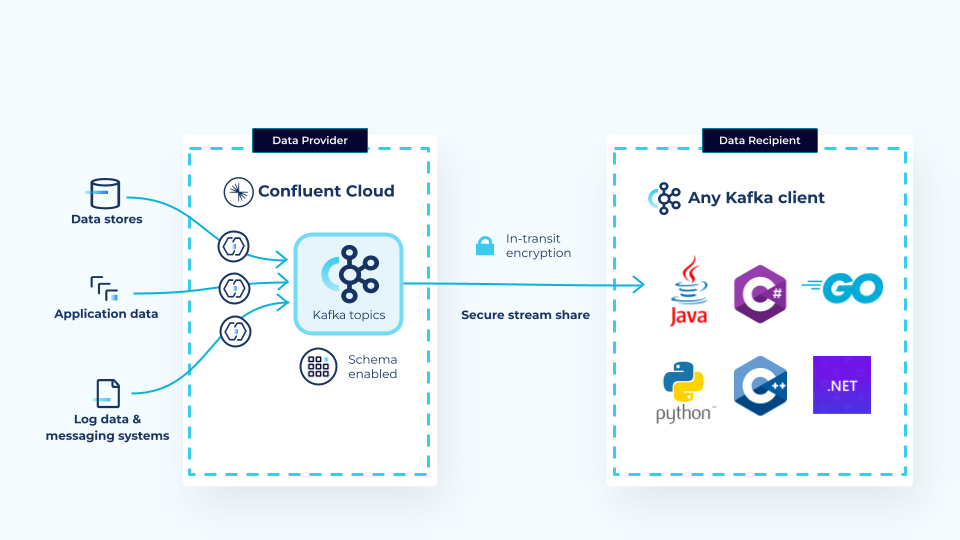
What is Confluent Stream Sharing?
Confluent Stream Sharing exchanges data at the topic level between separate organizations.
More specifically, Stream Sharing:
Confluent Cloud users can share topics outside their Confluent Cloud organization, between enterprises or business units.
Consumers can stream shared topics. Newly invited consumers can either log in to an existing Confluent Cloud organization, or create a new account and organization where they consume data directly using an Kafka client.
After a consumer accepts the invitation to the topic, they can access the data.
Limitations
Note the following limitations for the Stream Sharing feature:
You can only share data by inviting users through email.
Stream Sharing doesn’t support sharing through Cluster Linking. Data can only be shared directly from a provider’s cluster.
You can share only a limited amount of data. Currently the limit is 10 MB per second, per share. If you need this limit adjusted, contact your Confluent representative.
Enterprise Kafka clusters don’t support Stream Sharing.
Basic, Standard, and Dedicated Kafka clusters support Stream Sharing. Stream Sharing doesn’t support all private network options for Dedicated Kafka clusters.
The following networking options are supported: public internet, AWS PrivateLink, Azure Private Link, and Google Cloud Private Service Connect.
To share streams over a private endpoint, the data provider and data recipient must use the same cloud provider.
Wildcard principals, such as user and service accounts, for topics apply to Stream Sharing data recipients. This means authenticated Stream Sharing recipients can access the shared topic and any other topics where access is applied for all principals. For more information, see Wildcard principals.