

Manage Mirror Topics for Cluster Linking on Confluent Cloud
A mirror topic is a read-only topic that a cluster link creates and owns on a destination cluster, and that receives a byte-for-byte, offset-preserving copy of a source topic.
What are mirror topics?
Mirror topics are read-only topics that are created and owned by a cluster link. They move data between clusters with Cluster Linking.
The following sections give a conceptual overview of mirror topics — how they are created and configured and how they behave in operation — that applies to both Confluent Platform and Confluent Cloud.
How mirror topics relate to source topics
A cluster link connects a mirror topic to its source topic. Any messages produced to the source topic are mirrored over the cluster link to the mirror topic.
A mirror topic syncs many of its configurations from its source topic. It can also sync access control lists (ACLs) and consumer group offsets from its source topic, if you enable those features on the cluster link. Some topic configurations are overridable, including security parameters, which are specific to the mirror topic unless you sync ACLs. Finally, some topic configurations (such as schema validation, tiered storage, and replica placement) are never synced. For a detailed summary and explanation of how mirror topics acquire configurations, see How mirror topic configurations are synced.
You can convert a mirror topic to a normal topic and stop the
mirroring relationship using the Cluster Linking promote and failover commands. To restore mirroring after a
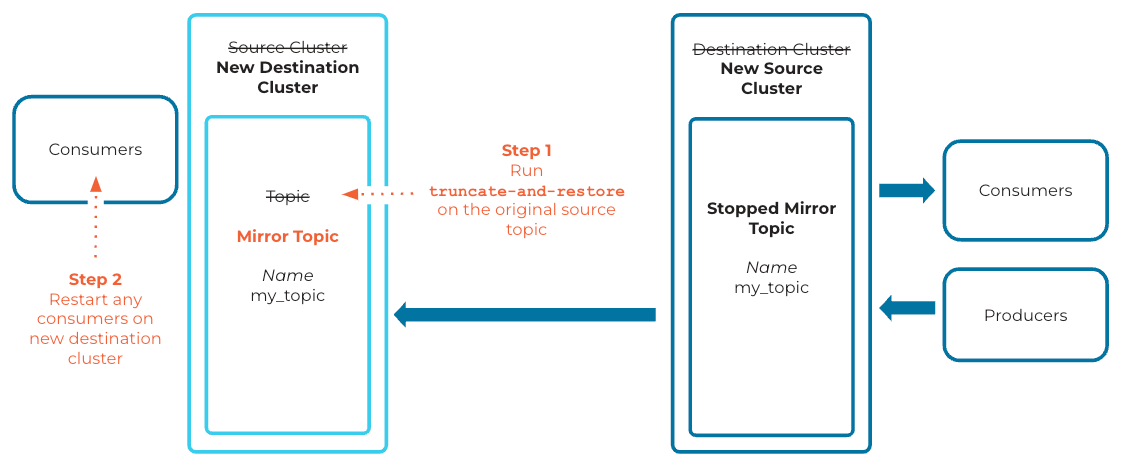
failover or a promote, you can run truncate-and-restore on the original source topic to make it mirror from the newly stopped mirror topic.
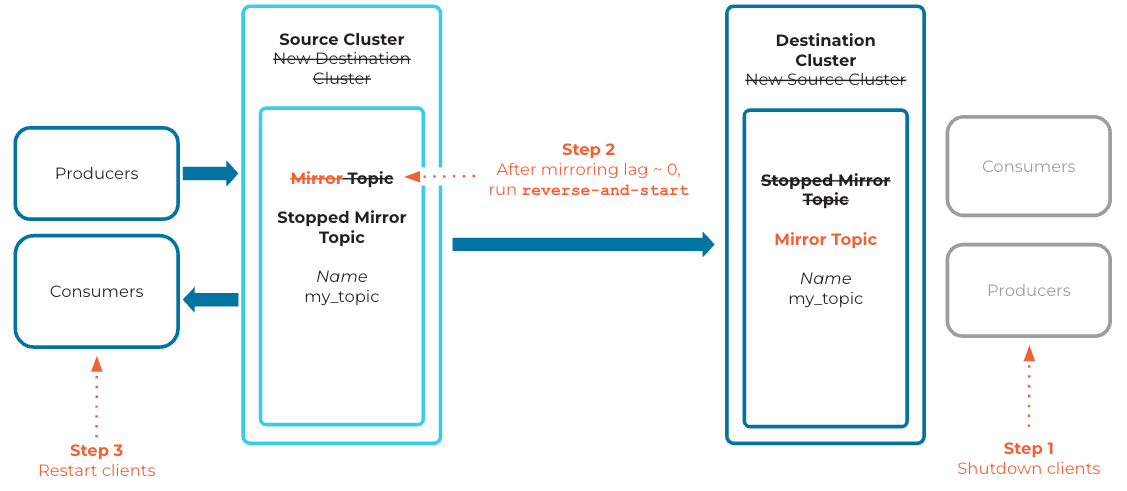
You can reverse the mirroring relationship with the reverse-and-start and reverse-and-pause
commands, which cause the mirror topic to become the source topic, and the source topic to become the mirror topic.
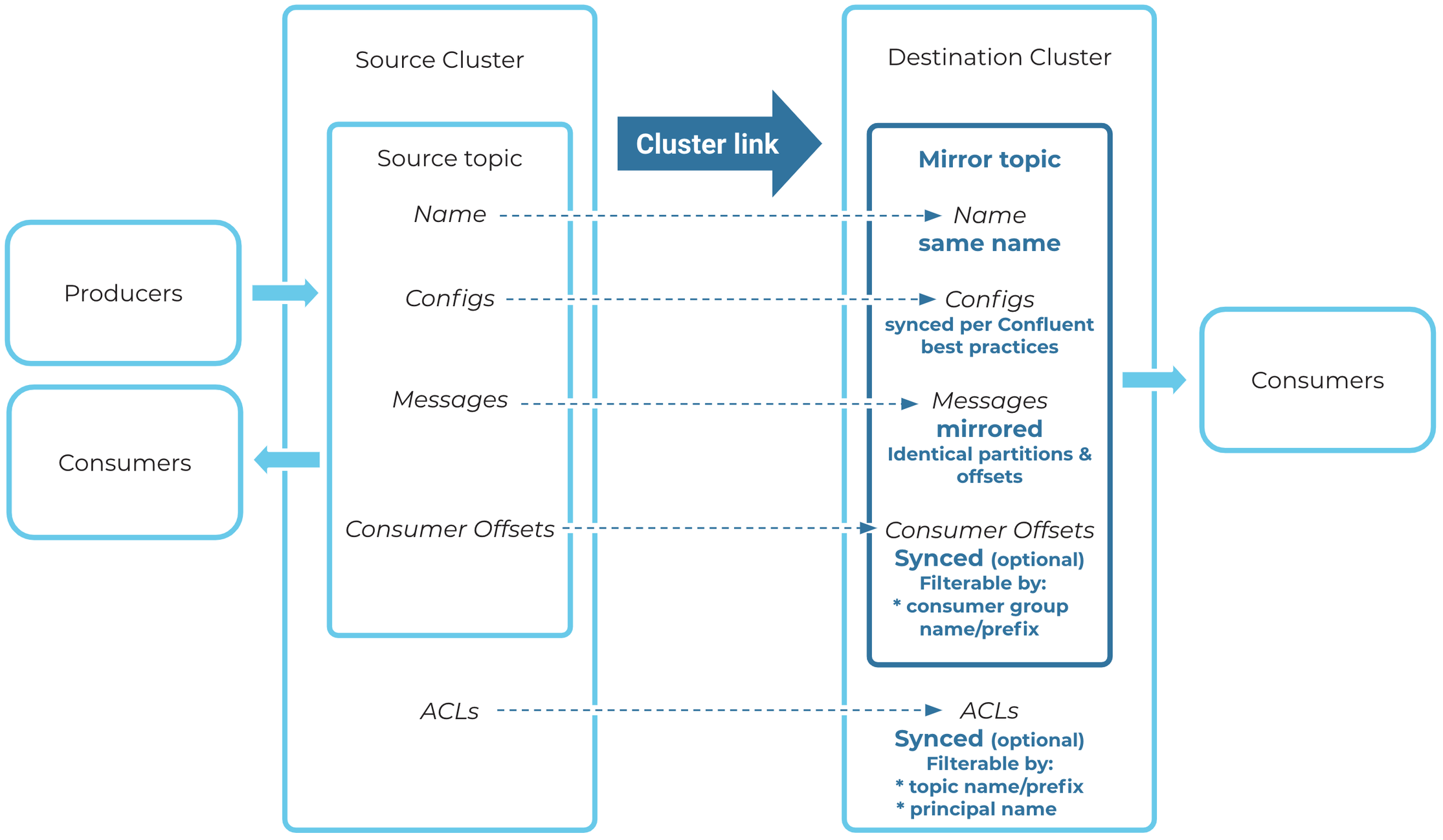
The diagram below shows how mirror topics work, including the relationship between the mirror topic and its source topic, and the syncing of ACLs and consumer offsets.
Mirror topic fundamentals
Properties
Mirror topics have these unique properties:
Mirror topics are created by and owned by a cluster link.
Mirror topics get their messages from their source topic. They are byte-for-byte, offset-preserving asynchronous copies of their source topics.
Mirror topics are read-only; you can consume them the same as any other topic, but you cannot produce into them. If a producer tries to produce a message into a mirror topic, the action will fail. The only way to get a message into a mirror topic is to produce the message to the mirror topic’s source topic.
Many of the mirror topic’s configurations are copied and synced from the source topic. For the full list, see How mirror topic configurations are synced.
Mirror topic creation
You can create a mirror topic using the Confluent Cloud Console, the Confluent Cloud REST API, the Confluent CLI, the Confluent Platform AdminClient API, or Confluent for Kubernetes.
Alternatively, you can configure your cluster link to automatically create mirror topics that match certain prefixes.
Requirements
Mirror topics can only be created with the mirror topic command or by enabling auto-create mirror topics on the cluster link. A mirror topic cannot be pre-created by a command other than the mirror topic command.
Creating a mirror topic requires an existing cluster link. The cluster link creates the mirror topic on the destination cluster of the cluster link. You must have access to the destination cluster.
A mirror topic is always created with the same name as its source topic. A topic of that name must exist on the source cluster. The only exception is when a cluster link has
link.prefixconfigured, which adds a prefix to the mirror topic name.The destination cluster must be able to reach the source cluster and verify that a suitable topic exists. A mirror topic cannot be created if the source cluster is unreachable.
Creating a mirror topic on Confluent Cloud requires you to have the
CloudClusterAdmin,EnvironmentAdmin, orOrganizationAdminrole over the destination cluster, that is, the cluster where the mirror topic is created. Alternatively, you can have the appropriate ACLs.The cluster link’s principal must have both
DeveloperReadandDeveloperManageon the relevant source topic on the source cluster. Alternatively, it could haveResourceOwneror the appropriate ACLs on that topic. You do not need any permissions on the source cluster.
Tip
You can also have the cluster link automatically create mirror topics.
For more information about configuring access on Confluent Cloud, see Security for Cluster Linking on Confluent Cloud.
For more information about configuring security on Confluent Platform, see Cluster Linking Security.
Create a mirror topic on Confluent Cloud Console
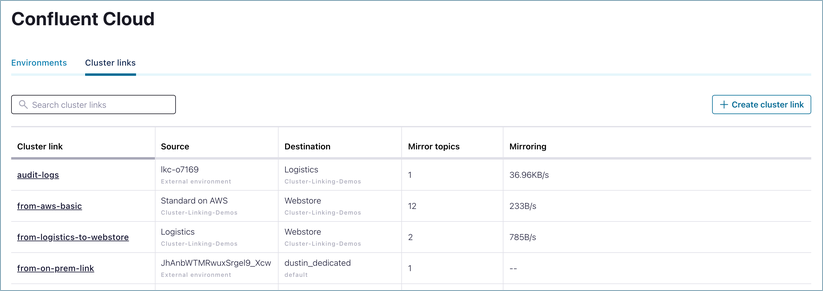
If the destination cluster is a Confluent Cloud cluster, you can view and create mirror topics on the Confluent Cloud Console:
On the environments page, click the Cluster links tab.
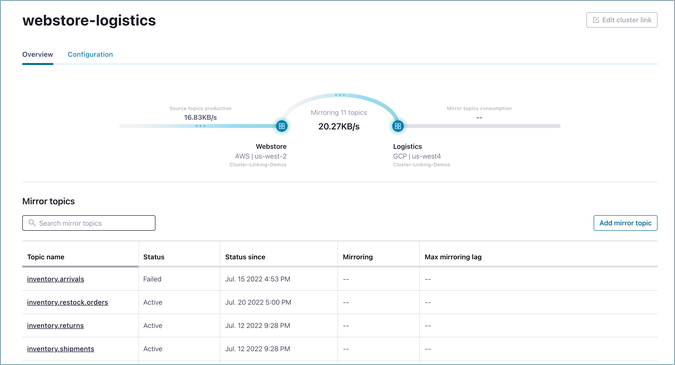
Click an existing cluster link, or create one. (If you choose to create a new cluster link, follow the prompts as given.)
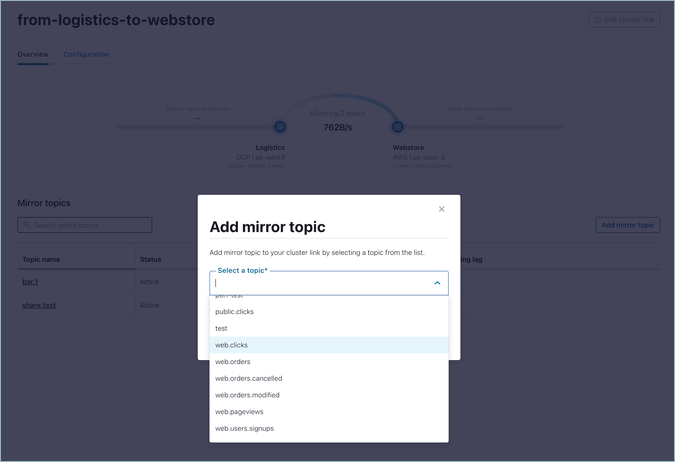
To add a mirror topic to an existing cluster link, click Add mirror topic.
If the source cluster is a Confluent Cloud cluster that you have access to, the dialog will have a dropdown with a list of all of the source topics on it.
If the source cluster is external to Confluent Cloud or you do not have access to it, then you will see a text box instead in which to add the name of the source topic.
Enter the source topic name and click Add.
Tip
For cluster links with link.prefix configured, enter the name of the source topic in this dialog. The mirror topic name automatically gets the prefix after you click Add.
Create a mirror topic with the Confluent CLI
To create a mirror topic with the Confluent CLI, the general syntax is:
confluent kafka mirror create <mirror-topic-name> --link <link-name>
The command must be run against the destination cluster. If needed, you can specify the destination cluster with --cluster <destination-cluster-id>.
To learn more, see confluent kafka mirror create in the command reference.
If the cluster link is configured with link.prefix, then --source-topic source-topic-name must be passed, too. For example:
confluent kafka mirror create west.clicks --link from-west --source-topic clicks
On Confluent Platform clusters, you can use either the Confluent CLI or the bin/kafka-mirrors script. The general syntax to create a mirror topic is:
kafka-mirrors --create --mirror-topic <topic-name> \
--link <link-name> \
--bootstrap-server <host:port>
To learn more, see Cluster Linking on Confluent Platform.
Create a mirror topic with the REST API
On Confluent Cloud:
To create a mirror topic, send a
POSTrequest to the destination cluster’s REST API endpoint at:/kafka/v3/clusters/{cluster_id}/links/{link_name}/mirrors.Include the following in the payload:
{
  "source_topic_name": "<source-topic-name>",
  "mirror_topic_name": "<mirror-topic-name>"
}
mirror_topic_nameis only required iflink.prefixis configured.The above shows the only required parameters. More options are available to override topic configurations.
To learn more, see the Create a mirror topic in the Confluent Cloud API reference.
Examples
For examples of how to create mirror topics on Confluent Platform, see Create the cluster link and mirror topic (step 2, “Initialize the mirror topic”) in the basic tutorial and Creating a mirror topic in the commands reference.
For examples of how to create mirror topics on Confluent Cloud, see the following sections:
Create source and mirror topics in the Quick Start for Cluster Linking on Confluent Cloud
Mirror a topic in the Confluent Cloud Cluster Linking tutorial
examples on the Confluent CLI command reference
Create a mirror topic with the AdminClient API
On Confluent Platform, you can use the AdminClient API to create mirror topics. To learn more, see ConfluentAdmin API reference.
You can create new mirror topics with the NewTopic Admin client method. The mirror is an optional parameter of the method when creating the new topic.
public NewTopic newMirrorTopic(String linkName, String mirrorTopic) {
  NewTopic newTopic = new NewTopic(mirrorTopic, Optional.empty(), Optional.of(replicationFactor));
  newTopic.mirror(Optional.of(new NewMirrorTopic(linkName, mirrorTopic)));
  return newTopic;
}
For the promote and failover operations, see alterMirrors,
which takes in an AlterMirrorOp (such as AlterMirrorOp.PROMOTE, AlterMirrorOp.FAILOVER, and so forth).
The following example promotes a topic:
Map alterOpMap = new HashMap<>();
alterOpMap.put("topic-to-failover", AlterMirrorOp.PROMOTE);

AlterMirrorsResult alterOpResult = adminClient.alterMirrors(alterOpMap, null);
System.out.println(alterOpResult.all().get());
Create a mirror topic with Terraform
Create a mirror topic with the Confluent Terraform provider. For more information, see confluent_kafka_mirror_topic Resource.
Additional requirements when prefixing is enabled
When a cluster link has a prefix set, the prefix is added to the beginning of
mirror topic names. For example, if you set the prefix to west, the source topic orders is mirrored as west.orders.
If the cluster link is configured for prefixing mirror topic names, then to create a mirror topic you must pass both the mirror topic name and the source topic name (instead of only the source topic name).
To learn more about prefixing, see Prefix mirror topics and consumer group names.
Bidirectional cluster linking
Bidirectional linking connects two clusters with a cluster link running in each direction, so each side can mirror the other’s topics. To establish bidirectional linking between two clusters, you must use two cluster links. You cannot establish bidirectional linking with a single cluster link. For an example of bidirectional linking, see the Hybrid tutorial (on either Confluent Cloud or Confluent Platform), which sets up bidirectional linking between on-premises and cloud clusters.
Bidirectional linking is supported for different topics. For a specific topic, only unidirectional linking is supported.
Select which topics to mirror
To select topics to be mirrored, you can use any of the following methods:
Manually mirror individual topics with the
confluent mirrorcommand as shown in the tutorials (quick start for Confluent Cloud, tutorial for Confluent Platform).Use the Confluent Cloud Cluster Linking (v3) REST API to create a mirror topic.
Support for compacted topics
Cluster Linking supports compacted topics. Cluster Linking mirrors a compacted topic as a compacted topic on the destination. To learn more, see the FAQs for Confluent Cloud and Confluent Platform.
Diagram of a cluster link
This diagram shows an example of a cluster link and a mirror topic configured with some of the properties described in Properties.
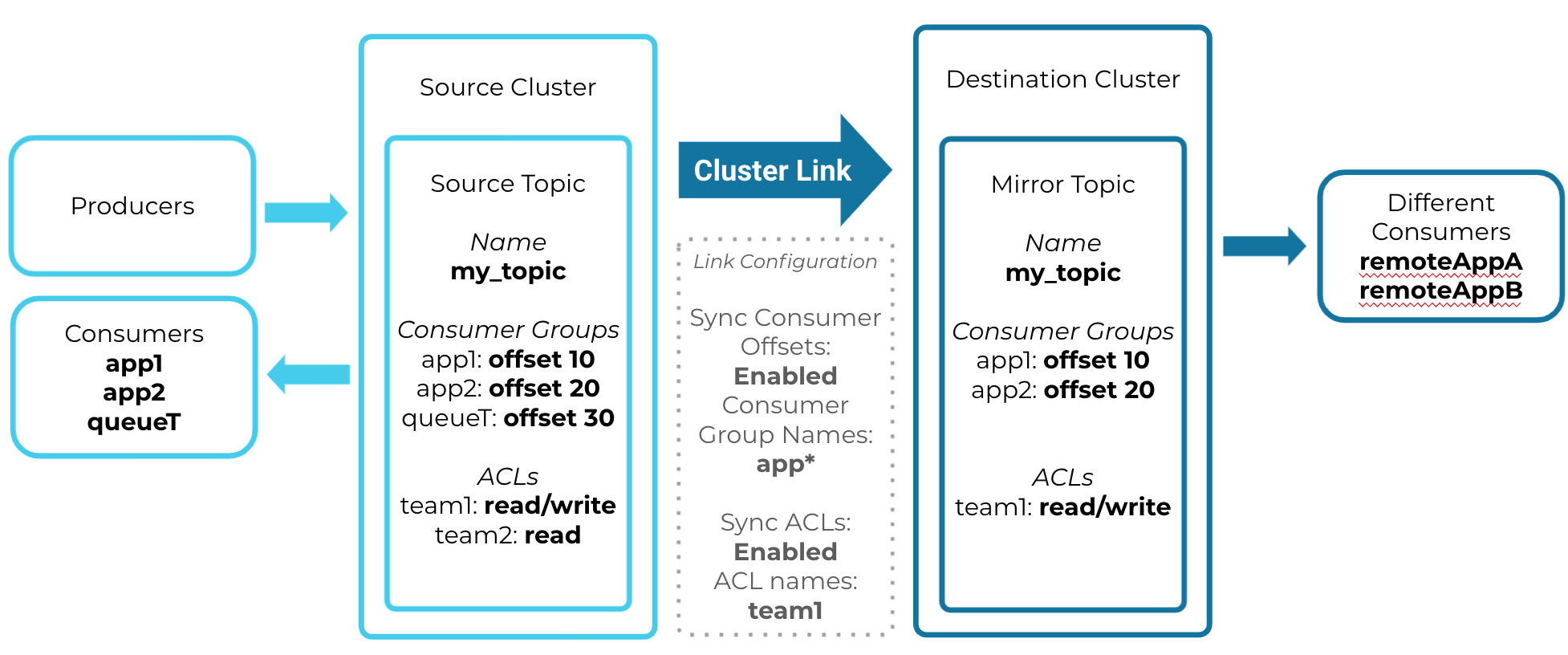
Mirror topic syncing topic data, ACLs, and consumer offsets from the source topic
Auto-create mirror topics
A cluster link can automatically create mirror topics on the destination cluster for any topics that exist on the source cluster. This is called “auto-creating” mirror topics. This saves time and effort because you do not have to create mirror topics by hand. You can scope this functionality to a specific set of topics by matching topic names.
Enable auto-create mirror topics
To enable this functionality, you must set two properties on the cluster link. You can set these properties when a cluster link is created, or update an existing cluster link with these properties. These properties are:
auto.create.mirror.topics.enableWhether or not to auto-create mirror topics based on topics on the source cluster. When set to
true, the cluster link auto-creates mirror topics. Setting this option tofalsedisables mirror topic creation and clears any existing filters.Type: boolean
Default: false
auto.create.mirror.topics.filtersA JSON object with one property,
topicFilters, that contains an array of filters to apply to indicate which topics should be mirrored. Filters are described below.This list must have at least one filter.
Ordering of the filters in this array does not matter.
Type: array
Default: empty
Syntax
{ "topicFilters": [ <each filter to apply> ] }
Filters for auto-create mirror topics
In Confluent Cloud, auto-creating mirror topics automatically filters out Confluent internal topics and the topic that holds schemas (default name _schemas).
In Confluent Platform, internal topics are not filtered out.
All other filtering options described below are available in both Confluent Cloud and current releases of Confluent Platform.
Confluent Replicator uses the internal __consumer_timestamps topic for consumer offset translation;
this topic should not be mirrored. Therefore, you must filter this topic out using the auto-create mirror topics EXCLUDE filters, as described below.
Other topics can be excluded using filters. For example, if a different topic name is used for Schema Registry storage, instead of _schemas,
it can be excluded by using filters, as shown in the following examples.
You can select exactly which source topics to automatically mirror through a list of filters. You can add any number of filters on a cluster link.
Each filter is a JSON object with the following fields:
nameText matched against the topic name. Set
nameto the wildcard,*, to apply to all topics.patternTypeEither
LITERALorPREFIXED.If
nameis set tofoo, then settingpatternTypetoLITERALwill only match a topic namedfoo.Setting
patternTypetoPREFIXEDwill match any topic names that begin with “foo”, for example, “foo”, “football”, and “foo.fighters”.
filterTypeEither
INCLUDEorEXCLUDE.If
filterTypeis set toINCLUDE, any topic names on the source cluster that match this filter are created as mirror topics.If
filterTypeis set toEXCLUDE, any matching topic names are not created as mirror topics. In other words, anEXCLUDEfilter prevents auto-creation of mirror topics for the specified topic names.EXCLUDEfilters override any overlappingINCLUDEfilters. For example, if you have anINCLUDEfilter for the prefix “foo” but have anEXCLUDEfilter for the prefix “foo.bar,” then a topic on the source cluster named “foo.fighters” would be mirrored automatically, but a topic named “foo.bar.fighters” would not be mirrored automatically.
Example filters
Mirror all topics
This filter will create mirror topics for all current and future source cluster topics:
{ "topicFilters": [ {"name": "*", "patternType": "LITERAL", "filterType": "INCLUDE"} ] }
Mirror all topics that begin with a given string
This filter will mirror all topics that begin with “foo”:
{ "topicFilters": [ {"name": "foo", "patternType": "PREFIXED", "filterType": "INCLUDE"} ] }
Mirror all topics except those that begin with secret
This filter will mirror all topics except those that begin with “secret”:
{ "topicFilters": [ {"name": "*",  "patternType": "LITERAL",  "filterType": "INCLUDE"},   \
{"name": "secret",  "patternType": "PREFIXED",  "filterType": "EXCLUDE"} ] }
Mirror named topics if they exist on the source cluster
This filter will mirror three topics, “liz”, “jack”, and “kenneth”, if they exist on the source cluster:
{ "topicFilters": [ {"name": "liz",  "patternType": "LITERAL",  "filterType": "INCLUDE"},   \
{"name": "jack",  "patternType": "LITERAL",  "filterType": "INCLUDE"},    \
{"name": "kenneth",  "patternType": "LITERAL",  "filterType": "INCLUDE"}  ] }
How a mirror topic is auto-created
For a given topic on a cluster link’s source cluster (the “source topic”), the cluster link auto-creates a new mirror topic if all of these conditions are true:
auto.create.mirror.topics.enableis set totrueauto.create.mirror.topics.filtershas filters thatINCLUDEthe source topic nameThe cluster link’s security credential is authorized by source cluster ACLs to read the source topic.
There is no topic by that name already on the destination cluster.
If prefixing is enabled on the cluster link, then the source topic cannot be a mirror topic. You cannot chain mirror topics when both
auto.create.mirror.topics.enableand prefixing are enabled.
If any of the above conditions are false, the cluster link does not auto-create a mirror topic for that source topic.
Override topic configurations when using auto-create mirror topics
You can override a topic configuration for auto-created mirror topics in two ways:
Change the topic configuration after the mirror topic is automatically created.
Use the CLI or API to manually create the mirror topic, and override the configuration. Even if a topic matches the auto-create mirror topic filters, it can still be manually created as a mirror topic before the cluster link creates it automatically. Auto-create mirror topics runs once every five minutes, so the mirror topic can be manually created soon after the cluster link is created or soon after the source topic is created.
Delete topics that were auto-created
You cannot delete a mirror topic that matches the auto-create mirror topics
filters. If you deleted such a topic, and there was a topic of the same name on
the source cluster, the cluster link would automatically recreate the mirror topic and sync
its full history (if mirror.start.offset.spec is set to the default). The delete would have no effect.
To delete a mirror topic while auto-create mirror topics is enabled, you have three options: delete the source topic first, exclude the topic’s name from the auto-create mirror topics filters, or disable auto-create mirror topics.
Option 1: Delete the source topic first — Given a source topic named
cool-topic, if you delete the source topic and then want to subsequently delete the associated mirror topic (cool-topicon the destination), wait until the mirror topic becomes aFAILEDmirror topic (which can take up to five minutes), after which point you can delete it. You can also callfailoverorpromoteon the mirror topic to transition it to theSTOPPEDstate. BothFAILEDandSTOPPEDmirror topics can be deleted.Option 2: Exclude the topic name from the auto-create mirror topics filters — This strategy will prevent the mirror topic from overlapping with the auto-create filters. To remove a given topic from the filters, add an
EXCLUDEfilter for that topic name. You can addcool-topicto theEXCLUDEfilters, even if no such source topic exists. After editing the auto-create mirror topic filters, you can delete the mirror topic.Option 3: Disable auto-create mirror topics on the cluster link — After the setting has been disabled, the mirror topic can be deleted. If needed, auto-create mirror topics can be immediately re-enabled on the cluster link. To learn more, see Disable auto-create mirror topics and Mirror topic deletion.
Disable auto-create mirror topics
To disable auto-create mirror topics entirely, set this property on the cluster link:
auto.create.mirror.topics.enable=false
Here’s an example of how to set that property with the CLI:
echo "auto.create.mirror.topics.enable=false" > tmp.txt
confluent kafka link configuration update <link-name> --config-file tmp.txt
rm tmp.txt
Prefix mirror topics and consumer group names
Cluster links can be configured with a prefix (cluster.link.prefix) that is
applied to the names of the mirror topics and, optionally, the names of the
consumer groups that are managed by the cluster link at the destination cluster.
This enables topics and consumer groups from different source clusters that have
the same name to be synced to the destination without name clashes. It also
enables all mirror topics from a cluster link to be categorized and managed
under one prefix on the destination.
Note
Prefixing is not available on Confluent Platform version 7.1 or earlier. It is available on Confluent Cloud and in Confluent Platform starting with release 7.2.0.
For example, consider two links, link-1 and link-2. link-1 links data from
cluster s1 to the destination and link-2 links data from s2 to the destination, and
furthermore s1 and s2 both contain a topic “clicks”. Without prefixing, it would
be impossible for both links to sync data for their own “clicks” topic, because they would
have the same name on the destination cluster. With prefixing, each link can
have its own unique prefix that is applied to the topic name as it is mirrored.
link-1 could have prefix usa_ and link-2 could have prefix eu_. Finally,
at the destination cluster there would be two topics, usa_clicks and
eu_clicks.
If the link is configured with a prefix, the mirror topic name must begin with
the prefix when you create the topic, for example with confluent kafka mirror create.
Otherwise, the operation fails. If auto-create mirror topics
is used, the topics created on the destination will automatically be named with the prefix.
The prefix can optionally be applied to the consumer groups that are created on
the destination cluster because of consumer group offset syncing. When offsets
are synced, consumer groups are created on the destination; with this feature
it’s possible to prefix the consumer group name on the destination. This enables
consumer group offsets to be synced even when consumer groups on two or more
different source clusters have the same name. For example, if
link-1 had consumer group g1 and link-2 had consumer group g1, then prefixing
would result in two consumer groups at the destination: usa_g1 and eu_g1.
By default, consumer group names are not prefixed with the prefix; consumer.group.prefix.enable
must be set to true in the cluster link configuration to enable this.
Here’s an example configuration file for Confluent Enterprise, containing only the elements relevant to prefixing:
bootstrap.servers=localhost:9092
cluster.link.prefix=usa_
consumer.offset.sync.enable=true
auto.create.mirror.topics.enable=true
auto.create.mirror.topics.filters={"topicFilters":[{"name": "*","patternType": "LITERAL","filterType": "INCLUDE"}]}
consumer.group.prefix.enable=false
acl.sync.enable=false
Here, a prefix of usa_ has been configured and consumer.group.prefix.enable
has been set to false (which is the default, but shown here for context). All mirror
topic names on the destination will start with the prefix; consumer group names
will remain the same as they are on the source. acl.sync.enable is
set to false, which is required because auto.create.mirror.topics.enable is set
to true and prefixing is enabled; see Limitations on prefixing.
On Confluent Cloud, these configurations are specified on the command line or the Cloud Console.
Limitations on prefixing
The prefix cannot be changed after the cluster link is created.
Valid characters are
[a-zA-Z0-9._-]. This is a regex pattern. The square brackets[ ]are not included in the valid characters set. The prefix can consist of alphanumeric characters, a period, an underscore, and a hyphen.ACL sync and prefixing cannot be enabled together on a single cluster link. ACLs can always be synced on a separate link; create a new link and configure it to sync ACLs.
Consumer group prefixing cannot be enabled for bidirectional links. Setting
consumer.group.prefix.enabletotrueon a bidirectional cluster link will result in an “invalid configuration” error stating that the cluster link cannot be validated due to this limitation.Prefixing cannot be combined with chaining and auto-create mirror topics at the same time. When auto-mirroring and prefixing are configured, a link cannot mirror a topic that is itself a mirror topic at the source cluster. For example, consider the
link-1andlink-2example described previously. If a newlink-3was created, auto-mirroring would not be able to mirror data fromusa_clicksoreu_clicksor any mirror topic on the destination (even if it didn’t have a prefix) because they are mirror topics. This is done as a safeguard to prevent auto-mirroring from creating an infinite number of topics due to cyclical cluster link connections.The
reverse-and-startandreverse-and-pausecommands are not supported on cluster links configured with a topic prefix (cluster.link.prefix). Failover and failback workflows that require reversing the link direction must use cluster links with standard (non-prefixed) topic names.
Tip
Prefixed chained mirror topics can still be created by hand, for
example with confluent kafka mirror create.
Aggregate multiple source cluster topics into a single topic
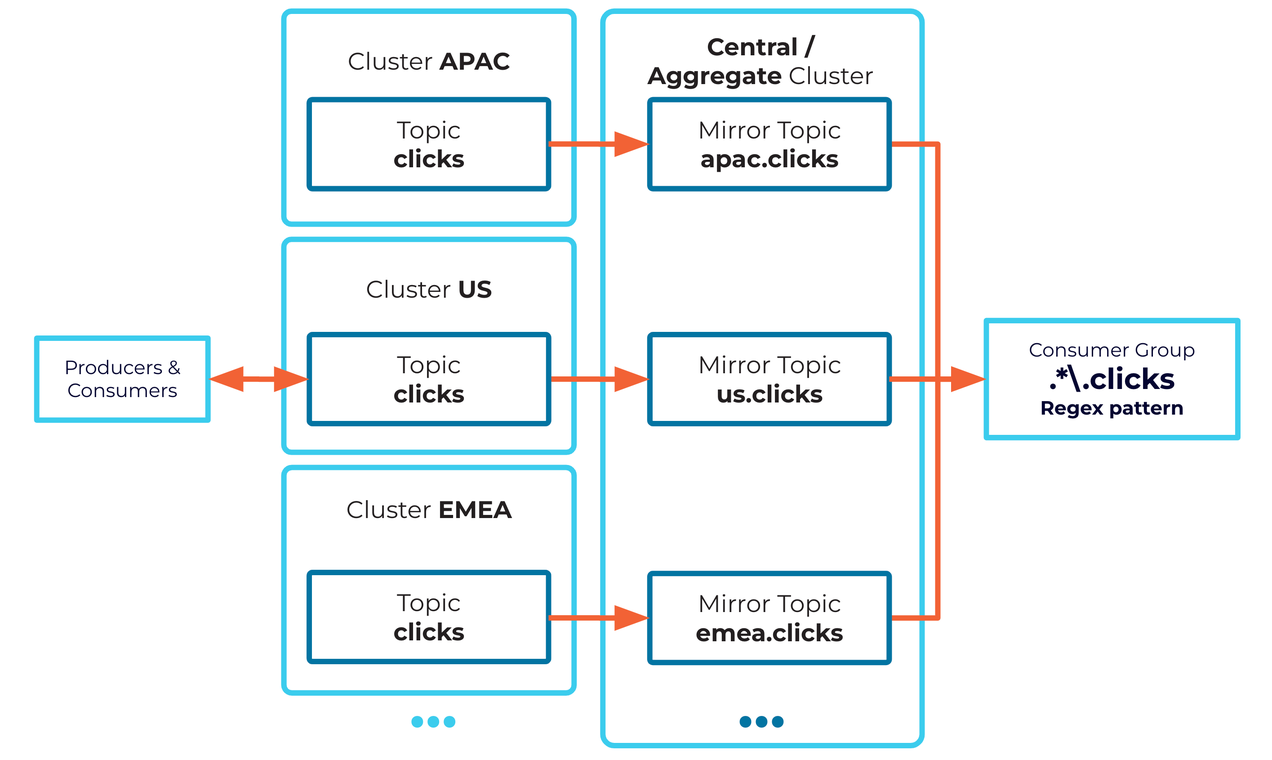
Use Cluster Linking to aggregate data from multiple identical source clusters into one destination cluster. For example, each source cluster might run in a different region, collecting local data, and Cluster Linking can stream data from each local cluster to a central, aggregate cluster.
Every topic, on every source cluster, that you want to aggregate needs its own uniquely named mirror topic on the aggregate cluster. Set a unique prefix on each cluster link to accomplish this.
If a consumer group needs to read the data from all source clusters (for example, from all regions), it can consume multiple mirror topics at the same time by consuming from a regular expression (“regex”) topic pattern that matches all the mirror topic names you want to source from (rather than consuming from a single topic name). Most open-source Apache Kafka® clients support consuming from a regex topic pattern.
Tip
If you can’t consume from a regex pattern, use ksqlDB INSERT queries to merge the mirror topics
into a single aggregated topic for each data type.
Topics not mirrored
By design, the following topics are not mirrored (synced):
confluent-audit-log-eventsInternal or system topics (for example, any topic prefixed with
_confluentor__confluent)The Schema Registry schemas topic (for example,
_schemas), as described in Filters for auto-create mirror topics
Mirroring lag
Mirroring lag is the delay between when a message is produced to the source topic and when it appears on the mirror topic. The mirror process is asynchronous in operation, so some mirroring lag is normal. The most recent messages on the source topic might not yet be mirrored to the mirror topic, so the mirror topic can be slightly behind the source topic.
The same is true for syncing the topic configuration, the consumer group offsets, and the ACLs. All of these processes are asynchronous, so the changes will happen first on the source topic, and then on the mirror topic shortly after.
Sync consumer group offsets
You can configure your cluster link to sync consumer group offsets from its source topics to the destination topics.
Enable consumer group offset sync and specify filters
To set this up, configure the following properties:
consumer.offset.sync.enable- Set this totrueto sync consumer group offsets. (The default isfalse.)consumer.offset.group.filters- Pass in a JSON file with a pattern that is matched against consumer group names to identify which groups to mirror.
If these two properties are set, the cluster link syncs the consumer group offsets of any matching consumer groups for all mirror topics that the link mirrors.
Note
Consumer group filters should not include groups that are being used on the destination. This will help ensure that the system does not override offsets committed by other consumers on the destination, or overwrite the consumer offsets while consumer groups are consuming from the mirror topic. If you are unsure about which consumer groups are being used on the destination, disable consumer offset sync on the cluster link until you verify this.
Why consumer offsets are clamped during failover
A consumer group’s synchronized offset can never exceed the highest available offset on its mirror topic, which is known as the Log End Offset (LEO). If a cluster link attempts to sync or evaluate an offset that is higher than the LEO, Confluent Platform automatically resets (“clamps”) that group’s offset down to the LEO.
Offset clamping occurs in two primary scenarios:
You run either
failoverorpromotecommand on a mirror topic.A consumer group migrates to the destination cluster and reads its first message from a mirror topic.
Consider a source topic containing a single partition with messages produced up to offset 100. This topic is replicated to a destination cluster on a cluster link.
Due to asynchronous replication lag, only messages up to offset 90 are mirrored
when a disaster disrupts the source cluster. You then run the failover
command to promote the mirror topic to a writable topic.
The cluster link handles consumer groups differently depending on their position at the time of the outage:
Consumer group A committed its last position at offset 80 on the source cluster. Because offset 80 was successfully synchronized to the destination before the outage, the group safely remains at offset 80 on the destination cluster.
Consumer group B committed its last position at offset 95 on the source cluster. Because the mirror topic’s log ends at offset 90, offset 95 does not yet exist on the destination cluster.
If consumer group B resumed consuming at offset 95 after new messages were produced, it would permanently skip messages at offsets 90 through 94 on the destination. To prevent this data loss, the cluster link clamps consumer group B’s offset down to 90 (the current LEO), ensuring it processes those records when data flow resumes.
To learn more about stopping the mirroring relationship with failover or promote,
see Convert a mirror topic to a normal topic.
Failover considerations for active-passive and active-active setups
Consider the following when planning offsets:
In an active-passive deployment, all producers and consumers are interacting with the active cluster only. On failover, the producers and consumers will stop interacting with the failed cluster, and start interacting with the active cluster only. The best practice for this scenario is to specify
LOCAL_MIRRORonly in the offset sync configuration. Given this configuration, upon failover, the system will always sync offsets in one direction only.In an active-active deployment, where consumers are on both sides, producers could be on both sides, or on only one side. In this scenario, you must have unique consumer groups on both sides, and in the offset sync filtering you must specify the exact consumer groups you want to sync to prevent cycles. You can configure offsets to use
LOCAL_MIRRORandREMOTE_MIRROR. Importantly, on failover, update the offset sync filter on both sides to include or exclude the consumer groups.
Reverse a source and mirror topic
The relationship between a source topic and its mirror topic can be reversed using the reverse-and-start or reverse-and-pause commands.
These cause the source topic to become the mirror topic, and the mirror topic to become the source topic.
The following diagram shows how a reverse-and-pause command works. The reverse-and-start command behaves similarly,
except that instead of the extra manual step to resume the mirror topic to become an active mirror topic, the command automatically converts
the topic to an active mirror topic.

How reverse-and-start and reverse-and-pause work
The reverse-and-start command leaves the new mirror topic in an active mirroring state, whereas reverse-and-pause leaves the new mirror topic in a paused state until the resume command is called.
These commands are available in the Confluent CLI at confluent kafka mirror,
the REST API at reverse,
and kafka-mirrors in Confluent Platform 7.7 or later.
Cluster Linking ensures that both topics have the same data and metadata at the point of change, so no data is left behind. After you call the command, the source topic stops accepting new writes, which allows the mirror topic to catch up and perform the reversal. After the reversal is complete, data written to the (new) source topic will then flow to the (new) mirror topic. This provides a fast and efficient failback for a planned failover mechanism, allowing you to quickly fail over to the mirror site, produce new data, and then quickly fail back to the original site.
Requirements for using “reverse” commands
The cluster link must be in Bidirectional mode.
On Confluent Cloud, clusters must be either Dedicated or Enterprise clusters. They do not have to be the same type. To learn more, see Supported cluster types.
Both clusters must be healthy and able to communicate over the network.
You must have the CLUSTER:ALTER ACL or the Admin role on the cluster where this command is run. Additionally, you need ALTER permissions on all relevant topics, such as ALTER: Topic (Mirror).
Make sure you have monitoring in place to check all of the different states the topics will be going through (as described in Process flow for “reverse” commands). If any issues arise, you can always use the
failovercommand to get a mirror topic to a writable state.Run this command with only one topic at a time for transactional producers, and you must monitor each topic to the end state before running the command for the next topic. If you run the command in batch, you must make sure that all topics are transitioned to a writable state before restarting the application for production. Otherwise, if the applications are restarted before the topics are transitioned into the end state, this can result in the new records not being persisted in Kafka because it starts writing to an immutable topic.
Process flow for “reverse” commands
Caution
As a prerequisite to running
reverse-and-start, all consumer groups must be moved over to ensure that the “reverse and start” operation can complete successfully. If this is not done, the topic can get stuck inPENDING_STOPPED. You can fail over a topic stuck inPENDING_STOPPEDto force it into a writable state; but some messages will be reprocessed because, in this case, not all consumer group offsets are guaranteed to be copied over.At any point after the
reverse-and-startcommand is called, do not delete source or mirror topics on either side of the link. This will disrupt the “reverse and start” operation and topics, and can result in an indefinite pending state. To learn more about mirror topic states, see Mirror topic states and statuses.
The reverse commands follow this chain of events:
Call
reverse-and-startorreverse-and-pauseon the mirror topic.Make sure this command is used against the cluster that hosts the mirror topic; for example, the disaster recovery (DR) cluster.
Multiple topics can be reversed at once using the REST API.
You must have the CLUSTER:ALTER ACL or the Admin role on the cluster where this command is run.
The mirror topic enters
PENDING_SYNCHRONIZEstate, and the source topic entersPENDING_MIRRORstate.During this time:
The source topic will not accept any new writes (produce requests).
The mirror topic will fetch all data from the source topic until it is up to date.
Tip: The larger the mirroring lag on the mirror topic, the longer this step will take. To minimize the amount of time when both topics are in a read-only state, call the command at a time when mirroring lag is at zero, or very low.
Once the data has been synchronized, the (old) mirror topic enters
PENDING_STOPPEDstate.During this time, the old mirror topic fetches any last metadata, such as consumer offsets.
Use the state transition error API or metrics to monitor for errors that could cause this step to hang.
The (new) source topic enters the
STOPPEDmirror state and accepts writes as a normal topic.The (new) mirror topic enters the
ACTIVEorPAUSEDstate, depending on which command was called. The mirroring relationship is reversed.
Limitations on reverse commands
The “reverse” commands only work with hybrid links if the on-premises cluster is on Confluent Platform 7.7 or later.
The “reverse” commands cannot be used in Confluent Platform when unclean leader election is enabled.
The failback APIs do not support Terraform.
The “reverse” commands do not support prefixed links, as the topic names will be different on the source and mirror sides of the link.
Convert a mirror topic to a normal topic
To convert a mirror topic to a normal topic that you can produce to, use the promote or failover
command on the destination cluster. See confluent kafka mirror promote
and confluent kafka mirror failover.
confluent kafka mirror promote <topic-name> --link <link-name>
confluent kafka mirror failover <topic-name> --link <link-name>
Both the promote and failover commands run on the destination cluster where the mirror topic resides and require the cluster link name.
promoteUse for planned migrations when you need to ensure zero lag between source and mirror topics. The
promotecommand checks that there is no mirroring lag, configuration sync lag, or consumer offset lag between the source and mirror topics. Then, it converts the mirror topic to a normal topic, with the assurance that the topic is identical to its source topic. This check requires that the destination cluster’s brokers can reach the source cluster’s brokers, so your source cluster must be online.failoverUse for disaster recovery when the source cluster is unavailable, such as during a cloud region outage. The
failovercommand shifts operations from the source topic to the mirror topic. This command succeeds regardless of mirroring lag or the source cluster’s reachability.truncate-and-restoreUse to restore mirroring after a
promoteorfailoveroperation. After failing over or promoting a mirror topic, you can runtruncate-and-restoreon the original primary topic to make it a mirror fetching from the newly stopped mirror topic. This command also truncates and deletes any divergent records that were produced to the original primary cluster after the point of failover, meaning there could be some data loss if your clients are not set up to reprocess data. This command is only available on bidirectional links.reverse-and-startAfter running
truncate-and-restore, you can restore the original primary and secondary regions by running thereverse-and-startcommand on the new mirror topic. This command is only available on bidirectional links.
You can use the --dry-run option with the promote and failover commands to preview
the results before you run the command.
Important
After promoting or failing over a mirror topic, you can still run
confluent kafka mirror describe <mirror-topic-name> --link <link>to show the mirror history. If you delete the cluster link, you lose all associated mirror topic history, andmirror describedoes not return any information on former mirror topics.There is no way to change a mirror topic to use a different cluster link or make changes to the link itself, other than to recreate the mirror topic on a different link.
You cannot delete a cluster link that still has mirror topics on it (the delete operation will fail).
If you are using Confluent for Kubernetes (CFK), and you delete your cluster link resource, CFK forcibly converts any mirror topics still attached to that cluster link to normal topics by calling the
failoverAPI. To learn more, see Modify a mirror topic in Cluster Linking using Confluent for Kubernetes.
Example of topic migration
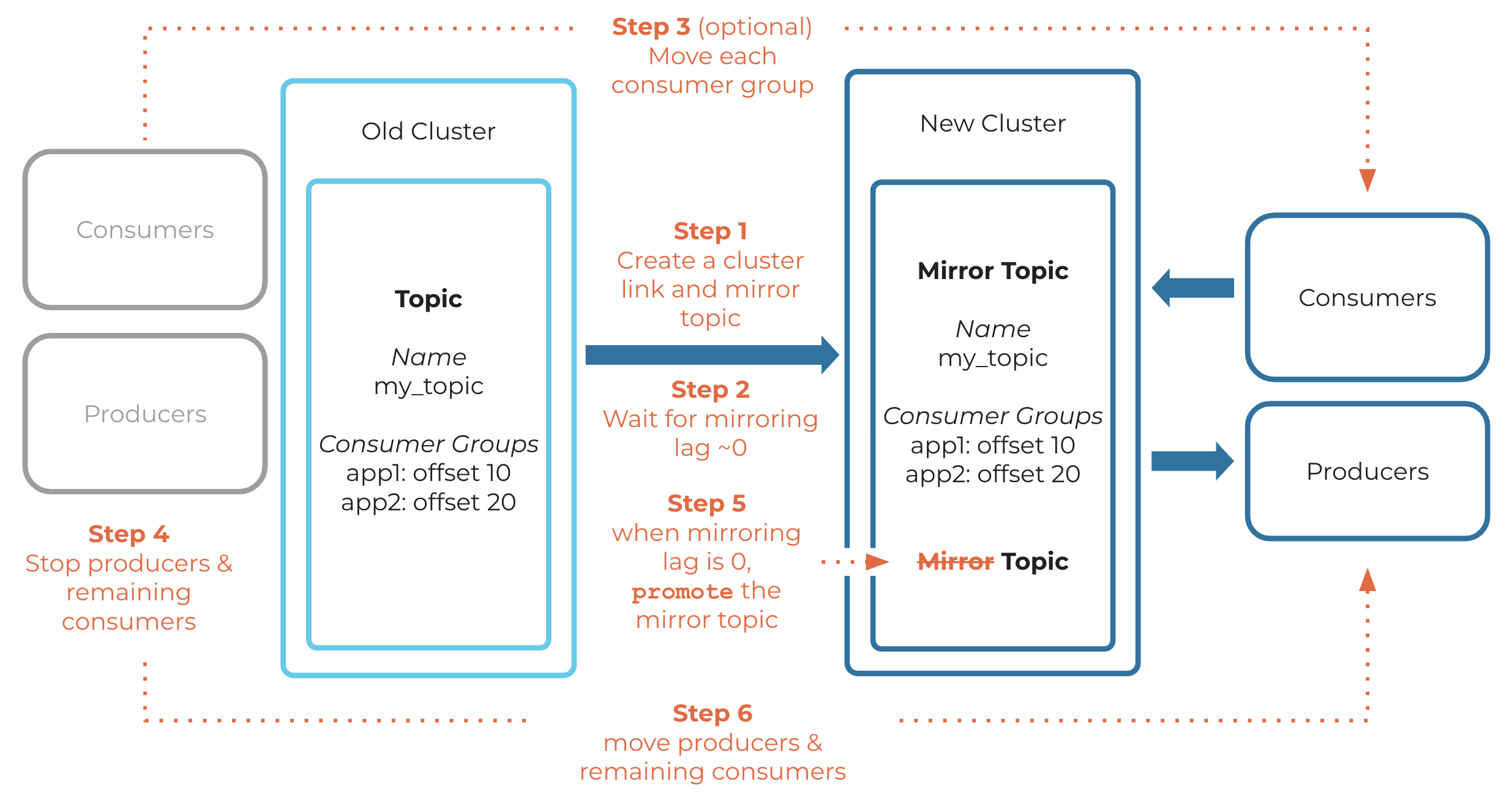
Example of failing over a topic
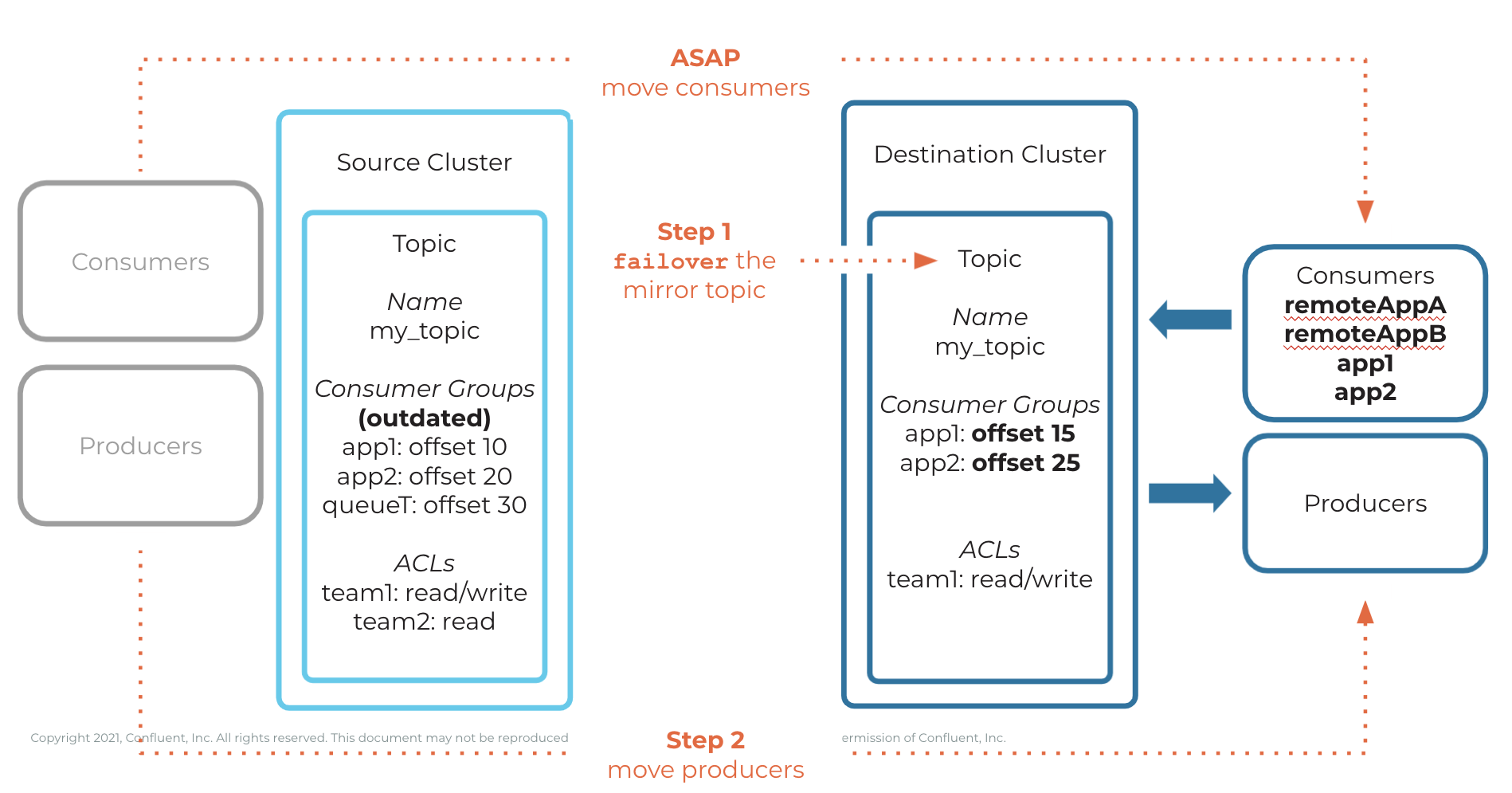
Example of truncate and restore
Example of reverse and start
Mirror topic states and statuses
You can use the command confluent kafka mirror describe to get information about a mirror topic, including related states and statuses.
For example:
confluent kafka mirror describe orders --link from-on-prem-link
      Link Name     | Mirror Topic Name | Source Topic Name | Mirror Status | Status Time (ms) | Partition | Partition Mirror Lag | Last Source Fetch Offset
--------------------+-------------------+-------------------+---------------+------------------+-----------+----------------------+---------------------------
  from-on-prem-link | orders            | orders            | ACTIVE        |    1730740163703 |         0 |                    0 |                       10
When you describe a mirror topic, it will return one of these states:
ACTIVEThe mirror is running normally, and messages are being mirrored from the source topic to the destination topic.
PAUSEDYou paused mirroring for this mirror topic.
To reach this state, you must either pause this specific topic, or pause its cluster link.
Caution
Confluent Cloud cluster links cannot be paused. On Confluent Cloud, you can pause only the individual mirror topics, as described in confluent kafka mirror pause.
PENDING_SYNCHRONIZEThis topic is in the process of becoming a normal topic that will be mirrored to the remote cluster. (Previous to this, the topic was a mirror topic.)
This topic is currently read-only. It will not accept produce requests, but it can be consumed from.
The
PENDING_SYNCHRONIZEstate occurs when areversecommand is called on a topic.Allowed operations to a topic in this state are as follows:
pause: to pause the reversal process.failover: to permanently abort the reversal process and convert this to a writable, non-mirror topic.
The topic will automatically transition to the
STOPPEDstate when ready.
PENDING_MIRRORThis topic is in the process of becoming a mirror topic (it was formerly a writable topic).
It will not accept produce requests, but it can be consumed from because it is read-only.
The
PENDING_MIRRORstate occurs when areversecommand is called on the remote mirror topic for this source topic.Allowed operations to a topic in this state are as follows:
failover: to permanently abort the reversal process and convert this to a writable, non-mirror topic.
When its conversion to a mirror topic has completed, the topic will automatically transition to the
ACTIVEorPAUSEDstate, depending on whichreversecommand was used.
PENDING_SETUP_FOR_RESTOREThis topic is in the initial reconciliation phase of a restore operation.
In this state, Cluster Linking compares epoch histories and determines the exact offset boundaries required to identify divergent records produced while the topic was writable.
It does not accept produce requests. While the topic remains technically readable, clients should avoid consuming from it during this state, as reading data can cause offset clamping issues during the restoration process.
The
PENDING_SETUP_FOR_RESTOREstate occurs when you issue arestorecommand on a topic.When offset reconciliation completes, the topic automatically transitions to the
PENDING_RESTORE_MIRRORstate.Allowed operations to a topic in this state are as follows:
failover: to permanently stop the restoration process and convert this to a writable, non-mirror topic.
PENDING_RESTORE_MIRRORThis topic is in the active truncation and re-linking phase of a restore operation.
In this state, Cluster Linking truncates the divergent records identified during setup and re-establishes partition fetchers to the remote source cluster.
It does not accept produce requests. While the topic remains technically readable, clients should avoid consuming from it during this state, as reading data can cause offset clamping issues during the restoration process.
The
PENDING_RESTORE_MIRRORstate occurs automatically after thePENDING_SETUP_FOR_RESTOREstate completes.When truncation and fetcher initialization complete, the topic automatically transitions to the
ACTIVEstate, or to thePAUSEDstate if restored as paused.Allowed operations to a topic in this state are as follows:
failover: to permanently abort the restoration process and convert this to a writable, non-mirror topic.
PENDING_STOPPEDYou stopped this mirror topic with the
promotecommand, and this topic will soon be in theSTOPPEDstate.To force the mirror topic to immediately go from the
PENDING_STOPPEDstate to theSTOPPEDstate, call thefailovercommand on it. Doing this cancels any synchronization that was happening between the source cluster and the destination cluster, and eliminates any guarantees that thepromotecommand gives.As a workaround, you can fail over a topic stuck in
PENDING_STOPPEDto force it into a writable state; but some messages will be reprocessed because, in the case of a “stuck”reverse-and-start, not all consumer group offsets are guaranteed to be copied over. To learn more about this troubleshooting scenario, see Process flow for “reverse” commands.
STOPPEDMirroring has permanently stopped for this topic. It will no longer receive messages from its source topic. The topic is now writable and can receive messages produced directly to it.
To get into this state, you must call either
promoteorfailoveron this mirror topic.Even though a
STOPPEDtopic is no longer a mirror topic, it will still be listed in output for the commandsconfluent kafka mirror listandconfluent kafka mirror describe <destination-topic-name> --link <link>for as long as the cluster link exists. This is useful because the topic will return the last offset it fetched from its source topic (Last Source Fetch Offset) for each partition, and the time at which it was stopped (Status Time).
SOURCE_UNAVAILABLEThe mirror topic is unable to reach the source topic, and is not mirroring messages from the source topic. This could happen if the source cluster is experiencing an outage or if the network between the destination cluster and the source cluster is unstable.
Mirroring resumes after the issue is resolved and the destination cluster can reach the source cluster.
Note
Using a Confluent Platform 7.0.x source cluster with a source-initiated link to a KRaft destination cluster will
generate a SOURCE_UNAVAILABLE error. Cluster Linking between a source cluster running
Confluent Platform 7.0.x or earlier (non-KRaft) and a destination cluster running in KRaft mode is not supported.
To resolve this, upgrade the source cluster to Confluent Platform 7.1.0 or later.
LINK_FAILEDAn error has broken the mirror topic’s cluster link, and no data is being mirrored. You must reconfigure the link manually.
FAILEDThe mirror topic has permanently failed. It will no longer mirror data. This can happen if the cluster link ACLs are removed from the source cluster, or if the source topic is deleted. In both cases, the failed status takes effect only after cluster.link.retry.timeout.ms is reached (by default, the system retries the link for five minutes).
You can stop this mirror with the
failovercommand, and it will become a normal topic.If you want to restore mirroring for this topic, you must delete the legacy mirror topic and create a new mirror topic with the same name.
View mirror topic state transition errors
You can use the following commands to view mirror topic state transition errors.
For example, when a mirror topic is promoted, it transitions from the
PENDING_STOPPED state to STOPPED state. During that process, various
actions are performed to implement the transition and errors can occur during
that implementation. The following APIs allow you to view these errors and
unblock the mirror topic state transitions. For example, if you see an
authentication issue, you can reconfigure the link’s credentials to allow the
mirror topic to be fully promoted.
For a full list of possible task states and error codes, see Troubleshooting Cluster Linking on Confluent Cloud.
To view errors associated with a state transition:
confluent kafka mirror state-transition-error list <topic-name> --link <link-name>
./bin/kafka-mirrors.sh ... --list-state-transition-errors --topics <topic-name>
See Describe the mirror topic in the Confluent Cloud REST API documentation.
To view a mirror topic status, send a GET request to <REST-Endpoint>/clusters/<cluster-ID>/links/<link-name>/mirrors/<mirror_topic_name>?include_state_transition_errors=true.
Examples
confluent kafka mirror state-transition-error list topic-1 --link link-1

Mirror State Transition Error  | Mirror State Transition Error
              Code              |            Message
---------------------------------+---------------------------------
  AUTHENTICATION_ERROR           | Failed to describe topic
                                | configs due to authentication
                                | issues.
---------------------------------+---------------------------------
./bin/kafka-mirrors.sh --bootstrap-server pkc-j581r8.us-west2.gcp.confluent.cloud:9092 --command-config
command-config.properties --list-state-transition-errors --topics topic-1
Topic: topic-1    State: PENDING_STOPPED
Error Code: AUTHENTICATION_ERROR  Error Message: "Failed to describe topic configs due to authentication issues."
curl -H "Authorization: Basic XXX" --request GET \
--url 'https://pkc-j581r8.us-west2.gcp.confluent.cloud:443/kafka/v3/clusters/lkc-ok51xj/links/link-1/mirrors/topic-2?include_state_transition_errors=true' | jq

% Total    % Received % Xferd  Average Speed   Time    Time     Time  Current
                                Dload  Upload   Total   Spent    Left  Speed
100   844    0   844    0     0   2217      0 --:--:-- --:--:-- --:--:--  2215
{
  "kind": "KafkaMirrorData",
  "metadata": {
    "self": "https://pkc-j581r8.us-west2.gcp.confluent.cloud/kafka/v3/clusters/lkc-ok51xj/links/link-1/mirrors/topic-2"
  },
  "link_name": "link-1",
  "mirror_topic_name": "topic-2",
  "source_topic_name": "topic-2",
  "num_partitions": 6,
  "mirror_lags": [
    {
      "partition": 5,
      "lag": 0,
      "last_source_fetch_offset": -1
    },
    {
      "partition": 4,
      "lag": 0,
      "last_source_fetch_offset": -1
    },
    {
      "partition": 3,
      "lag": 0,
      "last_source_fetch_offset": -1
    },
    {
      "partition": 2,
      "lag": 0,
      "last_source_fetch_offset": -1
    },
    {
      "partition": 1,
      "lag": 0,
      "last_source_fetch_offset": -1
    },
    {
      "partition": 0,
      "lag": 0,
      "last_source_fetch_offset": -1
    }
  ],
  "mirror_status": "PENDING_STOPPED",
  "mirror_topic_error": "NO_ERROR",
  "state_time_ms": 1706820222493,
  "mirror_state_transition_errors": [
    {
      "error_code": "AUTHENTICATION_ERROR",
      "error_message": "Failed to describe topic configs due to authentication issues."
    }
  ]
}
Mirror topic deletion
You can safely delete a mirror topic. Deleting a mirror topic permanently stops data mirroring to that topic. If you create a new normal topic of the same name on the same cluster, data will not be mirrored to it.
To delete a mirror topic, use the same command you would use to delete a normal topic:
confluent kafka topic delete <topic-name>
To learn more, see Delete topics that were auto-created.
Important
When deleting a cluster link, first check that all mirror topics are in the
STOPPEDstate. If any are in thePENDING_STOPPEDstate, deleting a cluster link can cause irrecoverable errors on those mirror topics due to a temporary limitation.You cannot delete a cluster link that is attached to any mirror topics. You must first delete, fail over, or promote all of the mirror topics, and then you can delete the cluster link.
Source topic deletion
Although it is possible to delete a source topic that is being mirrored by a mirror topic and a cluster link, as a best practice, do not delete a source topic that is being mirrored. In particular, unpredictable behavior can occur if a source topic is deleted, and a topic by the same name is then created within a few minutes. This scenario can cause permanent data loss on any mirror topics that are still mirroring from that source topic, and can also cause performance issues on the source cluster or destination cluster.
Caution
Do not delete a source topic that is being mirrored by a mirror topic. Doing so can lead to unpredictable truncation and data loss on the mirror topic. Always stop mirroring to all associated mirror topics before deleting a source topic.
Before deleting a source topic, stop any mirroring to associated mirror topics. You can stop mirroring on a mirror topic in one of these ways:
Delete the mirror topic.
Call
promoteorfailoverso the mirror topic enters theSTOPPEDstate.Revoke the security permissions for the cluster link to read the source topic. You can do this in one of these ways:
Delete the cluster link’s
ALLOWACL for the source topic.Create a
DENYACL for the source topic.Delete the cluster link’s API key.
For further discussion about Kafka limitations with topic deletion and how topic IDs will help, see KIP-516.
How schemas work with mirror topics
Cluster Linking preserves the schema ID stored in each message. Therefore, to consume from a mirror topic that is using schemas, the consumer clients must use a Schema Registry context with the same schema IDs as on the Schema Registry context used by the producers to the source topic. To consume from a mirror topic that uses schemas, do one of the following:
Option 1: Use the same Schema Registry as the producers used.
Option 2: Use a Schema Registry context that was synced through Schema Linking from the Schema Registry that the producers used.
Caution
When using Schema Linking: To use a mirror topic that has a schema with Confluent Cloud ksqlDB, broker-side schema ID validation, or the topic viewer, make sure that Schema Linking puts the schema in the default context of the Confluent Cloud Schema Registry. These fully managed Confluent Cloud features require schemas to be in the default context of the Confluent Cloud Schema Registry in their environment.
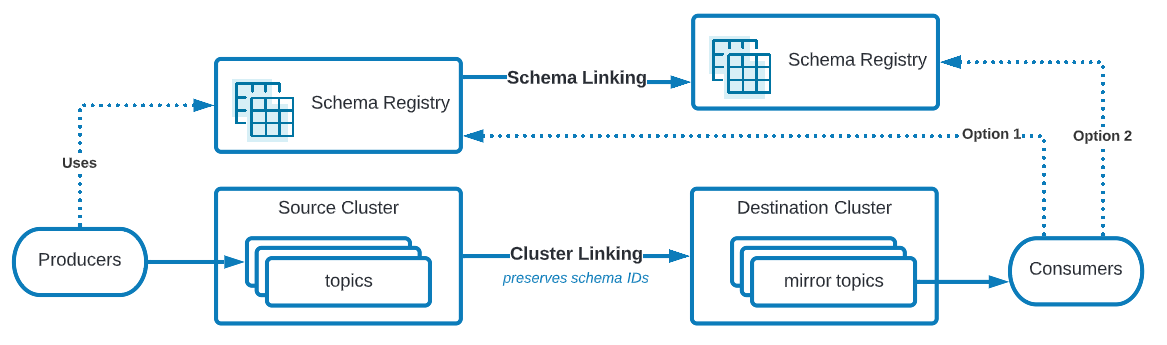
Mirror topics and schemas
To learn more about how Schema Registry supports disaster recovery scenarios, see Manage Schema Linking in Disaster Recovery Failover Scenarios.
Advanced mirror topic architectures
Chain mirror topics across multiple cluster links
A mirror topic can be a source topic itself. A mirror topic can be mirrored by different cluster links, allowing you to chain cluster links and mirror topics together.
For example, Topic A (source topic) on Cluster 1 —cluster link—> Topic A (mirror topic and source topic) on Cluster 2 —cluster link—> Topic A (mirror topic) on Cluster 3
Tip
You can safely create these chained topics and cluster links without creating a circular dependency between mirror topics and cluster links. You can create mirror topics without the fear of creating an infinite loop.
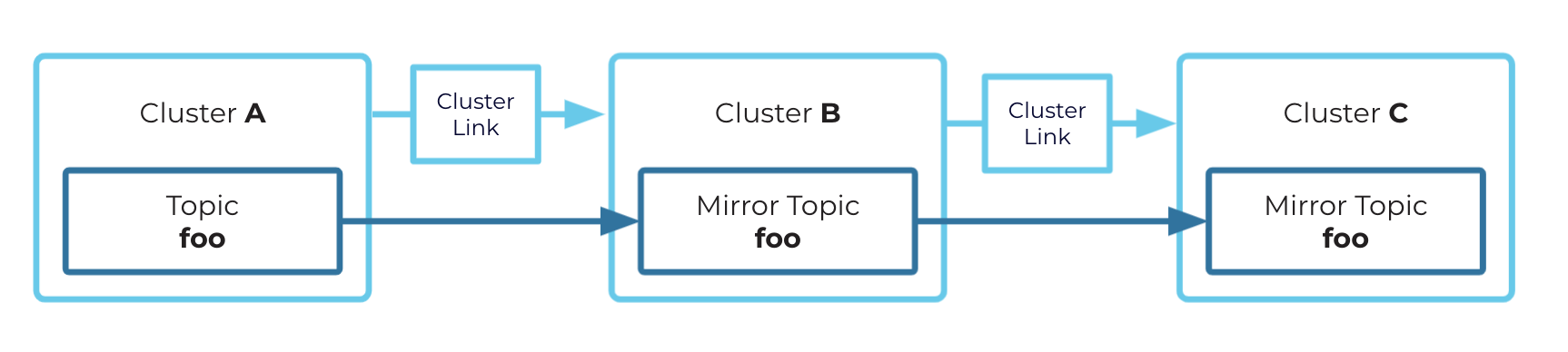
Chaining example
Fan out a source topic to multiple mirror topics
A source topic can be mirrored to multiple mirror topics. These mirror topics must exist on multiple different clusters.
For example, Topic A on Cluster 1 —cluster link—> Topic A on Cluster 4, and Topic A on Cluster 1 —cluster link—> Topic A on Cluster 5
Tip
If you plan to use failover or promote on a cluster link (for example, for disaster recovery or migration), then chained or
fanned-out mirror topics will not automatically retain their shape. For example, if you fan out A –> B and A –> C, if A has an outage
and you call failover on B, there is no way to automatically mirror B –> C. You will need to reconstruct the appropriate mirroring
relationship for your use case using brand new topics.
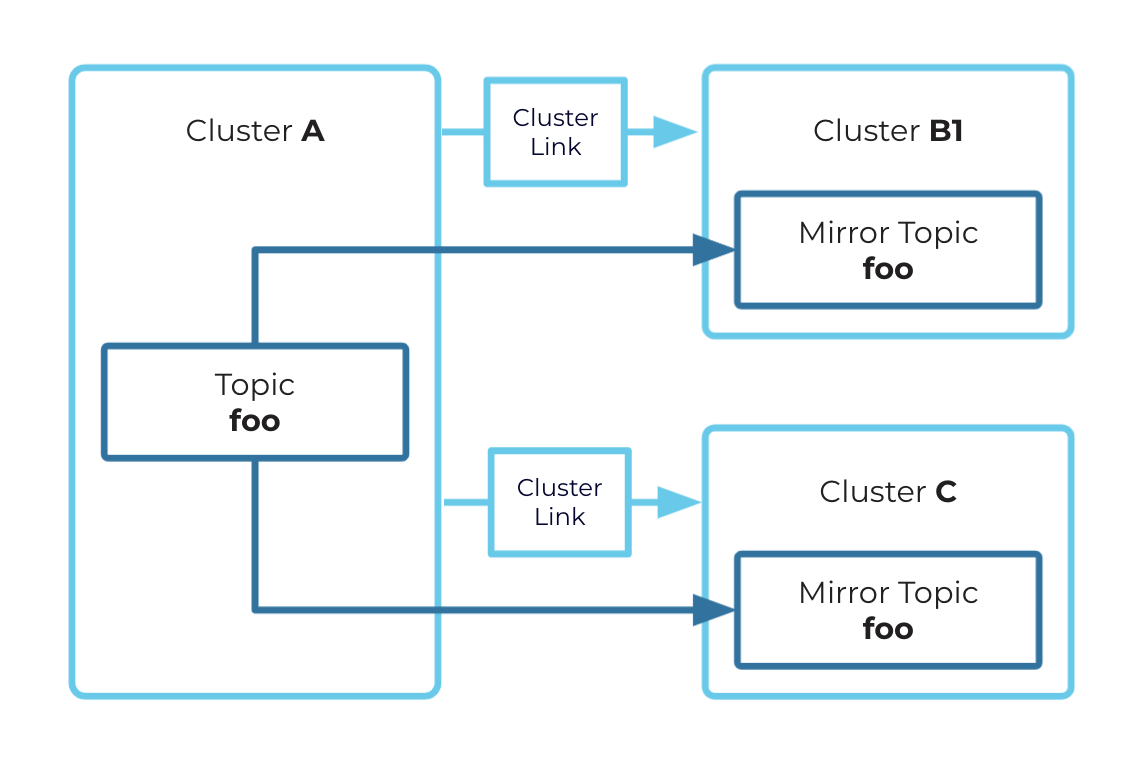
Fan-out example
How mirror topic configurations are synced
The following sections describe which configurations sync from the source topic to the mirror topic, how to override the defaults, and the concepts behind syncing.
Synced mirror topic configurations for Confluent Cloud
These configurations are always synced from the source topic to the mirror topic. Mirror topics will always have the same value as their source topic, to ensure the properties of mirror topics are met.
Number of partitions
max.message.bytescleanup.policymessage.timestamp.typemessage.timestamp.difference.max.ms
By default, the following configurations are also synced from the source topic to the mirror topic
unless they are explicitly removed from topic.config.sync.include, as described in the following section.
retention.bytesretention.msdelete.retention.msmin.compaction.lag.msmax.compaction.lag.ms
Setting retention configurations to always sync keeps the source and destination data identical. With this default configuration, the starting offset is also synced from source to mirror topics. By maintaining consistent log start offsets, Cluster Linking guarantees that records deleted from the source cluster are also deleted from the destination cluster. This can be a regulatory requirement.
Override default syncing to specify independent mirror topic behavior
Some use cases require independent retention for source and destination topics. For example, when mirroring data from small edge clusters to large centralized clusters, low-footprint edge clusters can use short retention, but rely on the data being available for a long time on the destination cluster.
To satisfy these cases, you can override the defaults by explicitly setting the following property to specify only those topic configurations you want synced from source to destination:
topic.config.sync.includeThe list of topic configurations to sync from the source topic.
For example, the topic configurations could be set to the following (which does not include the retention properties):
topic.config.sync.include=max.message.bytes,cleanup.policy,message.timestamp.type,message.timestamp.difference.max.ms,min.compaction.lag.ms,max.compaction.lag.ms
topic.config.sync.include is a cluster-link-level configuration and must be set when creating or updating the cluster link itself, not when creating individual mirror topics.
Use the Confluent CLI command confluent kafka mirror update (or confluent kafka link update for cluster-link-level configurations) to dynamically override topic-level configurations on the existing cluster link,
as described in confluent kafka mirror create.
With these overrides in place, mirror topics will have independent retention periods and starting offsets instead of syncing with their source topics.
Important
Configuration overrides such as topic.config.sync.include are specified at the cluster link level and apply to all mirror topics on the cluster.
If independent retention is specified (by omission in topic.config.sync.include), you must either specify the retention value or use the Kafka defaults.
Mirror topic configurations not synced
Confluent Cloud does not sync any configuration that is not in the preceding list to a mirror topic. Therefore, the mirror topic’s configuration could be different from the source topic’s configuration. If you don’t override the mirror topic’s configuration, then it will inherit its cluster’s default.
A few important examples of configurations that are not synced to mirror topics in Confluent Cloud:
min.insync.replicasconfluent.placement.constraintscompression.typereplication.factor— replication factors are never synced to mirror topics. The replication factor defaults to3for all topics and is not configurable.
Hybrid cloud configuration syncs
Confluent Platform and Confluent Cloud have different policies for which mirror topic configurations are synced. If you create a cluster link between Confluent Platform and Confluent Cloud, the destination cluster’s policy applies.
For example, if you create a cluster link from a Confluent Platform source cluster to a Confluent Cloud destination cluster,
the value of compression.type is not synced. But if you create a cluster link from a Confluent Cloud source cluster
to a Confluent Platform destination cluster, compression.type is synced.