

Kafka REST APIs for Confluent Cloud
The Kafka REST API v3 provides HTTP endpoints for producing/consuming messages and managing clusters in Confluent Cloud. Use it when native Kafka clients aren’t available: serverless functions, CI/CD pipelines, shell scripts, or restricted environments where only HTTPS is permitted.
The API lets you produce records to topics, consume from topics, create and configure topics, manage ACLs, and configure Cluster Linking. All operations use simple HTTP requests with base64-encoded authentication. The API supports both streaming mode (persistent HTTP connection, thousands of requests/second) and non-streaming mode (request-response).
The Kafka REST API (v3) is compatible with the Kafka REST Proxy v3 APIs and is available by default on all Basic, Standard, Enterprise, Dedicated, and Freight Kafka clusters.
When to use the Kafka REST API
Use the Kafka REST API when you need to produce/consume records or manage clusters via HTTP without installing native Kafka clients:
Supercharge your business workflows: Automatically create topics, grant privileges to existing ones to onboard new customers or data partners.
Integrate with third-party data partners, providers and solutions: Allow your customers to directly post records to specific topics on your Confluent Cloud cluster, or build cluster links between their Confluent Cloud clusters and yours, without having to learn and use the Kafka protocol.
Integrate with Serverless solutions in a cloud of your choice: Use the simple Kafka REST API to build workflows with bleeding-edge serverless solutions of your choice.
Scale beyond the connection limits for Kafka: If you have a large number of clients with low throughput requirements, maintaining a Kafka protocol connection has overhead. The request-response semantics of Kafka REST APIs mean that you can scale your clients independently of Kafka connection limits.
REST API reference
To see available REST APIs, see Kafka REST API (v3). This topic focuses on the key concepts you need to know to get started with Kafka REST APIs for Confluent Cloud. It also provides examples for the Cluster Admin API and Produce API.
Get the cluster endpoint
Every Confluent Cloud cluster has a unique REST endpoint URL, for example,
https://pkc-abcde.us-west4.gcp.confluent.cloud:443, used for all API calls
to that cluster. Find this endpoint in the cluster settings page of the
Confluent Cloud Console.
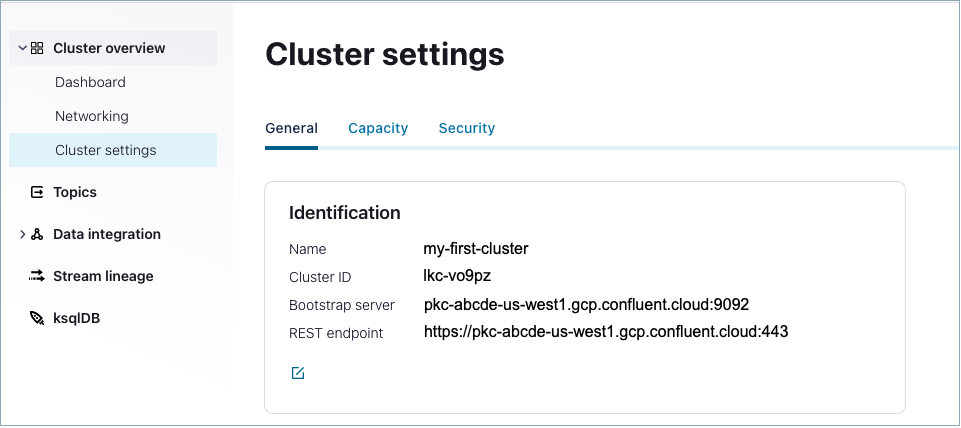
Alternatively, use the Confluent CLI with the following command to view cluster details:
confluent kafka cluster describe <cluster-ID>
+--------------+--------------------------------------------------------+
| Id           | lkc-vo9pz                                              |
| Name         | my-first-cluster                                       |
| Type         | STANDARD                                               |
| Ingress      |                                                    100 |
| Egress       |                                                    100 |
| Storage      | Infinite                                               |
| Cloud        | gcp                                                    |
| Availability | single-zone                                            |
| Region       | us-west4                                               |
| Status       | UP                                                     |
| Endpoint     | SASL_SSL://pkc-abcde.us-west4.gcp.confluent.cloud:9092 |
| RestEndpoint | https://pkc-abcde.us-west4.gcp.confluent.cloud:443     |
+--------------+--------------------------------------------------------+
This endpoint can be used to perform operations against the APIs listed under
the /kafka/v3/ group, as shown in the Cluster (v3) API reference.
Tip
Kafka REST endpoints are per-cluster, rather than single, control plane API endpoints.
You must have network access to the cluster as a prerequisite for using Kafka REST. For example; if you are using a laptop and your cluster is privately networked (not on the internet), you must configure a network path from your laptop to the cluster in order to use Kafka REST.
Using base64 encoded data and credentials
To communicate with the REST API you must send your Confluent Cloud API key and API secret as BINARY, base64-encoded data. (You also need write permissions to the target Kafka topic.)
This overview provides use cases and examples that require you to know how to create and use these credentials. The Kafka REST API Quick Start for Confluent Cloud provides detailed information on how to do this.
For instructions on how to create credentials, base64 encode them, and use them in your API calls, see Step 2: Create credentials to access the Kafka cluster resources .
You would base64 encode data in a similar way. For example, to base64 encode the word “bonjour”, use the following command on Mac OS.
echo -n "bonjour" | base64
You would then use the string result of this operation in your API call, in place of word “bonjour”.
Principal IDs for ACLs
Confluent Cloud currently supports two REST API principal formats for ACLs: Resource ID
and Integer ID. For example, a principal using an Integer ID looks like this:
User:1234. A principal using a Resource ID looks like this:
User:sa-1234, where sa stands for service account. The preferred
principal format is Resource ID. Note that the principal format Integer ID
will be deprecated and is not recommended when creating principals for ACLs.
For additional information, see ACL operation details.
Cluster Admin API
The Confluent Cloud REST APIs support both cluster administration operations as well as producing records (or events) directly to a topic.
The KAFKA API (v3) provides an Admin API to enable you to build workflows to better manage your Confluent Cluster. This includes:
Listing the cluster information
Listing, creating and deleting topics on your Confluent Cloud cluster
Listing and modifying the cluster and Topic configuration
Listing, creating and deleting ACLs on your Confluent Cloud cluster. For additional details, see Principal IDs for ACLs.
Listing information on consumer groups, consumers, and consumer lag (for dedicated cluster only)
Listing partitions for a given topic
Managing your Cluster Linking configuration
For detailed reference documentation and examples, see Cluster (v3).
Produce API
Producing records to a Kafka topic involves writing and configuring a
KafkaProducer within a client application that utilizes the Kafka binary
protocol. For most workloads, this introduces additional complexity in getting
data into the Kafka topic.
The REST API makes producing records to a Kafka topic as simple as making an HTTP POST request, without worrying about the details of the Kafka protocol.
Kafka REST Produce API has limits depending on the cluster type you choose. For more information, see Cluster limit comparison.
There are two ways to use the API to produce records to Confluent Cloud, as covered in the sections that follow: streaming mode (recommended) and non-streaming mode.
Note that you cannot transmit compressed records from clients to the Kafka REST Produce API, and attempting
to do so will result in an error response from the API.
For example, Content-Encoding: gzip is not supported.
Streaming mode (recommended)
Streaming mode is the more efficient way to send multiple records. The performance difference is under a hundred requests per second for individual calls, as compared to several 1000 per second for streaming mode.
Streaming mode supports sending multiple records over a single stream. This
can be achieved by setting an additional header "Transfer-Encoding: chunked” on
the initial request as shown in the following example.:
curl -X POST -H "Transfer-Encoding: chunked" -H "Content-Type: application/json” -H \
"Authorization: Basic <BASE64-encoded-key-and-secret>" https://<REST-endpoint>/kafka/v3/clusters/<cluster-id>/topics/<topic-name>/records -T-
Once the stream has been established, you can start sending multiple records on the same stream, each on a different line, as shown in the following example.:
{"value": {"type": "JSON", "data": "{\"Hello \" : \"World\"}"}}

{"value": {"type": "JSON", "data": "{\"Hi \" : \"World\"}"}}

{"value": {"type": "JSON", "data": "{\"Hey \" : \"World\"}"}}
HTTP status code 200 is returned if the connection can be established in streaming mode. Note that individual records will return their own status codes.
Tip
For a Produce v3 streaming mode example, see the GitHub project kafka-rest/examples/produce_v3/python.
Limits by cluster type for streaming mode
There are limits for REST API connections and message size based on the cluster type used in Confluent Cloud in streaming mode.
The following table provides REST API limits by cluster type. For a full list of limits by cluster type, see Cluster limit comparison.
Dimension |
|||||
|---|---|---|---|---|---|
Kafka REST Produce v3 - Max connection requests (per second) ‡ |
25 |
25 |
25 |
75,600 † |
25 |
Kafka REST Produce v3 - Max streamed requests (per second) |
1000 |
1000 |
1000 |
756,000 † |
1000 |
Kafka REST Produce v3 - Max message size for Kafka REST Produce API (MB) |
8 |
8 |
8 |
20 |
8 |
† Limit based on a Dedicated Kafka cluster with 252 CKUs. For more information, see CKU.
‡ Connection request limits are enforced per cluster and IP address for elastic cluster types.
For Dedicated clusters, this limit scales linearly with the number of CKUs provisioned. For the per-CKU value, see eCKU/CKU comparison.
Non-streaming mode
Non-streaming mode to produce records to follows the more traditional, request-response model, where you can make requests to send one (or more) record/s at a time.
Important
Streaming mode (recommended) performance is generally better than non-streaming mode, which is why streaming mode is recommended.
Producing a single record to a topic
Individual calls are made to the REST Produce endpoint (/kafka/v3/clusters/<cluster-id>/topics/<topic-name>/records) as shown in the following example:
curl -X POST -H "Content-Type: application/json"  -H \
"Authorization: Basic <BASE64-encoded-key-and-secret>” \
"https://<REST-endpoint>/kafka/v3/clusters/<cluster-id>/topics/<topic-name>/records" -d \
'{"value": {"type": "BINARY", "data": "<base64-encoded-data>"}}'
For this example, the endpoint returns the delivery report, complete with metadata about the accepted record.:
{
  "error_code": 200,
  "cluster_id": "lkc-vo0pz",
  "topic_name": "testTopic1",
  "partition_id": 0,
  "offset": 67217,
  "timestamp": "2021-12-13T16:29:10.951Z",
  "value": {
    "type": "BINARY",
    "size": 6
  }
}
Data payload specification
The OpenAPI specification of the request body describes the parameters that can be passed in the request payload:
ProduceRequest:
    type: object
    properties:
      partition_id:
        type: integer
        nullable: true
        format: int32
      headers:
        type: array
        items:
          $ref: '#/components/schemas/ProduceRequestHeader'
      key:
        $ref: '#/components/schemas/ProduceRequestData'
      value:
        $ref: '#/components/schemas/ProduceRequestData'
      timestamp:
        type: string
        format: date-time
        nullable: true

ProduceRequestHeader:
      type: object
      required:
        - name
      properties:
        name:
          type: string
        value:
          type: string
          format: byte
          nullable: true

ProduceRequestData:
      type: object
      properties:
        type:
          type: string
          x-extensible-enum:
            - AVRO
            - BINARY
            - JSON
            - STRING
        data:
          $ref: '#/components/schemas/AnyValue'
      nullable: true

AnyValue:
      nullable: true
All the fields, including data, are optional. An example payload using all the options is shown below:
{
  "partition_id": 0,
  "headers": [
    {
      "Header-1": "SGVhZGVyLTE="
    }
  ],
  "key": {
    "type": "BINARY",
    "data": "SGVsbG8ga2V5Cg=="
  },
  "value": {
    "type": "JSON",
    "data": "{\"Hello \" : \"World\"}"
  },
  "timestamp": "2021-12-13T16:29:10.951Z"
}
The key and data fields can be of type AVRO, BINARY, JSON, or STRING. For binary and Avro data, the data must be base64 encoded. The headers must be base64 encoded.
An example JSON payload is shown here:
'{"value": {"type": "JSON", "data": "{\"Hello \" : \"World\"}"}}'
An example STRING payload is shown here:
'{"value": {"type": "STRING", "data": "Hello World"}}'
An example AVRO payload is shown here:
'{"value": {"type": "AVRO", "data": "<base64-encoded-avro-data>"}}'
Connection bias
The distribution of API connection requests for REST instances is balanced
across clusters. However, a long-lived connection may result in a bias for API
requests to continue through this connection. The connection bias may result in
a returned 429 status code (too many requests), even though the limit has
not been exceeded.
The best practice for avoiding connection bias is to close connections. To do
this, add a Connection: close header on requests. For example:
Request.Post(restUrl).connectTimeout(connectTimeout).socketTimeout(socketTimeout)
                   .addHeader("Content-Type", CONTENT_TYPE)
                   .addHeader("Accept", CONTENT_TYPE)
                   .addHeader("Authorization", "Basic " + this.basicAuth)
                   .addHeader("Connection", close)