

Custom SMT for Confluent Cloud Limitations and Support
This page describes the limitations and support for Custom SMTs. Be sure to review all the information in this page before proceeding with the Quick start.
Limitations
Custom SMTs can only be used with fully managed connectors.
Custom SMTs scope to a specific environment and CSP, including AWS, Microsoft Azure, and Google Cloud.
Custom SMT on Azure requires Confluent CLI version 4.49.0 or later.
Custom SMT on Google Cloud requires Confluent CLI version 4.56.0 or later.
Default limit for Custom SMTs per fully managed connector is 10.
Default limit for uploaded Custom SMT artifact files is 10 per Confluent environment.
Default limit for Custom artifact file size is 100 MB.
Message size limit of ~2MB (4MB on the wire size).
Custom SMT JARs must be compiled using Java 21, Java 17 or earlier. JARs compiled with Java 25 are not supported.
Enabling a Custom SMT reduces connector throughput. To prevent additional throughput loss, avoid unnecessary or verbose logging in Custom SMT code.
Custom SMT performance does not automatically scale with the number of connector tasks. You must manually tune connector capacity for different workloads.
Custom SMTs support Log4j2 and slf4j for logging. For Log4j2, use
log4j-apiandlog4j-corewithprovidedscope. For slf4j, useslf4j-apiwithprovidedscope.
Important
Confluent may scan files uploaded through Custom SMT to detect security risks.
Custom SMT external egress reachability
Every Custom SMT with external egress enabled can reach the public internet, regardless of cloud provider or cluster type. Only AWS supports private endpoint reachability, and only for specific cluster configurations:
Cloud provider |
Cluster configuration |
Private endpoint reachability |
|---|---|---|
AWS |
Enterprise, Freight, or Dedicated cluster with private networking |
Reachable, through an Egress PrivateLink Endpoint |
AWS |
Basic, Standard, Dedicated, or Freight cluster on public networking |
Not reachable |
Azure |
Any |
Not reachable |
Google Cloud |
Any |
Not reachable |
Co-location requirement: The destination service must be in the same region and cloud provider as the connector, for both public internet and private endpoint destinations. Cross-region and cross-cloud egress calls are not supported.
Unsupported interfaces: You can’t enable external egress from Confluent Cloud Console. Set
csmt.egress.enableusing the Confluent CLI, the Confluent Cloud REST API, or Terraform.Static egress IP limitations: Custom SMT external calls don’t use the public egress IP addresses shown on the connector creation page or under Cluster Settings > Networking. Allowlisting those addresses on a destination service doesn’t cover a Custom SMT’s calls to that service. For details, see Use Public Egress IP Addresses on Confluent Cloud for Connectors and Cluster Linking.
AWS PrivateLink requirements
To reach private endpoints on AWS, you must route traffic through an Egress PrivateLink Endpoint created on an Egress PrivateLink gateway. For setup instructions, see Use AWS Egress PrivateLink Endpoints for Serverless Products on Confluent Cloud.
Important
Custom SMTs do not support Egress PrivateLink Endpoints created directly on a Confluent Cloud network for Dedicated clusters.
Shared Responsibility
Confluent supports the underlying Custom SMT infrastructure in Confluent Cloud only. It is your responsibility to troubleshoot Custom SMT issues for connectors you build or that were provided to you from others. The following provides additional details about shared support responsibilities.
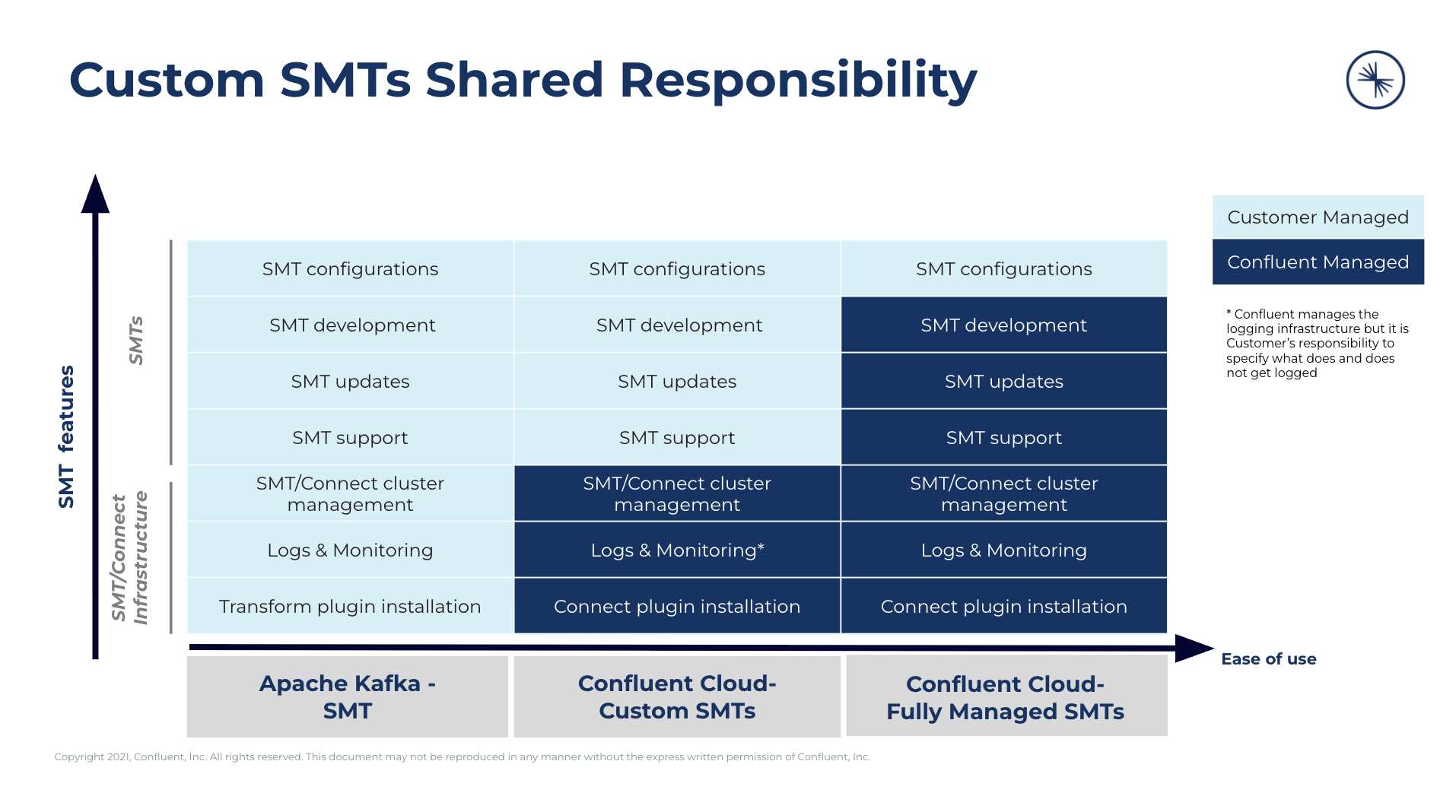
Shared responsibilities matrix
Customer Managed: The customer is responsible for self-managing these services. Confluent does not provide any support for customer-managed services and features with Custom SMTs.
Confluent Managed: Confluent is responsible for managing these services and providing support.
Supported regions
For the full list of regions where you can use Custom SMTs with fully managed connectors, see Confluent Cloud Regions and Availability by Cloud Provider.
Observability / Logs
Add logging statements to your Custom SMT code to help monitor and debug its behavior. Custom SMT log events are captured alongside the events for the fully managed connector that uses the SMT, and you can view them using the Confluent Cloud Console or Confluent CLI. For more information, see View Connector Events for Confluent Cloud.
Implement logging code
To add logging to your Custom SMT, import a supported logging library and get a logger instance in your transformation class. Custom SMTs support Log4j2 and slf4j. For information about the required dependencies, see Limitations.
The following example shows a Custom SMT that imports the
org.apache.logging.log4j.LogManager and org.apache.logging.log4j.Logger
namespaces. It gets the Logger instance by calling
LogManager.getLogger(), then logs messages from the apply()
method.
package your.package.namespace;

import org.apache.kafka.connect.connector.ConnectRecord;
import org.apache.logging.log4j.LogManager;
import org.apache.logging.log4j.Logger;
import org.apache.kafka.connect.transforms.Transformation;

public class InsertTimestampHeaders<R extends ConnectRecord<R>> implements Transformation<R> {

   private static final Logger LOGGER = LogManager.getLogger();

   @Override
   public R apply(R record) {
      if (record == null) {
         LOGGER.info("Received a null record");
         return null;
      }

      LOGGER.debug("Processing record with key: {}", record.key());

      // Your transformation logic goes here.

      return record;
   }

   // Implement the remaining Transformation interface methods.
}
The following log levels are supported.
ALLDEBUGERRORFATALINFOOFFTRACEWARN
Important
Verbose logging, especially at the DEBUG and TRACE levels, can
reduce connector throughput. Avoid unnecessary or verbose logging in
production Custom SMT code.
View logged events
After you deploy a fully managed connector that uses your Custom SMT, you can view its logged events alongside the connector’s other log messages. Use the Cloud Console or the Confluent CLI. For steps, see View Connector Events for Confluent Cloud.