

Billing Dimensions in Confluent Cloud
Confluent Cloud bills you on these dimensions: cluster capacity (CKU or eCKU), data ingress and egress, storage, cluster linking, connectors, ksqlDB, Flink SQL, Tableflow, and audit logs. The following sections describe each dimension. For support plan billing, see Confluent support plans.
To stop your Apache Kafka® clusters from accruing billed usage, delete your clusters in the Confluent Cloud Console, or use the Confluent CLI.
Important
Confluent storage and throughput is calculated in binary gigabytes (GB), where 1 GB is 230 bytes. This unit of measurement is also known as a gibibyte (GiB).
Dimension summary
Clusters are billed based on the dimensions listed in the following tables. For every available dimension, the following table lists the Costs API line item and the unit of measure for the dimension.
Dimension |
Line Type |
Unit of Measure |
|---|---|---|
Advanced Security add-on |
|
Cost per hour |
Kafka storage |
|
Cost per GB stored per hour |
Kafka ingress |
|
Cost per GB written |
Kafka egress |
|
Cost per GB read |
CKU/eCKU |
|
Cost per CKU/eCKU per hour |
Kafka ingress through Kafka REST APIs |
|
Cost per GB written |
KSQL Confluent Streaming Unit (CSU) |
|
Cost per CSU per hour |
Connector capacity for Dedicated Kafka cluster |
|
Cost per hour |
Connect task |
|
Cost per task per hour |
Connect data transfer |
|
Cost per GB written or read |
Confluent support plan |
|
Cost per hour (prorated based on monthly price) |
Cluster linking links |
|
Cost per link per hour |
Cluster linking ingress |
|
Cost per GB written |
Cluster linking egress |
|
Cost per GB read |
Audit logs |
|
Cost per GB of data read from audit log topics |
Stream Governance base |
|
Cost per hour |
Schema Registry schema |
|
Cost per schema per hour |
Stream Governance rule |
|
Cost per rule per hour |
Credit |
|
Credit issued by Confluent |
Custom connect task |
|
Cost per task per hour |
Custom connect data transfer |
|
Cost per GB written or read per hour |
Confluent Unit for Flink (CFU) |
|
Cost per CFU per minute |
Tableflow topic hours |
|
Cost per topic per hour |
Tableflow data processed |
|
Cost per GB processed |
Tableflow storage (Confluent managed storage only) |
|
Cost per GB stored per hour |
Basic, Standard, Enterprise, and Freight Kafka clusters
The following table summarizes the billing dimensions for Basic, Standard, Enterprise, and Freight clusters. Capacity is measured per eCKU. The following sections contain more details for some of the billing dimensions.
Dimension |
Unit of measure |
|---|---|
Cost per eCKU per hour |
|
Cost per GB written per hour |
|
Cost per GB read per hour |
|
Cost per GB stored per hour |
Pricing changes for Basic and Standard clusters
Beginning 4/16/2024, the pricing model for Basic and Standard clusters uses eCKUs instead of Base and Partitions. These changes are only applicable to Confluent Cloud organizations created on or after 4/16/2024. All organizations created before this date are not impacted and continue to use their existing cluster pricing model and limits. For details, see the legacy billing model.
If you have any questions, create a support request through the Confluent Cloud Support Portal, or reach out to your account team.
Dedicated clusters
The following table summarizes the billing dimensions for Dedicated clusters. The following sections contain more details for some of the billing dimensions.
Dimension |
Unit of measure |
|---|---|
CKU price |
Cost per CKU per hour |
Cost per GB written per hour |
|
Cost per GB read per hour |
|
Cost per GB stored per hour |
CKU
A CKU is a fixed unit of pre-allocated capacity for Dedicated Kafka clusters in Confluent Cloud. Each CKU bundles throughput, partition, and connection limits. You set the number of CKUs at cluster creation and pay per CKU per hour.
CKU charges accrue each hour based on the configured capacity of your cluster. You can expand and shrink Dedicated clusters. When you expand or shrink a Dedicated cluster, you are billed for the new CKU value in the next hour following the change in capacity.
eCKU
An eCKU is a unit of capacity for Basic, Standard, Enterprise, and Freight Kafka clusters in Confluent Cloud. Unlike CKUs, eCKUs scale elastically: you pay only for the capacity you use in a given hour, up to a fixed ceiling.
Basic, Standard, Enterprise, and Freight clusters are elastic and automatically scale up to a fixed ceiling. The ceiling governs how much maximum capacity your Kafka cluster can use; however, you are only billed for the capacity that you use in a given hour, up to the maximum allowed by the ceiling. The billing system monitors the actual consumption of each dimension. For each hour, you are billed for the maximum number of eCKUs used. For example, if dimensional usage oscillates between 2 and 3 eCKUs in a single hour, you are billed for 3 eCKUs.
Basic, Standard, Enterprise, and Freight clusters have a minimum capacity if you use any capacity. If the capacity you use is less than the minimum, you pay the minimum. If your cluster is at zero consumption across all dimensions, you pay nothing. Zero consumption across all dimensions means your cluster has no partitions, no topics have been created (or all topics have been deleted), and there is no other capacity usage from an eCKU billable dimension, including the following: ingress, egress, client connections, connection attempts, or requests. For more information, see eCKU/CKU comparison and Cluster provisioning and scaling.
Compare billing units for Kafka clusters
CKUs and eCKUs are billing units for different Kafka cluster types. Both quantify pre-allocated resources; they differ in how you are billed.
Attribute |
CKU |
eCKU |
|---|---|---|
Cluster type |
Dedicated |
Basic, Standard, Enterprise, and Freight |
Billing basis |
Fixed: pay for CKUs set at cluster creation |
Elastic: pay for capacity used per hour |
What you pay when idle |
Full CKU cost (capacity is reserved) |
Minimum (if any consumption); nothing at zero consumption |
Maximum capacity |
Number of CKUs configured |
Fixed ceiling set at cluster creation (costs cannot exceed this) |
Ingress and egress
Confluent Cloud charges you for all data transfers, including requests for produce and consume and every other type of incoming or outgoing request. This includes charges for requests made by Cloud Console to display messages in message browser. An additional $0.01 ingress charge applies for using the Produce (v3) REST API, before the regional multiplier is applied. All ingress and egress charges are then multiplied by a regional multiplier based on the cloud provider region.
Storage
Confluent Cloud charges for storage based on the total post-replication volume of
data on a Kafka cluster. Because Confluent Cloud replicates data three times for high
availability, billed storage is typically about 3x the volume you write. To
reduce storage usage, you can configure the retention.bytes and
retention.ms properties on a topic. To learn more, see Topic Settings and Edit topics.
Partitions
Confluent Cloud does not charge for partitions on any type of Kafka cluster, but the number of partitions you use can have an impact on eCKU. To determine eCKU limits for partitions, Confluent Cloud bills only for pre-replication (leader partitions) across a cluster. For more information, see eCKU/CKU comparison.
Only partitions that are visible in the Cloud Console count toward this limit. Partitions internal to Kafka itself, such as consumer offsets, are not visible in the Cloud Console and don’t count.
This distinction applies differently to Connect, depending on how you run it:
A self-managed Connect worker creates its
config,offset, andstatustopics directly on your Kafka cluster. These topics are visible in the Cloud Console, so their partitions count toward your partition limit and eCKU. They’re also compacted, so they count toward the Enterprise compacted partition sub-limit as well.A fully managed connector’s internal state is managed in Confluent’s own infrastructure. It isn’t created as a topic on your cluster and isn’t visible in the Cloud Console, so it doesn’t count toward your partition limit or eCKU. Only the connector’s data topics count.
Legacy partition billing for Basic and Standard clusters
Confluent Cloud charges for partitions on Basic and Standard clusters. You are charged for the number of unique partitions that exist on your cluster during a given hour.
Basic clusters receive 10 partitions free of charge.
Standard clusters receive 500 partitions free of charge.
Enterprise clusters have no partition-based charges.
Dedicated clusters have no partition-based charges.
For billing purposes, partitions for topics that you create and partitions
for internal topics are counted. Internal topics are topics that are
automatically created by Confluent components such as ksqlDB, Kafka Streams,
and Connect, and prefixed with an underscore (_). Partitions for topics
that are internal to Kafka itself and are not visible in the
Cloud Console, such as consumer offsets, do not count against partition
limits or toward partition billing.
Cluster Linking
Cluster Linking in Confluent Cloud is billed on three dimensions: cost per cluster link per hour, ingress per GB written, and egress per GB read. A cluster link connects a source cluster to a destination cluster. For more details, see Supported cluster types for Cluster Linking.
The following tables provide a detailed breakdown for Cluster Linking billing.
Cluster Linking intra-cloud and public networking
The following pricing applies to cluster links where both clusters are in the same cloud or either cluster uses public networking.
Dimension |
Unit of measure |
Details |
|---|---|---|
Cluster link |
Cost per link per hour |
$0.25 / hour per cluster link for Confluent Cloud clusters with internet endpoints, and $0.50/hour for privately networked Confluent Cloud clusters. A cluster is charged for all cluster links for which it is a source or destination. If a given cluster link connects two Confluent Cloud clusters, then both the source and the destination cluster are charged their respective hourly rates for that cluster link. A bidirectional cluster link is charged as two links, both at the higher of the two hourly rates: $0.50/hour. If a cluster link connects a Confluent Cloud cluster with a cluster outside of Confluent Cloud, only the Confluent Cloud cluster is charged its hourly cluster link price. A cluster link must be created by a Confluent Cloud user. It contains a source cluster, a destination cluster, and security credentials. You can have an unlimited number of mirror topics on a cluster link. It is possible to create multiple cluster links with the same source cluster, destination cluster, and security configuration. Confluent does not de-duplicate these links. Confluent Cloud charges for all cluster link objects, even if there is not a mirror topic or data throughput on the cluster link at a given point in time. |
Ingress (ClusterLinkingWrite) |
Cost per GB written per hour |
There is a per GB cost for all data that a Confluent Cloud cluster receives over a cluster link. It is charged at the same price as the cluster’s price for Kafka ingress (KafkaNetworkWrite). If you use Cluster Linking between two Confluent Cloud clusters, you are not charged by a cloud provider for this ingress. You are not charged for Kafka ingress (KafkaNetworkWrite) in addition to the Cluster Linking ingress (ClusterLinkingWrite). |
Egress (ClusterLinkingRead) |
Cost per GB read per hour |
$0.25/GB for all data (including metadata) that a Confluent Cloud cluster sends over a cluster link. You are not charged by a cloud provider for this egress; Confluent pays the cloud provider egress. You are not charged for Kafka egress (KafkaNetworkRead) in addition to the Cluster Linking egress (ClusterLinkingRead). Note: Volume discounts are available. Contact your Confluent Cloud account team to find out more. |
Note
If a source cluster or destination cluster is not a Confluent Cloud cluster, then that cluster does not accrue any charges.
Cluster Linking cross-cloud on private networking
Cross-cloud private networking pricing applies when both of the following are true:
The link connects clusters in different cloud providers.
Both clusters use Confluent Cloud private networking.
All Cluster Linking billing terms remain the same as shown in the previous table, except for the per-link hourly charge.
Charge type |
Price |
Notes |
|---|---|---|
Cost per link per hour |
$2.50 per privately networked cluster |
Cross-cloud only |
Cost per link per hour — Premium regions |
$5.00 per privately networked cluster |
Applies to the cluster charge if it is a premium region. |
Mirroring throughput |
Same as standard Cluster Linking |
No change |
To find out whether a region is a premium region, see the “Premium region (cross-cloud private networking)” row in the region availability tables at Confluent Cloud Regions and Availability by Cloud Provider.
Regional multiplier
Every Confluent Cloud cluster has a regional multiplier depending on its region and cloud provider. This regional multiplier is applied to the base prices. For example, a cluster in AWS in us-east-1 has a 1x regional multiplier, so its Cluster Linking per link price is the base $0.25. A Google Cloud cluster in asia-east2 has a 1.2x regional multiplier, so its Cluster Linking per link price is $0.25 * 1.2 = $0.30.
Metadata syncs
In addition to the data produced to source topics as “messages”, Cluster Linking also syncs metadata such as topic configurations, consumer group offsets, and ACLs. Cluster Linking charges for this metadata at the same rate as topic message data. Therefore, the total throughput for a cluster link might be larger than the sum of the produce throughput produced into source topics.
To measure the amount of metadata throughput, subtract the metric that only
accounts for topic data
(io.confluent.kafka.server/cluster_link_mirror_topic_bytes) from the metric
that accounts for all cluster link data
(io.confluent.kafka.server/cluster_link_destination_response_bytes).
Using the Metrics API to monitor billable metrics
Each line item has a corresponding metric in the Confluent Cloud Metrics:
Line Item |
Metric |
|---|---|
ClusterLinkingPerLink |
|
ClusterLinkRead |
|
ClusterLinkWrite |
|
Examples
The following examples illustrate cluster-linking billing for common configurations. These examples are for clusters with internet networking only; examples of private networked clusters are provided in later versions of this documentation.
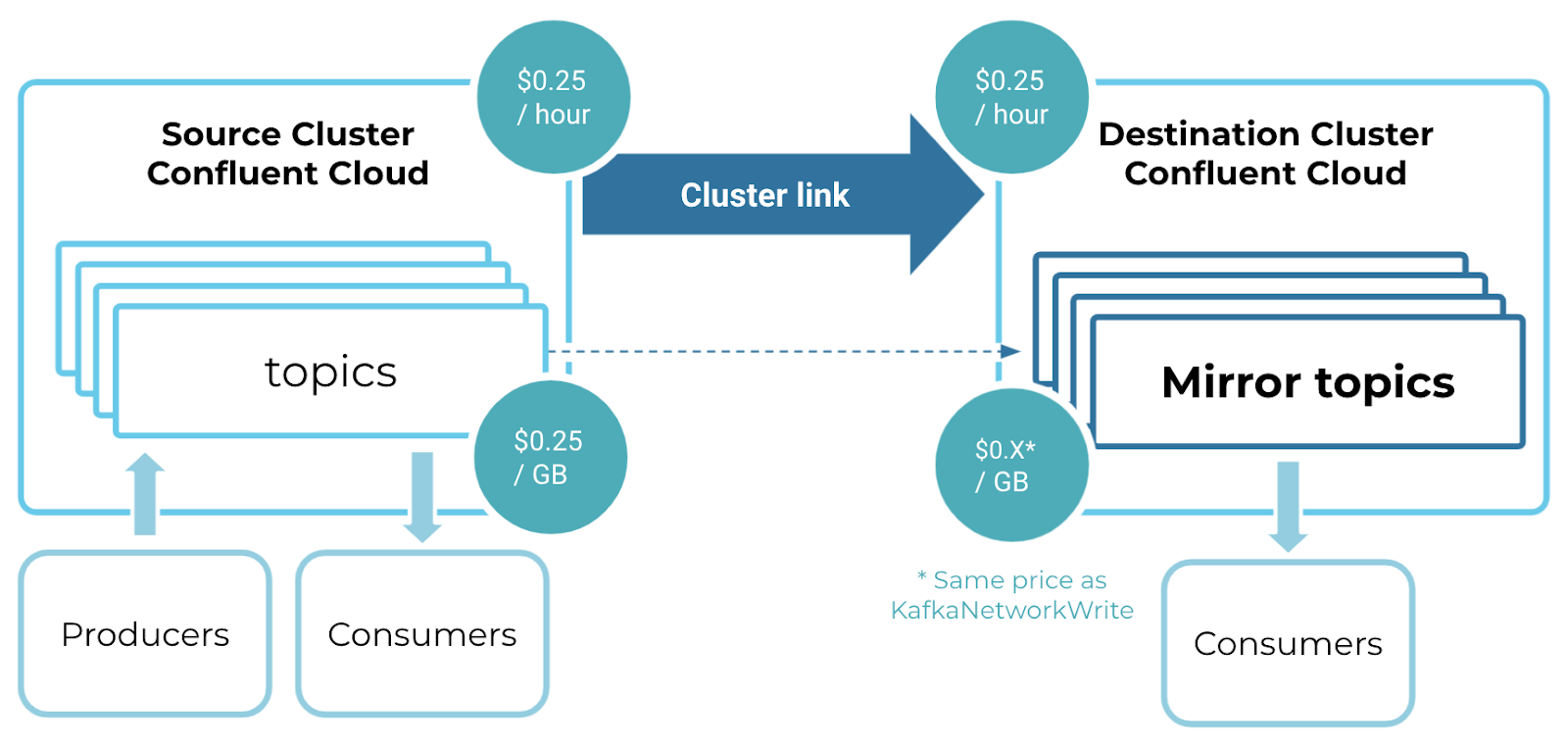
One cluster link in an active-passive setup
In this example, you have one cluster link between a Source cluster and a Destination cluster.
The source cluster is charged $0.25 per hour and $0.25 per GB.
The destination cluster is charged $0.25 per hour and $0.01 per GB, because the
cluster’s KafkaNetworkWrite cost is $0.01 per GB.
Two cluster links in an active-active setup
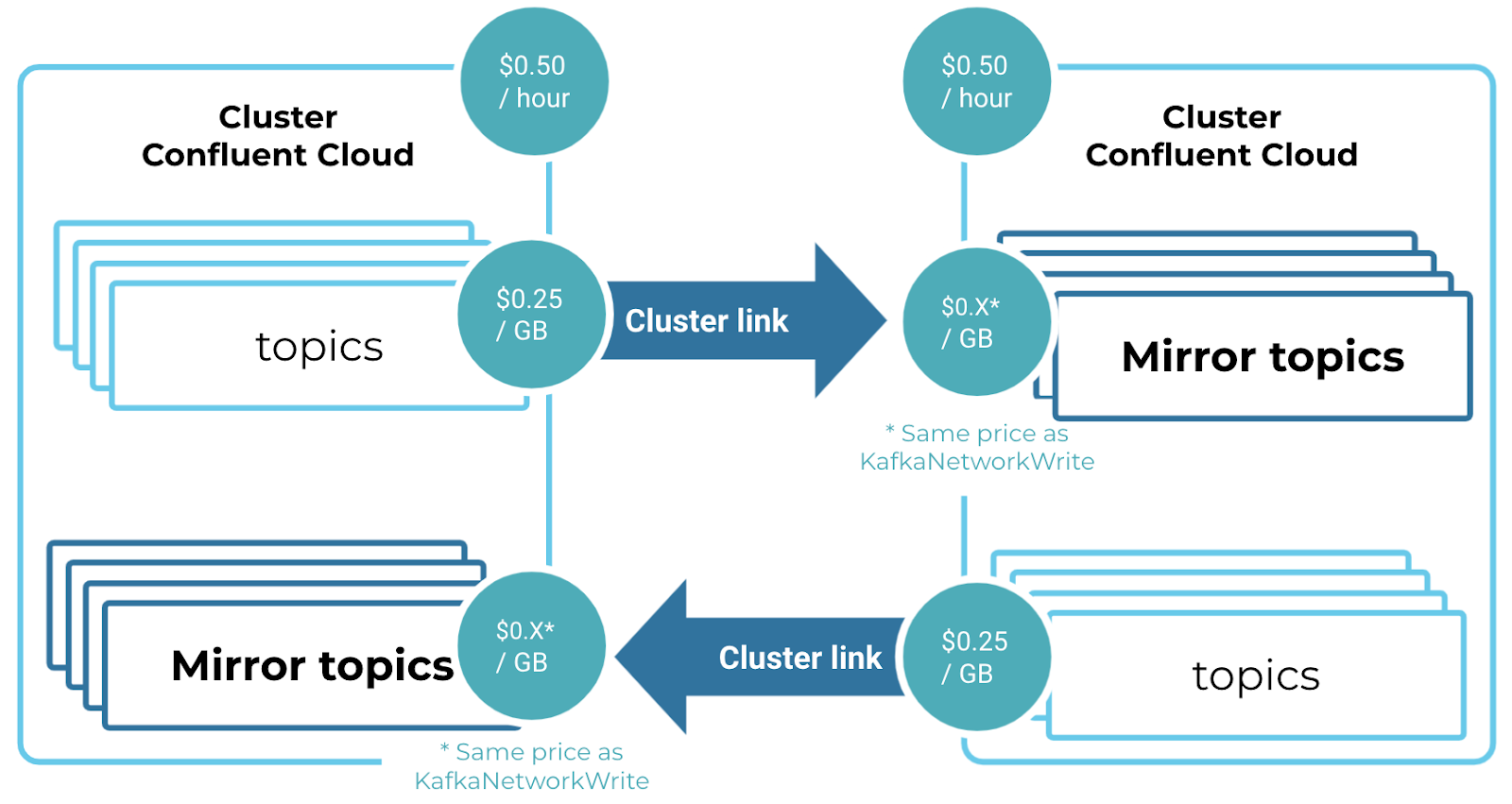
In this example, you have two clusters with two cluster links between them: one in each direction.
Each cluster is charged $0.50 per hour (2 x $0.25).
Each cluster is charged $0.25 per GB that it sends over a cluster link.
The left cluster is charged $0.04 per GB for data it receives on a cluster link, because that is its KafkaNetworkWrite price.
The right cluster is charged $0.01 per GB for data it receives on a cluster link, because that is its KafkaNetworkWrite price.
Hybrid cloud or migration with one link writing to a Confluent Cloud cluster
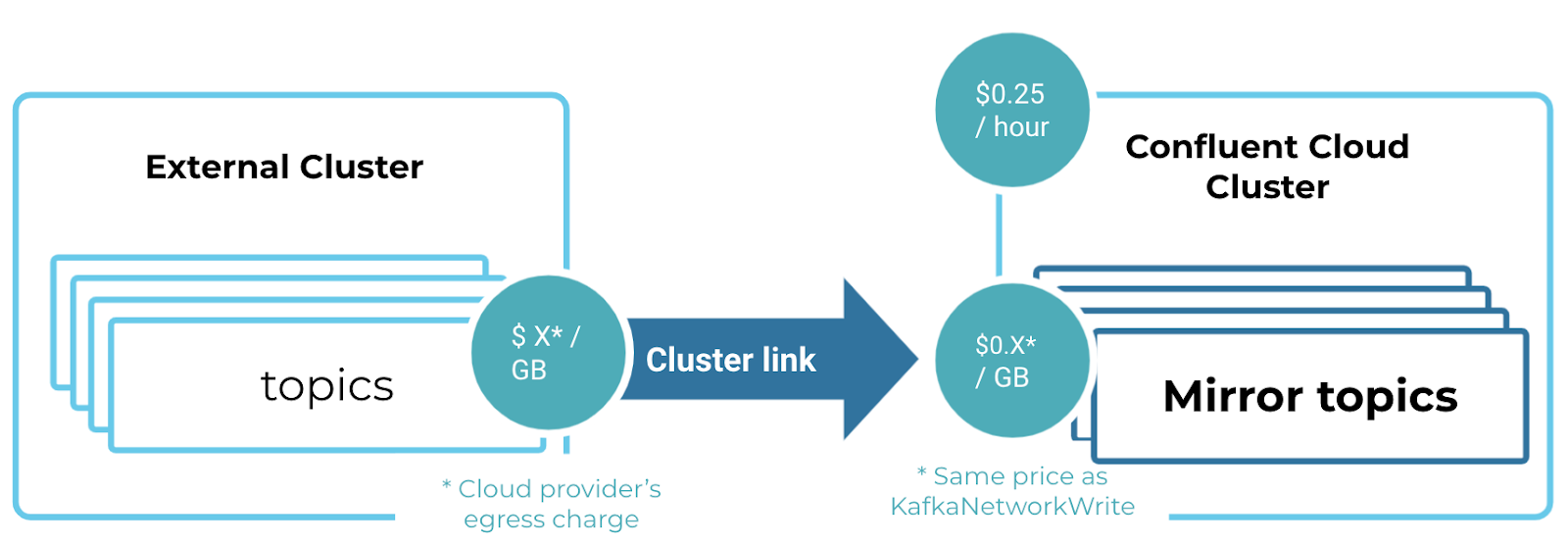
In this example, you have an external source cluster, which is not a Confluent Cloud cluster, with one cluster link sending data to a Confluent Cloud cluster.
The Confluent Cloud cluster is charged $0.25 per hour and $0.01 per GB, because that is its KafkaNetworkWrite price.
The external cluster does not accrue Confluent Cloud charges. If the external cluster is hosted in a public cloud provider, it might be charged an egress fee to send data to Confluent Cloud.
Managed connectors and custom connectors
Review the following billing information for managed connectors and custom connectors. For both managed and custom connectors, throughput billing is based on decompressed data. This is the metric reported by the connector. In Cloud Console, you can see decompressed data metrics on the tile in Connectors. The Kafka cluster reports compressed data. In Cloud Console, you can see this (lower) metric on the cluster tile in Environments.
Note
Custom connectors get billed similarly to managed Connect. However, Confluent allocates 2 GB of memory for a custom connector. This memory allocation cannot be changed.
Managed Connect cluster
If you use a dedicated Kafka cluster, connectors on
Confluent Cloud run on your own dedicated Connect cluster. Confluent Cloud provisions the
dedicated Connect cluster when you launch your first connector. If you use a
Basic or Standard Kafka cluster, your connector runs in
multitenant Kafka Connect clusters. For the connectors running on a
multitenant Connect cluster, there is no Connect capacity
(ConnectCapacity) charge.
If you pause a managed connector, tasks are paused, which means message processing is also paused until the connector is restarted. However, the connector is still active and hourly base costs for tasks assigned to the connector continue to accrue. To stop your Connect connectors from accruing billed usage, you can delete them in the Confluent Cloud Console, or use the Confluent CLI.
The dedicated cluster and fully managed connectors are billed based on the following dimensions. For Custom Connector billing details, see Custom connector cluster.
Dimension |
Unit of measure |
|---|---|
Dedicated cluster |
Cost per hour |
Task base price |
Cost per task per hour |
Throughput |
Cost per GB written or read per hour |
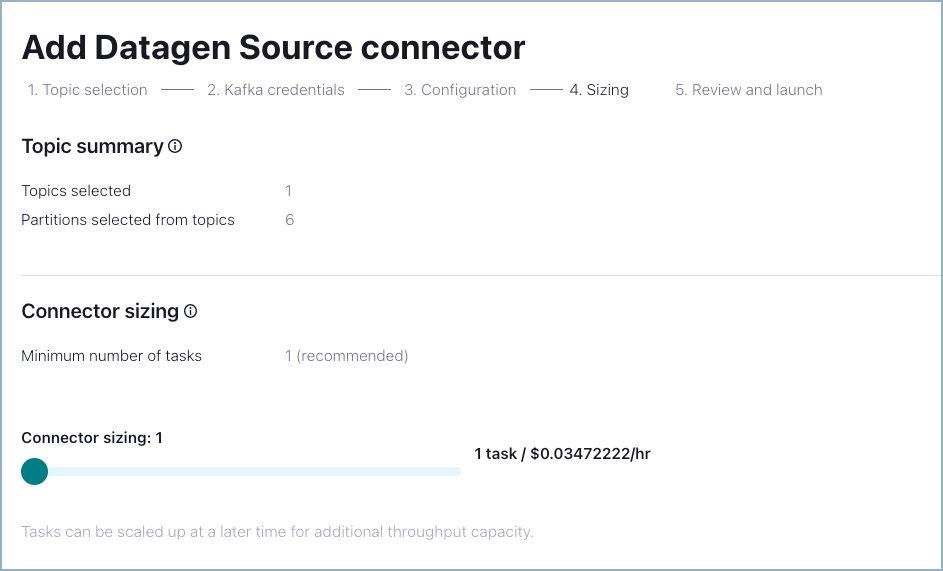
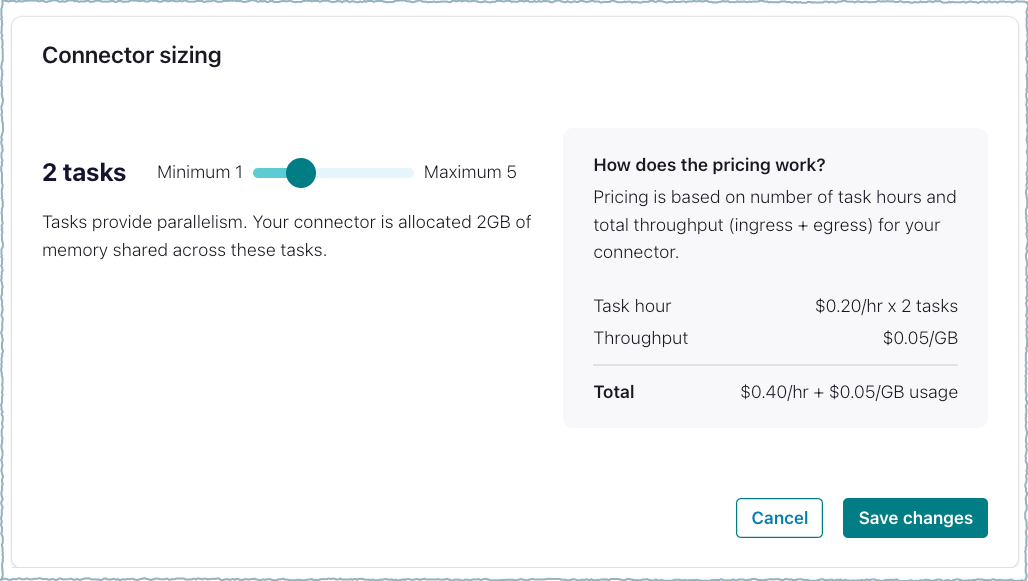
Fully managed connector pricing is displayed in the Add Connector screen:
Dedicated connect cluster hourly pricing is shown on the Review and launch screen the first time you launch a connector.
Dedicated cluster billing is shown as a line item on the Billing and payment > Billing screen.
Self-managed connectors have no billing mechanism themselves. However, note that using self-managed connectors might incur ingress, egress, and storage charges for your Kafka clusters running in Confluent Cloud.
Custom connector cluster
Custom connectors are supported on Basic, Standard, and Dedicated clusters. Your custom cluster is billed based on the following dimensions:
Dimension |
Unit of measure |
|---|---|
Task base price |
Cost per task per hour |
Throughput |
Cost per GB written or read per hour |
Note
Customers are responsible for all charges related to using the app log topic with a custom connector.
Customers incur some throughput charges while using APIs, CLIs, and the UI to access logs data stored in the apps log topic.
The throughput limit is 750 Mbps.
ksqlDB
Fully managed ksqlDB is billed based on the following dimension:
Dimension |
Unit of measure |
|---|---|
CSU |
Cost per Confluent Streaming Unit per hour |
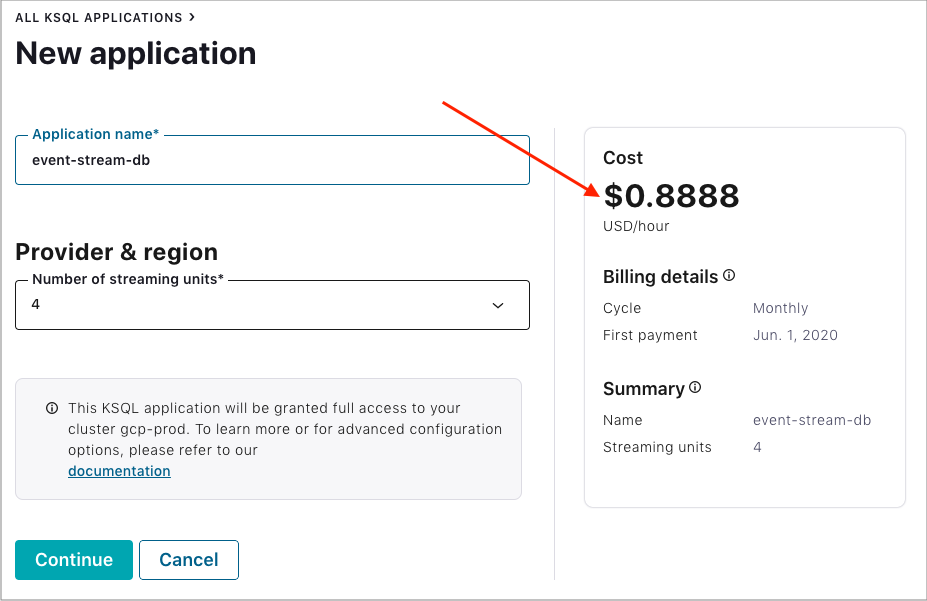
In addition to the per-CSU charge, ksqlDB applications might influence Kafka ingress, egress, and storage.
Fully managed ksqlDB pricing is displayed in the Add an Application screen:
To stop your ksqlDB application from accruing billing, you can delete your application in the Confluent Cloud Console, or use the Confluent CLI to delete your application.
Connector events and audit log
Dimension |
Unit of measure |
|---|---|
CSU |
Cost per GB of data read from audit log topics |
Connector events and audit logging operate from the Audit Log cluster. Consumption charges for both connector events and audit logging are combined on your bill.
Flink SQL
Cloud native Confluent Cloud for Apache Flink® is billed based on the following dimension:
Dimension |
Unit of measure |
|---|---|
CFU |
Cost per CFU per minute |
With the serverless architecture of Confluent Cloud for Flink SQL, you’re charged only for the minutes when your queries are running.
For more information, see CFU billing.
Tableflow
Tableflow is billed by topic-hour and gigabytes (GB) processed.
Billing is enabled at a per-topic level, which includes Apache Iceberg™ and Delta Lake table formats. If you enable a topic for both formats, you’re only charged once for the overall topic, not per format.
For more information, see Billing with Tableflow in Confluent Cloud.