

Update Kafka clusters
You can update a cluster using the Confluent Cloud Console, Confluent CLI, and REST API.
Considerations:
You can update cluster names for all cluster types.
Avoid duplicate cluster names.
For Confluent Cloud for Apache Flink®, renaming a cluster is a database name change that can have unintended consequences in your Flink usage, if you have an associated compute pool in the same region.
For Basic clusters, you can upgrade cluster type to Standard (cluster types cannot be downgraded). This upgrade must be made on its own, with no other requests, and comes with zero downtime.
For Standard and Enterprise clusters, you can upgrade the uptime SLA (SLA downgrades are not supported).
For Dedicated clusters, you can update the number of CKUs. For more information, see Resize a Dedicated Kafka Cluster.
Shrink operations can reduce the capacity of the cluster to the minimum number of CKU supported by the cluster.
When you lower the maximum eCKU for an elastic cluster type, you lower the capacity of your cluster. Use this feature with caution. The maximum eCKU limits a cluster’s capacity, which can lead to throttling or workload impact when the reduced capacity limit is reached.
Cloud Console
Navigate to the clusters page for your environment and select a cluster, then follow the steps for the update you want to make.
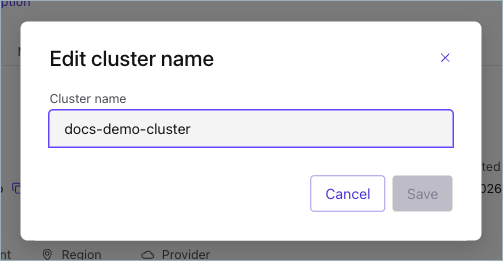
On the Details tab, click Edit next to the cluster name.
Enter the new name in the Cluster name box and click Save.
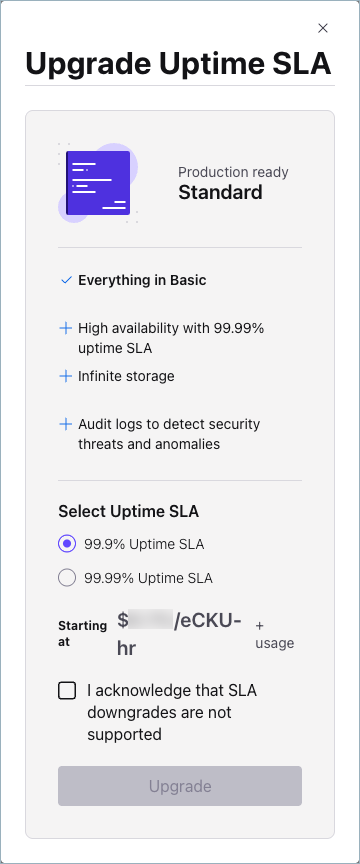
On the Settings tab, select Upgrade.
In Select Uptime SLA, select an uptime:
99.9% Uptime SLA
99.99% Uptime SLA
Acknowledge that SLA downgrades are not supported and select Upgrade.
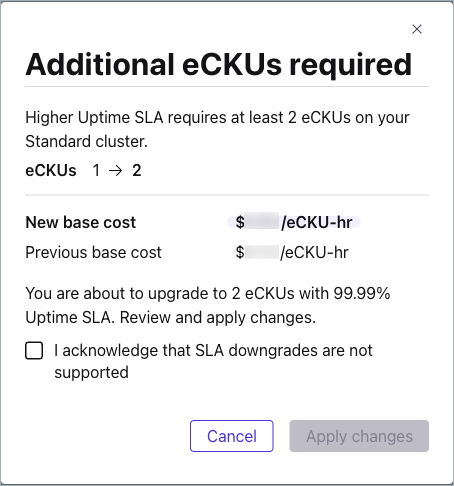
On the Settings tab, select Upgrade.
In Additional eCKUs required, review New base cost, acknowledge that SLA downgrades are not supported, and select Apply changes.
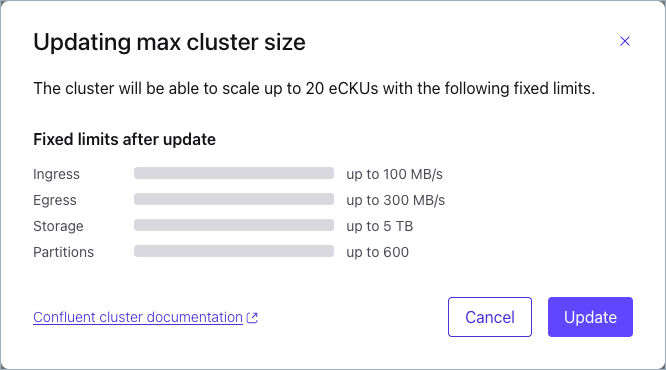
On the Settings tab, under Max cluster size for auto-scaling, enter the maximum capacity for your cluster in Number of eCKUs and select Update limit.
Depending on the current load on the cluster with the new capacity, take one of the following actions:
If the new maximum limit can accommodate the current load, select Update.
If the new maximum limit cannot accommodate the current load, select I understand to acknowledge that performance might suffer with the new limit.
Confluent CLI
To rename a cluster using the CLI, run the following command in your terminal:
confluent kafka cluster update <id> --name <name>
For example:
confluent kafka cluster update lkc-123exa --name "my-new-name"
Your output should resemble:
+----------------------+---------------------------------------------------------+
| Current              | true                                                    |
| ID                   | lkc-123exa                                              |
| Name                 | my-new-name                                             |
| Type                 | BASIC                                                   |
| Ingress Limit (MB/s) |                                                     250 |
| Egress Limit (MB/s)  |                                                     750 |
| Storage              | 5 TB                                                    |
| Cloud                | aws                                                     |
| Region               | us-west-2                                               |
| Availability         | single-zone                                             |
| Status               | UP                                                      |
| Endpoint             | SASL_SSL://pkc-exa45.us-west-2.aws.confluent.cloud:9092 |
| REST Endpoint        | https://pkc-exa45.us-west-2.aws.confluent.cloud:443     |
+----------------------+---------------------------------------------------------+
Confluent Cloud APIs
To update the cluster, make a PATCH call to the cluster endpoint.
You specify the environment and cluster identifiers in the request, and include a payload that contains details of the change.
Request
This request structure applies to all cluster types.
PATCH /cmk/v2/clusters/{id}
Parameter |
Required or Optional |
Description |
|---|---|---|
|
Required |
Path parameter specifying the identifier for the cluster to update. |
The JSON payload must contain a spec object with the following:
environmentobject with anidproperty that identifies the environment
And one or more of the following:
display_nameproperty with a new cluster name valueconfigobject that contains akindproperty specifying the desired cluster type: Standard or Dedicatedconfigobject that contains ackuproperty with an integer value, for Dedicated clusters onlyconfigobject that contains amax_eckuproperty with an integer value, for elastic cluster types only
Request examples by operation
Example request for a name change
PATCH /cmk/v2/clusters/abc-f3a90de HTTP/1.1
Host: api.confluent.cloud

{
   "spec": {
         "display_name": "updated_name",
         "environment": {
               "id": "env-a12b34"
         }
   }
}
Example request to upgrade Basic to Standard
PATCH /cmk/v2/clusters/abc-f3a90de HTTP/1.1
Host: api.confluent.cloud

{
   "spec": {
         "config": {
               "kind": "Standard"
         },
         "environment": {
               "id": "env-a12b34"
         }
   }
}
Example request to change the number of CKUs for Dedicated clusters
PATCH /cmk/v2/clusters/abc-f3a90de HTTP/1.1
Host: api.confluent.cloud

{
   "spec": {
         "config": {
               "kind": "Dedicated",
               "cku": 3
         },
         "environment": {
               "id": "env-a12b34"
         }
   }
}
Example request to change the maximum eCKU for elastic cluster types
PATCH /cmk/v2/clusters/abc-f3a90de HTTP/1.1
Host: api.confluent.cloud

{
   "spec": {
         "config": {
               "kind": "Basic",
               "max_ecku": 40
         },
         "environment": {
               "id": "env-a12b34"
         }
   }
}
Response
Success returns a 200 OK and a JSON payload that describes the updated
cluster.
Responses include the following information:
The cloud provider (
AWS,GCP,AZURE) and region for the cluster.The cluster status (
PROVISIONED,PROVISIONING,FAILED) andkind, one of Basic, Standard, Enterprise, Dedicated, and Freight.Information about the environment that contains the cluster.
For Dedicated clusters, the number of CKUs allocated to the cluster.
Response examples by operation
Example response for a name change
HTTP/1.1 200 OK
Content-Type: application/json

{
   "api_version":"cmk/v2",
   "kind":"Cluster",
   "id":"abc-f3a90de",
   "metadata":{
      "self":"https://api.confluent.cloud/v2/kafka-clusters/abc-f3a90de",
      "resource_name":"crn://confluent.cloud/kafka=abc-f3a90de",
      "created_at": "2022-04-22T20:45:26.657894Z",
      "updated_at": "2022-04-22T21:13:55.742641944Z"
   },
   "spec":{
      "display_name":"updated_name",
      "availability":"SINGLE_ZONE",
      "cloud":"GCP",
      "region":"us-east4",
      "config":{
         "kind":"Basic"
      },
      "kafka_bootstrap_endpoint":"abc-00000-00000.us-east4.gcp.glb.confluent.cloud:9092",
      "http_endpoint":"https://abc-00000-00000.us-east4.gcp.glb.confluent.cloud",
      "environment":{
         "id":"env-a12b34",
         "related":"https://api.confluent.cloud/v2/environments/env-a12b34",
         "resource_name":"crn://confluent.cloud/organization=abcd41c4-edef-46ac-8a41-c49e44a3fd9a/environment=env-a12b34"
      }
   },
   "status":{
      "phase":"PROVISIONED"
   }
}
Example response to upgrade Basic to Standard
HTTP/1.1 200 OK
Content-Type: application/json

{
   "api_version":"cmk/v2",
   "kind":"Cluster",
   "id":"abc-f3a90de",
   "metadata":{
      "self":"https://api.confluent.cloud/v2/kafka-clusters/abc-f3a90de",
      "resource_name":"crn://confluent.cloud/kafka=abc-f3a90de",
      "created_at": "2022-04-22T20:45:26.657894Z",
      "updated_at": "2022-04-22T21:13:55.742641944Z"
   },
   "spec":{
      "display_name":"updated_name",
      "availability":"SINGLE_ZONE",
      "cloud":"GCP",
      "region":"us-east4",
      "config":{
         "kind":"Standard"
      },
      "kafka_bootstrap_endpoint":"abc-00000-00000.us-east4.gcp.glb.confluent.cloud:9092",
      "http_endpoint":"https://abc-00000-00000.us-east4.gcp.glb.confluent.cloud",
      "environment":{
         "id":"env-a12b34",
         "related":"https://api.confluent.cloud/v2/environments/env-a12b34",
         "resource_name":"crn://confluent.cloud/organization=abcd41c4-edef-46ac-8a41-c49e44a3fd9a/environment=env-a12b34"
      }
   },
   "status":{
      "phase":"PROVISIONED"
   }
}
Example response to change the number of CKUs for Dedicated clusters
HTTP/1.1 200 OK
Content-Type: application/json

{
   "api_version":"cmk/v2",
   "kind":"Cluster",
   "id":"abc-f3a90de",
   "metadata":{
      "self":"https://api.confluent.cloud/v2/kafka-clusters/abc-f3a90de",
      "resource_name":"crn://confluent.cloud/kafka=abc-f3a90de",
      "created_at": "2022-04-22T20:45:26.657894Z",
      "updated_at": "2022-04-22T21:13:55.742641944Z"
   },
   "spec":{
      "display_name":"updated_name",
      "availability":"SINGLE_ZONE",
      "cloud":"GCP",
      "region":"us-east4",
      "config":{
         "kind":"Dedicated",
         "cku": 3
      },
      "kafka_bootstrap_endpoint":"abc-00000-00000.us-east4.gcp.glb.confluent.cloud:9092",
      "http_endpoint":"https://abc-00000-00000.us-east4.gcp.glb.confluent.cloud",
      "environment":{
         "id":"env-a12b34",
         "related":"https://api.confluent.cloud/v2/environments/env-a12b34",
         "resource_name":"crn://confluent.cloud/organization=abcd41c4-edef-46ac-8a41-c49e44a3fd9a/environment=env-a12b34"
      }
   },
   "status":{
      "phase":"PROVISIONED",
      "cku": 3
   }
}
Example response to change the maximum eCKU for elastic cluster types
HTTP/1.1 200 OK
Content-Type: application/json

{
   "api_version": "cmk/v2",
   "id": "lkc-abc123",
   "kind": "Cluster",
   "metadata": {
      "created_at": "2025-09-12T06:00:33.781667Z",
      "resource_name": "crn://confluent.cloud/organization=abcd41c4-edef-46ac-8a41-c49e44a3fd9a/environment=env-a12b34/cloud-cluster=lkc-abc123/kafka=lkc-abc123",
      "self": "https://api.confluent.cloud/cmk/v2/clusters/lkc-abc123",
      "updated_at": "2025-09-12T06:13:30.043624Z"
   },
   "spec": {
      "api_endpoint": "",
      "availability": "LOW",
      "cloud": "AWS",
      "config": {
         "kind": "Basic",
         "max_ecku": 40
      },
      "display_name": "test_cluster",
      "environment": {
         "id": "env-a12b34",
         "related": "https://api.confluent.cloud/org/v2/environments/env-a12b34",
         "resource_name": "crn://confluent.cloud/organization=abcd41c4-edef-46ac-8a41-c49e44a3fd9a/environment=env-a12b34"
      },
      "http_endpoint": "https://pkc-kod82.us-west-2.aws.confluent.cloud:443",
      "kafka_bootstrap_endpoint": "SASL_SSL://pkc-kod82.us-west-2.aws.confluent.cloud:9092",
      "region": "us-west-2"
   },
   "status": {
      "phase": "PROVISIONED"
   }
}
Terraform
Update a cluster’s configuration by using the Confluent Terraform provider. For more information, see confluent_kafka_cluster_config Resource.