

Migrate between Kafka Clusters using Confluent Cloud Gateway
The client switchover feature of Confluent Cloud Gateway (Confluent Gateway) enables migrations from a source Kafka cluster to a destination Kafka cluster without requiring client-side changes. Confluent Gateway handles the routing and authentication mapping transparently, allowing producers and consumers to continue operating without any changes to their configurations.
You can use client switchover to enable disaster recovery, for example by switching from an unhealthy self-managed cluster to Confluent Cloud.
Client switchover architecture
To switch over clients, change the switchover route to point to the destination Kafka cluster by updating the Streaming Domain and corresponding bootstrap server ID in the switchover route.
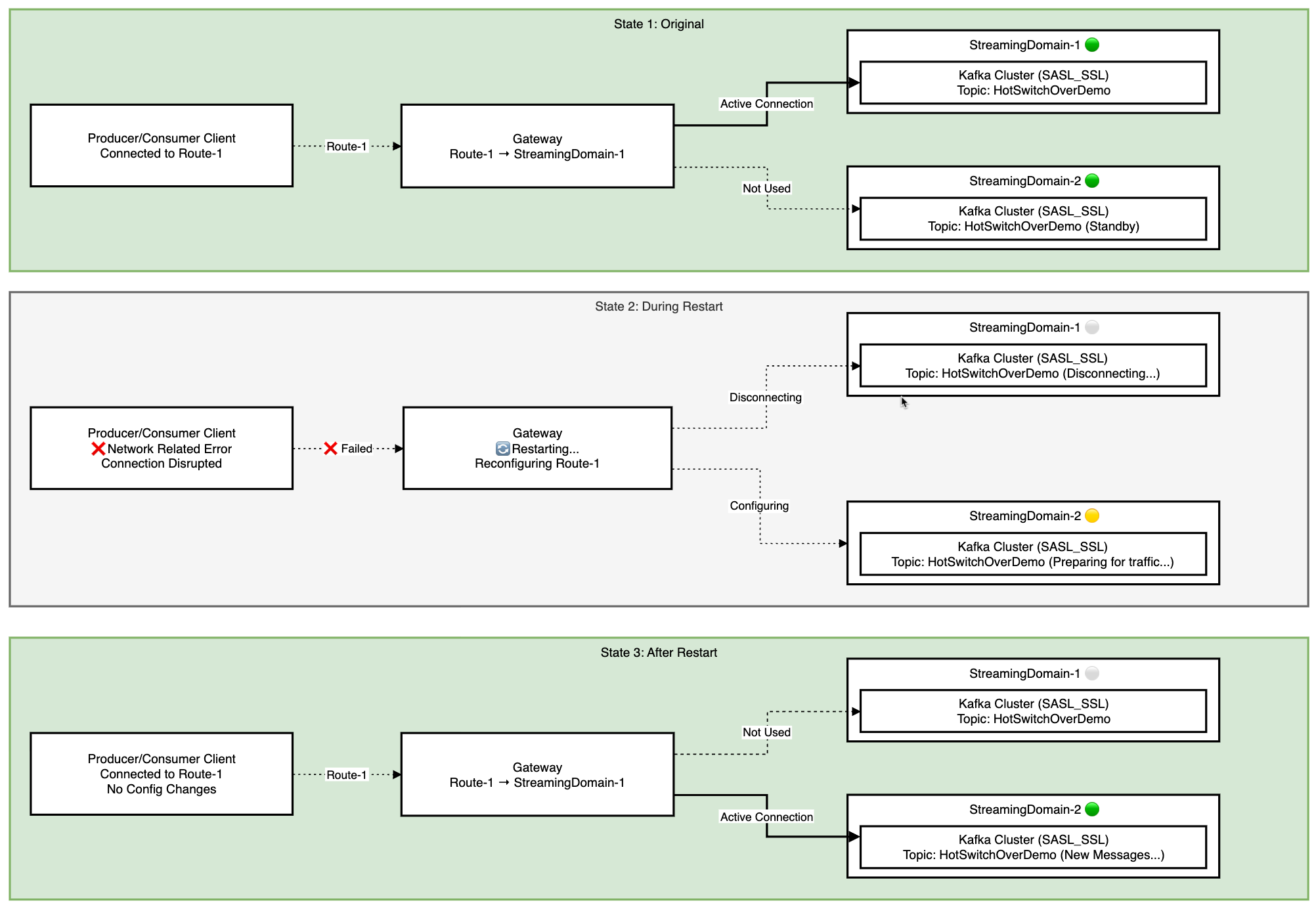
For a sample configuration, see the Switchover Example in the Gateway image GitHub repository.
Review the requirements and potential implications of client switchover before performing the migration.
Prerequisites
Data replication must be set up outside of Confluent Gateway based on your requirements using tools like Cluster Linking.
The destination Kafka cluster must already have the topics that clients produce to and consume from. Confluent Gateway doesn’t create topics on the destination cluster during switchover, and clients receive an
UNKNOWN_TOPIC_OR_PARTITIONerror if a topic doesn’t exist.If ordering guarantee and data consistency are required, for example, for Kafka Streams applications, do not use client switchover because it involves more than one Kafka cluster.
Considerations
Client switchover requires restart of the Confluent Gateway service, which impacts:
Consumer: When the Confluent Gateway restarts after a client switchover, it triggers consumer group rebalancing as connections are severed, especially if restart exceeds
session.timeout.ms, with default of45seconds. During rebalancing, consumers might reprocess messages if offsets weren’t committed before the restart. Applications should handle duplicate message processing or enable auto-commit with appropriate intervals:Use
isolation.level=read_committedto avoid reading aborted transactions.Tune server properties (if required):
group.coordinator.rebalance.protocols: Set toeager,cooperative, orconsumer.group.coordinator.session.timeout.ms
Producer: The primary risk during Confluent Gateway restart after a client switchover is message duplication when the broker acknowledges a message but the Confluent Gateway fails before relaying the acknowledgment to the producer. This causes producer retries, resulting in duplicate messages.
Use the
enable.idempotence=trueKafka configuration to prevent duplicates, or ensure your application can handle them.Switching to a different physical cluster can also cause a transient
OUT_OF_ORDER_SEQUENCE_NUMBERerror, because the destination brokers haven’t seen the producer’s ID before. The producer recovers automatically by re-registering with the new brokers.Transactions: Exactly Once Semantics (EOS) holds in client switchover. In-flight transactions commit if the outage is shorter than
transaction.timeout.ms, and otherwise abort. On switchover, any open transaction on the source aborts and cannot be committed on the target. The producer application must reset the transaction state on failure and start a new transaction.Authentication: Clients that use SASL/OAUTHBEARER identity passthrough send a logical cluster (
lkc) extension to identify the target cluster. After a switchover, the active cluster changes. If a client-supplied logical cluster value is not updated, authentication fails. ConfigurepassthroughConfigso that Confluent Gateway sets this extension on the client’s behalf. For more information, see Configure identity passthrough mode and Passthrough clients fail authentication after a failover.
Perform client switchover
To perform client switchover:
Have your Confluent Gateway configured with two Streaming Domains: one for your self-managed source cluster, and one for your Confluent Cloud destination cluster.
For example:
streamingDomains:
  - name: onprem-domain
    type: kafka
    kafkaCluster:
      name: onprem-cluster
      bootstrapServers:
        - id: internal-plaintext-listener
          endpoint: "kafka-1:44444"
  - name: ccloud-domain
    type: kafka
    kafkaCluster:
      name: ccloud-cluster
      bootstrapServers:
        - id: sasl-ssl-listener
          endpoint: "pkc-abc123.us-east-1.aws.confluent.cloud:9092"
          ssl: {}  # see Configure Security for authentication options
Reconfigure the Route to point to the destination Kafka cluster by updating the Streaming Domain and corresponding bootstrap server ID in the Route.
For example, the following configuration points the
switchover-routeto theonprem-domainstreaming domain, and the clients send and receive messages from the source Kafka cluster,onprem-cluster.Note
When using the
hostbroker identification strategy, Confluent Gateway requires asecurity.sslkeystore to terminate TLS and read the client’s SNI header. If omitted, Confluent Gateway fails to start withGatewayConfigParseException: SSL keystore must be defined for host identification strategy. For more information, see SSL configuration.streamingDomains: - name: onprem-domain type: kafka kafkaCluster: name: onprem-cluster bootstrapServers: - id: internal-plaintext-listener endpoint: "kafka-1:44444" - name: ccloud-domain type: kafka kafkaCluster: name: ccloud-cluster bootstrapServers: - id: sasl-ssl-listener endpoint: "pkc-abc123.us-east-1.aws.confluent.cloud:9092" ssl: {} routes: - name: switchover-route endpoint: "host.docker.internal:19092" brokerIdentificationStrategy: type: host pattern: "broker-$(nodeId).switchover.example.com:19092" streamingDomain: name: onprem-domain bootstrapServerId: internal-plaintext-listener security: ssl: truststore: type: PKCS12 location: /opt/ssl/client-truststore.p12 password: file: /opt/secrets/client-truststore.password keystore: type: PKCS12 location: /opt/ssl/gw-keystore.p12 password: file: /opt/secrets/gw-keystore.password
When you update the
switchover-routeto point to theccloud-domainstreaming domain, the clients start sending and receiving new messages from the destination Kafka cluster in Confluent Cloud,ccloud-cluster.streamingDomains: - name: onprem-domain type: kafka kafkaCluster: name: onprem-cluster bootstrapServers: - id: internal-plaintext-listener endpoint: "kafka-1:44444" - name: ccloud-domain type: kafka kafkaCluster: name: ccloud-cluster bootstrapServers: - id: sasl-ssl-listener endpoint: "pkc-abc123.us-east-1.aws.confluent.cloud:9092" ssl: {} routes: - name: switchover-route endpoint: "host.docker.internal:19092" brokerIdentificationStrategy: type: host pattern: "broker-$(nodeId).switchover.example.com:19092" streamingDomain: name: ccloud-domain bootstrapServerId: sasl-ssl-listener security: ssl: truststore: type: PKCS12 location: /opt/ssl/client-truststore.p12 password: file: /opt/secrets/client-truststore.password keystore: type: PKCS12 location: /opt/ssl/gw-keystore.p12 password: file: /opt/secrets/gw-keystore.password
Stop and restart the Confluent Gateway container.
When the Confluent Gateway container is restarted, the clients continue sending and receiving new messages from the destination Kafka cluster in Confluent Cloud.
No changes are required on the producer or consumer side.