

List and view Kafka clusters
You can list all clusters in an environment or view details for a specific cluster, such as its type, capacity, and networking endpoints.
List clusters
You can list clusters using the Confluent Cloud Console, Confluent CLI, or REST API.
Cloud Console
In the navigation menu, select Environments.
Select an environment. Your recently created clusters are shown as cards on the environment’s Overview page.
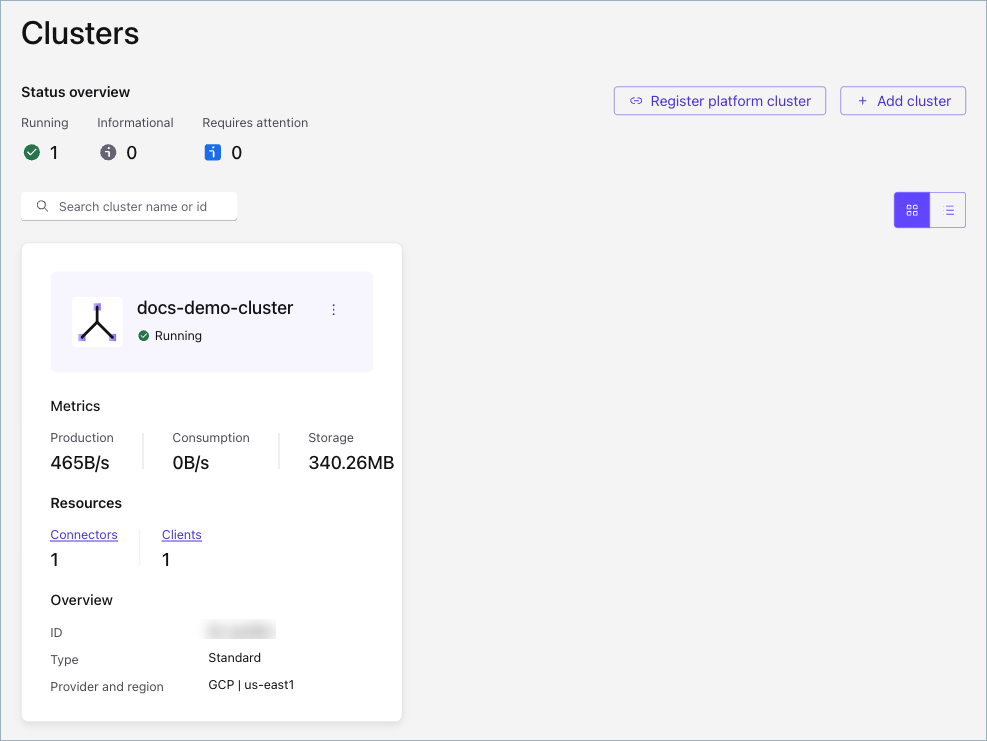
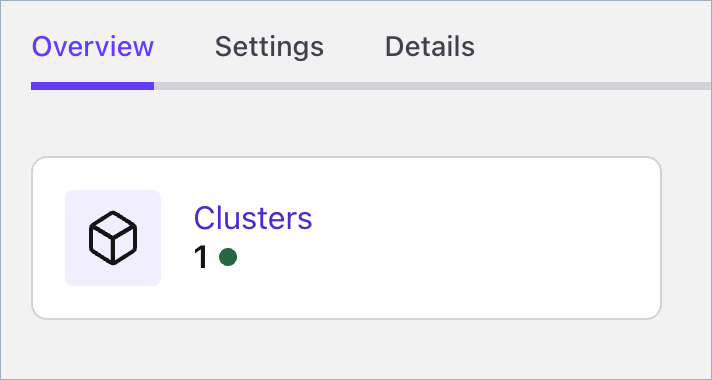
To view all your clusters, select View all clusters or click the Clusters box.
Confluent CLI
To list clusters using the CLI, run the following command in your terminal:
confluent kafka cluster list [flags]
For example:
confluent kafka cluster list

 Current |     ID     |    Name   |   Type   | Cloud |   Region  | Availability | Status
---------+------------+-----------+----------+-------+-----------+--------------+--------
         | lkc-123exc | cluster_1 | BASIC    | gcp   | us-west4  | single-zone  | UP
         | lkc-123exb | cluster_0 | STANDARD | gcp   | us-west4  | single-zone  | UP
         | lkc-123exa | cluster_2 | BASIC    | aws   | us-west-2 | single-zone  | UP
Confluent Cloud APIs
To list clusters, make a GET request that specifies the
environment.
Request
GET /cmk/v2/clusters?environment={environment_id}
Your request can include the following parameters:
Parameter |
Required or Optional |
Description |
|---|---|---|
|
Required |
Specifies the identifier for the environment that contains the clusters to list. |
|
Optional |
Specifies an integer page size for the returned payload. Max value is 100. Default: 10. |
|
Optional |
A network identifier for the clusters to list. Your query can contain multiple network identifiers. |
|
Optional |
Contains the opaque pagination token string. |
Response
Successful calls return HTTP 200 OK and a JSON payload that
contains the list of clusters for the environment.
Responses include the following information:
The cloud provider (
AWS,GCP,AZURE) and region for the cluster.The cluster status (
PROVISIONED,PROVISIONING,FAILED) andkind(Basic, Standard, Enterprise, Dedicated, and Freight).Information about the environment that contains the cluster.
For Dedicated clusters, the number of CKUs allocated to the cluster.
Response examples by cluster type
Example response for Basic and Standard clusters
HTTP/1.1 200 OK
Content-Type: application/json

{
   "api_version": "cmk/v2",
   "data": [
      {
      "api_version": "cmk/v2",
      "kind": "Cluster",
      "id": "abc-f3a90de",
      "metadata": {
         "self": "https://api.confluent.cloud/v2/kafka-clusters/abc-f3a90de",
         "resource_name": "crn://confluent.cloud/kafka=abc-f3a90de",
         "created_at": "2022-04-22T20:45:26.657894Z",
         "updated_at": "2022-04-22T21:13:55.742641944Z"
      },
      "spec": {
         "display_name": "ProdKafkaCluster",
         "availability": "Low",
         "cloud": "GCP",
         "region": "us-east4",
         "config": {
               "kind": "Basic"
         },
         "kafka_bootstrap_endpoint": "abc-00000-00000.us-east4.gcp.glb.confluent.cloud:9092",
         "http_endpoint": "https://abc-00000-00000.us-east4.gcp.glb.confluent.cloud",
         "environment": {
            "id": "env-a12b34",
            "related": "https://api.confluent.cloud/v2/environments/env-a12b34",
            "resource_name": "crn://confluent.cloud/organization=1234abcd-edef-46ac-8a41-c49e44a3fd9a/environment=env-a12b34",
            "api_version": "org/v2",
            "kind": "Environment"
         }
      },
      "status": {
         "phase": "PROVISIONED"
      }
   }
   ],
   "kind": "ClusterList",
   "metadata": {
   "first": "https://api.confluent.cloud/cmk/v2/clusters",
   "total_size": 1
   }
}
Example response for Enterprise clusters in a private network
HTTP/1.1 200 OK
Content-Type: application/json

{
   "api_version": "cmk/v2",
   "data": [
      {
      "api_version": "cmk/v2",
      "kind": "Cluster",
      "id": "abc-f3a90de",
      "metadata": {
         "self": "https://api.confluent.cloud/v2/kafka-clusters/abc-f3a90de",
         "resource_name": "crn://confluent.cloud/kafka=abc-f3a90de",
         "created_at": "2022-04-22T20:45:26.657894Z",
         "updated_at": "2022-04-22T21:13:55.742641944Z"
      },
      "spec": {
         "display_name": "ProdKafkaCluster",
         "availability": "High",
         "cloud": "AWS",
         "region": "us-east-1",
         "config": {
            "kind": "Enterprise"
            },
         "kafka_bootstrap_endpoint": "abc-00000-00000.us-east4.gcp.glb.confluent.cloud:9092",
         "http_endpoint": "https://abc-00000-00000.us-east4.gcp.glb.confluent.cloud",
         "environment": {
            "id": "env-a12b34",
            "related": "https://api.confluent.cloud/v2/environments/env-a12b34",
            "resource_name": "crn://confluent.cloud/organization=1234abcd-edef-46ac-8a41-c49e44a3fd9a/environment=env-a12b34",
            "api_version": "org/v2",
            "kind": "Environment"
            },
         "network": {
            "id": "n-00000",
            "environment": "env-a12b34",
            "related": "https://api.confluent.cloud/networking/v1/networks/n-00000",
            "resource_name": "crn://confluent.cloud/organization=1234abcd-edef-46ac-8a41-c49e44a3fd9a/network=n-00000",
            "api_version": "networking/v1",
            "kind": "Network"
            }
      },
      "status": {
         "phase": "PROVISIONED"
      }
   }
   ],
   "kind": "ClusterList",
   "metadata": {
   "first": "https://api.confluent.cloud/cmk/v2/clusters",
   "total_size": 1
   }
}
Example responses for Dedicated clusters
On a secure public endpoint:
HTTP/1.1 200 OK
Content-Type: application/json

{
   "api_version": "cmk/v2",
   "data": [
      {
      "api_version": "cmk/v2",
      "kind": "Cluster",
      "id": "abc-f3a90de",
      "metadata": {
         "self": "https://api.confluent.cloud/v2/kafka-clusters/abc-f3a90de",
         "resource_name": "crn://confluent.cloud/kafka=abc-f3a90de",
         "created_at": "2022-04-22T20:45:26.657894Z",
         "updated_at": "2022-04-22T21:13:55.742641944Z"
      },
      "spec": {
         "display_name": "ProdKafkaCluster",
         "availability": "SINGLE_ZONE",
         "cloud": "GCP",
         "region": "us-east4",
         "config": {
               "kind": "Dedicated",
               "cku": 2
         },
         "kafka_bootstrap_endpoint": "abc-00000-00000.us-east4.gcp.glb.confluent.cloud:9092",
         "http_endpoint": "https://abc-00000-00000.us-east4.gcp.glb.confluent.cloud",
         "environment": {
            "id": "env-a12b34",
            "related": "https://api.confluent.cloud/v2/environments/env-a12b34",
            "resource_name": "crn://confluent.cloud/organization=1234abcd-edef-46ac-8a41-c49e44a3fd9a/environment=env-a12b34",
            "api_version": "org/v2",
            "kind": "Environment"
         }
      },
      "status": {
         "phase": "PROVISIONED",
         "cku": 2
      }
   }
   ],
   "kind": "ClusterList",
   "metadata": {
   "first": "https://api.confluent.cloud/cmk/v2/clusters",
   "total_size": 1
   }
}
In a private network:
HTTP/1.1 200 OK
Content-Type: application/json

{
   "api_version": "cmk/v2",
   "data": [
      {
      "api_version": "cmk/v2",
      "kind": "Cluster",
      "id": "abc-f3a90de",
      "metadata": {
         "self": "https://api.confluent.cloud/v2/kafka-clusters/abc-f3a90de",
         "resource_name": "crn://confluent.cloud/kafka=abc-f3a90de",
         "created_at": "2022-04-22T20:45:26.657894Z",
         "updated_at": "2022-04-22T21:13:55.742641944Z"
      },
      "spec": {
         "display_name": "ProdKafkaCluster",
         "availability": "SINGLE_ZONE",
         "cloud": "GCP",
         "region": "us-east4",
         "config": {
            "kind": "Dedicated",
            "cku": 2
            },
         "kafka_bootstrap_endpoint": "abc-00000-00000.us-east4.gcp.glb.confluent.cloud:9092",
         "http_endpoint": "https://abc-00000-00000.us-east4.gcp.glb.confluent.cloud",
         "environment": {
            "id": "env-a12b34",
            "related": "https://api.confluent.cloud/v2/environments/env-a12b34",
            "resource_name": "crn://confluent.cloud/organization=1234abcd-edef-46ac-8a41-c49e44a3fd9a/environment=env-a12b34",
            "api_version": "org/v2",
            "kind": "Environment"
            },
         "network": {
            "id": "n-00000",
            "environment": "env-a12b34",
            "related": "https://api.confluent.cloud/networking/v1/networks/n-00000",
            "resource_name": "crn://confluent.cloud/organization=1234abcd-edef-46ac-8a41-c49e44a3fd9a/network=n-00000",
            "api_version": "networking/v1",
            "kind": "Network"
            }
      },
      "status": {
         "phase": "PROVISIONED",
         "cku": 2
      }
   }
   ],
   "kind": "ClusterList",
   "metadata": {
   "first": "https://api.confluent.cloud/cmk/v2/clusters",
   "total_size": 1
   }
}
View cluster details
You can view details for a single cluster using the Confluent Cloud Console, Confluent CLI, or REST API.
For Enterprise clusters with both Private Network Interface and PrivateLink configured, you must initially assign a default endpoint. For more information, see Set the endpoint to be used by the Confluent Cloud Console for AWS Enterprise clusters.
Cloud Console
Navigate to the clusters page for your environment and select a cluster.
Select the Details tab to get information about the cluster, including its type, uptime SLA, and region.
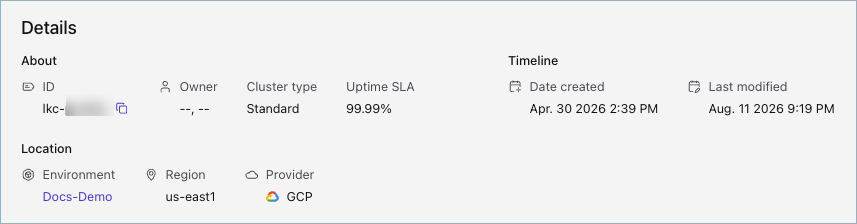
To get capacity details, select the Settings tab.
Confluent CLI
To view cluster details using the CLI, run the following command in your terminal:
confluent kafka cluster describe [id] [flags]
For example:
confluent kafka cluster describe lkc-123exa

+----------------------+---------------------------------------------------------+
| Current              | true                                                    |
| ID                   | lkc-123exa                                              |
| Name                 | my_new_cluster                                          |
| Type                 | BASIC                                                   |
| Ingress Limit (MB/s) |                                                     250 |
| Egress Limit (MB/s)  |                                                     750 |
| Storage              | 5 TB                                                    |
| Cloud                | aws                                                     |
| Region               | us-west-2                                               |
| Availability         | single-zone                                             |
| Status               | UP                                                      |
| Endpoint             | SASL_SSL://pkc-exa45.us-west-2.aws.confluent.cloud:9092 |
| REST Endpoint        | https://pkc-exa45.us-west-2.aws.confluent.cloud:443     |
+----------------------+---------------------------------------------------------+
Confluent Cloud APIs
To view a cluster, make a GET request that specifies the cluster
and environment.
Request
This request structure applies to all cluster types:
GET /cmk/v2/clusters/{id}?environment={environment_id}
Your request can include the following parameters:
Parameter |
Required or Optional |
Description |
|---|---|---|
|
Required |
Path parameter specifying the identifier for the cluster to read. |
|
Required |
Query parameter specifying the identifier for the environment that contains the cluster to read. |
Response
Successful calls return HTTP 200 OK and a JSON payload that
describes the cluster.
Responses include the following information:
The cloud provider (
AWS,GCP,AZURE) and region for the cluster.The cluster status (
PROVISIONED,PROVISIONING,FAILED) andkind(Basic, Standard, Enterprise, Dedicated, and Freight).Information about the environment that contains the cluster.
For Dedicated clusters, the number of CKUs allocated to the cluster.
Response examples by cluster type
Example response for Basic and Standard clusters
HTTP/1.1 200 OK
Content-Type: application/json

{
      "api_version":"cmk/v2",
      "kind":"Cluster",
      "id":"abc-f3a90de",
      "metadata":{
         "self":"https://api.confluent.cloud/v2/kafka-clusters/abc-f3a90de",
         "resource_name":"crn://confluent.cloud/kafka=abc-f3a90de",
         "created_at":"2022-04-22T20:45:26.657894Z",
         "updated_at":"2022-04-22T20:45:28.045579Z"
      },
      "spec":{
         "display_name":"ProdKafkaCluster",
         "availability":"Low",
         "cloud":"GCP",
         "region":"us-east4",
         "config":{
               "kind":"Standard"
         },
         "kafka_bootstrap_endpoint":"abc-00000-00000.us-east4.gcp.glb.confluent.cloud:9092",
         "http_endpoint":"https://abc-00000-00000.us-east4.gcp.glb.confluent.cloud",
         "environment":{
               "api_version": "org/v2",
               "id": "env-a12b34",
               "kind": "Environment",
               "related":"https://api.confluent.cloud/v2/environments/env-a12b34",
               "resource_name":"crn://confluent.cloud/organization=abcd41c4-edef-46ac-8a41-c49e44a3fd9a/environment=env-a12b34"
         }
      },
      "status":{
         "phase":"PROVISIONED"
      }
}
Example response for Enterprise clusters on a private network
HTTP/1.1 200 OK
Content-Type: application/json

{
      "api_version":"cmk/v2",
      "kind":"Cluster",
      "id":"abc-f3a90de",
      "metadata":{
         "self":"https://api.confluent.cloud/v2/kafka-clusters/abc-f3a90de",
         "resource_name":"crn://confluent.cloud/kafka=abc-f3a90de",
         "created_at":"2006-01-02T15:04:05-07:00",
         "updated_at":"2006-01-02T15:04:05-07:00"
      },
      "spec":{
         "display_name":"ProdKafkaCluster",
         "availability":"High",
         "cloud":"AWS",
         "region":"us-east-1",
         "config":{
               "kind":"Enterprise"
         },
            "kafka_bootstrap_endpoint": "abc-00000-00000.us-east-1.aws.glb.confluent.cloud:9092",
            "http_endpoint": "https://abc-00000-00000.us-east-1.aws.glb.confluent.cloud",
            "environment": {
            "api_version": "org/v2",
            "id": "env-a12b34",
            "kind": "Environment",
            "related": "https://api.confluent.cloud/v2/environments/env-a12b34",
            "resource_name": "crn://confluent.cloud/organization=1234abcd-edef-46ac-8a41-c49e44a3fd9a/environment=env-a12b34"
            },
            "network": {
            "id": "n-00000",
            "environment": "env-a12b34",
            "related": "https://api.confluent.cloud/networking/v1/networks/n-00000",
            "resource_name": "crn://confluent.cloud/organization=abcd41c4-edef-46ac-8a41-c49e44a3fd9a/network=n-00000",
            "api_version": "networking/v1",
            "kind": "Network"
         }
      },
      "status":{
         "phase":"PROVISIONED"
      }
}
Example responses for Dedicated clusters
On a secure public endpoint:
HTTP/1.1 200 OK
Content-Type: application/json

{
      "api_version":"cmk/v2",
      "kind":"Cluster",
      "id":"abc-f3a90de",
      "metadata":{
         "self":"https://api.confluent.cloud/v2/kafka-clusters/abc-f3a90de",
         "resource_name":"crn://confluent.cloud/kafka=abc-f3a90de",
         "created_at":"2006-01-02T15:04:05-07:00",
         "updated_at":"2006-01-02T15:04:05-07:00"
      },
      "spec":{
         "display_name":"ProdKafkaCluster",
         "availability":"SINGLE_ZONE",
         "cloud":"GCP",
         "region":"us-east4",
         "config":{
               "kind":"Dedicated",
               "cku": 2
         },
         "kafka_bootstrap_endpoint":"abc-00000-00000.us-east4.gcp.glb.confluent.cloud:9092",
         "http_endpoint":"https://abc-00000-00000.us-east4.gcp.glb.confluent.cloud",
         "environment":{
               "api_version": "org/v2",
               "id": "env-a12b34",
               "kind": "Environment",
               "related":"https://api.confluent.cloud/v2/environments/env-a12b34",
               "resource_name":"crn://confluent.cloud/organization=abcd41c4-edef-46ac-8a41-c49e44a3fd9a/environment=env-a12b34"
         }
      },
      "status":{
         "phase":"PROVISIONED",
         "cku": 2
      }
}
In a private network:
HTTP/1.1 200 OK
Content-Type: application/json

{
      "api_version":"cmk/v2",
      "kind":"Cluster",
      "id":"abc-f3a90de",
      "metadata":{
         "self":"https://api.confluent.cloud/v2/kafka-clusters/abc-f3a90de",
         "resource_name":"crn://confluent.cloud/kafka=abc-f3a90de",
         "created_at":"2006-01-02T15:04:05-07:00",
         "updated_at":"2006-01-02T15:04:05-07:00"
      },
      "spec":{
         "display_name":"ProdKafkaCluster",
         "availability":"SINGLE_ZONE",
         "cloud":"GCP",
         "region":"us-east4",
         "config":{
               "kind":"Dedicated",
               "cku": 2
         },
            "kafka_bootstrap_endpoint": "abc-00000-00000.us-east4.gcp.glb.confluent.cloud:9092",
            "http_endpoint": "https://abc-00000-00000.us-east4.gcp.glb.confluent.cloud",
            "environment": {
            "api_version": "org/v2",
            "id": "env-a12b34",
            "kind": "Environment",
            "related": "https://api.confluent.cloud/v2/environments/env-a12b34",
            "resource_name": "crn://confluent.cloud/organization=1234abcd-edef-46ac-8a41-c49e44a3fd9a/environment=env-a12b34"
            },
            "network": {
            "id": "n-00000",
            "environment": "env-a12b34",
            "related": "https://api.confluent.cloud/networking/v1/networks/n-00000",
            "resource_name": "crn://confluent.cloud/organization=abcd41c4-edef-46ac-8a41-c49e44a3fd9a/network=n-00000",
            "api_version": "networking/v1",
            "kind": "Network"
         }
      },
      "status":{
         "phase":"PROVISIONED",
         "cku": 2
      }
}