

User-defined namespaces for external catalog integrations
A user-defined namespace is a business-aligned name (for example,
finance, customer360, or my-custom-db) that you specify when you
create or edit a Tableflow external catalog integration. Tableflow uses
this name in place of the default cluster ID when it publishes synced tables
to the destination catalog.
When Tableflow synchronizes Apache Iceberg™ or Delta Lake tables to an external catalog, it must publish those tables under a namespace in the destination catalog. By default, Tableflow uses your Confluent Cloud cluster ID as the namespace, which isolates each cluster’s tables but produces opaque, machine-generated names that rarely match an organization’s data governance taxonomy.
The name you provide is used to automatically create the corresponding catalog construct in the destination service.
External catalog |
Catalog construct created by Tableflow |
Default value |
|---|---|---|
AWS Glue Data Catalog |
Glue |
Cluster ID |
Databricks Unity Catalog |
Unity |
Cluster ID |
Snowflake Open Catalog (Apache Polaris) |
Snowflake Open Catalog |
Cluster ID |
One user-defined namespace is configured per external catalog integration, at the cluster level. All Tableflow-enabled topics in the cluster that sync through this integration are published under the namespace in the destination catalog.
Note
This page covers the external catalog namespace. The Tableflow Iceberg REST Catalog (IRC) namespace continues to use the cluster ID; user-configurable IRC namespaces are planned for a later release.
Naming rules
Tableflow validates the namespace before the integration is created or updated. The following rules apply to all external catalog namespaces:
Allowed characters: alphanumerics (
A-Z,a-z,0-9), underscore (_), and hyphen (-).The namespace must additionally satisfy the destination catalog’s own naming rules. Tableflow validates against these constraints and fails fast with a descriptive error if the name is invalid.
If you do not specify a namespace, Tableflow uses the cluster ID as the default. This preserves backward compatibility with existing integrations.
Be aware of the following destination-catalog conventions:
AWS Glue: Lowercase is recommended. Database names have a 255-character limit.
Databricks Unity Catalog: Schema names that contain hyphens require backtick quoting in SQL queries. For example:
SELECT * FROM main.`my-schema`.orders
Snowflake Open Catalog or Apache Polaris: Dots (
.) are reserved for nested namespace paths and are not allowed in a single namespace value.
Specify a namespace when adding a catalog integration
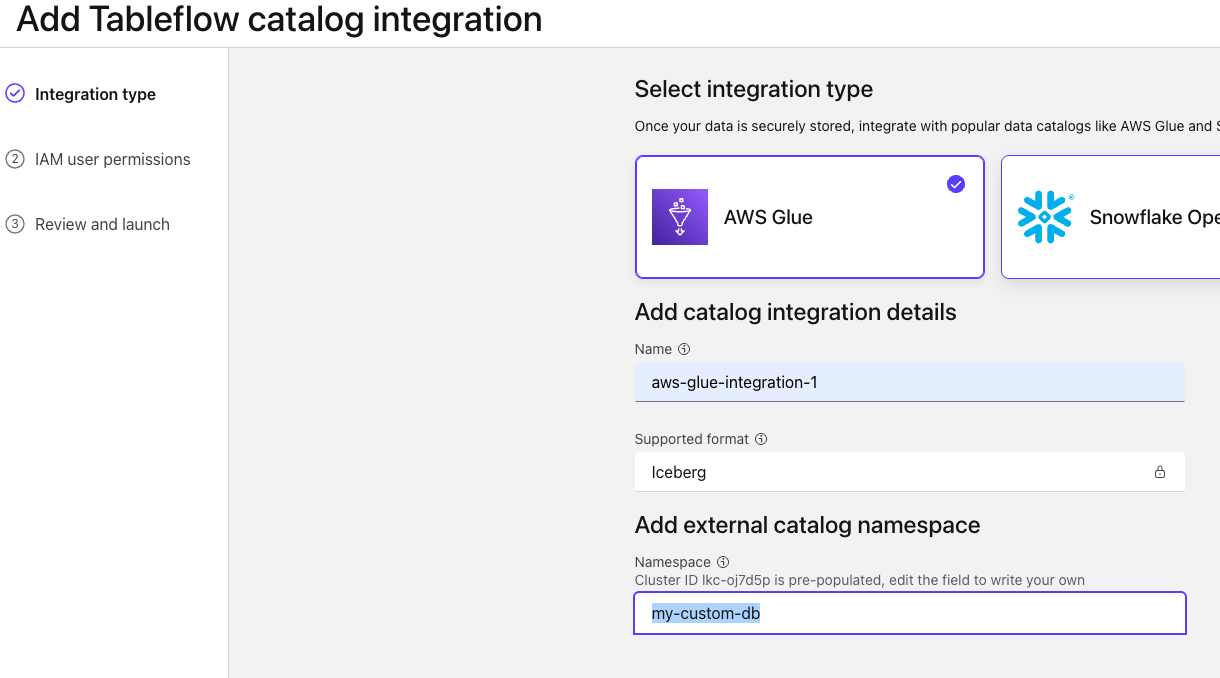
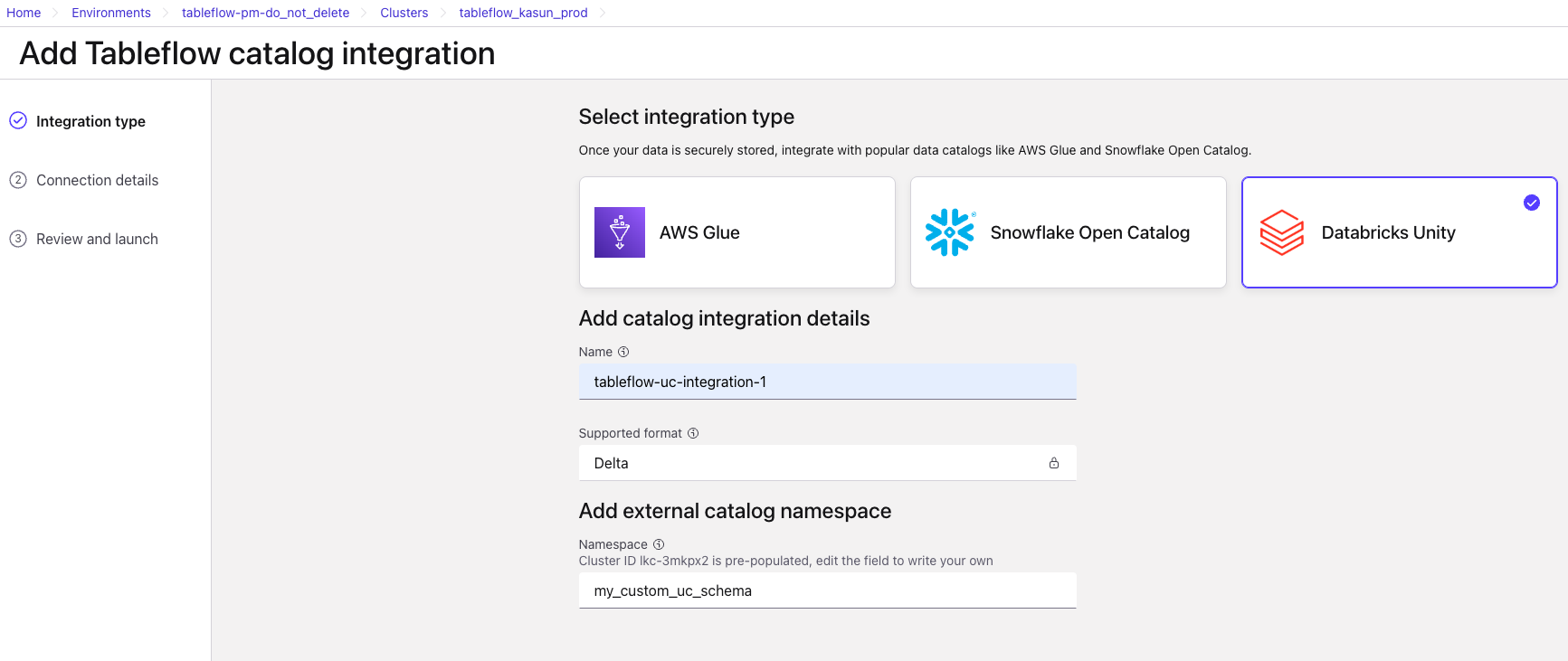
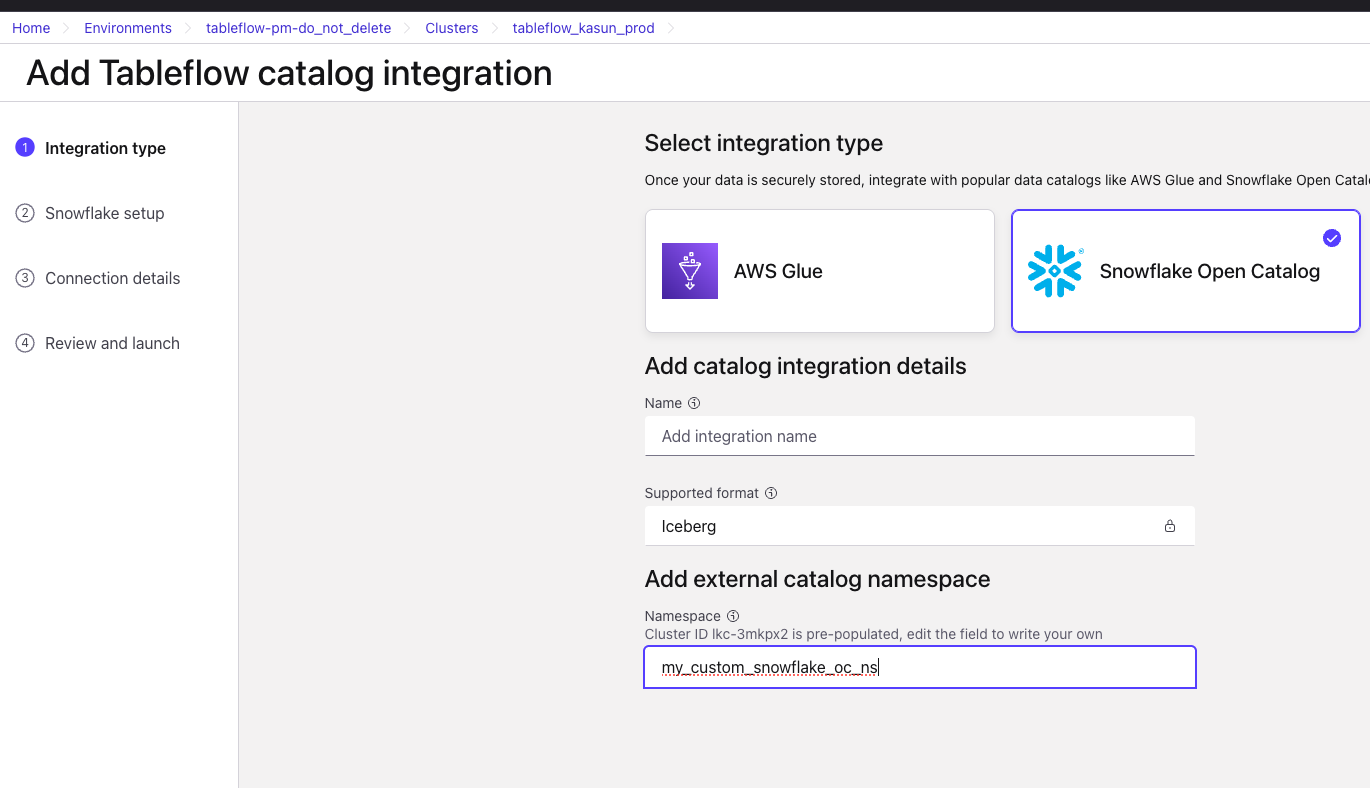
The user-defined namespace field appears in the Add Tableflow catalog integration wizard for all three external catalog types. The cluster ID is pre-populated as the default. Edit the field to provide your own value before continuing.
AWS Glue Data Catalog
In the catalog integration wizard, after you select AWS Glue and provide
an integration name, locate the Add external catalog namespace section.
The value you enter becomes the Glue database name that Tableflow
creates and publishes tables into.
For example, a topic named orders published through an integration with
the namespace finance appears in Glue as finance.orders instead of
lkc-xxxxxx.orders.
Databricks Unity Catalog
For Databricks Unity Catalog (Delta Lake tables), the namespace value
becomes the Unity schema name that Tableflow creates inside the
configured Unity catalog. For example, a topic named orders published
through an integration with the namespace finance appears in Unity
Catalog as main.finance.orders instead of main.lkc-xxxxxx.orders.
Snowflake Open Catalog or Apache Polaris
For Snowflake Open Catalog and other Apache Polaris flavors, the value
becomes the namespace that Tableflow creates inside the configured
catalog. For example, a topic named orders published through an
integration with the namespace finance appears in Snowflake Open Catalog
as finance.orders.
Rename an existing catalog namespace
You can change the namespace of an existing catalog integration at any time through the Edit Tableflow catalog integration panel.
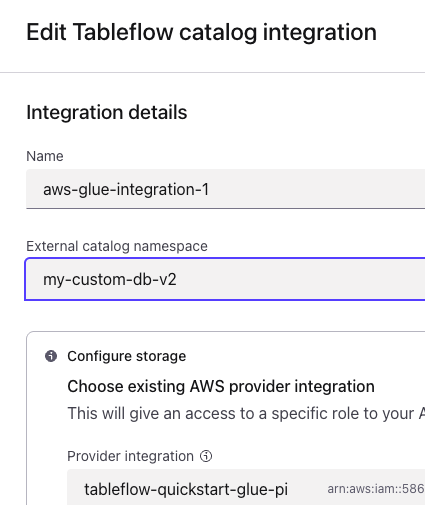
When you rename a namespace, Tableflow performs the following actions automatically:
Validates the new namespace value against the destination catalog’s naming rules.
Republishes all existing Tableflow tables for the integration under the new namespace in the external catalog.
Deregisters the previous namespace’s tables from the external catalog so the old name no longer appears in downstream tools.
Warning
Renaming a namespace changes the fully qualified name of every table
published through the integration. Downstream consumers, dashboards,
pipelines, and queries that reference tables by the old
<namespace>.<table> path break until they are updated to use the new
namespace. Coordinate the rename with downstream owners before you save
the change.
Note
Cleanup of the previous namespace’s tables is performed on a best-effort basis. While a rename is in progress, Tableflow blocks subsequent namespace updates on the same integration until cleanup completes, but it still allows updates to other integration parameters (for example, credentials, warehouse, or catalog URL). If you change one of those parameters before cleanup completes, Tableflow can no longer guarantee complete deregistration of tables from the previous namespace. Wait for the rename to finish before making other changes to the integration.
Validation and conflict detection
Tableflow validates namespace values at configuration time using the naming rules. After a sync starts, any topic-level conflict, such as a namespace already in use by another integration or a destination table that Tableflow does not own, surfaces as a failed or degraded catalog sync status on the affected topic. The status message identifies the conflicting object so you can rename the topic, switch to a different namespace, or resolve the conflict in the destination catalog and retry.
Limitations
One user-defined namespace is supported per external catalog integration, at the cluster level. All Tableflow-enabled topics in the cluster that sync through the integration share that namespace in the destination catalog.
The namespace for the Tableflow Iceberg REST Catalog (IRC) endpoint is not yet user-configurable and continues to be derived from the cluster ID.
Two clusters that publish topics with the same name to the same external catalog using the same custom namespace collide on the destination table. Use distinct namespaces per cluster if topic names overlap.