

Cluster Linking Automatic Failover Tutorial for Active-Passive Deployments
Automatic Failover lets your clients automatically follow the active cluster through a single global bootstrap URL when you fail over to the DR cluster with one command, minimizing downtime and data loss.
Important
Automatic Failover is an Early Access Program feature in Confluent Cloud.
Early Access Program features are intended for feedback and evaluation in development and testing environments only, and not for production use. Early Access Program features are considered to be a Proof of Concept as defined in the Confluent Cloud Terms of Service. Contact Confluent support or your account team to request access to this feature, which is available at no extra charge during Early Access.
With Automatic Failover and Cluster Linking, you can implement an active-passive, cross-region Disaster Recovery (DR) setup with a low recovery time objective (RTO) and low recovery point objective (RPO). Failover from the primary to the secondary cluster requires only a single command on the “cluster pair”. Your clients automatically switch over to the secondary cluster without any manual intervention.
Automatic Failover is currently available on active-passive Cluster Linking setups.
What the tutorial covers
You build two Apache Kafka® clusters, use Cluster Linking to replicate data across the clusters, and pair them with Automatic Failover. You get a single global bootstrap URL for the cluster pair that your clients connect to. Next, you simulate normal operations by adding data load to the pair with a sample producer and consumer.
Initially, the global bootstrap URL of the cluster pair resolves to the primary cluster. Clients produce to and consume from “source” topics on the primary cluster, with private networking if configured.
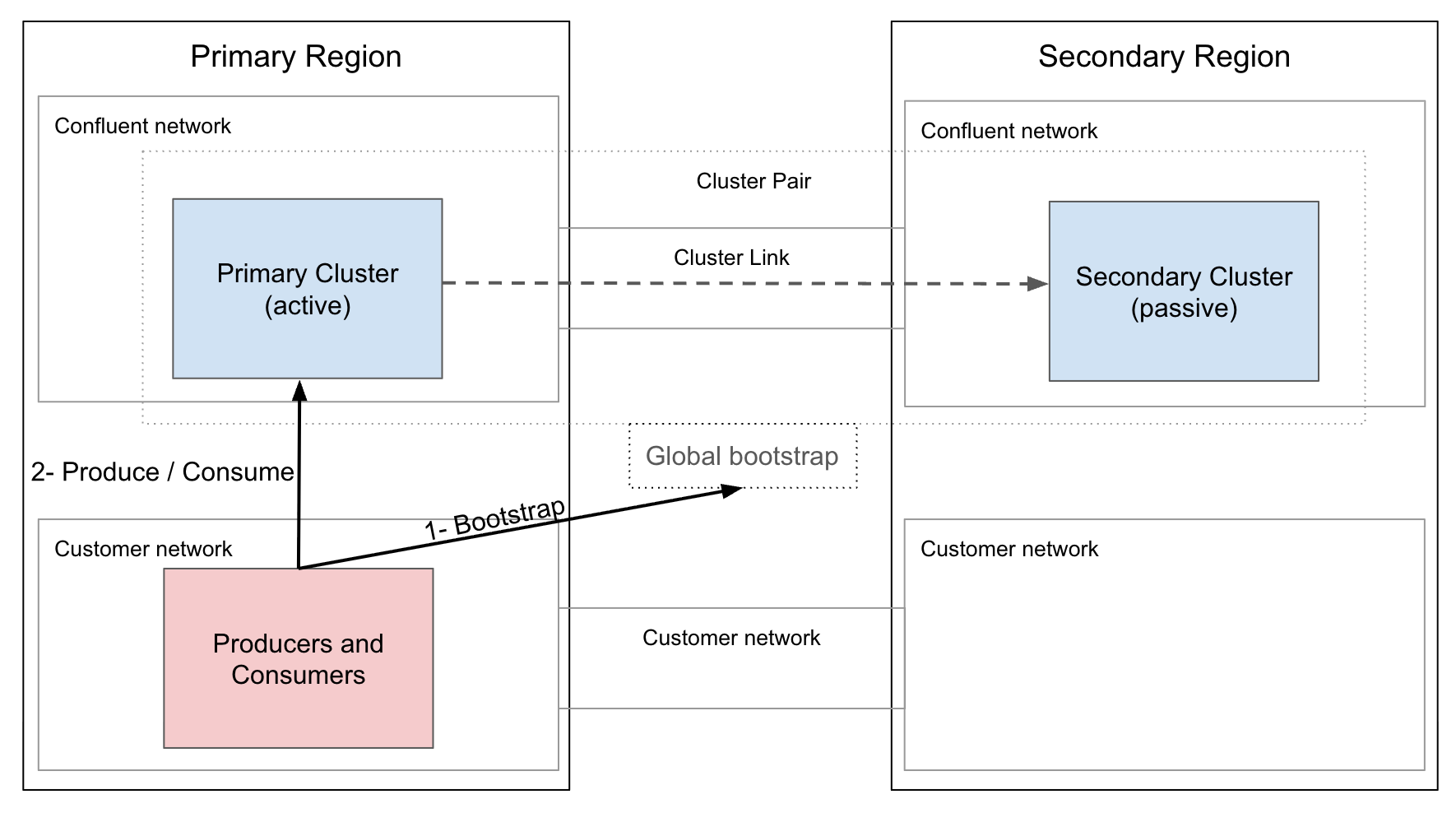
In this steady state, the secondary cluster acts as a standby with “mirror topics” automatically managed by Cluster Linking.
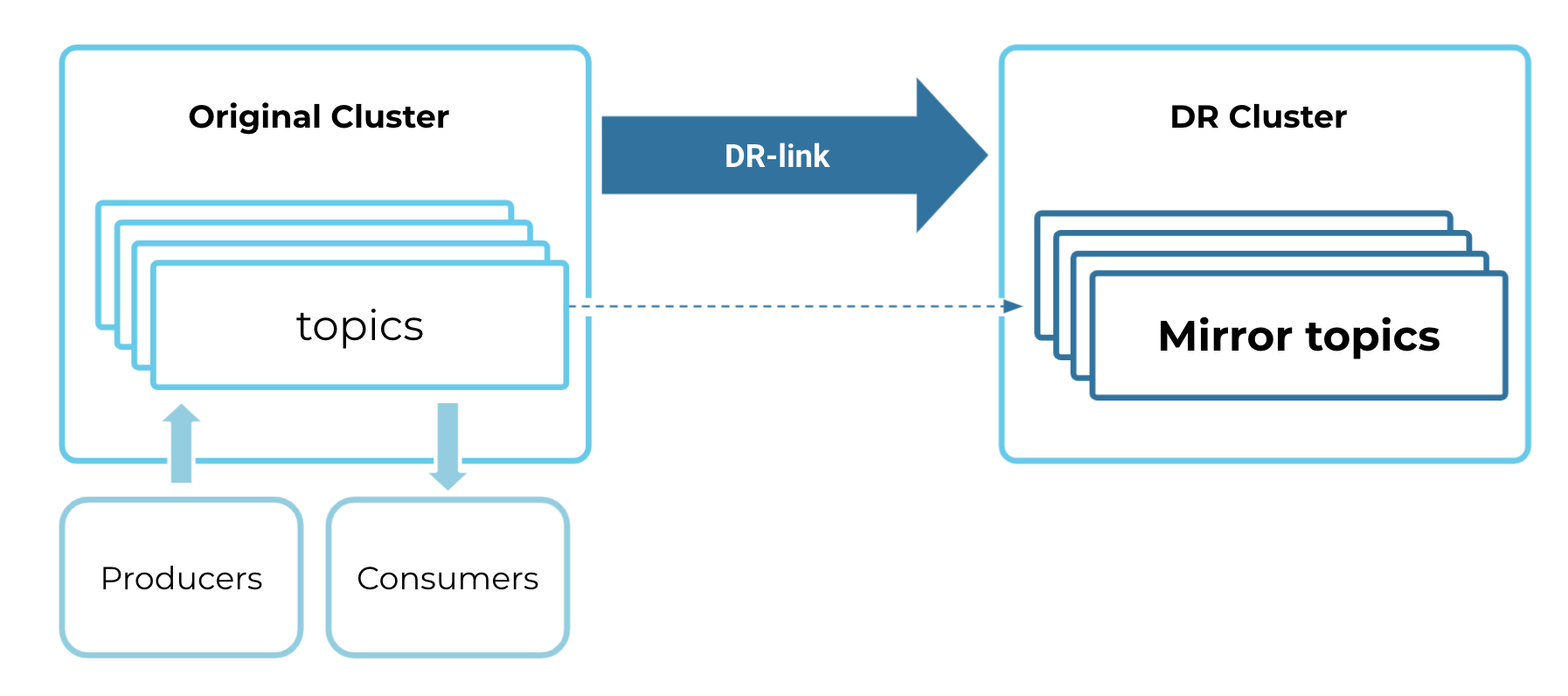
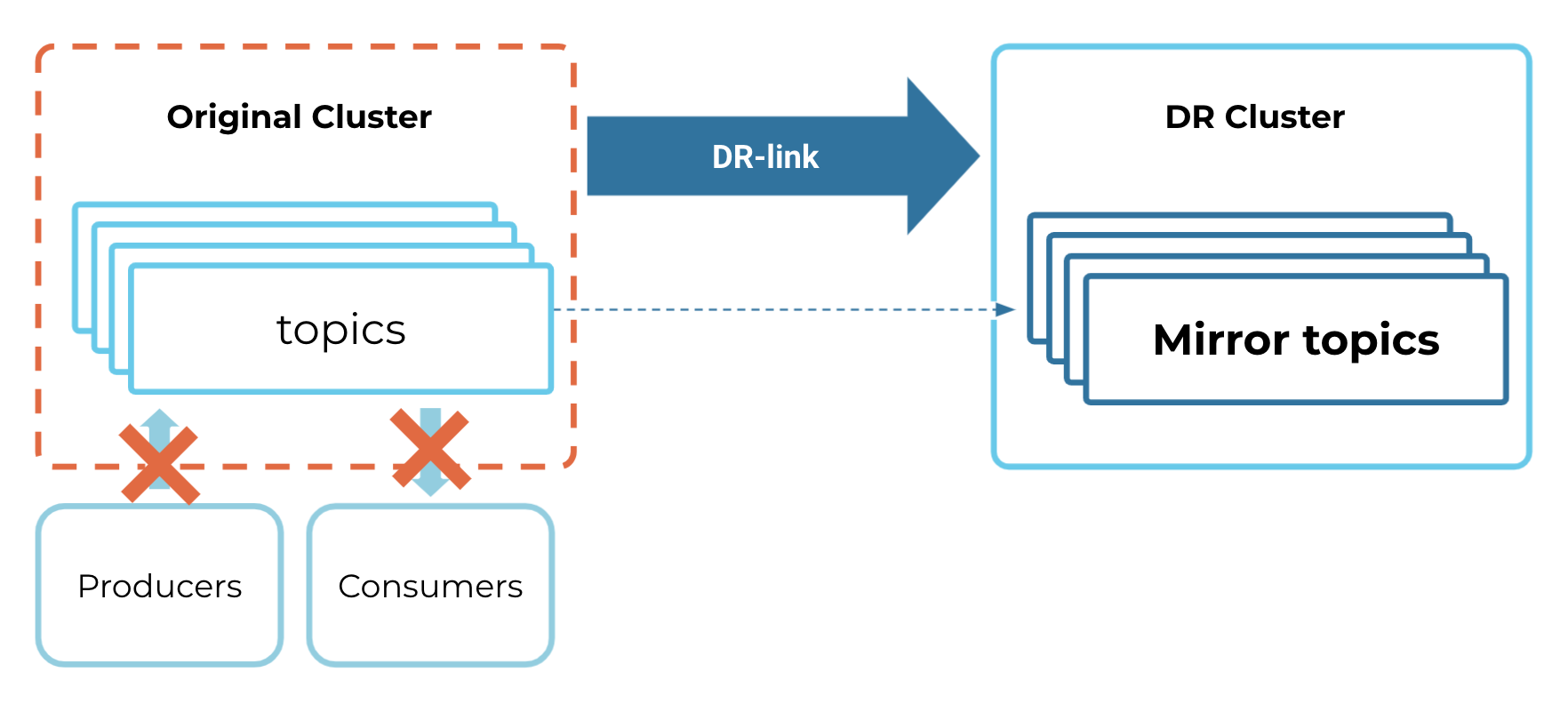
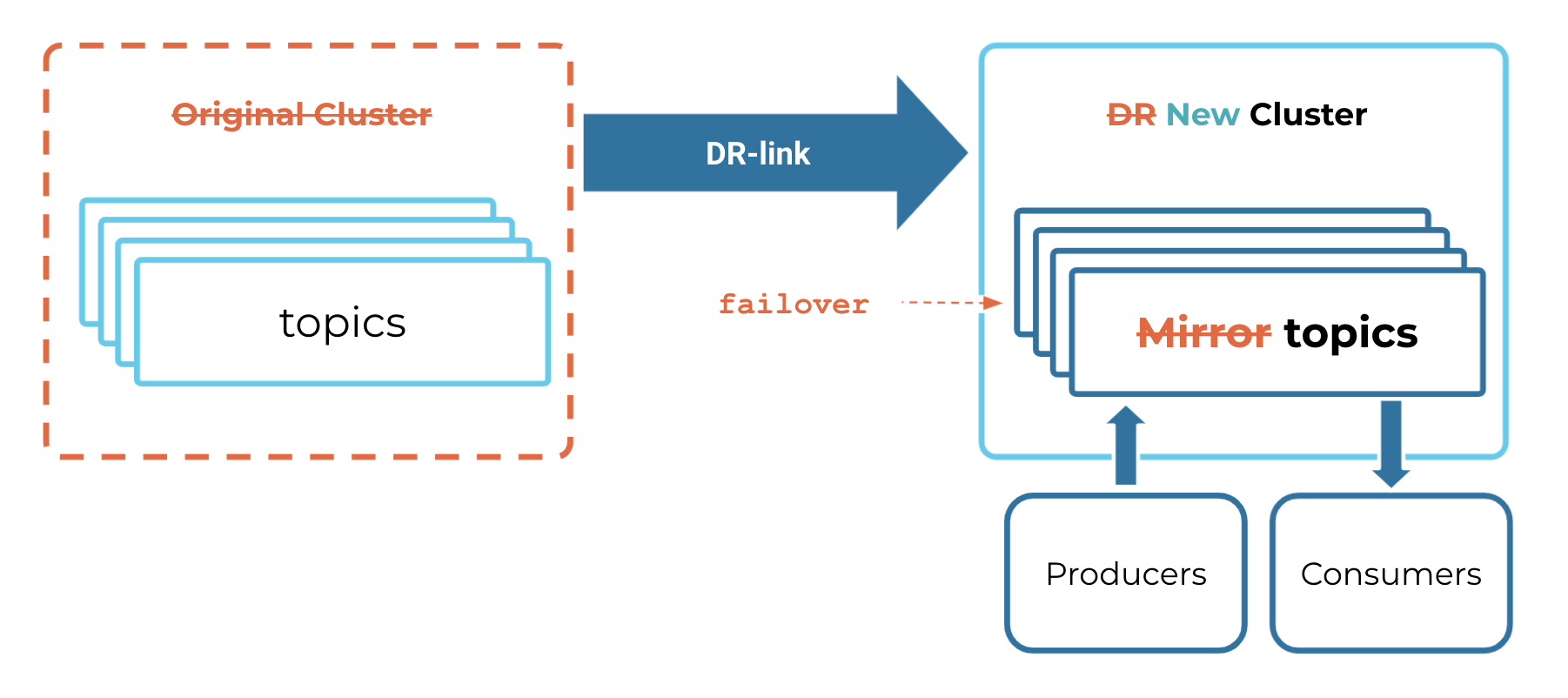
When a disaster hits, the producers, consumers, and cluster link cannot interact with the original cluster.
To model your recovery strategy in a disaster, trigger a failover command on the cluster pair. The global bootstrap URL now resolves to the secondary cluster, which becomes the active cluster. This command also reverses the Cluster Linking data replication flow. Produce and consume target the secondary cluster, with private networking if configured.
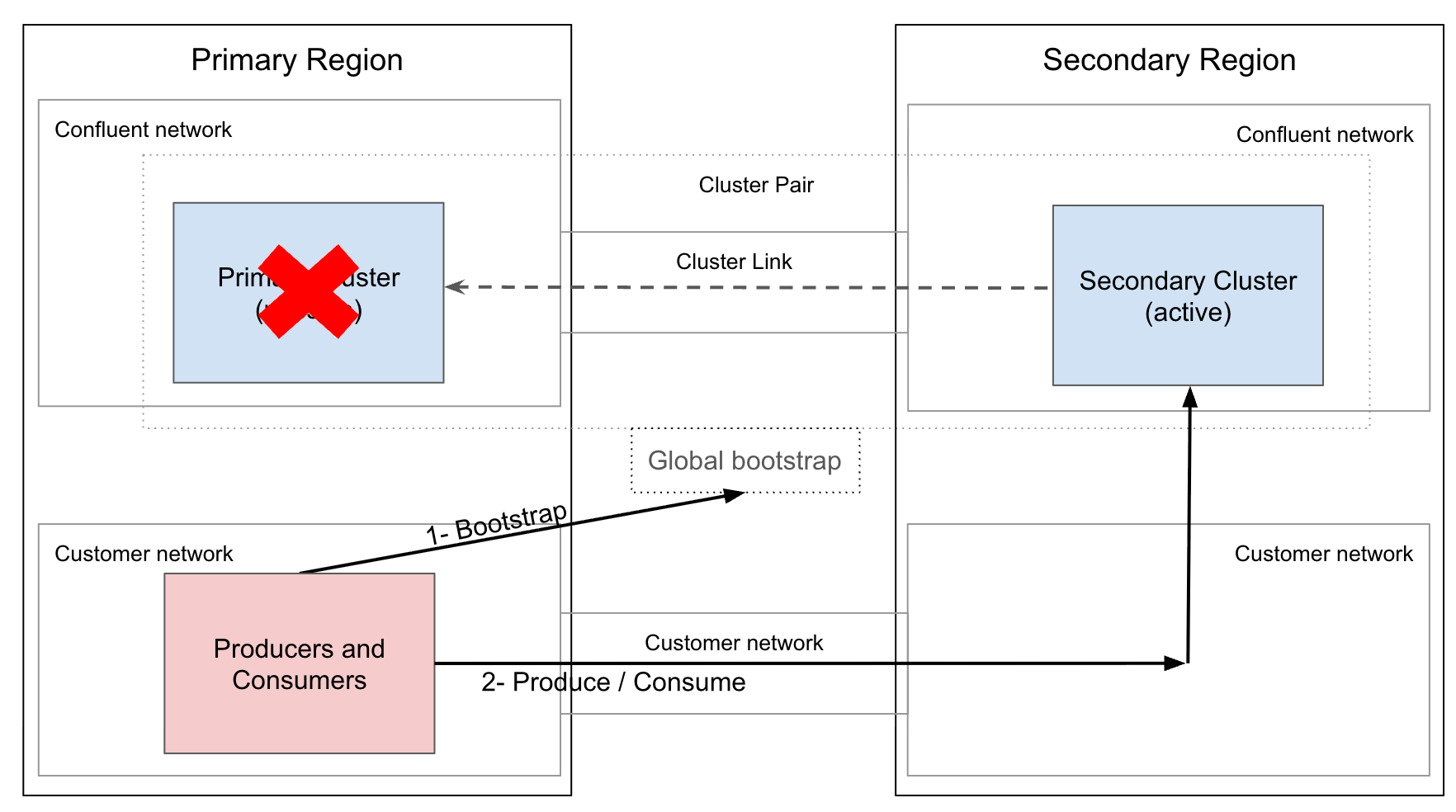
The DR cluster becomes the new source of truth.
Prerequisites and considerations
Before you start working through this tutorial, verify you have the following prerequisites and understand the operational considerations for Automatic Failover.
Cluster and account prerequisites
Cluster types: Dedicated or Enterprise clusters only on both primary and secondary clusters. Basic, Standard, and Freight are not supported. To learn more, see cluster types.
Environment and organization scope: Both clusters must belong to the same Confluent Cloud organization, but can be in different environments.
Cluster sizing and parity: Ideally, you should size both clusters identically with same Confluent Unit for Kafka (CKU), so the secondary cluster can absorb full primary traffic during a failover. If you use Enterprise clusters, their elastic CKUs (eCKUs) can scale down to a minimum while the DR cluster is passive. Dedicated clusters use a fixed number of provisioned CKUs.
Secondary cluster initial state: The secondary cluster must be entirely empty of producers and consumers at the time of pairing.
Bidirectional Cluster link: Automatic Failover requires a bidirectional cluster link between the primary and secondary clusters. You’ll create this link manually as part of this tutorial.
No additional destination cluster link: Primary and secondary clusters should not be a destination of another cluster link and should not have another bidirectional cluster link. Using the global endpoint as part of a cluster link configuration causes all topics to fail.
Transactions: Cluster link does not support transactions with exactly-once semantics and can leave hung transactions on failover.
Not all mirror topics properties are synchronized: Cluster link replicates critical topic configuration properties. For a list of configurations that are not replicated, see Mirror topic configurations not synced.
Networking and connectivity prerequisites
Network parity: If using private networking, you must pair endpoints of the same type on both clusters. For example, pair a Private Link endpoint from your primary cluster to another Private Link endpoint on your secondary cluster.
Cross-region connectivity: You are responsible for provisioning the cross-region network path between clusters. For example, clients in region A must be able to reach your Private Link / Private Service Connect in region B.
Forward proxy SNI support: If client traffic passes through a forward proxy, the proxy must pass the TLS Server Name Indication (SNI) extension unmodified. Stripping or rewriting SNI hostnames breaks failover.
Public DNS resolution path: Your DNS resolution path (including split-horizon or internal DNS resolvers) must be capable of resolving the global bootstrap endpoint over public DNS. For the global bootstrap URL patterns to allow, see Construct the global bootstrap endpoint URL.
Client and security prerequisites
Client library version: Kafka client versions 4.0 or later. Clients written in Java, C/C++ (
librdkafka), Python, Go, .Net/C#, JavaScript / Node.js are supported. REST API clients are not supported.Client authentication types: Clients must authenticate using OAuth or Global API keys. Cluster-scoped API keys cannot fail over. This tutorial uses API keys as an example. OAuth can also be used and pointers on how to do that are provided in this tutorial.
Client and user authorization: When authorizing clients with role-based access control (RBAC), you must manually configure role bindings on both primary and secondary clusters for failover to work. When using ACLs, you can define ACLs on the primary cluster and have Cluster Linking automatically synchronize the ACLs to the secondary cluster.
Encryption / security: Bring Your Own Key (BYOK) storage encryption, if enabled, must be configured on both primary and secondary clusters before pairing.
Permissions required to set up resources: You must create all Identity and Access Management (IAM), cluster, and cluster pair resources with OrganizationAdmin or EnvironmentAdmin permissions. The cluster link resource requires the
CloudClusterAdminrole or higher. Depending on the interface that you use to run this tutorial, these permissions take different forms. For the Early Access version, the cluster pair and failover API does not support OAuth authentication.
Log in to the Confluent CLI to authenticate and set permissions associated with your user account. Make sure you use Confluent CLI version 4.78.0 or later.
confluent login
Set authentication and permissions using either a Confluent Cloud API key linked to a service account, or with an OAuth token from your identity provider linked to an identity pool.
To create resources in this tutorial, you need a Confluent Cloud API key with Cloud Resource management or Global scope.
Its service account must have OrganizationAdmin or EnvironmentAdmin permissions.
This tutorial assumes that you already have one, and refers to its ID as $CLOUD_API_KEY.
Set credentials for the confluentinc/confluent Terraform provider via the CONFLUENT_CLOUD_API_KEY / CONFLUENT_CLOUD_API_SECRET environment variables (or the provider block’s cloud_api_key/cloud_api_secret arguments). They’re sent as HTTP Basic auth on every control-plane call, switchover included.
terraform {
  required_providers {
    confluent = {
      source  = "confluentinc/confluent"
      version = ">= 2.88.0"   # first version to include the switchover resources
    }
  }
}

provider "confluent" {
  endpoint = "https://api.confluent.cloud"
}

# Input variables referenced as var.* throughout this tutorial
variable "org" {}
variable "primary_env" {}
variable "secondary_env" {}
variable "pair_env" {}
variable "client_principal_id" {}
Declare these once in the provider-setup configuration so every later tab’s snippets work, and pass values with
-var or TF_VAR_<name> environment variables.
Use the same Confluent Cloud API Key described in the REST API tab (Cloud Resource management or Global scope, service account with OrganizationAdmin or EnvironmentAdmin permissions).
Schema and governance constraints
Schema Registry DR: Schema Registry failover is not managed by Automatic Failover. You must set up schema DR (such as schema linking) independently.
Manual schema validation setup: Cluster Linking does not replicate topic-level schema validation configurations (
confluent.key.schema.validationandconfluent.value.schema.validation). You must apply these manually to the secondary cluster.Cloud tags gap: Cloud tags, including tags for client-side field level encryption (CSFLE), do not automatically synchronize across paired clusters. ACLs and cluster configurations do synchronize. Service accounts and Global API keys are organization-scoped, so they apply to both clusters without syncing.
Other products
Managed ecosystem services: You must manually fail over managed connectors, Apache Flink®, and ksqlDB applications running on paired clusters. These are not a part of Automatic Failover.
Performance limitations
Failover performance is largely dominated by cluster link’s performance to reverse links.
Unplanned failover performance grows with topic count and to a minor extent partition count. Order of magnitude is in
~50s+1s/Topic.Planned failover performance scales in a similar way as unplanned failovers with topic count and partition count but also scales with the time it takes to get consumer lags down to 0 and the total number of consumer groups. During the EA, limit the number of consumer groups to under 1000.
Set up Automatic Failover
Automatic Failover pairs your clusters across regions, configures DR-optimized settings, and provisions a single global bootstrap URL using an existing cluster link.
The commands below use OAuth to authenticate the cluster link and the sample producer and consumer clients because a single OAuth identity can work across both clusters without managing per-cluster credentials. Global API keys, not cluster-scoped API keys, are also a supported option for both the cluster link and your client applications.
Create primary and secondary clusters
The primary cluster is the source cluster, and the secondary cluster is the DR cluster (destination). Both clusters must be Dedicated or Enterprise clusters. Create two Dedicated or Enterprise clusters in the respective regions in the same organization and same or different environments:
Create the primary cluster in your primary region:
confluent kafka cluster create my-primary-cluster \
--cloud aws --region us-east-1 --type dedicated --cku 2 \
--availability multi-zone --environment $PRIMARY_ENV
where:
$PRIMARY_ENVis your Environment id hosting this cluster.Create the secondary cluster in your secondary region:
confluent kafka cluster create my-secondary-cluster \
--cloud aws --region us-west-2 --type dedicated --cku 2 \
--availability multi-zone --environment $SECONDARY_ENV
where:
$SECONDARY_ENVis your Environment id hosting this cluster.
Create the primary cluster in your primary region:
curl -sS "https://api.confluent.cloud/cmk/v2/clusters" -X POST \
-u "$CLOUD_API_KEY:$CLOUD_API_SECRET" -H "Content-Type: application/json" \
-d '{
   "spec": {
      "display_name": "my-primary-cluster",
      "cloud": "AWS",
      "region": "us-east-1",
      "availability": "MULTI_ZONE",
      "config": {"kind": "Dedicated", "cku": 2},
      "environment": {"id": "'"$PRIMARY_ENV"'"}
   }
}' | jq .
where:
$CLOUD_API_KEYand$CLOUD_API_SECRETare your Cloud API key ID and secret.$PRIMARY_ENVis the environment ID hosting this cluster.
Create the secondary cluster in your secondary region.
$SECONDARY_ENVis the Environment id hosting this cluster:curl -sS "https://api.confluent.cloud/cmk/v2/clusters" -X POST \ -u "$CLOUD_API_KEY:$CLOUD_API_SECRET" -H "Content-Type: application/json" \ -d '{ "spec": { "display_name": "my-secondary-cluster", "cloud": "AWS", "region": "us-west-2", "availability": "MULTI_ZONE", "config": {"kind": "Dedicated", "cku": 2}, "environment": {"id": "'"$SECONDARY_ENV"'"} } }' | jq .
where:
$CLOUD_API_KEYand$CLOUD_API_SECRETare your Cloud API key ID and secret.$SECONDARY_ENVis the environment ID hosting this cluster.
Create the primary and secondary clusters using the confluent_kafka_cluster resource.
resource "confluent_kafka_cluster" "primary" {
  display_name = "my-primary-cluster"
  availability = "MULTI_ZONE"
  cloud        = "AWS"
  region       = "us-east-1"

  dedicated {
    cku = 2
  }

  environment {
    id = var.primary_env
  }
}

resource "confluent_kafka_cluster" "secondary" {
  display_name = "my-secondary-cluster"
  availability = "MULTI_ZONE"
  cloud        = "AWS"
  region       = "us-west-2"

  dedicated {
    cku = 2
  }

  environment {
    id = var.secondary_env
  }
}
Apply the Terraform configuration to generate a plan, and run it.
terraform apply
where: var.primary_env and var.secondary_env map to $PRIMARY_ENV and $SECONDARY_ENV.
Create the cluster link
Set up identity, grant permissions, and create a bidirectional cluster link between the primary and secondary clusters.
You can use API keys or OAuth to authenticate and authorize your cluster link.
Create the cluster link identity
Create the service account for the cluster link identity.
Create the service account for the cluster link identity.
confluent iam service-account create dr-link-sa --description "Cluster link identity for DR pair"
Create the service account for the cluster link identity.
curl -sS "https://api.confluent.cloud/iam/v2/service-accounts" -X POST \
-u "$CLOUD_API_KEY:$CLOUD_API_SECRET" -H "Content-Type: application/json" \
-d '{
   "display_name": "dr-link-sa",
   "description": "Cluster link identity for DR pair"
}' | jq .
where: $CLOUD_API_KEY is your Cloud API key ID.
Create the service account for the cluster link identity using the confluent_service_account resource.
resource "confluent_service_account" "dr_link_sa" {
  display_name = "dr-link-sa"
  description  = "Cluster link identity for DR pair"
}
Apply the Terraform configuration to generate a plan, and run it.
terraform apply
If using OAuth, create an identity pool for the cluster link identity.
Grant the cluster link identity the CloudClusterAdmin role on both clusters
Grant the cluster link identity the CloudClusterAdmin role on both the primary and secondary clusters so it can manage link and topic resources during failover:
Grant the cluster link identity the CloudClusterAdmin role on both clusters.
confluent iam rbac role-binding create --principal User:$CL_SA \
--role CloudClusterAdmin --environment $PRIMARY_ENV --cloud-cluster $PRIMARY_LKC
confluent iam rbac role-binding create --principal User:$CL_SA \
--role CloudClusterAdmin --environment $SECONDARY_ENV --cloud-cluster $SECONDARY_LKC
where:
$CL_SAis the Service Account ID of the cluster link.$PRIMARY_LKCand$SECONDARY_LKCare the Cluster ID of your respective clusters.$PRIMARY_ENVand$SECONDARY_ENVare the Environment ID of your respective clusters.
Create a Global API key scoped to cluster link identity
confluent api-key create --resource global --service-account $CL_SA \
--description "dr-link global key" -o json
where:
$CL_SAis the service account ID of the cluster link.
Grant the cluster link identity the CloudClusterAdmin role on both clusters.
curl -sS "https://api.confluent.cloud/iam/v2/role-bindings" -X POST \
-u "$CLOUD_API_KEY:$CLOUD_API_SECRET" -H "Content-Type: application/json" \
-d '{
   "principal": "User:'"$CL_SA"'",
   "role_name": "CloudClusterAdmin",
   "crn_pattern": "crn://confluent.cloud/organization='"$ORG"'/environment='"$PRIMARY_ENV"'/cloud-cluster='"$PRIMARY_LKC"'"
}' | jq .
curl -sS "https://api.confluent.cloud/iam/v2/role-bindings" -X POST \
-u "$CLOUD_API_KEY:$CLOUD_API_SECRET" -H "Content-Type: application/json" \
-d '{
   "principal": "User:'"$CL_SA"'",
   "role_name": "CloudClusterAdmin",
   "crn_pattern": "crn://confluent.cloud/organization='"$ORG"'/environment='"$SECONDARY_ENV"'/cloud-cluster='"$SECONDARY_LKC"'"
}' | jq .
where:
$CLOUD_API_KEYis your Cloud API key ID.$CLOUD_API_SECRETis your cloud API secret.$ORGis your organization ID.$CL_SAis the service account ID of the cluster link.$PRIMARY_LKCand$SECONDARY_LKCare the cluster ID of your respective clusters.$PRIMARY_ENVand$SECONDARY_ENVare the environment ID of your respective clusters.
Create a Global API key scoped to cluster link identity
curl -sS --request POST \
--url 'https://api.confluent.cloud/iam/v2/api-keys' \
-u "$CLOUD_API_KEY:$CLOUD_API_SECRET" \
--header 'Content-Type: application/json' \
--data '{
   "spec": {
      "display_name": "dr-link global key",
      "description": "dr-link global key",
      "owner": {"id": "'"$CL_SA"'"},
      "resource": {"id": "global"}
   }
}' | jq .
where:
$CLOUD_API_KEYis your Cloud API key ID.$CLOUD_API_SECRETis your Cloud API secret.$CL_SAis the Service Account id of the cluster link.
Grant the cluster link identity the
CloudClusterAdminrole on both clusters using theconfluent_role_bindingresource.resource "confluent_role_binding" "dr_link_sa_primary" { principal = "User:${confluent_service_account.dr_link_sa.id}" role_name = "CloudClusterAdmin" crn_pattern = confluent_kafka_cluster.primary.rbac_crn } resource "confluent_role_binding" "dr_link_sa_secondary" { principal = "User:${confluent_service_account.dr_link_sa.id}" role_name = "CloudClusterAdmin" crn_pattern = confluent_kafka_cluster.secondary.rbac_crn }
Apply the Terraform configuration to generate a plan, and run it.
terraform applyCreate the Global API key for the cluster link identity with the
confluent_api_keyresource, using amanaged_resourceblock of kindGlobal.resource "confluent_api_key" "dr_link_global_key" { display_name = "dr-link global key" description = "dr-link global key" owner { id = confluent_service_account.dr_link_sa.id api_version = confluent_service_account.dr_link_sa.api_version kind = confluent_service_account.dr_link_sa.kind } managed_resource { id = "global" api_version = "global/v1" kind = "Global" } lifecycle { prevent_destroy = true } }
The
lifecycleblock protects this key from accidental deletion, because bothconfluent_cluster_linkresources (and the data source lookups later in this tutorial) authenticate with it: destroying it would break the bidirectional link between both clusters. To intentionally destroy this resource, remove thelifecycleblock first.Apply the Terraform configuration to generate a plan, and run it.
terraform apply
Note
The cluster link identity (service account or identity pool) on the secondary cluster
must have permissions to LIST and DESCRIBE all topics and mirror topics.
Insufficient permissions can cause data loss.
Specify configurations for the cluster link
The cluster link must be bidirectional. If you create the link from only one side, the other side is left as a mismatched, unmanaged link object.
As a best practice, configure the cluster link with these recommended settings to ensure optimal DR performance and consumer offset preservation during failover and failback:
Setting |
Recommended Value |
Purpose |
|---|---|---|
Auto-create Mirror Topics |
Enabled (All topics) |
Ensures new topics created on the active cluster are automatically protected by DR. |
Consumer Offset Sync |
Enabled ( |
Preserves consumer group positions across failover, resuming execution near the last committed offset. |
ACL Sync |
Enabled |
Ensures that ACLs are synchronized across the active and DR clusters. |
Create a single link configuration file for both the primary cluster and secondary clusters.
This configuration syncs offsets for all consumer groups (*) for these mirror topics.
Copy the following lines into a file called dr-link.config, and replace the placeholder variables with your details.
link.mode=BIDIRECTIONAL

auto.create.mirror.topics.enable=true
auto.create.mirror.topics.filters={"topicFilters": [{"name": "*","patternType": "LITERAL","filterType": "INCLUDE"}]}
topic.config.sync.ms=1000

consumer.offset.sync.enable=true
consumer.offset.group.filters={"groupFilters": [{"name": "*","patternType": "LITERAL","filterType": "INCLUDE","topicTypes": ["LOCAL_MIRROR"]}]}
consumer.offset.sync.ms=1000

acl.sync.enable=true
acl.filters={ "aclFilters": [ { "resourceFilter": { "resourceType": "any", "patternType": "any" }, "accessFilter": { "operation": "any", "permissionType": "any" } } ] }
acl.sync.ms=1000

security.protocol=SASL_SSL
sasl.mechanism=PLAIN
sasl.jaas.config=org.apache.kafka.common.security.plain.PlainLoginModule required username="$CL_API_KEY" password="$CL_API_KEY_SECRET";

local.security.protocol=SASL_SSL
local.sasl.mechanism=PLAIN
local.sasl.jaas.config=org.apache.kafka.common.security.plain.PlainLoginModule required username="$CL_API_KEY" password="$CL_API_KEY_SECRET";
where:
$CL_API_KEYis your cluster link API key ID.
$CL_API_KEY_SECRETis your cluster link API key secret.
link.mode=BIDIRECTIONAL

auto.create.mirror.topics.enable=true
auto.create.mirror.topics.filters={"topicFilters": [{"name": "*","patternType": "LITERAL","filterType": "INCLUDE"}]}
topic.config.sync.ms=1000

consumer.offset.sync.enable=true
consumer.offset.group.filters={"groupFilters": [{"name": "*","patternType": "LITERAL","filterType": "INCLUDE","topicTypes": ["LOCAL_MIRROR"]}]}
consumer.offset.sync.ms=1000

acl.sync.enable=true
acl.filters={ "aclFilters": [ { "resourceFilter": { "resourceType": "any", "patternType": "any" }, "accessFilter": { "operation": "any", "permissionType": "any" } } ] }
acl.sync.ms=1000

security.protocol=SASL_SSL
sasl.mechanism=OAUTHBEARER
sasl.login.callback.handler.class=org.apache.kafka.common.security.oauthbearer.OAuthBearerLoginCallbackHandler
sasl.oauthbearer.token.endpoint.url=$OAUTH_TOKEN_ENDPOINT
sasl.jaas.config=org.apache.kafka.common.security.oauthbearer.OAuthBearerLoginModule required clientId='$OAUTH_CLIENT_ID' clientSecret='$OAUTH_CLIENT_SECRET' scope='' extension_identityPoolId='$OAUTH_IDENTITY_POOL_ID';

local.security.protocol=SASL_SSL
local.sasl.mechanism=OAUTHBEARER
local.sasl.login.callback.handler.class=org.apache.kafka.common.security.oauthbearer.OAuthBearerLoginCallbackHandler
local.sasl.oauthbearer.token.endpoint.url=$OAUTH_TOKEN_ENDPOINT
local.sasl.jaas.config=org.apache.kafka.common.security.oauthbearer.OAuthBearerLoginModule required clientId='$OAUTH_CLIENT_ID' clientSecret='$OAUTH_CLIENT_SECRET' scope='' extension_identityPoolId='$OAUTH_IDENTITY_POOL_ID';
where:
$OAUTH_TOKEN_ENDPOINTis your OAuth token endpoint.
$OAUTH_CLIENT_IDis your OAuth client ID.
$OAUTH_CLIENT_SECRETis your OAuth client secret.
$OAUTH_IDENTITY_POOL_IDis your OAuth identity pool ID.
Note
extension_logicalCluster is no longer required and must even be removed for the same config file to be
used in both cluster link directions.
Create a bidirectional cluster link
Automatic Failover requires a bidirectional Cluster Linking link between the two clusters, so mirror topics, ACLs, and consumer group offsets replicate in both directions and either side can be promoted without a resync.
Create the link on the primary cluster.
confluent kafka link create dr-link --remote-cluster $SECONDARY_LKC \
--remote-bootstrap-server $SECONDARY_LKC_BOOTSTRAP \
--config dr-link.config \
--cluster $PRIMARY_LKC --environment $PRIMARY_ENV
where:
$SECONDARY_LKC,$PRIMARY_LKC,$PRIMARY_ENVare your respective cluster and environment ids.$SECONDARY_LKC_BOOTSTRAPis your secondary cluster bootstrap endpoint.
Create the link on the secondary cluster.
confluent kafka link create dr-link --remote-cluster $PRIMARY_LKC \
--remote-bootstrap-server $PRIMARY_LKC_BOOTSTRAP \
--config dr-link.config \
--cluster $SECONDARY_LKC --environment $SECONDARY_ENV
where:
$PRIMARY_LKC,$SECONDARY_LKC,$SECONDARY_ENVare your respective cluster and environment ids.$PRIMARY_LKC_BOOTSTRAPis your primary cluster bootstrap endpoint.
Transform the config file into REST arguments
CONFIGS_JSON=$(jq -c -Rn '
   [inputs
      | select(length > 0 and (startswith("#") | not))
      | capture("^(?<name>[^=]+)=(?<value>.*)$")]
   ' dr-link.config)
Create the link on the primary cluster.
curl -sS "https://$PRIMARY_REST_ENDPOINT/kafka/v3/clusters/$PRIMARY_LKC/links?link_name=dr-link" -X POST \
-u "$CL_API_KEY:$CL_API_KEY_SECRET" \
-H "Content-Type: application/json" \
-d '{
   "remote_cluster_id": "'"$SECONDARY_LKC"'",
   "configs": '"${CONFIGS_JSON%]}"',{"name": "bootstrap.servers", "value": "'"$SECONDARY_LKC_BOOTSTRAP"'"}]
}' | jq .
where:
$PRIMARY_LKC,$SECONDARY_LKCare your respective cluster ids.$PRIMARY_REST_ENDPOINTis your primary cluster REST endpoint (without the URL protocolhttps://).$CL_API_KEYis your cluster link API key ID.$CL_API_KEY_SECRETis your cluster link API key secret.$SECONDARY_LKC_BOOTSTRAPis the bootstrap of your secondary cluster.
Create the link on the secondary cluster.
curl -sS "https://$SECONDARY_REST_ENDPOINT/kafka/v3/clusters/$SECONDARY_LKC/links?link_name=dr-link" -X POST \
-u "$CL_API_KEY:$CL_API_KEY_SECRET" \
-H "Content-Type: application/json" \
-d '{
   "remote_cluster_id": "'"$PRIMARY_LKC"'",
   "configs": '"${CONFIGS_JSON%]}"',{"name": "bootstrap.servers", "value": "'"$PRIMARY_LKC_BOOTSTRAP"'"}]
}' | jq .
where:
$SECONDARY_LKC,$PRIMARY_LKCare your respective cluster ids.$SECONDARY_REST_ENDPOINTis your secondary cluster REST endpoint (without the URL protocolhttps://).$CL_API_KEYis your cluster link API key id.$CL_API_KEY_SECRETis your cluster link API key secret.$PRIMARY_LKC_BOOTSTRAPis the bootstrap of your primary cluster.
Create the link on both clusters using the confluent_cluster_link resource: one resource per direction, sharing the same config.
locals {
  dr_link_config = {
    "auto.create.mirror.topics.enable"  = "true"
    "auto.create.mirror.topics.filters" = jsonencode({ topicFilters = [{ name = "*", patternType = "LITERAL", filterType = "INCLUDE" }] })
    "topic.config.sync.ms"              = "1000"
    "consumer.offset.sync.enable"       = "true"
    "consumer.offset.group.filters"     = jsonencode({ groupFilters = [{ name = "*", patternType = "LITERAL", filterType = "INCLUDE", topicTypes = ["LOCAL_MIRROR"] }] })
    "consumer.offset.sync.ms"           = "1000"
    "acl.sync.enable"                   = "true"
    "acl.filters"                        = jsonencode({ aclFilters = [{ resourceFilter = { resourceType = "any", patternType = "any" }, accessFilter = { operation = "any", permissionType = "any" } }] })
    "acl.sync.ms"                        = "1000"
  }
}

resource "confluent_cluster_link" "primary_to_secondary" {
  link_name = "dr-link"
  link_mode = "BIDIRECTIONAL"

  local_kafka_cluster {
    id            = confluent_kafka_cluster.primary.id
    rest_endpoint = confluent_kafka_cluster.primary.rest_endpoint
    credentials {
      key    = confluent_api_key.dr_link_global_key.id
      secret = confluent_api_key.dr_link_global_key.secret
    }
  }

  remote_kafka_cluster {
    id                 = confluent_kafka_cluster.secondary.id
    bootstrap_endpoint = confluent_kafka_cluster.secondary.bootstrap_endpoint
    credentials {
      key    = confluent_api_key.dr_link_global_key.id
      secret = confluent_api_key.dr_link_global_key.secret
    }
  }

  config = local.dr_link_config

  depends_on = [
    confluent_role_binding.dr_link_sa_primary,
    confluent_role_binding.dr_link_sa_secondary,
  ]
}

resource "confluent_cluster_link" "secondary_to_primary" {
  link_name = "dr-link"
  link_mode = "BIDIRECTIONAL"

  local_kafka_cluster {
    id            = confluent_kafka_cluster.secondary.id
    rest_endpoint = confluent_kafka_cluster.secondary.rest_endpoint
    credentials {
      key    = confluent_api_key.dr_link_global_key.id
      secret = confluent_api_key.dr_link_global_key.secret
    }
  }

  remote_kafka_cluster {
    id                 = confluent_kafka_cluster.primary.id
    bootstrap_endpoint = confluent_kafka_cluster.primary.bootstrap_endpoint
    credentials {
      key    = confluent_api_key.dr_link_global_key.id
      secret = confluent_api_key.dr_link_global_key.secret
    }
  }

  config = local.dr_link_config

  depends_on = [
    confluent_role_binding.dr_link_sa_primary,
    confluent_role_binding.dr_link_sa_secondary,
  ]
}
Apply the Terraform configuration to generate a plan, and run it.
terraform apply
where: confluent_api_key.dr_link_global_key is the Global API key resource created in the previous step (see Grant the cluster link identity the CloudClusterAdmin role on both clusters).
Verify the cluster link
Confirm that the bidirectional cluster link is active on both clusters before you create the pair:
List the details and status of the cluster link on the primary cluster.
confluent kafka link describe dr-link --cluster $PRIMARY_LKC --environment $PRIMARY_ENV
List the details and status of the cluster link on the secondary cluster.
confluent kafka link describe dr-link --cluster $SECONDARY_LKC --environment $SECONDARY_ENV
List the details and status of the cluster link on the primary cluster.
curl -sS "https://$PRIMARY_REST_ENDPOINT/kafka/v3/clusters/$PRIMARY_LKC/links/dr-link" \
-u "$CL_API_KEY:$CL_API_KEY_SECRET" | jq .
where:
$PRIMARY_REST_ENDPOINTis your primary cluster REST endpoint (without the URL protocolhttps://).$PRIMARY_LKCis your primary cluster ID.$CL_API_KEYis your cluster link API key ID.$CL_API_KEY_SECRETis your cluster link API key secret.
List the details and status of the cluster link on the secondary cluster.
curl -sS "https://$SECONDARY_REST_ENDPOINT/kafka/v3/clusters/$SECONDARY_LKC/links/dr-link" \
-u "$CL_API_KEY:$CL_API_KEY_SECRET" | jq .
where:
$SECONDARY_REST_ENDPOINTis your secondary cluster REST endpoint (without the URL protocolhttps://).$SECONDARY_LKCis your secondary cluster ID.$CL_API_KEYis your cluster link API key ID.$CL_API_KEY_SECRETis your cluster link API key secret.
Look up the link’s status on both clusters with the confluent_cluster_link data source.
data "confluent_cluster_link" "primary" {
  link_name     = "dr-link"
  rest_endpoint = confluent_kafka_cluster.primary.rest_endpoint
  kafka_cluster {
    id = confluent_kafka_cluster.primary.id
  }
  credentials {
    key    = confluent_api_key.dr_link_global_key.id
    secret = confluent_api_key.dr_link_global_key.secret
  }
}

data "confluent_cluster_link" "secondary" {
  link_name     = "dr-link"
  rest_endpoint = confluent_kafka_cluster.secondary.rest_endpoint
  kafka_cluster {
    id = confluent_kafka_cluster.secondary.id
  }
  credentials {
    key    = confluent_api_key.dr_link_global_key.id
    secret = confluent_api_key.dr_link_global_key.secret
  }
}

output "cluster_link_state" {
  value = {
    primary   = data.confluent_cluster_link.primary.link_state
    secondary = data.confluent_cluster_link.secondary.link_state
  }
}
Apply the Terraform configuration to generate a plan, and run it.
terraform apply
where: confluent_api_key.dr_link_global_key is the Global API key resource created in Grant the cluster link identity the CloudClusterAdmin role on both clusters.
Create the cluster pair
Pair the clusters and retrieve the global bootstrap endpoint URL.
Create the cluster pair
Before you pair the clusters, verify that:
The bidirectional cluster link is
ACTIVE.The secondary cluster has no active producers or consumers connected. There should be no consumer groups active in the secondary cluster, otherwise mirror topics might enter the
PENDING_STOPPEDstate.
Create the switchover pair, referencing both cluster resource names:
Create the switchover pair named my-cluster-pair with the primary and secondary clusters as members, and set the primary cluster as the active member.
confluent switchover pair create my-cluster-pair \
   --member name=primary,crn=$PRIMARY_CLUSTER_CRN \
   --member name=secondary,crn=$SECONDARY_CLUSTER_CRN \
   --active-member primary \
   --environment $PAIR_ENV
where:
$ORGis your organization ID.$PRIMARY_ENV,$PRIMARY_LKC,$SECONDARY_ENV,$SECONDARY_LKCare your respective environment and cluster ids.$PRIMARY_CLUSTER_CRNis your primary cluster’s Confluent Resource Name (CRN). You can construct using the following format:crn://confluent.cloud/organization=$ORG/environment=$PRIMARY_ENV/cloud-cluster=$PRIMARY_LKC.$SECONDARY_CLUSTER_CRNis your secondary cluster’s CRN, constructed the same way:crn://confluent.cloud/organization=$ORG/environment=$SECONDARY_ENV/cloud-cluster=$SECONDARY_LKC.$PAIR_ENVis the environment that hosts the switchover pair itself, not necessarily the environment of either member cluster. You can set it to$PRIMARY_ENVas an example.
Create the switchover pair named my-cluster-pair with the primary and secondary clusters as members, and set the primary cluster as the active member.
curl -sS "https://api.confluent.cloud/switchover/v1/switchover-pairs" -X POST \
   -u "$CLOUD_API_KEY:$CLOUD_API_SECRET" -H "Content-Type: application/json" \
   -d '{
      "spec": {
      "display_name": "my-cluster-pair",
      "environment_crn": "crn://confluent.cloud/organization='"$ORG"'/environment='"$PAIR_ENV"'",
      "members": [
         {"name": "primary", "member_crn": "'"$PRIMARY_CLUSTER_CRN"'"},
         {"name": "secondary", "member_crn": "'"$SECONDARY_CLUSTER_CRN"'"}
      ],
      "active_member": "primary"
      }
   }' | jq .
where:
$CLOUD_API_KEYis your Cloud API key ID.$CLOUD_API_SECRETis your Cloud API key secret.$ORGis your organization ID.$PRIMARY_ENV,$PRIMARY_LKC,$SECONDARY_ENV,$SECONDARY_LKCare your respective environment and cluster ids.$PRIMARY_CLUSTER_CRNis your primary cluster’s CRN. You can construct using the following format:crn://confluent.cloud/organization=$ORG/environment=$PRIMARY_ENV/cloud-cluster=$PRIMARY_LKC.$SECONDARY_CLUSTER_CRNis your secondary cluster’s CRN, constructed the same way:crn://confluent.cloud/organization=$ORG/environment=$SECONDARY_ENV/cloud-cluster=$SECONDARY_LKC.$PAIR_ENVis the id of the environment that hosts the switchover pair itself, not necessarily the environment of either member cluster. You can set it to$PRIMARY_ENVas an example.
Create the switchover pair named my-cluster-pair with the primary and secondary clusters as members, and set the primary cluster as the active member.
resource "confluent_switchover_pair" "my_cluster_pair" {
  display_name  = "my-cluster-pair"
  active_member = "primary"

  members {
    name       = "primary"
    member_crn = confluent_kafka_cluster.primary.rbac_crn
  }
  members {
    name       = "secondary"
    member_crn = confluent_kafka_cluster.secondary.rbac_crn
  }

  environment_crn = "crn://confluent.cloud/organization=${var.org}/environment=${var.pair_env}"

  depends_on = [
    confluent_cluster_link.primary_to_secondary,
    confluent_cluster_link.secondary_to_primary,
  ]
}
Apply the Terraform configuration to generate a plan, and run it.
terraform apply
where: confluent_kafka_cluster.primary/confluent_kafka_cluster.secondary are the cluster resources created earlier, and var.org/var.pair_env map to $ORG/$PAIR_ENV.
display_name is the only attribute updatable in place: changing members or environment_crn after create is rejected by the provider (destroy and recreate, or apply -replace=confluent_switchover_pair.my_cluster_pair, to change one).
apply blocks until the pair reaches READY_TO_FAILOVER.
Verify the cluster pair
Check the status of the pair, including async validation and polling for READY_TO_FAILOVER.
Get the status of the cluster pair.
confluent switchover pair describe $SW \
   --environment $PAIR_ENV
where:
$SWis your switchover pair ID.$PAIR_ENVis the ID of the environment that hosts the switchover pair.
Get the status of the cluster pair.
curl -sS "https://api.confluent.cloud/switchover/v1/switchover-pairs/$SW?environment=$PAIR_ENV" \
-u "$CLOUD_API_KEY:$CLOUD_API_SECRET" | jq .
where:
$CLOUD_API_KEYis your Cloud API key ID.$CLOUD_API_SECRETis your Cloud API key secret.$SWis your switchover pair id.$PAIR_ENVis the ID of the environment that hosts the switchover pair.
apply above already blocks until the pair reaches READY_TO_FAILOVER. This data source lets you reference the pair’s state elsewhere in this same configuration, such as in another resource or output:
data "confluent_switchover_pair" "my_cluster_pair" {
  id              = confluent_switchover_pair.my_cluster_pair.id
  environment_crn = "crn://confluent.cloud/organization=${var.org}/environment=${var.pair_env}"
}

output "pair_phase" {
  value = data.confluent_switchover_pair.my_cluster_pair.phase
}
Apply the Terraform configuration to generate a plan, and run it.
terraform apply
where: id is your switchover pair ID ($SW) and environment_crn is the environment that hosts the switchover pair ($PAIR_ENV).
A data source has nothing to change: apply simply refreshes and shows the output.
Create an endpoint pair
For each primary cluster endpoint, you can have a corresponding endpoint on your secondary cluster and pair these endpoints together. Each of these endpoint pairs provides a global endpoint that your clients can connect to. During a disaster, you trigger failover on the cluster pair, and all its child endpoint pairs follow.
Public and Private Link / Private Service Connect endpoints are supported. Endpoint pairs must be of matching networking type. For example, you can only pair a Private Link endpoint with another Private link endpoint.
In this tutorial, you pair together a set of public endpoints: one from the primary and one from the secondary cluster.
Create an endpoint pair bound to your cluster pair:
Create the switchover endpoint for the pair.
confluent switchover endpoint create my-cluster-pair-endpoint \
   --parent-resource-crn crn://confluent.cloud/organization=$ORG/environment=$PAIR_ENV/switchover-pair=$SW \
   --endpoint name=primary-ep,type=public \
   --endpoint name=secondary-ep,type=public
where:
$ORGis your organization ID.$PAIR_ENVis the ID of the environment that hosts the switchover pair.$SWis the switchover pair ID.
Create the switchover endpoint for the pair.
curl -sS "https://api.confluent.cloud/switchover/v1/switchover-endpoints" -X POST \
-u "$CLOUD_API_KEY:$CLOUD_API_SECRET" -H "Content-Type: application/json" \
-d '{
   "spec": {
      "display_name": "my-cluster-pair-endpoint",
      "parent_resource_crn": "crn://confluent.cloud/organization='"$ORG"'/environment='"$PAIR_ENV"'/switchover-pair='"$SW"'",
      "endpoints": [
      {"name": "primary-ep", "endpoint_filter": {"type": "public"}},
      {"name": "secondary-ep", "endpoint_filter": {"type": "public"}}
      ]
   }
}' | jq .
where:
$CLOUD_API_KEYis your Cloud API key ID.$CLOUD_API_SECRETis your Cloud API key secret.$ORGis your organization ID.$PAIR_ENVis the ID of the environment that hosts the switchover pair.$SWis the switchover pair ID.
Create the switchover endpoint for the pair. parent_resource_crn references the pair resource directly. target is server-owned (it follows the active member), so there’s no input for it.
resource "confluent_switchover_endpoint" "my_cluster_pair_endpoint" {
  display_name        = "my-cluster-pair-endpoint"
  parent_resource_crn = "${confluent_switchover_pair.my_cluster_pair.environment_crn}/switchover-pair=${confluent_switchover_pair.my_cluster_pair.id}"

  endpoints {
    name = "primary-ep"
    endpoint_filter {
      type = "public"
    }
  }
  endpoints {
    name = "secondary-ep"
    endpoint_filter {
      type = "public"
    }
  }
}
Apply the Terraform configuration to generate a plan, and run it.
terraform apply
Same rule as the pair resource: display_name is the only attribute updatable in place. Changing endpoints or parent_resource_crn after create is rejected by the provider (destroy and recreate, or apply -replace=confluent_switchover_endpoint.my_cluster_pair_endpoint, to change one).
Verify the endpoint pair
Check the status of the endpoint pair, including async validation and polling for READY.
Get the status of the endpoint pair.
confluent switchover endpoint describe $SE \
   --environment $PAIR_ENV
where:
$SEis your switchover endpoint ID.$PAIR_ENVis the ID of the environment that hosts the switchover pair.
Get the status of the endpoint pair.
curl -sS "https://api.confluent.cloud/switchover/v1/switchover-endpoints/$SE?environment=$PAIR_ENV" \
-u "$CLOUD_API_KEY:$CLOUD_API_SECRET" | jq .
where:
$CLOUD_API_KEYis your Cloud API key ID.$CLOUD_API_SECRETis your Cloud API key secret.$SEis your switchover endpoint ID.$PAIR_ENVis the id of the environment that hosts the switchover pair.
data "confluent_switchover_endpoint" "my_cluster_pair_endpoint" {
  id              = confluent_switchover_endpoint.my_cluster_pair_endpoint.id
  environment_crn = "crn://confluent.cloud/organization=${var.org}/environment=${var.pair_env}"
}

output "endpoint_target" {
  value = data.confluent_switchover_endpoint.my_cluster_pair_endpoint.target
}
Apply the Terraform configuration to generate a plan, and run it.
terraform apply
where: id is your switchover endpoint ID ($SE) and environment_crn is the environment that hosts the switchover pair ($PAIR_ENV).
Construct the global bootstrap endpoint URL
Using the switchover pair ID ($SW) and switchover endpoint ID ($SE) retrieved previously, construct your global bootstrap endpoint URL using the following format:
glkc-$SW-$SE.global.glb.confluent.cloud:9092
where
$SWis formatted as sw-<12 chars> (such as,sw-a1111bc23d45)$SEis formatted as se-<12 chars> when using private networking (such as,se-12a3456b78c9)
For example:
glkc-sw-a1111bc23d45-se-12a3456b78c9.global.glb.confluent.cloud:9092
Keep this global bootstrap as you’ll need to give it to your clients for them to failover properly.
Produce and consume sample data
Start by creating sample produce and consume applications in the language of your choice. Use either API keys or OAuth by following one of these tutorials: Kafka Client Examples for Confluent Cloud. By default, these applications connect to a single cluster that is not set up for DR. Point them towards your primary cluster for now.
This tutorial uses the Java produce/consume sample as an example.
The following steps show how to set up your clients for DR and test the setup using sample data.
Confirm the mirror topic exists on the secondary cluster
Confirm that the cluster link automatically created a mirror topic for the purchases topic created in the sample application tutorials:
List topics on the secondary cluster to verify that the mirror topic for purchases exists.
confluent kafka topic list --cluster $SECONDARY_LKC --environment $SECONDARY_ENV
List topics on the secondary cluster to verify that the mirror topic for purchases exists.
curl -sS "https://$SECONDARY_REST_ENDPOINT/kafka/v3/clusters/$SECONDARY_LKC/topics" \
-u "$CL_API_KEY:$CL_API_KEY_SECRET" | jq .
Look up the mirror topic on the secondary cluster with the confluent_kafka_topic data source.
data "confluent_kafka_topic" "purchases_secondary" {
  kafka_cluster {
    id = confluent_kafka_cluster.secondary.id
  }

  topic_name    = "purchases"
  rest_endpoint = confluent_kafka_cluster.secondary.rest_endpoint

  credentials {
    key    = confluent_api_key.dr_link_global_key.id
    secret = confluent_api_key.dr_link_global_key.secret
  }
}

output "purchases_mirror_topic_config" {
  value = data.confluent_kafka_topic.purchases_secondary.config
}
Apply the Terraform configuration to generate a plan, and run it.
terraform apply
A lookup that succeeds confirms the mirror topic exists. terraform apply fails if it doesn’t (yet).
Update client authentication configuration
For failover to work, clients (both producers and consumers) must be able to authenticate against your primary and secondary clusters. Update their authentication configuration whether they use API key or OAuth.
When using API keys, clients must use Global API keys. Follow this Global API keys tutorial to create new keys and update your authentication config:
security.protocol=SASL_SSL
sasl.mechanism=PLAIN
sasl.jaas.config=org.apache.kafka.common.security.plain.PlainLoginModule required username='$CLIENT_API_KEY' password='$CLIENT_API_KEY_SECRET';
where:
$CLIENT_API_KEYis your client’s Global API key id.
$CLIENT_API_KEY_SECRETis your client’s Global API key secret.
When using OAuth, clients must remove extension_logicalCluster.
Follow this Identity Pool tutorial to create identity pools if needed and verify your authentication config:
security.protocol=SASL_SSL
sasl.mechanism=OAUTHBEARER
sasl.login.callback.handler.class=org.apache.kafka.common.security.oauthbearer.OAuthBearerLoginCallbackHandler
sasl.oauthbearer.token.endpoint.url=$OAUTH_TOKEN_ENDPOINT
sasl.jaas.config=org.apache.kafka.common.security.oauthbearer.OAuthBearerLoginModule required clientId='$OAUTH_CLIENT_ID' clientSecret='$OAUTH_CLIENT_SECRET' scope='' extension_identityPoolId='$OAUTH_IDENTITY_POOL_ID';
where:
$OAUTH_TOKEN_ENDPOINTis your OAuth token endpoint.
$OAUTH_CLIENT_IDis your OAuth client id.
$OAUTH_CLIENT_SECRETis your OAuth client secret.
$OAUTH_IDENTITY_POOL_IDis your OAuth Identity Pool Id.
Grant permissions to your clients on both clusters
For failover to work, clients (both producers and consumers) must be authorized on your primary and secondary clusters.
If using ACLs, you don’t need to do anything else since they are automatically replicated by cluster link.
If using RBAC, make sure to set up role bindings on your primary and secondary clusters.
Grant DeveloperWrite to produce and DeveloperRead to consume on topics, plus DeveloperRead
on consumer groups, on both clusters. These bindings are identical whether you use API keys or OAuth.
Only the principal differs: a service account for API keys, or an identity pool for OAuth.
Grant write access to the topic, to produce, on both clusters.
confluent iam rbac role-binding create --principal User:$CLIENT_PRINCIPAL \
--role DeveloperWrite --resource Topic:purchases \
--environment $PRIMARY_ENV --cloud-cluster $PRIMARY_LKC --kafka-cluster $PRIMARY_LKC
confluent iam rbac role-binding create --principal User:$CLIENT_PRINCIPAL \
--role DeveloperWrite --resource Topic:purchases \
--environment $SECONDARY_ENV --cloud-cluster $SECONDARY_LKC --kafka-cluster $SECONDARY_LKC
Grant read access to the topic, to consume, on both clusters.
confluent iam rbac role-binding create --principal User:$CLIENT_PRINCIPAL \
--role DeveloperRead --resource Topic:purchases \
--environment $PRIMARY_ENV --cloud-cluster $PRIMARY_LKC --kafka-cluster $PRIMARY_LKC
confluent iam rbac role-binding create --principal User:$CLIENT_PRINCIPAL \
--role DeveloperRead --resource Topic:purchases \
--environment $SECONDARY_ENV --cloud-cluster $SECONDARY_LKC --kafka-cluster $SECONDARY_LKC
Grant read access to its consumer group, to consume, on both clusters.
confluent iam rbac role-binding create --principal User:$CLIENT_PRINCIPAL \
--role DeveloperRead --resource Group:dr-demo-consumer \
--environment $PRIMARY_ENV --cloud-cluster $PRIMARY_LKC --kafka-cluster $PRIMARY_LKC
confluent iam rbac role-binding create --principal User:$CLIENT_PRINCIPAL \
--role DeveloperRead --resource Group:dr-demo-consumer \
--environment $SECONDARY_ENV --cloud-cluster $SECONDARY_LKC --kafka-cluster $SECONDARY_LKC
where:
$CLIENT_PRINCIPALis your client’s service account id (API keys) or identity pool id (OAuth).$PRIMARY_ENV,$PRIMARY_LKC,$SECONDARY_ENV,$SECONDARY_LKCare your respective environment and cluster ids.
Grant write access to the topic, to produce, on both clusters.
curl -sS "https://api.confluent.cloud/iam/v2/role-bindings" -X POST \
-u "$CLOUD_API_KEY:$CLOUD_API_SECRET" -H "Content-Type: application/json" \
-d '{
   "principal": "User:'"$CLIENT_PRINCIPAL"'",
   "role_name": "DeveloperWrite",
   "crn_pattern": "crn://confluent.cloud/organization='"$ORG"'/environment='"$PRIMARY_ENV"'/cloud-cluster='"$PRIMARY_LKC"'/kafka='"$PRIMARY_LKC"'/topic=purchases"
}' | jq .
curl -sS "https://api.confluent.cloud/iam/v2/role-bindings" -X POST \
-u "$CLOUD_API_KEY:$CLOUD_API_SECRET" -H "Content-Type: application/json" \
-d '{
   "principal": "User:'"$CLIENT_PRINCIPAL"'",
   "role_name": "DeveloperWrite",
   "crn_pattern": "crn://confluent.cloud/organization='"$ORG"'/environment='"$SECONDARY_ENV"'/cloud-cluster='"$SECONDARY_LKC"'/kafka='"$SECONDARY_LKC"'/topic=purchases"
}' | jq .
Grant read access to the topic, to consume, on both clusters.
curl -sS "https://api.confluent.cloud/iam/v2/role-bindings" -X POST \
-u "$CLOUD_API_KEY:$CLOUD_API_SECRET" -H "Content-Type: application/json" \
-d '{
   "principal": "User:'"$CLIENT_PRINCIPAL"'",
   "role_name": "DeveloperRead",
   "crn_pattern": "crn://confluent.cloud/organization='"$ORG"'/environment='"$PRIMARY_ENV"'/cloud-cluster='"$PRIMARY_LKC"'/kafka='"$PRIMARY_LKC"'/topic=purchases"
}' | jq .
curl -sS "https://api.confluent.cloud/iam/v2/role-bindings" -X POST \
-u "$CLOUD_API_KEY:$CLOUD_API_SECRET" -H "Content-Type: application/json" \
-d '{
   "principal": "User:'"$CLIENT_PRINCIPAL"'",
   "role_name": "DeveloperRead",
   "crn_pattern": "crn://confluent.cloud/organization='"$ORG"'/environment='"$SECONDARY_ENV"'/cloud-cluster='"$SECONDARY_LKC"'/kafka='"$SECONDARY_LKC"'/topic=purchases"
}' | jq .
Grant read access to its consumer group, to consume, on both clusters.
curl -sS "https://api.confluent.cloud/iam/v2/role-bindings" -X POST \
-u "$CLOUD_API_KEY:$CLOUD_API_SECRET" -H "Content-Type: application/json" \
-d '{
   "principal": "User:'"$CLIENT_PRINCIPAL"'",
   "role_name": "DeveloperRead",
   "crn_pattern": "crn://confluent.cloud/organization='"$ORG"'/environment='"$PRIMARY_ENV"'/cloud-cluster='"$PRIMARY_LKC"'/kafka='"$PRIMARY_LKC"'/group=dr-demo-consumer"
}' | jq .
curl -sS "https://api.confluent.cloud/iam/v2/role-bindings" -X POST \
-u "$CLOUD_API_KEY:$CLOUD_API_SECRET" -H "Content-Type: application/json" \
-d '{
   "principal": "User:'"$CLIENT_PRINCIPAL"'",
   "role_name": "DeveloperRead",
   "crn_pattern": "crn://confluent.cloud/organization='"$ORG"'/environment='"$SECONDARY_ENV"'/cloud-cluster='"$SECONDARY_LKC"'/kafka='"$SECONDARY_LKC"'/group=dr-demo-consumer"
}' | jq .
where:
$CLIENT_PRINCIPALis your client’s service account id (API keys) or identity pool id (OAuth).$CLOUD_API_KEY/$CLOUD_API_SECRETare your Cloud API key ID/secret.$ORGis your organization id.$PRIMARY_ENV,$PRIMARY_LKC,$SECONDARY_ENV,$SECONDARY_LKCare your respective environment and cluster ids.
Grant write access to the topic, to produce, on both clusters.
resource "confluent_role_binding" "client-primary-write" {
principal   = "User:${var.client_principal_id}"
role_name   = "DeveloperWrite"
crn_pattern = "${confluent_kafka_cluster.primary.rbac_crn}/kafka=${confluent_kafka_cluster.primary.id}/topic=purchases"
}

resource "confluent_role_binding" "client-secondary-write" {
principal   = "User:${var.client_principal_id}"
role_name   = "DeveloperWrite"
crn_pattern = "${confluent_kafka_cluster.secondary.rbac_crn}/kafka=${confluent_kafka_cluster.secondary.id}/topic=purchases"
}
Grant read access to the topic, to consume, on both clusters.
resource "confluent_role_binding" "client-primary-read-topic" {
principal   = "User:${var.client_principal_id}"
role_name   = "DeveloperRead"
crn_pattern = "${confluent_kafka_cluster.primary.rbac_crn}/kafka=${confluent_kafka_cluster.primary.id}/topic=purchases"
}

resource "confluent_role_binding" "client-secondary-read-topic" {
principal   = "User:${var.client_principal_id}"
role_name   = "DeveloperRead"
crn_pattern = "${confluent_kafka_cluster.secondary.rbac_crn}/kafka=${confluent_kafka_cluster.secondary.id}/topic=purchases"
}
Grant read access to its consumer group, to consume, on both clusters.
resource "confluent_role_binding" "client-primary-read-group" {
principal   = "User:${var.client_principal_id}"
role_name   = "DeveloperRead"
crn_pattern = "${confluent_kafka_cluster.primary.rbac_crn}/kafka=${confluent_kafka_cluster.primary.id}/group=dr-demo-consumer"
}

resource "confluent_role_binding" "client-secondary-read-group" {
principal   = "User:${var.client_principal_id}"
role_name   = "DeveloperRead"
crn_pattern = "${confluent_kafka_cluster.secondary.rbac_crn}/kafka=${confluent_kafka_cluster.secondary.id}/group=dr-demo-consumer"
}
where:
var.client_principal_idis your client’s service account id (API keys) or identity pool id (OAuth).confluent_kafka_cluster.primary/confluent_kafka_cluster.secondaryare the cluster resources created earlier.
Apply the Terraform configuration to generate a plan, and run it.
terraform apply
Update client bootstrap configuration
Similarly, for failover to work, your clients (both producers and consumers) must point at the currently active cluster. You can do this by using the global bootstrap and clients internal logic available in versions Kafka 4.0 or later.
bootstrap.servers=$GLOBAL_BOOTSTRAP_URL
where:
$GLOBAL_BOOTSTRAP_URLis the global bootstrap URL for your switchover pair, constructed earlier:glkc-$SW-$SE.global.glb.confluent.cloud:9092.
The sample consumer client’s default group.id doesn’t match the consumer group you granted access to earlier.
Set group.id to the same consumer group so the client is authorized on both clusters:
group.id=dr-demo-consumer
Apply your client configuration
To finish setting up your clients, restart them so that they pick up the changes.
For this tutorial, start your producer and consumer in separate terminals so you can watch messages during a failover. The exact command depends on which sample client tutorial you followed. For example, for the Java sample client:
In one terminal, start the producer:
java -cp build/libs/kafka-java-getting-started-0.0.1.jar io.confluent.developer.ProducerExample
In another terminal, start the consumer:
java -cp build/libs/kafka-java-getting-started-0.0.1.jar io.confluent.developer.ConsumerExample
Your Automatic Failover setup is now complete. On failover, clients automatically follow the active cluster without any client configuration changes or restarts.
Monitor mirroring lag
Because Cluster Linking is an asynchronous process, there might be mirroring lag between the source cluster and the destination cluster.
You can see what your mirroring lag is on a per-partition basis for your DR (mirror) topic:
Check the mirroring lag for your DR topic.
confluent kafka mirror describe purchases --link dr-link --cluster $SECONDARY_LKC --environment $SECONDARY_ENV
Check the mirroring lag for your DR topic.
curl -sS "https://$SECONDARY_REST_ENDPOINT/kafka/v3/clusters/$SECONDARY_LKC/links/dr-link/mirrors/purchases" \
-u "$CL_API_KEY:$CL_API_KEY_SECRET" | jq .
where:
$SECONDARY_REST_ENDPOINTis your secondary cluster REST endpoint (without the URL protocolhttps://).
$SECONDARY_LKCis your secondary cluster id.
$CL_API_KEY/$CL_API_KEY_SECRETare your cluster link’s Global API key id/secret.
N/A
The following example shows the output of the mirroring lag for each partition of your DR topic.
  LinkName  | MirrorTopicName | Partition | PartitionMirrorLag | SourceTopicName | MirrorStatus | StatusTimeMs
+-----------+-----------------+-----------+--------------------+-----------------+--------------+---------------+
   dr-link  | purchases       |         0 |                  0 |  purchases      | ACTIVE       | 1624030963587
   dr-link  | purchases       |         1 |                  0 |  purchases      | ACTIVE       | 1624030963587
   dr-link  | purchases       |         2 |                  0 |  purchases      | ACTIVE       | 1624030963587
You can also monitor mirroring lag and metrics through the Confluent Cloud Metrics. These two metrics are exposed:
MaxLag shows the maximum lag (in number of messages) among the partitions that are being mirrored. It is available on a per-topic and a per-link basis. This gives you a sense of how much data is on the original cluster only at the point of failover.
Mirroring Throughput shows on a per-link or per-topic basis how much data is being mirrored.
Fail over (Automatic Failover)
Trigger a failover on the switchover pair to promote the secondary cluster to active. Two failover types are supported:
PLANNED: use this for a graceful, voluntary failover (such as for scheduled maintenance) where the primary cluster is still reachable and can cooperate in the handoff. Because the primary can finish syncing before the secondary is promoted, this is the lower-risk option that should not involve data loss, and you can fail back directly afterward without a restore step.
UNPLANNED: use this when the primary cluster is genuinely unavailable (such as in a real outage) and cannot cooperate in the handoff. The secondary is promoted immediately without waiting on the primary, so any data not yet mirrored at the time of the outage is not reflected on the newly active cluster. Because of this, an
UNPLANNEDfailover must be followed by a restore step before failing back to the original primary.
Tip
You can start with a PLANNED failover and escalate to an UNPLANNED one if it’s taking
too long. But escalating means accepting the data loss and required restore step described above.
Trigger a planned failover to promote the secondary cluster to active.
confluent switchover pair failover $SW \
--active-member secondary \
--failover-type PLANNED \
--environment $PAIR_ENV
Trigger an unplanned failover (primary cluster unavailable).
confluent switchover pair failover $SW \
--active-member secondary \
--failover-type UNPLANNED \
--environment $PAIR_ENV
where:
$SWis your switchover pair ID.$PAIR_ENVis the ID of the environment that hosts the switchover pair.
Trigger a planned failover to promote the secondary cluster to active.
curl -sS "https://api.confluent.cloud/switchover/v1/switchover-pairs/${SW}:failover" -X POST \
-u "$CLOUD_API_KEY:$CLOUD_API_SECRET" -H "Content-Type: application/json" \
-d '{
   "spec": {
      "environment_crn": "crn://confluent.cloud/organization='"$ORG"'/environment='"$PAIR_ENV"'",
      "active_member": "secondary",
      "failover_type": "PLANNED"
   }
}' | jq .
Trigger an unplanned failover (primary cluster unavailable).
curl -sS "https://api.confluent.cloud/switchover/v1/switchover-pairs/${SW}:failover" -X POST \
-u "$CLOUD_API_KEY:$CLOUD_API_SECRET" -H "Content-Type: application/json" \
-d '{
   "spec": {
      "environment_crn": "crn://confluent.cloud/organization='"$ORG"'/environment='"$PAIR_ENV"'",
      "active_member": "secondary",
      "failover_type": "UNPLANNED"
   }
}' | jq .
where:
$CLOUD_API_KEYis your Cloud API key ID.$CLOUD_API_SECRETis your Cloud API key secret.$ORGis your organization ID.$SWis your switchover pair ID.$PAIR_ENVis the ID of the environment that hosts the switchover pair.
Terraform manages the switchover pair and endpoint resources (create, read, update, destroy) but does not support triggering a failover. Use the Confluent CLI or REST API tab instead.
When failover runs, the global bootstrap of the cluster pair resolves client connections to the newly promoted active cluster.
Mirror topics become regular topics on the promoted secondary during failover.
During an outage, make topic configuration changes directly on the active cluster with the API,
CLI (confluent kafka topic), or Confluent Cloud Console. While in a failed-over state, mirror topics
are not visible through Automatic Failover interfaces.
Restore and fail back
When your original primary cluster is recovered and you are ready to return traffic to it,
perform the following steps. The restore step is required only after an UNPLANNED failover.
If you performed a PLANNED failover, skip the restore step and go directly to the failback step.
Restore the original primary cluster
This section describes how to restore the original primary cluster after an unplanned failover.
Caution
Data loss risk: The restore step truncates unreplicated data on the original primary cluster to align its state with the active (secondary) cluster. This permanently deletes any unreplicated writes made to the original primary cluster before the outage. If you need those records, recover them before you run restore, as described in Recover lagged data (Recover lagged data).
Data loss risk: Make sure that the restore step does not need to truncate into tiered storage. Otherwise, the topic enters a
PENDING_RESTORE_MIRRORstate that requires deleting and recreating it.
Truncate and catch up the original primary from the currently active cluster:
Trigger a restore operation to catch up the original primary cluster from the currently active cluster.
confluent switchover pair failover $SW \
--failover-type RESTORE \
--environment $PAIR_ENV
where:
$SWis your switchover pair ID.$PAIR_ENVis the ID of the environment that hosts the switchover pair.
Trigger a restore operation to catch up the original primary cluster from the currently active cluster.
curl -sS "https://api.confluent.cloud/switchover/v1/switchover-pairs/${SW}:failover" -X POST \
-u "$CLOUD_API_KEY:$CLOUD_API_SECRET" -H "Content-Type: application/json" \
-d '{
   "spec": {
      "environment_crn": "crn://confluent.cloud/organization='"$ORG"'/environment='"$PAIR_ENV"'",
      "failover_type": "RESTORE"
   }
}' | jq .
where:
$CLOUD_API_KEYis your Cloud API key ID.$CLOUD_API_SECRETis your Cloud API key secret.$ORGis your organization ID.$SWis your switchover pair ID.$PAIR_ENVis the ID of the environment that hosts the switchover pair.
Terraform does not support triggering a restore: use the Confluent CLI or REST API tab instead.
Fail back to the original primary cluster
When the primary cluster is fully restored and ready to resume its role as the active cluster, you can initiate a planned failback. Before triggering a planned failover, make sure that your cluster link lag is as small as possible to speed up failover.
After failback, the topics on the original primary cluster become regular (writable) topics again, and the topics on the secondary cluster revert to mirror topics.
Caution
Duplicate messages
Consumers can reprocess duplicate messages after failback, because consumer offsets sync
across the link on an interval (consumer.offset.sync.ms, which is 1000 ms in the
recommended configuration and defaults to 30 seconds) rather than instantly. To prevent this,
wait until at least one full sync interval passes after the last committed offset before
initiating failback.
After that sync interval, trigger a planned switchover to return active status to the primary:
Trigger a planned switchover to return active status to the primary cluster.
confluent switchover pair failover $SW \
--active-member primary \
--failover-type PLANNED \
--environment $PAIR_ENV
where:
$SWis your switchover pair ID.$PAIR_ENVis the ID of the environment that hosts the switchover pair.
Trigger a planned switchover to return active status to the primary cluster.
curl -sS "https://api.confluent.cloud/switchover/v1/switchover-pairs/${SW}:failover" -X POST \
-u "$CLOUD_API_KEY:$CLOUD_API_SECRET" -H "Content-Type: application/json" \
-d '{
   "spec": {
      "environment_crn": "crn://confluent.cloud/organization='"$ORG"'/environment='"$PAIR_ENV"'",
      "active_member": "primary",
      "failover_type": "PLANNED"
   }
}' | jq .
where:
$CLOUD_API_KEYis your Cloud API key ID.$CLOUD_API_SECRETis your Cloud API key secret.$ORGis your organization ID.$SWis your switchover pair ID.$PAIR_ENVis the ID of the environment that hosts the switchover pair.
Terraform does not support triggering a failback: use the Confluent CLI or REST API tab instead.