

Cluster Linking Active-Active Manual Switchover Tutorial
Active-active setups use bi-directional cluster links to replicate topic data between two active regions simultaneously, allowing producers and consumers to run in both clusters. Because Automatic Failover is not supported for active-active architectures, failover and traffic redirection are managed manually at the application or DNS level.
If you are implementing an active-passive disaster recovery topology and want automated, one-click failover using a single global bootstrap URL, see Cluster Linking Automatic Failover Tutorial for Active-Passive Deployments.
Prerequisites and considerations
Before setting up an active-active or manual switchover architecture, review the following prerequisites.
Cluster and account prerequisites
Cluster types: Dedicated or Enterprise clusters only (Basic, Standard, and Freight are not supported).
Bidirectional links: Cluster links must be explicitly created in bidirectional mode from the outset. Existing unidirectional links cannot be converted in place.
Topic prefixes: When writable topics share the same name across clusters (for example,
orders), both clusters must configurecluster.link.prefix. As a best practice, use a distinct, region-based prefix on each cluster (for example,us-east.andus-west.) so you can identify where each mirror topic originated.Environment and Organization scope: All clusters in the active-active topology must belong to the same Confluent Cloud organization. They can be in the same environment or in different environments.
Cluster sizing: Size all clusters identically (same CKUs) so that any cluster can absorb the full traffic load if another cluster’s region has an outage.
Networking and connectivity prerequisites
Cross-region connectivity: You are responsible for provisioning the network path between each pair of clusters (for example, clients in region A must be able to reach your Private Link / Private Service Connect in region B).
Network parity: If using private networking, private endpoints must be configured identically across all clusters in the topology.
Client and application prerequisites
Dynamic re-bootstrapping: Client applications must fetch connection endpoints dynamically from a service discovery tool (such as HashiCorp Consul) or secret manager (such as HashiCorp Vault or AWS Secrets Manager) rather than hardcoding cluster endpoints.
Pre-provisioned credentials: Credentials, service accounts, and access control list (ACL) permissions must be pre-provisioned on both primary and secondary clusters prior to failover.
Topic pattern subscriptions: Consumers must subscribe using regex topic patterns (for example,
^([a-z0-9-]*\.)?orders$) so they consume from both local writable topics and incoming mirror topics automatically.Timestamp ordering logic: For keyed messages, client processing logic must rely on Apache Kafka® record timestamps rather than partition offsets, as records with the same key written in different regions are in different partitions.
Schema and governance constraints (manual setup)
Manual schema validation setup: Cluster Linking does not replicate topic-level schema validation properties (
confluent.key.schema.validationandconfluent.value.schema.validation). These must be applied manually to both clusters.Dedicated ACL sync link: Enabling
cluster.link.prefixon data replication links disables automatic ACL synchronization. If ACL replication is required, create a separate, dedicated Cluster Linking link without a prefix exclusively for ACL sync.
Requirements for active-active deployments (manual switchover)
For active-active architectures, Apache Kafka® clients require these capabilities to fail over smoothly between active regions in an active-active deployment:
Clients must bootstrap to the DR cluster after a failover is triggered.
Clients must have valid credentials (cluster-scoped API keys, service accounts, or ACLs) provisioned on both the primary and secondary clusters before failover.
Consumers must be able to tolerate a small number of duplicate messages.
Consumers and producers must tolerate a recovery point objective (RPO).
Producers and consumers should be designed to handle potential duplicate messages resulting from bi-directional topic replication.
Cluster Linking does not support share group clients (a Kafka consumption model where multiple consumers cooperatively read from the same partitions) because these clients cannot fail over smoothly. Cluster Linking does not replicate or synchronize share group offsets or consumption states. If your client applications use share groups, you should manually manage or reset their consumption states when these clients fail over to the disaster recovery cluster.
Clients must bootstrap to the DR cluster after a failover is triggered
When you detect an outage and decide to fail over to the DR cluster, your clients must all switch over to the DR cluster to produce and consume data. To do this, your clients must do two things:
To trigger a failover, change the active bootstrap server and security credentials to those of the DR cluster wherever your clients read them from. As a best practice, don’t hardcode the bootstrap servers and security credentials of your primary and DR clusters into your clients’ code. Instead, store the bootstrap server of the active cluster in a service discovery tool (such as HashiCorp Consul) and the security credentials in a key manager (such as HashiCorp Vault or AWS Secrets Manager). When a client starts up, it fetches its bootstrap server and security credentials from these tools, so it picks up the change when it restarts and bootstraps to the DR cluster.
Any clients that are still running need to stop and restart. If your primary cluster has an outage but not your clients (for example, if you have clients in a different region than the primary cluster that were unaffected by the regional cloud service provider outage), these clients continue running and attempting to connect to the primary cluster. When you decide to fail over, these clients need to stop running and restart, so that they bootstrap to the DR cluster. Kafka has no built-in mechanism for this. You can take several approaches to achieve this behavior:
If a central Kafka operator manages all clients centrally, such as in a Kubernetes cluster, the operator can order all clients to shut down until the count of running clients is down to 0, and then can scale the clients back up.
You can add code wrapping your clients that polls the service discovery tool to check for a change in the bootstrap server. If the bootstrap server changes, the wrapping code restarts the clients.
Each team with Kafka clients can be paged and ordered to restart their clients.
How quickly your clients are able to bootstrap to the DR cluster determines a large part of your recovery time after an outage. As a best practice, practice the failover process so you can be sure that you can hit your recovery time objectives (RTOs).
Consumers must be able to tolerate a small number of duplicate messages
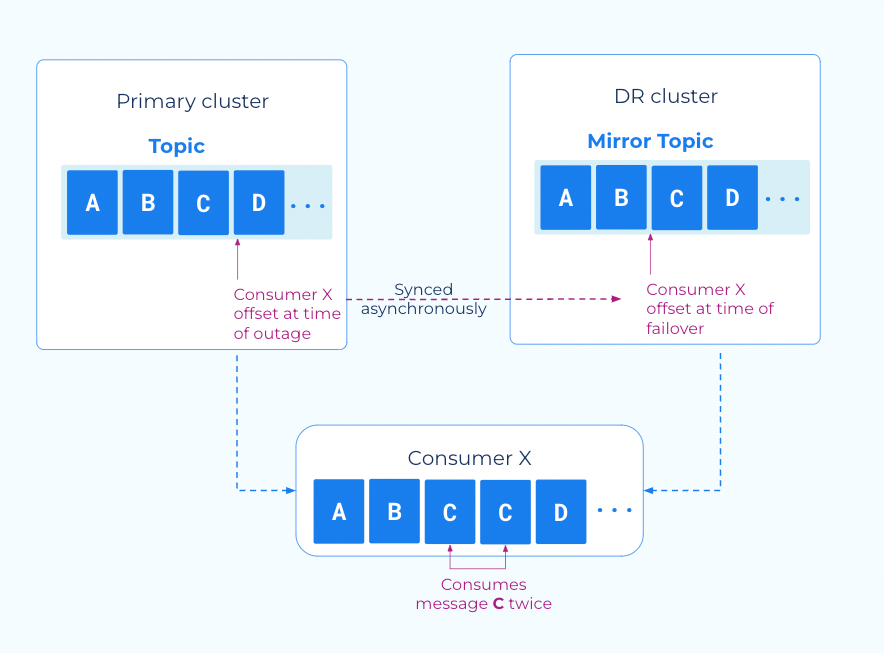
Consumers might receive a small number of duplicate messages during failover because consumer offset sync is asynchronous. The most recent offsets committed to the source cluster might not yet be on the destination cluster when the outage occurs.
Cluster Linking consumer offset sync gives your applications a low RTO by
enabling consumers to restart close to where they left off. However, offsets
are written to the destination cluster every consumer.offset.sync.ms
milliseconds (default 30 seconds, configurable as low as one second). When an
outage occurs, any offsets committed after the last sync are not on the
destination cluster, causing consumers to re-read those messages.
Tip
If you are using AWS Lambda, use the custom consumer group ID feature with Confluent Cloud clusters when performing disaster recovery.
Producers and consumers must be tolerant of a small RPO
During failover, a small number of messages might not have been replicated to the DR cluster because Cluster Linking replication is asynchronous. Producer and consumer applications must tolerate this potential data gap.
When producers produce messages to the source cluster, they receive an acknowledgement from the source cluster before the cluster link replicates those messages to the DR cluster. If an outage occurs during this window, Confluent Cloud loses unreplicated messages.
You can monitor your exposure to this through the mirroring lag in the Metrics API, CLI, REST API, and Confluent Cloud Console.
Active/active tutorial
For some advanced use cases, multiple regions must be active at the same time. In Kafka, an “active” region is any region that has active producers writing data to it. These architectures are called “active/active.” While these architectures typically use two regions, the pattern is straightforward to extend to three or more active regions.
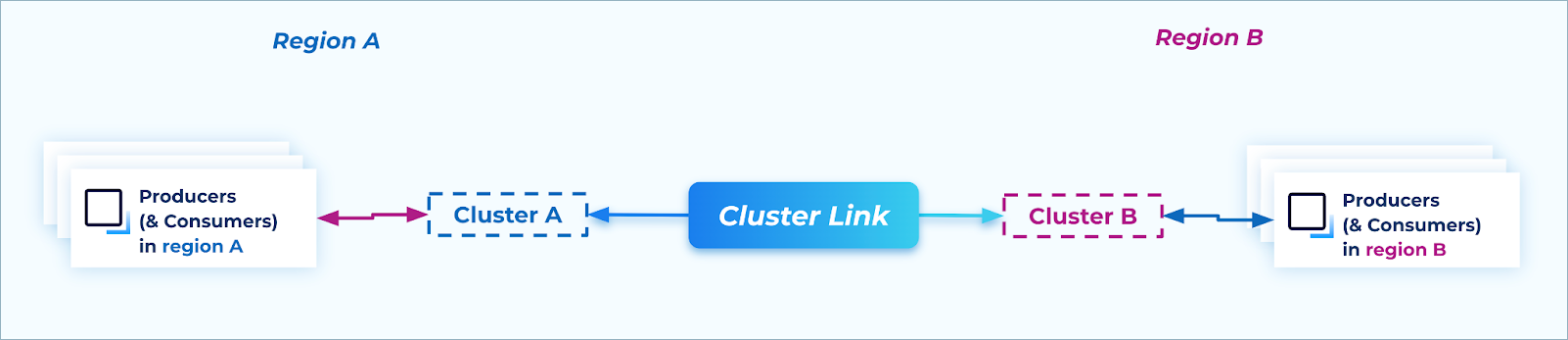
Active/active: During steady state, producers and consumers are active in multiple regions
Benefits of active/active architecture
Benefits of an active/active architecture include:
Latency: If client applications are geographically dispersed to be closer to the customers they serve, the applications can connect to the nearest cloud region to minimize produce and consume latency. This can achieve lower latency reads and writes than having a single active region, which could be far away from clients in other regions.
- Availability: Because producers and consumers are active in multiple regions at all times,
if any one cloud region has an outage, the other region(s) are unaffected. So, a cloud region outage only affects a subset of traffic, which enables you to achieve even higher availability overall than the active/passive pattern.
Flexibility: Because Kafka clients can produce or consume to any region at a given time, they can be moved between regions independently. Clients do not have to be aware of which region is “active” and which is “passive.” This is different from the active/passive pattern, which requires the producers and consumers to move regions at the same time, coordinated with the
failoverorpromotecommand, to write to and read from the correct topics. The flexibility of the active/active architecture can make it easier to deploy Kafka clients at scale.Extensibility: After you implement an active/active architecture, you can add new regions to the architecture with no changes to existing producers, consumers, or cluster links.
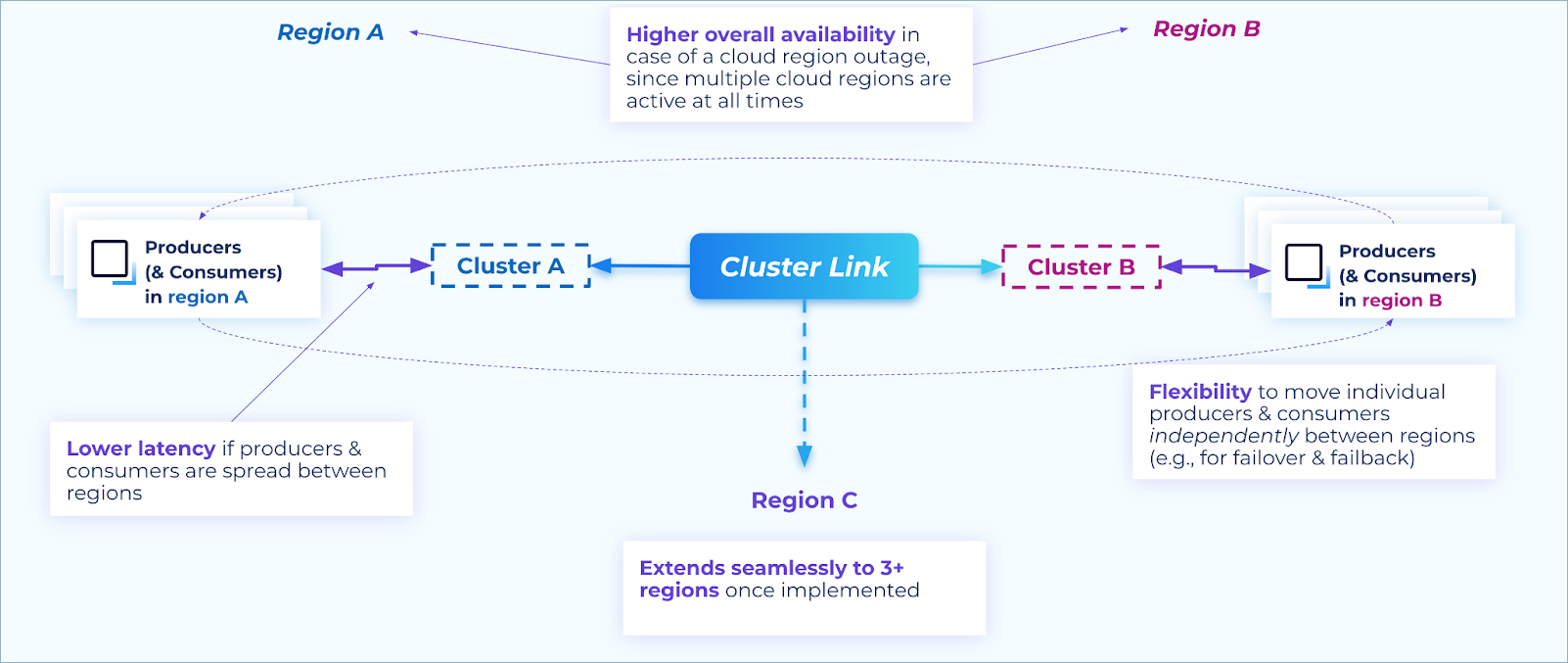
Benefits of an active/active architecture
Note
Active/active is not an extension of active/passive. Active/active has different requirements from active/passive, and transitioning from active/passive to active/active requires planned changes.
Requirements and constraints for active/active architecture
Adopting an active/active architecture for Kafka comes with implementation requirements for the following tasks:
Create writable topics
For each topic adopting an active/active setup, each region must have one writable (normal) topic. Producers always produce to that topic when connected to that region, which means that if a producer moves to a different region, it produces to a different topic.
As a best practice, give these writable topics the same name (for example,
numbers in the image below), so that producers can always use the same topic
name in all regions. This can also simplify security rules and schemas.
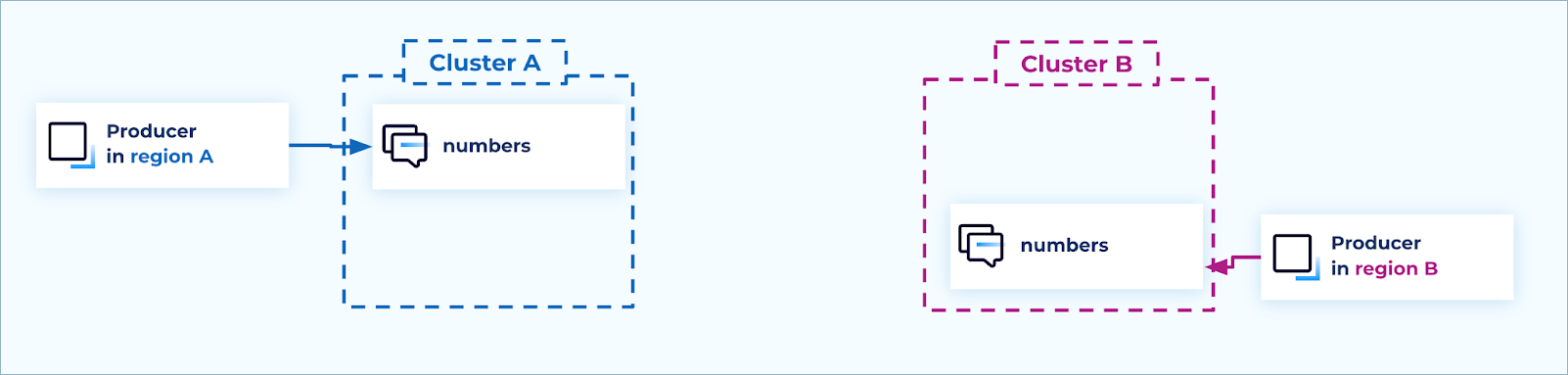
Create writable topics
Alternatively, topics can be named for the region that they are writable in, for
example, us-east-1.numbers and us-west-2.numbers. This approach requires
producers to be aware of the region they are producing to, and use the correct
topic name.
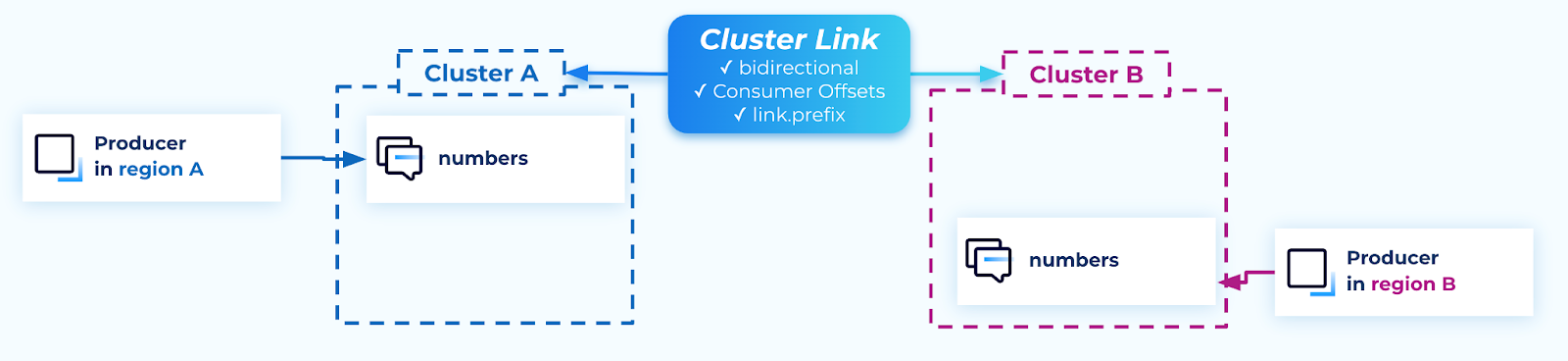
Create cluster links
A cluster link in bidirectional mode is required between each pair of clusters.
If there are only two clusters, then one cluster link suffices. If there are three regions and clusters, then three cluster links are required: A to B, B to C, and A to C.
A cluster link’s mode cannot be changed after you create it. A cluster link must be created with bidirectional mode from the outset.
If the writable topics have the same name on all clusters (as recommended), then
create the cluster links with cluster.link.prefix, which adds a prefix to
the name of mirror topics created with the cluster link. As a best practice, set the prefix to the name of
the region that the topic originated from, followed by a delimiter, for example: us-west-2..
When creating a bidirectional cluster link, if you want the topics to have the same name on both clusters, you must set cluster.link.prefix on both clusters.
Use a distinct value of cluster.link.prefix on each cluster (for example, a name that identifies the originating cluster or region) so mirror topic names don’t collide, especially when you add more than two clusters.
Cluster links should enable consumer offset syncing, so consumer groups have their offset present in all regions when they choose to fail over or fail back.
For a bidirectional cluster link, you must enable consumer offset syncing on both clusters when creating each cluster’s cluster link object.
If you want ACL syncing, create a dedicated cluster link for that, as explained in the security section.
Cluster links
Create mirror topics
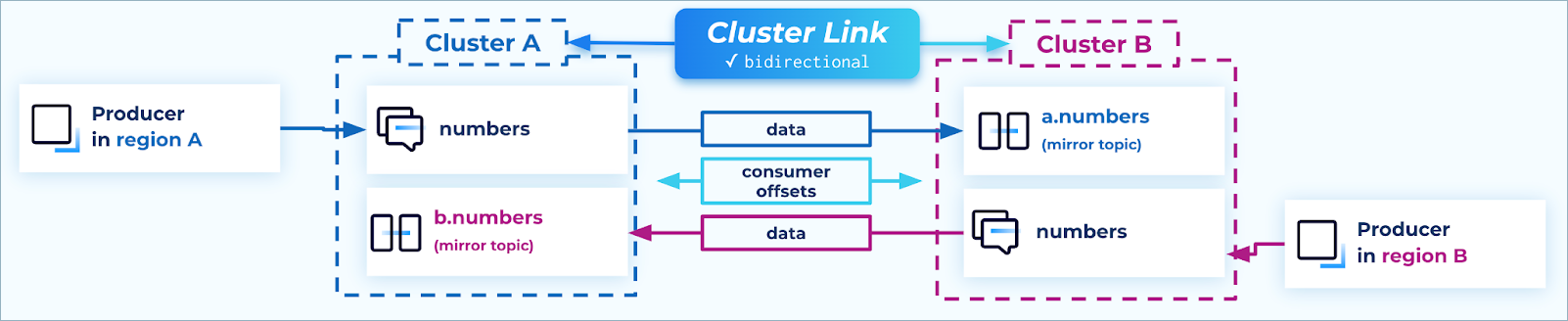
The cluster links should be used to create mirror topics for every writable topic on each cluster. This way, each cluster in the active/active architecture has the full set of data.
The cluster link cluster.link.prefix setting creates mirror topics with a prefix, so their names don’t clash with the name of the writable topic.
For each topic, data flows in only one direction (source topic → mirror topic).
Mirror topics
Set up consumer groups
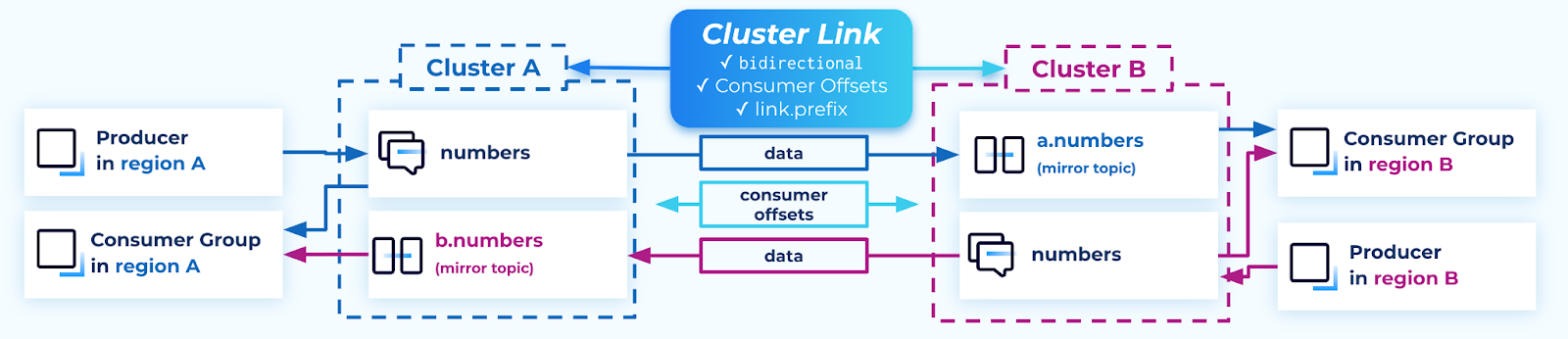
For a consumer group to receive the full set of data, it should consume across both topics. This can be done natively in Kafka in two ways:
Specify a list of topic names to consume from.
Specify a topic name pattern, which uses regex matching to find the topics to consume from.
The advantage of using a regex pattern is that if you extend the active/active architecture to three or more clusters, consumers pick up the topics from new clusters automatically, without needing a configuration change.
Be careful when constructing the regex to not accidentally craft a regex that could include other, unrelated topics.
For example, the regex ^([a-z0-9-]*\.)?numbers$ is safer than the regex .*numbers because the latter could also include
topic names such as east.private.numbers or east.numbers-processed.
When consumer offset syncing is enabled on a bidirectional cluster link, the consumer offsets flow in both directions: from source topic → mirror topic and from mirror topic → source topic.
Consumer group names must be globally unique, so that their offsets can be synced to other clusters.
In Kafka, each consumer group consumes from one cluster at a time: a given consumer group can connect to either cluster A or cluster B, but not both at the same time.
If you need to move a consumer group from cluster A to cluster B, make sure it is shut down on cluster A before restarting it on cluster B.
Consumer groups
Important considerations for consumers when using keyed messages:
If your producers produce messages with keys, and your consumers rely on Kafka to maintain ordering per key, an active/active architecture requires a slightly different strategy.
Normally in Kafka, when only one topic is in play, all records with a given key are always in the same partition. A single partition has static (fixed) ordering of messages. This ensures that all consumer groups consume the records for a given key in the same order: the order in which they’re stored in that partition in Kafka.
This is different when multiple topics are in play. Two messages with the same key could end up in different partitions: if message M1 with key K is produced to cluster A, and message M2 with key K is produced to cluster B, then M1 and M2 are in different topics and thus different partitions.
Because they are in different partitions, consumers cannot rely on the Kafka partition ordering to keep the messages in order. Some consumer groups might consume M1 and then M2, whereas others might consume M2 and then M1. Kafka does not guarantee ordering across multiple partitions.
If a consumer group needs to rely on ordering of messages in its processing logic, it is best to use the message timestamp to determine the order in which messages were produced. The message timestamp is assigned by Kafka when the message is originally produced, and is preserved by Cluster Linking.
For example, the consumer group could keep a high watermark of the latest timestamp it has seen for each key. If a message comes in with a timestamp before the high watermark for its key, then that message can be either ignored or processed with special out-of-order handling.
In this strategy, ensure the high watermark is across the consumer group, not the individual consumer instance, because partitions for the same key can be assigned to different consumer instances.
Set up security
If you use role-based access control (RBAC) role bindings, you must create the same role binding in each cluster, and modify or delete it in each cluster. Role bindings are not synced between clusters by Cluster Linking.
If using ACLs, you can choose from two possible approaches to sync ACLs between clusters with Cluster Linking:
If the cluster links in the active/active architecture do not use prefixing (not common), then the cluster link ACL sync feature can be enabled on them. When ACLs are created on a cluster for principal X to produce or consume from topics A and B, that ACL is synced to the other cluster.
If using cluster link prefixing (more common in active/active), then ACL sync cannot be enabled on the cluster links that are used for data replication. No safe, deterministic way exists to add a prefix to all ACLs, so Cluster Linking disables this combination of features. However, if your ACL scheme fits, an extra cluster link can be created with the sole purpose of syncing ACLs (and no data).
For example, an ACL that allows a principal to read or write from topics
numbers,a.numbers, andb.numberscould be synced with this ACL-specific cluster link so that the principal has access to all topics across both clusters.
Failover and failback process
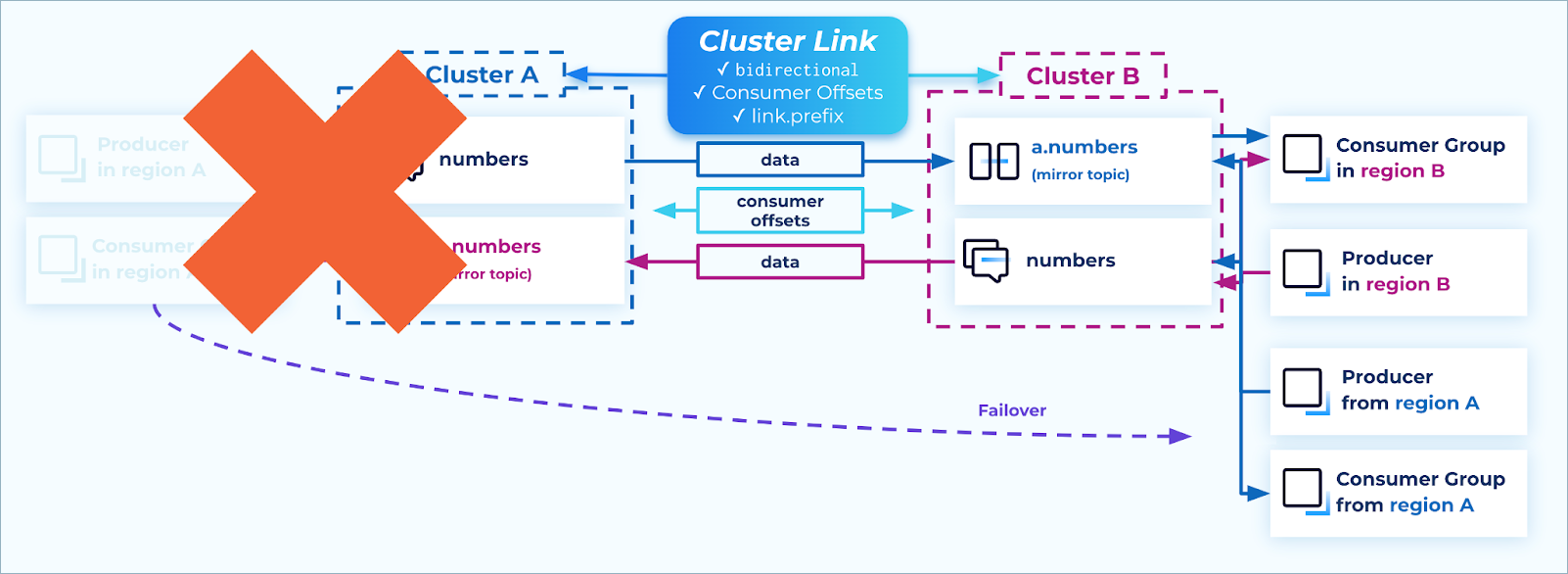
The advantage of the active/active pattern shines during failover and failback. Because any producer can produce to either side and any consumer can consume from either side, moving a Kafka client from one cluster to the other is as simple as stopping it on one cluster and starting it on the other. Unlike the active/passive pattern, no mirror topics need to be promoted, and no Cluster Linking APIs need to be called.
Fail over
When a disaster strikes, shut down any instances of producers and consumers that are still running in the failed region, and restart them in the DR region. In that way, the full topology is restored, from all producers to all consumer groups, and the business has averted an outage.
Failover
Do not call failover on the mirror topics, and do not delete the cluster
links. Leaving the mirroring relationship intact allows for easy data recovery
and failback.
The client requirements described in Requirements for active-active deployments (manual switchover) apply when you fail clients over between regions.
Data recovery
Depending on the failure, it’s possible that some messages were only on the
Confluent cluster in the region that had an outage, and had not yet been
mirrored to the other region at the time of failover. For example, if the
networking between regions A and B suddenly disappeared, some small number of
records might only be on cluster A’s numbers topic and not yet on cluster B’s
a.numbers topic. While this is uncommon in the cloud, because multi-zone
Confluent clusters are spread across three datacenters with redundant networking,
it is nonetheless a possibility that enterprises might prepare for.
When the outage is over, the cloud region, its services, and the Confluent cluster recover. The Confluent cluster still has those records available. At this point, the cluster link resumes functioning, and streams the messages to the other cluster (for example, from numbers to a.numbers). From there, the messages flow to the consumer groups.
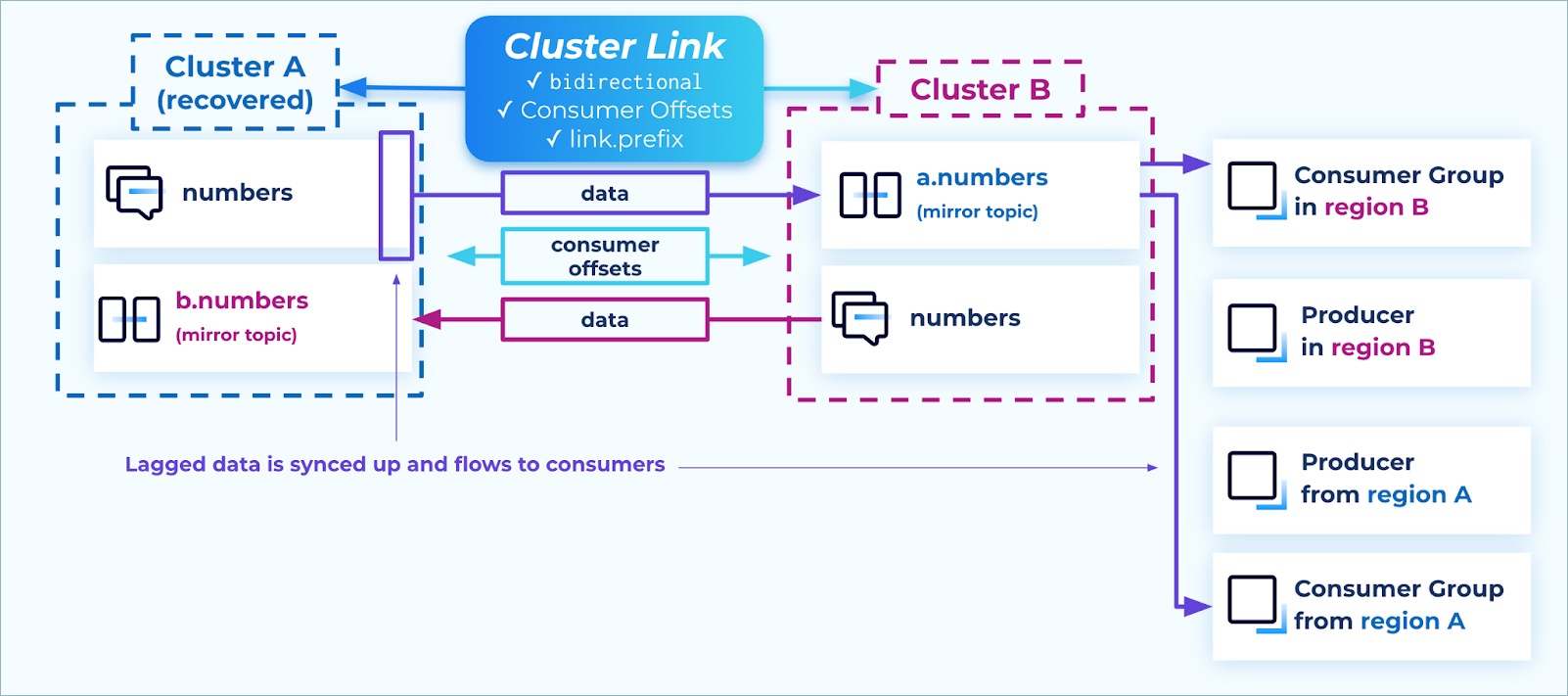
Recovery
If you want to control the timing of when this happens, you can pause the mirror topics on cluster B, and only resume them when you want the data to catch up.
Fail back
Similar to the data recovery stage, failing back also takes advantage of the
cluster links which were left intact during the outage. All data that had been
produced to the surviving cluster during the outage is now synced to the
recovered cluster, for example, from cluster B’s numbers topic to cluster A’s
b.numbers topic.
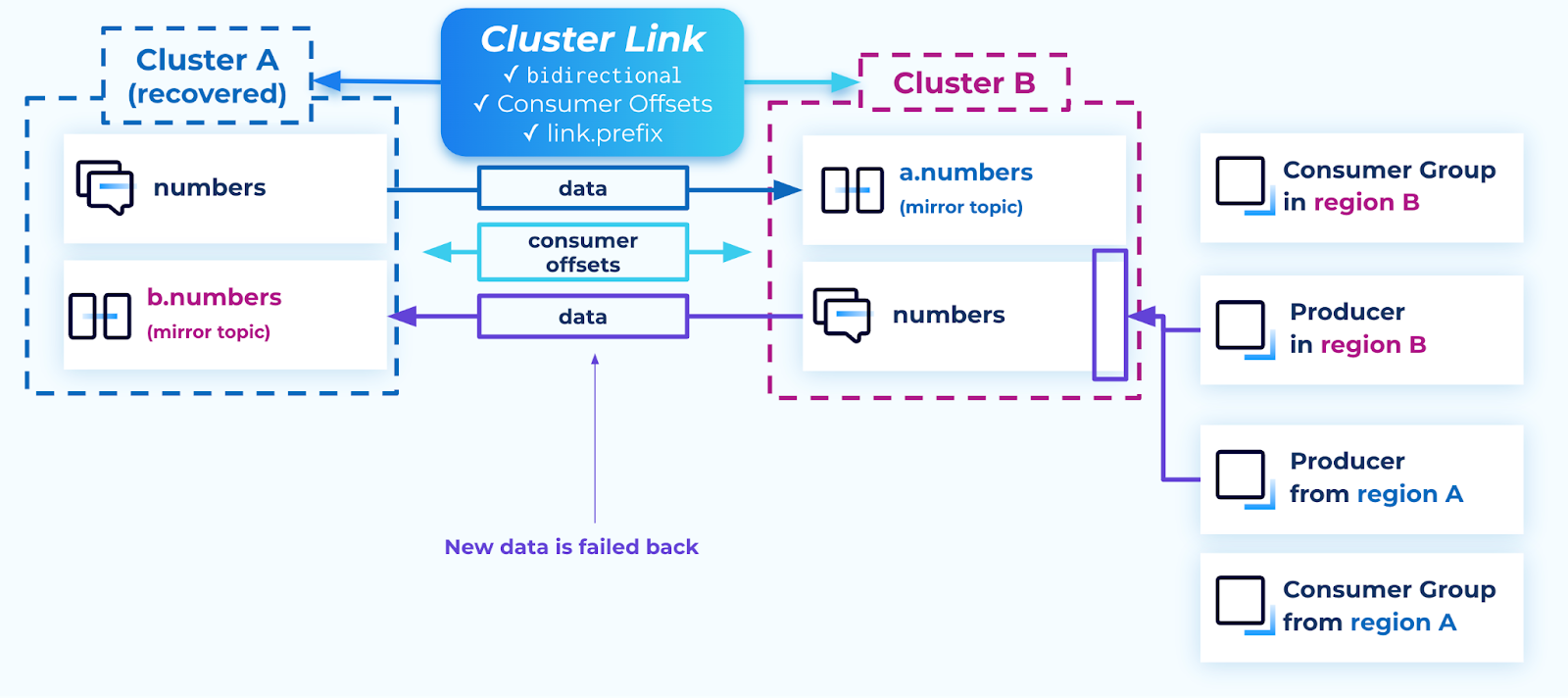
Failback
Just as with failover, Kafka clients can be failed back by stopping them in one region and restarting them connected to the other cluster. An advantage of the active/active pattern is that each producer can be moved at will, unlike the active/passive pattern, where the producers must be moved in a batch, topic by topic, because only one side is writable at a time.
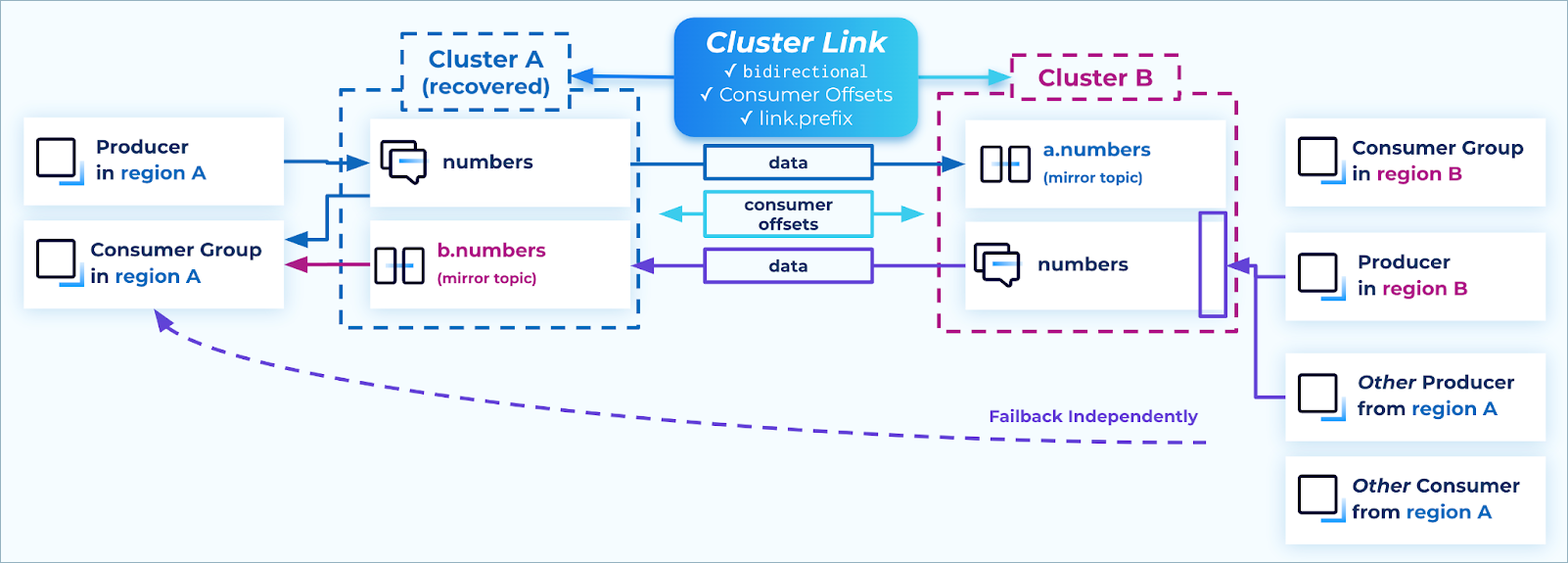
Failback independently
Consumer groups can consume duplicate messages during the failback if their consumer offsets are clamped. To prevent this, ensure that the following conditions are met before failing back:
Either the mirror topic
lag=0or the mirror topiclag < consumer group lag, andEnough time has passed for the consumer group’s offsets to be synced. This is configured on the cluster link
consumer.offset.sync.mssetting, which defaults to 30 seconds. At least one whole time interval needs to have passed since the consumer group last committed its offsets to be sure that the offsets have been synced.
Connectors and sharing data in active/active setups
Often, external systems need to consume data from a Confluent cluster, either through a sink connector or through a cluster link to another party’s cluster. Sometimes, these data pipelines also need as high availability as possible.
To achieve high availability with external systems in an active/active architecture, stream each of the writable topics to the external systems.
Connectors: Create a sink connector on each cluster from each writable topic to the external system.
Confluent clusters: Create a cluster link from each cluster to the external cluster, including only the writable topics from the source clusters.
Sharing the writable topics from each cluster ensures:
All data across all regions is shared during steady state.
During an outage, the data system continues to receive new data without needing manual intervention, regardless of which region the outage happened in.
After an outage, any lagged data gets caught up automatically.
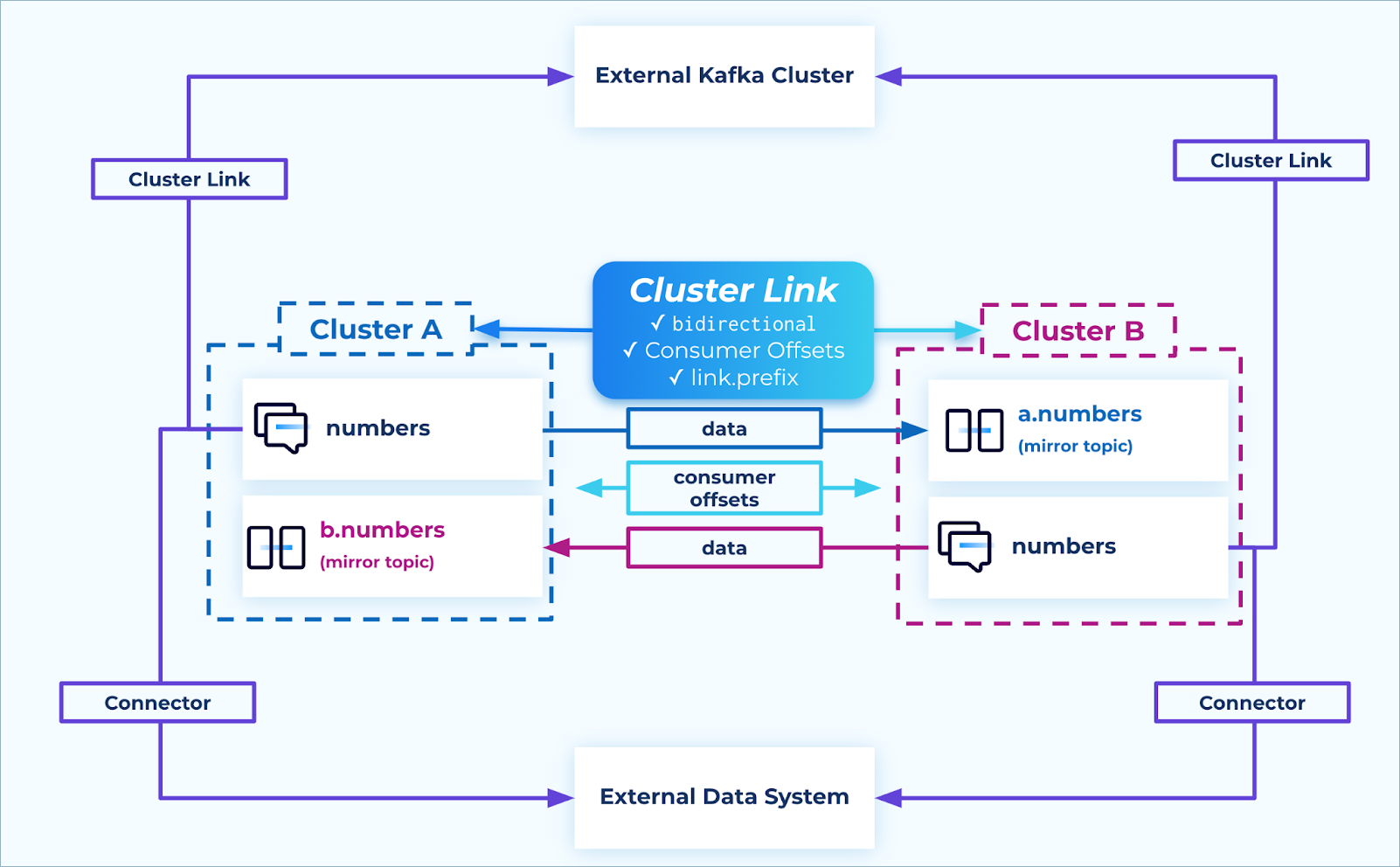
Connectors and data sharing