Confluent Confluent
Documentation Access the Tableflow Iceberg REST Catalog over AWS PrivateLink
Confluent Developer Marketplace Get started
Home Confluent Cloud Confluent Platform Connectors Clients
  1. Home
  2. Cloud
  3. Manage Topics in Confluent Cloud
  4. Tableflow
  5. Tableflow

Access the Tableflow Iceberg REST Catalog over AWS PrivateLink

The Tableflow Apache Iceberg™ REST Catalog (IRC) is accessed by query engines, such as Apache Spark and Trino, to query data. External catalogs, such as AWS Glue, access it for catalog federation. If your analytics run in VPCs without internet access, or your security policies require traffic to the IRC to remain on a private network, you can reach the catalog over AWS PrivateLink.

This topic shows how to make the IRC reachable from your AWS VPC over AWS PrivateLink, so that query engines and federated catalogs in that VPC can use Tableflow tables without a public endpoint.

Note

Ingress private network connectivity to the Tableflow catalog is available on AWS only. Azure and Google Cloud aren’t supported. For an overview and limitations, see Use Private Networking with Tableflow in Confluent Cloud.

How it works

Private access to the Tableflow IRC is established through an ingress PrivateLink Gateway in Confluent Cloud, an interface VPC endpoint, and a private DNS name. Query engines and AWS Glue use an endpoint in your VPC and a DNS name that resolves only within that VPC. They connect to the private hostname as they would to the public catalog endpoint, while data files are read directly from your storage bucket.
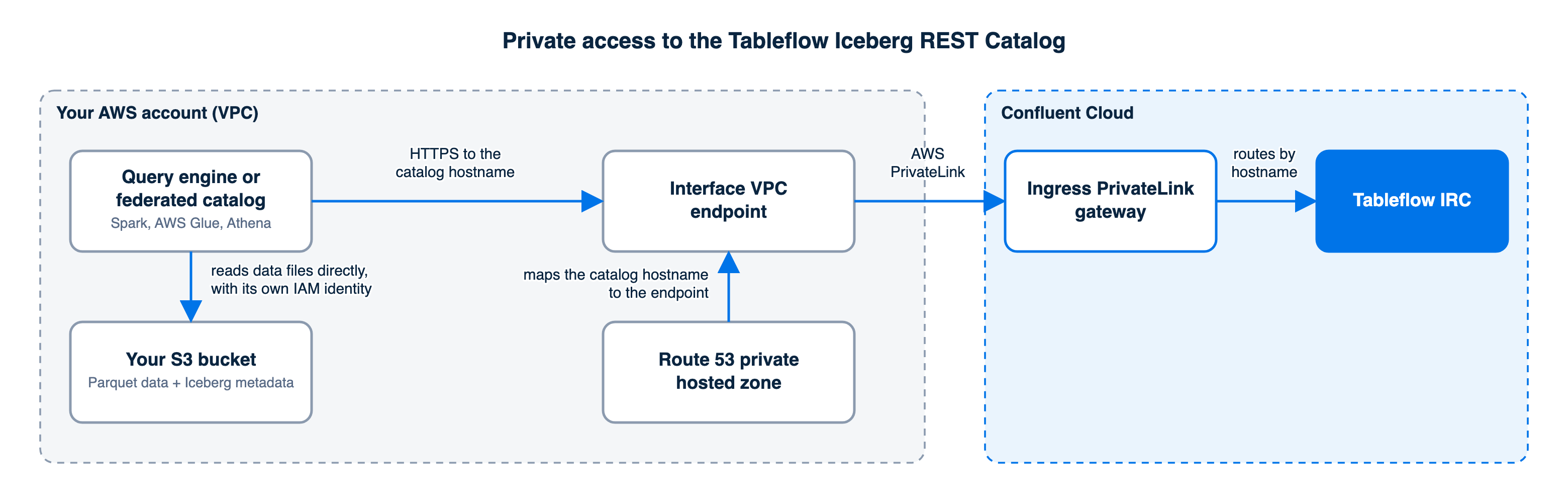
Flow from a query engine or federated catalog in your VPC through an interface VPC endpoint and the ingress PrivateLink gateway to the Tableflow Iceberg REST Catalog

At a high level, you set up private access with the following steps:

  1. Create an ingress PrivateLink Gateway in your Confluent Cloud environment, in the AWS Region of your VPC. Confluent Cloud publishes the Tableflow catalog as an AWS PrivateLink endpoint service.

  2. Create an interface VPC endpoint in your VPC that connects to that service. The endpoint gets one private IP address in each subnet you select.

  3. Create an access point on the gateway that registers your VPC endpoint. Confluent Cloud accepts the endpoint connection and assigns the access point a DNS domain.

  4. Create a Route 53 private hosted zone attached to your VPC, named after the DNS domain, with a record that resolves the private catalog hostname to your VPC endpoint.

  5. Point your query engine or federated catalog at the private catalog hostname, tableflow-<accesspointId>.<region>.aws.accesspoint.glb.confluent.cloud, where <accesspointId> is your access point ID with the hyphen removed. For example, ap-123456 becomes ap123456. The gateway routes requests for this hostname to the Tableflow IRC.

Note

Tableflow tables are read-only for query engines, and all writes go through Tableflow.

Prerequisites

Before you begin, ensure that you have the following:

  • A Confluent Cloud cluster in AWS with at least one Tableflow-enabled topic that uses your own storage in Iceberg format and is in the Running phase. For steps, see Tableflow Quick Start with Iceberg Tables Using Your Storage and AWS Glue in Confluent Cloud.

  • An AWS VPC in the region where you want the gateway, with a private subnet in each availability zone you use, and with DNS hostnames and DNS resolution enabled.

  • Permissions in that AWS account to create interface VPC endpoints and Route 53 private hosted zones.

  • A client host in a private subnet of the VPC, for verification and for Spark. For example, use an EC2 instance that you manage through AWS Systems Manager Session Manager.

  • A Tableflow API key and secret for the catalog. For steps, see Tableflow Quick Start with Iceberg Tables Using Your Storage and AWS Glue in Confluent Cloud.

  • Your Confluent Cloud organization ID and environment ID, which form part of the catalog URI.

  • For the CLI instructions, the Confluent CLI, logged in, and the AWS CLI.

Step 1: Create the ingress PrivateLink Gateway

Create the gateway in the environment that contains your cluster. Each step in this procedure includes the Confluent Cloud Console or AWS console instructions and the matching CLI commands.

  1. In the environment that contains your cluster, click Network management.

  2. On the For serverless products tab, click + Add gateway configuration. The ingress gateway is managed on this tab for every cluster type.

  3. Keep PrivateLink selected as the gateway type. In the Set up connections to/from Confluent Cloud section, find the From your VPC or VNet to Confluent Cloud card and click + Create configuration. The Configure gateway pane opens.

  4. On the Gateway tab, enter a Gateway name, keep aws as the cloud provider, and select the Region of your VPC in Region.
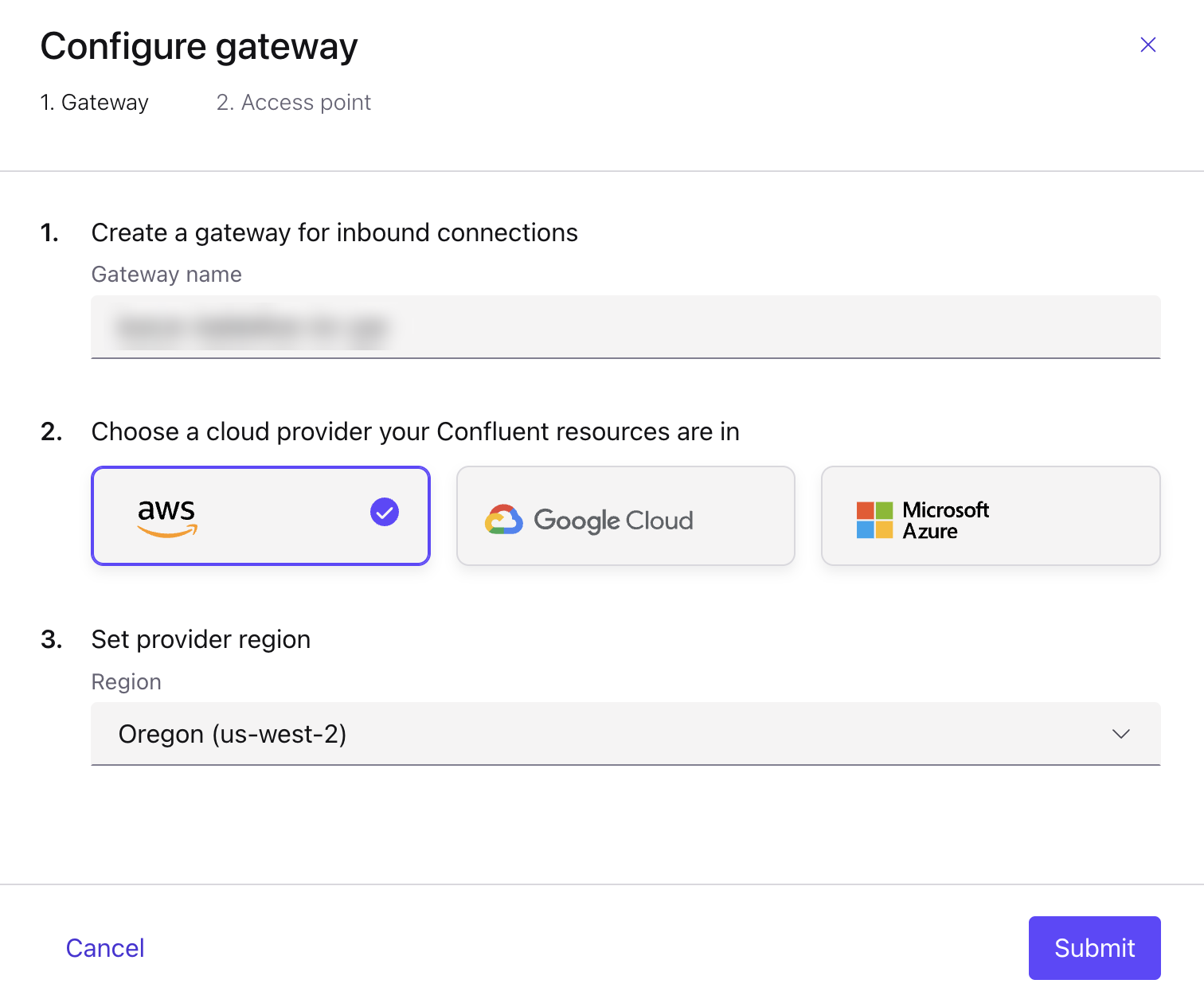
    The Gateway tab of the Configure gateway pane with the gateway name, the aws cloud provider, and the region
  5. Click Submit. The pane moves to the Access point tab and the gateway status is Created.

  6. Copy the PrivateLink Service ID shown in the pane. You use it in Step 2.
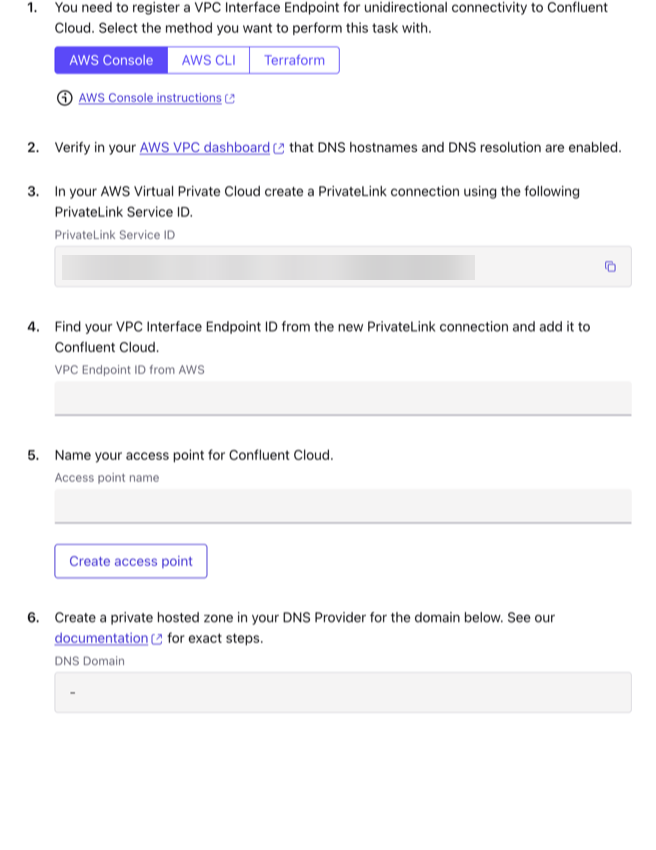
    The Access point tab of the Configure gateway pane with the PrivateLink Service ID
confluent network gateway create my-ingress-gateway \
  --cloud aws --region <region> --type ingress-privatelink \
  --environment <env-id>

confluent network gateway describe <gateway-id> --environment <env-id>
# note the AWS VPC Endpoint Service Name

Step 2: Create the interface VPC endpoint

Each gateway needs its own interface VPC endpoint in your VPC, created against the PrivateLink Service ID from Step 1. The service ID is the same for every gateway in an environment and Region. Leave private DNS disabled, because you create the DNS records yourself in Step 4. The endpoint stays in Pending acceptance until you create the access point in Step 3.

  1. Open VPC, then PrivateLink and Lattice, then Endpoints, and click Create endpoint.

  2. Under Service settings, enter the PrivateLink Service ID in Service name and click Verify service.

  3. Select your VPC and one private subnet in each availability zone you use.

  4. Select a security group that allows inbound TCP 443 from your client hosts.

  5. Clear Enable DNS name if it is selected, then click Create endpoint.

  6. Copy the VPC endpoint ID. After the endpoint becomes Available in Step 3, copy the first entry under DNS names on the endpoint’s Details tab. You use it in Step 4.

aws ec2 create-vpc-endpoint \
  --vpc-id <vpc-id> --vpc-endpoint-type Interface \
  --service-name <privatelink-service-id> \
  --subnet-ids <private-subnet-ids> \
  --security-group-ids <sg-allowing-443-from-clients> \
  --no-private-dns-enabled

Step 3: Create the access point

Create an access point on the gateway that registers your VPC endpoint.

  1. Continue on the Access point tab of the Configure gateway pane. To return to it later, open Network management, and on the For serverless products tab, select your gateway, open the Access points tab, and click Create access point.

  2. Paste the endpoint ID from Step 2 in VPC Endpoint ID from AWS.

  3. Enter an Access point name and click Create access point.
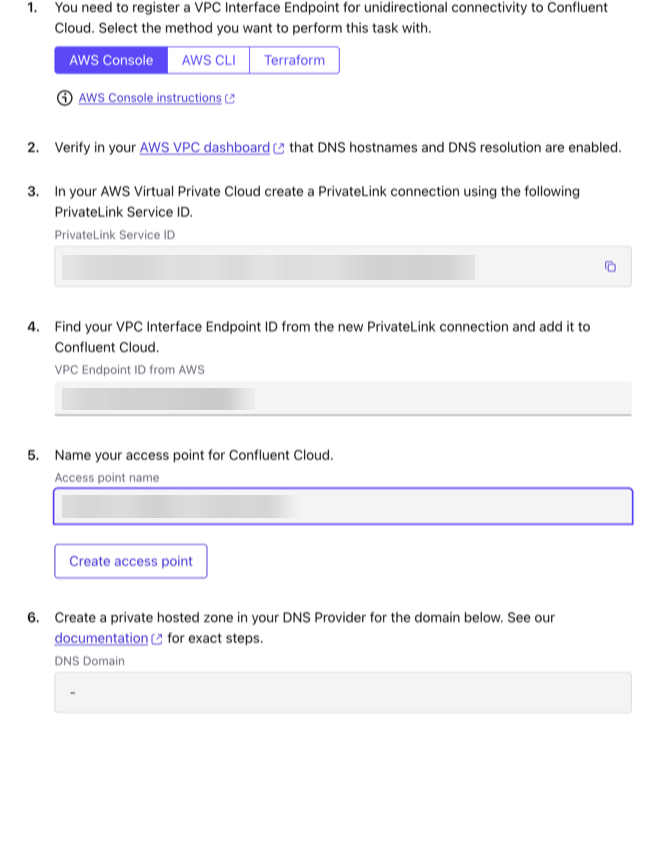
    The Access point tab with the VPC endpoint ID and the access point name entered
  4. Wait for Access point successfully created. The access point shows Ready, and the pane shows the DNS Domain, for example ap123456.us-west-2.aws.accesspoint.confluent.cloud. Copy it for Step 4.
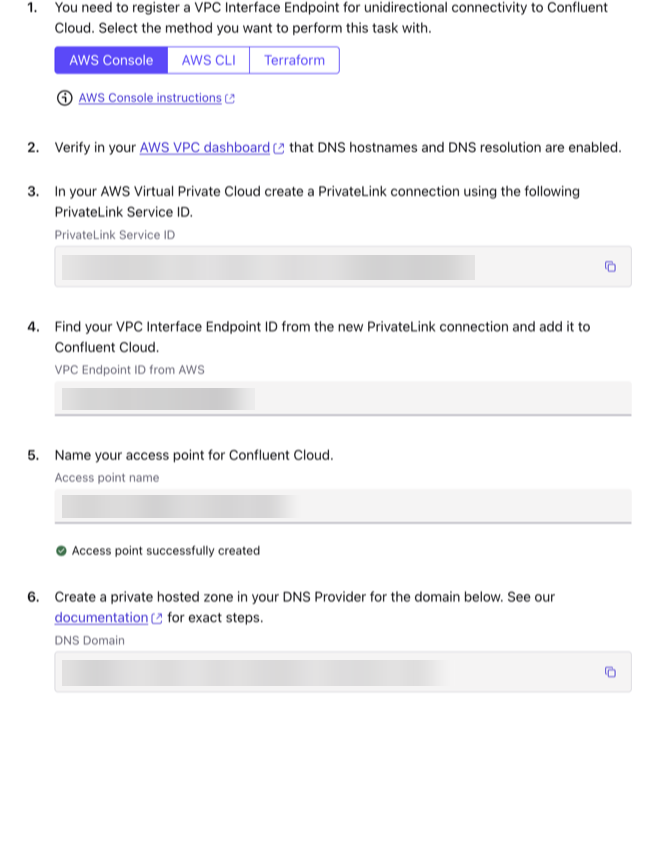
    The Access point tab after the access point is created, showing the DNS Domain
  5. In the AWS console, confirm that the VPC endpoint status has changed from Pending acceptance to Available. This takes a minute or two.

  6. Click Finish. On Network management, the gateway status moves from Provisioning to Ready.

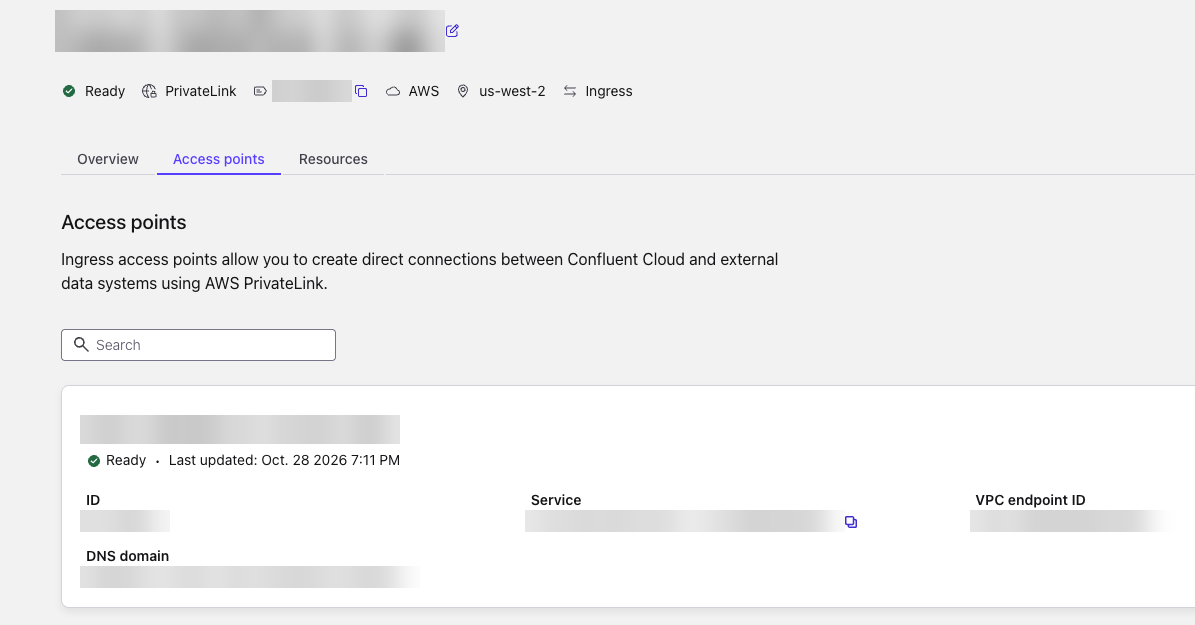
    The Access points tab of the gateway showing the access point in the Ready state with its ID, VPC endpoint ID, and DNS domain
confluent network access-point private-link ingress-endpoint create \
  --cloud aws --gateway <gateway-id> --vpc-endpoint-id <vpce-id> \
  --environment <env-id>

confluent network access-point private-link ingress-endpoint describe \
  <access-point-id> --environment <env-id>
# note the DNS Domain

Determine your catalog endpoint

Every client setting in the remaining steps uses values derived from the access point. Build them once and keep them at hand.

Value

Format

Example

Access point ID (Step 3)

ap-xxxxxx

ap-123456

DNS domain (Step 3)

<accesspointId>.<region>.aws.accesspoint.confluent.cloud, where <accesspointId> is your access point ID with the hyphen removed. For example, ap-123456 becomes ap123456.

ap123456.us-west-2.aws.accesspoint.confluent.cloud

<catalog-hostname>

tableflow-<accesspointId>.<region>.aws.accesspoint.glb.confluent.cloud. This is the DNS domain with tableflow- in front (hyphen, not dot) and glb. inserted before confluent.cloud.

tableflow-ap123456.us-west-2.aws.accesspoint.glb.confluent.cloud

<catalog-uri>, the Iceberg REST base URL

https://<catalog-hostname>/iceberg/catalog/organizations/<org-id>/environments/<env-id>

https://tableflow-ap123456.us-west-2.aws.accesspoint.glb.confluent.cloud/iceberg/catalog/organizations/<org-id>/environments/<env-id>

The private catalog hostname is published in public DNS only as a pointer to your DNS domain. It resolves to an address only inside VPCs associated with your private hosted zone, so the catalog is only reachable over PrivateLink.

The same hostname and URI serve every Tableflow cluster in the environment. The cluster ID appears only as the namespace in catalog calls.

Step 4: Create the private hosted zone

In Route 53, the AWS DNS service, create a private hosted zone named exactly as the DNS domain, and add one tableflow CNAME record in it. The zone is needed because public DNS answers <catalog-hostname> with a CNAME to tableflow.<accesspointId>.<region>.aws.accesspoint.confluent.cloud, a name that has no public records. The private zone resolves that name only inside your VPC, and it returns the DNS name of your VPC endpoint. Keep the VPC on the Amazon-provided resolver so that the first, public lookup still works.

  1. Open Route 53, then Hosted zones, and click Create hosted zone.

  2. Set Domain name to the DNS domain from Step 3, for example ap123456.us-west-2.aws.accesspoint.confluent.cloud.

  3. Set Type to Private hosted zone, select the Region and VPC ID of the VPC that contains the endpoint, and click Create hosted zone.

  4. Click Create record. Set Record name to tableflow, Record type to CNAME, and Value to the VPC endpoint DNS name from Step 2. Set TTL to 60 seconds and click Create records.

ZONE=$(aws route53 create-hosted-zone --name <dns-domain> \
  --caller-reference "tf-irc-$(date +%s)" \
  --vpc VPCRegion=<region>,VPCId=<vpc-id> \
  --hosted-zone-config PrivateZone=true \
  --query HostedZone.Id --output text)

aws route53 change-resource-record-sets --hosted-zone-id $ZONE \
  --change-batch '{
  "Changes": [{"Action": "UPSERT", "ResourceRecordSet": {
    "Name": "tableflow.<dns-domain>", "Type": "CNAME", "TTL": 60,
    "ResourceRecords": [{"Value": "<vpce-dns-name>"}]}}]}'

The Confluent Cloud networking documentation uses a wildcard record (*) in this zone to cover every service behind the access point. A tableflow record covers the Tableflow IRC only.

Step 5: Verify the connection from your VPC

Run the following commands from your client host in the VPC. The first command checks DNS. The second command requests a token. The third command lists the catalog namespaces through the private path.

getent hosts <catalog-hostname>

TOKEN=$(curl -s -X POST <catalog-uri>/v1/oauth/tokens \
  -d grant_type=client_credentials -d scope=catalog \
  -d client_id=<tableflow-api-key> \
  --data-urlencode client_secret=<tableflow-api-secret> \
  | jq -r .access_token)

curl -s -H "Authorization: Bearer $TOKEN" <catalog-uri>/v1/namespaces

The first command prints private IP addresses from your subnets, one for each subnet of the endpoint. The third command prints a JSON list of namespaces that includes your cluster ID. If you run the first command from a host outside the VPC, it returns nothing, because public DNS answers the hostname only with the CNAME to the access point domain, so the catalog has no public address.

Query with Spark

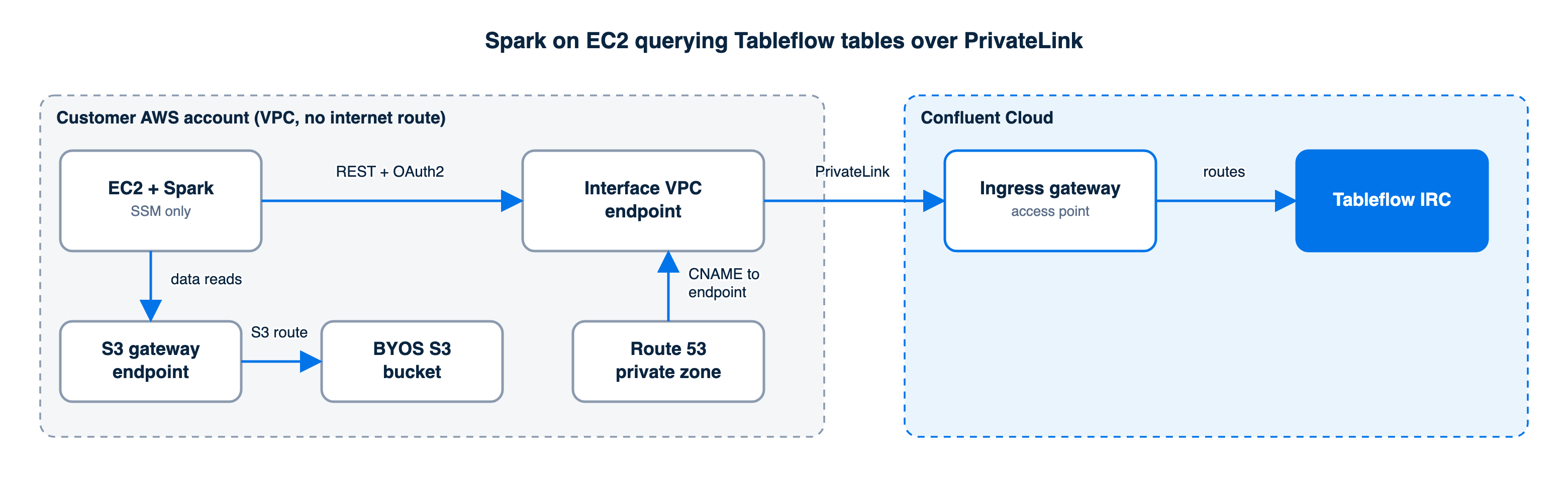
Spark on an EC2 instance in a VPC without an internet route querying Tableflow tables through the interface VPC endpoint and ingress gateway, and reading data files through an S3 gateway endpoint

On your client host, use the Iceberg Spark runtime and AWS bundle, for example iceberg-spark-runtime-3.5_2.12 and iceberg-aws-bundle version 1.8.1. Place the JAR files in $SPARK_HOME/jars, because a VPC without an internet path can’t download them through --packages. The IAM role of the host needs s3:GetObject, s3:ListBucket, and s3:GetBucketLocation on the storage bucket.

spark-sql \
  --conf spark.sql.extensions=org.apache.iceberg.spark.extensions.IcebergSparkSessionExtensions \
  --conf spark.sql.catalog.tf=org.apache.iceberg.spark.SparkCatalog \
  --conf spark.sql.catalog.tf.type=rest \
  --conf spark.sql.catalog.tf.uri=<catalog-uri> \
  --conf spark.sql.catalog.tf.credential=<tableflow-api-key>:<tableflow-api-secret> \
  --conf spark.sql.catalog.tf.oauth2-server-uri=<catalog-uri>/v1/oauth/tokens \
  --conf spark.sql.catalog.tf.scope=catalog \
  --conf spark.sql.catalog.tf.io-impl=org.apache.iceberg.aws.s3.S3FileIO \
  --conf spark.sql.catalog.tf.client.region=<region>

Then run queries such as the following:

SHOW NAMESPACES IN tf;
SELECT * FROM tf.`<cluster-id>`.<topic-name> LIMIT 10;

AWS Glue catalog federation over PrivateLink

Catalog federation through AWS Glue and AWS Lake Formation uses the private path when the Glue connection is attached to a private subnet in your VPC, because Glue then calls the catalog from network interfaces inside the VPC. Follow the catalog federation section of Integrate Tableflow with the AWS Glue Data Catalog with the following changes.
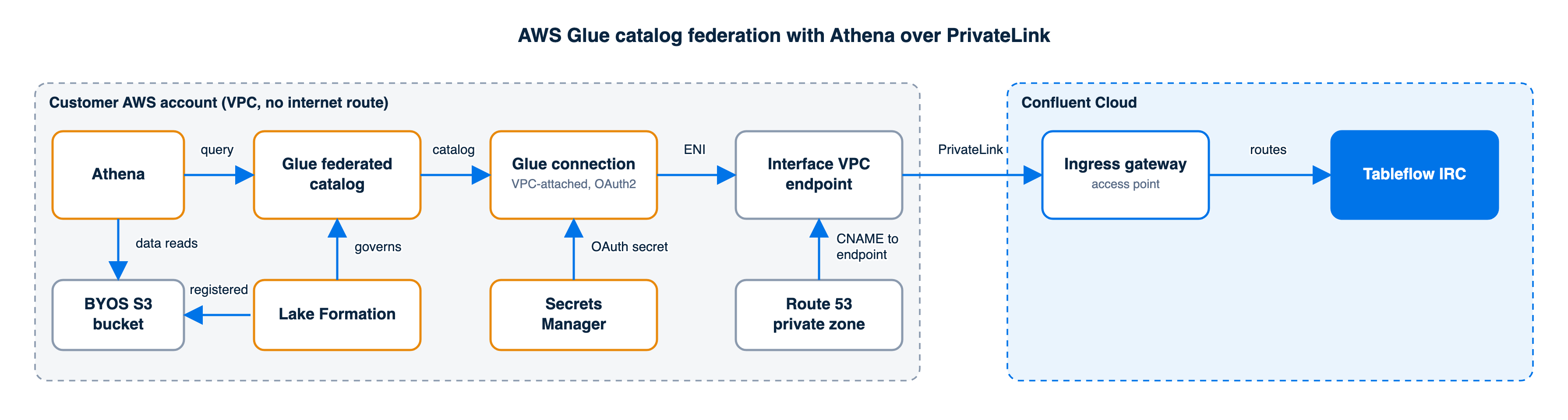
Amazon Athena querying through an AWS Glue federated catalog and a VPC-attached Glue connection that reaches the Tableflow Iceberg REST Catalog through the interface VPC endpoint and ingress gateway
  1. Prepare the VPC for the Glue connection. Glue places network interfaces in the subnet you choose and calls the catalog from them. Those interfaces must reach the catalog endpoint, AWS Secrets Manager, AWS STS, and AWS KMS.

    • If the subnet has no NAT gateway, create interface VPC endpoints for secretsmanager, sts, and kms with private DNS enabled.

    • Create a security group for the Glue interfaces with a self-referencing inbound rule.

    • On the security group of the catalog VPC endpoint from Step 2, allow inbound TCP 443 from the Glue security group.

  2. Extend the IAM role. In addition to the permissions in the Glue guide, the role needs the following permissions:

    • EC2 permissions to place its network interfaces in your VPC: ec2:CreateNetworkInterface, ec2:DeleteNetworkInterface, ec2:DescribeNetworkInterfaces, ec2:ModifyNetworkInterfaceAttribute, ec2:AttachNetworkInterface, ec2:DetachNetworkInterface, ec2:DescribeSubnets, ec2:DescribeVpcs, ec2:DescribeVpcEndpoints, ec2:DescribeSecurityGroups, ec2:DescribeRouteTables, ec2:DescribeAvailabilityZones, and ec2:CreateTags

    • KMS permissions for the key that protects the OAuth secret: kms:Decrypt, kms:DescribeKey, and kms:GenerateDataKey

    • Secrets Manager permission to write refreshed tokens back to the secret: secretsmanager:UpdateSecret, in addition to secretsmanager:PutSecretValue

  3. Create the connection with the AWS CLI and attach it to your VPC. Use <catalog-uri> as the endpoint, and set the subnet and security group from the first change. Wait until the connection status is READY.

    aws glue create-connection --connection-input '{
      "Name": "tableflow-irc-conn",
      "ConnectionType": "ICEBERGRESTCATALOG",
      "ConnectionProperties": {
        "INSTANCE_URL": "<catalog-uri>",
        "ROLE_ARN": "<role-arn>",
        "CATALOG_CASING_FILTER": "LOWERCASE_ONLY"
      },
      "AuthenticationConfiguration": {
        "AuthenticationType": "OAUTH2",
        "OAuth2Properties": {
          "OAuth2GrantType": "CLIENT_CREDENTIALS",
          "TokenUrl": "<catalog-uri>/v1/oauth/tokens",
          "OAuth2ClientApplication": {
            "UserManagedClientApplicationClientId": "<tableflow-api-key>"},
          "TokenUrlParametersMap": {"scope": "catalog"}
        },
        "SecretArn": "<secret-arn>"
      },
      "PhysicalConnectionRequirements": {
        "SubnetId": "<private-subnet-id>",
        "SecurityGroupIdList": ["<glue-sg-id>"],
        "AvailabilityZone": "<subnet-az>"
      }
    }'
    
    aws glue get-connection --name tableflow-irc-conn \
      --query Connection.Status
    
  4. Create the federated catalog on this connection. In the Lake Formation wizard from the Glue guide, select the connection you created under Connector object instead of entering a new one. Continue with the Glue guide to create the catalog and query your tables from Athena. Each Tableflow cluster appears as a database and each Tableflow-enabled topic appears as a table.

Snowflake Horizon Catalog federation over PrivateLink

This path requires Snowflake Business Critical edition or higher, and the Snowflake account must run on AWS.

Snowflake Horizon Catalog federates to the Tableflow catalog through a catalog-linked database. Follow Integrate Tableflow with Snowflake Horizon Catalog for the external volume, the IAM role, and the catalog-linked database. To reach the catalog over the ingress PrivateLink Gateway instead of the public endpoint, use Snowflake outbound private connectivity with the following changes.
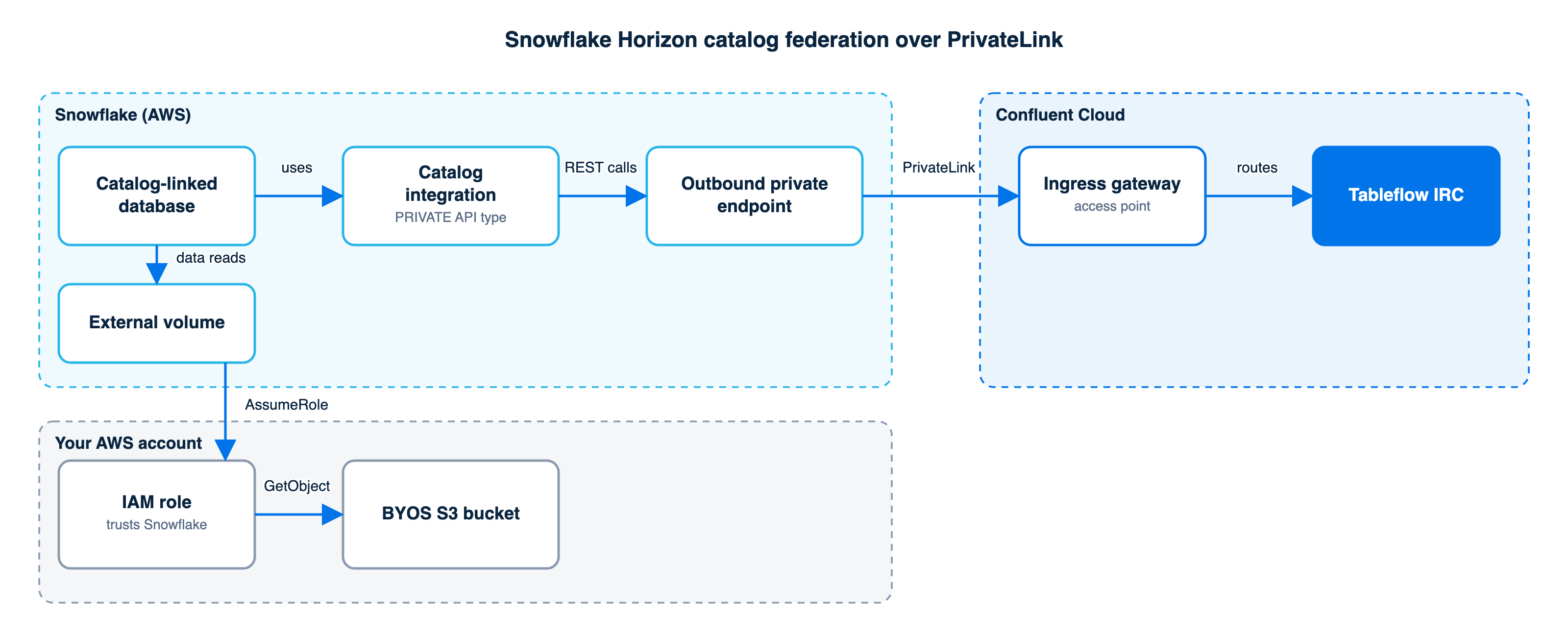
Snowflake catalog-linked database using an outbound private endpoint to reach the Tableflow Iceberg REST Catalog through an ingress gateway access point
  1. Provision the Snowflake private endpoint. As ACCOUNTADMIN, provision an endpoint against the PrivateLink Service ID from Step 1 and the <catalog-hostname> from “Determine your catalog endpoint”. Note the endpoint ID that Snowflake reports.

    SELECT SYSTEM$PROVISION_PRIVATELINK_ENDPOINT(
      '<privatelink-service-id>', '<catalog-hostname>');
    SELECT SYSTEM$GET_PRIVATELINK_ENDPOINTS_INFO();
    
  2. Create an access point for the Snowflake endpoint. Repeat Step 3 on the same gateway. Enter the endpoint ID from the previous step. You don’t create a VPC endpoint or a Route 53 hosted zone in your account for this path, because the endpoint is in the Snowflake VPC.

  3. Create the catalog integration with the private API type. Set CATALOG_API_TYPE = PRIVATE in REST_CONFIG. Use <catalog-uri> as the catalog URI and <catalog-uri>/v1/oauth/tokens as the token URI. All other settings are the same as in the Snowflake Horizon Catalog guide.

    CREATE CATALOG INTEGRATION tableflow_horizon_int
      CATALOG_SOURCE = ICEBERG_REST
      TABLE_FORMAT = ICEBERG
      CATALOG_NAMESPACE = '<kafka-cluster-id>'
      REST_CONFIG = (
        CATALOG_URI = '<catalog-uri>',
        CATALOG_API_TYPE = PRIVATE,
        ACCESS_DELEGATION_MODE = EXTERNAL_VOLUME_CREDENTIALS
      )
      REST_AUTHENTICATION = (
        TYPE = OAUTH,
        OAUTH_TOKEN_URI = '<catalog-uri>/v1/oauth/tokens',
        OAUTH_CLIENT_ID = '<tableflow-api-key>',
        OAUTH_CLIENT_SECRET = '<tableflow-api-secret>',
        OAUTH_ALLOWED_SCOPES = ('catalog')
      )
      ENABLED = TRUE;
    
  4. Create the catalog-linked database on this integration, as in the Snowflake Horizon Catalog guide.

Related content

  • Use Private Networking with Tableflow

  • Integrate with AWS Glue Catalog

  • Integrate with Snowflake Horizon Catalog

  • Use AWS PrivateLink for Serverless Products on Confluent Cloud

Note

This website includes content developed at the Apache Software Foundation under the terms of the Apache License v2.

Ask the community Confluent Support Portal Last updated: Nov 03, 2026
Terms & Conditions | Privacy Policy | Do Not Sell My Information | Modern Slavery Policy | Cookie Settings | Feedback

Copyright © Confluent, Inc. 2014- Apache®, Apache Kafka®, Kafka®, Apache Flink®, Flink®, Apache Iceberg®, Iceberg® and associated open source project names are trademarks of the Apache Software Foundation

Confluent Cloud

CLOUD

  • Overview
  • Get Started
    • Overview
    • Free Trial
    • Create and Manage Your Account
    • Regions and Availability
    • Quick Start: Confluent Cloud
    • Quick Start: REST API
    • Manage Schemas
    • Tutorials and Examples
      • Overview
      • Tutorial: Use Replicator to Copy Kafka Data to Cloud
      • Example: Create Fully Managed Services
    • Use Docs with AI Tools
  • Build a Streamhouse
    • Overview
    • Quick start
    • Capture and maintain your business
    • Run your business
    • Query current state
  • Use Kafka Clusters
    • Overview
    • Resilience
    • Cluster Deletion Protection
    • Multi-Tenancy and Client Quotas
      • Overview
      • Quick Start
    • Manage Clusters
      • Create a Cluster
      • View Clusters
      • Update a Cluster
      • Delete a Cluster
      • Resize a Dedicated Cluster
      • Manage Configuration Settings
    • Migrate Clusters
      • Migrate to Confluent Cloud
      • Migrate with kcp
    • Copy and Share Data
      • Cluster Linking
        • Overview
        • Quick Start
        • Configure, Manage, and Monitor
          • Configure and Manage Cluster Links
          • Manage Mirror Topics
          • Manage Private Networking
          • Manage Security
          • Monitor Metrics
        • Use Cases and Tutorials
          • Share Data Across Clusters, Regions, and Clouds
          • Disaster Recovery and Failover
            • Disaster Recovery Overview
            • Automatic Failover (Active-Passive)
            • Manual Switchover (Active-Active)
            • Manual Switchover (Active-Passive)
          • Create Hybrid Cloud and Bridge-to-Cloud Deployments
          • Use Tiered Separation of Critical Workloads
          • Migrate Data
          • Manage Audit Logs
        • Troubleshooting
      • Replicator
        • Quick Start
        • Use Replicator to Migrate Topics
    • Connect Confluent Platform and Cloud Environments
      • Overview
      • Connect Self-Managed Gateway to Cloud
        • Confluent Cloud Gateway Overview
        • Configure and Deploy
          • Overview
          • Docker Deployment
            • Deploy using Docker
            • Secure Docker Deployments
            • Troubleshoot Docker Deployments
          • CFK Deployment
            • Deploy using CFK
            • Secure CFK Deployments
        • Enforce Centralized Governance
          • Overview
          • Configure Centralized Governance
        • Migrate Kafka Clusters
        • Migrate Topics with Topic-Based Routing
        • Set up Network Isolation and Custom Domains
        • Monitor Gateway Metrics
      • Connect Self-Managed Control Center to Cloud
      • Connect Self-Managed Clients to Cloud
      • Connect Self-Managed Connect to Cloud
      • Connect Self-Managed REST Proxy to Cloud
      • Connect Self-Managed ksqlDB to Cloud
      • Connect Self-Managed MQTT to Cloud
      • Connect Self-Managed Schema Registry to Cloud
      • Connect Self-Managed Streams to Cloud
      • Example: Autogenerate Self-Managed Component Configs for Cloud
    • Automate with Infrastructure as Code
      • Create Clusters with Terraform
      • Terraform Security Best Practices
      • Create Clusters with Pulumi
    • FAQ
  • Build Client Applications
    • Overview
    • Architectural Considerations
    • Client Quick Start
    • Configure Clients
      • Consumer
      • Share Consumers
      • Producer
      • Configuration Properties
    • Test and Monitor a Client
      • Test
      • Monitor
        • Overview
        • Monitoring with JMX
        • Configure JMX
        • Producer Metrics
        • Consumer Metrics
        • Share Consumer Metrics
      • Reset Offsets
    • Optimize and Tune
      • Overview
      • Throughput
      • Latency
      • Durability
      • Availability
      • Freight
    • Client Guides
      • Python
      • .NET Client
      • JavaScript Client
      • Go Client
      • C++ Client
      • Java Client
    • Kafka Client APIs for Confluent Cloud
      • Python Client API
      • .NET Client API
      • JavaScript Client API
      • Go Client API
      • C++ Client API
      • Java Client API
    • Deprecated Client APIs
    • Client Examples
      • Overview
      • Rust Client
      • Python Client
      • .NET Client
      • JavaScript Client
      • Go Client
      • C++ Client
      • Java
      • Spring Boot
      • KafkaProducer
      • REST
      • Clojure
      • Groovy
      • Kafka Connect Datagen
      • kafkacat
      • Kotlin
      • Ruby
      • Scala
    • Confluent Plugin for JetBrains IDEs
    • VS Code Extension
    • Connect to a Kafka Cluster with VS Code
    • Browse Messages with VS Code
    • Work with Schemas in VS Code
    • Clients FAQ
  • Build Kafka Streams Applications
    • Overview
    • Quick Start
    • Metrics
    • Monitor Applications
    • FAQ
    • Upgrade Guide
    • ksqlDB
      • Create Stream Processing Apps with ksqlDB
      • Quick Start
      • Enable ksqlDB Integration with Schema Registry
      • ksqlDB Cluster API Quick Start
      • Monitor ksqlDB
      • Manage ksqlDB by using the CLI
      • Manage Connectors With ksqlDB
      • Develop ksqlDB Applications
      • SQL Reference (Confluent Platform)
      • Pull Queries
      • Grant Role-Based Access
      • Migrate ksqlDB Applications on Confluent Cloud
  • AI and ML
    • Overview
    • Build AI with Confluent Intelligence
      • Overview
      • Streaming Agents
        • Overview
        • Agent Runtime Guide
        • Call Tools
        • Create and Run Streaming Agents
        • Manage Agents in the Console
        • Reflection Workflows
        • Monitor Streaming Agents
        • Debug Streaming Agents
        • Examples
      • Real-Time Context Engine
        • Overview
        • Get Started
        • Manage
        • Query Data
        • Lightning Queries
        • Manage Access
        • Private Networking
        • Support and Limitations
      • Built-in AI/ML Functions
        • Overview
        • Analyze Sentiment
        • Detect Anomalies
        • Detect PII
        • Forecast Trends
        • Invoke a Tool in an AI Workflow
        • ML Preprocessing Functions
        • Model Inference Functions
      • Create Embeddings
        • Overview
        • Create Embeddings
      • Run Managed Model Inference
      • Run External Model Inference
      • Search External Tables
        • Overview
        • Key Search with External Sources
        • Text Search with External Sources
        • Vector Search with External Sources
      • FAQ
    • Use AI Tools with Confluent
      • Overview
      • Access Confluent Cloud with the Managed MCP Servers
      • Build with the Open-Source MCP Server
      • Build with Agent Skills
      • Confluent Assistant overview
      • Troubleshoot connectors with Confluent Assistant
  • Manage Topics
    • Overview
    • Configuration Reference
    • Message Browser
    • Share Streams
      • Overview
      • Provide Stream Shares
      • Consume Stream Shares
    • Tableflow
      • Overview
      • Concepts
        • Overview
        • Storage
        • Schemas
        • Materialize Change Data Capture Streams
        • Write Modes
      • Get Started
        • Overview
        • Quick Start with Managed Storage
        • Quick Start Using Your Storage and AWS Glue
        • Quick Start Using Your Storage on Google Cloud
        • Quick Start with Delta Lake Tables
      • How-to Guides
        • Overview
        • Configure Storage
        • Encrypt Sensitive Fields
        • Integrate Catalogs
          • Overview
          • Integrate with AWS Glue Catalog
          • Integrate with Lakehouse Runtime Catalog
          • Integrate with Snowflake Horizon Catalog
          • Integrate with Snowflake Open Catalog
          • Integrate with Unity Catalog
          • User-defined namespaces
        • Query Data
          • Overview
          • Query with AWS
          • Query with DuckDB
          • Query with Flink
          • Query with Snowflake
          • Query with Trino
      • Operate
        • Overview
        • Configure
        • Grant Role-Based Access
        • Monitor
        • Use Private Networking
        • Access the Tableflow Iceberg REST Catalog over AWS PrivateLink
        • Use Private Networking with Azure
    • Real-Time Context Engine
    • FAQ
  • Manage and Monitor Resources with USM
    • Overview
    • Register Confluent Platform with USM
      • Overview
      • Set Up Payment Method
      • Configure Private Networking
        • Overview
        • AWS
        • Azure
      • Configure a Service Account
      • Deploy the USM Agent
      • Complete the Cluster Registration
    • Register Connect Cluster with USM
      • Overview
      • Confluent Platform Kafka as the Metadata Cluster
      • Confluent Cloud Kafka as the Metadata Cluster
      • Deregister a Connect Cluster
    • Monitor Confluent Platform Resources
      • Overview
      • Clusters
      • Topics
      • Connectors on Confluent Platform Kafka
      • Connectors on Confluent Cloud Kafka
      • Consumer Lag
      • Clients
      • Kafka Streams
      • Alerts
    • Data Governance for Confluent Platform
    • Role-Based Access Control
    • Remove the USM Agent
    • Troubleshoot
  • Govern Data Streams
    • Overview
    • Stream Governance
      • Manage Governance Packages
      • Data Portal
      • Track Data with Stream Lineage
      • Manage Stream Catalog
        • Stream Catalog User Guide
        • REST API Catalog Usage and Examples Guide
        • GraphQL API Catalog Usage and Examples Guide
    • Manage Schemas
      • Overview
      • Manage Schemas
      • Delete Schemas and Manage Storage
      • Use Broker-Side Schema ID Validation
      • Schema Linking
      • Schema Registry Tutorial
    • Fundamentals
      • Key Concepts
      • Schema Evolution and Compatibility
      • Schema Formats
        • Serializers and Deserializers Overview
        • Avro
        • Protobuf
        • JSON Schema
      • Data Contracts
      • Explicit Topic-Subject Associations
      • Security Considerations
      • Enable Private Networking
        • Enable Private Networking with Schema Registry PrivateLink
        • Enable Private Networking for Schema Registry with a Public Endpoint
    • Reference
      • Overview
      • Configure Clients
      • Schema Registry C++ Client (libschemaregistry)
      • Maven Plugin
      • REST API Usage Examples
      • Use AsyncAPI to Describe Topics and Schemas
    • FAQ
  • Connect to External Services
    • Overview
    • Install Connectors
      • ActiveMQ Source
      • AlloyDB Sink
      • Amazon CloudWatch Logs Source
      • Amazon CloudWatch Metrics Sink
      • Amazon DocumentDB Sink
        • Configure and Launch
        • Configure with AWS Egress PrivateLink Endpoints
      • Amazon DynamoDB CDC Source
        • Configure and Launch
        • Configure with AWS Egress PrivateLink Endpoints
      • Amazon DynamoDB Sink
      • Amazon Kinesis Source
      • Amazon Redshift Sink
      • Amazon S3 Sink
        • Configure and Launch
        • Configure with AWS Egress PrivateLink Endpoints
      • Amazon S3 Source
      • Amazon SQS Source
      • AWS Lambda Sink
      • Azure Blob Storage Sink
        • Configure and Launch
        • Configure with Azure Egress Private Link Endpoints
      • Azure Blob Storage Source
      • Azure Cognitive Search Sink
      • Azure Cosmos DB Sink [Deprecated]
      • Azure Cosmos DB Sink V2
      • Azure Cosmos DB Source [Deprecated]
      • Azure Cosmos DB Source V2
      • Azure Data Explorer (Kusto) Database Sink
      • Azure Data Lake Storage Gen2 Sink
      • Azure Event Hubs Source
      • Azure Functions Sink
      • Azure Log Analytics Sink
      • Azure Log Analytics Sink V2
      • Azure Service Bus Source
      • Azure Synapse Analytics Sink
      • ChromaDB Sink
      • ClickHouse Sink
        • Configure and Launch
        • Configure with AWS Egress PrivateLink Endpoints
        • Configure with Azure Egress Private Link Endpoints
        • Configure with Google Cloud Private Service Connect Endpoints
      • Couchbase Source
        • Configure and Launch
        • Configure with AWS Egress PrivateLink Endpoints
        • Configure with Azure Egress Private Link Endpoints
        • Configure with GCP Egress Private Service Connect Endpoints
      • Couchbase Sink
        • Configure and Launch
        • Configure with AWS Egress PrivateLink Endpoints
        • Configure with Azure Egress Private Link Endpoints
        • Configure with GCP Egress Private Service Connect Endpoints
      • Databricks Delta Lake Sink
        • Set up Databricks Delta Lake (AWS) Sink Connector for Confluent Cloud
        • Configure and launch the connector
      • Datadog Metrics Sink
      • Datagen Source (development and testing)
      • DataStax Sink
      • Elasticsearch Service Sink [Deprecated]
      • Elasticsearch Service Sink V2
        • Configure and Launch
        • Configure with AWS Egress PrivateLink Endpoints
        • Configure with Google Cloud Private Service Connect Endpoints
        • Configure with Azure Egress Private Link Endpoints
      • GitHub Source
      • Google BigQuery Source (JDBC)
      • Google BigQuery Sink [End of Life]
      • Google BigQuery Sink V2
      • Google Cloud BigTable Sink
      • Google Cloud Dataproc Sink [End of Life]
      • Google Cloud Firestore Sink
      • Google Cloud Functions Gen 2 Sink
      • Google Cloud Functions Sink [End of Life]
      • Google Cloud Pub/Sub Source
      • Google Cloud Spanner CDC Source (Debezium)
      • Google Cloud Spanner Sink
      • Google Cloud Storage Sink
      • Google Cloud Storage Source
      • HTTP Sink
      • HTTP Sink V2
      • HTTP Source
      • HTTP Source V2
      • IBM Db2 Source (JDBC)
      • IBM MQ Sink
      • IBM MQ Source
      • InfluxDB 2 Sink
      • InfluxDB 2 Source
      • InfluxDB 3 Sink
      • Jira Source
      • MariaDB CDC Source (Debezium)
      • Marketo Sink
      • Microsoft Dynamics 365 CRM Source
      • Microsoft SQL Server CDC Source (Debezium) [End of Life]
      • Microsoft SQL Server CDC Source V2 (Debezium)
        • Configure and launch the connector
        • Backward incompatibility considerations
      • Microsoft SQL Server Sink (JDBC)
      • Microsoft SQL Server Source (JDBC)
      • MongoDB Atlas Sink
        • Configure and Launch
        • Configure with AWS Egress PrivateLink Endpoints
        • Configure with Azure Egress Private Link Endpoints
        • Configure with Google Cloud Egress Private Service Connect Endpoints
      • MongoDB Atlas Source
      • MongoDB CDC Source (Debezium)
        • Configure and Launch
        • Configure with AWS Egress PrivateLink Endpoints
        • Configure with Azure Egress Private Link Endpoints
        • Configure with Google Cloud Egress Private Service Connect Endpoints
        • Monitoring
      • MQTT Sink
      • MQTT Source
      • MySQL CDC Source (Debezium) [End of Life]
      • MySQL CDC Source V2 (Debezium)
        • Configure and Launch the connector
        • Backward Incompatible Changes
      • MySQL Sink (JDBC)
      • MySQL Source (JDBC)
      • Neo4j Sink
        • Configure and Launch
        • Configure with AWS Egress PrivateLink Endpoints
        • Configure with Google Cloud Private Service Connect Endpoints
      • New Relic Metrics Sink
      • OpenSearch Sink
      • Oracle XStream CDC Source
        • Overview
        • Configure and Launch the connector
        • Oracle Database Prerequisites
        • Downstream Capture
        • Cascading Downstream Capture
        • Change Events
        • Signals and Actions
        • Examples
        • Troubleshooting
        • Monitoring
      • Oracle CDC Source
        • Overview
        • Configure and Launch the connector
        • Horizontal Scaling
        • Oracle Database Prerequisites
        • SMT Examples
        • DDL Changes
        • Troubleshooting
      • Oracle Database Sink (JDBC)
      • Oracle Database Source (JDBC)
      • PagerDuty Sink [End of Life]
      • Pinecone Sink
      • PostgreSQL CDC Source (Debezium) [End of Life]
      • PostgreSQL CDC Source V2 (Debezium)
        • Configure and Launch the connector
        • Backward Incompatible Changes
      • PostgreSQL Sink (JDBC)
      • PostgreSQL Source (JDBC)
      • RabbitMQ Sink
      • RabbitMQ Source
      • Redis Sink [Deprecated]
      • Redis Kafka Sink
      • Redis Kafka Source
      • Salesforce Bulk API 2.0 Sink
      • Salesforce Bulk API 2.0 Source
      • Salesforce Bulk API Source
      • Salesforce CDC Source
      • Salesforce Platform Event Sink
      • Salesforce Platform Event Source
      • Salesforce PushTopic Source
      • Salesforce SObject Sink
      • Salesforce Source V2
      • ServiceNow Sink
      • ServiceNow Source (Legacy) [Deprecated]
      • ServiceNow Source V2
      • SFTP Sink
      • SFTP Source
      • Snowflake Sink
        • Configure and Launch
        • Configure with AWS Egress PrivateLink Endpoints
        • Configure with Azure Egress Private Link Endpoints
        • Configure with Google Cloud Private Service Connect Endpoints
      • Snowflake Source
        • Configure and Launch
        • Configure with AWS Egress PrivateLink Endpoints
        • Configure with Azure Egress Private Link Endpoints
        • Configure with Google Cloud Private Service Connect Endpoints
      • Solace Sink
      • Solace Source
      • Splunk Sink
      • Stripe Source
        • Configure and Launch
        • Record Schemas
      • Zendesk Source
    • Self-Managed Connectors on Confluent Cloud
      • Overview
    • Confluent Marketplace
      • Overview
      • Component Archive Specification
      • Contribute
    • Install Custom Plugins and Custom Connectors
      • Overview
      • Quick Start
      • Manage Custom Connectors
      • Limitations and Support
      • API and CLI
    • Manage Client-Side Encryption
    • Manage Provider Integration
    • Secret Manager Integration
      • Overview
      • Azure Key Vault Integration
      • AWS Secrets Manager Integration
      • Google Cloud Secret Manager Integration
    • Back Up and Restore Data with Object Storage Connectors
    • Networking and DNS
      • Overview
      • AWS Egress PrivateLink Endpoints for First-Party Services
      • AWS Egress PrivateLink Endpoints for Self-Managed Services
      • AWS Egress PrivateLink Endpoints for Amazon RDS
      • AWS Egress PrivateLink Endpoints for Amazon DocumentDB
      • Azure Egress Private Link Endpoints for First-Party Services
      • Azure Egress Private Link Endpoints for Self-Managed Services
      • Google Cloud Private Service Connect Endpoints for First-Party Services
      • Google Cloud Private Service Connect Endpoints for Self-Managed Services
    • Connect API Usage
    • Manage Public Egress IP Addresses
    • Sample Connector Output
    • Configure Single Message Transformations
    • Configure Custom SMTs
      • Quick Start
      • Manage Custom SMT APIs
      • Enable External Network Calls
      • Limitations and Support
    • View Connector Events
    • Interpret Connector Statuses
    • Manage Service Accounts
    • Configure RBAC
    • View Errors in the Dead Letter Queue
    • Connector Limits
    • Manage Offsets
    • Migrate Self-Managed Connectors
    • Transforms List
      • Overview
      • AdjustPrecisionAndScale
      • BytesToString
      • Cast
      • ChangeTopicCase
      • Drop
      • DropHeaders
      • EventRouter
      • ExtractChangedRecordState
      • ExtractField
      • ExtractNestedField
      • ExtractNewRecordState
      • ExtractTimeStamp
      • ExtractTopic
      • Filter (Kafka)
      • Filter (Confluent)
      • Flatten (Kafka)
      • Flatten (Confluent)
      • HeaderFrom
      • HeaderToValue
      • HoistField
      • InsertField
      • InsertHeader
      • KeyToValue
      • MaskField
      • MessageTimestampRouter
      • ReplaceField (Kafka)
      • ReplaceField (Confluent)
      • SetMaximumPrecision
      • SetSchemaMetadata
      • TimestampConverter
      • TimestampNow
      • TimestampNowField
      • TimestampRouter
      • TimescaleDB
      • TimezoneConverter
      • ToLogicalTopicRouter
      • TombstoneHandler
      • TopicRegexRouter
      • ValueToKey
    • Reference
      • Additional Connector Configuration
      • Confluent AI-Assisted Troubleshooting
  • Integrate with Confluent Cloud
    • Overview
    • Connect with Confluent Program
    • Reuse Connections with External Services
      • Overview
      • Supported External Services
      • Manage Connections
    • Integrate with Cloud Service Providers
      • Overview
      • Create an AWS Provider Integration
      • Create an Azure Provider Integration
      • Create a Google Cloud Provider Integration
      • Manage a Provider Integration
  • Process Data with Flink
    • Overview
    • Get Started
      • Overview
      • Quick Start with Cloud Console
      • Quick Start with SQL Shell in Confluent CLI
      • Quick Start with Java Table API
      • Quick Start with Python Table API
    • Concepts
      • Overview
      • Autopilot
      • Batch and Stream Processing
      • Comparison with Apache Flink
      • Compute Pools
      • Delivery Guarantees and Latency
      • Determinism
      • External Tables
      • Materialized Tables
      • Private Networking
      • Process Table Functions
      • Schema and Statement Evolution
      • Security Controls
      • Snapshot Queries
      • Statements
      • Statement CFU Metrics
      • Tables and Topics
      • Time and Watermarks
      • User-defined Functions
    • How-To Guides
      • Overview
      • Aggregate a Stream in a Tumbling Window
      • Combine Streams and Track Most Recent Records
      • Compare Current and Previous Values in a Stream
      • Configure a Dead Letter Queue
      • Convert the Serialization Format of a Topic
      • Create a Process Table Function
      • Create a UDF
      • Deduplicate Rows in a Table
      • Deploy a Statement with CI/CD
      • Enrich a Stream with Reference Data
      • Evolve a Streaming Pipeline
      • Generate Custom Sample Data
      • Handle Late-Arriving Data
      • Handle Multiple Event Types
      • Log Debug Messages in UDFs
      • Mask Fields in a Table
      • Move a Statement to a Different Compute Pool
      • Read and Write Custom Changelog Formats
      • Read Records without a Schema ID Prefix
      • Profile a Query
      • Resolve Statement Issues
      • Scan and Summarize Tables
      • Run a Snapshot Query
      • Set a Baseline CFU for a Statement
      • Transform a Topic
      • Use Client-Side Field Level Encryption
      • View Schema Metadata in the Catalog Browser
      • View Time Series Data
    • Operate and Deploy
      • Overview
      • Carry-over Offsets
      • Connect with JDBC
      • Deploy with dbt
      • dbt Adapter Reference
      • Deploy Table API Programs
      • Development Lifecycle
      • Enable Private Networking
      • Generate a Flink API Key
      • Grant Role-Based Access
      • Manage Compute Pools
      • Manage Connections
      • Manage with Terraform
      • Monitor and Manage Statements
      • Move SQL Statements to Production
      • Use the Query Profiler
      • REST API
    • Flink Reference
      • Overview
      • SQL Syntax
      • DDL Statements
        • Statements Overview
        • ALTER AGENT
        • ALTER CONNECTION
        • ALTER MODEL
        • ALTER MATERIALIZED TABLE
        • ALTER TABLE
        • ALTER TOOL
        • ALTER VIEW
        • CREATE AGENT
        • CREATE CONNECTION
        • CREATE FUNCTION
        • CREATE MATERIALIZED TABLE
        • CREATE MODEL
        • CREATE OR ALTER MATERIALIZED TABLE
        • CREATE TABLE
        • CREATE TOOL
        • CREATE VIEW
        • DESCRIBE
        • DROP AGENT
        • DROP CONNECTION
        • DROP FUNCTION
        • DROP MATERIALIZED TABLE
        • DROP MODEL
        • DROP TABLE
        • DROP TOOL
        • DROP VIEW
        • EXPLAIN
        • RESET
        • SET
        • SHOW
        • USE CATALOG
        • USE database_name
      • Queries
        • Queries Overview
        • Deduplication
        • Group Aggregation
        • HINTS
        • INSERT INTO FROM SELECT
        • INSERT VALUES
        • Joins
        • LIMIT
        • Pattern Recognition
        • ORDER BY
        • OVER Aggregation
        • SELECT
        • Set Logic
        • EXECUTE STATEMENT SET
        • Top-N
        • Window Aggregation
        • Window Deduplication
        • Window Join
        • Window Top-N
        • Window Table-Valued Function
        • WITH
      • Functions
        • AI Model Inference
        • Aggregate
        • Changelog Conversion
        • Collections
        • Comparison
        • Conditional
        • Datetime
        • Flink SQL Functions
        • Hashing
        • JSON
        • ML Preprocessing
        • Numeric
        • Search
        • String
        • Table API
      • Data Types
      • Data Type Mappings
      • Time Zone
      • Keywords
      • Information Schema
      • Example Streams
      • SQL Examples
      • Table API
      • CLI Reference
    • Get Help
    • FAQ
  • Manage Networking
    • Confluent Cloud Networking Overview
    • Networking on AWS
      • AWS Networking Overview
      • Public Networking on AWS
      • Confluent Cloud Network on AWS
      • PrivateLink on AWS
        • PrivateLink Overview
        • Inbound PrivateLink for Dedicated Clusters
        • Inbound PrivateLink for Serverless Products
        • Outbound PrivateLink for Dedicated Clusters
        • Outbound PrivateLink for Serverless Products
      • VPC Peering on AWS
      • Transit Gateway on AWS
      • Private Network Interface on AWS
      • DNS Forwarding on AWS
    • Networking on Azure
      • Azure Networking Overview
      • Public Networking on Azure
      • Confluent Cloud Network on Azure
      • Private Link on Azure
        • Private Link Overview
        • Inbound Private Link for Dedicated Clusters
        • Inbound Private Link for Serverless Products
        • Outbound Private Link for Dedicated Clusters
        • Outbound Private Link for Serverless Products
      • VNet Peering on Azure
    • Networking on Google Cloud
      • Google Cloud Networking Overview
      • Public Networking on Google Cloud
      • Confluent Cloud Network on Google Cloud
      • Private Service Connect on Google Cloud
        • Private Service Connect Overview
        • Inbound Private Service Connect for Dedicated Clusters
        • Inbound Private Service Connect for Serverless Products
        • Outbound Private Service Connect for Dedicated Clusters
      • VPC Peering on Google Cloud
    • Connectivity for Confluent Resources
      • Overview
      • Public Egress IP Address for Connectors and Cluster Linking
      • Cluster Linking using AWS PrivateLink
      • Follower Fetching using AWS VPC Peering
    • Use the Confluent Cloud Console with Private Networking
    • Test Connectivity
    • Networking FAQ
  • Log and Monitor
    • Overview
    • Metrics
    • Integrate Third-Party Monitoring Tools
    • Manage Notifications
    • Monitor Consumer Lag
    • Monitor Dedicated Clusters
      • Manage Performance and Expansion
      • Track Usage by Team
    • Export Logs to Third-Party Tools
    • Tutorials and Examples
      • Run Example Queries
      • Observability for Kafka Clients
    • FAQ
  • Manage Security
    • Overview
    • Manage Authentication
      • Overview
      • Manage User Identities
        • Overview
        • Manage User Accounts
          • Overview
          • Authentication Security Protections
          • Manage Local User Accounts
          • Multi-factor Authentication
          • Manage SSO User Accounts
        • Manage User Identity Providers
          • Overview
          • Use Single Sign-On (SSO)
          • Manage SAML Single Sign-On (SSO)
          • Manage Azure Marketplace SSO
          • Just-in-time User Provisioning
          • SCIM User Provisioning
          • Group Mapping
            • Overview
            • Enable Group Mapping
            • Manage Group Mappings
            • Troubleshooting
            • Best Practices
          • Manage Trusted Domains
          • Manage SSO provider
          • Troubleshoot SSO
      • Manage Workload Identities
        • Overview
        • Manage Workload Identities
        • Manage Service Accounts and API Keys
          • Overview
          • Create Service Accounts
          • Manage Service Accounts
          • Manage API Keys
            • Overview
            • Manage API keys
            • Best Practices
            • Troubleshoot
        • Manage OAuth/OIDC Identity Providers
          • Overview
          • Add an OIDC Identity Provider
          • Use OAuth Identity Pools and Filters
          • Manage Identity Provider Configurations
          • Manage the JWKS URI
          • Configure OAuth Clients
            • Overview
            • Go Clients
            • Java Clients
            • JavaScript Clients
            • .NET Clients
            • Python Clients
            • Configuration Reference
            • Configure UAMI
            • Configure AWS IAM Java Client Plugin
            • Configure AWS IAM Python Client Plugin
            • Configure AWS IAM .NET Client Plugin
          • Access Kafka REST APIs
          • Use Confluent STS Tokens with REST APIs
          • Best Practices
          • Troubleshoot OAuth Issues
        • Manage mTLS Identity Providers
          • Overview
          • Configure mTLS
          • Manage Certificate Authorities
          • Manage Certificate Identity Pools
          • Create CEL Filters for mTLS
          • Create JSON payloads for mTLS
          • Manage Certificate Revocation
          • Troubleshoot mTLS Issues
      • Identity FAQ
    • Control Access
      • Overview
      • Resource Hierarchy
        • Overview
        • Organizations
          • Overview
          • Manage Multiple Organizations
        • Environments
        • Confluent Resource Names (CRNs)
      • Manage Role-Based Access Control
        • Overview
        • Predefined RBAC Roles
        • Manage Role Bindings
        • Use ACLs with RBAC
      • Manage IP Filtering
        • Overview
        • Manage IP Groups
        • Manage IP Filters
        • Best Practices
      • Manage Access Control Lists
        • Overview
        • Operations
        • Examples
        • Troubleshoot
        • Reference
      • Use the Confluent CLI with multiple credentials on Confluent Cloud
    • Encrypt and Protect Data
      • Overview
      • Manage Data in Transit With TLS
      • Use Self-Managed Encryption Keys
        • Overview
        • Use Self-Managed Encryption Keys on AWS
        • Use Self-Managed Encryption Keys on Azure
        • Use Self-Managed Encryption Keys on Google Cloud
        • Use Self-Managed Encryption Keys with Tableflow
        • Use Confluent CLI for Self-Managed Encryption Keys
        • Use BYOK API for Self-Managed Encryption Keys
        • Revoke Access to Data at Rest
        • Best Practices
        • Troubleshoot Key Policy Issues
      • Use Client-Side Field Level Encryption
        • Overview
        • Manage CSFLE using Confluent Cloud Console
        • Use Client-side Field Level Encryption
        • Configuration Settings
        • Manage Encryption Keys
        • Manage Multiple Encryption Rules
        • Quick Start
        • Implement a Custom KMS Driver
        • Process Encrypted Data with Apache Flink
        • Code examples
        • Troubleshoot
        • FAQ
      • Use Client-Side Payload Encryption
    • Advanced Security Add-on
    • Monitor Activity
      • Concepts
      • Audit Log Event Categories
      • Audit Log Event Records
      • Audit Log Event Schema
      • Auditable Event Methods
        • Access Transparency
        • Connector
        • Custom Connector Plugin
        • Endpoints
        • Flink Management and Operations
        • Flink Authentication and Authorization
        • IP Filter Authorization
        • IP Filter and IP Group Management
        • Kafka Cluster Management and Operations
        • Kafka Cluster Authentication and Authorization
        • ksqlDB Cluster Authentication and Authorization
        • Networking
        • Notifications Service
        • OAuth-OIDC Identity Provider and Identity Pool
        • Organization
        • Role-Based Access Control
        • Real-Time Context Engine
        • Schema Registry Management and Operations
        • Schema Registry Authentication and Authorization
        • SCIM
        • Tableflow Control Plane
        • Tableflow Data Plane
        • Unified Stream Manager Control Plane
      • Access and Consume Audit Logs
      • Access Transparency
      • Retain Audit Logs
      • Best Practices
      • Troubleshoot
    • Access Management Tutorial
    • Security FAQ
  • Manage Billing
    • Overview
    • Billing Dimensions
      • Overview
      • Cluster Linking
      • Connectors
      • ksqlDB
      • Flink SQL
      • Tableflow
      • Audit Logs
      • Stream Governance
      • Advanced Security Add-on
      • Real-Time Context Engine
      • Unified Stream Manager
      • Kafka Streams
    • Invoices and Costs
    • Cost Allocation
    • Multi-Org Billing
    • Marketplace Billing
      • Amazon Web Services
      • Google Cloud
      • Microsoft Azure
      • Marketplace Organization Suspension and Deactivation
    • Billing Examples
    • Troubleshoot Billing
    • FAQ
    • Legacy Billing Reference
  • Manage Service Quotas
    • Overview
    • Service Quotas
    • View Service Quotas Using Confluent CLI
    • Service Quotas API
  • APIs
    • Overview
    • Confluent Cloud API Usage and Reference
      • Overview
      • Confluent Cloud API Reference
      • Metrics API Reference
      • Admin and Produce REST API Usage
      • Connect API Usage
      • Provider Integration API Usage
      • Stream Catalog REST API Usage
      • Service Quotas API Usage
    • Kafka Client API Reference
      • Overview
      • .NET Client API Reference
      • C++ Client API Reference
      • Go Client API Reference
      • Java Client API Reference
      • JavaScript Client API Reference
      • Python Client API Reference
    • Flink Client API Usage and Reference
    • GraphQL API Usage and Reference
  • Confluent CLI
  • Query Data with Lightning Tables
    • Overview
    • Get Started
    • Manage Lightning Tables
    • Query a Lightning Table
      • Overview
      • SQL Reference
    • Private Networking
  • Release Notes & FAQ
    • Release Notes
    • FAQ
    • Upgrade Policy
    • Compliance
    • Generate a HAR file for Troubleshooting
    • AI Assistant
  • Support
  • Glossary
Give feedback about this page
On this page:
  • How it works
  • Prerequisites
  • Step 1: Create the ingress PrivateLink Gateway
  • Step 2: Create the interface VPC endpoint
  • Step 3: Create the access point
  • Determine your catalog endpoint
  • Step 4: Create the private hosted zone
  • Step 5: Verify the connection from your VPC
  • Query with Spark
  • AWS Glue catalog federation over PrivateLink
  • Snowflake Horizon Catalog federation over PrivateLink
  • Related content
Access the Tableflow Iceberg REST Catalog over AWS PrivateLink
Get started
    Home Confluent Cloud Confluent Platform Connectors Clients

    CLOUD

    • Overview
    • Get Started
      • Overview
      • Free Trial
      • Create and Manage Your Account
      • Regions and Availability
      • Quick Start: Confluent Cloud
      • Quick Start: REST API
      • Manage Schemas
      • Tutorials and Examples
        • Overview
        • Tutorial: Use Replicator to Copy Kafka Data to Cloud
        • Example: Create Fully Managed Services
      • Use Docs with AI Tools
    • Build a Streamhouse
      • Overview
      • Quick start
      • Capture and maintain your business
      • Run your business
      • Query current state
    • Use Kafka Clusters
      • Overview
      • Resilience
      • Cluster Deletion Protection
      • Multi-Tenancy and Client Quotas
        • Overview
        • Quick Start
      • Manage Clusters
        • Create a Cluster
        • View Clusters
        • Update a Cluster
        • Delete a Cluster
        • Resize a Dedicated Cluster
        • Manage Configuration Settings
      • Migrate Clusters
        • Migrate to Confluent Cloud
        • Migrate with kcp
      • Copy and Share Data
        • Cluster Linking
          • Overview
          • Quick Start
          • Configure, Manage, and Monitor
            • Configure and Manage Cluster Links
            • Manage Mirror Topics
            • Manage Private Networking
            • Manage Security
            • Monitor Metrics
          • Use Cases and Tutorials
            • Share Data Across Clusters, Regions, and Clouds
            • Disaster Recovery and Failover
              • Disaster Recovery Overview
              • Automatic Failover (Active-Passive)
              • Manual Switchover (Active-Active)
              • Manual Switchover (Active-Passive)
            • Create Hybrid Cloud and Bridge-to-Cloud Deployments
            • Use Tiered Separation of Critical Workloads
            • Migrate Data
            • Manage Audit Logs
          • Troubleshooting
        • Replicator
          • Quick Start
          • Use Replicator to Migrate Topics
      • Connect Confluent Platform and Cloud Environments
        • Overview
        • Connect Self-Managed Gateway to Cloud
          • Confluent Cloud Gateway Overview
          • Configure and Deploy
            • Overview
            • Docker Deployment
              • Deploy using Docker
              • Secure Docker Deployments
              • Troubleshoot Docker Deployments
            • CFK Deployment
              • Deploy using CFK
              • Secure CFK Deployments
          • Enforce Centralized Governance
            • Overview
            • Configure Centralized Governance
          • Migrate Kafka Clusters
          • Migrate Topics with Topic-Based Routing
          • Set up Network Isolation and Custom Domains
          • Monitor Gateway Metrics
        • Connect Self-Managed Control Center to Cloud
        • Connect Self-Managed Clients to Cloud
        • Connect Self-Managed Connect to Cloud
        • Connect Self-Managed REST Proxy to Cloud
        • Connect Self-Managed ksqlDB to Cloud
        • Connect Self-Managed MQTT to Cloud
        • Connect Self-Managed Schema Registry to Cloud
        • Connect Self-Managed Streams to Cloud
        • Example: Autogenerate Self-Managed Component Configs for Cloud
      • Automate with Infrastructure as Code
        • Create Clusters with Terraform
        • Terraform Security Best Practices
        • Create Clusters with Pulumi
      • FAQ
    • Build Client Applications
      • Overview
      • Architectural Considerations
      • Client Quick Start
      • Configure Clients
        • Consumer
        • Share Consumers
        • Producer
        • Configuration Properties
      • Test and Monitor a Client
        • Test
        • Monitor
          • Overview
          • Monitoring with JMX
          • Configure JMX
          • Producer Metrics
          • Consumer Metrics
          • Share Consumer Metrics
        • Reset Offsets
      • Optimize and Tune
        • Overview
        • Throughput
        • Latency
        • Durability
        • Availability
        • Freight
      • Client Guides
        • Python
        • .NET Client
        • JavaScript Client
        • Go Client
        • C++ Client
        • Java Client
      • Kafka Client APIs for Confluent Cloud
        • Python Client API
        • .NET Client API
        • JavaScript Client API
        • Go Client API
        • C++ Client API
        • Java Client API
      • Deprecated Client APIs
      • Client Examples
        • Overview
        • Rust Client
        • Python Client
        • .NET Client
        • JavaScript Client
        • Go Client
        • C++ Client
        • Java
        • Spring Boot
        • KafkaProducer
        • REST
        • Clojure
        • Groovy
        • Kafka Connect Datagen
        • kafkacat
        • Kotlin
        • Ruby
        • Scala
      • Confluent Plugin for JetBrains IDEs
      • VS Code Extension
      • Connect to a Kafka Cluster with VS Code
      • Browse Messages with VS Code
      • Work with Schemas in VS Code
      • Clients FAQ
    • Build Kafka Streams Applications
      • Overview
      • Quick Start
      • Metrics
      • Monitor Applications
      • FAQ
      • Upgrade Guide
      • ksqlDB
        • Create Stream Processing Apps with ksqlDB
        • Quick Start
        • Enable ksqlDB Integration with Schema Registry
        • ksqlDB Cluster API Quick Start
        • Monitor ksqlDB
        • Manage ksqlDB by using the CLI
        • Manage Connectors With ksqlDB
        • Develop ksqlDB Applications
        • SQL Reference (Confluent Platform)
        • Pull Queries
        • Grant Role-Based Access
        • Migrate ksqlDB Applications on Confluent Cloud
    • AI and ML
      • Overview
      • Build AI with Confluent Intelligence
        • Overview
        • Streaming Agents
          • Overview
          • Agent Runtime Guide
          • Call Tools
          • Create and Run Streaming Agents
          • Manage Agents in the Console
          • Reflection Workflows
          • Monitor Streaming Agents
          • Debug Streaming Agents
          • Examples
        • Real-Time Context Engine
          • Overview
          • Get Started
          • Manage
          • Query Data
          • Lightning Queries
          • Manage Access
          • Private Networking
          • Support and Limitations
        • Built-in AI/ML Functions
          • Overview
          • Analyze Sentiment
          • Detect Anomalies
          • Detect PII
          • Forecast Trends
          • Invoke a Tool in an AI Workflow
          • ML Preprocessing Functions
          • Model Inference Functions
        • Create Embeddings
          • Overview
          • Create Embeddings
        • Run Managed Model Inference
        • Run External Model Inference
        • Search External Tables
          • Overview
          • Key Search with External Sources
          • Text Search with External Sources
          • Vector Search with External Sources
        • FAQ
      • Use AI Tools with Confluent
        • Overview
        • Access Confluent Cloud with the Managed MCP Servers
        • Build with the Open-Source MCP Server
        • Build with Agent Skills
        • Confluent Assistant overview
        • Troubleshoot connectors with Confluent Assistant
    • Manage Topics
      • Overview
      • Configuration Reference
      • Message Browser
      • Share Streams
        • Overview
        • Provide Stream Shares
        • Consume Stream Shares
      • Tableflow
        • Overview
        • Concepts
          • Overview
          • Storage
          • Schemas
          • Materialize Change Data Capture Streams
          • Write Modes
        • Get Started
          • Overview
          • Quick Start with Managed Storage
          • Quick Start Using Your Storage and AWS Glue
          • Quick Start Using Your Storage on Google Cloud
          • Quick Start with Delta Lake Tables
        • How-to Guides
          • Overview
          • Configure Storage
          • Encrypt Sensitive Fields
          • Integrate Catalogs
            • Overview
            • Integrate with AWS Glue Catalog
            • Integrate with Lakehouse Runtime Catalog
            • Integrate with Snowflake Horizon Catalog
            • Integrate with Snowflake Open Catalog
            • Integrate with Unity Catalog
            • User-defined namespaces
          • Query Data
            • Overview
            • Query with AWS
            • Query with DuckDB
            • Query with Flink
            • Query with Snowflake
            • Query with Trino
        • Operate
          • Overview
          • Configure
          • Grant Role-Based Access
          • Monitor
          • Use Private Networking
          • Access the Tableflow Iceberg REST Catalog over AWS PrivateLink
          • Use Private Networking with Azure
      • Real-Time Context Engine
      • FAQ
    • Manage and Monitor Resources with USM
      • Overview
      • Register Confluent Platform with USM
        • Overview
        • Set Up Payment Method
        • Configure Private Networking
          • Overview
          • AWS
          • Azure
        • Configure a Service Account
        • Deploy the USM Agent
        • Complete the Cluster Registration
      • Register Connect Cluster with USM
        • Overview
        • Confluent Platform Kafka as the Metadata Cluster
        • Confluent Cloud Kafka as the Metadata Cluster
        • Deregister a Connect Cluster
      • Monitor Confluent Platform Resources
        • Overview
        • Clusters
        • Topics
        • Connectors on Confluent Platform Kafka
        • Connectors on Confluent Cloud Kafka
        • Consumer Lag
        • Clients
        • Kafka Streams
        • Alerts
      • Data Governance for Confluent Platform
      • Role-Based Access Control
      • Remove the USM Agent
      • Troubleshoot
    • Govern Data Streams
      • Overview
      • Stream Governance
        • Manage Governance Packages
        • Data Portal
        • Track Data with Stream Lineage
        • Manage Stream Catalog
          • Stream Catalog User Guide
          • REST API Catalog Usage and Examples Guide
          • GraphQL API Catalog Usage and Examples Guide
      • Manage Schemas
        • Overview
        • Manage Schemas
        • Delete Schemas and Manage Storage
        • Use Broker-Side Schema ID Validation
        • Schema Linking
        • Schema Registry Tutorial
      • Fundamentals
        • Key Concepts
        • Schema Evolution and Compatibility
        • Schema Formats
          • Serializers and Deserializers Overview
          • Avro
          • Protobuf
          • JSON Schema
        • Data Contracts
        • Explicit Topic-Subject Associations
        • Security Considerations
        • Enable Private Networking
          • Enable Private Networking with Schema Registry PrivateLink
          • Enable Private Networking for Schema Registry with a Public Endpoint
      • Reference
        • Overview
        • Configure Clients
        • Schema Registry C++ Client (libschemaregistry)
        • Maven Plugin
        • REST API Usage Examples
        • Use AsyncAPI to Describe Topics and Schemas
      • FAQ
    • Connect to External Services
      • Overview
      • Install Connectors
        • ActiveMQ Source
        • AlloyDB Sink
        • Amazon CloudWatch Logs Source
        • Amazon CloudWatch Metrics Sink
        • Amazon DocumentDB Sink
          • Configure and Launch
          • Configure with AWS Egress PrivateLink Endpoints
        • Amazon DynamoDB CDC Source
          • Configure and Launch
          • Configure with AWS Egress PrivateLink Endpoints
        • Amazon DynamoDB Sink
        • Amazon Kinesis Source
        • Amazon Redshift Sink
        • Amazon S3 Sink
          • Configure and Launch
          • Configure with AWS Egress PrivateLink Endpoints
        • Amazon S3 Source
        • Amazon SQS Source
        • AWS Lambda Sink
        • Azure Blob Storage Sink
          • Configure and Launch
          • Configure with Azure Egress Private Link Endpoints
        • Azure Blob Storage Source
        • Azure Cognitive Search Sink
        • Azure Cosmos DB Sink [Deprecated]
        • Azure Cosmos DB Sink V2
        • Azure Cosmos DB Source [Deprecated]
        • Azure Cosmos DB Source V2
        • Azure Data Explorer (Kusto) Database Sink
        • Azure Data Lake Storage Gen2 Sink
        • Azure Event Hubs Source
        • Azure Functions Sink
        • Azure Log Analytics Sink
        • Azure Log Analytics Sink V2
        • Azure Service Bus Source
        • Azure Synapse Analytics Sink
        • ChromaDB Sink
        • ClickHouse Sink
          • Configure and Launch
          • Configure with AWS Egress PrivateLink Endpoints
          • Configure with Azure Egress Private Link Endpoints
          • Configure with Google Cloud Private Service Connect Endpoints
        • Couchbase Source
          • Configure and Launch
          • Configure with AWS Egress PrivateLink Endpoints
          • Configure with Azure Egress Private Link Endpoints
          • Configure with GCP Egress Private Service Connect Endpoints
        • Couchbase Sink
          • Configure and Launch
          • Configure with AWS Egress PrivateLink Endpoints
          • Configure with Azure Egress Private Link Endpoints
          • Configure with GCP Egress Private Service Connect Endpoints
        • Databricks Delta Lake Sink
          • Set up Databricks Delta Lake (AWS) Sink Connector for Confluent Cloud
          • Configure and launch the connector
        • Datadog Metrics Sink
        • Datagen Source (development and testing)
        • DataStax Sink
        • Elasticsearch Service Sink [Deprecated]
        • Elasticsearch Service Sink V2
          • Configure and Launch
          • Configure with AWS Egress PrivateLink Endpoints
          • Configure with Google Cloud Private Service Connect Endpoints
          • Configure with Azure Egress Private Link Endpoints
        • GitHub Source
        • Google BigQuery Source (JDBC)
        • Google BigQuery Sink [End of Life]
        • Google BigQuery Sink V2
        • Google Cloud BigTable Sink
        • Google Cloud Dataproc Sink [End of Life]
        • Google Cloud Firestore Sink
        • Google Cloud Functions Gen 2 Sink
        • Google Cloud Functions Sink [End of Life]
        • Google Cloud Pub/Sub Source
        • Google Cloud Spanner CDC Source (Debezium)
        • Google Cloud Spanner Sink
        • Google Cloud Storage Sink
        • Google Cloud Storage Source
        • HTTP Sink
        • HTTP Sink V2
        • HTTP Source
        • HTTP Source V2
        • IBM Db2 Source (JDBC)
        • IBM MQ Sink
        • IBM MQ Source
        • InfluxDB 2 Sink
        • InfluxDB 2 Source
        • InfluxDB 3 Sink
        • Jira Source
        • MariaDB CDC Source (Debezium)
        • Marketo Sink
        • Microsoft Dynamics 365 CRM Source
        • Microsoft SQL Server CDC Source (Debezium) [End of Life]
        • Microsoft SQL Server CDC Source V2 (Debezium)
          • Configure and launch the connector
          • Backward incompatibility considerations
        • Microsoft SQL Server Sink (JDBC)
        • Microsoft SQL Server Source (JDBC)
        • MongoDB Atlas Sink
          • Configure and Launch
          • Configure with AWS Egress PrivateLink Endpoints
          • Configure with Azure Egress Private Link Endpoints
          • Configure with Google Cloud Egress Private Service Connect Endpoints
        • MongoDB Atlas Source
        • MongoDB CDC Source (Debezium)
          • Configure and Launch
          • Configure with AWS Egress PrivateLink Endpoints
          • Configure with Azure Egress Private Link Endpoints
          • Configure with Google Cloud Egress Private Service Connect Endpoints
          • Monitoring
        • MQTT Sink
        • MQTT Source
        • MySQL CDC Source (Debezium) [End of Life]
        • MySQL CDC Source V2 (Debezium)
          • Configure and Launch the connector
          • Backward Incompatible Changes
        • MySQL Sink (JDBC)
        • MySQL Source (JDBC)
        • Neo4j Sink
          • Configure and Launch
          • Configure with AWS Egress PrivateLink Endpoints
          • Configure with Google Cloud Private Service Connect Endpoints
        • New Relic Metrics Sink
        • OpenSearch Sink
        • Oracle XStream CDC Source
          • Overview
          • Configure and Launch the connector
          • Oracle Database Prerequisites
          • Downstream Capture
          • Cascading Downstream Capture
          • Change Events
          • Signals and Actions
          • Examples
          • Troubleshooting
          • Monitoring
        • Oracle CDC Source
          • Overview
          • Configure and Launch the connector
          • Horizontal Scaling
          • Oracle Database Prerequisites
          • SMT Examples
          • DDL Changes
          • Troubleshooting
        • Oracle Database Sink (JDBC)
        • Oracle Database Source (JDBC)
        • PagerDuty Sink [End of Life]
        • Pinecone Sink
        • PostgreSQL CDC Source (Debezium) [End of Life]
        • PostgreSQL CDC Source V2 (Debezium)
          • Configure and Launch the connector
          • Backward Incompatible Changes
        • PostgreSQL Sink (JDBC)
        • PostgreSQL Source (JDBC)
        • RabbitMQ Sink
        • RabbitMQ Source
        • Redis Sink [Deprecated]
        • Redis Kafka Sink
        • Redis Kafka Source
        • Salesforce Bulk API 2.0 Sink
        • Salesforce Bulk API 2.0 Source
        • Salesforce Bulk API Source
        • Salesforce CDC Source
        • Salesforce Platform Event Sink
        • Salesforce Platform Event Source
        • Salesforce PushTopic Source
        • Salesforce SObject Sink
        • Salesforce Source V2
        • ServiceNow Sink
        • ServiceNow Source (Legacy) [Deprecated]
        • ServiceNow Source V2
        • SFTP Sink
        • SFTP Source
        • Snowflake Sink
          • Configure and Launch
          • Configure with AWS Egress PrivateLink Endpoints
          • Configure with Azure Egress Private Link Endpoints
          • Configure with Google Cloud Private Service Connect Endpoints
        • Snowflake Source
          • Configure and Launch
          • Configure with AWS Egress PrivateLink Endpoints
          • Configure with Azure Egress Private Link Endpoints
          • Configure with Google Cloud Private Service Connect Endpoints
        • Solace Sink
        • Solace Source
        • Splunk Sink
        • Stripe Source
          • Configure and Launch
          • Record Schemas
        • Zendesk Source
      • Self-Managed Connectors on Confluent Cloud
        • Overview
      • Confluent Marketplace
        • Overview
        • Component Archive Specification
        • Contribute
      • Install Custom Plugins and Custom Connectors
        • Overview
        • Quick Start
        • Manage Custom Connectors
        • Limitations and Support
        • API and CLI
      • Manage Client-Side Encryption
      • Manage Provider Integration
      • Secret Manager Integration
        • Overview
        • Azure Key Vault Integration
        • AWS Secrets Manager Integration
        • Google Cloud Secret Manager Integration
      • Back Up and Restore Data with Object Storage Connectors
      • Networking and DNS
        • Overview
        • AWS Egress PrivateLink Endpoints for First-Party Services
        • AWS Egress PrivateLink Endpoints for Self-Managed Services
        • AWS Egress PrivateLink Endpoints for Amazon RDS
        • AWS Egress PrivateLink Endpoints for Amazon DocumentDB
        • Azure Egress Private Link Endpoints for First-Party Services
        • Azure Egress Private Link Endpoints for Self-Managed Services
        • Google Cloud Private Service Connect Endpoints for First-Party Services
        • Google Cloud Private Service Connect Endpoints for Self-Managed Services
      • Connect API Usage
      • Manage Public Egress IP Addresses
      • Sample Connector Output
      • Configure Single Message Transformations
      • Configure Custom SMTs
        • Quick Start
        • Manage Custom SMT APIs
        • Enable External Network Calls
        • Limitations and Support
      • View Connector Events
      • Interpret Connector Statuses
      • Manage Service Accounts
      • Configure RBAC
      • View Errors in the Dead Letter Queue
      • Connector Limits
      • Manage Offsets
      • Migrate Self-Managed Connectors
      • Transforms List
        • Overview
        • AdjustPrecisionAndScale
        • BytesToString
        • Cast
        • ChangeTopicCase
        • Drop
        • DropHeaders
        • EventRouter
        • ExtractChangedRecordState
        • ExtractField
        • ExtractNestedField
        • ExtractNewRecordState
        • ExtractTimeStamp
        • ExtractTopic
        • Filter (Kafka)
        • Filter (Confluent)
        • Flatten (Kafka)
        • Flatten (Confluent)
        • HeaderFrom
        • HeaderToValue
        • HoistField
        • InsertField
        • InsertHeader
        • KeyToValue
        • MaskField
        • MessageTimestampRouter
        • ReplaceField (Kafka)
        • ReplaceField (Confluent)
        • SetMaximumPrecision
        • SetSchemaMetadata
        • TimestampConverter
        • TimestampNow
        • TimestampNowField
        • TimestampRouter
        • TimescaleDB
        • TimezoneConverter
        • ToLogicalTopicRouter
        • TombstoneHandler
        • TopicRegexRouter
        • ValueToKey
      • Reference
        • Additional Connector Configuration
        • Confluent AI-Assisted Troubleshooting
    • Integrate with Confluent Cloud
      • Overview
      • Connect with Confluent Program
      • Reuse Connections with External Services
        • Overview
        • Supported External Services
        • Manage Connections
      • Integrate with Cloud Service Providers
        • Overview
        • Create an AWS Provider Integration
        • Create an Azure Provider Integration
        • Create a Google Cloud Provider Integration
        • Manage a Provider Integration
    • Process Data with Flink
      • Overview
      • Get Started
        • Overview
        • Quick Start with Cloud Console
        • Quick Start with SQL Shell in Confluent CLI
        • Quick Start with Java Table API
        • Quick Start with Python Table API
      • Concepts
        • Overview
        • Autopilot
        • Batch and Stream Processing
        • Comparison with Apache Flink
        • Compute Pools
        • Delivery Guarantees and Latency
        • Determinism
        • External Tables
        • Materialized Tables
        • Private Networking
        • Process Table Functions
        • Schema and Statement Evolution
        • Security Controls
        • Snapshot Queries
        • Statements
        • Statement CFU Metrics
        • Tables and Topics
        • Time and Watermarks
        • User-defined Functions
      • How-To Guides
        • Overview
        • Aggregate a Stream in a Tumbling Window
        • Combine Streams and Track Most Recent Records
        • Compare Current and Previous Values in a Stream
        • Configure a Dead Letter Queue
        • Convert the Serialization Format of a Topic
        • Create a Process Table Function
        • Create a UDF
        • Deduplicate Rows in a Table
        • Deploy a Statement with CI/CD
        • Enrich a Stream with Reference Data
        • Evolve a Streaming Pipeline
        • Generate Custom Sample Data
        • Handle Late-Arriving Data
        • Handle Multiple Event Types
        • Log Debug Messages in UDFs
        • Mask Fields in a Table
        • Move a Statement to a Different Compute Pool
        • Read and Write Custom Changelog Formats
        • Read Records without a Schema ID Prefix
        • Profile a Query
        • Resolve Statement Issues
        • Scan and Summarize Tables
        • Run a Snapshot Query
        • Set a Baseline CFU for a Statement
        • Transform a Topic
        • Use Client-Side Field Level Encryption
        • View Schema Metadata in the Catalog Browser
        • View Time Series Data
      • Operate and Deploy
        • Overview
        • Carry-over Offsets
        • Connect with JDBC
        • Deploy with dbt
        • dbt Adapter Reference
        • Deploy Table API Programs
        • Development Lifecycle
        • Enable Private Networking
        • Generate a Flink API Key
        • Grant Role-Based Access
        • Manage Compute Pools
        • Manage Connections
        • Manage with Terraform
        • Monitor and Manage Statements
        • Move SQL Statements to Production
        • Use the Query Profiler
        • REST API
      • Flink Reference
        • Overview
        • SQL Syntax
        • DDL Statements
          • Statements Overview
          • ALTER AGENT
          • ALTER CONNECTION
          • ALTER MODEL
          • ALTER MATERIALIZED TABLE
          • ALTER TABLE
          • ALTER TOOL
          • ALTER VIEW
          • CREATE AGENT
          • CREATE CONNECTION
          • CREATE FUNCTION
          • CREATE MATERIALIZED TABLE
          • CREATE MODEL
          • CREATE OR ALTER MATERIALIZED TABLE
          • CREATE TABLE
          • CREATE TOOL
          • CREATE VIEW
          • DESCRIBE
          • DROP AGENT
          • DROP CONNECTION
          • DROP FUNCTION
          • DROP MATERIALIZED TABLE
          • DROP MODEL
          • DROP TABLE
          • DROP TOOL
          • DROP VIEW
          • EXPLAIN
          • RESET
          • SET
          • SHOW
          • USE CATALOG
          • USE database_name
        • Queries
          • Queries Overview
          • Deduplication
          • Group Aggregation
          • HINTS
          • INSERT INTO FROM SELECT
          • INSERT VALUES
          • Joins
          • LIMIT
          • Pattern Recognition
          • ORDER BY
          • OVER Aggregation
          • SELECT
          • Set Logic
          • EXECUTE STATEMENT SET
          • Top-N
          • Window Aggregation
          • Window Deduplication
          • Window Join
          • Window Top-N
          • Window Table-Valued Function
          • WITH
        • Functions
          • AI Model Inference
          • Aggregate
          • Changelog Conversion
          • Collections
          • Comparison
          • Conditional
          • Datetime
          • Flink SQL Functions
          • Hashing
          • JSON
          • ML Preprocessing
          • Numeric
          • Search
          • String
          • Table API
        • Data Types
        • Data Type Mappings
        • Time Zone
        • Keywords
        • Information Schema
        • Example Streams
        • SQL Examples
        • Table API
        • CLI Reference
      • Get Help
      • FAQ
    • Manage Networking
      • Confluent Cloud Networking Overview
      • Networking on AWS
        • AWS Networking Overview
        • Public Networking on AWS
        • Confluent Cloud Network on AWS
        • PrivateLink on AWS
          • PrivateLink Overview
          • Inbound PrivateLink for Dedicated Clusters
          • Inbound PrivateLink for Serverless Products
          • Outbound PrivateLink for Dedicated Clusters
          • Outbound PrivateLink for Serverless Products
        • VPC Peering on AWS
        • Transit Gateway on AWS
        • Private Network Interface on AWS
        • DNS Forwarding on AWS
      • Networking on Azure
        • Azure Networking Overview
        • Public Networking on Azure
        • Confluent Cloud Network on Azure
        • Private Link on Azure
          • Private Link Overview
          • Inbound Private Link for Dedicated Clusters
          • Inbound Private Link for Serverless Products
          • Outbound Private Link for Dedicated Clusters
          • Outbound Private Link for Serverless Products
        • VNet Peering on Azure
      • Networking on Google Cloud
        • Google Cloud Networking Overview
        • Public Networking on Google Cloud
        • Confluent Cloud Network on Google Cloud
        • Private Service Connect on Google Cloud
          • Private Service Connect Overview
          • Inbound Private Service Connect for Dedicated Clusters
          • Inbound Private Service Connect for Serverless Products
          • Outbound Private Service Connect for Dedicated Clusters
        • VPC Peering on Google Cloud
      • Connectivity for Confluent Resources
        • Overview
        • Public Egress IP Address for Connectors and Cluster Linking
        • Cluster Linking using AWS PrivateLink
        • Follower Fetching using AWS VPC Peering
      • Use the Confluent Cloud Console with Private Networking
      • Test Connectivity
      • Networking FAQ
    • Log and Monitor
      • Overview
      • Metrics
      • Integrate Third-Party Monitoring Tools
      • Manage Notifications
      • Monitor Consumer Lag
      • Monitor Dedicated Clusters
        • Manage Performance and Expansion
        • Track Usage by Team
      • Export Logs to Third-Party Tools
      • Tutorials and Examples
        • Run Example Queries
        • Observability for Kafka Clients
      • FAQ
    • Manage Security
      • Overview
      • Manage Authentication
        • Overview
        • Manage User Identities
          • Overview
          • Manage User Accounts
            • Overview
            • Authentication Security Protections
            • Manage Local User Accounts
            • Multi-factor Authentication
            • Manage SSO User Accounts
          • Manage User Identity Providers
            • Overview
            • Use Single Sign-On (SSO)
            • Manage SAML Single Sign-On (SSO)
            • Manage Azure Marketplace SSO
            • Just-in-time User Provisioning
            • SCIM User Provisioning
            • Group Mapping
              • Overview
              • Enable Group Mapping
              • Manage Group Mappings
              • Troubleshooting
              • Best Practices
            • Manage Trusted Domains
            • Manage SSO provider
            • Troubleshoot SSO
        • Manage Workload Identities
          • Overview
          • Manage Workload Identities
          • Manage Service Accounts and API Keys
            • Overview
            • Create Service Accounts
            • Manage Service Accounts
            • Manage API Keys
              • Overview
              • Manage API keys
              • Best Practices
              • Troubleshoot
          • Manage OAuth/OIDC Identity Providers
            • Overview
            • Add an OIDC Identity Provider
            • Use OAuth Identity Pools and Filters
            • Manage Identity Provider Configurations
            • Manage the JWKS URI
            • Configure OAuth Clients
              • Overview
              • Go Clients
              • Java Clients
              • JavaScript Clients
              • .NET Clients
              • Python Clients
              • Configuration Reference
              • Configure UAMI
              • Configure AWS IAM Java Client Plugin
              • Configure AWS IAM Python Client Plugin
              • Configure AWS IAM .NET Client Plugin
            • Access Kafka REST APIs
            • Use Confluent STS Tokens with REST APIs
            • Best Practices
            • Troubleshoot OAuth Issues
          • Manage mTLS Identity Providers
            • Overview
            • Configure mTLS
            • Manage Certificate Authorities
            • Manage Certificate Identity Pools
            • Create CEL Filters for mTLS
            • Create JSON payloads for mTLS
            • Manage Certificate Revocation
            • Troubleshoot mTLS Issues
        • Identity FAQ
      • Control Access
        • Overview
        • Resource Hierarchy
          • Overview
          • Organizations
            • Overview
            • Manage Multiple Organizations
          • Environments
          • Confluent Resource Names (CRNs)
        • Manage Role-Based Access Control
          • Overview
          • Predefined RBAC Roles
          • Manage Role Bindings
          • Use ACLs with RBAC
        • Manage IP Filtering
          • Overview
          • Manage IP Groups
          • Manage IP Filters
          • Best Practices
        • Manage Access Control Lists
          • Overview
          • Operations
          • Examples
          • Troubleshoot
          • Reference
        • Use the Confluent CLI with multiple credentials on Confluent Cloud
      • Encrypt and Protect Data
        • Overview
        • Manage Data in Transit With TLS
        • Use Self-Managed Encryption Keys
          • Overview
          • Use Self-Managed Encryption Keys on AWS
          • Use Self-Managed Encryption Keys on Azure
          • Use Self-Managed Encryption Keys on Google Cloud
          • Use Self-Managed Encryption Keys with Tableflow
          • Use Confluent CLI for Self-Managed Encryption Keys
          • Use BYOK API for Self-Managed Encryption Keys
          • Revoke Access to Data at Rest
          • Best Practices
          • Troubleshoot Key Policy Issues
        • Use Client-Side Field Level Encryption
          • Overview
          • Manage CSFLE using Confluent Cloud Console
          • Use Client-side Field Level Encryption
          • Configuration Settings
          • Manage Encryption Keys
          • Manage Multiple Encryption Rules
          • Quick Start
          • Implement a Custom KMS Driver
          • Process Encrypted Data with Apache Flink
          • Code examples
          • Troubleshoot
          • FAQ
        • Use Client-Side Payload Encryption
      • Advanced Security Add-on
      • Monitor Activity
        • Concepts
        • Audit Log Event Categories
        • Audit Log Event Records
        • Audit Log Event Schema
        • Auditable Event Methods
          • Access Transparency
          • Connector
          • Custom Connector Plugin
          • Endpoints
          • Flink Management and Operations
          • Flink Authentication and Authorization
          • IP Filter Authorization
          • IP Filter and IP Group Management
          • Kafka Cluster Management and Operations
          • Kafka Cluster Authentication and Authorization
          • ksqlDB Cluster Authentication and Authorization
          • Networking
          • Notifications Service
          • OAuth-OIDC Identity Provider and Identity Pool
          • Organization
          • Role-Based Access Control
          • Real-Time Context Engine
          • Schema Registry Management and Operations
          • Schema Registry Authentication and Authorization
          • SCIM
          • Tableflow Control Plane
          • Tableflow Data Plane
          • Unified Stream Manager Control Plane
        • Access and Consume Audit Logs
        • Access Transparency
        • Retain Audit Logs
        • Best Practices
        • Troubleshoot
      • Access Management Tutorial
      • Security FAQ
    • Manage Billing
      • Overview
      • Billing Dimensions
        • Overview
        • Cluster Linking
        • Connectors
        • ksqlDB
        • Flink SQL
        • Tableflow
        • Audit Logs
        • Stream Governance
        • Advanced Security Add-on
        • Real-Time Context Engine
        • Unified Stream Manager
        • Kafka Streams
      • Invoices and Costs
      • Cost Allocation
      • Multi-Org Billing
      • Marketplace Billing
        • Amazon Web Services
        • Google Cloud
        • Microsoft Azure
        • Marketplace Organization Suspension and Deactivation
      • Billing Examples
      • Troubleshoot Billing
      • FAQ
      • Legacy Billing Reference
    • Manage Service Quotas
      • Overview
      • Service Quotas
      • View Service Quotas Using Confluent CLI
      • Service Quotas API
    • APIs
      • Overview
      • Confluent Cloud API Usage and Reference
        • Overview
        • Confluent Cloud API Reference
        • Metrics API Reference
        • Admin and Produce REST API Usage
        • Connect API Usage
        • Provider Integration API Usage
        • Stream Catalog REST API Usage
        • Service Quotas API Usage
      • Kafka Client API Reference
        • Overview
        • .NET Client API Reference
        • C++ Client API Reference
        • Go Client API Reference
        • Java Client API Reference
        • JavaScript Client API Reference
        • Python Client API Reference
      • Flink Client API Usage and Reference
      • GraphQL API Usage and Reference
    • Confluent CLI
    • Query Data with Lightning Tables
      • Overview
      • Get Started
      • Manage Lightning Tables
      • Query a Lightning Table
        • Overview
        • SQL Reference
      • Private Networking
    • Release Notes & FAQ
      • Release Notes
      • FAQ
      • Upgrade Policy
      • Compliance
      • Generate a HAR file for Troubleshooting
      • AI Assistant
    • Support
    • Glossary